There are mobile apps for everything these days, and for the majority of people, they rarely go a day without using them. The sports betting industry, in particular, has seen a massive surge in recent years of punters preferring to have a flutter on the go. This article takes a look at the most popular types of betting apps and how they’ve changed the way modern customers wager on sports.
Horse Racing Betting Apps
Alongside football, horse racing is the most popular sport for betting in the UK. The majority of horse racing betting apps, which you can find if you go to horseracingbetting.co.uk, are integrated into the bookmaker’s full sportsbook. However, there are a couple of dedicated apps now available purely for racing enthusiasts.
Sports Betting Apps
Sports betting apps provide punters with thousands of betting opportunities at their fingertips. They offer dozens of sports, with events coming from all over the globe. Previously, these apps were viewed as an optional extra as most online bettors tended to use PCs and laptops, but that isn’t the case anymore. This shift in consumer behaviour has led to the leading betting sites putting more emphasis on improving the user experience for mobile punters.
Benefits of Mobile Betting Apps
Every bettor is an individual, and they value the benefits of mobile betting apps independently. However, here are some of the advantages we associate with these apps, and by default, it’s altered the way thousands of people bet on their favourite sports and racing events.
Convenience
Rarely are we without our phones. They go with us everywhere – many even take them to the toilet, which highlights how attached we have become to these devices. The benefit of this from a sports betting perspective is that punters never have to miss a great betting opportunity. As long as you have an internet connection, you can have a flutter whenever and wherever you choose. This convenience and freedom are what many punters crave.
Sociable
All high street betting shops have their regular crowd. These punters mainly bet on horse racing and greyhounds because there are races every day, which normally start in the late morning and run through until the afternoon. The regulars will often share tips and predictions with one another and watch the action on the TV screens. It is a sociable experience as you are enjoying this pastime with others who also share the same interest.
Online betting at home on a computer eroded the social aspect of having a punt. It became sterile and solitary. For most bettors, myself included, much of the enjoyment of betting is sharing the highs and lows with others. This component is not present when sat at home in the corner of your living room.
Mobile betting apps have helped reintroduce this social side as many customers place their bets while out with friends. With live betting, you can be in the pub watching a game with your mates and chat about what bets to place for the second half. You may decide to all chip in on a punt. Apps have made betting fun and friendly, which is how it should be.
Additional features
Although the fundamentals of placing a bet haven’t changed, betting operators now focus on the user experience. This is understandable because punters in the UK can choose between 50 – 100 licensed betting sites, and it only takes a couple of minutes to create an account.
Betting apps are at the forefront of this new and improved customer experience as they offer several additional perks compared to regular online betting via a PC.
Tailored alerts – most betting apps allow users to set alerts. These can be messages about their bets or general sports alerts, such as a goal being scored in a specific football match.
Personalised displays – if you’re only interested in one particular sport, you can customise the display to show what matters to you, which makes finding the right bets easier and faster.
Extra form guides – the amount of data now available for sports bettors and horse racing punters is phenomenal and the latest betting apps have it all ready at the tap of a button.
My teams / horses – several apps have features where customers can create lists of their favourite football teams and virtual stables for their favourite horses. They then receive updates about when the teams/horses are in action, and what betting odds you can get.
Push notifications – a huge advantage that betting apps have is push notifications. Customers can set these in the preferences settings of the application so that they receive real-time updates directly to their device. The type of notifications includes new bonuses and promotions, price alerts, odds boosts, and live scores.
In today’s modern world, online dating is the most important part of someone’s life looking for a partner. Everyone wants to meet a special person, but dating apps fail to attract people from their platforms. Stay hooked to know the ways of creating an excellent dating app!
The Best Tips to Create a Mobile Dating App: A Detailed Guide
The search for the right person is a never-ending hunch. People might make mistakes while making choices in a hurry. Due to this, they tend to seek apps that support their interests and find a partner matching their preferences. Apps with trustworthy policies and good strategies hit the fine quality line.
It is advisable to have an opinion about the app design. If you are a beginner, then you should follow the guidelines with all your heart. There is no definite creation process. You need to be elaborative and follow the changing trends. Dive into the article for a wider look at the tips you should follow while creating the best dating mobile app to succeed and sustain in the market competition!
What Are the Tips to Design a Dating App More Effectively?
Many dating apps are there in the market, but you must start from scratch if you are new in the field. Read the below-written strategies to follow proven design practices:
Prioritize Mobiles – While setting up the application design, make sure you think and put much effort into mobile screens. Many brands mistake it considering websites to be the excellent base, but users indulge more in mobile apps than visiting any websites. The main plan should certainly work for the ease of the users, maintaining a bright format to attract more people. An app becomes popular due to its easy interface, fast procedure, and convenient usage.
Make the Search Interesting – Your app needs to be very clear for the users to navigate what they need. Designing should not have complicated features; it should be engaging for the users to experience the platform without any hassle. Graphic icons play a great role, and you need to implement them in such a way so that the users are attracted to click on them apart from primarily switching between profiles.
Balance between Design and Texts – Texts are the primary mode of interaction, but not everyone likes to go through a bulky paragraph. Graphic icons and pictures, along with texts in the design, are very effective. Try choosing fresh ways of delivering the information about the candidate and picking them depending on the user’s interests.
Set the Right Mood – Colours are important to create a healthy ambiance and outcast feelings. Try setting the right mood for the users through the language of colors. Red will be an appropriate choice, whereas green and pink are also lovely to choose from.
Build a Strong Communication – Enable several options for the candidates to feel free to initiate a conversation. In such a case, notifications, personal notes, reminders, and pop-up messages can be good options. Make sure you support the candidates through these ways, which will, in return, make your platform a star.
Logo and Games – First impression is necessary, so you need to be firm while creating a logo. It must be memorable and sharp to attract people. For a recognized platform, a logo plays a vital role. To make the candidates engage, try to develop unique ideas like sharing stories or rating someone.
Conclusion
We hope we have motivated you to create a digitally proven, user-friendly app for candidates looking for a partner. Remember, you should not overdo any of your ideas. Instead, try to follow the tips we have mentioned to create a good mobile dating app. If you are looking for amazing dating app designs, then you can check https://fireart.studio/blog/game-website-design-development/ for help.
Have you ever been in a situation where people are tossing tech terms and you’ve heard them before but you don’t know what they mean? There’s plenty of common terms we hear every day in meetings or classrooms that we are not familiar with. Here’s a list of the top terms you’ve probably heard but don’t know the meaning of.
1. The Internet vs. the Web
It’s very true, these terms may seem familiar but there’s a big difference between them.
The internet is basically a stream of different networks connected with each other globally so they can communicate and provide for each other. Computers are genuinely faster than anything, they perform millions of calculations and transfer information within seconds. Whereas the web can specify the information in the form of secret folders and documents, these different folders, specifically, are referred to as web pages.
Briefly, the internet is a set of connections and instruments which helps the web to perform or generate data with the help of these instruments.
2. App vs. Software
We are all familiar with the term “Applications”. An App or an application is actually a set of commands which performs a specific function in our mobile phones, laptop, or Macs. Anything performed in a system is basically done by software. So, apps are basically a type of software, but they are way different from the software which runs our iOS, Android, Windows, drivers, or any other utilities within the system.
Terms like exabytes are also common when talking about cloud storage and space. They essentially are made up of bytes and can store around 1 billion Gigabytes of space. Data storage or cloud storage capabilities of any device or platform hold immense importance in the tech world.
Those software are different because they operate the computer as a whole and allow these apps to run in the system. In short, apps cannot be run without software.
3. HTML vs. CSS
HTML or Hypertext Markup Language is the language used to compose website pages and describe their structure. It involves many components like passages, headers, and links. These components provide a structure for the web pages and display different images, fonts, and videos.
Cascading Style Sheet (CSS) advises internet browsers on how to arrange and style an HTML record. It is a simple method of adding style to web documents. At the end of the day, CSS enhances the presentation of the whole record. You can adjust different font colors, animations, and all the different types of things to make your record look flawless and well presented. To lay it out plainly, HTML holds the substance set up, and CSS makes it look appealing.
4. UX vs. UI
People believe that user interface and user experience are basically the same, but they are not. A user interface is basically a built product that communicates with the users to let the users know the expertise of a given website. UI tells how the whole operation is organized. On the other hand, user experience is our experience as a user with the presented website. UX are your thoughts of how you feel about the operation and how it looks. So as an example, the look of the new version of your Instagram feed is a part of UX, but it involves a change to UI.
5. Front End vs. Back End
The specific term front end refers to the user interface which is usually created by using a combination of technologies like HTML, CSS, or java scripts. The main focus of the front end is on what the users will visually see when they open their applications or web pages.
The front finish of a site is the visible part and is responsible for the look and feel of a web page. This incorporates HTML and CSS and the wide range of various things you take a look at in your program. The social media posts that update or the Google search terms that autocomplete are all due to the front-end programming language JavaScript.
The back end refers to the database, application, or server which provides the data on request, and is handled by people often called programmers or web developers. The back finish of a site is the part that makes it work. It incorporates several applications that instruct sites, and users cannot see the back end work but it is the code that communicates the database information to the browsers or the web pages.
On YouTube, for example, the appearance of your channel is the front end, and all the information is put away in the back end.
These are some terms mentioned in our daily lives, commonly heard over the TV, in our classroom, or in job meetings as well. It’s good to have a basic understanding so we don’t get confused every time somebody tosses one of these terms around. You probably heard them before but never knew their meaning, so go ahead and get yourself familiar with them.
You can hear it from everywhere about the fact that gambling is almost the most profitable niche of modern online business. In addition, gambling applications take the top of the users’ rankings.
But what should be done to make an app and how to start? How to create an effective application that will generate revenue? We have prepared a whole guide on how to develop and run your app in a long distance. Enjoy!
How Does Everything Really Work?
In general, there are two main types of applications:
WebView. The application itself is just a shell for the browser, launching the application, the user will see the mobile version of the casino. But the user does not understand that this is a browser, there is no URL line and other markers, for him everything looks like the most typical software.
Application itself – it is a regular application.
It is for advanced users and those who have an extensive budget, since developing an application from scratch is quite expensive – both in terms of money and time. WebViews live for several months, while apps can live for a year.
Running The App: Algorithm
In short, the steps for launching the application from scratch are next:
Step 1: Choose OS: IOS or Android
Step 2: Search or create an app
Step 3: Select a traffic source to attract users
Step 4: Develop a creative ad to attract attention
Step 5: Make the final setup of the app and the ad
Doesn’t look too complicated? For the first time, it is easy to do only the last step: click on the “Start” button when everything is ready. We will explain how to deal with the 4 main steps.
Step 1: IOS Or Android
In PlayMarket, it is easier to push a gambling application: moderation is faster, there are lots of similar applications, especially online slots, they are also more Android users. The price of installation on iPhones is about two times higher. There is an opinion that iOS has a more loyal audience, but this is controversial — a beginner should stay on Android.
Step 2: Search Or Create An App
There are 3 main ways to launch the app:
Order it yourself from the web developer.
Rent a reliable app.
Take it from the affiliate program.
The most revenue can bring your application. It will live longer since you are its only owner. Plus — you can see and control all the statistics and the internal processes of the application yourself.
The second and third options are similar: in the third, you rent the app from an affiliate program. Partner companies usually rent the app cheaper than individuals, and sometimes even free of charge. If you know where to rent a good app – feel free to use it.
How to order the app?
The easiest option is to use freelance websites. But do not immediately publish an ad: there is a high chance that a fraudster will respond. It’s easier to open a database with freelancers’ profiles, select developers with good reviews, and write to them.
When the app is ready, you need to publish it on Play Market or AppStore. To do this, you need a trusted account of a developer.
<h3>Step 3: Select A Traffic Source To Attract Users</h3>
Not so long ago, everyone was working only with Facebook Ads. Today you can safely try your hand at Tik Tok Ads. Consider the advantages of each site.
Why choose Facebook Ads:
With FB, there are many similar cases on the network, it is not so difficult to find people on forums who will help you.
Moderation of campaigns with ads on FB is very easy since GooglePlay/AppStore are considered as trusted sites.
A lot of audience from almost any GEO.
Why choose Tik Tok Ads:
The new site, no overloaded auctions.
Users do not have advertising blindness yet.
But Tik Tok has non-obvious disadvantages: there are few cases and information, most of the GEO is unavailable or there is little traffic, and, most importantly, manual moderation.
Step 4: Develop A Creative Ad To Attract Attention
A lot depends on the ad: in most cases, a bad ad result is the result of bad creatives. Of course, videos are the best way to go. There are several ways to make a creative ad:
Use SPY services to monitor competitors.
Order from a designer who works in this market, this is usually done by most of the best Irish online casinos.
Do it yourself.
It is optimal to order from the designer. The video costs $ 8-10, the person already knows the main approaches and requirements and will make sure that the works pass moderation.
Step 5: Make The Final Setup Of The App And The Ad
After the application has been developed and creatives have been created for it in the ad cabinet, you can launch everything.
Congratulations! Now you’re part of the gambling business and you have done a great job. Good luck!
Find out a list of the top 7 most distracting apps. Which one will make you forget about your studies?
Learning is often a long and challenging process. Moreover, it might become even more complicated if you are constantly distracted from your studies. Which apps usually make students stick to the screen of their smartphones for hours? Let’s find out more information about this common issue below.
There is nothing new that most students have dozens of academic assignments that should be completed within the shortest terms. Many learners are forced to constantly do the research and look for the answers to different questions related to their studies, such as “what is a capstone project?” or “how to write an essay on ecology fast?” Fortunately, there is a handy solution to this issue. Now, you can get professional academic writing and mba assignment help in a reliable way. Just order papers online and solve all your academic issues in no time. This will allow you to use your favourite apps as much time as you want without any limitations. So, here is the list of the most popular apps that are incredibly popular among students all over the world.
TikTok
This is one of the most popular social networking services among students.People use it globally and many users choose to have the TikTok growth service to stay in the top. If you haven’t tried using it already, it might make you forget about everything for hours. The core function of this app is an opportunity to share short videos with your friends and the entire world. You can find millions of funny and entertaining videos on the platform that will make you laugh out loud. The maximum length of a video is only one minute.
Moreover, it is easy to share your own videos too. The app is intuitively understandable and user-friendly. Not to mention, the number of TikTok downloads in the past year reached 800 million.
Facebook
This is a veteran social media with a whopping number of users that continues to grow. Even your parents and grandma might be using Facebook. The network has an incredible number of functions and options available to all users. This includes sharing photos and videos, finding friends and mates, connecting with other people, selling goods and services, placing ads, and many more.
Facebook is considered one of the most common distractors for many learners since you might spend days and hours on this social media.
WhatsApp
Online communication has long become a considerable part of our lives. It’s easy to drop a message, send photos and videos, make video and audio calls, and chat in groups on the most popular messengers. However, WhatsApp still takes first place on the list of the most commonly used apps for online communication. You can hardly find a person who doesn’t use WhatsApp to send free messages to their family and friends. By the way, the app is completely free to use.
Instagram
This is another powerful social media that revolutionised the digital world almost a decade ago. The main thing you can do there is to share countless photos, posts, and stories with your subscribers. Moreover, blogging on Instagram allows monetisation. This means the popular bloggers can earn thousands of dollars by sharing different types of information by means of Instagram. You can do that, too.
Messenger
This app is also known as Facebook messenger. The app allows you to communicate with hundreds of friends from Facebook, as well as chat with people out of your network. It is an easy, convenient, and reliable way to keep in touch with all your mates.
Messenger can also be used for business purposes. In case you sell goods or services on Facebook, you can communicate with all your customers via this handy app.
Snapchat
This is another incredibly popular app for chatting and sharing media. The number of downloads of this app has reached 280 million in the past year only. Moreover, the service attracts more and more new users with its flawless design and rich functionality. It’s easy to have fun and forget about all your worries with Snapchat!
Netflix
Everyone knows Netflix. The mobile app of this popular service is currently booming. If you are fond of watching movies, series, and the most well-known TV shows, Netflix is always ready to offer you such an opportunity. The app contains millions of different high-resolution videos, so you can now enjoy watching your favourites anytime and everywhere.
If you wonder about the numbers, over 220 million people have been using Netflix to spend their time in an easy and relaxing way. The variety of genres and styles of movies available on the app looks overwhelming even for the most dedicated cinema lovers.
Final Words
The most popular apps for most students are social media and messengers. This is because online communication now takes a considerable part of the free time of most people. Facebook,
We must admit that kids of the young generation are much more tech-savvy than us. Although, as millennials, we have witnessed the great revolution of technology. From Symbian phones to smart digital devices, the 80s and 90s kids know how fast technology has surrounded us.
At present, cell phone and tablet monitoring have become a common activity. The reason? Well, with the increasing number of smartphones, the rate of cyber threats is also increasing. The most concerned people demanding mobile spy apps are parents, of course!
Kids use technology for educational and entertainment purposes without fear until they encounter cyberbullying or any other online threat. Honestly speaking, the internet is not a secure place for children. Unrestricted and unlimited internet access can invite online dangers to kids’ real lives.
If you think that you need to spy on your child online, we recommend trying TheWiSpy monitoring app. Keep reading this spy app review to discover more about TWS monitoring solutions.
What is TheWiSpy?
TheWiSpy is one of the most prevalent spy apps that offers quality monitoring features to keep track of your target devices’ cellular activities. It is a spy app for Android helping parents to spy on the mobile and tablet activities of kids secretly. TWS app also offers corporate solutions to advance employee surveillance. Yes, you can monitor work phones and tablets with this Android tracking app.
TheWiSpy is undetectable. It works non-intrusively. The target user can not notice a spy app is installed on his/her cell phone.
How Does TheWiSpy Operate?
TheWiSpy is an Android monitoringappdesigned to record all the information (stored or happening) on the target device. However, like other mobile applications, TWS also needs to be installed on the target phone or tablet. After getting installed, TWS starts imitating the target device’s cyber activities and uploads all the gathered information on an online control panel. TheWiSpy control panel is easily accessible through any mobile or desktop device. All you need to do is open your TWS account via any web browser. TheWiSpy online dashboard lets you enjoy advanced spying with remote access.
TheWiSpy Supported Devices:
TWS is compatible with Android devices of top brands. Samsung, Motorola, HTC, Google Pixel, every Android device can be monitored by TWS app. There is one thing to remember, TWS only supports Android phones/tablets that hold OS versions of 4 or plus. It means that you can monitor Android devices with the OS version of Ice Cream Sandwich up to the latest operating system.
TheWiSpy Features:
Most of us confuse spying with monitoring. Although, spying and monitoring both mean to keep an eye on someone’s activities. But, in the digital world, cell phone spying has only one purpose – to save loved ones from cyber threats.
TheWiSpy comes with a wide set of monitoring features. You can use TWS features for parental, corporate, or even personal reasons.
Phone Call Recording – The app enables you to hear all the call recordings of incoming and outgoing phone calls. You can record the active phone calls and listen to the recordings whenever you find time. You can also spy on call history and monitor most frequent callers secretly.
Contacts Monitoring – From saved contacts to call logs numbers, TWS allows you to monitor the contact list and all the saved and unsaved numbers present on your target device.
GPS Location Tracking – Using TheWiSpy, it is very easy to track someone’s whereabouts. You can monitor live location as well as location history with TWS app.
Text Message Monitoring – Sent, received, draft, or deleted text messages; TWS can track them all. You can read the text chats remotely and secretly.
Multimedia Tracking – Monitor saved, captured, and downloaded multimedia files secretly. With TWS app, you can spy on the media gallery of your target phone or tablet without any suspicion.
Remote Camera Spying – You can control your target phone’s camera and capture photos or record videos with remote commands.
Surround Recording – With TWS app, you can record the surrounding sounds of your target device. This feature enables you to hear background conversations, noises, and other sounds secretly.
App Monitoring – TheWiSpy app monitoring provides complete app usage details. You can track app activities and spy on all installed applications remotely.
Keylogging – TWS gives you keystroke alerts on every typed text of the target phone/tablet. You can monitor keystrokes made on instant messaging apps and web browsers etc. TWS allows you to set blacklist or inappropriate words and sends you instant alerts when any of the words are triggered by the target user.
Screen Recording – You can monitor screen activities of mobile phones and tablets using TWS app. Screen monitoring reveals all the digital happenings of the device you want to monitor.
Other Features – TWS is jam-packed with various monitoring features. You can spy on mobile notes, WiFi history, call logs, and other cyber activities without any suspicion.
How to Install TWS on Your Target Device?
Just like other mobile apps, TWS needs to be installed on the phone or tablet you desire to spy. But, the installation process of TheWiSpy app is quite different from other mobile apps installation processes.
Here are the easy steps involved in TWS app installation.
Go to thewispy.com and register yourself by creating an account. Use a valid email ID and a strong password.
Confirm your registered ID using your credentials.
Now, choose the subscription plan that suits best your budget and spying needs. Pay for the subscription.
Open your email inbox and find the installation instructions guide and activation key from the email sent to you by TheWiSpy.
Install TWS app on your target device. You need to install TWS manually, and for that, physical access to the target device is needed.
Install and configure the spyware app following the instruction guide.
Upon finishing the setup process, open your TWS dashboard with registered login credentials.
From the control panel, pick the spying feature you want to monitor.
Note that there is no such requirement to root your target device. You can enjoy TWS features without rooting the device you wish to monitor.
TheWiSpy Pricing:
Spending money on mobile apps is still a hard choice to make. People don’t trust an app until they read satisfied reviews and ratings from the already existing clients.
Unlike many expensive spy apps, TheWiSpy is an affordable Android monitoring app offering a fair pricing policy on each license subscription. You can choose your subscription from starter, basic, and premium plans.
Here are the starting prices of TWS packages:
Starter Package: $9.99
Basic Package: $19.99
Premium Package: $29.99
If you want to try TheWiSpy app for free, unfortunately, there is no such offer active by the service provider. Although, you can enjoy seasonal discounts of up to 50% on special events and occasions. Before you purchase TWS app, we recommend you test the demo app from TWS official website.
TheWiSpy – Frequently Asked Questions:
TheWiSpy has gained worldwide popularity as a reliable spy app for Android. However, to answer all the functionality-related questions, we have dedicated this section of this review to the FAQs of TheWiSpy.
What makes TheWiSpy the best Android spy app?
TheWiSpy has made its place among top-rated Android monitoring apps due to its high-end features and seamless functionality. It offers affordable pricing with diverse spying solutions to enable you to enjoy advanced monitoring for personal and corporate use.
Can you spy on Android devices remotely using TheWiSpy?
Yes, TheWiSpy allows you to spy on Android devices remotely. It uploads every recorded information on an online server; the control panel. You can access the dashboard from any web browser. All you need to do is log in to your TWS dashboard using either your cell phone or desktop.
Is TheWiSpy a legal app?
Indeed, TheWiSpy is a valid monitoring solution for parental and corporate use only. If anyone uses TWS license for stalking purposes, he/she will have to face legal penalties. TWS does not offer spouse monitoring. Spying on someone using TWS app without the target person’s consent (above 18 years old) is also an illegal act. It can be a matter of objection in the court of law.
Is TheWiSpy Undetectable?
Yes, TheWiSpy is an undetectable Android tracking app. It works in complete stealth mode. TWS gets integrated with the target device’s operating system and imitates everything happening on it while functioning in the background. Hence, no one can detect its presence on the target device.
How to PurchaseTWS License?
Visit TheWiSpy website and click on pricing. Choose a package and then create an account to get yourself registered on TWS platform. Upon registration, open your account and pay for the package.
TheWiSpy Review – Concluding Words:
With much online hassle, it is now compulsory to keep an eye on your child’s online space. No matter how much blind trust you have in your kid, you can’t guarantee that he/she might not encounter cyber threats. Kids either get bullied or become bullies. And the open online space has given anyone a chance to post harsh comments and troll others. TheWiSpy is a spy app for Android phones and tablets empowering parents to keep their kids’ cyberspace safe. Parents can use this Android tracking app to monitor the cyber and real-life of their children remotely.
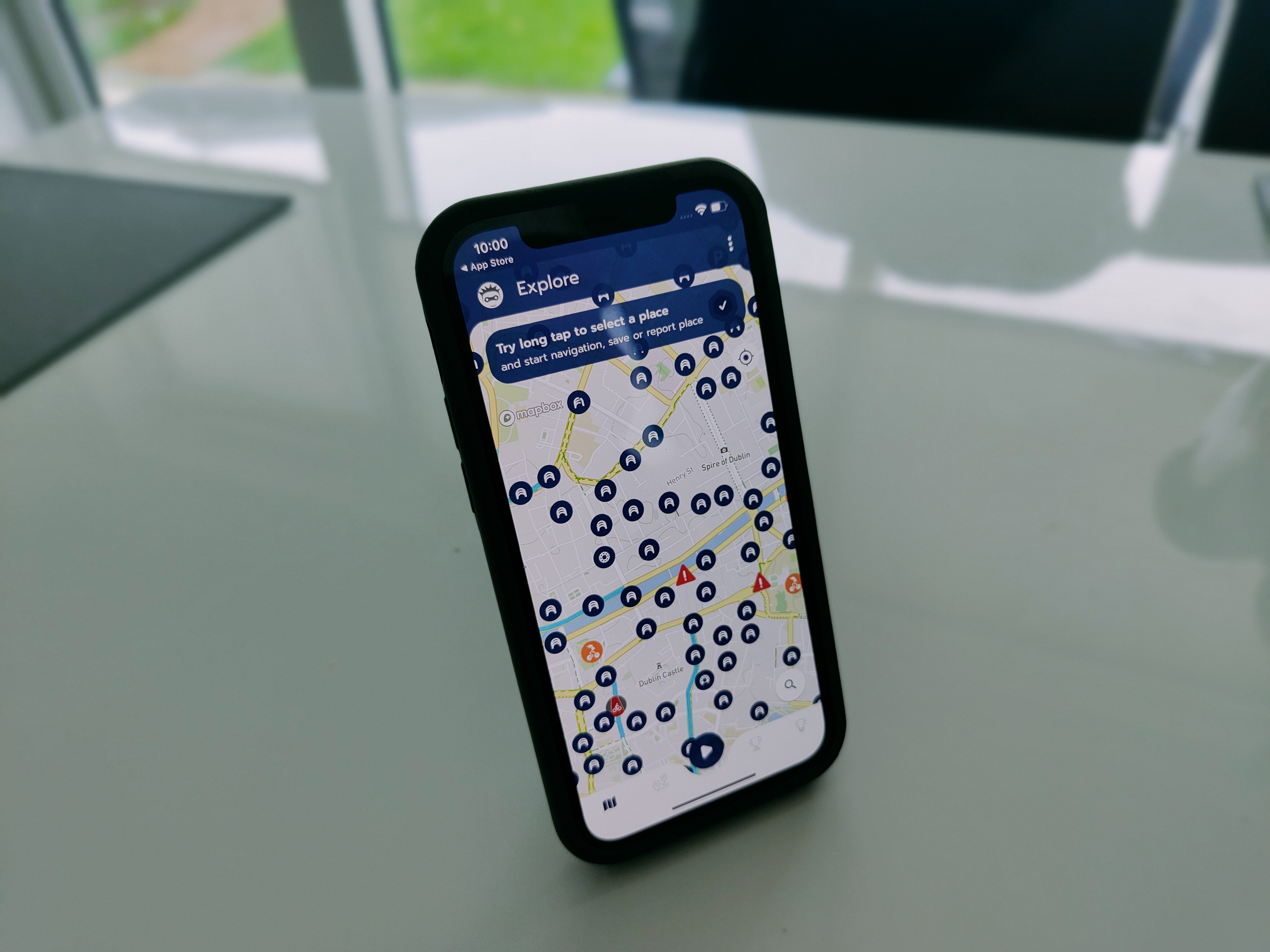
Cycling in Dublin is best described as risky due to no room on the road and again when it comes to sharing roads and not forgetting being lit up having the right gear on and the clash with motorists and cyclists breaking red lights and much more but this is not about who is right or wrong this is a new app which will be welcome amongst the cycling community. I cycle myself and will be giving this a go and also we have some cycling tech accessories in for review so stay tuned for that.
Dublin Cycling Campaign, Dublin City Council, and Smart Dublin, have been working together to produce the ‘Go-To’ cycle routing and gamification app curated just for Dublin. Through the participation of our cycling community, this app will continue to crowd-source critical information to provide more ‘localised’ and accurate cycle routing data. This will help Dublin City Council to create a safer and more bike-friendly environment for all.
Dublin Cycling Buddy helps make your cycle rides around Dublin safer and more enjoyable! Built using a new community-powered cycling navigation engine, the app will find safe, bike-friendly routes for your commuting and recreational rides. It utilises large data sets, including GPS trajectories and crowdsourced issue reports, with a data engine that analyses the collected data to produce these optimised routes. The solution will give cyclists peace of mind when planning their ride, knowing full well that they’re getting the best selection of cycle routes available.
The collection of data from cycling routes will help the city council’s planning department determine which ‘non official’ routes that cyclists are organically taking, in order to improve cycling infrastructure in these key locations.
The app is also expected to foster a deeper digital community for Dublin cyclists through the real time feedback (e.g. potholes, traffic jams, near misses etc.), as well as taking part in the friendly competitions across the city and county.
As quoted by DCC’s Chief Executive Owen Keegan:
“The app offers Dublin’s cyclists a smarter way to engage with the Council, build a community of cyclists, as well as share trip information and advice on safer routes. This will help inform our investment priorities and also help us measure the impact of current investments across the city.”
Unless you work with mobile technology, you might not be aware of what APK files are and what they are used for. However, it is becoming more and more important for the general public to understand these important files to get the most benefit out of using them.
What Are APK Files?
If you have an android phone or have ever owned one in the past, believe it or not, you have almost certainly used an APK file already by this point. APK stands for Android Application Package and is the standard file type used by all applications for distribution and installation on the Android Operating System.
If you have a personal computer, you can compare APK files to .exe files used to run, execute and install programs on the Windows operating system. Therefore, the APK file type is arguably the most important in the Android ecosystem, so it is so important for users to understand what they are.
How APK Files Work
Everything required to execute, install, and run an application on an Android device is compiled into the APK file. This includes Dex files that convert activities and objects into bytes the Android device can understand, assets such as graphic files, resources like database files and information, security protocols such as certificates, and the application manifest – which is essentially another security feature because it tells the device how the app should run and what it should do.
Most people do not know what APK files are because the Google Store downloads and installs the file for you when you click to download an app from it, but that doesn’t mean people can go out, find APK’s and do it themselves.
This type of download and installation file has various important uses, such as testing an app out before launching it on the store or even sharing programs and games that you might not want explicitly listed on the store.
It can be used for just about anything, from simulation games to business apps and communication applications like WhatsApp. They are used extensively by the iGaming industry, where companies like bet365 have made their apps available for download via APK files, and players can also access the bet365 casino bonus when using the mobile version of the app.
Pros Of Using APK Files
Now that we know a bit more about APK files and how they work, we can get into the benefits of using them, and there are several. The first of which being that if you, for whatever reason, are unable to access the Google Store, APK files become the only way for you to install your favourite apps.
The latest updates to applications are often available via APK file downloads before they are made live on the Google Store. So, if you want to be among the first to gain access to new features and updates to your favourite apps, APK files are the best way to stay ahead of the curve.
On the flip side, if you enjoy a particular version of an app or game and feel like an update has ruined or broken the experience for you in any way, you can grab the APK of the version you prefer and use that one.
This includes apps and games that might not be available in your country of residence. However, it is essential to note that you should only download APK files from trusted and respected sources for the same reasons mentioned above.
By using APK files, you are installing a version of the app that has not been approved or shared by Google yet, so people with nefarious aims can take advantage of that. Just be careful and make sure that you are only downloading legal APK files, and you will be fine.
HP Inc. today announced the expansion of HP+, the smartest printing system designed for consumers and small businesses. In a time when demand for printing is high (+6% NPD/GFK), driven by millions of people working and learning from home, HP+ is modernizing today’s printing experience. Powered by a new cloud-based ecosystem, HP+ makes printing more secure, productive, and sustainable than ever.
Smart Printer
Consumers and small businesses today have higher expectations on devices to meet their expanded needs. In addition, 70% of consumers believe smart tech makes life easier. With the new HP+ cloud ecosystem, consumers and small businesses are able to stay connected and secure with exclusive, new features:
New Cloud resiliency automatically detects and fixes connectivity issues
New Smart Security monitoring helps detect and prevent malware attacks
New Native in-OS printing enables printing from virtually anywhereon any device
New Private Pickup lets you hit print now and pick up later when you’re at the printer
New Smart Dashboard helps you manage your printer in one convenient place
New, one-year extra HP warranty
HP+ will first launch with the new HP LaserJet M200 Series, Red Dot design award winner, as well as HP OfficeJet Pro 8000e and 9000e Series, DeskJet 2700e and 4100e Series, and ENVY 6000e and 6400e Series.
To deliver HP’s highest quality, most reliable, and more sustainable printing experience, HP+ smart printers only work with Original HP ink and toner.
Smart Ink Subscription
In 2020, eCommerce sales grew by more than 16.5% worldwide accelerated not only by the need for contactless shopping, but also by the convenience consumers have grown to rely on. For HP Instant Ink, this expansion and reliance on the delivery economy drove more than 60% year-over-year growth, reaching more than nine million subscribers. With HP+, customers receive a six-month trial of ink or toner.
Subscribe and save up to 70% on superb-quality Original HP Ink or 50% percent on HP Original Toner, with print plans starting at €0.99 per month. New toner print plans are now available, starting at €1.99 per month.
Smart App
In addition to the need for cloud-based solutions and convenient subscriptions – consumers and small businesses have also grown to rely on mobile ubiquity. With the HP Smart App, which has more than 48M active monthly users, customers are able to enjoy the ability to print and scan from virtually anywhere.
With HP+, enjoy HP Smart Advance features such as advanced scanning, mobile fax, and productivity features for 24 months.
Easily access Google Drive, Dropbox, and more.
Smart for the Planet
Lastly, it’s clear – the planet matters to our customers; 3 out of 4 consumers consider sustainability important when purchasing a printer. With HP+, we are building on our commitment to a future that is forest positive promoting net zero-deforestation prints and closed loop cartridge recycling:
With our new Forest First feature, HP invests in the restoration and preservation of healthy forests.
HP recycles your used ink cartridges to help create new ones.
Pricing and Availability
HP DeskJet 2700e Series is expected to be available in May for a starting price of €49.00
HP DeskJet Plus 4100e Series is expected to be available in May for a starting price of € 69.00
HP Envy 6000e Series is expected to be available in May for a starting price of €79.00
HP Envy 6400e Series is expected to be available in May for a starting price of €99.00
HP OfficeJet Pro 8000e Series is expected to be available in May for a starting price of €129.00
HP LaserJet M200e Series is expected to be available in May for a starting price of €149.99
More information on HP+, including pricing and more details on HP+ hardware (including functionality equivalent non-HP+ devices) can be found athp.com/plus.