Tech Review – Creative Outlier Free bone conduction headphones

Typical Headphones are made up of small speakers either separated with each in the ear or over the ear with cushions for comfort and sound insulation.  The Creative Outlier Free are Bone conduction headphones – that transmit sound waves through the bones in a user’s skull instead of their ear canal. These are worn resting on your temples. Because of this design,  these are ideal for conditions in which many earphones would fall out of the inner ear or shake off the head. These have the advantage of not blocking the ear ( similar to hear-through as used on some earphones ) allowing alertness of the surrounding areas. The material is strong and sturdy with bigger buttons that are seen on many earphones with water-resistant, but not as fully waterproof as seen on their other model Creative Outlier Free pro.  The creative logo is visibly seen on the earphones.

These do not come with a carry case to protect the earphones or store the charging cable when not in use which is slightly disappointing.

Technical spec

  •       Headphone Drivers: Bone Conduction Transducers
  •       Frequency Response: 20–20,000 Hz
  •       Microphones: Omni-directional x 1
  •       Bluetooth Version: Bluetooth 5.3
  •       Bluetooth Profiles
  •       •A2DP (Advanced Audio Distribution Profile)
  •       •AVRCP (Audio / Video Remote Control Profile)
  •       •HFP (Hands-free Profile)
  •       Audio Codec: SBC
  •       Operating Frequency: 2402–2480 Hz
  •       Operating Range: Up to 10m / 33 ft
  •       Voice Assistant Support: Siri and Google Assistant
  •       Playtime: Up to 10 Hours*
  •       Charging Time: 2 Hours
  •       Charging Interface: USB-A
  •       Battery Type: Rechargeable Lithium-ion Polymer Battery
  •       180 mAh 0.666 Wh
  •       Input: 5V 1A
  •       Operating Temperature: 0–45°C
  •       Maximum RF Output Power: 4 dBm
  •       IP Rating: IPX5

Setup:

The quick start guide is excellent allowing the use of a QR code to read the manual easily. The setup is straightforward while having the bonus of multimode connectivity which allows the headset connected to two separate devices at the same time.  This may be two separate phones or a laptop connected via  Bluetooth. Either device if called automatically can respond as a call or music played from either device. The process of connecting works the same way as syncing a new Bluetooth device.

Connection to an Android phone and a Windows laptop worked uncomplicated and straightforwardly as you would expect from Creative.

Battery & charging:

The earphones come with a Magnetic USB charging port to USB Type A with a  Rechargeable Lithium-ion Polymer Battery of 180 mAh which has a charging time of about 2 hours charging for 10 hours of use.  This is where these earphones are let down, most modern earphone comes with a standardised USB C charger lead ( Meaning this cable can be swapped via a modern android phone ) and some come with a wireless charger, Creative have gone with a proprietary magnetic charger given a reasonable 10 hours as compared to other in an earphone that gives over 30 hours via the case.  When the earphones aren’t in use the power button is larger but required this to be manually pressed to power down.

A Full  Tech Review – Creative Outlier Free Pro bone conduction headphones seen at techbuzzireland previously https://techbuzzireland.com/2023/03/14/tech-review-creative-outlier-free-pro-bone-conduction-headphones/ 

Warranty

The warranty is 2 years within the European Union but may be less outside of the EU.

Conclusion:

The audio quality in terms of the frequency response for these headphones is  20 to 20,000 Hz which is a standard frequency in this range, When used in a traditional phone call the audio is a noticeable difference in terms of the bone conduction headphones which transmit sound waves through the bones in a user’s skull instead of their ear canal this causes a vibration which is not a critique of the audio rather a different approach. When used for  High-Resolution Audio the audio which has higher sampling rates is partially noticeable but unless stopped and fully concentrated on the music hard to tell the difference. This model is good in terms of when listening to higher volumes those surrounding the earphones do not hear a leakage on the music .  the option to Turn on Low Latency Mode to enjoy synchronized and smoother playback of audio and video is a positive for these earphones allowing for multiple options on audio experiences.

When looked at from a Safety perspective ( open-ear listening) being able to hear the surrounding area but also in terms of not directly in the ear canal, ( This is not supported by formal medical advice but rather an opinion ) no ear wax has been pushed into the ear and safer from an awareness of your surroundings.  The IPX5 splashproof or sweatproof rating is excellent for everyday use as could be taken in and out of the shower but not suitable for swimming certainly good enough to ensure if out in the rain these will not be affected,

Overall as someone that tries to walk for over an hour a day, this is my go-to set of earphones, as practically impossible to have them fall off the head due to the design, through the design from a safety perspective, they are similar to having heard through on all the time without the need to remove from your head is stopping to chat to someone,  The multimode is excellent allowing connectivity & versatility for use in more than one device. Once familiar with the design while heaver at 30g than many other earphones on the market this quickly becomes forgotten they are around your head. This model is ideal for extreme sports and certainly will endure lots of adversity in its use.

BUY 

Video Review

Tech Review – ZHIYUN Smooth 5S Combo gimbal

The kit came in a professional-looking box, clean and smart with all the accessories listed on the side with the QR code directly for the app. Inside the box came a solid practical carry case with all the accessories located with the additional slots to allow to add additional accessories. The carry case allows the portability to carry the case without the worries of losing odd accessories. The Zhiyun Smooth 5S is solid yet lightweight with 3-Axis Stabilizer which an appropriate locking mechanism, the kit has a Detachable Tripod, and USB-C Charging Cable. There is a digital display while minimal in terms of size of the screen, with a Light as required controlled via the dials. The Light has Dual-Side Magnetic to allow the colours to change with an extensive  Smartphone Compatibility List

Contents:

  •       1x Zhiyun Smooth 5S
  •       1x Mini Tripod For Smooth 5S
  •       1x USB Type-C Cable
  •       1x Wrist Strap
  •       1x Protective Bag
  •       1x Magnetic Fill Light
  •       4x Fill Light Filter
  •       1x Zhiyun Prime 1-Year Membership Card


Key features:

  •       3-Axis Stabilizer for 1-Person Capture
  •       Integrated & Magnetic Fill Lights
  •       Supports Larger Smartphones 5.3-10.6 oz
  •       For Phones 2 to 3.5″ Wide, 0.4″ Thick
  •       Sturdy Motors, Upgraded Algorithm
  •       Livestreaming via Mobile App
  •       Various Templates & Gimbal Modes
  •       2-Hour PD Charging/Up to 25-Hour Runtime
  •       Detachable Tripod, USB-C Charging Cable
  •       Zhiyun Prime 1-Year Membership

Setup and use:

The Smooth 5S Combo come with clear instructions with a QR code available to download the instructions easily. The setup for an android phone is relatively easy and playing with the Stabilizes and balances the phone to the correct settings. Allow at least 30 minutes to play with the setting and balancing on the first go. If you have the same phone taking note of the setting on the scale ( or Tipp-Ex to the mark ) allows for easy future setting up which can be done in a minute or 2 once familiar with the balancing. This model was found to be easy and practical to set up as compared to other models use. Once set up and balanced the choice then becomes on the shooting modes including PF, L, F, POV and V  which is technically easy rather than a user-artistic approach to filming.

Zhiyun Smooth 5S Combo,  buttons

Multiple classic shooting modes including PF, L, F, POV and V

  •       Pan Follow mode (PF): The tilt axis and roll axis motors are locked, and the camera rotates with the handle while panning horizontally. Push the joystick up/down to control the tilt axis angle, and push it left/right to control the pan axis of the camera.


  •       Follow mode (F): The roll axis motor is locked, and the tilt axis and pan axis motors follow the rotation of the handle. Push the joystick up/down to change the tilt angle of the camera and the left/right to change the horizontal orientation of the camera.


  •       Point of View mode (POV): All three motors move when the handle is rotated.


  •       Vortex mode (V): The tilt axis motor rotates upward by 90°, and the tilt axis, roll axis, and pan axis motors follow the rotation of the handle. Push the joystick to the left/ right to control the rotation of the pan axis. How to Use CRANE-M2 S


  •       Go mode (GO): The roll axis motor is locked, and the tilt axis and pan axis motors quickly follow the rotation of the handle.

App use: ZY Cami

The app got a rating of 1.6 out of 1.59 k reviews. I would agree with this poor rating for an Android phone. This app requires getting a verification code matching certain pictures in the background, sounds simple,  similar to eg ticks of boats on a screen but is made more complicated by the system used in a different format. this is further complicated by when getting a code the email states must be used within 10 minutes while the phone has a timer count down of 60 seconds, This is before you get to log in to the software. The experience of using the app with an iPhone is much improved as per conversations with colleagues and feedback but not tried it during this review.

Warranty:  1 year

Models comparison

 Conclusion:

The physical setup of the gimble works well with the calibration process easier than others used before with minimal effort / technical knowledge/experience required.  This product is let down by the Android App if used as this has an overly complicated setup process and depending on the model used results in a different experience having tried it on a few phones.

This Zhiyun brand stands out in terms of accessories supplied and case, A lot of work has gone into this area with a well-designed case with all the accessories compartmentalised and the option to carry additional bits in the strong carry case.  The shooting modes are easy to use for the PF, L, F, POV and V to allow a variety of filming tableau and artistic presentations.

Overall a sturdy easy-to-use gimbal with an abundance of accessories and features for any budding filming enthusiastic to allow creative filming.

BUY

Video review

Tech Review – Enfokus AI-based intelligent video conference camera

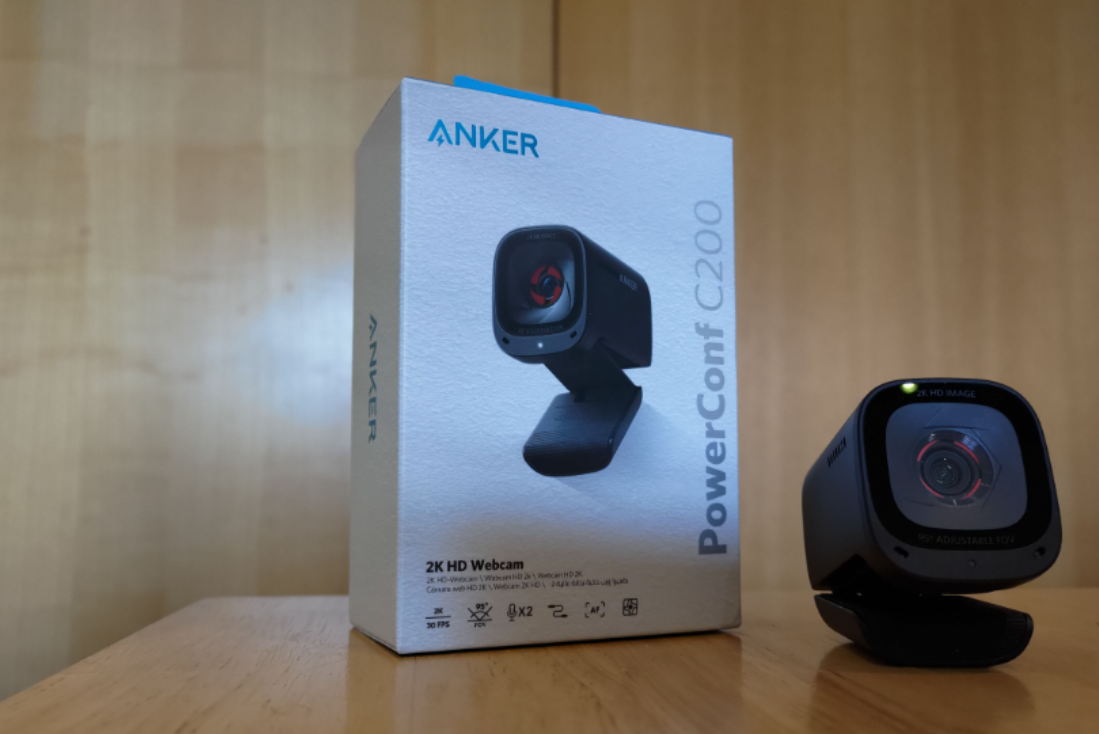
The EnFokus AI Video Conference Camera came in clearly defined packaging with the key features visible on the packaging. The kit is robust with no additional accessories to lose or carry around, the cable with a USB A plug connects directly to a windows laptop without any issues. The camera is mechanical in terms of operation adjusted which pops up with voice automation to advise the scanning AI on the views. The speaker (2 Watt) is incorporated into the kit with a nice touch of LXM logo on the kit. This kit does not have any controls on the unit in terms of volume/ mute etc which have to be done via a Laptop etc.

Key features

  •       AI face recognition
  •       Double talk
  •       Echo Cancellation
  •       Noise reduction
  •       Invisible Camera
  •       Built-in audio DSP

Set up:

The setup is simple and easy Plug and play, and no additional drivers were required.  This took less than one minute to update and required no additional accessories required. Microsoft teams automatically changed the speaker and camera on numerous calls with no time lag or loss.

The AI face recognition was automatic in the background, as focused on a face within a room this took up to 30 seconds on initially plugging in the camera but the Pan tilt zoom part adjusted accordingly as a person’s face moved within the room as would be done during a presentation. The double talk where 2 people on a call spoke at the same time again worked without interference.  The camera when connected shows a red light and changes to a green line when on a call,

Warranty:

The warranty comes with a 1-year warranty, which is disappointing from the website in terms of manufacturing culture and mixed communication in terms of repair times and taking responsibility for customers.

Conclusion :

The EnFokus AI Video Conference Camera does what is said on the box easily and efficiently and works as required. The 2-watt speaker is sufficient for voice calls but lacks a punch when used to listen to high-quality music ranges albeit this is not designed for this area while sufficient to listen to eg Youtube music in the background. The 4 inbuilt microphones have a range of 5 Meters which is sufficient for most boardrooms and can handle multiple people talking at once. The  2K ( 2560 X 1440)  Camera works well and has clarity in a variety of settings when the light dimmed or in a bright room. The AI face recognition worked well and zoomed in or Panned as required to a facial movement. This was noted to be slow which may be designed to ensure a steady smooth transition rather than a jump on the camera. The Manufactures’s website has a variety of mixed messages in terms of warranty repairs and lacks the customer-first ethos as seen by some of the brands tested in the past.

Overall, The product does what is supposed to do keeping it simple without the clutter of additional accessories getting lost, or additional buttons/displays on the units overcomplicating the product. An easy simple product to connect and use, and works as expected.

Buy – https://ensonore.com/products/m?variant=42399067046102

Video review

Tech Review – Jabra Engage 50 II

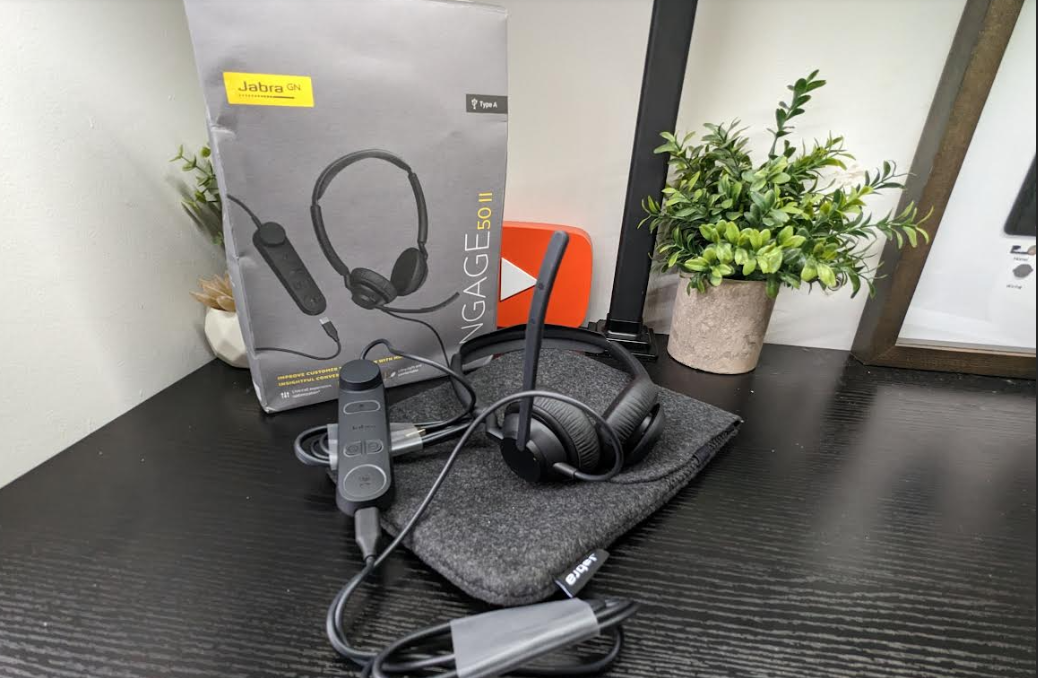
The Jabra Engage 50 II  came in a well-presented box with the main features and operational instructions visible on the box.  This is a hard-wired headset with ear cushions and fitted with a USB-A connector which fits directly into a laptop. This model came with a Link Call Control kit which allows the volume, mute, and answers calls. The link can be disconnected and plugged directly into a USB-C phone connection.

Contents:

Jabra Engage 50 II MS Wired Stereo Headphones with Link Call Control Unit, USB-A Charging Cable and Carry Pouch . 

Features:

Audio

  •       Noise-isolating fit   Yes
  •       Noise reduction on calls Yes
  •       Speaker size 20mm
  •       Speaker max input power   30 mW
  •       Speaker bandwidth (music mode)   50Hz – 20000Hz
  •       Speaker bandwidth (speak mode) 100Hz – 14000Hz
  •       Microphone type   2 x MEMS Microphone sensitivity -26dBFS/Pa
  •       Microphone bandwidth   100Hz – 14000Hz
  •       Materials used Leatherette, PC & PC/ABS plastic, PP, silicon rubber, stainless steel, TPE
  •       Headset Weight (stereo variant) 65g | 2.3oz
  •       Headset Weight (mono variant)   45g | 1.6oz
  •       Weight (stereo) w. Link 152g | 5.4oz
  •       Weight (mono) w. Link   132g | 4.7oz
  •       USB cable length (sku dependent)
  •       1.6m | 2.4m | 5.2ft | 7.8ft
  •       Warranty   3 years
  •       LED features and functions Busylight, incoming call, Microsoft Teams notifications (SKU dependent)
  •       Certifications and compliance Cisco, Unify, Microsoft Teams (SKU specific), Zoom, Google Meet, Amazon Chime
  •       LED behavior Busylight, incoming/active call, mute/hold call, Microsoft Teams notifications
  •       Materials used   Silicon rubber, TPU, PC & PC/ABS plastic, TPE, PP
  •       SmartRinger Yes

Setup & use.

The setup requires no installation but rather plug and play which has the option to download free software to personalise the experience, the free software allows greater control and control of the buttons in use.

Software

  •       Jabra Direct
  •       Jabra Xpress
  •       Jabra Engage+

The software allows the personalisation of the experience allowing for a variety of setting amended as required, eg this allows the headset to be used on either side.


Conclusion:

The Jabra brand has been known for its audio quality but has a  sustainable focus with the box’s 100% Recyclable material. This is followed up by the hearing protection in Jabra SafeTone™ 2.0, PeakStop 105, EU Noise at Work, G616, OSHA. At Techbuzz we regularly get questions about which is better wireless or hard-wired.  Most gamer gamers will typically use hard work function but lack the convenience of answering the door, walking to make coffee or moving around the desk. From a technical perspective hard-wired generally work better with less latency, less interference, and distortion and required no battery charging.

The Jabra Engage 50 II  has professional call quality with its noise-cancelling 3-mic technology to ensure worthy call quality which is required for both users. The earphones are ultra-lightweight and do not require a battery to charge with the controls built into the Link controller, this experience is enhanced with Noise protection for your ears with Jabra Safetone to allow comfortable use for hours. The earphones are certified for Microsoft Teams allowing for the usually expected functionality, answering and muting calls, adjust the volume.

Overall another professional hard-wired product from Jabra allows a sustainable product, ear protection, 3-year warranty with professional call quality. See video review below for more. 

BUY 

Video Review

Tech Review – DriverGenius HB081 USB-C Multi-card Reader / Writer

The kit comes with a robust metal type housing with a braided cable while lightweight and sturdy with the main slots acceptable, this allows the portability to carry in a bag around. The DriverGenius HB081 USB is like a Swiss army knife (in terms of a portable solution for accessing multiple types of memory cards.) and has flexibility for a wide variety of flash media to allow for quick transfer and backup files.  The USB-C port multi-card reader/writer supports SD4.0 SD, UHS-II microSD, and CFast 2.0 via tablet, smartphone, laptop or desktop computer. The USB 3.0 card reader supports the vast majority of memory cards on the market, including SDXC cards up to 2 TB, this can also connect directly to an android smartphone to copy/ move files without the need for a laptop or other device.

APPLICATIONS

■ Transfer photos, videos or other files from your SD, microSD, and CFast 2.0 cards to your USB-C enabled tablet, laptop, or another device

■ Gain greater efficiency when working with a variety of memory cards – ideal for creative professionals including photographers, videographers, and graphic designers


Features

  •       UHS-II SD 4.0/CF CARD READER: High integrated External USB Type-c Multi-Card Reader support UHS-II SD/SDXC/SDHC/MicroSD, backwards UHS-I, also as CF-1 (43*36*3.3mm) memory card adapter.
  •       CLICK-in FEATURE: DriverGenius HB080 use click popping design for the slots, that can fix cards well and protect cards from random insertion. The pocket-size design lets you take this card reader anywhere.
  •       3 SLOTS USB-C CARD READER WRITER: 3-in-1 slots for SD4.0, microSD4.0, CF-1 memory card,and can read and write simultaneously, no need to switch, no harm to SD cards. Suitable for quick workflow with multi device and multi-scenario.
  •       5Gbps USB3.1 GEN1 TYPE-C SUPPORT: Professional UHS SD to USB-C laptop/tablet/smartphone, it allows high speed data and movie transfer in seconds. Ensure high resolution still of images.
  •       VERSATILE COMPATIBILITY: Compatible for Win 10 / 8 / 7, mac, Ubuntu 21.04.


Setup:

There is no requirement for a setup in terms of plug in the USB C into a laptop, inserting the relevant card and read and write simultaneously. This required no download of drivers/programs for use. This is plug and play, because you do not need to download any drivers or programs etc.

Conclusion

From an early age, it has been taught to keep a backup of our data whether used for a photographer or shooting any video. This may involve transferring photos, videos or other files from your SD, microSD, and CFast 2.0 cards to your USB-C enabled tablet, laptop or another device.

They’re a noticeable speed connection when the card is placed into the reader and to a laptop, The kit quoted data transfer speeds up to 5Gbps which would be under an ideal scenario and would require card, and laptop to achieve this speed transfer. Tests carried out by techbuzz gave a large increase in transfer vs the standard cables often used to transfer files. Overall the kit is solid in terms of build and required no additional software required in to make it work “Plug and play” with a transfer speed far exceeding typical cables while compatible with a variety of systems and cards. A must for those that transfer / read / write simultaneously,  a lot of data, ensuring efficiency in their work/leisure.

 BUY

Video review

Tech Review – Mercusys AX3000 Whole Home Mesh Wi-Fi 6 System Halo H80X

The typical router as supplied by your ISP (contrary to their marketing literature), may be of basic quality and give a reasonable Wi-Fi range, but if a few of these are placed in the same areas, as your router, there may be congestion on certain frequency ranges and poor broadband speed or coverage. (Depending on the router and technical experience the frequency range may be changed but may require some specialised knowledge) The Halo H80X is a specialised kit to increase the range and allow a repeater of the signal.

Note: the Halo can only forward the signal going into the building,  if the signal is poor at the junction box or default router to Halo, this  will not increase this,  while if the signal is good coming into the building, in theory, this should spread the  signal evenly throughout the building ensuring no black spots or poor coverage in parts of the building.  Albeit coverage may depend on the type of construction within the building, large thick concrete walls or   tinfoil-backed walls or fireproof doors will diminish signal quality.  The Halo will certainly improve this signal, allowing the option to place close to black spots to improve the broadband experience. The location of the Halo is also a key factor in terms of range and quality of the signal, this should be placed as far as practical in an open space away from large metal items or e.g., book cabinet which would diminish the speed dramatically, the app gives a guideline on the best locations for the Halo. The Kit came with a clear specifications called out on the packaging giving full detail of what the kit could do.


Package Contents see unboxing below for more 

2-pack

2× Halo H80X Units

1× RJ45 Ethernet Cable

2× Power Adapters

Quick Installation Guide

 Note this comes in a 2 or 3 pack Kit, this review has been using the 2-pack kit, The 3 pack could be used to extend the range further.


Features:

  •       Dual Band WiFi 6 Speeds up to 3000 Mbps – 2402 Mbps on 5 GHz and 574 Mbps on 2.4 GHz.†
  •       Seamless Roaming with One Unified Network – Halo units work together to automatically switch between Halos as you move around your home with a single unified WiFi name and password.‡
  •       Whole Home Coverage – Blanket up to 5,000 ft² (460 m²) with high-speed WiFi, eliminating WiFi dead zones at your home.†
  •       Connect over 150 Devices – Provide fast and stable connections over 150 devices.†
  •       Easily Mange Your Home Network – Use the MERCUSYS App to quickly set up and manage your WiFi. You can also manage your kids’ online time and contents.
  •       Full Gigabit Ports – 3× Gigabit ports per Halo unit for lightning-fast wired connections.**

Reset Button:

The one option I always like in a product is the option to reset the system to ensure if issues on the setup etc, you can start from scratch,

  •       Press 1 second to reset Halo to factory default settings.


Setup:

The first impression of the instruction guide was disappointing in that there is a manual included, there is one page of instructions in English, this shows a QR code, scanning allowed the app to be downloaded, but this did not give any circuit diagram for network connection. There was a help option, albeit the setup is logical, but would benefit from a basic diagram option to connect the devices.

Suggested setup option via Mercusys support links

1. Turn off the modem, and remove the backup battery if it has one.

2. Connect the modem to either Ethernet port on the router.

3. Power on the router, and wait for it to start.

4. Turn on the modem.


Login the web interface 

1.Connect to the main router wirelessly using the default SSID (network name) printed on the main router’s label.

2.Open a web browser and enter the default domain name http://mwlogin.net in the address field to access the web management page.

3.A login window will appear. Create a login password when prompted.

Tips: For subsequent login, use the password you set.


App setup – MERCUSYS app

The app has over 100K+ downloads with a 3.3 star rating out of 5, the setup is standard for app given the functionality.

Android app setting –


There is a variety of different options within the functionality of the app this includes a very useful feature of network optimization. If the unit is used in a highly congested area with a lot of neighbour’s routers on the same frequency the network optimization can pick the best frequency and update as required, this works but does not tell you what frequency it is changed to.  Alternatively, if required to blacklist a particular unit, a device can be easily achieved.  A very useful feature is the parental controls this allows to prevent access to example over 18 sites or configure individual sites blocked, e.g., Facebook if not be required. This has options as used for a junior person, it may also be used for a child, preteen, or adult  blocking social networking downloads blocked. If used in an office environment there is a website category with specific websites that can be blocked, most staff that work in a commercial environment will be aware certain sites are blocked by their local IT department.  This can be achieved within the app by updating the website and blocking specific sites example Facebook.  Or whatever sites are deemed inappropriate for staff, again for younger generations it could also be used to block specific areas that are not required.

Reporting features are available to give an idea of how much data is being used which can give an indication that may assist in security implications. Within the advanced features, there is a variety of technical settings that configures by specialised, teams. One feature which is quite useful is the LED, the LED can be turned off or set for a night mode to switch off at night-time if the unit is used in a bedroom.

The  app has an option to  easily see what devices are connected, for example, smartphones,  home network laptops etc this is very handy to visually see if something is connected which should not be connected or unexpected, this is  similar to having a review of your credit card bills to ensure everything looks in place having a look at your own network to see what’s connected is possibly good practise now and again.

Within the Wi-Fi settings on the app 2.4 GHz 5 giga Hertz functionality can be turned off and, on,  the guest, the network can be enabled or disabled. The main network name can be changed, or the password can easily be updated


Compare mobile app (android) vs web link

Typically I would expect to be able to do the same function on the app as the website, ( http://mwlogin.net ) The web login has minimal practical use, in that changes, etc cannot be made only view the setting, Any changes to the network etc allow the guest network to be turned on, parental controls etc is required to be done via the mobile app. This may result in a lot of wasted time if searching on the web link for functionality.

The web link does allow the software to be updated via e.g., a memory stick or via the web.

Results:

As part of this techbuzz review, the H80X was set up as above.  A speed test was done from various rooms in the house, with all doors closed and no other internet surfing etc turned on

In each room a windows laptop was connected to the initial network and a speed test was run 3 times,  Download, Upload speed and latency were tested, the average rate was logged, in the same room the connection was changed to the Mercusys  Ax3000 Halo H80X ( network called techbuzz )  and again the speed was tested an averaged from 3 readings, this was done in the rooms below.

Techbuzz speed tests comparison from ISP router to Mercusys Ax3000 Halo H80X (network called techbuzz)

 Analysis of the data:

Within the same room as the router (Classed as the Sitting room)

Tested location   Standard internet provider router     Techbuzz – Mercusys  Ax3000 Halo H80X
    Download (Mbps) Upload (Mbps) Latency (ms)   Download (Mbps) Upload (Mbps) Latency (ms)
             
Sitting room (router placed)   270 51 13   360 50 14

The data showed an improvement from 270 Mbps to 360 on the Halo H80X which I believe is down to the app optimisation frequency picking out the best network frequencies or uncongested frequency.

There was no coverage from the ISP router in the indication the Halo expanded the coverage

Downstairs utility room   Not connect Not connect Not connect   11 14 16

The furthest room has the biggest increase in broadband speed going from initially 12 Mbps to 190 Mbps, and half the latency which would benefit gamers,

Upstairs furthest bedroom   12 4.1 32   190 47 16


Additional Test done:

As part of the testing, a windows laptop was connected to the Halo and walked to his furthest part of the drive until reduced coverage.  subsequently walked to the back of the garden where the Halo in front would not have coverage, this worked seamlessly on the handover from one Halo to the next without any drop our loss in signal

Conclusion:

With the Halo a few minor niggles in terms of the lack of network diagrams, the colour of the White box with a black plug, (I would prefer from aesthetics to have all white or all back colours) The Web app is of little practical use.

Overall, the kit comes with many useful features in terms of, Dual frequency, security, Parental controls, and network optimisation but more importantly for anyone with blackspots  / poor Wi-Fi coverage this kit does exactly as described and what it is designed to do as seen on the test results carried out by Techbuzz in a consistence manner and comparison to the ISP equipment.

Technology continues to advance and poor coverage can be fixed by the non-technical with this kit that works as broadband should, a Must for those with Wi-fi blackspots.

BUY 

Video review


Tech Review – Konftel 800 & Ceiling Mount Kit

The Hybrid conference phone came in a neutral packing in terms of limited information on the packing but has the impressive Climate neutral products symbol on the packing.  This kit came with the Konftel 800 Ceiling Mount Kit allowing the kit flexibility in placements The kit is designed for Small to Large rooms while having the options for larger spaces or multipurpose rooms to be able to connect additional devices using the daisy-chain to increase audio capabilities. The 4.3-inch graphical LCD touchscreen display allowed for easy configurations and visual displays when the volume or mute options were used via colour changes on the kit. The kit has an additional, two mute key buttons located along the corners of the unit to allow any user to go on mute.

Previously at techbuzz Ireland, we reviewed The Konftel C2070 conferencing system, which came with a speakerphone, camera, and hub their Konftel Cam10 Ego bluetooth speakerphone and also the Cam10 webcam

 Features:

  •   Connectivity: USB and Bluetooth
  •   Suitable for up to 12 participants, can be expanded to 20 with expansion mics (sold separately)
  •   Supports the Konftel Unite App via Adaptor
  •   SIP Verified – ShoreTel, Swyx, Avaya, Broadsoft, Cisco, Unify
  •   Hybrid: Collaboration App and Phone call
  •   Microphone: Omnidirectional 360
  •   OmniSound with HD Audio
  •   Supports HD Audio on mobile network
  •   NFC Technology
  •   Power through PoE (Power Over Ethernet)
  •   Web-based configuration


Konftel 800 conference ceiling and mount kit for conference calls – techbuzzireland

Setup and use:

The Kit came with a quick user guide in terms of the setting up with outstanding diagrams to give a clear view of how to install it. The basic installation required minimal technical experience. Those of an advanced nature can refer to the web version “Installing and Administering Konftel 800” which contains  200 pages for diverse types of network installations configurations,  

The conference phone can also use Bluetooth to connect to a mobile device, or a laptop as it supports Hands-Free and A2DP Bluetooth profiles. Konftel 800 uses 10/100 Mbit Ethernet and supports PoE Class 1 and Class 2 power.

Note: This kit is a Power Over Ethernet (PoE) enabled device and would require purchasing as an optional accessory if needed which Jim has a good deal of knowledge with NTP time servers when it comes to clock systems which also uses PoE in certain configurations

App:   Konftel Unite

This allows connection via your phone for One Touch Conferencing, calling from your contact list, create your conference groups. Techbuzz tested on an android device which was a standard install.

App Store

https://itunes.apple.com/app/konftel-unite/id1093774146

Google Play

https://play.google.com/store/apps/details?id=com.konftel.unite

Warranty: 2 years

Overall:

The kit came in a Climate neutral packing which is always a bonus. The design while having many awards has a few personal niggles in terms of several types of screws provided for the Ceiling Mount Kit and the network cable does not have a tray to hide the cable if placed on a boardroom table as you would see on a typical phone system.

The physical connection to the network is straightforward but may require looking towards a PoE injector for power. The Ceiling Mount Kit mechanically connects easily and can easily be removed as required. Connectivity via the app or via a laptop was standard without any issues,

As a real positive the ability to connect via a smartphone easily and quickly, is great especially if the kit is being mounted, the colour changes for the mute etc are great.  The Audio quality cannot be faulted as the test carries out walking close and further back gave exceptional audio quality.

The audio quality is a result of the three microphones in the base of Konftel 800, which support 10 users in a 30 square meters room.  The audio was excellent at blocking out noise from outside of the room testing via the Smart Microphone which had built-in cancellation of echo and background noise through OmniSound.

The additional socket via daisy chain allowed for the addition of microphones to increase the conference phone coverage to seventy square meters or daisy chain three Konftel 800 devices to cover up to 90 square meters.

The kit has a few minor niggles but is a real gem in terms environmentally friendly, easy to set up and use with the options of seriously advanced features, Voip / traditional with the option to expand the impressive audio experience for any call.

https://www.konftel.com/en/products/konftel-800

Video review


Strauss & Wagner EM205 Wired Earbuds with 3.5mm Connection and Mic+Remote

The Strauss & Wagner  EM205 Wired Earbuds with a 3.5mm connection are designed for use with portable devices and HiFi systems, ( Albeit will connect to laptops with a suitable 3.5mm connection) The 3.5mm connection is the only feature difference from the Strauss & Wagner EM8C USB-C earbuds previously reviewed at TechBuzz in which we went into more details on the specifications on the EM8C USB-C review

Features:

Standard 3.5mm plug for use with desktop and mobile devices

Three-button remote with volume and playback adjustment, as well as a microphone for calls and voice commands

The integrated microphone allows for clearer audio quality thanks to a sensitivity of -43 dB

Includes: three sizes of silicone ear tips for personalized comfort plus a carry pouch


  •       Frequency Response   20Hz-20kHz
  •       Impedance      32Ω
  •       Sensitivity        108dB
  •       Microphone    -43dB
  •       Driver 9mm
  •       Cable Length  43″
  •       Warranty         1 year

Setup and use:

The setup for mobile devices being connected with a cable required no software updates ensuring e.g., Bluetooth turned on or the need to download a specific app for the earphones. When connected to a standard windows laptop, windows drivers picked up the device and audio worked,

Note: when connected to the laptop the audio worked as expected, with excellent quality while the Volume Up / Down etc did not work, (this may have been down to the divers on the laptop requiring updating) while this product is expected to connect, without any intervention.  When connected to a mobile device the volume etc worked as expected.

Controls:


Overall.

The Strauss & Wagner EM205 Wired Earbuds differ from the EM8C as comes with a 3.5 mm connection vs the USB C on the EM8C. Both have excellent call quality while do not filter out background noises to the level of more specialised earphones when on calls. The EM8C appears geared towards laptop use with the functionally working seamlessly when used on e.g., MS teams calls vs the EM205 which did not adjust the audio by default.  The wired earphones do not come with all the bells and whistles of ANC, hear through, apps tailored to specific-tailed music rather an uncomplicated approach of plug-in, listen to your audio and it works. Should the earphones be used for a work laptop, typically company security policy blocks many ports or Bluetooth devices, the use of the 3.5 mm plug can bypass this without the risks.

The wired approach removes the complications of battery life, software updates, latency, compatibility etc of Bluetooth earphones. The earphones are designed to last with the option to reasonably purchase replacement ear tips should the need be required.

As with the EM8C review, an impressive audio experience from wired earbuds that are fractionally cheaper than the EM8C but provide the same uncomplicated audio quality without breaking the bank.

BUY

Video Link

Tech Review – Strauss & Wagner EM8C USB-C earbuds

The Strauss & Wagner EM8C is a Wired earbud with a Type-C connection, a microphone, and a volume remote control for music listening and calls. The earphones are not compatible with apple products The type c connection is unique as a connection to most modern android phones or suitable for connections to a laptop e.g., MS teams calls.

Features:

Type-C plug for use with desktop and mobile devices.

Three-button remote with volume and playback adjustment, as well as a microphone for calls and voice commands. Perfect for switching flawlessly between music listening and phone calls.

The integrated microphone allows for clearer audio quality thanks to a sensitivity of -43 dB.

Comes with silicone ear tips in three different sizes for personalised comfort.

A carrying pouch is also included to keep your earbuds protected. 

One year warranty


Frequency Response   20Hz-20kHz

Impedance      32Ω

Sensitivity        108dB

Microphone    -43dB

Driver 9mm

Cable Length  43″

Warranty         1 year

Controls:


Overall

The connection via the USB C connection was seamless for an android phone and laptop. The volume with a Sensitivity of 108dB allowed for extremely high pitch audio with limited distortion, this is the cable for the low and higher specification of the responses of 20Hz-20kHz which is in line with higher-end product ranges. The bass is noted as commanding yet on the higher audio levels not distorted as may be expected from smaller earphones. As with all earphones, it is endorsed

sound levels between 60 and 85 decibels to minimise the damage to your ears while on the higher-level power 100 decibels, this should be reduced to 15 mins listening. The microphone on numerous phone calls and MS teams calls has given honest feedback, while does not filter out background noise as done with a more specialised kit, this can be observed when typing on a keyboard the taps can be heard at the other end. The carrying pouch while good to have offers little protection in terms of damages when in a pocket or laptop bag. The remote is effective in its use but takes a bit of practice to become familiar with the accept / reject calls click required.  Overall, an impressive audio experience from Wired earbuds with a Type-C connection without the requirement to pay for a high-end earphone.


BUY

Video review