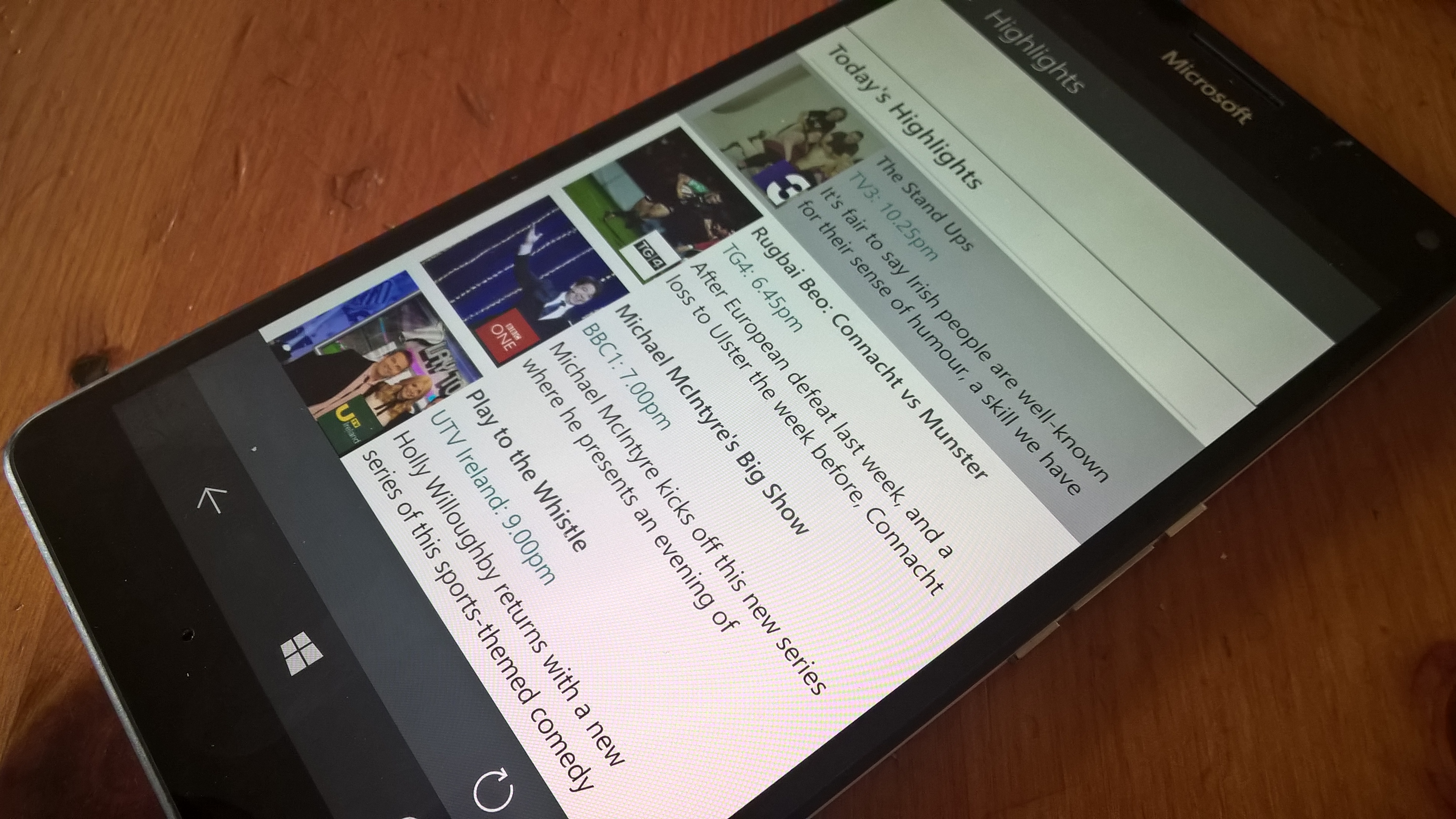
Entertainment.ie TV Guide gets a UWP app. #Windows #TV #IrishDevs #UWP

Lets be frankly honest here,when it comes to local apps here in Ireland for Windows Phone it sucks,It cant be denied end of story,with plenty of apps for Android and iOS there is a rare sight of a Windows Phone app to match to the numbers, Alongside the ignorance from the companies themselves alongside the media with little or no  coverage of apps it has been a downhill battle for the last few years and market share now proves this,I personally have given up constantly asking companies due the same repeated scripted responses when we all knew they would not bother their backside with Windows Phone apps,The most common saying was “We do not have any plans to make this app for Windows Phone” This in turn has made people jump ship,the banking sector and airlines in particular where users can use their devices to make life easier,it just never happened and probably never will..


Today there is some good news from a third party dev called Thierry Fierens who has developed an app for the Irish people,and its people like him that give Windows Phone users some hope and perhaps cling onto the platform a bit longer,the app is called Entertainment.ie TV (Unofficial)

Thierry tells us he was fed up not being able to check this on my phone. Then i thought, I’m always on my laptop or tablet, so why not make an app that works on all 3.

App features 

Single in-app-purchase (IAP) will unlock features on all your Windows 10 device.

The best Irish TV Guide, now with over 90 channels.

Including TV News, Hightlights, Soaps, and recommended On Demand viewing.

7 Day TV listings guide with full programme details and descriptions Over 90 of the most popular TV channels including RTE, TV3, BBC, ITV, SKY and all the rest…..

Channel Filtering: List only the channels you have access to (IAP) What’s On Now & Next! TV Highlights & Recommendations *New* TV News about all your favourite shows such as Breaking Bad, Love Hate and the gossip behind the soaps.

*New* On Demand TV recommending the very best from Netflix, Sky On Demand, UPC, RTE Player and many more. SOAPS & latest TV gossip. Genre Search (search for Sport, Movies, Drama etc.) Save your own favourite channels (IAP) Local programme reminders (IAP) Cortana Integration (IAP) Adaptive UI with split screen support in landscape mode on mobile device with large screen. And more…

If you chose to want more you can get all this in the unlocked features.

  • Remove Adverts
  • Buy once for all your Windows 10 devices
  • Channel Filtering
  • Email
  • Local Reminder
  • Cortana Intergration
  • Free access to all future locked features.

Having went through the app it looks well,performs well and does everything that is required which makes it a noce job indeed an its nice to see..

Download HERE


My First look at the Microsoft Lumia 950 XL unboxing/gallery and more #Microsoft #Lumia950XL

The Microsoft Lumia 950 XL has dropped in and we shall take a look,this is the full package though with a portable keyboard,Arc mouse and Continuum which is the latest interest thus far for Windows Phone fans Hopefully this unit provides some good news as we expect it to be quashed of recent issues. The extras here would not be for everyone considered they do carry laptops with them but I can see its point perhaps not a must for me but I can see the benefits but clutter comes to mind in my workspace should I sport my own laptop on my travels,That said if travelling especially if you are going into the unknown and you have limited access a monitor or PC it would be ideal but the extra luggage factor would be an issue for some I would feel,overall though it works well and is a nice idea and will be welcome for plenty of WinPhans..

The device itself is rather light to hold considered its size but the build quality would play a role here in this,compared to Lumia of past from Nokia I really feel the design and build quality has dropped but that is just my opinion on this matter and its how I feel.Having said that the device is on the big side but feels nice to hold in the hand and easy to use with the one hand in my case. Setting up the device was fine apart from Hello Windows which fails to see my eyes after several attempts but will work on that perhaps in different lighting conditions. The 950 XL does look better than its sister device the 950 from the rear it must be said,perhaps colour has a role to play here which is another thing missing from Lumia of past,those bright colours made a statement but here with just Black and White we are back to the old days again which people once hated.Perhaps being a long time Lumia user and collector I did get sick of the boring Black models I was so used to seeing and when the nice bright colours became available this suited me more so and the devices did get some attention.The only attention and thing that stands out on the 9xx range is the back side of it,from the front it is a bit boring…..

UNBOXING VIDEO


The removable back cover and Micro SD expansion is a welcome move,Some prefer this option and some dont,With cloud being pushed across the board and which some users are not sold on for security reasons for example the option is there and will be used alongside cloud storage which myself have not adapted to over storing things on cards. For now the device seems to be working fine with apps opening quicker than expected having seen some reviews but this is down to many factors such as connectivity and of course a fully working device,it does happen that you can get a faulty device and things might not seem all that well,so we will load it up with some more apps and games and see how it performs from there. As for the camera its good as expected and what Windows Phone user have come to expect with all the trimmings and settings inside,but remember the phone is not all about the camera it is about how the device works as a whole,over the years Lumia devices have been to focussed on the camera and what it can do,it does not work like that any more and with an OS that lack apps ( Especially local ones) all these things add up and moving forward with universal apps changes need to happen and happen fast if Windows Phone wants to regain its market share and until then it still might be too late with Microsoft building apps for other platforms which does not bode well with users..

IMAGE GALLERY

1 / 21

I still use Windows Phone as a daily driver along with Android and more ( Yeah it is a pain in the ass carrying 2/3 phones daily) and still find it the best looking OS from a home-screen perspective with the Live tiles that give info on the fly and it just makes your device look ALIVE. Looks are not everything though it is how it performs as a whole and how well the OS is maintained..

So what do I think so far?

Pros 

  • Light for its size
  • Seems fast lets see when loaded up with some more games and apps
  • SD Card and Removable Battery
  • Camera is great

Cons

  • Still way  too expensive.(contract free its still €699)
  • USB Type – C Fest. Though  this is now a process which will take 18 months perhaps to become custom too.
  • Colour choices available aside third party offerings for back covers
  • The app gap,still huge locally
  • Build quality BUT it is not bad but see this.   


Windows10 will be the only fully supported OS for newer hardware By @VicenteA_George #Intel #AMD #W10

As the year is starting many of you are planning on upgrade you PC’s or laptops but if you’re thinking of getting the latest and greatest specs the only version of Windows you can use is Windows 10

Although as today, there’s more than 200 millions devices running Windows 10 there’s also millions of other that still prefer to use the old but reliable Windows 8/8.1 or even Windows 7, (specially companies)

And given the fact this versions of the OS are going to get updates ’till 2020 and 2023 is not a bad idea at all, but there’s a catch.

After CES las week, Microsoft has made official their commitment to Windows 10 as a “One OS to rule them all” therefore, they want to W10 to be on more and more devices.

So with the announcements of the upcoming silicon such as :

Intel’s “Kaby Lake”

Qualcomm’s “8996” 

and AMD’s “Bristol Ridge”

Microsoft is planning on rely on this manufactures “a better integration between software and hardware to improve performance” on every device.

How? There’s going to be limitations on how the devices will perform under certain OS, if you have W7 or W8 your system is not going to be well optimize, but if you have W10 you will get up to 30x better graphics and 3x battery life (which is certainly unfair as it’s a really big difference in graphics)

You still are going to be able to install any of the former versions but without the proper optimizations your system will be very vulnerable.

Actually, even the recently announced Skylake silicon is going to have a downfall as those who are still on W7 or W8.1 just going to get security updates until July 17th of 2017.

So this is one of those situation in which you have to choose between to two worst options.

But, what are your thoughts on this matter? Are you happy with this decision?

Or do you think is worth the risk keeping up the old W7 or the not so old W8.1 around?

Let us know in the comment below or tweet us at @jimboireland or @VicenteA_George

Source: Microsoft


Word Flow keyboard is coming to iPhone By @VicenteA_George #Windows #iPhone #Keyboard

Windows fans all over the world has always been proud of the built-in keyboard of W8 and W8.1 as it broke a Guinness World Record for the fastest typing when it was launched.

But ever since Microsoft took over the Nokia Cell phone Division some of those key features of WP are starting to be ported to other platforms, one of the “most infamous moves” was when Cortana became available in other platforms even before being completely available on the WP ecosystem.

Well, this time is the same famous keyboard the one being ported, as accordingly to an e-mail sent to some Windows insiders, they want to have the app available on iOS and possibly on Android.

What does this mean to the WP ecosystem?

Well, it depends on you and if you see the glass half full or half empty.

The Word Flow keyboard resembles what third party apps like Swipe or SwiftKey can do on both operative systems, which is not a warm welcome.

The app is apparently being developed for iPhone 5s and above, although the real question is:

Would you use the WP Keyboard on your device if you already have some of the aforementioned apps?

What’s you opinion on Microsoft and multiple apps going outside of their “home”? Let us know in the comment section or tweet us using #techbuzzireland

Source


Microsoft does it again..Launches an app on iOS. #MicrosoftSelfie.

Microsoft is on a roll of late….Launching apps for other platforms that is and not committing itself to close the huge app gap that continues to grow and leaving fans in hope that universal apps will save the day,Today they release another app on iOS which is making me wonder what exactly is going on in Microsoft…

The app is self explanatory anyway and here is what it says in the description…

Microsoft Selfie is a selfie and portrait enhancement application. The app takes age, gender, skin tone, lighting, and many other variables into account, applies different models automatically and finishes enhancement with just a single click. Users can transform average photos into more presentable portraits in seconds. Key features of this application are noise reduction, intelligent enhancement, automatic exposure and color theme.

Download on iOS   Source – WMPU


India to get the Surface Pro 4 on January 7th By @VicenteA_George #Surface #Windows

This year was great for gadgets that boost up our productivity on he go, like the IPad Pro, the stunning Surface Book and last but not least the Surface Pro 4 which was unveiled earlier this year and you can see our full coverage here.

But back then it wasn’t available everywhere to buy but today we received the news that is going to be officially available in India as soon as next week on January 7th

As you can see after all the wait is finally going to happen for our Indian readers the very next week.

There’s no word about full prices and available along the country but as a far as we know the “lower 128GB an Intel Core m3 with 4GB RAM model” could go for Rs. 67,999 and the powerhouse variant with 256GB an Intel Core i7 and 16GB of RAM could go for somewhere around Rs. 1,32,99 which means the other variants are going to be in between these prices.

The Surface Pro line is a well known productivity tool and made ir widely available is great, paired with Windows 10 this thing is a beast.

From consuming media to full work presentations the Surface Pro 4 packs everything you could need in a beautiful portable size.

We’ll bring more info once the day comes, but till then, let us know! Will you pick one for yourself? Sound below in the comments or Tweet us using #techbuzzireland

Source


Unboxing and First impressions #Nokia #Lumia830 Gold by @Tiwaash #Goldie

The world was excited ever since the leaked news of Nokia Lumia Limited Edition started to surface and every Nokia fanboy wanted the Gold Limited edition Lumia830 and Lumia930 to be theirs, and we were no exception to it and finally after a lot of sourcing we bring you the Unboxing and First impressions of the Nokia Lumia830 Limited Edition, Black Gold.

I was so excited when I received the parcel, I know it was going to be special. And read on to know what was there in the package and how is the Nokia Lumia830 Limited Edition different from the usual Nokia Lumia830.

Package:

Well to be honest I wasn’t really impressed with the package, it was the same slide-out type box exactly like the other Nokia Lumia packages with the photos on the face and the back of the box and name of the device on the side with the colour indicator and “Limited Edition” badging.

Cut open the tag and you cannot stop smiling. You are greeted with the Gold Edition Nokia Lumia830, I had the black gold combo and it looked just great. Apart from the device the package was meager and nothing else to excite about with the travel adapter, a couple of booklets, battery and  a USB data cable in the simplest manner possible.

Being a limited edition I expected the package to be more generous like a “Limited edition” case and ear phones would have been a welcome premium offering as the phone comes with MixRadio pre-installed.

What is special in “Limited Edition”?

Anything with a “Limited Edition” badging creates excitement and so did the Nokia Lumia830. The Limited Edition was restricted to the paint job on the device. The Limited Edition Nokia Lumia830 was available in Black- gold or White- gold colour schemes with Gold colour used for the Metal casing with the buttons, the Nokia badging on the back and the battery space below the back cover.

First Impressions:

I love the Black- gold colour scheme on this device. It gives the device a premium upmarket feel and with “Limited Edition” stamp its a rare device to own. Other than the paint job, the Limited Edition Nokia Lumia830 is identical to the normal Nokia Lumia830, its light, slim, has a 10 mp snapper on the back with PureView technology and an LED flash, the 3.5 mm jack and micro-USB port are also stationed at exactly the spot and all other specs remain the same.

I enjoy the feel of the Matte- black finish on the device with brushed metal in Gold, this device will definitely make you stand out in the crowd. Enjoy the gallery here.

Let us know in the comments below about your views or tweet us using #techbuzzireland.

Stay tuned for more Tech buzz.

There is a new Nokia branded handset from Microsoft,its the Nokia 230. #Nokia230

It has been a while since we have seen any branded Nokia handsets from Microsoft and today there is a new candybar styled device announced by Microsoft and it comes in a Dual sim too,its the Nokia 230 and 230 Dual Sim.,priced at $55 it is due to ship in December 2016 and other regions in 2016,these are not the typical plasctic covered devices but sport aluminium casing on the back in silver or dark silver

With a 2.8-inch screen you can play your favorite videos again and again using the video player, listen to radio stations on the FM radio, or use the MP3 player for your personal music library. With memory card support up to 32 GB, that’s potentially a lot of entertainment.

The Nokia 230 and Nokia 230 Dual SIM are also good for gaming. The Opera Store has plenty of games (and apps, incidentally) to choose from, but if you’re looking for inspiration, you can download one free Gameloft game every month for a year. Titles include “Assassin’s Creed Brotherhood” and “Midnight Pool 3.

Specs on the Nokia 230

Device Nokia 230 and Nokia 230 Dual SIM
Operating system Nokia Series 30+
Display 2,8” QVGA (240*320)
Battery BL-4UL ,1200 mAh[2]
Talk time & Standby time Talk time: up to 23 hours
Standby time: up to 27 days for Single SIM, and up to 22 days for Dual SIM variant
Camera Main camera: 2MP with LED flash
Front camera: 2MP with LED flash
Connectivity 900/1800 MHz, micro USB, 3.5mm AV connector, Bluetooth 3.0 with SLAM and HSP/HFP profile
Memory Up to 32GB Micro SD supported[3]
Dimensions 124.6×53.3×10.9mm
91.8g


See more at source

Microsoft’s arrows launcher exits beta and hits Play store. #Android #Microsoft

Arrow launcher from Microsoft has been on beta for some time now and its officially available now to download from the play store,the launcher will focus on the users and make life that bit easier when it comes to finding apps,You will have your home-screens full of what you use and priority apps and contacts etc.

Arrow has been a garage project so it will be interesting to see if updates flow from here on in..

Key Features: Made for You
Arrow is designed for simplicity, and personalized to your usage habits.
• Apps: No more wasting time finding the app you need – your apps are automatically arranged based on your usage
• People: Easily find and contact the people who matter the most to you
• Reminders: Never forget to pick up milk or call your spouse with integrated reminders
• Recent: Quickly get back to your recent photos, file downloads, app installs, and even dropped calls

Other Features: Customization, Elegance and Performance
• Page Management: Re-arrange pages, show/hide a particular page, and set a specific page as your home page.
• Widgets: Arrow is compatible with all your favorite widgets, organized on one page
• Customizable Dock: Conveniently access your favorite apps in the dock from any screen.
• Bing & Custom Wallpapers: Receive a beautiful new wallpaper every day or customize your own.
• 3rd Party Icon Pack Support: Theme your icons with a third party icon pack.
• Performance: Arrow is lightweight, and optimized for battery life and speed to help you enjoy your phone all day.

Download on Android