Leading real hands on tech review site in Ireland with technology, business news and more. Jim O Brien Tech.

Author: brendanlahert
20 years’ experience in the commercial technical industry. Interested in technology.
Certified ITIL v3 Service Management, Project Management Prince 2, Six Sigma.
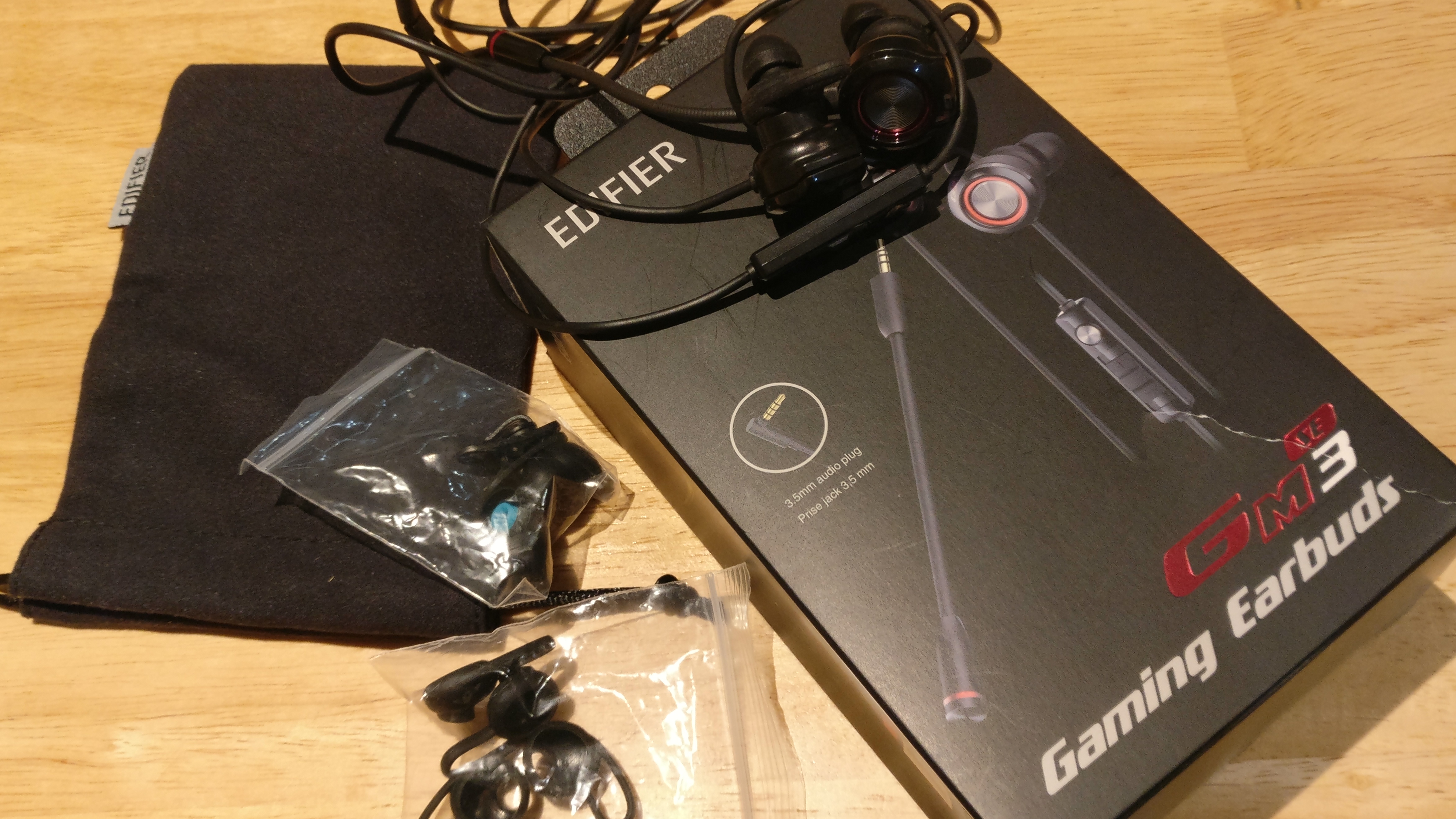
This model came with a variety of accessories, including a travel pouch for the earphones. The initial view was the in-ear earphones are larger than many other used but a nice colour. Unusually the Omni-directional microphone can be removed as required allowing flexibility on the earphones. The earphone came with a headphone/microphone splitter which allows the use on a Laptop,
Accessories : Travel pouch, 1.3m cable length + extension for PC use, and multiple Silicone replacement ear tips and wings of different sizes.
Product Dimensions: 17 x 13 x 12 cm.
Boxed-product Weight: 150g.
Driver unit: Ф10mm.
Bass unit: Ф10mm.
Compatible with –
PC, Android, IOS & PS4
Inline control /Volume control
The Slider button has a multitude of options, from Pause/play, Answer/ hang-up calls, next track, previous track reject a call, voice assistance, volume up volume down. The volume slider takes time to get used to all the options, while can be a challenge to set the exact volume of the audio from the slider on occasions.
Overview
This model is unusual as a swiss army knife can be used as a mobile device used for its primary purpose of gaming, or for calls on your mobile or listening to music. This is still able to fit in your pocket when not in use. The detachable microphone improved the quality reducing the back round noise. The earbuds have two microphones which allow the other Mic to be used when the boom mic is removed, Both microphones work independently with a good quality voice. Whether you’re gaming, making phone calls, the earbuds’ microphones perform well. The earphones are bulky but after a days use are light enough not to be noticed. The audio quality is good for the size of the earphones but lacks some of the higher frequency ranges on some games. This model has got lots of attention which may be down to the removal mic, with most thinking this was cool, Noise cancelling is not available but its light enough to carry around and used for gaming/laptop use with an excellent mic option.
The Creative SXFI GAMER initial opening was a delight, bright colors with the full specification visible on the box, in terms of contents, compatible, technical specification. On opening the box clear instructions and read me first was visible, with a variety of accessories. The headband was made of a steel frame what is synthetic Leatherette which was comfortable. large buttons were visible on the headset with a large volume dial for payback. a great feature with the inclusion of a USB C cable with the USB C to A adapter. The earpads were larger then I would normally expect from a gaming headset. This does not come with a Bluetooth option as a setup for wired connectivity only. It requires a USB input and has a 3.5mm audio input.
Features:
1.Headband
Synthetic Leatherette
Steel frame
RGB Rings Light button
Toggle button to turn earcup lighting ON -> Rainbow (alternating colours) -> OFF
CommanderMic
Uni-directional
Noise-canceling mic
SXFI InPerson microphone technology (distinguish chat over game audio)
Super X-Fi button
Press button to toggle audio profiles
OFF -> Super X-Fi mode -> Battle mode (gaming) -> OFF
Volume Control Dial
Controls the playback volume
Mic Mute button
Press button to toggle Mic Mute ON/OFF
Mic Mute ON (flashing red LED on CommanderMic) -> Mic Monitoring disabled
Mic Monitoring enabled by default (solid red LED on CommanderMic)
Headphone jack
4-pole analog jack
Super X-Fi disabled (passive mode without USB Type C connection)
USB Type C port
Supports direct Android device connection
Supports desktop computers like PC/Mac
Supports gaming consoles like PS4 and Nintendo Switch
Technical Specification
Headphone
Driver: 50 mm Neodymium magnet
Frequency response: 20–20,000 Hz
Impedance: 32Ω
Sensitivity: 114 dB / mW @ 1 kHz
USB input: 5V
Microphone
Type: Unidirectional noise-reduction
Frequency response: 100–16,000 Hz
Impedance: < 2.2 kΩ
Sensitivity: -42 dB @ 1 kHz
Compliance markings are located on the surface upon removal of ear cup cushion
which can be removed by hand.
SXFI App
The app was downloaded for a Samsung S8 phone and also tested on S10. The app had the option to experience magical Audio reality ( This was a bit of creatives marketing team getting carried away ) this allowed the personalization to perform a head mapping inclusive of the ears which allowed the app to adjust the sound to individual requirement. The app allows you to play content that is loaded on the phone. Unfortunately this worked it was noted traditional calls the earphones worked for the S10 but did not for the S8. This would have been expected to be similar for both models for calls made and received. ( a slight personal gripe )
Overall
The audio experience cannot be faulted. The over the ear covered the complete ear resulting in excellent noise canceling with the Mic superior to most microphones used. When playing 8D audio the overall experience was superior to many headphones tested. As a gaming earphone, the app was of little use but the audio, when used the SXFI button on the headset for specific games, was a noticeable difference. ( Creative use computer software for the SXFI button to enhance the audio)
A slight niggle, when used as multipurpose headphones connected to a phone, was observed ( Albeit the instruction do not market this for this propose)
The RGB lighting had a soft tone with the option to adjust/turn off as required, this stood out in terms of the packaging colors and the colors to include the red light to ensure the mic was faced the correct direction. The design in terms of comfort is excellent with a superior mic and an overall great base when combined with other Creative products. The tailoring of the audio experience is remarkable with no outside interference to hear via the Mic or earphones, An overall and well-considered headphones from packaging, quality, and overall audio experience.
The first impressions of the SoundBlasterx G6, was very sleek but looked strong as compared to previous reviews on the Creative SoundBlaster X3 & G3. This is compact not too big or too small unlike the SoundBlaster x3 which was very nice but a bit too big or the sound blaster g3 which was very small. This sound card is just the right size while still appealing and very sleek with a nice shine to the eye. Once taken out of the box it has a solid balance weight to it and consists of a metal case and a rubber bottom to ensure it is anti-slip on a lot of surfaces which is very handy.
The controls are 1 switch to control gain in your headset or speaker which can be set to low or high frequency. There is the SBX button which is mostly for the surround sound and gives an easier sound when listening to music. There is also a scout mode button which is commonly used for gameplay as it intensifies sounds and frequencies. This setting is not practical for listening to music as it starts to break up, while this mode is great for a game experience as the surround sound has an advantage in gameplay as the scout mode, which gives a better idea of where players are around you. If you hold down the scout mode button then the sound card will go into a direct mode and the scout mode button will flash it is almost the same as the SBX mode but a bit less of a surround sound blast from your headphones.
The SoundBlaster G6 has a button/volume wheel to select different modes for your headphone/ speaker it will select headphone mode or just mic mode if you hold it for more than 3 seconds same as the scout mode button.
The kit looked impressive out of the box but got further engaging as you turn it on, and the LED lights turn on which is great as a gamer/twitch or blogger for a camera show. This gave further excitement to the game card as you can also edited and select colors with the software download.
Package contents,
Sound BlasterX G6
1 x Optical Cable
1 x MicroUSB Cable
Quick Start Leaflet
Warranty Leaflets
7.1 HD External Console Gaming DAC Amp with Xamp Discrete Headphone Bi-amp for PS4™, Xbox One, Nintendo Switch, and PC
The creative Family:
Techbuzz Ireland has also a review of the above G3 sound card and more search CREATIVE on homepage.
Once downloaded this will open up your experience to the sound blasterX G6. As the software has all your controls for different modes like the SoundBlaster X3 but with a lot more programs for music and gaming, movies, etc.
Setup.
In the case of the PS4, the set up was very easy and simple connect the micro USB cable to the G6 and into the PlayStation and everything is connected up ready to go but unfortunately, there is no Bluetooth mode which is not great when you compare it to the two previous reviews of the SoundBlaster G3 and SoundBlaster X3 which are also done by us here at techbuzz Ireland.
Without the Bluetooth which is a shame you can’t connect to your phone like the G3 and X3, but you can set your game card to whichever setting you want on the software. Once set up this software complements the experience from gaming to programs to music. The software allows the option to change your voice and set it to a deeper, higher pitch and more even chipmunk sounding. Once completed you save your settings and voice, which is plugged back into the PlayStation/other devices listed all the settings will be saved on the SoundBlaster G6 and will work through your mic and headset.
Software Dashboard…
The software adjusts the sound frequency to whichever game/movie and music you’re listening to and can also self-adjust your sound wave which is very handy. It can also be tested on your headset for the full surround sound once the test in the settings is clicked. This gave off a voice that will be in different spots around the room which will give you an idea of how much better quality this will make your headset for the gaming experience. It also has a light control panel that you can switch and move around the light settings on your SoundBlaster G6 can be set to fade in and out, strobe and much more.
Sound settings
Software voice options/control
Lighting options
Setup
Overall:
Overall, it is a really enjoyable sound card which can be customized with a lot of positives and great features. There are 1 or 2 niggles where your mic will repeat back to your headphone what you say is an echo but can easily be adjusted. The missing Bluetooth option is a real niggle for us which was a positive on the previous models used, This has the result if you wish to change the e.g. Morph voice during a game, the unit has to be plugged in an e.g. laptop to reconfigure the software to your chosen setting. This would have been great to allow a change via your phone removing the requirement to disconnect and reconnect. ( These are slight personal niggles as was annoying to have to move cables ) The morph voice changer is a personal favorite allowing the type of voice to suit the occasion, The option to change the colors and flicker speed is as a positive with the option to turn off the led if required. Once set up correctly the customizable in terms of audio experience has superb options albeit control via the software, this gives a unique experience of gaming, As always, a delight of an audio experience from Creative.
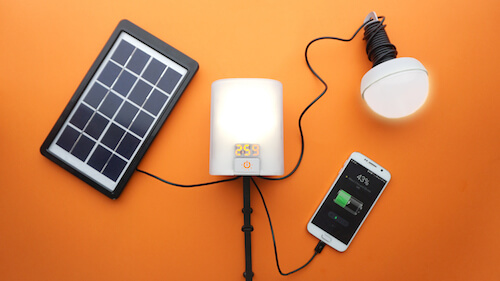
Typically Techbuzz review technology products that involve a download of an app, connected via a USB connection with the potential of security, audio, video. This product has none of the above but the successful crowdfunding and from the support of Comic Relief has resulted in a product which efficiently harnessing human effort or uses solar power to turn on lights or charge devices through its USB ports.
The nowlight kit includes:
1 x NowLight
1 x SatLight (SL03)
1 x 3W Solar Panel
1 x DC charging cable
1 x Setup instructions
Tech specs
Warranty:
This product which promotes green, working for the good of the community has their brief as Their goal was to create a sustainable alternative to dangerous, polluting and expensive kerosene lamps, has a disappointing 1-year warranty. My belief if they wish to create “create a sustainable” they should start with a minimum of a 3-year warranty rather than the disposal society encouraged by the 1-year warranty.
Setup: & connections
The setup is easy without the need for any technical expertise, while there may be safety concerns if using a ladder to install the solar light, the hanging cable would be required to be kept out of reach of young children to prevent been pulled down on them.
Affordable and renewable charging
The Kit comes with a 3W solar panel placed outdoors in direct sunlight can fully charge the nowlight in around 5 hours, The Kit if placed inside a window will not have sufficient light to correctly charge the kit, Manual charging can take less than 30 minutes while recommended to manually charge in blocks of a few minutes rather then constantly pulling the cable. Alternatively, if expecting to use on e.g. a camping trip the unit can be charged using a standard USB charger to the mains. (Any typical smartphone charger word work)
The nowlight has Up to 50 hours of light with • Up to 160 lumens
The nowlight has 6 independent brightness settings: 5 – 10 – 20 – 40 – 80 – 160 lumens
1-second manual charging = up to 2 minutes of light
1-minute manual charging = 15 Minutes of talk time on your mobile
Niggles:
This kit has numerous advantages from a technical perspective environment and humanity side but has a few niggles. The 1-year warranty for a product which is classed as affordable and renewable is let down by a paltry 1-year warranty which may be a continuous source of supply (albeit or 1 year as the warranty does not go further) The IP rating for the 3-watt solar panel is IP33, which is ok for outdoor in mild showers but not suitable for long terms in the rain/submersible, In the UK & Ireland a fine day is a where the sun casts sharp shadows and it doesn’t rain, but typically Ireland gets on average about 151 wet days per year, this solar panel should be 100% waterproof for our climate ensuring fit for purpose.
Conclusion,
In the world today 1 in 7 don’t have access to Electricity, the developer of the product have been able to develop a product renewable energy solution to provide light anywhere, anytime. This is not aimed at your commercial organisation rather getting assistance from Red Cross and Comic Relief to achieve humanitarian organisations equipment in terms of light. On practical terms, the unit works well with an abundance of light when required with the options of using solar, manual or traditional mains charging. A few slight niggles but the principle for renewable light with the options to charge a phone when stuck isimpressive. This is ideal for areas where electricity can be haphazard, or on camping trips or as a backup alternative. This is a great product using technology with humanitarian gains also.
Alternatively, there is an option to donate a nowlight for €52 via the Deciwatt partnership with humanitarian organisations to provide nowlights to households who have been displaced by natural disasters or conflict. This would provide a family with a nowlight, a SatLight and a Solar Panel for a reliable source of lighting and power for mobile devices.
The SecureData 16GB Secure USB is a Hardware Encrypted USB Flash Drive built with strong and sturdy from a physical side to been Encrypted. The flash drive looks like an ordinary flash drive but is configured via mobile to allow access once plugged into a Laptop. The flash drive also comes with preinstalled Malware Protection as little point backing up corrupted files. This model is available in 16GB, 32GB, 64 GB and 128 GB, big enough for data in terms of computer backup files, etc. Recently from the company we checked out the secure drive USB key and secure drive ssd drive
Features:
IP57 Certified: Dust and Waterproof (up to 1m)
OS/Host Independent. Works with any device with a powered USB port
Interior Parts Covered in Epoxy – No intact media removal for hackers
Hardware Encryption – AES256-bit XTS
User Authentication w/ Secure Wireless Mobile App w/ Encrypted BT (iOS/Android)
Remote Wipe, 2 Factor Authentication, FaceID/Touch ID Authentication, Password Retrieval
Admin/User Mode, Read-Only Mode, Time Out Auto-Lock
Preloaded with DriveSecurity® ESET Antivirus (1 Year License Included)
3 Year Limited Warranty
4GB, 8GB, 16GB, 32GB, 64GB and 128GB options
Setup:
The setup is standard, Scan the QR code from the Quickstart guide, install, (Write down the 8 digit code on the silver part of the USB flash drive). Plugin the USB drive and follow the instructions on screen.
Once installed using the 8 digit code (written down) and the default code is given in the quick start guide the drive is set up. It is recommended to change the default code via the app, and ensure this new code is kept safe away from the actual flash drive. When setting up full access to the 16Gb data is available on the Flash drive with the option to run the antivirus software stored on the drive.
Note The option to remote wipe if the flash drive is lost or stolen.
Conclusion:
Good practice of backing up personal data is important for individuals but for any business, this is critical whether documents, contacts, contracts, correspondence, accounts, and so on. The loss of data can compromise a company leading to lost profit, damage to reputation, and recovery costs. The dilemma is then how to backup, leaving on site opens the opportunity to fire or flood where all the data is lost or stolen. Removing the data off-site is good practice but the potential of loss or theft of the data has many implications and fines through GDPR if in the wrong hands. The SecureData 16GB Secure USB device is an ideal option with the data encrypted to a high standard with various levels of security to ensure the data is not compromised if lost.
The use of the device would require careful monitoring if given to an employee, as should the employee leave not on the best of terms the pin code may not be provided. There is No backdoor if the PIN is forgotten the data is permanently erased after 10 consecutive incorrect PIN entry attempts. This is ideal if lost or stolen whereas a challenge if lost by a staff member.
Following on from software “First, if you didn’t go looking for it, don’t install it. Second, if you installed it, update it. Third, if you no longer need it, get rid of it!” and finally if you need it Back it up, The SecureData 16GB Secure USB is Military Grade AES256 bit encryption which should the worst happen you are covered.
The Zendure Passport 11 pro is classed as a travel adapter with power to connect 5 devices at a time, 3 traditional USB A ports, 1 USB C port and a side USB C for charging e.g. 13” MacBook Pro and an AC Outlet which can take a variety of plugs. The adapter has no loose parts ( which is great to prevent losing over time ) The design allows the pins to be lengthened as required to the local country use which has a protective Press and Slide”button to ensure non-slippage. The Passport 11 pro has no internal battery ensuring this can be carried on as hand luggage on a plane if required. The types of plug used are listed on the plugs e.g. the USA . Australia etc.
Power rating: of 61 Watts is impressive Note: The travel charger doesn’t convert AC voltage. Typically electric shavers, electric toothbrushes are multi-voltage but Techbuzz would recommend checking in advance if the local voltage matches your electrical item. ( Phones, tablets etc are generally ok )
Intelligent Safety Measures The Passport II Pro adopts a child-proof shield to ensure the AC outlet is only used for plugs to prevent young children from getting hurt.
Overall: The manufactures quote works in over 200 countries, but as with many travel charges accessories get lost due to the design of various add on, the Zendure Passport 11 plus does not suffer from this problem not having any removable parts. While listed as a Travel charger Zendure are missing out on a key use, using at home/office as the abundance of connections is great for a family or those with multiple devices. The option to have various products connected without the loss of a pass-through plug is great. The 61 Watts is impressive but I would not recommend using a piece of traditional electrical equipment as the Passport 11 plus has a rating of 220 V @ 2500W, while some Electrical kettle has a higher power draw. A quick check on the product would advise. In the event you ignore the manufactures power rating this comes with an Auto-Resetting Fuse which will ensure not to destroy the adapter. A gem of a tech gear product, highly recommended. Note: Passport II Pro was launched on Kickstarter ON June 29th
Power 6 Devices Simultaneously
5 USB ports (2 USB-C & 3 USB-A) + 1 AC outlet, power six devices at once. Compatible with laptops, smartphones, tablets, Nintendo Switch and other devices.
Worry-Free to Travel Over 200 Countries
Passport II combines US, UK, EU, AU plugs in one design. You can use it in over 200 countries and regions.
10A Auto-Resetting Fuse for High Power Devices
2500W Max, 10A current AC output under the protection of auto-resetting fuse, worry-free to use high power devices. Utilizing aerospace technology, the auto-resetting fuse (patent pending) allows Passport II to recover from overloads without service or replacement up to 10,000 times.
Smaller, Even More Powerful
Passport II adopts GaN technology, providing 61W Power Delivery in smaller size & cooler operation temperature & higher efficiency.
The Gatekeeper Halberd tokenis a proximity-based 2FA technology which is acombination of the security key and password manager. This works on the principle that for a computer that is left unlocked with weak passwords ( in violation of many corporate policies on IT security ) theGateKeeper Halberd token use proximity-based authentication sensors via Bluetooth to Lock or unlock the Computer. This allows the automation of security taking the risk out of the individual user been automated. The Gatekeeper can be configured to one computer or the option to be configured to numbers as per the individual or corporate policies. Web accounts are similar in the passwords are stored on the gatekeeper centralised password manager removing the need to remember numerous passwords for 100’s of sites. The option of one time passwords is available.
Features:
The Gatekeeper can come as an individual service, as a once-off purchase for the hardware/software etc or an enterprise version:
Setup:
The setup involved using 2 different software, one for Proximity and one for the password manager, For individual use –https://gkaccess.com/downloads/ (Mac also available )
The software is installed with the dashboard configured,
The token option is ticked, add
Add a new device, which connects to the Bluetooth device and the Halberd token ( no need to manually enter and details )
This can be configured to be set up for a new user via the dashboard, the user can be given a four to 8 digit code to use the gatekeeper. IT departments have full access to set up individuals to a computer or allow multiple staff to access one computer.
In the event of loss / forget a Token, this can be configured as a loan token or factory reset of the lost token removing the option to access the computer. Additional security can be set up to include proximity & a unique pin code for a user.
GateKeeper Password Manager
This is set up via the GateKeeper desktop application to provide proximity-based access to web passwords. This is set up as a new extension on the chrome browser to allow OTP to your website,
A challenge for an individual user is where they use example Facebook, LinkedIn and require to access this, this may involve info from an OTP which would not be accessible from a temporary computer which is not connected via a Token.
An optional additional USB Bluetooth Proximity Sensor can be supplied to allow proximity set up where the PC USB is inaccessible allowing for extended coverage set up.
The individual user data is stored locally on the Laptop, in the event of loss of the token, the enterprise is stored on the network with a cloud version expected in the next few months.
Company:
Untethered Labs, Inc Gatekeeper is a USA company set up in 2015. They develop advanced wireless proximity access control solutions that act as the first line of defence for preventing unauthorized access to enterprise computers and websites.
They provide automated privileged access management solutions for a wide range of industries including healthcare, MSP/MSSPs, law enforcement, manufacturing, and finance. Their technology increases security and reduces support costs with touchless, proximity-based two-factor computer authentication, centralized enterprise password management, and auditing. They have partners in a variety of countries UK, France, Germany, and Australia, the individual option can be purchased directly from GateKeeper, the enterprise option is available directly or via their partner network.
Overall:
The Gatekeeper Halberd token is ideal for those in a highly regulated environment while can be used in any environment which requires good security practice. ISO27001 requires on leaving a laptop, the laptop should be locked, the proximity sensor is ideal for this as automating the process. Staff should be focussed on the day to day job not focussing on the IT department requirements for security. The ability to configure multiple workstations from one Halberd token is great allowing supervisor access to multiple systems in a controlled environment. Many articles on the web flag passwords are dead, this product is another nail in the coffin for the traditional password allowing flexibility to use and multiple sites without the need for multiple passwords. This is a dual-purpose device, security to lock your PC and password protection for your websites. Any technology that automates the cybersecurity process improves compliance, reduces support costs, enhancing security and removing the weaker link of the human intervention is a winner.
The Jabra Evolve2 65 came in the standard colours with their marketing giving clear details of the features of the earphones. The packaging as with the product looks professional with the packing also defined as crafted with 100% recyclable material. The internal packing was set up as a quick user guide on the features of the individual buttons.
The headset is made of ultra-soft foam cushion covered in colour-matched silicone, ear cushion soft audio foam covered in colour-matched leatherette, with an aluminium slider arm. The headset connects to multiple devices wirelessly simultaneous, e.g. laptop and phone,
Contents:
Headset,
Desk stand
Jabra Link 380 BT adapter, 1.2m/3.9ft
USB-C to USB-A cable,
soft pouch for the headset (not for the stand)
Warranty and warning (safety leaflets)
Weight – Stereo 176.4g/6.22ozThe weight is important in terms of wearing for hours, which is comfortable.
Key features
Noise-isolating design for ideal concentration: Keeps external sounds out for better work collaboration and listening experience in any environment
Long battery life and improved busy light: Keep interruptions to a minimum with up to 37 hours of battery life – the integrated red LED light shows ongoing conversations
Be heard and understood, wherever you are: 3 microphones, an enhanced digital chipset and the boom arm offer you the best possible audio quality
This Evolve2 65 headset is MS Teams-certified with a dedicated Teams button and meets MS Teams open office requirements
Warranty 2-year warranty
The plug-and-play experience includes these benefits:
Automatic selection as the default audio device.
A dedicated Microsoft Teams button to Notifications of Microsoft Teams LED flashes purple when. Microsoft Teams meeting ready to join. Microsoft Teams missed call. …
Voice prompt when the user is wearing the headset.
Battery, Charging
The unit came with a Desk stand charger USB A which can be plugged in a standard USB charger or direct to a Laptop. The headset has 2 gold contacts for the desk stand, alternatively, a USB C charging lead ( as supplied with most modern Android phones ) can be used. A full charge can provide 37 hours of battery life in 90 minutes. A fast charge of 15 minutes can provide 8 hours of battery life. While the Desk stand charger is ideal to store and charge the headset, this is an item not used as on the few occasions when the battery was getting low ( as advised on the phone app ) connecting to a power brick with a standard USB C charger cable meant the headset did not need to be removed from its primary purpose. The battery life of 37 hours is great with the option to shut down if not used within the app functionality.
Setup:
On the Jabra Evolve2 65, slide and hold (3 seconds) the on/Off/Pairing switch in the “Pairing” position until the LED flashes blue and the Jabra Evolve2 65 announces pairing mode. On your Android device, go to Apps, Settings, Connections, Bluetooth. Ensure Bluetooth is turned On.Your Android device will automatically search for available devices. When the name of your product appears on-screen, tap it to start pairing. When pairing is complete, your Jabra Evolve2 65 is ready to use with your mobile device. If you need to pair a second device, or if the initial pairing fails, restart the pairing process from the beginning.
LED colours and behaviours.
App
Download the Jabra Sound + app for the phone as the setup in the standard for android,
Laptop / PC
The Jabra Link Bluetooth adapter can be plugged directly into the USB port as Jabra device is pre-paired in the box. The Jabra Link Bluetooth adapter supports plug-and-play functionality, without needing to install separate software drivers on the computer.
Teams calls
The Evolve2 models that are certified for Microsoft Teams support Microsoft Teams as a plug-and-play experience. The plug-and-play experience includes these benefits:
Automatic selection as the default audio device.
A dedicated Microsoft Teams button to:
Notifications of Microsoft Teams LED flashes purple when
Microsoft Teams meeting ready to join
Microsoft Teams missed call
Microsoft Teams voicemails
Microsoft Teams LED flashes green with an incoming Microsoft Teams call
Invocations
Answering incoming Microsoft Teams calls
Opening the meeting “pre-join” screen
Open missed calls screen
Open Microsoft Teams voicemail screen
Bring up Microsoft Teams client from the background
Voice prompt when the user is wearing the headset
Niggles
Slight niggles were noticed on the boom mic which can be obtrusive when not in use listening to music, the boom mic cannot be disconnected or removed. On receipt of 2 calls e.g. from a laptop teams call and mobile call, the answering can be confusing in terms of the buttons to press, this takes practice to become familiar with the buttons like any other new product I guess.Most modern products as such are the same be it on one side or the other and no removable or detachable.
Overall:
The Jabra Evolve2 65 is quality in the physical feel of the headset, the software is tried and tested from previous models and works well. The core function of making and receiving calls via your phone or Laptop worked easily, The added featured of mute, physically moving the mic to mute or unmute, other standard features we typically expect worked well. It is also a viable product for personal music but Jabra excell here in other areas with the 85HEvolve 2 85 which Jim is testing right now and so far has been more than impressed with these as a hybrid answer or their latest True Wireless the elite active 75t which is tough to beat, with Jabra products they both suit our needs in the environments we both work in which sees different scenarios and some similar and Jabra products fit the bill perfectly and fulfil our needs and more when it comes to quality and features.
The software provides options for bass depth and clear treble for music, the office functionality in terms of Microsoft Teams and the consistency in call quality and connection provides a seamless experience. The Jabra does the simple thing right, connection to multiple devices simultaneously, provided clear call quality and audio experience, another quality product from a quality company, A pearl of audio communication experience.
The Jabra Evolve2 65 was supplied to us by Jabra with no preview or copy approval and no compensation was provided. You see our reviews the same time the brands we work with do. Additional text and unboxing video by Jim O Brien.
The first Impressions of the SoundBlaster X3, looked spacious and appealing to the eye once taken out, the first feel was a plastic frame with 3 buttons that didn’t feel out of place with an LED in the middle. It consisted of a volume wheel which was made from metal giving it a better look and feel of weight. The wheel is also a button for different modes and to connect to Bluetooth which will get to later. The quality of the feel of the X3 felt solid, with good packaging, made out of solid materials as compared to the previously reviewed Creative Sound Blaster G3, which we listed as “plastic seems flimsy” https://techbuzzireland.com/2020/05/08/review-the-creative-sound-blaster-g3-usb-c-dac-creative-gaming-tech/
The SoundBlaster X 3 includes a USB type C to type A converter which would suit modern-day technology, it comes with a lot of connection choices on the back of the blaster such as a front, side, rear and C/SUB line out so plenty of options but does not come with any of the other types of connections. The USB cable was extra-long which is great to allow connections a distance away.
Once turned on the SoundBlaster x 3 was appealing as the LED lights turned on behind the wheel which gave it a look of intensity, portrayed as a powerful Sound blaster.
Package contents,
Sound Blaster X3.
A USB type C to type A converter.
Quick and easy set up guide.
Leaflets & Instructions of more in detailed instructions
Warranty Guide
Warranty – 2 Years
Compatibility:
The compatibility of this particular SoundBlaster X3 it is more aimed in the direction of PC players rather than consoles like the PlayStation 4 and Nintendo switch. This was used with a PlayStation 4 on our tests.
Apps,
SoundBlaster command,
And for the X3 in particular SXFI app,
Setup.
In the case of the PS4, the set up was pretty basic as all that was needed was the USB type C to type A converter to connect the SoundBlaster X3 to the PS4 which can be done on the Nintendo switch the same. Then plug your headset/ (headphones and mic) to the aux for the headphone and if the mic is separate there is a mic aux connection too.
To set up on the PC all of the connections from your normal speakers can all go into the back connections on the SoundBlaster X3 and will come through the headset with the aux connection on the front of the sound blaster a mic can also be connected separately to the headset/headphones.
The setup is similar for all the consoles, which can be set up for your gaming, movie and music experience by the different colour LED lights. We observed to get the full benefit of the SoundBlaster X3 you should then download the 2 App to your smartphone above or to your PC.
In this case, the consoles and app were used on the PlayStation 4 slim & the Samsung s10. Connection to the phone and Soundblaster via Bluetooth required the download of the sound blaster command app and set you, blaster, in Bluetooth mode. The connection was via the Search for the X3 in the app and put the X3 in pairing mode by holding down the volume wheel until it flashes its white LED.
SXFI app
The Install of the App was easy, scan the QR from the box follow the link and download the app. Once connected the SXFI app goes through a tutorial to select your headphone and will ask to take a picture of your ears and head to customise your headset for your gaming experience, ( This part of the installation is unusual without leaving a logic for its purpose on the install ). Once finished go to the SB command app and the data will link and the command app will give the option for music and different types of games which is a great feature and once the SXFI is activated on the app your experience gets a whole lot better.
SXFI technology has done a great job at creating a 3D surround sound out of your headset which is enjoyable for players and all music and gaming experiences.
Overall:
There are a few hiccups with the app as if you click of the app the SoundBlaster will have to reconnect when the app is turned back off but once the setting is done it won’t change until the phone tries to reconnect but only a small error wouldn’t be too much bother. Other than the plastic case and buttons the SoundBlaster X3 overall is a great audio experience when connected with the apps. The mic sometimes echoes but is not a huge problem for the user and can be solved but it is full of options and great settings for all sorts of games.
The pre-set options for numerous games, default earphones and the options to change the audio experience is a delight for gaming, a setup in the right direction to enhance the audio gaming experience. BUY HERE Price £109.99