People with disabilities may find it quite hard to communicate or to live independently, depending on the nature of the impairment(s) with which they are living. Abilities such as speech, hearing and mobility could be affected, and these are things which able-bodied people can easily take for granted. However, advancements in technology have led to the creation of apps which make the world more ‘accessible’ for people living with disabilities.
In the infographic below from Home Healthcare Adaptations http://www.home-healthcare-adaptations.ie/stairlifts-dublin/ , you can see 10 such apps which aim to give sensually impaired people greater independence. There are apps for the hard of hearing, people with sight loss, people with developmental displays, people with dementia and people with limited mobility.
Among the apps featured are Tap, Tap, See, with which visually impaired people can take a photo of an item and the app will tell them what it is; Medisafe, which delivers an easily understandable reminder of what medication needs to be taken and when; and Wheelmap, an app which grades the accessibility of amenities and transport in your location with a simple color-coded system.
Anything which can help to make the lives of people with disabilities a bit easier should be embraced, which is why these apps are very worthy of your attention and belong on the devices of anyone who has a disability or lives with someone who does.
Something that has happened to almost all of us at least once, has been sitting in the airport, bus terminal, bar or even at the gym doing nothing when something on the TV caught our attention.
There’s just one tiny little problem, most of TV’s are muted or with a really low volume, what makes impossible for us to hear… Until today!
Lets welcome Tunity
This app does something so simple but yet so useful that is incredible no one has done it before.
Following a similar path as Shazam, the app with give you the info you need about something in TV.
All you need to do is “scan” the program you want the audio from with your camera and the sound will be sent to your phone’s headphones for your hearing pleasure.
The only catch in here is the fact that only works with live broadcasting (like an urgent news, the Oscars or a live football match) and you need to use GPS to know where you are in order to give you the correct audio stream.
This means, the app will not work on every single channel, but at least that random but “important” things we wanted to listen for a moment will be available for us.
As of today, Tunity works with approx. 100 channels including ESPN, TBS and even TNT(so Oscars are an option) among others.
Right now the app is available on Android and iOS and only in the US but is aimed to reach other countries soon.
What do you think of this? Do you see yourself using this app at some point? Let us know in the comment section below or joint the twitter conversation.
If you’re in college or school, or even at work you probably are in at least one Whatsapp group, that’s a good thing, as you can keep contact with classmate or colleagues.
That bad thing though is that in most cases those groups filled with junk images you precious storage, but now there’s a solution for that! Discover Magic Cleaner
Memes and funny pictures are really common in those groups, the problem is that even when WhatsApp has a separate system folder all those files end up in your photos library and what’s worse. Eating up your memory.
App’s own investigator, Professor Kleen, will take care of that for you.
How? Once you open the app, all you need to do is upload your photos to the server for a few seconds and there, using “deep learning” it will identify those junk files and delete them.
Once the analysis is done, you can check the files just in case there’s something selected that you want to keep.
Being somehow recent, the app can misinterpret some photos, but the more you use it, the better it gets.
Totally free in the app store all you need to do is give it a try, and you can do that HERE
But let us know! Do you suffer from infinite memes due to WhatsApp groups? What do you think of the app? Let us know in the comment section below.
The Keyboard, one of the most used features of our devices and one of the most discussed topics between mid and high end user on the Android ecosystem.
One of the simplest but useful app in this segment is Chrooma
Chrooma is really simply and is almost like the stock Google Keyboard with some but great adds on.
With this app you’ll be able to customize lots of features on it, like color or even size (this one comes really handy for those with larger phones but no so large hands) and the best part is that packs the Swipe gesture feature that most of us love.
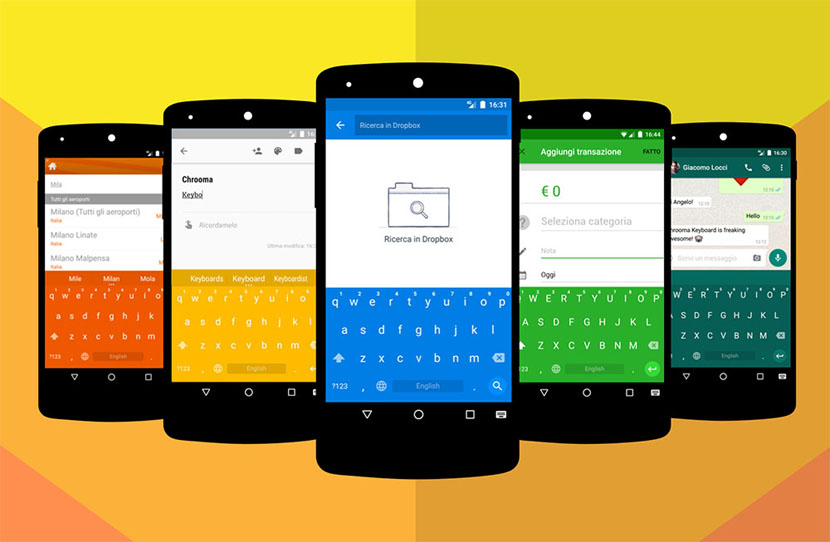
But where Chrooma stands out is the ability to have different colors depending on the app you are using with Palette Mode.
Is like having a virtual Razer keyboard, this one will change the color to match the app, like in the image above, so if your using FB Messenger it will turn blue.
Another cool feature is Night Mode, which will dim the colors as soon as it detects a light change.
So if you one os those people that love changing everything on your phone or want a theme to match perfectly this is the app you’ve been looking for.
Is not free, but the price would not break your pocket so if you want to try it out go and get it here:
Every day more and more companies are joining the VR wagon, but some of the most promising ones like Oculus are too expensive, some others just go an choose the Google cardboard which is way cheaper.
But today we have just discovered that now Apple has its own VR headset, the View-Master Virtual Reality Starter pack (hope the name changes )
Putting the name aside, this is and actual step into the right direction from the fruit company.
This headset was created following the same principles as he Google cardboard, using your iPhone’s screen, you’ll get two split images that when seen through the cristal on the device will simulated the 3D impression on your brain.
Unlike the former, this model is made of plastic, but with a strong resembles of those little toys we use to have when kids, the ones that came with a reel of different images. It even comes with a lever to control your phone.
Well, actually is practically the same as this device works with the same kind of mechanism, the app to control everything on your phone is totally free on the store, but its just a sneak peak of the entire content, such as Space and NATGEO wildlife and destinations.
Something that we did see coming, was a way to charge more for something that should have come ready, in order to unlock the full VR experience, customers will have to buy a separate reel that will free the true power of the app.
And although the device is compatible with iPhone 5 and up running iOS 8.1 or later, there’s a warning saying iPhones 5 and 5c may have issues as the app is not totally optimized.
The View-Master Virtual Reality Starter Pack it in pre-order stage at $29.95
Windows fans all over the world has always been proud of the built-in keyboard of W8 and W8.1 as it broke a Guinness World Record for the fastest typing when it was launched.
But ever since Microsoft took over the Nokia Cell phone Division some of those key features of WP are starting to be ported to other platforms, one of the “most infamous moves” was when Cortana became available in other platforms even before being completely available on the WP ecosystem.
Well, this time is the same famous keyboard the one being ported, as accordingly to an e-mail sent to some Windows insiders, they want to have the app available on iOS and possibly on Android.
What does this mean to the WP ecosystem?
Well, it depends on you and if you see the glass half full or half empty.
The Word Flow keyboard resembles what third party apps like Swipe or SwiftKey can do on both operative systems, which is not a warm welcome.
The app is apparently being developed for iPhone 5s and above, although the real question is:
Would you use the WP Keyboard on your device if you already have some of the aforementioned apps?
What’s you opinion on Microsoft and multiple apps going outside of their “home”? Let us know in the comment section or tweet us using #techbuzzireland
As we all know Lent is upon us and its a time of giving up something be it little or small anything helps,now we can keep help out Trócaire even more and much easier with a new app which is Available on Android and iOS which is a great idea..
Keep your Trócaire Box in your pocket and collect donations on the go with the Trócaire Box app powered by JustGiving. Trócaire works in partnership with communities in the developing world to support their efforts to improve their lives, meet their basic needs and ensure their human dignity.
Description
• Keep your fundraising on track and check how much you’ve raised whenever you like.
• Share your box easily via text, email, Facebook or Twitter so you can get donations from anywhere in the world.
• Donations have a higher average online so you’ll raise more money for Trócaire.
• The money you collect goes directly to Trócaire so they can start using it straight away to do their amazing work.
• Design your own individual box so it’s totally unique to you.
• Earn badges to share on social media when you reach your fundraising milestones.
Download the App
For more information on how you can help Trócaire please look at their website HERE
PicHit.Me is an exciting app where you can upload photos and make money it launched initially on Windows Phone last year and now has spread its wings to two more platforms which is Android and iOS,Often the case with well known apps its the reverse order here as Windows Phone users had the chance to use this app before any other..
What is PicHit.Me.
PicHit.Me contains three basic sections.
Market – A fun and vast photo market, where you get access to people’s photos and can request the photos you need. The photo market’s goal is to be where the photo need is big (starting of in PowerPoint and Word).
Missions – Photo missions where you can participate and upload your photos in order to earn money, win prizes, get rewarded with coupons, learn more about photographing, show your photo skills, compete or get reviews and ratings from others.
Me – Your account where you collect all your rewards, create your profile, gather your favorite photos in albums, connect to other members and interact with the community.
PicHit.Me is an eco-system that connects billions of people in need of photos with the billions of people with a camera.
PicHit.Me is global. PicHit.Me targets everyone. PicHit.Me opens up new ways to learn and earn money by taking photos.
PicHit.Me offers a fun, easy and affordable way to legally use photos
PicHitMe has been on WindowsPhone and has been a big success so if you have not tried it yet now is the time..
Now PicHit.Me has hit Android and iOS this is great news for them and its great new for those who have been waiting to use the App.
PicHit.Me is the perfect app for both photographers and people looking for legally cleared images. Those in need of photos have the ability to find the perfect image by requesting photos from the community of photographers. The request feature engages a crowd of photographers to capture the images straight from your imagination. Photographers can in turn accomplish these missions for a chance to be rewarded.
You can download PicHit.Me on here on iOSAndroidand Windows Phone ,also to note the Windows Phone app will be getting updated next month which is good news for users..
Also said today
Simply download the app, create a PicHit.Me account and post your fantastic photos to the relevant missions. There is even a $250 reward up for grabs in our latest Challenge, as we search for the perfect PowerPoint background – so be sure to upload to this mission to be in with a chance of winning.
There is plenty of calendar apps today on all Operating Systems be they good or bad or just stock apps built in but this app is designed purposely for shift workers hence the name “Shifts” it looks quite intuitive and nice check it out below.
Traditional calendar apps aren’t ideal for shift workers. You don’t necessarily work a traditional Monday to Friday 9-5 job. That makes it hard to keep track of when you’re working, especially with early morning and overnight schedules.
Shifts solves this problem with a simple solution. Create your own custom shifts using our attractive icons and color picker, then add them to your calendar with just one tap.
You can add up to 2 shifts per day, or setup a shift rotation and apply it to your Shifts calendar all at once. This makes it easy to enter an entire month – or even year’s worth of shifts in less than a minute! See any of your upcoming shifts right from the lock screen.
After you’ve entered your shifts, you can view them in our beautiful month view calendar, or in a handy list format. You can overlay your personal calendar on top, so you’ll know when you have things going on outside of work.
With just a tap you can share your schedule with friends, family, and co-workers – whether they’re using Shifts or not.
Built exclusively for iOS 8 and Apple’s latest iPhones, Shifts is the modern way to keep track of your work schedule
CREATE SHIFTS
Add as many shifts as you’d like, and choose your own icon and headerr for each shift type.
ADD TO CALENDAR WITH ONE TAP
Select one of your shifts, then tap each day on the calendar you’d like to add it to. Up to 2 shifts per day.
SHARE YOUR SCHEDULE
Send friends, family, and co-workers your work schedule whether they’re using Shifts or not.
VIEW UPCOMING SHIFTS RIGHT IN THE WIDGET
See your schedule without even opening up the app, right from the lock screen, or from inside any other app.
SET UP CUSTOM SHIFT ROTATIONS
Set up shift rotations and Shifts will automatically apply your shifts over any date range you choose – great for repeating schedules (e.g. a 3-week schedule that repeats for 4 months)
View your personal iCloud calendar overlaid on your work schedule
• Add personalized notes to any of your shifts
• Enter your hourly rate and we’ll show you an estimate of your monthly earnings
• Add up to 2 different shifts per day
• Reminders for shifts
• Indicate vacation days with the holiday icon, or sick days with the medical icon
• See your schedule on the Calendar or List view
• Swipe between months, or pick any month (just tap the date at the top)
GREAT FOR:
• Nurses
• Emergency workers
• Doctors
• Security guards
• Cleaners
• Retail employees
• Laborers
• Servers, bar tenders, kitchen staff
• Grocers
• Police and Firefighters
• Military
• Surgeons
• News and media reporters
• Paramedics
• Students and part time workers
• Taxi or Uber drivers
• Shipping and warehouse staff
• Pest control workers
• Locksmiths
• Hydro workers
• Protective service
• Food preparations
• Truckers and tow-truck drivers
• Construction workers
• Bus drivers and other transportation workers
• Anyone else who has trouble keeping track of their schedule!