The (real) benefits of Windows 10 for small business. #Windows10 #Business

Perhaps the most remarkable achievement Microsoft has pulled off over the last decade has been making Windows far more user friendly. While cliché to say, it’s nevertheless a distilled report of UX from users. From its beginnings as a tech geek, relatively cool product that – at times – frustrated non-technical folk, Microsoft has clearly listened to consumers over the years. Today, Windows 10 epitomises the marriage of its technical ability with a far more intuitive end user experience.

Microsoft has dominated the working world for years, and for good reason. Even early critics of Windows struggled to find the kind of apps Microsoft had already made mainstream 30 years ago. Not only does Microsoft Office suite remain streets ahead of competition in enabling businesses big and small, but Microsoft’s enterprise-grade Server products have enabled network access and management for thousands of large corporations. Both user security and efficiency have driven Microsoft’s overall suite development in the new millennium.

A heads up for everyone still running Windows XP or 7: those Windows versions are unsupported now, which means no security patches or upgrades of any kind are in your future. Unfortunately for you, that means high vulnerability and low security for your PC. Windows 8 was an unpopular option for many, as it followed a touchscreen design layout; in particular, business users weren’t ready to abandon their familiarity with previous versions. Which brings us to Windows 10, and some good news – it’s the best Windows ever

Here’s why.

The benefits of Windows 10 for small business are many

Loyalties and bias aside, excerpts from a top IT concern in London covering What Are the Benefits of Windows 10 for Small Business? will win over many former critics. As a testament to Microsoft’s ability to respond to the market, they’re focus is on user experience, mobile access and the right box of tools.


  • Updates are (almost) pleasant now


Faced with competitors of various hues that included upgrades as a part of ‘maintenance’ at no charge, Microsoft has adopted a ‘software as a service’ (SaaS) approach, too. Facing the loss of consumer appetite for paid upgrades, Microsoft has reinvented its approach in line with such expectations. While small business users had to opt in and install Windows 10 when it arrived, future upgrades will roll out seamlessly in the background. In other words, they’ve taken the roundabout way of installing an OS and automated it. 

A tiny tweak perhaps, but with huge implications for UX. Buying an installation disc or being billed for an online upgrade is over, too. The standard offering will be free, while users who employ more extensive versions or apps within Windows will pay per use.


  • Security is state of the art


Enterprise now has a clear legal responsibility in terms of GDPR. Personal data is regulated, and the onus on business to both safeguard against and react towards its illicit dissemination is clear, with punitive measures against those who are negligent in looking after users’ or clients’ data.

Today, it’s surprisingly best not to supplement the Windows Defender suite of programs with other antivirus apps. Windows’ in-house security is tight, performs alongside the best, and makes extrapolation of security measures a cinch when needed. In other words, having Windows Defender up and running as it should be on the OS covers business in terms of its liabilities concerning personal data. It makes small business compliant, identifies and secures individual app access, and can limit files that apps can access. 

Enterprise users can expect to be forewarned of illicit activity around access, and Bitlocker makes encryption a standard possibility for business now – not just James Bond.


  • Multiple device commonality


Sticking with user-driven common sense, the Windows 10 OS runs on desktops, laptops and tablets. It presents as a familiar face, with the design reminiscent of the older Windows the whole world became accustomed to over the initial years of use. That might seem unimpressive, but for working personnel, it’s the difference between feeling confident (in presentations or other participation where data needs to be shared) or feeling technically challenged.

As cloud computing becomes the norm, Microsoft’s OneDrive allows users to access data whenever and wherever. Being able to consistently access data easily between devices is now so commonplace that it might be overlooked as a new feature, but significant hard work went into making that possible.


  • Toggling devices and operating times


In an emerging gig economy, many people take work home and work at all hours of the day and night. The ability (continuity) to do so is, again, something we all simply expect as a default; but that, too, is a new feature with Windows 10.

Transitioning effortlessly between devices while drawing files down from OneDrive makes working access simple, anytime. The Timeline feature enables a linear work route too, as scrolling back through chronologically listed file access makes locating specific information easy. Likewise, using the Files On-Demand OneDrive feature allows users fast access without relying on a slower local drive.


  • Identity management


Apart from BitLocker, Windows Hello assimilates biometric data on users to grant access to files. Users typically encounter a two-factor authentication process that adds further security to business dealings. This might seem banal, but the reality is all these tweaks and touches have been modelled on user expectations and preferences, as well as the logic of easy, secure computing. Microsoft has become adept at imagining the experience of daily users, and designed Windows 10 in accordance with that.

Assorted local and networked resources can be accessed by identified individuals or groups. Managing access across a staff contingent, freelancers and clients has become a push-button process, as opposed to someone having to physically dole out and collect documents, or otherwise police company data. Office 365 Business and Enterprise users can also employ Azure Active Directory accounts to the same end.


  • Flexibility to scale


Offering users software subscriptions has changed Microsoft product licensing to the benefit of users. Utilising a per month or per user billing model has made Windows significantly more scalable – and pleasurable to use – because of it. 

Should a small business need to add new staff, whether freelance or otherwise, per user costs can be defined based on deliverables for any project. Decreasing the number of users is now a simple matter, whereas before customers were ‘locked in’ to Windows for a term. 

Upfront costs have disappeared, and business accounting departments across the globe are loving the predictability of a per user structure, too. Any small business paying for Windows products can be assured that they are utilising the same platform expertise as any large corporation elsewhere. The inbuilt universality of Windows 10 means top drawer service and security to all subscribers – a nice touch by Microsoft towards a level commercial playing field.


  • An assistant called Cortana


Cortana is Microsoft’s response to Alexa and Siri – an interactive voice command feature, with personality! Having had the benefit of watching assistants like Siri roll out and noting where they stumbled, Microsoft’s Cortana has started out at a higher level. She’s almost a personality (she has opinions on general life, too) and definitely an aide that will become indispensable once a user starts using the feature.

Cortana is simple to use but not simplistic in abilities, and pleasingly responsive and intuitive. Full of a host of time-saver tweaks once engaged, Cortana is a genuine efficiency boost in a busy digital world.

Microsoft products work very well together

Another major perk of Windows 10 is it’s the most enabling platform for any of the other Microsoft business suite products. Truly an undiscovered benefit until a company runs Office 365 or Microsoft Server, it’s often in expansion that a business realises what a hassle-free, empowering platform Windows 10 is. Microsoft Business Suite products are optimised on the Windows 10 OS in a manner that simply doesn’t happen any other way.

Windows 10 is a feel-good Windows version, and a smart response to user issues over the years. Microsoft has responded well – even critics grudgingly agree that many of their complaints are now addressed with this version of Windows. Security is still benchmark, upgrades are no longer a looming hassle, and the access and identity management of Windows 10 makes for pleasurable working. Any small business would be hard pressed to better enable business processes, resident and remote staff, as well as the overall demands of daily business without it.

Microsoft joins forces with Enable Ireland to embed AI into Assistive Technology Passport.

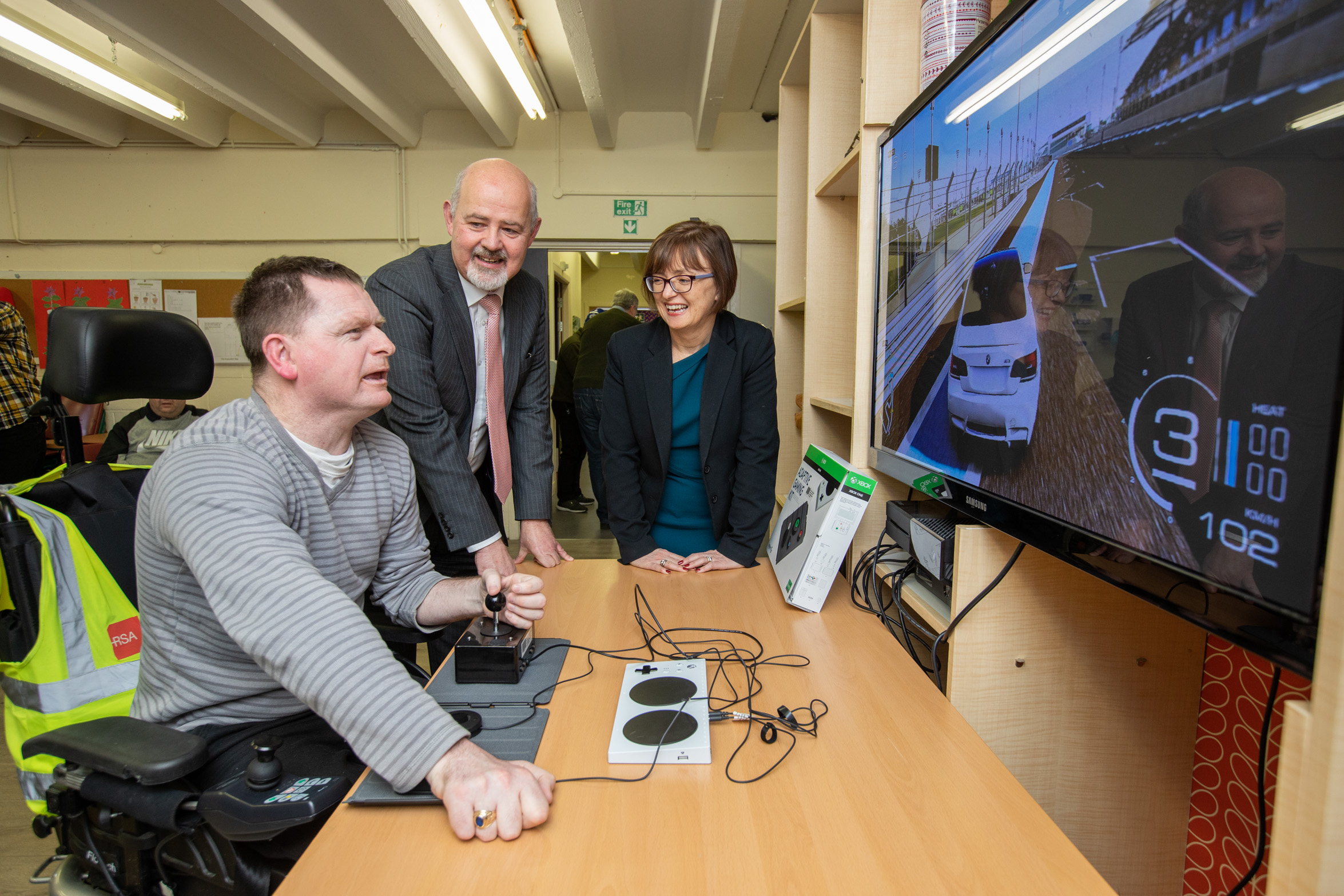
Microsoft and Enable Ireland have joined forces today to announce a new commitment to embed AI into the Assistive Technology Passport which is being developed to empower people with disabilities to have an independent life. The announcement marks the 20th anniversary of Microsoft’s partnership with Enable Ireland.

Microsoft and Enable Ireland have been collaborating on the role of Assistive Technology for twenty years. The partnership has been built on a shared vision of enabling technology to transform the lives of people with disabilities and to empower them to achieve more. The idea for the AT Passport came from a discussion paper published by Enable Ireland in 2016 with the support of Microsoft and Disability Federation of Ireland. The focus of this paper was about bringing the idea of the AT Passport to life in Ireland and today’s announcement marks the next phase in this process and will see Microsoft and Enable Ireland work with Maynooth University to make this idea a reality.


Picture shows from left John O’Sullivan, CEO, Enable Ireland; Imelda Delemere, Enable Ireland Adult Services in Sandyford  and Cathriona Hallahan, Managing Director, Microsoft Ireland


Research has shown that the provision of AT services is often fragmented, difficult to navigate and not user centric. The AT Passport is a personal record of all of the relevant information about an individual’s requirement for AT including the necessary referrals, eligibility and training requirements and can support users to access the training and supports they need. Once developed it will be a tool that will help to streamline the way in which people gain access to Assistive Technology – equipment, training and funding and has the potential to ensure that those who need Assistive Technology can get it and, as a result, experience greater autonomy in their own lives.

Speaking today Cathriona Hallahan, Managing Director, Microsoft Ireland said: “At Microsoft we believe that technology can play a key role in driving positive and progressive change across every aspect of our lives, unlocking new and exciting opportunities for everyone in society. Assistive technology can transform the lives of people with disabilities ensuring they have the tools, skills and support to be independent and live a life with no limits. That is why we have been supporting Enable Ireland’s life-changing work for over 20 years and why today we are announcing a collaboration with them to develop the Assistive Technology Passport.”

“Technology empowers us all to achieve more everyday but for a person living with a disability it can be the difference of being able to engage with the world and not. The idea of an AT passport was something we really wanted to help bring to life with Enable Ireland and the funding we’re providing will do this while also ensuring that we embed AI into the functionality of the passport. We’re really excited to see this project brought to life.”

Today just 1 in 10 people with a disability who require AT have access to it. In order to ensure that technology can deliver real progress and change for everyone in society we must equip those with disabilities with the technology they need and ensure that their families, carers, employers and educators have the necessary training. Scaling the AT Passport internationally has the potential to achieve a truly global impact.

John O’Sullivan, CEO of Enable Ireland said: “I am thrilled to be part of the announcement today of a deepening of our collaboration with Microsoft Ireland. We have enjoyed a great relationship with Microsoft over the last 20 years, which has allowed us to provide Ireland’s only accredited course in AT and for their continued commitment which will help us to develop an AT passport. I believe that an AT passport will help to ensures that those who need AT have access to it. Technology is able to provide truly life changing assistance to people with disabilities by enabling them to live and achieve independence. Research has shown that the provision of AT services is sometimes disjointed, unclear and not designed around the end user. By developing an AT passport, we believe it will be less ambiguous for users to access the support and training they require.”

For further details on this initiative follow Enable Ireland on www.enableireland.ie/at.

#Microsoft wants you to have a #Surface with a special offer if you exchange your old #MacBook. #Windows #MacOS #Trade

Earlier this week we told you about what Microsoft brough to the table on the last event, and today we realized that the also want to give you a special discount in any of their Surface line up (but the new Studio PC) if you exchange your Macbook.

Yes! As you can see from the capture above, the Microsoft Store is offering up to $650 for your old laptop.

Obviously the offering may vary depending on the state of your product, the closer you get to pristine condition (with box and original kits), the higher the discount.

The promo code will be valid until December 15, 2016 and the offers started yesterday October 27, 2016 at 12:00PM PST and will go all the way to November 7, 2016, 11:59PM PST.

This is a great offering considering that outdated processor in some old MacBooks, but the decision is yours.

Would you change your Mac for a Windows PC? Let us know in the comment section below or join us over Twitter

Microsoft Store

#Microsoft announces new Surface Studio PC and updated Surface Book i7. #Surface #Windows

During an event yesterday, Microsoft unveiled their two new offerings in the computer department.

Aiming not only to consumers that need portability but also the ones that need a powerhouse at home, we now see the company focusing once again in hardware…Well except mobile phones anyway..

Surface Book I7


There’s no big news on the portable side as what we have is a revindication of what I should have been the first offering.

The Surface Book is a great device, but for the more demanding professionals is was aimed, Not having the greatest battery life and some compatibility issues was a let down. But those flaws were attacked and now we have a new offer with the latest I7 processor (hence the name).

Also, they improved the graphics performance and increased the battery by 30%, everything else remains the same as previous models.

They even made a video just to say that, take a look:

The new model will be available starting in November and will start at $2,399 with pre-orders already open.

Surface Studio

This was the main attraction during the event, dubbed as “Surface Studio” this All-in-one PC is aimed to professional photographers, designers as well as Illustrators.

With a huge 28″ LCD PixelSense Display and a resolution of 4,500 x 3,000 (3:2 aspect), the Studio is Microsoft take on Apple’s iMac series.

Only one big difference though, the panel is completely tactile, which offer a whole new world of possibilities.

The spec sheet is quite impressive:

Display

Screen: 28″ PixelSense Display
Resolution: 4500 x 3000 (192 DPI)
Color settings: Adobe sRGB, DCI-P3 and Vivid Color Profiles, Individually color calibrated
Touch: 10-point multi-touch
Aspect Ratio: 3:2
Surface Pen
Zero Gravity Hinge

Processor

Quad-core 6th Gen Intel Core i5 or i7

Graphics

NVIDIA GeForce GTX 965M 2GB GPU GDDR5 memory or NVIDIA GeForce GTX 980M 4GB GPU GDDR5 memory

Storage

Rapid hybrid drive options: 1TB or 2TB

Memory

8GB, 16GB, or 32GB RAM

Wireless

Wi-Fi: 802.11ac Wi-Fi wireless networking, IEEE 802.11 a/b/g/n compatible
Bluetooth: Bluetooth 4.0 wireless technology
Xbox Wireless built-in3

Dimensions and weight

Display: 25.09 x 17.27 x 0.44 in (637.35 x 438.90 x 11.4 mm)
Base: 9.84 x 8.66 x 1.26 in (250.00 x 220.00 x 32.20 mm)
Weight: 21.07 lbs max (9.56 kg)

Connections and expansions

4 USB 3.0
Full-size SD card reader (SDXC compatible)
Mini Displayport
3.5mm headset jack
Compatible with Surface Dial onscreen interaction1

Cameras

Windows Hello2 face sign-in camera 5.0MP front-facing camera with 1080p HD video

Audio

Dual microphones
Stereo 2.1 speakers with Dolby Audio Premium
3.5mm headset jack

Buttons and keyboard

Physical buttons: Volume and power
Surface Pen
Surface Keyboard
Surface Mouse

In the box

Surface Studio
Surface Pen
Surface Keyboard
Surface Mouse
Power cord with grip-release cable

The Surface Studio will be available in December with some pre-orders being available for the holiday season, the next batch will have to wait till next year.

The price tag of the base model will be $2,999.00 going all the way up to $4,199.00 for the high-end model.

Capable of Pen input as you’d expect from a Surface product, that’s not the only trick under the sleeve.

Pair with the “Zero Gravity Hinge” that allows it to go from monitor to drawing desk, the addition we are really impressed is the Surface Dial.

As You can see from the video above, the Dial is not just an extra tool to have around, Its what will complement the experience when your primary work is on the designing or editing process.

With haptic feedback to let you know you’re changing option without seeing using the radial input, add free location on the screen and you ready to work whenever you want.

As extra, the little gadget with not only be compatible with the new Studio Pc, but also with the Surface Book and the Surface Pro 4.

The can get a standalone Dial once available for $99 with just one color option (looks fine to me), but if you pre-order the Surface Studio before next month you’ll one for free.

But tell us, Do you think Microsoft is offering a solid option against the iMac or the MacBook that are currently on the market? Will be good enough to compete with today’s announcements from Apple?

Let us know in the comment section or join the conversation on Twitter

Hub Keyboard from #Microsoft now available for #iPhone by @Tiwaash #GarageProject

The Garage Project from Microsoft is a hit with rolling out feature packed apps at regular intervals. As a part of Garage Project “Hub Keyboard” for Android was released back in February and now the app is available for iPhone users too.

Hub Keyboard gives you quick access to all important documents and contacts, and do multi-tasking without exiting the app, lets you share URLs of Office 365 documents in OneDrive and SharePoint and the Contacts icon allows you to search for a contact to get their address, phone number, or other details without exiting the app.

You can try this intuitive keyboard for yourself on your iPhone from here.

Features of Hub Keyboard:

  • Clipboard: Easily insert one of your recently copied items
  • Documents: Grab and share URLs of Office 365 documents in OneDrive and SharePoint
  • Contacts: Share information of a contact from your phone or your Office 365 account

Source

Windows10 will be the only fully supported OS for newer hardware By @VicenteA_George #Intel #AMD #W10

As the year is starting many of you are planning on upgrade you PC’s or laptops but if you’re thinking of getting the latest and greatest specs the only version of Windows you can use is Windows 10

Although as today, there’s more than 200 millions devices running Windows 10 there’s also millions of other that still prefer to use the old but reliable Windows 8/8.1 or even Windows 7, (specially companies)

And given the fact this versions of the OS are going to get updates ’till 2020 and 2023 is not a bad idea at all, but there’s a catch.

After CES las week, Microsoft has made official their commitment to Windows 10 as a “One OS to rule them all” therefore, they want to W10 to be on more and more devices.

So with the announcements of the upcoming silicon such as :

Intel’s “Kaby Lake”

Qualcomm’s “8996” 

and AMD’s “Bristol Ridge”

Microsoft is planning on rely on this manufactures “a better integration between software and hardware to improve performance” on every device.

How? There’s going to be limitations on how the devices will perform under certain OS, if you have W7 or W8 your system is not going to be well optimize, but if you have W10 you will get up to 30x better graphics and 3x battery life (which is certainly unfair as it’s a really big difference in graphics)

You still are going to be able to install any of the former versions but without the proper optimizations your system will be very vulnerable.

Actually, even the recently announced Skylake silicon is going to have a downfall as those who are still on W7 or W8.1 just going to get security updates until July 17th of 2017.

So this is one of those situation in which you have to choose between to two worst options.

But, what are your thoughts on this matter? Are you happy with this decision?

Or do you think is worth the risk keeping up the old W7 or the not so old W8.1 around?

Let us know in the comment below or tweet us at @jimboireland or @VicenteA_George

Source: Microsoft


Word Flow keyboard is coming to iPhone By @VicenteA_George #Windows #iPhone #Keyboard

Windows fans all over the world has always been proud of the built-in keyboard of W8 and W8.1 as it broke a Guinness World Record for the fastest typing when it was launched.

But ever since Microsoft took over the Nokia Cell phone Division some of those key features of WP are starting to be ported to other platforms, one of the “most infamous moves” was when Cortana became available in other platforms even before being completely available on the WP ecosystem.

Well, this time is the same famous keyboard the one being ported, as accordingly to an e-mail sent to some Windows insiders, they want to have the app available on iOS and possibly on Android.

What does this mean to the WP ecosystem?

Well, it depends on you and if you see the glass half full or half empty.

The Word Flow keyboard resembles what third party apps like Swipe or SwiftKey can do on both operative systems, which is not a warm welcome.

The app is apparently being developed for iPhone 5s and above, although the real question is:

Would you use the WP Keyboard on your device if you already have some of the aforementioned apps?

What’s you opinion on Microsoft and multiple apps going outside of their “home”? Let us know in the comment section or tweet us using #techbuzzireland

Source


India to get the Surface Pro 4 on January 7th By @VicenteA_George #Surface #Windows

This year was great for gadgets that boost up our productivity on he go, like the IPad Pro, the stunning Surface Book and last but not least the Surface Pro 4 which was unveiled earlier this year and you can see our full coverage here.

But back then it wasn’t available everywhere to buy but today we received the news that is going to be officially available in India as soon as next week on January 7th

As you can see after all the wait is finally going to happen for our Indian readers the very next week.

There’s no word about full prices and available along the country but as a far as we know the “lower 128GB an Intel Core m3 with 4GB RAM model” could go for Rs. 67,999 and the powerhouse variant with 256GB an Intel Core i7 and 16GB of RAM could go for somewhere around Rs. 1,32,99 which means the other variants are going to be in between these prices.

The Surface Pro line is a well known productivity tool and made ir widely available is great, paired with Windows 10 this thing is a beast.

From consuming media to full work presentations the Surface Pro 4 packs everything you could need in a beautiful portable size.

We’ll bring more info once the day comes, but till then, let us know! Will you pick one for yourself? Sound below in the comments or Tweet us using #techbuzzireland

Source


Unboxing and First impressions #Nokia #Lumia830 Gold by @Tiwaash #Goldie

The world was excited ever since the leaked news of Nokia Lumia Limited Edition started to surface and every Nokia fanboy wanted the Gold Limited edition Lumia830 and Lumia930 to be theirs, and we were no exception to it and finally after a lot of sourcing we bring you the Unboxing and First impressions of the Nokia Lumia830 Limited Edition, Black Gold.

I was so excited when I received the parcel, I know it was going to be special. And read on to know what was there in the package and how is the Nokia Lumia830 Limited Edition different from the usual Nokia Lumia830.

Package:

Well to be honest I wasn’t really impressed with the package, it was the same slide-out type box exactly like the other Nokia Lumia packages with the photos on the face and the back of the box and name of the device on the side with the colour indicator and “Limited Edition” badging.

Cut open the tag and you cannot stop smiling. You are greeted with the Gold Edition Nokia Lumia830, I had the black gold combo and it looked just great. Apart from the device the package was meager and nothing else to excite about with the travel adapter, a couple of booklets, battery and  a USB data cable in the simplest manner possible.

Being a limited edition I expected the package to be more generous like a “Limited edition” case and ear phones would have been a welcome premium offering as the phone comes with MixRadio pre-installed.

What is special in “Limited Edition”?

Anything with a “Limited Edition” badging creates excitement and so did the Nokia Lumia830. The Limited Edition was restricted to the paint job on the device. The Limited Edition Nokia Lumia830 was available in Black- gold or White- gold colour schemes with Gold colour used for the Metal casing with the buttons, the Nokia badging on the back and the battery space below the back cover.

First Impressions:

I love the Black- gold colour scheme on this device. It gives the device a premium upmarket feel and with “Limited Edition” stamp its a rare device to own. Other than the paint job, the Limited Edition Nokia Lumia830 is identical to the normal Nokia Lumia830, its light, slim, has a 10 mp snapper on the back with PureView technology and an LED flash, the 3.5 mm jack and micro-USB port are also stationed at exactly the spot and all other specs remain the same.

I enjoy the feel of the Matte- black finish on the device with brushed metal in Gold, this device will definitely make you stand out in the crowd. Enjoy the gallery here.

Let us know in the comments below about your views or tweet us using #techbuzzireland.

Stay tuned for more Tech buzz.