Maximizing Benefits with Cost-Effective Instagram API Integration

Instagram has become one of the most popular social media platforms in the world, with over one billion active users. With such a vast audience, businesses of all sizes are looking to leverage Instagram to grow their business. One way to do this is by integrating Instagram API into their business strategy. However, many businesses are hesitant to use Instagram API due to concerns about the cost. In this article, we will explore how to maximize the benefits of Instagram API integration with instagram api pricing.

Leveraging Instagram API for Business Growth

Instagram API is a powerful tool that can help businesses grow their audience and get more Instagram post reach.

One way to leverage Instagram API for business growth is by using it to automate tasks such as posting and commenting. By automating these tasks, businesses can save time and resources while still maintaining an active presence on Instagram.

Another way to leverage Instagram API is by using it to gather insights about your audience. Instagram API allows businesses to access data about their followers, such as demographics, interests, and engagement rates. By using this data, businesses can create more targeted content and advertising campaigns that are more likely to resonate with their audience.

Finally, businesses can use Instagram API to integrate Instagram with other marketing channels, such as email marketing and e-commerce platforms. This integration can help businesses streamline their marketing efforts and create a more seamless customer experience.

Budgeting Strategies for Instagram API Implementation

While Instagram API offers many benefits, businesses must be mindful of the cost of implementation. One budgeting strategy for Instagram API implementation is to start small and gradually scale up. This approach allows businesses to test the waters and see what works before committing to a larger investment.

Another budgeting strategy is to prioritize which features of Instagram API to implement first. Businesses should focus on the features that will have the most significant impact on their business goals and then gradually add more features as their budget allows.

Finally, businesses can work with a developer or agency that specializes in Instagram API integration. These professionals can help businesses identify the most cost-effective approach and avoid costly mistakes.

Cost-Effective Development Practices for Instagram API Integration

When developing an Instagram API integration, businesses must be mindful of cost. One way to keep costs low is by using pre-built tools and resources. Many third-party tools and libraries are available that can help businesses build Instagram API integrations quickly and easily.

Another cost-effective development practice is to use open-source software. Open-source software is typically free and can be customized to meet the specific needs of the business. By using open-source software, businesses can save money on licensing fees and development costs.

Finally, businesses should consider using a cloud-based platform for their Instagram API integration. Cloud-based platforms offer scalability and flexibility, allowing businesses to easily adjust their usage and costs based on their needs.

Monitoring and Managing Expenses in Instagram API Projects

Once an Instagram API integration is up and running, businesses must continue to monitor and manage their expenses. One way to do this is by setting clear goals and metrics for the integration. By tracking these metrics, businesses can determine the ROI of their Instagram API integration and make informed decisions about future investments.

Another way to monitor and manage expenses is by regularly reviewing and optimizing the integration. By identifying areas where costs can be reduced, businesses can ensure that they are getting the most value from their Instagram API integration.

Finally, businesses should consider using cost-tracking tools and software to monitor their expenses. These tools can help businesses identify trends and areas where costs are increasing, allowing them to take action before costs become unmanageable.

Conclusion

Instagram API integration offers many benefits for businesses looking to grow their audience and increase engagement. However, concerns about cost can make businesses hesitant to invest in Instagram API integration. By following the strategies outlined in this article, businesses can maximize the benefits of Instagram API integration while keeping costs low. Whether starting small and gradually scaling up, using pre-built tools and resources, or working with a developer or agency, businesses can find a cost-effective approach to Instagram API integration that works for them.

Instagram friends help me out scam to be very careful of.

There is no shortage of scams out there today and each day we see several hit the news, however one I got today was something new to me and very clever almost fell for it until i noticed some things happening in the thread then I rang the person in question and played the scammer along for the ride and things quickly slowed down. Yes I went further than I should have but my Instagram has 2FA but they still tried their hand however Instagram got in there before them which was a good move and good to see.

By the message thread you can see this person thought he had me roped in and was getting inpatient, Instagram has no service allowing your friend to help you out but these clowns thought they did, this was news though earlier this year stating they are testing such a feature buy way of letting you select two friends seen below is a sample of what we are talking about here.

Quote – Source

Leaning on your friend’s help to access your account

To help people who have lost access to their accounts, we’re testing a way for people to ask their friends to confirm their identity and regain access to their account. We will have more to share about this feature soon. THIS IS NOT YET A FEATURE>> BE VERY AWARE..

Below is the messages I had got from Facebook Instagram and the conversation I had after I thought something was not quite right here and made that phone call and the user was not aware either until the phone call then their phone started hopping messages.. They begin with stating they have a new phone, click on images to enlarge and have a read.

In turn what will happen here is you will get a message with a link and then you copy and past it back to the person on the Instagram account in their private message and here is where they will try login to your account, but after stringing this lad along today I began to throw up some logic by stating you do not live In Nigeria You do not have network issues and then when asked where do you live is where it all fell apart.

In short this could easily catch people out and perhaps not a good move for Instagram going forward just now anyway but it has been touted as a feature which has not been rolled out to users and a good attempt to try take over your account and you know what comes after that. If you ever receive such a message, it would be better to run the details on a people finder free lookup site to verify the identity of the person before replying anything.

How to Download Videos from Any Website with SnapDownloader

There’s plenty of entertaining videos on the internet that aren’t offered for offline viewing. Here’s how you can get your hands on all of the high-definition videos to watch offline with SnapDownloader.

Ever since videos sharing websites like YouTube, Metacafe, and Dailymotion, along with social media giants such as Facebook, Reddit, Instagram, and others, took over, the content creation and sharing of videos have skyrocketed. It isn’t a secret that video content is growing on social media platforms, which is why services such as IGTV by Instagram and the video-centric platform of Facebook Watch were created in the first place. YouTube alone is home to more than 1 Billion active users, which means virtually unending videos that you could watch during your entire lifetime. 

Why SnapDownloader Video Downloader?

With thousands of big-time content creators out there, millions of up-and-coming independent content creators, and news organizations offering plenty of video content on these media platforms, you have all the reasons to download videos for viewing offline, and SnapDownloader is here to make it easier than ever. But there are already hundreds, if not thousands, of different video downloaders out there, so what makes SnapDownloader any better than the rest? 

SnapDownloader Features: 

Supports 900+ websites – SnapDownloader enables you to download video content not just from social media networks such as Facebook and Instagram but more than 900 websites, which includes the unconventional ones such as Reddit, TikTok, BBC, and more. 

Convert videos to MP3 audio – This distinct feature comes in handy when obtaining audio content on websites such as YouTube. Whether you wish to fetch audiobooks, podcasts, audio tracks, or documentaries, SnapDownloader helps you get it done. 

Download in 8K quality – While YouTube is currently the only platform that supports 8K streaming, SnapDownloader already supports downloading it. Additionally, you can fetch videos in 4K, 1080p Full-HD, 720p, and even other standard video formats too. 

Built-in proxy – SnapDownloader brings the ability to quickly set up a geo-proxy and get past the geo-restrictions on YouTube and other social media platforms. If you want to download a video from a website that is restricted in your country of residence, SnapDownloader will get the job done. 

Users love the UI – One of the biggest pain points with hundreds of other video downloaders is the dated user interface and a barrage of ads that cloud everything. SnapDownloader keeps it all neat and clean for you to enjoy the video viewing experience every time, and no unsolicited advertisements that could harm the device. 

Cutting-edge advanced features – Apart from getting the core features right, SnapDownloader adds a cherry on the pie with video editing features baked into the app. You also get a Bulk Downloads feature to fetch up to 15 videos from different sources, all at once. 

Download Videos from Any Website with SnapDownloader

Before you can begin enjoying the best of video content without an active internet connection, you will need to download the SnapDownloader app, and here’s how you go about it:  


  • Install SnapDownloader for Windows or macOS and launch the app to continue. 

  • Launch the web browser and open YouTube, Facebook, or any other video-sharing platform from where you wish to download the video.


  • Copy the video link by right-clicking on it and paste the link of the video in the SnapDownloader app.

  • Similarly, you can also use the search bar to enter a keyword and search the video online.


  • Select the option of Output (MP4 or MP3), where you can even convert the video to an MP3 file directly.


  • Now, choose the Video Quality in which you wish to download the video.

  • Press the Download button to begin right away, or select Schedule for later if you wish to fetch the video at a later time. 


  • The download will begin, and details such as the file size, download speed, and even the estimated time left will be showcased.


That’s all there is to it! You will now have the video ready for viewing offline. While one video is downloaded, you can also cue up to 15 videos for downloading on SnapDownloader, all at once!


Final Words

The complete process for downloading videos from any other popular social media platform like Facebook, Twitch, Twitter, and other video-sharing platforms is exactly the same. All you have to do to get started is fetch the video URL, enter it into the search field of the SnapDownloader app, and you’re all done. While there are plenty of video downloader services that tend to help you download YouTube videos, the number of service providers for fetching content from other social media platforms is fairly limited, which is why SnapDownloader comes in handy.

Are you hoping to give SnapDownloader a try and see how it can help you download any video from the World Wide Web with just one click? We would love for you to let us know your thoughts on SnapDownloader in the comments section down below. 


Instagram launches new tools to stop abuse. #Instagram #SocialMedia

Instagram have announced a new way to protect people from seeing abusive DMs  as well as the ability to prevent someone you’ve blocked from contacting you from a new account. Social media has been under big pressure to tackle such and much more is still needed to be done here to curb this kind of behaviour this is a step forward and lets see what the future hold, see the Press release below.

A new feature to filter abusive messages

We understand the impact that abusive content – whether it’s racist, sexist, homophobic, or any other kind of abuse – can have on people. Nobody should have to experience that on Instagram. But combatting abuse is a complex challenge and there isn’t one single step we can take to eliminate it completely. For example, we know that many in our community, particularly people with larger followings, have faced abuse in their DM request inbox from people they don’t follow.

Because DMs are private conversations, we don’t proactively look for hate speech or bullying the same way we do elsewhere on Instagram. That’s why we’re introducing a new tool which, when turned on, will automatically filter DM requests containing offensive words, phrases and emojis, so you never have to see them. This tool focuses on DM requests, because this is where people usually receive abusive messages – unlike your regular DM inbox, where you receive messages from friends. It will work in a similar way to the comment filters we already offer, which allow you to hide offensive comments and choose what terms you don’t want people to use in comments under your posts. You can turn both comment and DM request filters on and off in a new dedicated section of your Privacy Settings called Hidden Words.

We’ve worked with leading anti-discrimination and anti-bullying organisations to develop a predefined list of offensive terms that will be filtered from DM requests when the feature is turned on. We know different words can be hurtful to different people, so you’ll also have the option to create your own custom list of words, phrases or emojis that you don’t want to see in your DM requests. All DM requests that contain these offensive words, phrases, or emojis – whether from your custom list or the predefined list – will be automatically filtered into a separate hidden requests folder. If you choose to open the folder, the message text will be covered so you’re not confronted with offensive language, unless you tap to uncover it. You then have the option to accept the message request, delete it, or report it.

This new feature is designed to help protect you from potentially offensive or abusive DM requests, while also respecting your privacy. All message filtering will take place on your own device, which means this feature won’t send any message content back to our servers. Using this feature doesn’t share the content of your DM requests with us, unless you report them.

We’ll start rolling out this feature in Ireland and a number of other countries in the coming weeks and will look to expand to more countries over the next few months.

A new way to protect you from unwanted contact 

We’re also making it harder for someone who you’ve already blocked from contacting you again through a new account. With this feature, whenever you decide to block someone on Instagram, you’ll have the option to both block their account and pre-emptively block new accounts that person may create. This will be available globally in the next few weeks.

This is in addition to our harassment policies, which already prohibit people from repeatedly contacting someone who doesn’t want to hear from them. We also don’t allow recidivism, which means if someone’s account is disabled for breaking our rules, we would remove any new accounts they create whenever we become aware of it.

Continuing our work to combat offensive comments

As well as using our proactive detection technology to help catch violating comments, we offer a number of tools to help you control abuse in your comments. If you have a public account, you have the option to only allow comments from people you follow and/or are following you.

We’re also starting to hide common misspellings of offensive words from your manual comment filter list, so that even if a word you don’t want to see is accidentally or deliberately spelled wrong, you still won’t see it in your comments.

We know there’s still more we can do, and we’re committed to continuing our fight against bullying and online abuse. We’ll keep working in partnership with experts, industry organizations, teens, creators, and public figures to understand their experience on Instagram and how we can evolve our policies and products to protect them from online abuse.

Easy Ways Of Getting More Interactions On Your Instagram Site

Unless you’ve been living under a rock, there isn’t a person on the planet that doesn’t know all about social media. Social media has become an essential tool for every business regardless of its size. You need it to increase brand awareness, connect with current and potential customers, show authenticity, and boost your leads and sales. Instead of heading down to the mall every few days, customers use social media, such as Instagram, to learn about sales, new collections, view availability, and more. Instagram has above 1 billion active users, and most of them interact with businesses of different sizes every day. Instead of searching for ways to buy real Instagram followers, If you allocate some time and use Instagram correctly, it can do wonders for your business. Here are easy ways that will help you get more interactions on your Instagram account.

Engage for Engagement

One of the easiest yet effective ways to boost your Instagram interactions is by engaging with similar accounts in your niche. Instagram’s algorithm is highly built on engagement; the more you engage, the higher the chance that you will be seen. When you boost your account’s visibility, more of your visitors will interact with you. However, keep in mind that the quality of your interactions is just as important as how frequently you do it. This is why you should be mindful and selective when it comes to choosing certain accounts to interact with. For instance, if you’re in the beauty industry, you should interact with beauty brands, influencers, inspiration, and other industry-related accounts. This will help you appear right in front of the right audience- interacting with a fitness guru won’t cut it. 


There are several ways in which you can find the right accounts to interact with. The simplest method is to scroll through your explore feed, which is usually filled with content that you may like, or the “recommendations by category” banner that’s right below the search bar. You can also search for specific keywords related to your industry in the search bar, which will generate many results. You can also search for niche-related hashtags which will show you related hashtags as well. Another great way to boost your interactions would be by interacting with your competitor’s audience. Go through the accounts that like and comment on their posts. 

Social Media Manager

The best way to ensure that your social media needs are taken care of is by hiring a social media manager. The social media specialists at https://www.socialproof.xyz/ suggest that social media managers are always on top of any algorithm changes. This way, they can always adopt new strategies and tailor the content to suit these changes. They will also come up with great strategies that will translate your organizational goals into a social media campaign, resulting in better engagement, leads, and results. Social Media managers play a great role in setting and protecting the business’ reputation and bringing in new perspectives. 

Long-Tail Hashtags

Long-tail hashtags are very carefully selected hashtags in terms of word choice and detail; to be more precise, long-tail hashtags perfectly describe the content’s context. Even though long-tail hashtags have fewer linked posts, it increases your chance of being visible and interacted with. When you use regular one-word hashtags, your post will keep getting pushed down every second as more posts use the hashtag. Besides, unless you have a huge account, it’s impossible to become featured in the hashtag’s “Top Posts.” You can still use general hashtags though, but make sure to mix in a few long-tail ones. Relying on general hashtags will not help you much in regards to discoverability. 

Quality Captions 

Coming up with a caption for every post is usually a headache- however, captions still play a huge role engagement-wise. Instagram’s present algorithm prioritizes the posts according to the engagement level. Good captions give the content context; whether you decide to tell a story or offer a different take on your image, it’s a good way to keep your audience engaged. You can also ask a question or raise controversy in your caption and encourage your audience to partake in the discussion. This way, you will ensure that the comments keep rolling in. 


Instagram has become a key platform for businesses of all kinds and sizes. Whether you are a start-up or a well-established business, Instagram is among the best way to reach current and potential audiences nowadays. While it can feel impossible to stand out among all the popular accounts in your niche, there are ways in which you can boost your engagement. 

How You Can Use Instagram To Sell Your Products And Promote Your Business

Instagram is one of the social media networks that has billions of users and is, therefore, a good channel to sell your products and promote your business. The more people that a platform has, the more your products are seen and it is a great way to improve the exposure of your brand. A study that was done by Facebook, reported that more than 80% of the people that were interviewed discover new items and services on Instagram and they prefer shopping here than on any other social media network.


Because today most people search for items online before they shop for them, your business needs to have a social presence like on Instagram. You will meet potential customers here who you can turn into actual buyers of your products. To run a thriving business on Instagram, you can follow the guidelines given below.

How to Sell Your Products on Instagram

The first step in running your products online is having an Instagram account. To create your account, visit instagram.com or download the Instagram app from your play store or AppStore and then click on sign up. Enter your email address and then choose a username and password for your Instagram account. This will create your account but this will not help to promote your business.


If you want to sell your products online, switch your account into a business account by clicking on the edit profile, and then you can select “Switch to a Business Account”. The next step is to complete your bio and make it catchy to add its value so that people know what your business is about. Ensure that you also add your business website to your profile. Here are some tips on how you can sell more products on your Instagram;

1. Frequently Post Your Products


One of the secrets of selling your products on Instagram is by posting your products regularly on your Instagram feed. It is also advisable to create your own URL for all Instagram posts that link to your listings and products that you are selling. Choose a specific day of the week when you will be posting the products so that your customers can know when to look for them. When posting the items, ensure that you post a variety of them, that is, different colors, sizes, and types of products that your customers can choose from.


Use backdrops like white walls when taking photos of your products so that they can stand out. The type of backdrop that you choose depends on the color of your products. It is also important to regularly post products on your Instagram stories and highlight them so that they do not disappear after 24 hours which is the set time for stories to disappear.

2. Create Tutorials


Another way to sell your products online is to create videos that teach your customers how to use your products. You can take short clips or long ones on IGTV. You can also create videos showing the process of creating your products and the hard work that you put into the process. Allow your customers to ask questions to promote interaction and feedback about your products.

3. Share Stories that Customers Post about Your Products


When customers are impressed with your products, they will post them on their Instagram and they can tag your business. This goes a long way in promoting your business.You can request these customers for permission to share these posts and their feedback on your Instagram page and using an Instagram hashtag generator to find the perfect hashtags is a great way to get attention by your audience.

How to Promote Your Business through Instagram


There are different ways that you can increase the exposure of your brand on Instagram. They include making use of Instagram influencers and ambassadors who have a huge following and when they post your products or review them, they can influence their followers to buy them. You can also promote your business by doing exclusive giveaways to your followers who are excited by such offers and may purchase more of your products.

Running contests on your Instagram page is another way to create awareness about your brand where you give the winner of the contest gifts from the products that you are selling. You can also promote your business on Instagram by using Instagram Ads that are not too obvious or boring.

In summary, Instagram has billions of users and it is, therefore, a good platform to sell your products online to a large audience. To sell your products on Instagram, you need to create an Instagram business account and complete your bio with a catchy description of your business and even your business website. Posting regularly on your Instagram feed, stories and highlights, creating tutorials about your products, and sharing posts of your customers are some ways to sell on Instagram. You can then promote your business through Instagram Ads, using influencers, give-aways, and running contests among your followers.

How to become a successful seller on Instagram

IG has turned out to be the 6th trendy world platform with 1 billion monthly active users. 

According to the statistics, about 60% of IG users look for business profiles to discover new products, while 90% of users follow IG business accounts. It seems that this platform has long been more than just a field of great visual sharing, but a place where you may profit from the most professional and visually aesthetic images.

Of course, it’s not without advertising because 75 percent of users purchase after seeing an advertisement and visiting the company or brand’s website. But advertising has always been and will be a powerful boost to sales, but are there other ways of captivating new customers without spending a dime? 

Hashtags, customer integration, advanced search Instagram and other features play no insignificant part in successful business promotion.

Let’s see what opportunities Insta offers to bump up your sales and how to sell on Instagram without spending huge sums to buy views or advertisements (everything has a measure).

7 basic steps to become a marketing guru


  • Turn into a business account

The first and essential step on the way to sales is to switch to a business profile. The business profile gives you an excellent free opportunity to set up a marketing campaign.

For example, the IG Insights feature provides sufficient, though not complete, analysis for you to determine your Instagram activity’s pace. You can find content statistics, reach, user engagement levels, etc. 

The CTA button under your profile description allows other users to get in touch with you via a phone number or email. Add a link to your website/store to make people more aware of your product, and thus audience reach will increase.

How to make a business page:


  • visit your present IG acc to pick out a “hamburger” icon on the top rights of a profile page;
  • choose “Settings”> “Switch to business profile” after scrolling down.

  • Make an advanced search Instagram

Search Instagram influencers, potential clients, partners, or like-minders now is easies. IG is a round-the-clock integration that yields excellent results in the form of new interesting people, partners, a new customer base, or simply accounts that will be your constant source of inspiration or business ideas. 

There are online advanced search Instagram tools to assist you with your lookup: adjust the filters to hit the target and find an appropriate account!


  • Make hashtag research

A hashtag seems to be nothing! But it isn’t. Today, relevant hashtags are one of the biggest tricks for attracting an audience interested in your profile.

With modern web-based hashtag generators, you may get the top hashtags according to the keywords you type in. These hot hashtags will help promote your post to the top of IG search and become the navigators that will lead new customers to your profile.


  • Use IG advertising

You may customize your ads via Insta images/videos/Stories/Explore feature/carousel/collection but don’t forget to research your audience better to decide on the best way to reach them.

Create ads via: 

  • “Promote” button under your IG post;
  • Using the ad manager on your FB page.


  • Publish an exciting content

Audiences like constant content updates, especially if we’re talking about accounts, they’re interested in. Feed your target audience with interesting posts, contests, polls in stories, ask their opinion and share incredible secrets from your professional field. Stay in touch with them at all times; that’s what’s important to customers.


  • Stick to a specific profile design

Insta is where people come for the visual content. The importance of creating visually appealing posts, Stories, etc., for all purposes (to sell or just inspire other users) remains undeniable. 

Make sure that you have a central theme for your account designed in a specific color palette. Visually compatible profile posts are important for new users because they will estimate your posts with their eyes first and only then read the basic information (or not, if your profile design is not well thought out at all). 

Apply the same filters to all your Insta photos, use the same colour palette, and think about your posts’ layout to give your profile an aesthetic taste.


  • Use IG Shopping feature

A new Insta Shopping feature made sales even more convenient. That’s because you may now post a product catalog directly on your profile and the checkout feature makes it easier for customers to purchase without leaving Insta. So tag items in a post or Stories to drive more users aware of them.


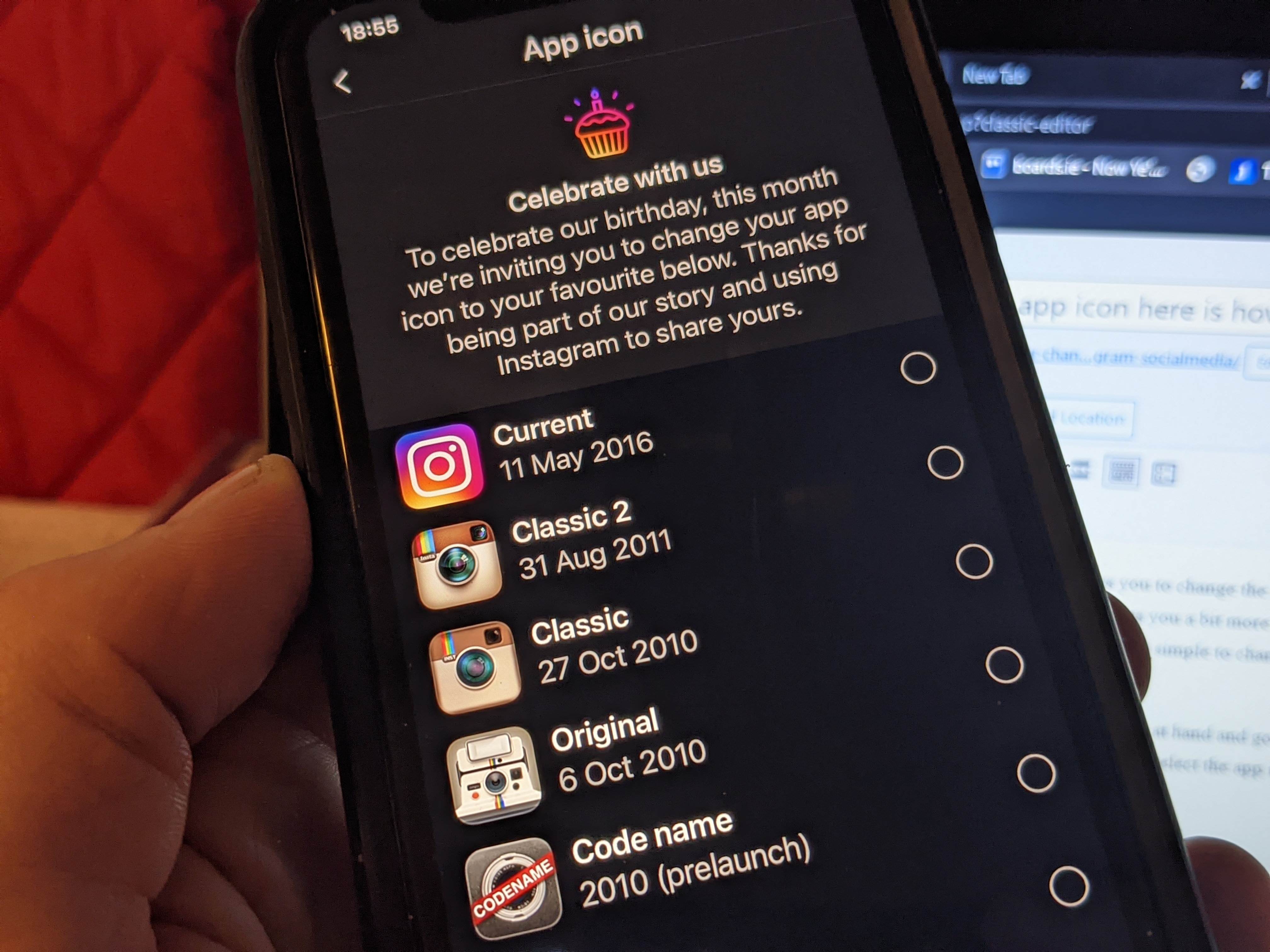
You can now change your Instagram app icon here is how to change it. #Instagram #SocialMedia

Instagram have dropped a nice little easter egg today which allows you to change the app icon which is pretty neat and this is something perhaps that could be done with other apps and gives you a bit more customisation to your home screen on your smartphone, the new change is on both Android and iOS and is simple to change and you have 10 options to pick from including the current one we all know.

All you need to do is go update your device and have the latest software at hand and go to settings then drag the screen down and you will then see the new change, All you do then after that is select the app icon you want and you are done, check the video below..

139 stats and facts you should know about Instagram in 2017. #Instagram

Instagram represents a mobile photography application, first released in 2010, and then purchased by Facebook for $1 billion in cash and stocks, back in 2012. During its years of service, the photo sharing social media app has managed to become incredibly popular for both consumers and advertisers, boasting over 700 million members in total.

In a recent graphic compiled and sent to us by  website builder.org a total of 139 must-know facts about the platform were released, to guide those who are interested in learning more about the platform through some of the tips they must know to become successful, while also sharing a few case studies, meant to put things a bit better into perspective.

While Instagram is half the size of Facebook, it is important to note the fact that it serves a different purpose, while Facebook isn’t really niche-based and represents an all-in-all stop. With this in mind, on Instagram, users are free to post photos and videos of themselves or anything else really, comment on other people’s posts, share live videos, use its direct messaging feature and more. One of the greatest things to know about Instagram is that the platform has become a great hub for advertisers and marketers throughout the world, due to the fact that most pages are organically-grown in terms of traffic, due to the nature of the platform.

A couple of stats mentioned in the infographic showcase that so far, 31% of female internet users have an Instagram account, followed by 21% of makes. Not only this, but it is also important to point out the fact that so far, 32% of internet users that live in urban areas have an account on the platform, whereas 28% of those living in suburban areas use it as well.

At this moment in time, Instagram is actively processing over 4.2 billion likes per day, with more than 95 million videos and photos being shared on a daily basis. So far, it has been pointed that around 40 billion apps and videos have been shared onto Instagram.

Based on these aspects, Instagram’s massive popularity is understandable, and all marketers should at least consider the idea of running social media campaigns on the Facebook-owned platform.