Often we don’t have all the words to explain exactly what we are looking for. For example, trying to find the perfect, unique piece of clothing or finding a tutorial to recreate hard-to-describe nail art.
Now there is technology to help! Google multisearch is here to help you uncover the information you’re looking for — no matter how tricky it might be to express what you need.
Multisearch does this by allowing you to search with text and images at the same time meaning that you can go beyond the search box and ask questions about what you see. With multisearch, you can ask a question about an object in front of you or refine your search by color, brand or a visual attribute.
For example, you can screenshot a stylish orange dress and add the query “green” to find it in another color. You can snap a photo of your dining set and add the query “coffee table” to find a matching table or you could take a picture of your rosemary plant and add the query “care instructions”.
It is that time of year again when Google drops their new (a) model and over time it has been a successful phone and having used the 6a for the last two weeks or so for now it is safe to say this one is no different either, a full review is not really due at this time but a good look of the device so far has led me to some conclusions, two weeks is not enough time to give a phone on
The presentation is as expected from Google which is clean and simple and we go through that in the unboxing and good walkthrough of the device below and see what is inside so do look at that to get some insights as to what the phone has to offer, a more thorough review will be along soon anyways after full loading the device with my huge list of apps and of course testing and software updates and so on.
The design is of course off the back of the Pixel 6 which was a heft phone this is much lighter and the camera bar thinner at the back and pretty much similar to the Pixel 5 which again was a smaller phone and a sweet spot for many, even for me these days as I am fed up with slabs, currently using a S22 Ultra and other phones I am reviewing the 6a is small, I have big hands but can live with it to be honest and it fits well in my pocket unlike the rest of the devices.
OK you are not getting the same superb build quality of the PIxel 6 itself but a much toned down build but still robust and very light in comparison and a not so notable camera bar on the back which is fine and for most will be fine too.
Again we have their own chip inside and from what I see has improved, I have shot quite few tech reviews with this phone which are all due after the embargo lifts shot in 1080p and in 4K and I have noted the processing is much faster than the Pixel 6 and I did find the phone a tad more snappy considering the new features inside and for me this is a good sign, also noted there was not much heating during this as long video shoots do heat up your phone and having doing several video reviews one after the other it went rather well and smoothly and I gained time rather than having to wait which for me is a good thing.
Google Pixel 6a unboxing and device walkthrough
If you are not a Pixel user yet and have wanted to try one which I know many are there is a new UI here to play with too allowing you to customise your phone even more with themed icons, widgets and dynamic colours, I would like to use widgets more so however with the amount of apps I use I do not have enough room and have a splattering of folders on my phones with several apps in each but that is just me and how I use my phone on a daily basis all my phones are set up identical, on the Pixel 6a you can search your device too for just about anything which for me is a real handy feature. You know have fast assistant voice typing and again this is a handy tool for many people out there today.
Also on board is Speech enhancement, Live translate and Interpreter mode furthermore there is a built in recorder too making the Pixel 6a a must have for many people out there today, the 6a offers plenty of tools for creators and journalists alike saving you the hassle of carrying multiple devices at once and of course the magic eraser is there which is a cool photo editing tool on the go. In short for someone on the go who uses such features and likes to multitask this device is capable.
We also have got the cameras which many want to know about I have left samples here for you to see for yourself rather than bang on about the specs, You do have Tensor, Live HDR+ video can be processed live on 4K video, resulting in rich, vivid colors, I have night and day image and video samples so you be the judge, the camera once again though is great and having tested this against another budget version phone this Pixel 6a just kills it full stop.
This is as mentioned a short term review but so far this has impressed me once again showing what Google can do, I have now fully moved off from my S22 Ultra and will be staying on this until the Pixel 7 drops as one of main main daily drivers, Anything else you might want to know just ask as always. And to sum the device up so far for the money you can’t really go wrong and that is quite a feat considering other devices I have tested and am testing now and this wins all the time. The only real concern is the battery life but again I am a power user and would not have the same use case as the average user but for them they would get a day out of the device at least. I will be back again with another look at the device after its release and more software updates. No wireless charging included here which is a bummer for some and no headphone jack and a 60Hz refresh rate are an easy pick for some to complain about as said in video but let’s be honest most folk do not care or notice the difference between that and 90/120hz refresh rate unless pointed out, some might say different but having used devices with the same it is not a huge deal nor do I take issue with it.
Smart, powerful, helpful. And less than you think.
Meet Pixel 6a, the more affordable Google phone that adapts to you.1 Powered by Google Tensor, it’s super fast and secure. The battery lasts over 24 hours.2 The Pixel Camera captures the moment just how you experienced it. And with TitanM2™ security, protection is built right in.
2
Google Tensor.
The brains behind it all.
Google Tensor is the first chip designed by Google just for Pixel. It’s the same chip as in Pixel 6 Pro, and it makes Pixel 6a super fast and responsive. Apps launch fast, pages and images load quickly and everything runs smoothly. Tensor also powers advanced features like Live Translate, which enables you to chat in 11 languages in real time.3
3
Designed around you, inside and out.
Pixel’s interface, Material You, helps you to find things easier and get things done faster. The entire phone UI updates to reflect whatever image you choose as your wallpaper. And every few months, you get new wallpapers, called Curated Culture, that celebrate cultural moments. Pixel 6a comes in three classic yet modern colours: Charcoal, Chalk and Sage. It includes 128 GB of storage and 6 GB of RAM4, and enhanced Wi-Fi and Bluetooth.5
4
Your photos match your vision.
This Pixel includes a dual rear camera with an upgraded ultrawide lens and advanced photography features. With Magic Eraser, you can remove distractions or make objects blend right in.6 Face Unblur makes faces in motion sharper.7 With Real Tone, photos represent different skin tones beautifully and authentically. And Night Sight lets you take rich, vibrant photos, even in low light.
5
The battery lasts a really, really long time.
Pixel’s Adaptive Battery can last over 24 hours.2 It learns your favourite apps, so it doesn’t waste power on the ones that you rarely use. Turn on Extreme Battery Saver and the battery can last up to 72 hours.8 You can choose which apps to keep running and Pixel will turn the others off. When you plug in your Pixel, it charges fast.9 With just a few minutes of charging, your phone gets hours of power.
6
Your protection, built into Pixel.
Pixel is built with an extra layer of hardware security in Google Tensor, which works with the Titan M2™ security chip to make Pixel more resilient to attacks.5Fingerprint Unlock is a secure and reliable way to unlock your phone with just a touch. With IP67 protection, Pixel 6a can take a little water and dust, so you can take your phone wherever you go.10 The Security hub helps to protect your phone, account and passwords by keeping all your security settings in one place. And your Pixel comes with at least five years of security updates, so it gets even more secure over time.11
7
Pixel just keeps getting better.
Every few months, your Pixel gets feature drops. They’re automatic software updates that send new features, tricks, wallpapers and apps to your phone.12
8
So much help. In so many ways.
Pixel’s features help you get things done easier. Use your voice to record and transcribe notes in real time, edit your audio clips, and share them with Recorder.13 Anything you record – personal notes, conversations, waves at the beach – is easy to find, and recorder will even tag transcripts with keywords.13 Pixel can also identify songs you’ve heard throughout the day and add them to your Now Playing history. You can even export the songs to a playlist in YouTube Music.14
9
A whole world of Pixel.
Get Pixel 6a accessories from Google or choose from 68 products designed by Made for Google brands. The new Pixel 6a cases are built to protect your phone and let its colours shine through. With Google Pixel Buds A-Series you can enjoy full, crisp audio for your songs, videos, and phone calls.15 Go the extra mile with our brand new Google Pixel Buds Pro which will bring premium, immersive sound to Pixel 6a, with Active Noise Cancellation that adapts to you.
10
The best of Google, included with Pixel.
Pixel 6a comes with three months of YouTube Premium and Google One free of charge.16Enjoy your favourite videos and music without ads, in the background and offline. Get access to 100 GB of cloud storage from Google One and automatic phone backup for your photos, videos, contacts and more.
The Pixel Buds Pro have just landed and today we take a first look and impressions of the latest earbuds as we have not had long enough to give our full thoughts all thanks to logistical issues which is becoming a nightmare for many folk depending on where you reside, So I have had these for two days and been using them constantly and so far the results are good.
You will note a new design here which is nice and they fit well in the ears too and they look nice in the colour too LemonGrass, the design has changed however they still fit nice and snug and will not budge and have not fallen out yet on me after quite heavy testing over the last two days.
The app once again is present and certainly enhances the user experience as expected with multiple options to enhance the audio experience we once again have ANC which this time has improved and decent bass and in general so far all the audio attributes have been good and enjoyable be it listening to music or watching movies. The gesture controls are also excellent so far I have to add. One thing missing but being updated is the full EQ suite which I hope arrives sooner rather than later.
You of course have transparency mode and Google assistant built in of course and if you want some more you can have your messages and emails read out to you which I think is really cool. For those who need more you have also got multipoint connectivity so for me this works really well working both on chromebook and phone and makes them a practical tool too. The case is slightly larger too and we also have wireless charging on deck.
A full review will be along soon with a closer look at the app of course and more on the experience too so stay tuned for that and check out the unboxing below and side by side comparison to the Pixel buds A series.
Pixel Buds Pro techbuzzireland
10 things to know about the Pixel Buds
1 – Premium sound with Active Noise Cancellation
Google Pixel Buds Pro create a quiet foundation so your music can shine. Active Noise Cancellation with Silent Seal™ adapts to your unique ear shape, and the earbuds fit in your ear canal to maximise the amount of noise blocked. Rather than using an off-the-shelf active noise cancellation solution, Pixel Buds Pro use an integrated system developed by Google, with a custom processor, custom algorithms and custom speakers.
2 – Never miss out on bass with Volume EQ
With many earbuds, bass disappears when you lower the volume, leaving your music sounding tinny and weak. Pixel Buds Pro bring full and rich sound at any level with Volume EQ,1 dynamically adapting to your listening volume and making subtle tweaks to the frequency curve. For example, when you lower the volume, Pixel Buds Pro increase the bass while ensuring that mid and high frequencies are balanced.
3 – Stay present with Transparency mode
Use Transparency mode for the moments when you don’t want to be fully immersed, like when running or crossing roads. Pixel Buds Pro process a wide range of frequencies with low latency to keep the audio sounding natural and in sync. This custom integration lets sound enter in real time, so you can keep on moving almost as if you weren’t wearing earbuds.
4 – Multipoint connectivity
Pixel Buds Pro can automatically change sound sources from one device to another. Easily go from listening to music on your phone to answering video calls on your laptop without needing to manually switch Bluetooth devices.. Multipoint connectivity helps you automatically switch between compatible devices including Android, iOS, tablets and laptops.
5 – Crystal clear calls
Get crystal clear calls even in loud and windy places, thanks to beamforming mics, a voice accelerometer and wind-blocking mesh covers. Pixel Buds Pro use bone conduction to analyse vibrations near your jaw area to pick out your voice so you can be heard loud and clear wherever you are – whether you’re on a noisy street or at home with loud roommates.
6 – Elevated design
Listen in comfort and style with your Pixel Buds Pro. With premium coatings, a soft matte texture and a two-toned design, they sit flush in your ears. The pebble-like case feels comfortable in your hand and easily fits in your pocket. Pixel Buds Pro come in four colours: Charcoal, Fog, Coral and Lemongrass
Because everyone’s ears are shaped differently, Google scanned thousands of ears to create a design that’s comfortable for as many people as possible. Sensors constantly measure the pressure in your ear canal so the earbuds can actively relieve it and stay comfortable. Eartips in three sizes ensure that your earbuds can be customised to best fit your unique ear shape.
7 – Hands-free help
Talk to Google Assistant hands-free to start your workout music, send a quick text or even get live translation – just say ‘Hey Google’ and stay focused on what’s in front of you while on the go.
8 – Touch controls make it easy
Important controls are a touch away, so you don’t have to pull out your phone. Tap your earbud once to play/pause or answer calls, twice to skip a track or reject calls, three times to rewind, and simply swipe horizontally to increase or decrease the volume. To switch between Active Noise Cancellation and Transparency mode, just touch and hold.
9 – Water and sweat resistant
Pixel Buds Pro are water and sweat resistant, so rainy days and sweaty workouts are no problem.
10 – Battery life and wireless charging
The custom processor is tuned for power efficiency so you can get more out of your battery. Get up to 7 hours of listening time on a single charge with Active Noise Cancellation on, and up to 20 hours with the charging case. Plus, charge them wirelessly with Pixel Stand or other Qi-certified chargers.
A 5-minute charge in the case gives you up to 1 hour of listening time with Active Noise Cancellation on.
Google Street view turns 15 and like me I use it quite often and you may have also noticed some nice Jaguar cars going around with a contraption on top, well that is Google if you did not know.. So where is the most visited places of interest on Google Street view.. Let’s have a look then read on some more about Google Street view
Most visited Places of Interest on Street View in Ireland
1. Dublin Castle
2. Billy Byrne 1798 Monument
3. Dublin Airport
4. Phoenix Park
5. The Temple Bar Pub
6. Guinness Storehouse
7. Aviva Stadium
8. Trinity College Dublin
9. Molly Malone Statue
10. Dog’s Bay
Most visited Museums on Street View in Ireland
1.Kilmainham Gaol
2. Titanic Experience Cobh
3. Dublinia
4.Muckross House
5. EPIC The Irish Emigration Museum
6. Drombeg Stone Circle
7. The National Wax Museum Plus
8. Irish Museum of Modern Art
9. MoLI – Museum of Literature Ireland
10. Bunmahon Geological Park
Fifteen years ago, Street View began as a far-fetched idea from Google co-founder Larry Page to build a 360-degree map of the entire world. Fast forward to today: There are now over 220 billion Street View images from over 100 countries and territories — a new milestone — allowing people to fully experience what it’s like to be in these places right from their phone or computer. And Street View doesn’t just help you virtually explore, it’s also critical to our mapping efforts — letting you see the most up-to-date information about the world, while laying the foundation for a more immersive, intuitive map.
While that’s all worth celebrating, we aren’t stopping there. Today, we’re unveiling Street View’s newest camera, giving you more ways to explore historical imagery, and taking a closer look at how Street View is powering the future of Google Maps.
Bringing Street View to more places with our newest camera
From the back of a camel in the Arabian desert to a snowmobile zipping through the Arctic, we’ve gotten creative with the ways we’ve used Street View cameras to capture imagery. And if there’s one thing we’ve learned, it’s that our world changes at lightning speed. Our hardware is one way we’re able to keep up with the pace.
In addition to our Street View car and trekker, we’re piloting a new camera that will fully roll out next year to help us collect high-quality images in more places. This new camera takes all the power, resolution and processing capabilities that we’ve built into an entire Street View car, and shrinks it down into an ultra-transportable camera system that’s roughly the size of a house cat. But unlike house cats, it’s ready to be taken to remote islands, up to the tops of mountains or on a stroll through your local town square.
Here’s a quick look at the new camera system:
It weighs less than 15 pounds. This means it can be shipped anywhere. This is especially handy when we work with partners around the world to capture imagery of traditionally under-mapped areas — like the Amazon jungle.
It’s extremely customizable. Previously, we needed to create an entirely new camera system whenever we wanted to collect different types of imagery. But now, we can add on to this modular camera with components like lidar — laser scanners — to collect imagery with even more helpful details, like lane markings or potholes. We can add these features when we need them, and remove them when we don’t.
It can fit on any car. Our new camera can be attached to any vehicle with a roof rack and operated right from a mobile device — no need for a specialized car or complex processing equipment. This flexibility will make collections easier for partners all over the world, and allow us to explore more sustainable solutions for our current fleet of cars — like plug-in hybrids or fully electric vehicles. You’ll start seeing our new camera in fun Google colors alongside our iconic Street View cars and trekkers next year.
Traveling back in time with Street View
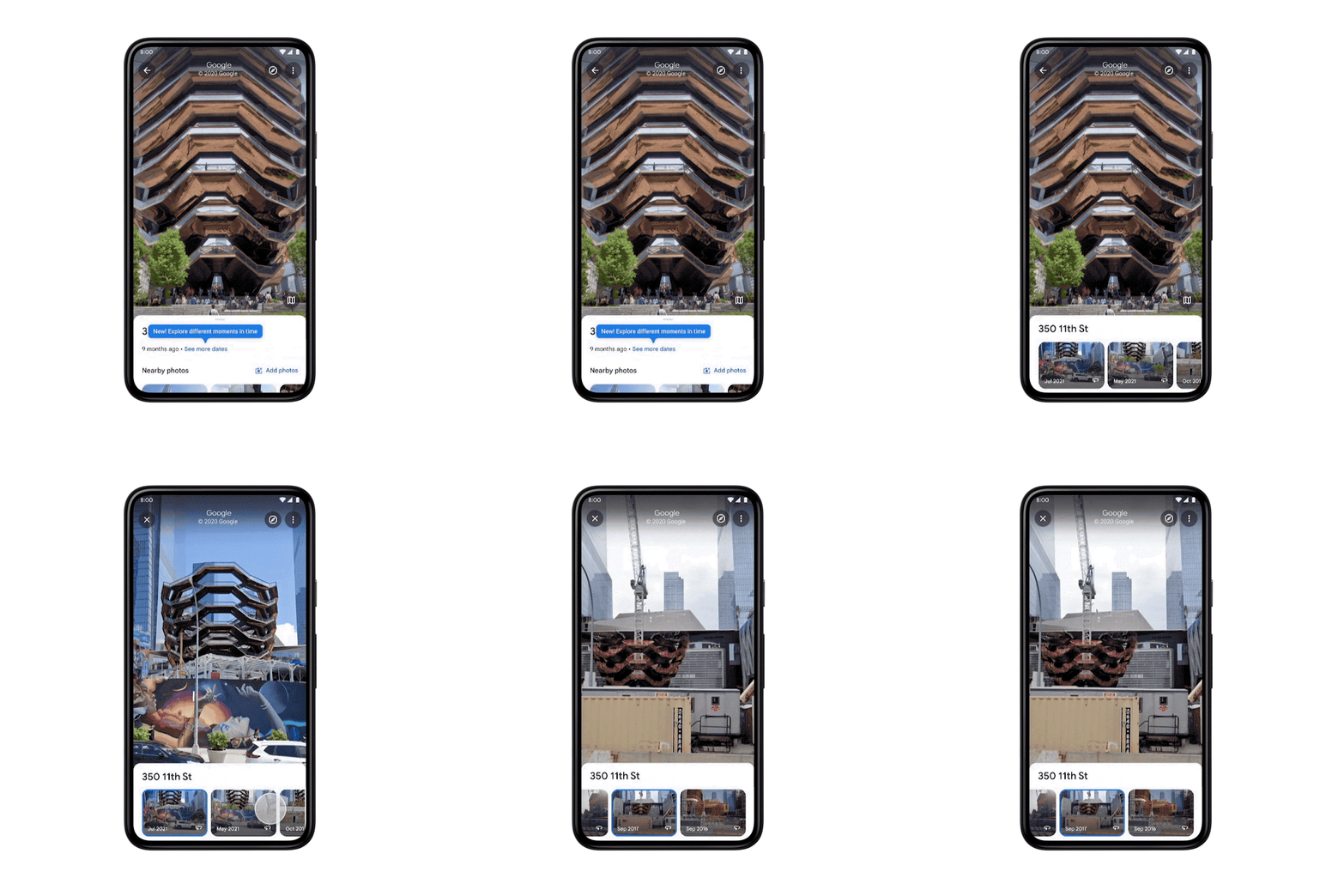
Street View is all about capturing the world as it changes, and it’s also a powerful way to reminisce about the past. Starting today on Android and iOS globally, it’s now easier than ever to travel back in time right from your phone. Here’s how it works:
When you’re viewing Street View imagery of a place, tap anywhere on the photo to see information about the location. Then tap “See more dates” to see the historical imagery we’ve published of that place, dating back to when Street View launched in 2007. Browse each of the images to see a digital time capsule that shows how a place has changed — like how the Vessel in New York City’s Hudson Yards grew from the ground up.
Building a more helpful, immersive map
Street View is also an essential part of how we map the world. Here’s a look at how imagery helps us do that:
Updates to business information that reflect your changing world. We use Street View imagery coupled with AI to make helpful updates to Google Maps — such as adding newly opened businesses, surfacing new hours at your favorite restaurants and updating speed limit information. In fact, over the last three years, AI has helped us make over 25 billion updates to Maps so you can be confident that the information you’re seeing is as fresh and up-to-date as possible.
Easier than ever navigation, indoors and out. Street View imagery powers popular features like Live View, which allows you to use your phone’s camera to overlay navigation instructions on top of the real world so you can walk to your destination in a snap.
Immersive view helps you know before you go. Thanks to advances in computer vision and AI over the last several years, we’re able to fuse together billions of Street View and aerial images to create a rich, digital model of places around the world. With our new immersive view launching later this year, you can easily glide down to street level on Maps and even check out the inside of a business as if you were walking around.
In celebration of Street View’s birthday, you’ll have the opportunity to make your navigation icon a celebratory Street View car – just tap the chevron when you’re in driving navigation. And on desktop, our beloved Pegman – who you can pick up and drop anywhere in Maps to see Street View – will be dressed up in a birthday hat and balloons for the celebration.
To keep the celebration going, check out our newest collections of places like The Pyramids of Meroë in Sudan and Les Invalides in France, popular spots to explore with Street View and some of our all-time favorite Street View images to date. Oh the places you’ll go!
Once Google adopted Zero Trust Security into its network, it began to gain interest from the tech community. Zero trust is recognized as a reliable network security method to prevent data breaches. The model implements a policy that treats each user as a potential threat until authentication.
An effective cyber security model limits the risk of exposure and implements potent contingencies. All of these factors are taken into account with Zero Trust network access. Assuming a constant threat keeps the system vigilant in identifying potential threats and securing the network.
How Does Zero Trust Work?
The Zero Trust principle has become a standard practice in tech. It works to offer network and cloud security; it is based on two safety principles that dictate its structure. This model does not take security for granted at any stage. It varies from traditional security models in two ways:
Constant Vigilance
Newer models have always taken a more trustworthy approach in maintaining security. Devices already in the network do not come under scrutiny. Instead, they have access to any data contained within the network with verification. Without endpoint security, a network would be left vulnerable to internal attacks.
Zero Trust does not assume a device or user is safe simply based on its user history or network access. Instead, it automatically assumes any device seeking access is a potential threat and treats it as such. Access is also always limited to what is needed, limiting exposure.
Data Collection
User access, unlike traditional models, is not based on one-off verification. Zero Trust security continuously monitors every access request. It analyzes risk exposure for every device to minimize the impact of data breaches. This entire process requires collecting and updating device data.
Before authenticating a device, the process involves monitoring endpoints, perimeter networks, and enterprise zones. It also collects and continuously assesses user identity, credentials, authentication protocols, and risk assessment data. A supportive IT infrastructure maintains network security by analyzing this data.
How is Zero Trust Necessary For You
With Zero Trust security, your network is protected at every step. Security is never taken for granted, which reduces the risk of a breach. As it becomes a standard for data security, it has highlighted the internal risks posed by traditional security models. Without Zero Trust, increasing security threats leave your network vulnerable. Here’s why Zero Trust is no longer optional:
Internal threats
Having internal access used to be the basis of trusting a user or device on the network. While some of the greatest threats come from outside sources, they should not automatically overlook potential internal threats. Zero Trust uses a “trust no one” policy that takes this factor into account.
Risks of Cloud
Cloud-based networks are becoming more commonplace with WFH policies starting with the pandemic. Cloud security has become imperative as employees are spread out over more expansive geographical areas rather than working from a single location.
Traditional models based on perimeter security cannot cater to this aspect. Moving from the private data center to the public cloud requires a shared responsibility model. Zero Trust considers the involvement of other parties when implementing security.
Need for Limiting Access
Not everyone involved with the organization needs access to its entire network. Traditional models cannot limit data or segregate users based on their access authentication. Corporations deal with many external parties, such as contractors, who need access to only a tiny data segment.
Trust dimensions in Zero Trust security limit access to data based on the user’s needs. Instead of allowing total access that increases risk, this approach protects the company from unnecessary network access.
Increasing External Attacks
The world of cybersecurity has been undergoing rapid expansion in recent years. At the same time, cyberattacks have been on the rise. Especially with the move to e-commerce during the pandemic, businesses have become victims of increasing attacks and are open to greater risk of an attack.
New threats call for a new and aggressive approach to cybersecurity. This is provided by Zero Trust security that does not automatically trust any device and stays more vigilant in network protection.
Conclusion
With expanding online networks and databases, and company operations moving to cloud-based networks, cybersecurity has become an increasing concern. With this in mind, Zero Trust has now come to define the standard of security to protect organizations from malicious attacks.
Without Zero Trust, organizations leave themselves vulnerable to internal and external threats. A robust and vigilant approach is the best practice in limiting exposure and preparing contingencies. Zero Trust is not only necessary but vital for network security.
The Google Pixel 6 and the Pro version have had the usual fanfare this year with leaks galore and set tongues wagging at the same time with those leaks which we avoid and this was due to the total redesign of the devices compared to previous models and one that stands out too giving the phones a unique look breaking away from all the rest of the phones we see that look pretty much the same and this was a good move and not only that they look much better than the previous models too and this led to lots of talk, opinions and more which of course is good for publicity but how does the Pixel 6 fair out from my time with it so far, let’s have a look.. I will not be boring you with specs here but let’s just talk about the experience.
Design and build
Let’s be clear here when you pick up the Pixel 6 you know you are picking up a flagship device the design is also quite unique and this stands out from its predecessors easily it looks premium and feels premium and people have asked me what phone it is which is something not often said especially when most could already tell what phone I use the same applied to the Galaxy Z flip 3 which I have parked aside now. The phone is not light but this aint bad you know it is in your pocket unlike the Z flip3 which had me doubting myself sometimes. The glass front and rear with metal sides feels so solid in the had too.
The camera which you can see videos and images from later is another talking point here with the bar across the rear of the device and I like it, the phone will not rock on the table here and gives a raised viewing angle and if you slap a case on it gets better ( check out our pixel 6 case reviews ) The camera bar has already have several names attached to it be we will not go there it looks good in my eyes and also serves as a balancing tool in my hand with my right finger nestling underneath when in use.
The key placement is fine here with the volume rockers and power on/off keys on the left side which I prefer on a phone anyway, the lack of a rear fingerprint sensor here might be a miss for some and I rather that myself and due to the current on screen fingerprint sensor being a big notorious right now it is missed but hopefully a software update will fix this in the future..
The screen is a joy to consume media on and in fact just work on as a whole and this coupled with the stereo speakers it makes in a win the media consumption end of things which adds to the user experience for those who spend most of their time on their phone like me for work and more..
Performance
My use case would be different than others I am a power user I work on the go and at home and mostly off my mobile phone and have been doing so for years and will remain that for for the foreseeable future and having done so on this device it has been a simple effortless task when it came to doing what I do no matter where I would be so doing emails documents social media and more and all this was great thanks to the big screen estate the only issue I came across was video editing on this phone, As one that uses mobile for video and not a standalone camera the Pixel 6 is my new driver for videos which is fine nonetheless but when it came to processing videos it was slow compared to even the likes of my Samsung Galaxy Z flip 3 or my old PIxel 5. I would have a video shot, edited processed and uploaded on the Pixel 5 and Flip 3 whilst the video would be just finished processing on the 6, I did think this may have been an app issue but trying the same thing on several phones it was consistent but again this could be fixed with updates I hope and I still use the Pixel 6 for my video reviews daily due to the quality results you get from the camera, Asides that it is fine and does a great job even on gaming which i do not do much of nor have the time too but it caused no problems there.
Camera
The camera has been a big factor with Google devices for the last few years and with computational photography being the thing it has not changed here at all it is a fantastic camera and low light video and pictures are great, this has been solid over the last few weeks testing the device and it is still one of the top cameras out there right now and below you can see some videos and images taken with the device and you can decide for yourself, these are all standard real world takes and not something in particular I went out to look for, there is some cool tricks you can use with the pixel 6 like magic eraser and that which is great to get rid of what is not wanted and is not so much a gimmick as some might call it. The Pixel 6 does lack the telephoto lens here which for me is not really an issue overall..
Night samples on the Pixel 6
Day samples on the Pixel 6
The screen on the Pixel 6 is great with a 90hz refresh rate so consuming media here is a joy overall and the same applies to gaming given gamers would prefer the 120 hz refresh rate here but for films or watching You Tube you are on a winner here with the screen estate at hand here.. If you want that bit more on the screen refresh you need to look at the Pixel 6 pro folks.
When it came to my usage on battery it would differ from the average user so take note, I did get the full day most days being a power user but some days I was reaching for a charger, again this depends on the work you do on the device and for me my device is used all day long. For most outside my work portfolio they would easily seek a day no worries here.
Overall if you want a decent camera and device with a superb build with good power this is one of the best if not best devices on the market now for the money there is lots of stuff here and with Google you get plenty like Google Lens and so on, Google and their services is a massive plus for me as I am an entrenched user in the ecosystem so for those who like the same it is a no brainer for others though it might seem a bit niche but if you want to try something new and not tried any of the Google device portfolio yet you should check this one out or perhaps the 6 Pro..
Things to know about the Pixel 6 and Pixel 6 Pro
1Meet Pixel 6 – the phone that adapts to you.
Meet Pixel 6. It’s reimagined, inside and out. Powered by Google Tensor, Google’s first-ever processor, it’s fast, smart and secure. The all-day battery adapts to you. The Pixel Camera captures moments just how you experienced them. And the Personal Safety app and the new Titan M2TM chip help protect you, your data and your privacy.Pixel 6 is just as durable as it is beautiful. With IP68 protection, it can take a little water and dust. The 6.4-inch Smooth Display is made with Corning® Gorilla® Glass Victus™, the toughest Gorilla Glass yet, with up to 2x better scratch resistance than previous Pixel phones.Pixel 6 comes in three iconic and vibrant colours that are expressive and versatile: Sorta Seafoam, Kinda Coral and Stormy Black, and it starts at only €649
2
Introducing Pixel 6 Pro – it’s the best of Google, built around you.
Introducing Pixel 6 Pro, the redesigned, high-spec Google phone. The brand-new triple rear camera system includes a pro-level telephoto lens with 4x optical zoom. Its main sensor captures 150% more light, bringing vivid col
our and greater accuracy to photos.6 Pixel 6 Pro’s 6.7-inch Smooth Display with LTPO technology can intelligently adjust up to 120 Hz for smoother, more responsive performance, or lower to 10 Hz to save battery. Pixel 6 Pro is premium and unique, with three sophisticated colour combinations that complement the high-end materials: Sorta Sunny, Cloudy White and Stormy Black. It starts at €899 and sets a new bar for Pixel phones.
3
Powered by Google Tensor, the new chip from Google.
Google Tensor is the first processor designed by Google, custom-made for Pixel. It helps make Pixel 6 and Pixel 6 Pro the smartest and fastest Pixel phones yet. With up to 80% faster performance than Pixel 5, Pixel 6 runs smoother, apps launch faster and gaming is more responsive. Tensor delivers Google’s advanced on-device AI for features deliver the Google way like faster, more accurate speech recognition and image processing.Plus it saves power to help you get through the day.
4
Only on the all-new, all-Google phone.
Incredibly intelligent machine learning helps you do things the Google way, like instantly translate messages and videos using Live Translate. Tensor’s custom image processor lets Pixel’s brand-new camera capture fun times and starry nights exactly how you remember them. And Tensor’s security core brings an extra layer of protection and works with the new Titan M2™ security chip to keep Pixel 6 and Pixel 6 Pro even more resilient to attacks.
5
The most advanced smartphone camera.
Your photos match your moment with the most advanced Pixel Camera on Pixel 6 and Pixel 6 Pro. The main sensor captures 150% more light – the most ever in a Pixel. Face Unblur helps to clearly capture faces even in the toughest conditions . Magic Eraser in Google Photos removes photobombers and distractions from your photos, just like that.15 Make everyday shots epic with Motion Mode which captures brilliant action shots and beautiful long-exposures. With Real Tone, portraits on Pixel represent all people and skin tones beautifully and accurately. Pixel 6 Pro’s pro-level lenses also include a telephoto lens with 4x optical zoom and an ultrawide front camera with 94° field of view for stunning group selfies.
6
The safest Pixel phones yet.
Your life is on your phone: your financial information, personal data, photos and more. So Pixel 6 and Pixel 6 Pro are built with the most layers of hardware security in any phone, including the new processor and the next-gen Titan M2TM security chip.16 Every day, Pixel helps you feel safe with five years of security updates, the Security hub, and protection from hackers and phishing in messaging apps. And Pixel keeps you in control of your privacy. You can turn your Pixel’s cameras off, and choose when apps can use your cameras and mics. Pixel doesn’t just protect your data, it also protects you. With the Personal Safety app, Pixel helps you reach emergency contacts or services if you need them, and can even detect if you’ve been in an accident and helps you reach the emergency services.
7
24-hour Adaptive Battery that charges fast.
Pixel’s all-day Adaptive Battery is everything that a battery should be. It can last beyond 24 hours, even on 5G. It learns your favourite apps, so it doesn’t waste power on ones that you never use. When you turn on Extreme Battery Saver, it keeps your essential apps running and turns off other apps to save even more power, so your battery can last up to 48 hours. And with the compatible 30 W USB-CⓇ Charger (sold separately), your Pixel charges super fast – up to 50% charge in around 30 minutes.
8
Enhance the Pixel experience with the new and more.
Get Pixel 6 and Pixel 6 Pro accessories from Google or choose products from one of the Made For Google brands offering 300+ accessories. The new Pixel 6 and Pixel 6 Pro cases are built to protect your phone and let your phone’s colours shine through. Plus, you can pick up the Google Pixel Buds A-Series, which bring you brilliant sound, clear calls and hands-free help from Google Assistant.
9
Pixel just keeps getting better.
[Every few months, Google enhances Pixel with software updates that send new features to your phone. Every feature drop brings new and better ways to do things. It’s like putting a new phone into your phone.]
10
Pre-order to claim Bose wireless headphones
[Post 28 Oct 21]
Comes with the best of Google
Buy a Google Pixel 6 or Pixel 6 Pro (subject to availability ) from participating retailers, before23:59 pm BST on 27th October 2021 and receive a set of Bose Noise Cancelling headphones 700. To redeem this offer visit pixel-offers.com/headphones for full terms and conditions27.
[Post 28 Oct 21]
Pixel 6 comes with three months of YouTube Premium and Google One on us.28 The combined savings add up to almost £14 a month – all to help you get the most out of your new Pixel.
The latest hardwear from Google has just landed, The New Google Nest cam with floodlight and indoor cam will finalise my complete home security set up with the Doorbell and Outdoor camera reviewed in full on site now so go check out what to expected from the duo with camera footage and more from both.
We will be doing a vlog style set up for the Nest cam with floodlight in the coming days and of course will have a full real hands on review with clips and what you will find in the app and how to set up and so on. So far the previous devices have been serving me well and have had no issues and I quite like the set up and I look forward to having the whole house covered with the set up almost now complete.
Any questions feel free to ask in the comments or on our social media handles and stay tuned for more coming soon with real hands on reviews.. Today we take a quick look at the new products and see what is in store and as mentioned we will be doing a vlog on setting up the Nest cam with floodlight
Google have launched new home smarts as we know and they are a welcome addition and if you are already invested in Google hardwear even better in my eyes and as mentioned on launch day I would be swapping over to this kit throughout my home and have ordered extra hardware to complete a full set up..
The Nest Doorbell is the first product we look at today and we will go through all the features and what you can expect to get for your money as they are on the pricey side for some folk.
Build Quality
The Nest Doorbell is tall and thin compared to my old setups here, I have went through several video doorbells over the years and find them a must have in the home and the Google Nest doorbell is no different.. This is white and noticeable and anyone into tech would know it is a Google product with their stand out colour. It is also robust and it stands out with a big black circle up top holding all the hardware and a big white circle on bottom that illuminates once activated and there is a gap in between. It does blend in better on your wall if the right colour but not really a huge deal as many folk have such products on their wall no matter how silly some do look..
There is no chime with the doorbell so this may be a problem for some, if you have a Goolge nest hub at home you are in business as you can watch a live feed or get notifications on the hub itself so you can see who is at the door if you do not have your phone at hand which is great, if you do not have a nest hub you need one in your house.
Battery life
You can use the nest doorbell wired or wireless which gives everyone an option, wired being better however I prefer wireless and you will get a decent run on battery life, on seeing results it seems average to the others I own but cant predict how long exactly but calculating so far it seems on par but we can come back to it in a few months and see how well it does, your traffic will of course impede on the battery life like with any tech product but you can use battery saving tips such as sensitivity and area zoning to minimise notifications this is something you should use if you have a busy pathway, we go through this in the video review down below. I would wager once a month here for the average user.
The App
As seen above the app is quite good, you do need to navigate around the app though to get the full benefits on the product and the best part most of the stuff anyone needs is free however you do need a Nest subscription if you want more but for the majority of people the package as is will be fine, there is lots to fiddle around with to get what your needs are and again we go through this in the video
Speaker and video
The video and audio quality is good here and on par with other known brands, tested both on my pixel 5 and Galaxy flip 3 and all worked a treat, I also tested from the Nest hub and again we can see this in the video review from our phone and nest hub both inside the house and outside and what you can expect to hear and see, you can toggle in the settings the quality you require the time frame and more and also pre-record messages if you like, the choice is yours here.
Things to try with Nest Doorbell
Set up visitor announcements: Visitor announcements use your Google Assistant-enabled speakers and displays (sold separately) to announce when someone rings your doorbell. If you have Nest Aware (sold separately), your visitors can even be announced by name. To set up visitor announcements, make sure you have a Display already set up with your
Google account. Open the Google Home app, tap on your doorbell and select “Settings.” From there, select “Doorbell” and toggle “Visitor announcements” on.
Optimize your video stream: In the Google Home app, you can choose to optimize your camera stream for battery life. Open the app and tap on your Doorbell, then tap the Settings wheel. From there, tap “Battery,” and “Battery usage” to adjust your setting for more recording, more battery life, or default, which balances the two. There’s also an option to turn on “Automatic battery saver,” which automatically conserves power when the battery life is less than 7 days.
Use quick responses or set quiet time: When you can’t get to the door or you’re away from home, use Quick Responses in the Google Home app to respond to someone, like “Just a sec, we’ll be right there,” or “You can just leave it. Thanks!” Tap on your doorbell in the Google Home app, then tap “More.” From there, choose your quick response. You can also set Quiet Time from the same place if you don’t want your doorbell to ring during a specific time.
Create Activity Zones for more tailored alerts: Nest Doorbell can identify packages as close to 8” from your door, and if you’d like the camera to focus on a specific part of what’s in view for extra-relevant notifications, set up an Activity Zone. To add an Activity Zone, tap your doorbell in the Google Home app, then tap the Settings wheel. From there, tap “Events,” “Seen Events,” and add a new Activity Zone.
View your 3-hour event history in the Google Home app: In the Google Home app, tap your doorbell, then tap “History.” From there, you can view your most recent event, or tap “Full history” to see what’s happened over the course of the last 3 hours.
WIth a Nest Aware subscription, you can view 30 to 60 days of event video history.
Filter your events by type: When you tap “Full history,” you also have the option to filter your events by type. Tap the “Filter” icon (an upside down triangle) in the top right corner to filter your events by device type if you have multiple cameras or doorbells, or notification, such as “Package,” “Vehicle,” “Person,” or “Animal.”
Add a Nest Aware subscription for up to 60 days of event video history: On our new cameras and doorbell, many intelligent features are available at no additional cost, but a Nest Aware subscription adds:
Some may find this product a little expensive in comparison to what else is on offer out there today however if you are already invested into Google it is worth the spend, for example I have moved to a chromebook and no matter where I am I can get notifications on it whilst working anywhere if my phone is not on it and it is all how things sync up together and overall as a home security feature it works well with all the features required for most without the need for a subscription and during my testing it has worked flawlessly when it comes to notifications and using all the features including the two way audio which has little or no lag compared to others I have tried in the past.
Notification feed
Image feed
Desktop on chrombook
BUY HEREBUY HERE Watch the video below for more and what you get for your money. Cant see the video click here
The all new Google Nest doorbell has arrived and is now going to be part of my new home security set up, having a wireless system makes more sense these days and the technology has improved hugely over the last few years as I have been using wireless security cameras in my home and having one ecosystem makes more sense rather than several mixed in together and it also cause clutter with extra hubs and so on.. The new offering from Google is of course wireless and easy to install too and can easily replace your existing system at home with less hassle especially if you have a wired set up that does limit the abilities and flexibility of the products.
Check out the unboxing and first look whilst we check this out over the coming weeks and we will have footage and more on this and the new nest cam too. Any questions you know what to do..