First look – Mercusys launches Halo H80X, the latest Wifi 6 Mesh System

Mercusys® from TP-Link unveils its first Mesh WiFi 6 system to the UK market that will join their reliable family line of network device providers, the Halo H80X.

It provides the essential requirements to enable a stable, secure and connected life for your network: speed, efficiency, and capacity. This is done via the Halo system automatically connecting to the fastest node available to provide a seamless experience. Additionally, the self-healing feature guarantees connectivity even when one access point is disrupted.

Mercusys has developed the ideal solution to make sure you never worry about your Wi-Fi, whether you’re gaming online, watching a movie or adding smart home convenience to your life. The Halo H80X is included with dual-band WiFi 6 reaching speeds up to 3000 Mbps – 2402 Mbps on 5 GHz and 574 Mbps on 2.4 GHz.

Unified network

The unified network also enables seamless roaming. The Halo units work together to automatically switch between Halos as you move around your home with a single unified WiFi name and password.

The high speed and stable network connection brings an end to buffering and interruptions.

Mercusys had previously delivered a series of Mesh products that significantly enhanced the home networking experience. The latest upgrade to WiFi 6 provides not only a technical but a lifestyle upgrade too. 

Easy network management

With coverage around the whole home, WiFi dead zones are eliminated as the mesh system covers up to 7,000 ft² (650 m²) with high-speed WiFi.

Today’s modern home has multiple devices such as televisions, smart home devices and gaming consoles which requires a robust network. Halo H80X delivers just that, providing stable connection to up to 150 devices.

Network management is easy with its quick set up and management through the Mercusys app. This allows parents to easily manage what content their children have access to and how long they spend online.

With 3× Gigabit ports per Halo unit, you also benefit from lightning-fast wired connections.

For more information about Mercusys Halo H80X visit:  https://www.mercusys.com/uk/product/details/halo-h80x

Stay tuned for a review soon..

Video 

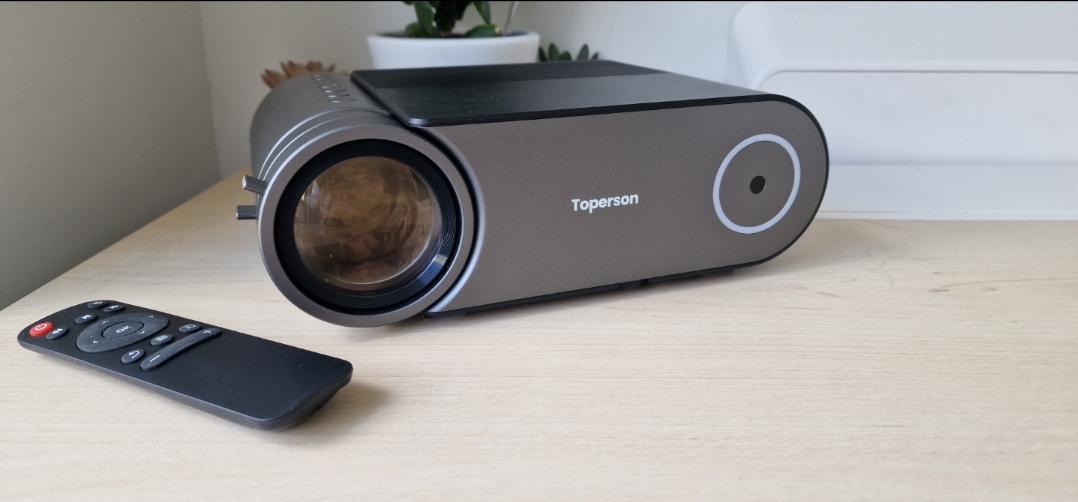
Tech Review – Toperson WiFi and Bluetooth 5G HD Home Portable Projector (YG421)

Projectors are popular and the market now caters for it rather well when it comes to choice and price however in the projector market it is really a get what you pay for sceen for the most and this is down to several things like Screen size, lumens and features, most projectors have got a built in store to download apps whereas this one does not but on another note it has features that others don’t so it is really down to the consumer and what they want to get from a projector.

OK so you might panic and wonder how this works with no store on board, most projectors have a store such as the Google store and the majority with have the Aptoide store which has the same and probably more in offerings for apps as I have found many apps will not work with Google on Projectors but the aforementioned store does all third party apps to work and they work well, I have both these instances at home on my projectors so I can see it from both sides here.

How does it work then

If you have a phone or tablet you can simply cast your device, ok so you may have to give up a phone to cast so if you had a spare phone about here is where to use it, it also has ports on the rear to support just about anything so PC or games consoles work with no problem at all it is a simple plug and play and that is it, you select what source from the home screen menu just like you would a standard tv these days and job done.

The Size

This is a big projector but not huge like some can it is portable and works with bluetooth and WiFi so it can be used anywhere and once you have a connection you simply connect and again plug in any console or connect any phone, it is that simple, this is on the larger size though but not that big it can’t be managed it is in the middle you could say when it comes to projector size, My main 4K projector would be considered small.

The picture

Ok so what you need to look out for in projectors is lumens, in tech speak that is the light emitted from the projector and how bright it is this is a key factor you may often also see ANSI lumens or Lux brightness, all this may confuse people and these terms can be used to fool people so do your homework, in this instance the terms used are in a good manner and it is a brighter screened experience than most at this price point which is good to say.

There is no auto focus or keystone here but you have two controls on the lens to do that and is a small price to pay for such caveats in fairness, the picture quality is rather good and again better than most of the chinese imports you tend to find or even some known brands you may find locally here in Ireland for up to 500 euro or so. You can get up to a 200 inch screen but 100-120 is for the best result.

Is it worth the money

Well to be fair and honest this one is. You can see the set up and samples below in the review so you do not have to struggle on setting up if you do decide to pick one up, there is screen brightness settings on board this which is omitted from many others at a higher price and certainly lower which gives it the advantage and given there is no store on board it works well with either your phone or consoles connected regardless and it is simple to use.

The sound

The sound is decent enough though this depends on the source and there may be some distortion at maxed out volume, you can listen to music too which is good. You can attach external speakers to really change the game which I would suggest anyway.

Features

  • ❤【Wireless & Bluetooth & Dolby Pro Support】Via 2.4G/5G WiFi connection, the Bluetooth projector can mirror movies/videos/photos/games from your iOS or Android device to big screen( No extra adapter needed). Based on Bluetooth CSR5.1 connection, the portable projector can wirelessly connect to external speakers or Bluetooth earphones/earbuds. Also the Dolby pro audio improves the acoustic fidelity of the movie projector for indoor or outdoor use.
  • ❤【Native 1080P FULL HD& 8500 Lux Brightness】Adopt the upgraded LCD 180 ANSI lumens or 8500 lux technology, Toperson YG421 native 1920 x 1080P HD projector with the true 1000:1 high contrast provides 90% higher brightness than other 1080P projectors. The outdoor projector particularly adopts multi-layer optical films and high-quality glass to reduce reflections and increase light transmission, thus allowing this portable HD projector to display sharper images without blurring.
  • ❤【Keystone & Zoom & Cooling System】 Via the zoom 75%-100%, Keystone ±15%, and 44”-140” inch display size(1.5-4.5m distance)(The best view screen size is 80-100″) makes the projector easier to adjust the screen get the best viewing angle and viewing size with correcting the keystone and adjusting the focus from this marvelous portable projector. Adopt the newest cooling system, the phone projector has a fast heat dissipation, making it cool down quickly even after a long-time use and less noise.
  • ❤【Multiple Devices Connection & Hi-fi Stereo Speaker】Equipped with 1*HDMI, 2* USB, AV, AUX, VGA ports, Toperson YG421 home theater video projector can properly compatible with Laptop, TV Box, Fire TV Stick, Chromecast, PC,Tablets, external speakers,USB Flash Drive, Xbox, PS3, PS4, PS5, Media players, Smartphones, IPad, iPhone, Android smartphones, etc. With 3W stereo speakers, even without external speakers, the led projector is able to enjoy the music smoothly.

BUY 

Video Link


WBA OpenRoaming Enables Dublin’s Smart City Vision with Seamless, Secure, High-Performance Wi-Fi #WorldWiFiday

The Wireless Broadband Alliance (WBA) and City of Dublin today announced a successful proof-of-concept trial of OpenRoaming™ in Dublin, Ireland. Initially deployed at Bernardo Square, Dame Street and the City Council’s Amphitheatre, WBA OpenRoaming enables residents and visitors to log in only once and then maintain seamless connectivity as their smartphones, tablets and other Wi-Fi devices automatically switch between different public Wi-Fi hotspots. The success of the trial will pave the way for a larger city-wide deployment. 

Dublin is a high growth city. It currently has a population in the Greater Dublin Area of around 2.02 million and is anticipated to grow to 2.2 million by 2031. It houses 30% of the country’s working population and attracts over 6.6 million overseas visitors a year.  It is anticipated that OpenRoaming will be initially rolled out on over 150 AP’s across Dublin city. 

Now available at over 1 million hotspots worldwide, WBA OpenRoaming frees users from the need to constantly re-register or re-enter log-in credentials — all while maintaining enterprise-grade security and privacy. The WBA OpenRoaming standard also enables enterprises, device OEMs, service providers and others to provide performance guarantees and — with Wi-Fi 6 and 6E— a carrier-grade experience as users roam between different public Wi-Fi venues.

The trial, initiated by Dublin City Council’s Smart Dublin programme and supported by the WBA and Virgin Media, also involved participation from CommScope and represents a key a milestone toward achieving Dublin’s smart city goals, which include:


  • Providing communities, residents and businesses with seamless access to services online, as well as high-quality connectivity
  • Giving tourists and other visitors free, secure, high-performance Wi-Fi access. Once they arrive and log on to an OpenRoaming-enabled hotspot, their device is automatically authenticated for use every time it switches to another OpenRoaming-enabled hotspot. This convenience makes it easier for them to find what they need, such as restaurant recommendations, transit schedules, directions and more.
  • This seamless, secure experience ensures that they have the broadband connectivity they need for interactive immersive learning, research, hybrid study and more.


Tiago Rodrigues, CEO of the Wireless Broadband Alliance, said: “Wi-Fi is the foundation for smart cities. This successful proof-of-concept trial shows that that the City of Dublin and its residents, businesses and visitors all can depend on the WBA OpenRoaming standard to ensure that they always have convenient access to seamless, secure, carrier-grade Wi-Fi connectivity.” 

Jamie Cudden, Smart City Lead, for the City of Dublin, said: “Dublin is at the forefront of a digital transformation that is serving as a model for other municipalities across Ireland and the world. Collaborations like this are key to the delivery of convenient, reliable and ubiquitous connectivity which is critical for achieving our smart city goals such as closing the digital divide and ensuring that government is responsive to the needs of citizens and businesses. This successful trial of WBA OpenRoaming is a milestone toward achieving all those goals.”

Bart Giordano, SVP Ruckus Networks, CommScope, said: ““As a founding partner in the OpenRoaming framework, we are pleased to announce with the WBA the successful launch of the OpenRoaming initiative and network for the City of Dublin.  OpenRoaming brings the promise of seamless and secure connectivity to users and IoT devices all over the world.  The core elements of OpenRoaming are in line with those of the Ruckus Network portfolio: cloud federation, cybersecurity, policy and automation.  We look forward to expanding the City of Dublin’s network and capabilities and supporting OpenRoaming deployments worldwide. “

Aidan Darcy, VP Business & Wholesale at Virgin Media Ireland said: “It’s fantastic to be working with Dublin City Council on such an important initiative. Given the fact that we are the official provider of both the Wi-Fi and broadband infrastructure, we are able to offer cutting-edge broadband speeds and an exceptional Wi-Fi experience for residents and tourists availing of the new Dublin City Wi-Fi Zones. We’re passionate about connecting communities and, with this new initiative, we really feel we’ll be creating connections for good.”

Launched in May 2020, WBA OpenRoaming is now in Release 3, which will make the business and commercial aspects of roaming easier than ever before and importantly, cut back on hundreds of hours of legal and administrative time when establishing roaming settlement agreements.


World Wi-Fi Day – 20th June 2022

This announcement comes just before World Wi-Fi Day (an annual WBA initiative), a global platform to recognize and celebrate the significant role Wi-Fi is playing in getting cities and communities around the world connected. 

It is a unique opportunity to reflect on how we can reduce digital poverty through innovative projects that will connect the unconnected. 

About the Wireless Broadband Alliance

Wireless Broadband Alliance (WBA) is the global organization that connects people with the latest Wi-Fi initiatives. Founded in 2003, the vision of the Wireless Broadband Alliance (WBA) is to drive seamless, interoperable service experiences via Wi-Fi within the global wireless ecosystem. WBA’s mission is to enable collaboration between service providers, technology companies, cities, regulators and organizations to achieve that vision. WBA’s membership is comprised of major operators, identity providers and leading technology companies across the Wi-Fi ecosystem with the shared vision. 

WBA undertakes programs and activities to address business and technical issues, as well as opportunities, for member companies. WBA work areas include standards development, industry guidelines, trials, certification and advocacy. Its key programs include NextGen Wi-Fi, OpenRoaming, 5G, IoT, Testing & Interoperability and Policy & Regulatory Affairs, with member-led Work Groups dedicated to resolving standards and technical issues to promote end-to-end services and accelerate business opportunities. 

The WBA Board includes Airties, AT&T, Boingo Wireless, Broadcom, BT, Cisco Systems, Comcast, Deutsche Telekom AG, Google, Intel and Viasat.  For the complete list of current WBA members, click here.

Follow Wireless Broadband Alliance: 
www.twitter.com/wballiance 

http://www.facebook.com/WirelessBroadbandAlliance

https://www.linkedin.com/company/2919934/

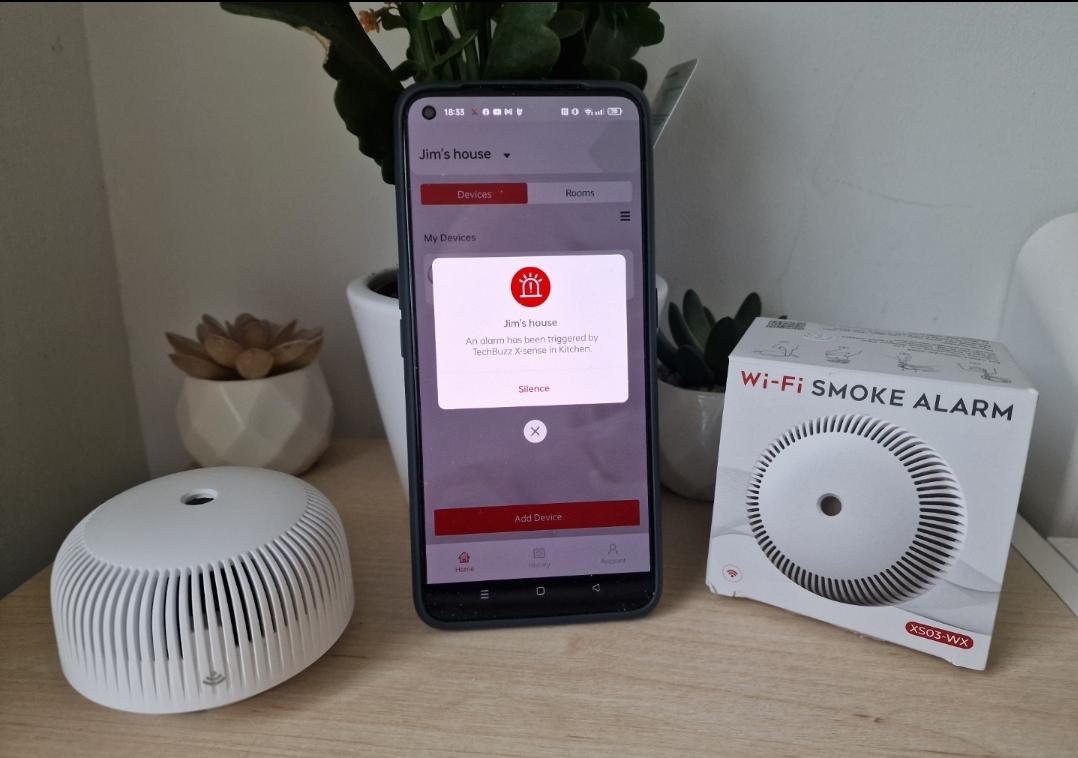
Tech Review – X-Sense Wi-Fi smoke alarm. (XS03-WX)

I do not need to tell you every house should have a smoke alarm but they a super important and again no need to explain why, they come in all shapes and size and again cost differences are there they are now installed in all new builds and wired but this little guy is wireless and smart and works really well and I have put it to the test.

The design is simple and familiar and it is smaller than most out there, it is easy to set up and the app is simple to use too which we go through in the video review and a live sample of it in action, a stock image review will have no context which is becoming too common and just lazy so we go through all out tech hands on for better context.

How does this work.

It is simple, you get a battery with it, mount to wherever suits connect to the app and you are done, it is that simple.

What features do you get.

2.4 GHz Wi-Fi Connection – Most tech is this anyway

Easily connect this alarm to your X-Sense app via a 2.4 GHz Wi-Fi network. Then you can control the alarm afar and be warned about any emergencies.

Easy Installation

1-minute installation in any circumstance with our included accessories, adding an attractive twist to your home.

Loud 85 dB Buzzer

Be alerted to fire hazards through the detector’s loud 85-dB alarm with a flashing LED indicator.

Full App Control

Control your smoke alarm from your fingertips. You can activate the self-check function, check the battery level and enable timely notifications, all within the app.

Instant Notifications

See what’s going on in the app notifications and be alerted to any fire hazards as soon as possible.

Overall this is a great cost effective product so for example if you have a garden shed or storage area outside or similar you can use this product there or indeed just add it your home for some extra security.

Check out the video for more and if you have any questions feel free to ask.

BUY

Video Link

WiFi 6: What You Need to Know

WiFi 6 is an incredibly revolutionary piece of technology that is waiting for us just around the corner, and when you factor in the number of benefits it is going to be able to bring to the average person, it goes without saying that WiFi 6 is going to be world-altering. 

Although, it seems as though information surrounding this topic is relatively sparse as of late, and in fact, few people seem to even know of WiFi 6’s existence. Well, we intend to change that. In this article, we will be telling you everything you need to know about WiFi 6, as well as going over a few of its most notable upgrades over its predecessors. 

Increased Speed

To cover the question of ‘what is WiFi 6?’ in one quick sweep; WiFi 6 is the classic WiFi you have come to know and love, but better. There are two main advantages that WiFi 6 has over its previous iterations, with perhaps the most notable being increased speed.

Having fast WiFi is beneficial for a variety of reasons, and in reality, you probably already know why having fast WiFi is a good thing. There is not one person on this planet that would be sad to see buffering and slow loading times disappear, and the difference in speed that WiFi 6 is going to be able to give to us when compared to its predecessors is truly incredible.

No longer will you have to wait for your PA online casino sign up bonus to come through or try to skip a part of a film that just never seems to load – with WiFi 6, these issues will become a thing of the past.

Less Congestion

On top of faster speeds, another one of the primary benefits of WIFI 6 is that congestion is now going to be much less of an issue. This is going to be especially beneficial for people that have numerous WiFi users in one house – WiFi 6 is likely going to transform said people’s entire internet experience.

WiFi 6 will practically allow over double the number of people that use a single connection to connect at any given time when compared to its current capabilities, and this is going to do wonders for improving people’s satisfaction with the web. Congestion being less of a problem is huge, and once WiFi 6 rolls out, this is undoubtedly going to be one of its biggest headliners. 

So, are you excited to get your hands on the new WiFi 6? We know we are. The benefits that come with WiFi 6 are just too good to ignore, and we have no doubt that a sizeable portion of you will be overjoyed to hear that your interest speeds may soon be improving astronomically. 

We can’t say for sure when WiFi 6 will become widespread, but it is probably not going to be too far down the line. Either way; it’s going to be more than worth the wait. Have fun.


Here’s how your router collects data and handles your privacy

As the internet has become an indispensable need for users today, routers are at every user’s home. An internet router is one of the required and utilitarian devices that makes the internet accessible. 

When you use a router for accessing the internet, your entire web activity goes through it. And there are people, on the other hand, ready to capture it. Sometimes, they are also prepared to monetize it or interrupt it.

So, you cannot stop using the internet; you cannot exclude the router from the network; you cannot stop the information from passing through the router. What is the solution here?

Does your internet router collect data?

Yes, the internet router collects data daily, no matter which brand it is. The router is designed to collect and store information to be used for website optimization, marketing, and analysis purposes.

Big brands like Netgear, TP-Link, Asus, D-Link, etc., capture user data for marketing purposes. Some of the prime aspects that these brands collect are location data, websites visited, and other personal data identifiers.

While this may not seem like a big issue, the concern lies in the fact that the router companies can share this data with third parties. Your Internet Service Provider is one such entity that has access to your router and all the data passing through it. And in some countries, these companies can share or sell information about their users. Furthermore, there might be limited options for disabling such practices. 

All the brands listed above share user data with third parties. Some claim that those third parties are in-house. It means that they have control over the fact that they do not use it unethically. However, some may share the data with unassociated third parties. These parties can use your data in questionable ways.

Do privacy policies help?

Whenever you install software on your device, it pokes you to accept some of its terms and conditions. Though we don’t take much time to tap on the “I Agree,” it can become dangerous if you don’t read them carefully.

If we talk about the privacy policies of the routers, they are designed in a complicated way. These policies are lengthy to read and are written in a vague manner with no specifics. The minimum length of the privacy policy is around 2000 words which takes 10 minutes to read. But it will take you more time for sure. 

As they are tough to comprehend in one go, you may end up with more questions than answers. Some manufacturers have taken steps to improve their privacy policies by presenting them in a summarized form. But to understand it better, you must read the entire piece. So, privacy policies may not help you much.

How can you keep your data safe?

Now you know that routers collect your data and can be shared with third parties. Though no one can know who possesses their data, you can put some methods in place to keep your mind at ease.

Most router brands do not provide this feature; there are some that do. If you want to keep your data safe, you should opt-out of data sharing. When you disable this feature, the router will stop collecting data daily.

One way to minimize the information ISPs learn about you is to encrypt your internet traffic. It means that they won’t be able to read the details about your activities. The easiest way to do this is to use a Virtual Private Network. 

It is essentially a program allowing users to reroute their traffic through remote servers. Additionally, it masks IP addresses, which could serve to bypass certain geo-blocks. So, download VPN apps if you wish to keep your activities a secret, especially if your ISPs tend to throttle (slow down) connections.

Conclusion

Though your router collects data, you can take some steps to ensure your data is safe. One of the first steps is to look for ways to opt-out of having your data shared with third parties. It guarantees that fewer companies will receive information about users’ activities. The second option is to hide your activities. We suggest pairing a Virtual Private Network with incognito modes and privacy-focused browsers for the best results. 

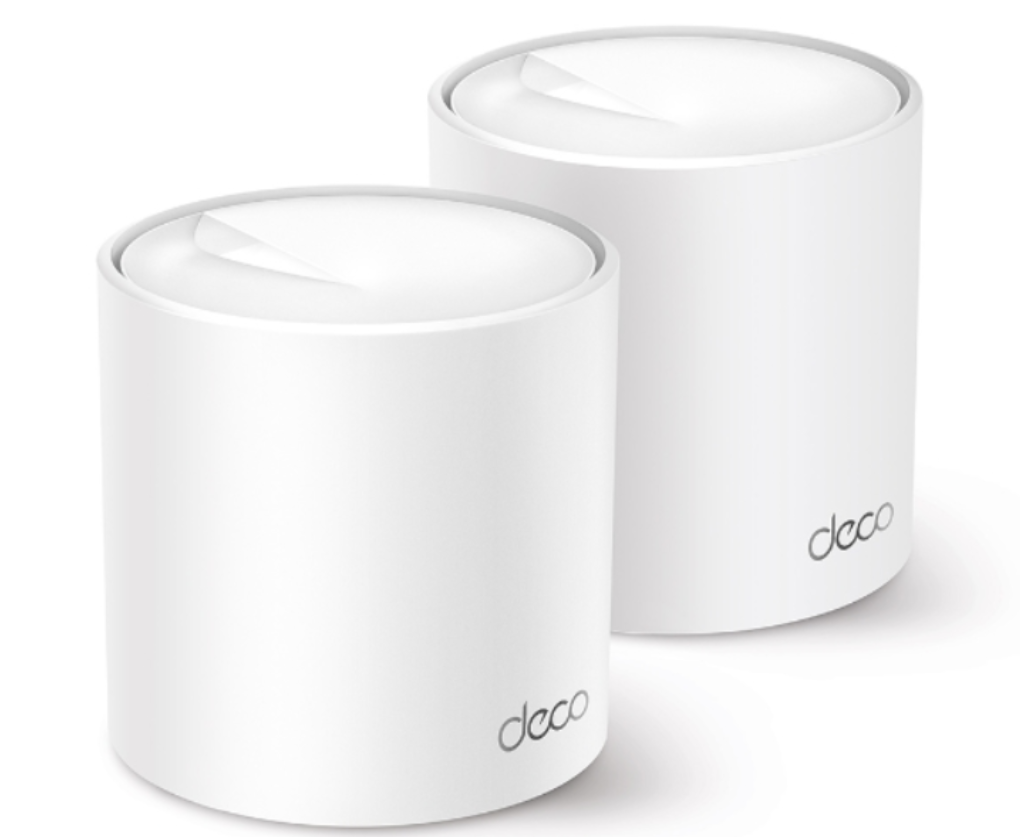
TP-Link Expands AI-Driven Mesh WiFi 6 Range with New Deco X50

TP-Link®, a leading global provider of consumer and business networking products, today announces the launch of the all-new Deco X50, its latest AI-driven Whole Home Mesh WiFi 6 System, in the UK.

Smart WiFi with Super Speeds

This sleek Mesh router provides AX3000 Dual Band WiFi to bring super-fast WiFi speeds up to 3.0 Gbps to the home. With WiFi 6 technology, the Deco X50 is designed to deliver a huge boost in coverage, speeds and total capacity that powers stable and lag-free internet connectivity for over 150 devices simultaneously. Equipped with 4 Streams (2×2/HE160 2402 Mbps + 2×2 574 Mbps) and 3× Gigabit ports, the router provides sufficient connectivity and a boost in seamless coverage up to 4,500 ft2 (2-pack) to blanket homes in fast and reliable WiFi connections.

Armed with AI-Driven Mesh, Deco X50 delivers smart WiFi that follows users, without interruption. Its advanced algorithms account for the factors that affect home WiFi and are continuously optimising to ensure the Deco X50 provides high performing and reliable mesh connectivity. The router automatically and intelligently learns the network environment, client quality, and user behaviours to provide ideal WiFi unique to every home.

A Seamless and Secure Network

Equipped with TP-Link HomeShied, the Deco X50 ensures comprehensive network protection, robust parental controls, and real-time IoT protection. Using HomeShield’s kit of built-in features, users can customise their home network with enhanced security to meet the needs of their household. Whether identifying network security holes, limiting the time children spend online, or blocking websites, the Deco X50’s HomeShield gives users the tools needed to fully manage their home network with ease and peace of mind.

TP-Link Mesh enables Deco units to work together to create one unified network. Deco X50 is compatible with every other Deco model to form a flexible mesh network that can be expanded at any time by simply adding another Deco unit. Devices such as phones or tablets will automatically connect to the fastest Deco node as users move through the home, creating a frictionless and uninterrupted WiFi experience to enjoy seamless streaming at the fastest possible speeds.

With clearer and stronger signals enhanced by BSS Color and Beamforming, Deco X50 boosts broader whole home WiFi coverage with great performance. Wireless connections and optional Ethernet backhaul work together to link Deco units, providing even faster network speeds and truly seamless coverage. Meanwhile, Quality of Service (QoS) features allow users to prioritise the bandwidth needs of specific devices to get a faster networking experience.

The Deco X50 setup is made easier than ever through the bespoke Deco app that walks users through the configuration process, getting home networks up and running in minutes. The Deco app also offers a range of features that enable users to manage their WiFi at home or away, including seeing all connected devices, prioritising their own and setting up a guest network. The Deco X50 is also compatible with Amazon Alexa and can be controlled with simple voice commands to add even more convenience to the smart home.

“Modern homes require more intelligent WiFi and the Deco X50 brings the power of both WiFi 6 and AI to the whole-home network. With a router that is continuously learning and optimising, users can walk through their home and enjoy seamless streaming at the fastest possible speeds. We will continue expanding our range of smart home routers in the coming months to deliver supreme mesh WiFi that brings ultimate convenience and helps users enjoy the future network that loads faster and connects more – even as their device usage increases,” commented Will Liu, Managing Director at TP-Link UK.

For more information about the Deco X50 please visit: https://www.tp-link.com/uk/home-networking/deco/deco-x50/.

Virgin Media commits to eliminating black spots around your home with the launch of their Wi-Fi Guarantee service

Virgin Media has today launched their new Wi-Fi Guarantee service which ensures a seamless connection in every room around your home, including areas which were previously Wi-Fi blackspots. The Wi-Fi Guarantee promises minimum speeds of 30Mb in every room, for working, gaming, and for show-streaming power, right where you want it.

Using Virgin Media’s next level Wi-Fi mesh technology, the Smart Wi-Fi Pods connect with the cloud to understand how each household uses Wi-Fi. This allows for constant adapting to create the best conditions for the network.

The Smart Wi-Fi Pods work together with the Virgin Media Hub to create a Wi-Fi bubble that covers your entire home, eliminating blackspots in the process. The two also work together to automatically change settings to manage interference ensuring the connection is fast, and reliable.

Orla Kelly, Proposition and CVP Manager from Virgin Media said: “Fast and reliable broadband is a priority for our customers and Virgin Media. Our Wi-Fi Guarantee is just another demonstration of our dedication and commitment to that.

“Blackspots, in those hard-to-reach places, like a new home office in the attic, are a real source of frustration for many households, but Virgin Media is committed to eliminating them and thanks to our Smart Wi-Fi Pods, we can make working, gaming, or simply browsing seamless.

“No more running cables across the landing or sitting on the stairs to get a signal for your Zoom call, Virgin Media’s Wi-Fi Guarantee gets Wi-Fi everywhere in your house, so you don’t have to!”

The Wi-Fi Guarantee includes a Smart Wi-Fi Pod, plus up to 2 additional pods and a technician visit if needed, to ensure customer get a minimum speed of 30Mb in every room for an additional €5 a month. If black spots persist, Virgin Media guarantees €50 credit.

Broadband vs. Wifi: Choosing What’s Best For You

Nearly 90% of the households in the United States have some type of Internet connection. Over the past decade, an Internet connection has gone from a luxury to a necessity in the eyes of American consumers. If you are in the market for an Internet service provider, you need to do your homework before making a selection.

There are two basic types of Internet connections available to modern consumers. Choosing between broadband and Wi-Fi is a lot harder than it might seem. Reader below to find out more about these connections and which one is the best fit for your needs.

What is Broadband Internet?

One of the most popular Internet options on the market is broadband. This type of Internet transmits Internet data by using various cables and lines. If traditional dial-up Internet is considered to be a one-way street, then broadband can be labeled as a highway with multiple lanes. The various data packets transmitted via broadband Internet connections are done so with the help of various lines. When attempting the parallel transfer of multiple data packets, you can increase the overall speed of your Internet with the help of broadband.

What Is Wi-Fi Internet?

The Wi-Fi technology used to power some Internet connections uses radio frequencies and signals. These signals and frequencies allow for information to be sent between devices wirelessly. The Wi-Fi connections available in the United States run on either 2.4Ghz or 5Ghz frequency. If long distances need to be covered with a Wi-Fi connection, 2.4Ghz is used. The 5Ghz option is used to cover shorter distances and larger bandwidths. If you are looking at Internet connections in terms of popularity, then Wi-Fi is the obvious choice. There are currently millions of homes in the United States using Wi-Fi to power their Internet.

Source-Pixabay

What’s The Difference Between These Internet Connection Options?

Now that you know more about these two Internet connection options, you are probably wondering how they are different. One of the main differences between these two connection types is that Wi-Fi doesn’t require the use of a physical connection to transfer data. However, if you are looking for high computing speeds, broadband is a good option.  You can optimize the speed of this Internet connection by using a LAN cable.

With some research, you can find a great Internet service provider in your area. If you are looking for a great Internet connection, check out this HighSpeedOptions list. The more you know about the service providers in your area, the easier it will be to choose the right one to meet your needs. When looking for a service provider, be sure to check out their online reviews and the prices they offer. With this information, you can start to narrow down the list of service providers at your disposal.

It’s Time To Make a Choice

By using the information in this article, you can find an Internet connection option to fit your needs. While you may have to invest some time into researching your options, it is worth the effort invested.