Gutted to be missing out on this year’s Glasto? Bring the festival vibes to your home this summer with JBL’s latest Bluetooth speakers and soundbars. Whether you’re streaming your favourite artists’ performances or choosing your own line-up and setlists, get into the full festival spirit with powerful JBL Original Pro sound.
Recreating the festival scene in your garden? Tune into your JBL Charge 5 Wi-Fi or JBL Boombox 3 Wi-Fi for even bigger sound with seamless connectivity. Off to the park instead? Attach your JBL Clip 4 Eco to your backpack for your own personal performance from your favourite acts. Catching up on the Glasto sets you missed? Immerse yourself into the performance with surround-sound from the JBL Bar 1000.
JBL Charge 5 Wi-Fi, JBL Boombox 3 Wi-Fi and JBL Clip 4 Eco are all waterproof, dustproof and allow for hours of playtime, so you can take them anywhere without stress. If you fancy staying home instead, immerse yourself in true surround sound with the JBL Bar 1000’s detachable speakers. Wherever this summer takes you, JBL has you covered.
The JBL Boombox 3 Wi-Fi and Bluetooth speaker delivers massive JBL Original Pro Sound with the deepest bass from a portable speaker. Stream your favourite festival acts in high-definition anywhere with the JBL Boombox 3, including 3D Dolby Atmos over Wi-Fi. Taking a call or scrolling your feed? Go ahead—it won’t interrupt your music. Switch easily to Bluetooth and keep enjoying seamless audio experiences whether you’re listening to your favourite artists indoors or outside. With a battery packing 24 hours of playtime and a waterproof and dustproof design, the JBL Boombox 3 Wi-Fi won’t let you down, wherever you take it. Stream music through AirPlay, Alexa Multi-Room Music, Chromecast built-in™ and Spotify Connect. Enjoy all of your favourite audio content, Internet radio, and podcasts in high definition. And wherever you go, the eco-friendly materials—incorporating recycled fabric and plastic—will help to make the world a little greener.
Go anywhere, hear anything. The bold JBL Original Pro Sound and deep bass of the JBL Charge 5 Wi-Fi keeps you moving to your own personal beat, setting the festival scene anywhere you go. Stream music anywhere over Wi-Fi, while still using your phone. Taking a call or scrolling your feed? Go ahead—it won’t interrupt your music. Switch easily to Bluetooth and keep enjoying seamless audio experiences whether you’re indoors or outside. The waterproof, dustproof portable speaker is powered by 20 hours of battery life and comes with a handy powerbank to keep your devices charged so you can stay connected with your fellow festival-goers. Stream music through AirPlay, Alexa Multi-Room Music, Chromecast built-in™ and Spotify Connect. And the eco-friendly design—incorporating recycled fabric and plastic—helps to make any adventure a little greener.
New innovative eco-friendly design, same rich JBL Pro Sound performance. The compact JBL Clip 4 Eco packs 10 hours of playtime and big bass performance into a compact and convenient speaker. Hook the JBL Clip 4 Eco onto your bag so you can beat the crowds without worrying about losing it. The JBL Clip 4 Eco is available in Forest Green, Ocean Blue and Cloud White.
Experience Glastonbury from the comfort of your own home with sound that puts you right in the middle of the action, thanks to 880W of total output power and thunderous bass from the 10″ subwoofer. The JBL Bar 1000 has MultiBeam™ and four up-firing drivers – two in the bar and two in the detachable battery-powered surround speakers – to envelop you in a sphere of Dolby Atmos® and DTS:X 3D surround sound with a wide, spacious soundstage with no need to draw extra cables. You’ll never miss a lyric with our PureVoice technology, which makes sure the dialogue is clear even when other sounds are at their loudest. When you’re ready to switch it up, stream your favourite playlist from AirPlay, Alexa MRM, and Chromecast built-in™ and it will feel like the headline acts are in your living room.
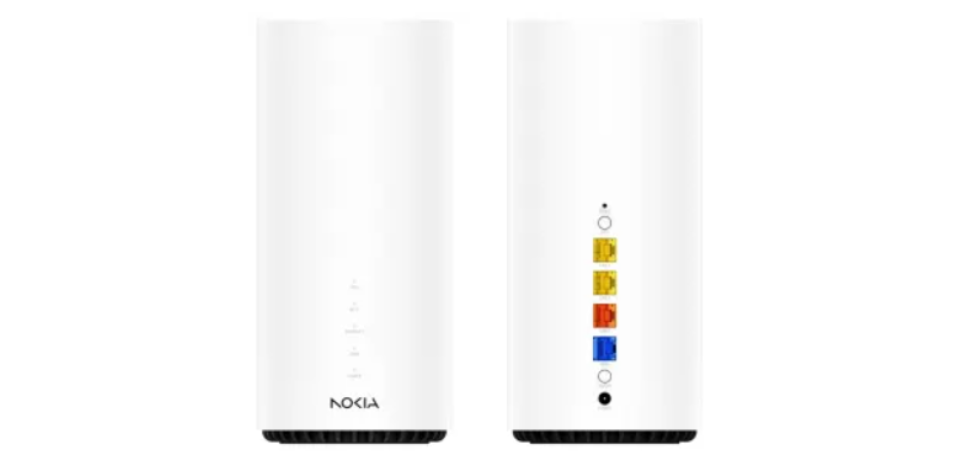
Nokia has today launched the Beacon 10, its first gateway supporting Wi-Fi 6E to provide seamless, high-capacity mesh networking. The Beacon 10 is a true tri-band device which can provide Wi-Fi throughput of 10Gbps. It includes a 10G WAN interface to pair with 10 Gb/second fiber modems for multi-gigabit services to the home. The new gateway is shown for the first time at Mobile World Congress, Barcelona.
Widespread roll-out of 10G fiber powered by XGS-PON requires upgrades to home and business Wi-Fi to deliver super high speeds to enabled devices. The ‘E’ in Wi-Fi 6E means faster speeds and lower latencies, ideal for the latest office applications, home entertainment and home working experiences.
Additionally announced at the show, Nokia has upgraded its Nokia WiFi Cloud Controller to act as a User Services Platform (USP) controller. USP is the industry standard protocol (also known as TR-369) to manage services and configurations in network devices (either remotely by a cloud application or locally by a mobile app). Nokia’s USP agent in the Beacon 10 is based on the open-source OB-USPA so it can be managed by any USP controller, including the Nokia WiFi Cloud Controller.
Nokia’s presentation at MWC also highlights its newly developed, all-in-one console for Wi-Fi management and optimization. The console will be available to customer care operators, network administrators, onsite technicians and level 3 support staff to provide advanced WiFi optimization, troubleshooting and management.
Nokia has established a complete eco-system of app developers to ensure CSPs can offer the value-add services they need to their customers on their Wi-Fi units. The Beacon 10 supports the latest, fully integrated cybersecurity application from F-Secure which is delivered as a containerized application.
Dirk Verhaegen, VP Broadband Devices, Nokia, said:“We are proud to introduce Nokia’s first Wi-Fi 6E product for premium, high-performance Wi-Fi in the home and office. Not only does it offer faster speeds, but it also supports 3rd party applications and a USP agent to be fully compatible with multiple controllers, making it much easier for operators to manage. Third party apps and USP are both of strategic interest to Nokia and we will include them in all new broadband devices we introduce, as well as retro-fitting to select existing equipment”
Michael Philpott, Research Director, Digital Consumer Services at Omdia, said: “Vendors like Nokia are paving the path for the next generation of in-home broadband devices with a container application framework that separates the application from the operating system. F-Secure is the first partner to fully leverage Nokia’s application ecosystem to bring its cybersecurity solution to Nokia broadband devices using this innovative and open environment.”
Looking for a new Wi-Fi streaming well look no further than this affordable piece of kit that connects to all your favourite streaming apps and more and comes in at a really good price and upgrades your home system you can even use your smartphone too which for me is really handy as it is where all my music is stored. You can also use a USB key stored with music to make this kit even more useful and there is multiple ports to pick from and it will work with Wi-Fi and Bluetooth,
You can stream Spotify, Amazon Music, Tidal, Qobuz, Deezer, Napster, TuneIn, Internet Radio, iHeart Radio, QQ Music, QQ FM and not only that you can stream music from your devices library to if you wish which is excellent.
The S10 mini stereo receiver connects directly to your online streaming providers to play high quality audio, avoiding Bluetooth bottlenecks and compression so in short better audio and no lag latency noted.
Connectivity is another win on this device as there is plenty and it is easy to set up to and comes with a free app called 4Stream and you can see all this in action in the video review below.You can also add other Arylic wireless streaming devices to build a multiroom system, manage and control all your wireless audio devices in one app.
Connections
Airplay – Stream any audio directly from your iOS system.
Bluetooth – Play any sound from your smart devices and paired with their streaming devices.
Web Control – Quick web control without app, enjoy your preset content and personal radios in a sec.
Remote Control – local remote control without network.
4STREAM APP – Take full functionally control via our 4STREAM app with network, streaming your favorite sounds, multiroom control and other personalize settings, this app is simple to use with a nice UI and makes life easier.
A total of 201 free Wi-Fi connectivity access points in public spaces across Ireland have now been installed by Magnet+, Ireland’s largest independent connectivity network, as part of the WiFi4EU initiative.
The demand for the free Wi-fi connectivity service, which was first introduced in Galway city in October 2020, has grown exponentially over the last two years, with a 30% increase in users nationwide in the last year alone and a total of 8,369 users recorded for the month October 2022.
The WiFi4U scheme offers free high-speed access to Wi-Fi connectivity for citizens in public spaces such as parks, squares, public buildings, libraries, museums and in towns and cities throughout Europe. It is an initiative of The European Commission funded by both The European Commission and Department of Rural and Community Development.
The areas with the Wi-Fi access points include:
Dublin
47 Access Points installed across 17 different towns including Fingal, Blanchardstown, Mulhuddart, Lucan, Castleknock, Portmarnock, Howth, Malahide, Portrane, Donabate, Swords, Balbriggan, Naul, Garristown, Rush, Lusk and Skerries.
There were 6,146 users in Fingal alone across September and October this year which is an increase of 15% compared to this time last year.
Tipperary County
52 Access Points installed across 6 different towns including Clonmel, Carrick on Suir, Nenagh, Tipperary Town, Roscrea & Thurles.
There were 3,030 users in Tipperary County across September and October this year which is an increase of 66% compared to this time in 2021.
Galway City
61 Access Points installed across 13 different towns including Ballinfoile, Galway City Centre, Roscam, Ballyloughnane, Liosban, Doughiska, Mervue, Knocknacarra, Blackrock, Salthill, Westside, Tuam Road & Renmore
There were 5,358 users in Galway City across September and October this year which is an increase of 88% compared to this time last year.
There were 3,991 users in Galway County across September and October this year which is an increase of 239% compared to the same time last year.
Under the WiFi4EU scheme, successful local authorities are issued with vouchers worth €15,000 to install Wi-Fi hotspots, which must be free of charge to the user, free from advertising and with no commercial re-use of data.
To date 28 of Ireland’s 31 local authorities have now secured WiFi4EU vouchers, with 23 securing the maximum of four available and 12 still to go to tender.
The Department of Rural and Community Development is providing matched funding of €15,000 for every voucher awarded to Ireland by the EU, effectively doubling the value of the investment.
Commenting on this landmark milestone, Philip Clapperton, Sales Director at Magnet +, says:“Magnet+ is delighted to have brought connectivity services to so many towns across Ireland. The multi-location WiFi4EU service will provide previously unavailable Wi-Fi service in these community locations, which will enhance the user experience when visiting these locations. Areas previously affected by a lack of Wi-Fi services can now access reliable, fast and secure internet services at no cost providing incredible ease of access for these areas and boosting all the local economies in these areas. We’re excited to grow these networks further to even more areas in the country.”
Telecom Infra Project (TIP) OpenWiFi is ideal for publicly sponsored urban Wi-Fi deployments. It allows the selection of the most appropriate solution based on use case rather than a single vendor’s products, facilitates the independent replacement and upgrading of components, and is compatible with municipalities’ procurement needs for vendor diversity and state-of-the-art technologies.
Dublin City Council, Ireland, supported by Virgin Media Business, the city’s internet service provider, is installing Wi-Fi 6 Access Points that are compliant with TIP OpenWiFi as a trial of open, disaggregated solutions for potential use in the city’s public Wi-Fi network. TIP OpenWiFi is compliant with the technical requirements of the European Commission’s WiFi4EU initiative, the benchmark for public Wi-Fi deployments in Europe.
WiFi4EU is a ground-breaking initiative that promotes free access to Wi-Fi connectivity for citizens in public spaces including parks, squares, public buildings, libraries, health centers and museums in municipalities throughout Europe. Municipalities receive a voucher that pays for the network including maintenance of the equipment to offer free and high-quality Wi-Fi connectivity for at least three years. Dublin City’s WiFi4EU Wi-Fi network will be a free Wi-Fi network and available throughout its historic city center.
“A smart city is built around collaboration and openness. We are delighted to be trialing Wi-Fi options that are built with an open source architecture that enables multi-vendor interoperability,” said Jamie Cudden. Smart City Program Manager, Dublin City Council.
Dublin City Council’s public Wi-Fi trials are using TIP OpenWiFi-compliant products and software including a cloud-based controller from NetExperience and access points from Edgecore and HFCL.
“Virgin Media is recognized for providing ‘clever tech’ with ultrafast speeds and ultra-reliability. We’re industry leaders offering our customers the latest technology and it just made sense to trial Dublin City Council’s Wi-Fi network using TIP OpenWiFi standards as part of our innovation partnership with the council ,” said Noel O Reilly, Business Products and Solutions Manager, Virgin Media Business.
TIP OpenWiFi is an open source-based Wi-Fi architecture that enables multi-vendor, interoperable Wi-Fi networks. The TIP OpenWiFi-based solution enables the Dublin City Council and Virgin Media to seamlessly mix and match additional access points and controllers from any TIP OpenWiFi compliant manufacturer, enabling it to easily expand the city center network.
A TIP OpenWiFi network can also support OpenRoaming, with no change in hardware or software. This demonstrates the innovation and maturity of TIP OpenWiFi.
OpenRoaming, based on Wi-Fi CERTIFIED Passpoint and the Wireless Broadband Alliance’s Wireless Roaming Intermediary eXchange (WRIX) standards, allows users to automatically connect to Wi-Fi networks without logging in. It also offloads mobile connectivity and enables wireless convergence.
Municipalities can learn more about TIP OpenWiFi and get involved in this initiative here.
The typical router as supplied by your ISP (contrary to their marketing literature), may be of basic quality and give a reasonable Wi-Fi range, but if a few of these are placed in the same areas, as your router, there may be congestion on certain frequency ranges and poor broadband speed or coverage. (Depending on the router and technical experience the frequency range may be changed but may require some specialised knowledge) The Halo H80X is a specialised kit to increase the range and allow a repeater of the signal.
Note: the Halo can only forward the signal going into the building, if the signal is poor at the junction box or default router to Halo, this will not increase this, while if the signal is good coming into the building, in theory, this should spread the signal evenly throughout the building ensuring no black spots or poor coverage in parts of the building. Albeit coverage may depend on the type of construction within the building, large thick concrete walls or tinfoil-backed walls or fireproof doors will diminish signal quality. The Halo will certainly improve this signal, allowing the option to place close to black spots to improve the broadband experience. The location of the Halo is also a key factor in terms of range and quality of the signal, this should be placed as far as practical in an open space away from large metal items or e.g., book cabinet which would diminish the speed dramatically, the app gives a guideline on the best locations for the Halo. The Kit came with a clear specifications called out on the packaging giving full detail of what the kit could do.
Package Contents see unboxing below for more
2-pack
2× Halo H80X Units
1× RJ45 Ethernet Cable
2× Power Adapters
Quick Installation Guide
Note this comes in a 2 or 3 pack Kit, this review has been using the 2-pack kit, The 3 pack could be used to extend the range further.
Features:
Dual Band WiFi 6 Speeds up to 3000 Mbps – 2402 Mbps on 5 GHz and 574 Mbps on 2.4 GHz.†
Seamless Roaming with One Unified Network – Halo units work together to automatically switch between Halos as you move around your home with a single unified WiFi name and password.‡
Whole Home Coverage – Blanket up to 5,000 ft² (460 m²) with high-speed WiFi, eliminating WiFi dead zones at your home.†
Connect over 150 Devices – Provide fast and stable connections over 150 devices.†
Easily Mange Your Home Network – Use the MERCUSYS App to quickly set up and manage your WiFi. You can also manage your kids’ online time and contents.
Full Gigabit Ports – 3× Gigabit ports per Halo unit for lightning-fast wired connections.**
Reset Button:
The one option I always like in a product is the option to reset the system to ensure if issues on the setup etc, you can start from scratch,
Press 1 second to reset Halo to factory default settings.
Setup:
The first impression of the instruction guide was disappointing in that there is a manual included, there is one page of instructions in English, this shows a QR code, scanning allowed the app to be downloaded, but this did not give any circuit diagram for network connection. There was a help option, albeit the setup is logical, but would benefit from a basic diagram option to connect the devices.
Suggested setup option via Mercusys support links
1. Turn off the modem, and remove the backup battery if it has one.
2. Connect the modem to either Ethernet port on the router.
3. Power on the router, and wait for it to start.
4. Turn on the modem.
Login the web interface
1.Connect to the main router wirelessly using the default SSID (network name) printed on the main router’s label.
2.Open a web browser and enter the default domain name http://mwlogin.net in the address field to access the web management page.
3.A login window will appear. Create a login password when prompted.
Tips: For subsequent login, use the password you set.
App setup – MERCUSYS app
The app has over 100K+ downloads with a 3.3 star rating out of 5, the setup is standard for app given the functionality.
Android app setting –
There is a variety of different options within the functionality of the app this includes a very useful feature of network optimization. If the unit is used in a highly congested area with a lot of neighbour’s routers on the same frequency the network optimization can pick the best frequency and update as required, this works but does not tell you what frequency it is changed to. Alternatively, if required to blacklist a particular unit, a device can be easily achieved. A very useful feature is the parental controls this allows to prevent access to example over 18 sites or configure individual sites blocked, e.g., Facebook if not be required. This has options as used for a junior person, it may also be used for a child, preteen, or adult blocking social networking downloads blocked. If used in an office environment there is a website category with specific websites that can be blocked, most staff that work in a commercial environment will be aware certain sites are blocked by their local IT department. This can be achieved within the app by updating the website and blocking specific sites example Facebook. Or whatever sites are deemed inappropriate for staff, again for younger generations it could also be used to block specific areas that are not required.
Reporting features are available to give an idea of how much data is being used which can give an indication that may assist in security implications. Within the advanced features, there is a variety of technical settings that configures by specialised, teams. One feature which is quite useful is the LED, the LED can be turned off or set for a night mode to switch off at night-time if the unit is used in a bedroom.
The app has an option to easily see what devices are connected, for example, smartphones, home network laptops etc this is very handy to visually see if something is connected which should not be connected or unexpected, this is similar to having a review of your credit card bills to ensure everything looks in place having a look at your own network to see what’s connected is possibly good practise now and again.
Within the Wi-Fi settings on the app 2.4 GHz 5 giga Hertz functionality can be turned off and, on, the guest, the network can be enabled or disabled. The main network name can be changed, or the password can easily be updated
Compare mobile app (android) vs web link
Typically I would expect to be able to do the same function on the app as the website, ( http://mwlogin.net ) The web login has minimal practical use, in that changes, etc cannot be made only view the setting, Any changes to the network etc allow the guest network to be turned on, parental controls etc is required to be done via the mobile app. This may result in a lot of wasted time if searching on the web link for functionality.
The web link does allow the software to be updated via e.g., a memory stick or via the web.
Results:
As part of this techbuzz review, the H80X was set up as above. A speed test was done from various rooms in the house, with all doors closed and no other internet surfing etc turned on
In each room a windows laptop was connected to the initial network and a speed test was run 3 times, Download, Upload speed and latency were tested, the average rate was logged, in the same room the connection was changed to the Mercusys Ax3000 Halo H80X ( network called techbuzz ) and again the speed was tested an averaged from 3 readings, this was done in the rooms below.
Techbuzz speed tests comparison from ISP router to Mercusys Ax3000 Halo H80X (network called techbuzz)
Analysis of the data:
Within the same room as the router (Classed as the Sitting room)
Tested location
Standard internet provider router
Techbuzz – Mercusys Ax3000 Halo H80X
Download (Mbps)
Upload (Mbps)
Latency (ms)
Download (Mbps)
Upload (Mbps)
Latency (ms)
Sitting room (router placed)
270
51
13
360
50
14
The data showed an improvement from 270 Mbps to 360 on the Halo H80X which I believe is down to the app optimisation frequency picking out the best network frequencies or uncongested frequency.
There was no coverage from the ISP router in the indication the Halo expanded the coverage
Downstairs utility room
Not connect
Not connect
Not connect
11
14
16
The furthest room has the biggest increase in broadband speed going from initially 12 Mbps to 190 Mbps, and half the latency which would benefit gamers,
Upstairs furthest bedroom
12
4.1
32
190
47
16
Additional Test done:
As part of the testing, a windows laptop was connected to the Halo and walked to his furthest part of the drive until reduced coverage. subsequently walked to the back of the garden where the Halo in front would not have coverage, this worked seamlessly on the handover from one Halo to the next without any drop our loss in signal
Conclusion:
With the Halo a few minor niggles in terms of the lack of network diagrams, the colour of the White box with a black plug, (I would prefer from aesthetics to have all white or all back colours) The Web app is of little practical use.
Overall, the kit comes with many useful features in terms of, Dual frequency, security, Parental controls, and network optimisation but more importantly for anyone with blackspots / poor Wi-Fi coverage this kit does exactly as described and what it is designed to do as seen on the test results carried out by Techbuzz in a consistence manner and comparison to the ISP equipment.
Technology continues to advance and poor coverage can be fixed by the non-technical with this kit that works as broadband should, a Must for those with Wi-fi blackspots.
It’s not uncommon for organizations to have employees that travel to different locations whether it’s to visit customers or different offices, especially with the rise in remote working and remote co-working spaces.
When these employees travel or work outside of the office network, they often connect to public Wi-Fi hotspots which could be creating a ‘massive surge’ in hacking crimes according to web filtering platform Titan HQ.
Providing users with remote access to the corporate network can help improve employee productivity, but it introduces a high level of cybersecurity risk with a chance an attacker could also gain remote access. However, this is far from the only danger when it comes to public Wi-Fi as hackers can also easily target individuals and their information with ease when connecting to public Wi-Fi.
When it comes to public Wi-Fi, the most likely threat is a common hacker or scammer attempting to steal a user’s information for profit. Attackers are often after personal details such as your name, address, financial information or social security numbers. There is also the potential for blackmail if an attacker finds compromising documents or images on your device.
As you peruse your favorite social media site, access your email, and check to see if a financial transaction cleared your online bank account, a hacker could easily capture all of your login credentials and data. So what is the most dangerous word or phrase when it comes to Wi-Fi?
“Free Wi-Fi”
As a result of the rise, in the US, the FBI and the Federal Trade Commission have all urged caution when using free Wi-Fi and be mindful of the security risks. Other organizations such as the AARP have cautioned its members that “Free public wireless networks may come at a steep price – the theft of your finances and identity.”
Free WiFi is everywhere these days, giving us the ability to work remotely in coffee shops and restaurants. It’s very convenient but potentially unsafe. Connecting to a public Wi-Fi network requires little authentication – at best you’ll be greeted by a captive portal and have to check a box agreeing to the terms of service. Anyone can connect to these networks, including cyber criminals.
The presence of any of these factors can contribute to an insecure environment, in which hackers can easily target unsuspecting users who are oblivious to their potential jeopardy. Some of the most common threats include the following:
Stealing your password or personal information within a non-encrypted connection or through a rogue access point
Session hijacking so that a hacker can browse a site using your own online account
Obtaining information on your computer by directly accessing your computer
Downloading malware and viruses that can then conduct their malicious task
On public Wi-Fi, there are many ways scammers can use to get to you. Here are some of the most common:
Man In The Middle attacks
These attacks are one of the most common while using public Wi-Fi. A hacker captures the data you are sending. Most hackers who use this method exploit flaws in apps or websites that allow them view the information being passed. The information can include bank details, passwords, personal identification information, and other data that could be used for identity theft. The most common type of MITM attacks is those that occur over unencrypted and unsecured Wi-Fi networks.
The easiest way for an attacker to exploit public WiFi is to position himself between clients and the router. A man-in-the-middle attack is like eavesdropping where an attacker can get in-between points A and B and intercept data. Sometimes this data can be modified in the process of transmission to trick the victim into disclosing sensitive information, such as login credentials. The victim will likely never notice anything is amiss. Once the user falls for the deception, the data is collected.
Fake Hotspots.
Not all public hotspots are legitimate. Attackers create “free” WiFi networks (often called evil twin hotspots) in an attempt to lure in unsuspecting users. When you connect to such a network, you give criminals an opportunity to monitor all your data. All an attacker has to do is find a high-traffic location and set up a fake network with a legitimate sounding name like ‘Hotel Wi-Fi.” By the time the attack is uncovered or authorities have isolated the source of the signal, the attacker has moved on – with the stolen user credentials.
The whole experience is transparent to the victim. Most of the time the hacker allows the victims to reach their intended Internet destinations while they secretly eavesdrop on the network traffic so that they can steal the information from the victims as the victims attempt to log in to their e-mail, provide credit card numbers while shopping online, etc. Avoid using open Wi-Fi hotspots – always ensure they’re secured and that a password is required to access them.
Wireless “sniffing.”
This is a practice where your data is observed, intercepted, and interpreted. It helps experts to diagnose any problems on the network. In the wrong hands, it can be used to monitor and collect data from unsuspecting victims.
Common Tools used by Wi-Fi attackers
While many sites are switching to Secure Socket Layer (SSL) which provides end-to-end encryption, there are various ways an attacker can circumvent this. One example is an SSLstrip, a tool that transparently hijacks HTTP traffic on a network.
This lets security managers assess the risk level of a network with the push of a button but it can also make it easy for attackers to scan public WiFi networks and find vulnerable devices – including yours.
“It doesn’t take long for a determined hacker to crack an unprotected wifi network. For would be hackers, there are a multitude of websites that promise to help you crack wi-fi passwords in two minutes. Many others provide significant detail on wireless hacking tools’ Ronan Kavanagh from TitanHQ said.
“This does not mean that you should never utilize public Wi-Fi. It just means you should take precautions. If you wouldn’t verbally give out your password in a crowded coffee shop then you should see a wireless hotspot as being full of prying ears as well as everyone shares the same wireless access point. In a sense, it is one big conversation.”
How To Stay Safe on Public Wi-Fi:
1. Check the Terms and Conditions.
In your desire to get some free internet, it can be quite tempting to click through any terms and conditions that pop up on your screen. However, you should be careful about what you sign up for in public. A huge amount of free public Wi-Fi also takes something from you. These firms will give you some bandwidth as long as you agree to give them your email address and a phone number for instance. Try to find time to read before agreeing.
2. Stick to Advertised Wi-Fi Networks.
Just because you see free Wi-Fi pop up on your screen does not mean you must connect to it. Hackers are known to set up free Wi-Fi that they use to mine data from unsuspecting individuals. If you see open Wi-Fi that is not advertised publicly, you will have to think twice about using it.
3. Only Visit Secure Sites on Wi-Fi.
The green padlock at the top left corner of your browser shows you that you are connecting to a secure site. This sign is even more important when you are relying on free Wi-Fi. Think hard before doing anything important when on free Wi-Fi. For instance, avoid making any credit card transactions on public Wi-Fi. Additionally, it is best to use a mobile browser rather than an app when on public Wi-Fi. Mobile browsers are better at checking the security of sites than apps.
4. Switch Off Sharing.
When your device is connected to the Internet in a public area, you will not want to share anything. You can turn off sharing in the Control Panel depending on the OS you use. You may also opt to have your OS do it for you by choosing “Public” the first time you connect to a public network.
5. Switch Off Wi-Fi Capabilities in Public.
Even when you are not actively connected to any Wi-Fi network, your computer hardware can still transmit data to any network that is in range. There are measures in place to keep such networks from getting in touch with you. However, hackers can be quite smart, and they can get into your laptop. Besides that, switching off Wi-Fi settings allows you to extend the battery life of your device.
Other Useful Tips.
Avoid downloading anything when using public Wi-Fi. Additionally, always ensure that the OS and all other software are always up to date. Although your device automatically manages your connection when you are on public Wi-Fi, it is always best to double-check. When you are done with Wi-Fi, always forget the network. That way, you can reduce the security risk to your device. Additionally, make simple choices like using different passwords for each app.
Always ask the establishment what the name of the official hotspot is. This will prevent you from making incorrect assumptions and choose a malicious hotspot.
Disable the “auto connect” or “auto-join” functions for saved hotspots for all of your wireless devices, which is good advice in general.
TP-Link, a leading global provider of consumer and business networking products, today announces the arrival of the new EAP670, the latest blazing-fast AX5400 Ceiling Mount Wi-Fi 6 Access Point in its cloud-managed Omada range.
Available today in the UK, the new Omada EAP670 Access Points enable superior Wi-Fi 6 speeds of up to 5.4 Gbps which enable seamless connections for more devices than any other system before, specially designed for high-density environments that rely on network connectivity.
Omada EAP670 includes automatic channel selection and transmit power adjustment settings to minimise channel interference from neighbouring Access Points.
The PoE-powered access points are easy to mount and do not require any electrical wiring. EAP 670 supports both standard 802.3at PoE+ and DC power supply.
EAP670 also comes with a 2.5 Gbps Ethernet port to be able to leverage its high performance.
EAP670 also supports 160 MHz channels in the 5 GHz band, which allow to double the data at peak transmission times on a single stream with respect to the use of 80 MHz channels, the maximum channel bandwidth supported in previous models.
The Omada Software Defined Networking (SDN) platform allows for easy management of all network devices such as Access Points, switches, and routers. The system provides completely centralised cloud management of a highly scalable network, controlled from a single interface. The Omada app enables the configuration of settings, network status monitoring, and client management, all from the convenience of a smartphone or tablet.
TP-Link®, a leading global provider of consumer and business networking products, today announces the first WiFi 6E whole home Mesh system, Deco XE75, has launched in the UK, expanding Mesh networking into a new era.
WiFi currently plays one of the most important roles in our daily lives. We work from home, play video games, stream movies, and rely on a smooth data connection for everything we do. The latest WiFi technology will take your network performance to the next level. Deco XE75 is your best choice as an entry-level 6E product.
Mesh WiFi Evolved with the Latest 6 GHz Band
Unleash the latest WiFi technologies and enjoy congestion-free networking. WiFi 6 brings about upgraded performance in network efficiency and capacity. Opening the 6 GHz band changes the game for WiFi 6, allowing WiFi 6 to meet its potential. The 6 GHz band is also clean and congestion-free, being exclusive for WiFi 6E devices to eliminate interference from legacy devices.
Deco XE75 testing shows that its 6 GHz channel usage is 20%-40% cleaner than the 2.4 GHz and 5 GHz band, bringing less interference to the network. It also features 300% larger throughput and 50%-90% lower latency than the 5 GHz band. ‡
Blazing-Fast WiFi Speed up to 5.4 Gbps
The Tri-Band WiFi with 1024-QAM and 160 MHz channel technology boosts overall speeds up to an incredible 5400 Mbps for up to 7,200 ft2 coverage. Deco XE75 utilises the capabilities of 6 GHz to enable high-bandwidth applications that require faster data throughput. Enjoy smooth 8K streaming and VR/AR experiences without buffering. The lower latency connectivity ensures every online gaming experience remains seamless and immersive.
Cover Every Corner of Your Home
Deco XE75 eliminates weak signal areas with clearer, stronger whole-home WiFi generated by BSS (Base Service Station) Coloring and Beamforming technologies as the WiFi dead zone killer. BSS Coloring detects and marks data frames from neighbouring networks. It reduces slowdowns and interference while allowing more simultaneous data transmissions. Beamforming identifies devices and concentrates wireless signal strength towards them. With BSS Coloring and Beamforming, there will be no more searching for a stable connection.
Engineered for More Devices
No matter how many screens or devices are on at once, the newest generation of WiFi enables congestion-free signals. Deco XE75 builds a more efficient network with more throughput on connected devices in dense environments. You can connect up to 200 devices to your Deco XE75 for a lag-free wireless experience. Say goodbye to poor performance when playing immersive online games.
AI-Driven Mesh, WiFi Tailor to Your Home
Walk through your home and enjoy seamless streaming at the fastest possible speeds. The Deco Mesh system forms a unified network with a single network name. Also, built-in AI roaming creates the ideal Mesh WiFi solution with its sophisticated algorithms and self-learning.
Keep All Elements Secure — HomeShield§
With the enhanced WPA3 encryption and TP-Link HomeShield, Deco XE75 is one of the most secure WiFi Mesh systems, keeping your home network safe. TP-Link HomeShield manages online time and blocks inappropriate content to keep families healthy online with Parental Controls. Quality of Service (QoS) and Network Protection keep your home network smooth and safe. With comprehensive reports, you can check all the statistics and insights to help you get to know your home network better.
Deco XE75 Key Features
Whole-Home WiFi 6E — Cover up to 7,200 ft2 (3-pack) with next-gen seamless WiFi, making dead zones and buffering a thing of the past
Brand-New 6 GHz Band — Experience the latest frequency of WiFi, eliminating interference from all legacy devices. The 6 GHz band also delivers a powerful dedicated backhaul to streamline the WiFi performance of non-6E devices
True Tri-Band Speed — All three WiFi bands work together to unleash your network’s total speeds up to 5,400 Mbps for 200 devices
AI-Driven Mesh — Unite your home under one name and password while delivering the best connections as you move room to room
TP-Link HomeShield — Keeps your home network safe with cutting-edge features for network and IoT protection§
Setup Made Easier Than Ever — The Deco app walks you through setup and installation, step-by-step
Universal Compatibility — Backward compatible with all WiFi generations and works with any internet service provider (ISP)