Review – The Gatekeeper Halberd token. #GateKeeper #Security

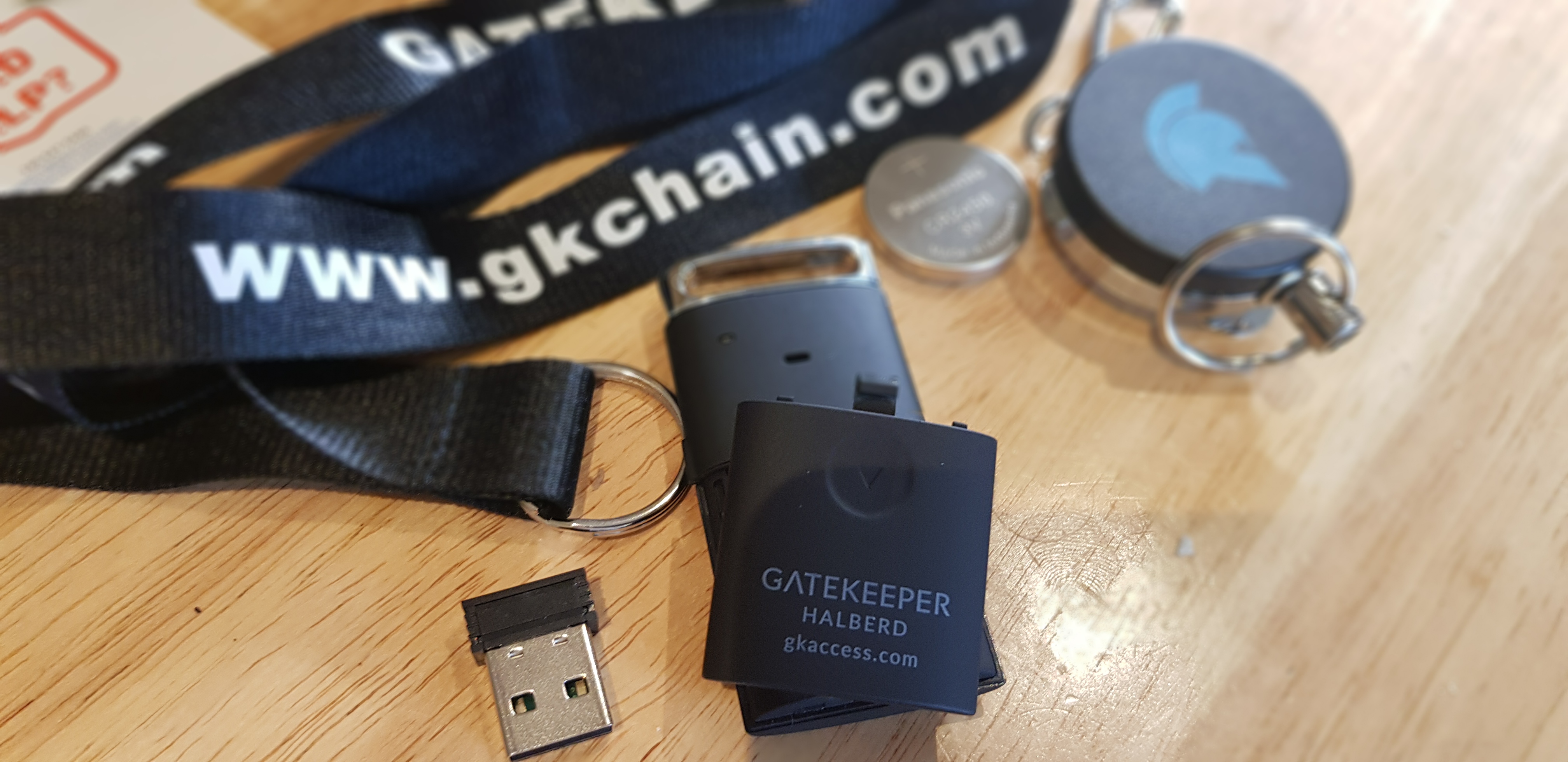
The Gatekeeper Halberd token is a proximity-based 2FA technology which is a combination of the security key and password manager. This works on the principle that for a computer that is left unlocked with weak passwords ( in violation of many corporate policies on IT security ) the GateKeeper Halberd token use proximity-based authentication sensors via Bluetooth to Lock or unlock the Computer. This allows the automation of security taking the risk out of the individual user been automated. The Gatekeeper can be configured to one computer or the option to be configured to numbers as per the individual or corporate policies. Web accounts are similar in the passwords are stored on the gatekeeper centralised password manager removing the need to remember numerous passwords for 100’s of sites. The option of one time passwords is available.

Features:

The Gatekeeper can come as an individual service, as a once-off purchase for the hardware/software etc or an enterprise version:

Setup:

The setup involved using 2 different software, one for Proximity and one for the password manager, For individual use – https://gkaccess.com/downloads/ (Mac also available )

The  software is installed  with the dashboard configured,

The token option is ticked, add

Add a new device, which connects to the Bluetooth device and the Halberd token ( no need to manually enter and details )


This can be configured to be set up for a new user via the dashboard,  the user can be given a four to 8 digit code to use the gatekeeper. IT departments have full access to set up individuals to a computer or allow multiple staff to access one computer.


In the event of loss / forget a Token,  this can be configured as a loan token or factory reset of the lost token removing the option to access the computer. Additional security can be set up to include proximity & a unique pin code for a user.


GateKeeper Password Manager

This is set up via the GateKeeper desktop application to provide proximity-based access to web passwords.  This is set up as a new  extension  on the chrome browser to allow OTP to your website,


A challenge for an individual user is where they use example Facebook,  LinkedIn and require to access this, this may involve info from an OTP which would not be accessible from a temporary computer which is not connected via a Token.

An optional additional USB Bluetooth Proximity Sensor can be supplied to allow proximity set up where the PC USB is inaccessible allowing for extended coverage set up.   

The individual user data is stored locally on the Laptop, in the event of loss of the token, the enterprise is stored on the network with a cloud version expected in the next few months.


Company:

Untethered Labs, Inc Gatekeeper is a USA company set up in 2015. They develop advanced wireless proximity access control solutions that act as the first line of defence for preventing unauthorized access to enterprise computers and websites.

They provide automated privileged access management solutions for a wide range of industries including healthcare, MSP/MSSPs, law enforcement, manufacturing, and finance. Their technology increases security and reduces support costs with touchless, proximity-based two-factor computer authentication, centralized enterprise password management, and auditing. They have partners in a variety of countries UK, France, Germany, and  Australia, the individual option can be purchased directly from GateKeeper,  the enterprise option is available directly or via their partner network.


 Overall:

The Gatekeeper Halberd token is ideal for those in a highly regulated environment while can be used in any environment which requires good security practice.  ISO27001 requires on leaving a laptop, the laptop should be locked, the proximity sensor is ideal for this as automating the process. Staff should be focussed on the day to day job not focussing on the IT department requirements for security. The ability to configure multiple workstations from one Halberd token is great allowing supervisor access to multiple systems in a controlled environment. Many articles on the web flag passwords are dead,  this product is another nail in the coffin for the traditional password allowing flexibility to use and multiple sites without the need for multiple passwords.  This is a dual-purpose device,  security to lock your PC and password protection for your websites.  Any technology that automates the cybersecurity process improves compliance, reduces support costs,  enhancing security and removing the weaker link of the human intervention is a winner.


https://gkaccess.com/store/

A house is burgled every 31 minutes in Ireland – PhoneWatch has some tips. #PhoneWatch

After spending four months in the safety of our homes, now is the time to reunite with friends and family and begin to rebuild our daily routines. With the excitement of the new normal, can come anxiety and anticipation as we leave the comfort of our safety bubble, our home. With a burglary taking place every 31 minutes in Ireland, PhoneWatchIreland’s leading provider of monitored home safety systems, wants to share some simpltips that will ensure you feel confident and comfortable transitioning into the new way of living. We are also reviewing some home security with more on the way so stay tuned for our reviews and what is on offer out there today and also check what we have covered already.


Created by PhoneWatch experts, the summer security tips are designed to ensure our homes stay safe this season.

  1. Check your windows and doors: When are home all day, we are often less conscious of windows being open. Be sure to close and lock all windows when you leave the house, or even if you are in the garden
  1. Secure your outdoor valuables: Make sure garden equipment or bicycles are secured in a shed or garage, and kept out of sight where possible
  2. Close gates: Make a habit of closing gates, especially those leading to the rear of the home
  3. Maintain your garden: Cut the grass before you go away, overgrown grass can make a house look empty. Alsoprune trees and shrubs that may grow more quickly in the summer for clearer views, large bushes can act as cover for anyone who may be watching a home
  4. Don’t advertise your trips on social media: Keep those photos of your days out and staycations until you return home
  5. Leave a light on: Timer switches for lamps can provide a cost-effective way to keep your home looking occupied if you are gone over night
  1. Arm your alarm: If your home is equipped with an alarm, be sure and use it. Research shows that an alarm is one of the most effective ways to keep your home safe
  2. When going away, nominate a next-door neighbourAn important tip for keeping your home safe is “maintaining an appearance” that your home is occupied. A neighbour or family member can help you keep your house look occupied by keeping post or deliveries clear from the letter box, parking a car in the driveway for a few hours, putting the bins out and taking them in on the same day and acting as the nominated key holder to your monitored alarm provider


Eoin Dunne, Managing Director of PhoneWatch said: At PhoneWatchour mission is to make people feel safe and secure in their homes. More than ever, the past few months have made us all realise the importance of a safe home. The good news is, by taking simple precautions as we begin to venture outside of our homes again, we can ensure that they will be considerably safer when we return. 


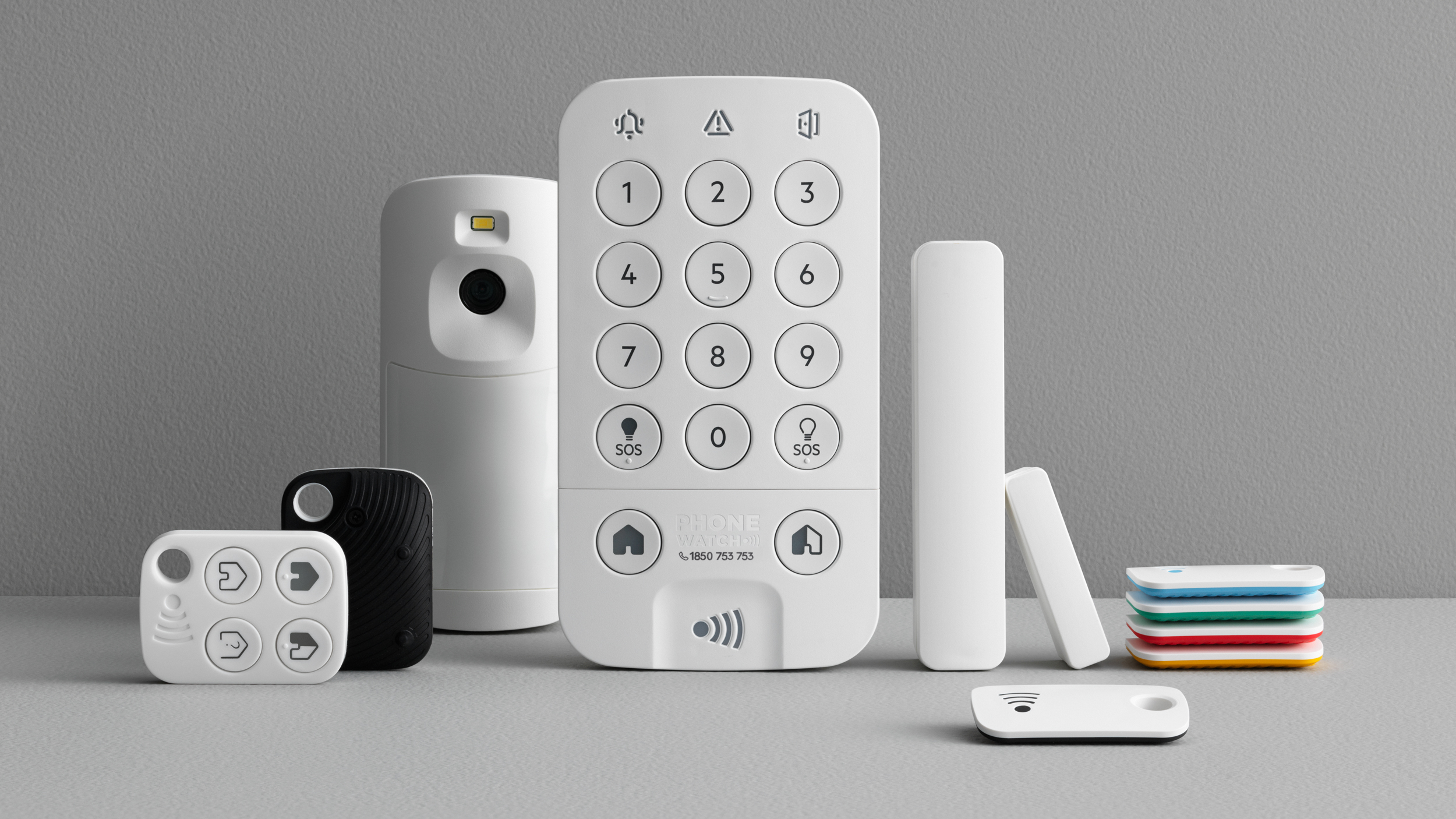
Protect the things and people you cherish most  with  a monitored home alarm from PhoneWatch. Total peace of mind with instant response to your burglar and smoke alarms 24 hours a day.Discover how PhoneWatch can help by visiting www.phonewatch.ie

First look. The Eufy 2K HD video doorbell. #Eufy #Tech #Security

With the Covid restrictions lifting now it is time to look at security of the home, Over the last few months we perhaps have taken our eyes off the topic being at home and now it is time to check all systems still work as we get back to work and for many still leave an empty house behind us.

We are starting off this season with eufy which offers complete home security and more and we are starting with their video doorbell then we will be checking out their cameras too in the coming weeks. A video doorbell is a great place to start and is very usefull in many ways in which we have covered with many offerings before.

eufy also offer security of your data and privacy is a core essential to their product range and in this day and age vital and also there is no monthly fees and your data is stored locally overall this is a welcome part of the package you buy and gives you peace of mind, Features of this paarticular camera is 2K res,180 day battery life,IP65 weatherproof,Free 16GB local storage,Military Grade Data Security and Facial Recognition. Check out the unboxing below and feel free to ask us anything in the meantime..

BUY HERE 


Review – SIMCAM 1S. #SimCam1S #Security #AI

Security cameras are available in all forms today and we havetested countless on the market over the last two years that come in all price points but now they are coming down in price giving you more features for you money and even more some now come with no subscription fee to maintain the device which is an added bonus.

Unlike other security cameras, SimCam uses on-device AI detection to avoid false alarms or alert delays  This also effectively protects the users’ privacy, because the camera data is stored in the SD card or NAS. SimCam can be integrated with other smart home devices, works with IFTTT, Google Home and Alexa. The device can be placed anywhere in the house and has a 360 degree rotation axis but no movement on the horizontal however it does capture with a massive feild of view and with no lag and excellent clairty on the playback videos on your smartphone.
The build quality is also good two and a simple installment should you wish to mount it on a wall or you can leave it sat in a corner of the home where it does not look anyway intrusive,there is LEDs on the device at which are noticable but this is not an issue and not only that a deterrent for anyone looking in or has gained access to your property.
The app itslef is really quite good with many settings and options at hand for you to pick from and set up to your needs it is one of the better apps I have seen in a while too and easy to use we go through this in the video below to make it easy to understand yet it is easy to navigate the app which I have tested on both Android and iOS
The camera can be also used to detect many things including outside your home by facing it out the window some cameras do not work so well in this manner but this one works fine you can also detect objects and pets and using AI it also has facial recognition and home automation.
At night this camera works particualry well too offering a really good look at what is being captured,The 1080p starlight night vision allows up to 50ft in complete darkness and has has literally no motion blur this is where i found the camera great and the daylight captures also top quality and no blur.
1 / 8
Another benefit of this camera it works on both 2.5/5G WiFi many cameras I own only work on the latter this is a great bonus for those with a big house or many devices on the go, you also have a two way audio set up,local storage and a decent alarm buzzer at 100dB and you can geo fence. You can also share the app with someone else and add an emergency contact number in the app.
For your money here you are getting features seen on more expensive cameras and it is something for others to watch out for and consider,this is a great value security camera and one to check out.


Here’s What You Need to Know About Enterprise Security in the COVID-19 Era. #Covid-19 #Security

In the wake of the developing COVID-19 pandemic, organizations around the world have adopted social distancing practices to slow the spread of the disease, including instructing many employees to work from home. But no one could have foreseen the need for businesses, government agencies, and other organizations around the world to quickly transition the majority of their workforces to remote work. 


The fast transition, the sheer number of people now working from home, and the already-devastating economic effects of the pandemic are among the factors that make this time an especially perilous one for enterprise security. IT security teams are struggling to keep up with increased threat levels from COVID-19-related malware and other cyber threats. Newly remote workers are leaving their companies’ networks vulnerable to hackers, and COVID-19-related cyber scams are on the rise as hackers seek to cash in on the crisis. Here’s what you need to know to keep your company safe.

Educate Employees About COVID-19 Cybersecurity

If your organization hasn’t already been giving employees regular cybersecurity training, then you need more help than this article can give. If you have been giving employees regular cybersecurity training, now is not the time to slack off. You should be aware that COVID-19-related cyber scams are proliferating at a mind-boggling pace. By mid-March, Computer Weekly was already calling COVID-19 the biggest cyber-threat in history, due to the massive volume of related malware and scam emails already circulating by that time. By mid-April, Google reported blocking 18 million COVID-19-related scam emails a day. 


Cyber criminals love to play on the emotions of their victims to cash in, because users in the grip of a strong emotion, like fear of a deadly disease, often aren’t thinking straight. They’ll click on links or download attachments that they might otherwise have ignored. And many people around the world, having lost their jobs or been physically restricted to their homes or neighborhoods, are looking for a way to make a living, so the ranks of cyber criminals may be swelling, too.


That’s why it’s so important to educate employees about the cybersecurity risks associated with COVID-19. Regular security training will keep employees vigilant against suspicious emails that might land in their inboxes. Make sure to send out regular memos warning employees of common COVID-19 related malware and phishing scams as they emerge. Your employees may not be targeted by specific scams, but knowing what kinds of things to look out for can help them protect the enterprise network.


Of course, you’ll also need a security solution that can detect vulnerabilities and threats and work to neutralize them. Your employees will be reporting suspicious emails, perhaps in greater numbers than ever before, and your IT security team will be facing more threats than it probably ever has in the past. Make sure you have a comprehensive enterprise network security solution to help your team meet these new challenges.

Require a VPN and Regular Security Check-Ins

Your employees’ home networks won’t be as secure as your enterprise network, because it’s unlikely that employees have intrusion detection or protection on their home networks. That’s why you should require employees to connect to the company’s network through a virtual private network (VPN). A VPN can hide your employees’ activities on your network, and help protect your information from thieves.


You should also set network security standards for employees working from home. Put together a security protocol that includes securing devices physically, keeping work and personal emails separate, and locking down their home networks. Implement regular security check-ins with staff to make sure they’re using multi-factor authentication to log into enterprise systems and work email accounts, and to verify that they’re implementing the enterprise security protocols for their home networks. 

Give Employees Company Devices to Work from Home

It might be tempting to allow employees to work from home on their personal devices — it would save your organization a lot of money on laptops. But you don’t know what employees are doing on their personal devices when they’re not on the clock, what antivirus and antimalware protection they’re using, or how tight their security is. It’s easier to protect your enterprise network when you issue company devices to employees who are working from home. It’s also easier to keep an eye on those employees to make sure they really are working when they’re supposed to be. When you issue company devices, you’ll be able to synchronize the same endpoint solution across each one, to remove some of the vulnerabilities that can come with a rapid distribution of teams.


The COVID-19 pandemic has brought a lot of uncertainty with it, especially when it comes to keeping your enterprise network secure. Don’t let the challenges of this pandemic leave you vulnerable to cyber criminals. Protect your network, so you and your employees can weather the storm.

Review – The Pan/Tilt Home Security Wi-Fi Camera Tapo C200 #Tech #Security

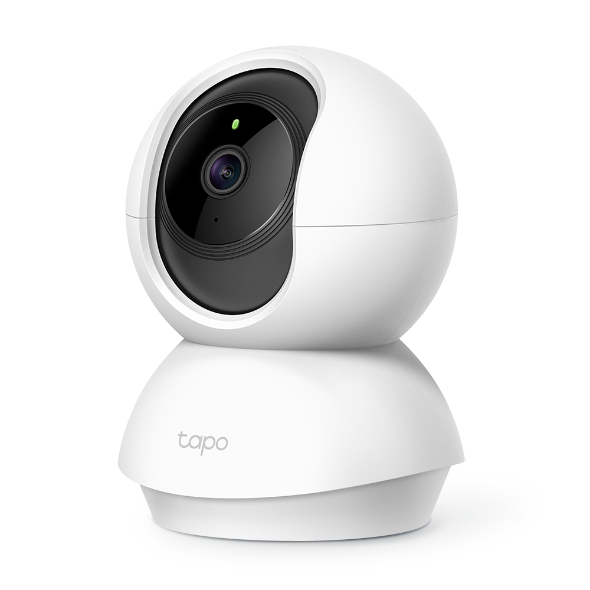
Review by Liam Burke.  The Tapo C200 is indoor security/monitoring camera from TP-Link. During my review I mainly used as Pet camera could be used as baby monitor or home security monitor also.  In the box, you get Tapo Pan/Tilt Home Security Wi-Fi Camera, Standard UK Plug with 3 metre cable, Quick Start Guide, Mounting Screws and a Mounting Plate The built-in speaker and power connection are at the rear of the camera.

The Microsd slot is located underneath the camera lens alongside the reset button (No Microsd included) On the base of the camera there is 3 soft rubber feet which give it some grip when placed on a surface.Using the mounting plate you could mount it on a wall/ceiling but I just placed mine on my kitchen counter, it’s a pity more companies don’t include a mounting guide.

Configuring the Camera

Using the Tapo App (available from Goolge Play Store or iOS) setting up the camera app was very straightforward. First sign-in to your Tp-Link account


You will be prompted to connect to a wifi network that the Tapo C200 will create for the initial connection, then you will get prompted to select the wifi network of your home that you want your Tapo to connect to and its Wi-Fi password.

Finally, there’s an option to name your Tapo C200 device and give it a nice looking icon for it. And that’s it! Your all set.The Tapo app is very straight forward and all the main features for the camera are easily accessible when you select your camera.

In the above screenshot the main options are clearly laid out like changing video settings from HQ/LQ video Auto (Day/Night Mode) and the Main Settings Menu.If you have multiple Tapos you can view them all on one screen at the same time. From the main screen if your viewing the stream you can take a picture or Start/Stop a recording, or make the picture fullscreen.

Other features are 

* One way talk

Allows one way communication from your phone to the camera’s speaker, handy mode if you want to talk to a baby or a miss behaving pet.

* Pan and tilt

I found it very responsive it has a good range of motion (360 Degree Rotational Views, 114 degree Vertical range) The apps has some modes of rotation, horizontal/vertical pan and mark a position that you can quickly return to.

Privacy button

To easily stop the recording functions of the camera.

* Switch Alerts on/off

Allows the user to disable/enable audio alerts on the camera’s speaker

* Playback and memory

This shows you what you have recorded and also the videos/pictures that you have saved.

Voice Call

Allows you to make a two way “normal” call to the Tapo from your device.


Camera Settings Menu

In the Settings menu you have plenty of options to configure the Tapo C200.

You can rename the camera, see what wifi network that your connected to and view signal strength. It would be nice if you could connect to a 5Ghz wifi but only 2.4Ghz is supported. Also there is an options to check for Firmware updates

Location will give you nice icon to show where the camera is located

Video Rotation, if you place the camera on a ceiling and you want to flip the images to that it appears the correct way up in the app.

LED. Option to disable/enable the LED.

Detection & Alerts, alerts are audio prompts that will use the cameras speaker.I have the Tapo set to Motion Detection for me, as I only want to record when the camera detects motion. It records in 1080p and Night vision up to 30ft and I found the quality of night time images quiet good.

“Notifications”, I disabled this as my pet as always setting of a recording then I would get notification, if you were using the camera as a security camera I would keep it enabled.

“Camera Alert” The camera will make an audio alert that it has detected motion, I had this disabled as I didn’t want the camera to make audio notification but if you setup a schedule it would be good security feature to enable. Even if you have pets you can select a certain area to check for motion

SD Card, I had issues with my 128GB Microsd card, the app should make it a bit more obvious that it has to format a Microsd card for the camera to use it. When I first inserted the card the camera said it had problems with the card. To resolve this you need to select the Format option in the settings menu and then you should be good to use your existing Microsd card (from the TP-Link website 128 GB on a microSD card, equal to 384 hours (16 days) of footage)

The Edit Schedule settings allows you to define periods when you want to record/not to record.

Advanced settings let you setup a camera account is to allow other apps/ from your PC to access your camera https://www.tp-link.com/uk/support/faq/2680/

On-screen Display, essentially allows you to inserts a timestamp and or customer text on your recording.

If you want to integrate with your Smart device I was easily able to get it to work with Alexa by using the Tapo Skill.


Image of the camera on the Amazon Echo Show 5, “Alexa show Kitchen”

If you looking for a security/indoor monitoring camera without a paid for cloud subscription that has excellent video quality it would be hard to beat the Tapo C200.

Daylight and Night time samples.

Full Specs 

https://www.tapo.com/uk/product/smart-camera/tapo-c200/

Available to Buy

https://www.amazon.co.uk/TP-Link-Security-Rotational-Required-Storage/dp/B07XR2NWZC/ref=sr_1_5?keywords=tapo+c200&qid=1583428858&sr=8-5

AWS Announces General Availability of Amazon Detective. Available in Ireland. #AWS #AmazonDetective

Today, Amazon Web Services Inc, announced the general availability of Amazon Detective, a new security service that makes it easy for customers to conduct faster and more efficient investigations into security issues across their AWS workloads. Amazon Detective automatically collects log data from a customer’s resources and uses machine learning, statistical analysis, and graph theory to build interactive visualizations that help customers analyze, investigate, and quickly identify the root cause of potential security issues or suspicious activities. There are no additional charges or upfront commitments required to use Amazon Detective, and customers pay only for data ingested from AWS CloudTrail, Amazon Virtual Private Cloud (VPC) Flow Logs, and Amazon GuardDuty findings. To get started with Amazon Detective, visit https://aws.amazon.com/detective/.

When customers face a security issue like compromised user credentials or unauthorized access to a resource, security teams must conduct an investigation to understand the cause, assess the impact, and determine the remediation steps. Before an investigation can even begin, customers must first collect and combine terabytes of potentially relevant data from network, application, and security monitoring systems, and make it available in a way that allows their security analysts to infer related anomalies. In order to explore the data, analysts rely on data scientists and engineers to turn seemingly simple questions like “is this normal?” into mathematical models and queries that can help produce answers. Customers then typically build custom dashboards that analysts use to validate, compare, and correlate the data to reach their conclusions. Security teams must continually re-establish baselines of normal behavior, understand new patterns of activity, and revisit application configurations as resources, accounts, and applications are added or updated in an environment. These complex and time-consuming tasks impede security teams’ ability to quickly investigate and respond to security issues.

Amazon Detective helps security teams conduct faster and more effective investigations. Once enabled with a few clicks in the AWS Management Console, Amazon Detective automatically begins distilling and organizing data from AWS CloudTrail, Amazon VPC Flow Logs, and Amazon GuardDuty findings into a graph model that summarizes resource behaviors and interactions observed across a customer’s AWS environment. Using machine learning, statistical analysis, and graph theory, Amazon Detective produces tailored visualizations to help customers answer questions like “is this an unusual API call?” or “is this spike in traffic from this instance expected?” without having to organize any data or develop, configure, or tune their own queries and algorithms.

Amazon Detective’s visualizations provide the details, context, and guidance to help analysts quickly determine the nature and extent of issues identified by AWS security services like Amazon GuardDuty and AWS Security Hub. Amazon Detective’s graph model and analytics are continuously updated as new telemetry becomes available from a customer’s AWS resources, allowing security teams to spend less time tending to constantly changing data sources. By letting the Amazon Detective service perform the necessary data sifting, security teams can more quickly move on to remediation.

“Even when customers tell us their security teams have the tools and information to confidently detect and remediate issues, they often say they need help when it comes to understanding what caused the issues in the first place,” said Dan Plastina, Vice President for Security Services at AWS. “Gathering the information necessary to conduct effective security investigations has traditionally been a burdensome process, which can put crucial in-depth analysis out of reach for smaller organizations and strain resources for larger teams. Amazon Detective takes all of that extra work off of the customer’s plate, allowing them to focus on finding the root cause of an issue and ensuring it doesn’t happen again.”

Amazon Detective is available today in the US East (N. Virginia), US East (Ohio), US West (Oregon), Europe (Frankfurt), Europe (Ireland), Europe (London), Europe (Paris), Europe (Stockholm), Asia Pacific (Mumbai), Asia Pacific (Seoul), Asia Pacific (Singapore), Asia Pacific (Sydney), Asia Pacific (Tokyo), and South America (Sao Paulo) regions, with more regions coming soon.

T-Systems, a subsidiary of Deutsche Telekom, is one of the world’s leading digital service providers. “As part of protecting our clients’ cloud applications and services, T-Systems’ security experts analyze billions of security-relevant events every day,” said Andrej Maya, Cloud Solutions Architect for T-Systems. “This has traditionally required using custom log management solutions that take considerable time and resources to maintain. Amazon Detective simplifies our security monitoring and helps our security analysts quickly understand potential issues without the complexity of managing the underlying data ourselves.”

WarnerMedia is a leading media and entertainment company that creates and distributes premium and popular content to global audiences. “Large security organizations are tasked with protecting huge environments with diverse workloads from a multitude of threats, while the smaller organizations I talk to often don’t have the resources to replicate the tooling and expertise of their bigger counterparts,” said Chris Farris who leads public cloud security for WarnerMedia and teaches Cloud Security for the SANS Institute. “Amazon Detective will help both of these groups reach faster, better-informed conclusions to their security investigations. It does the hard work of aggregating and analyzing high-volume telemetry sources like VPC Flow logs and CloudTrail. Larger organizations will see major efficiencies, and small teams will have access to information and tooling that they’d have a hard time collecting and building on their own.”

Expel provides transparent managed security, on-prem and in the cloud. “We have customers of all shapes and sizes running a diverse array of workloads on AWS, so it’s critical that we have high-quality data sources that can aid us in conducting fast and accurate security investigations,” said Peter Silberman, chief technology officer at Expel. “Amazon Detective offers our customers an additional layer of insight about what’s happening in their environment, which gives our security analysts more data and context to use during investigations without adding complexity to that process. With Amazon Detective, we’ll be able to process specific types of alerts faster, which means reducing investigation time and getting quicker, more detailed answers to our customers about what happened.

The Perfect MWC: Less Focus on the Latest Devices and More on the Future of the Mobile Industry. #MWC #5G #AI #MachineLearning

The perfect Mobile World Congress would focus less on the latest devices and more on the future of the mobile industry; it would be more of a collaborative forum where the entire mobile ecosystem comes together to define the state of the industry and identify what really needs to be done in order to move markets, solutions, and outcomes forward, states the MWC veteran analysts from global tech market advisory firm, ABI Research.

In its new whitepaper, The Perfect Mobile World Congress: 13 Visions for the Ideal Mobile Trade Show, ABI Research highlights that while MWC 2020 was a missed show, it’s not a missed opportunity. The cancellation was unavoidable, but “this pause may prove to be just what the mobile community needs: a chance to reflect, reengage, and, ultimately, reorient to most effectively chart the future of the industry,”  explains Stuart Carlaw, Chief Research Officer at ABI Research.

The Perfect Mobile World Congress visions from ABI Research’s analysts:

“Traditionally, most MWC events are inundated by noise-generating, but not revolutionary, announcements. This annual game of one-upmanship largely detracts from the meaningful discussions, dialogs, and negotiations that should be happening at the perfect MWC to build consensus around how to shape the future of the industry,” Carlaw propounds.

AI & Machine Learning: “The perfect MWC would have all telcos presenting at the event fully realize and embrace the importance of 5G and Artificial Intelligence (AI). The deployment of 5G already brings AI to radio access networks and backhaul optimization. Telcos will need to speed up their adoption curve by integrating AI into service-based architecture and utilize AI in various domains, such as customer service, inventory management, and network service orchestration,” offers Lian Jye Su, AI Principal Analyst at ABI Research.

5G and Mobile Network Infrastructure: “The perfect MWC would put the challenges facing the mobile telco domain in a market that is currently experiencing 5G deployments and mass market adoption of this new generation, including geopolitics, a declining economic environment, increased pressure on infrastructure vendors, and a transition to more open networks. An ideal MWC would have a forum to discuss all these aspects and become the central arena to move the industry forward,” advises Dimitris Mavrakis, 5G Research Director at ABI Research.

5G Markets: “The perfect MWC would have the telco market come together to identify and pursue SME requirements and create the platforms, services, and applications to cater to them. This may not mean doing everything alone, but to collaborate with the web domain to address this challenging market segment,” proposes Leo Gergs, 5G Analyst at ABI Research.

5G Devices, Smartphones & Wearables: “The perfect MWC would offer real insight into more collaboration in 5G. Indeed, a welcome prospect, with major vendors (yes, including perennial shunner Apple!) and component suppliers working closely with global carrier partners to create differentiated offerings taking 5G far away from the concept of being just another ‘G’,” advocates David McQueen, 5G Devices Research Director at ABI Research.

Digital Security: “The perfect MWC would have significantly more coverage of more cybersecurity-related issues. This is especially critical for any IoT-adjacent services, and with each IoT vertical holding its own unique security requirements (e.g., industrial, critical infrastructure, smart cities, etc.),” envisions  Michela Menting, Cybersecurity Research Director at ABI Research.

“One thing is for certain; the mobile industry is not learning lessons fast enough and is not answering the right questions at the right time.  The cancellation of MWC 2020 might seem a disaster, but the future is bleaker if the industry doesn’t pause, take some time to reflect, and radically retool its approach to be a fit-for-purpose entity, Carlaw sums up.

For even more visons of The Perfect MWC, download the whitepaper: https://abi.link/2VIMFRa.

Mobile phone myths Brits believe the most. #5G #Apps #Security #Mobile

This is more common sense than myth, but it’s worth noting modern smartphones are designed to optimise foreground “tasks” while others harmlessly float in the background. From 5G conspiracy theories to radiation poisoning, OnBuy’s mobile phone department conducted a survey to find out the mobile phone myths Brits believe the most and asked us to share it. 

When it comes to mobile phone batteries, OnBuy found the number one thing Brits believe is: apps running in the background use up battery. In fact, 87% of those surveyed believe this is true.

While this is more common sense than myth, it’s worth remembering modern smartphones are designed to optimise foreground “tasks” while others harmlessly float in the background.

Another common belief is overcharging a phone damages the battery (39%) or charging your phone overnight is bad for it (34%).

However, contrary to popular belief, modern smartphones contain chips to prevent charge overload. If your phone uses a lithium-ion battery, the current stops once its fully charged.

Urban Myths

Worryingly, Brits admit they have heard the following urban myths – but are yet to put them to the test!
You can cook an egg by placing it between two mobile phones – 6%

Never use a mobile when there’s a lightning storm – 19%

You can charge an iPhone in 20 seconds using a microwave oven – 25%

Myths included in OnBuy.com’s survey can be seen below OR see the full blog post HERE


  • Apps running in the background use up battery 87%
  • A screen protector will stop your phone getting scratched 77%
  • Taking out your SIM card keeps you from being tracked 75%
  • More megapixels = better camera 66%
  • You can dry a wet phone in a bag of rice 66%
  • Phones interfere with hospitals and planes 43%
  • Overcharging a phone damages the battery 39%
  • Charging your phone overnight is bad for it 34%
  • You shouldn’t keep your phone in the same pocket as a credit card 31%
  • Having a phone near your private parts can reduce sperm count / fertility 31%
  • Incognito mode protects your privacy 30%
  • Smartphones give off dangerous radiation 29%
  • Mobile phone use near a petrol pump can cause an explosion 26%
  • You shouldn’t use your phone while it’s charging 24%
  • A bigger battery means longer battery life 21%
  • You should drain your battery completely before charging 18%
  • Free Wi-Fi is safe to use 5%

Methodology

To achieve the results OnBuy.com sent out a survey to 3,446 British people. 50% of respondents that took part are male, 45% are female and 5% identify as “other.”