
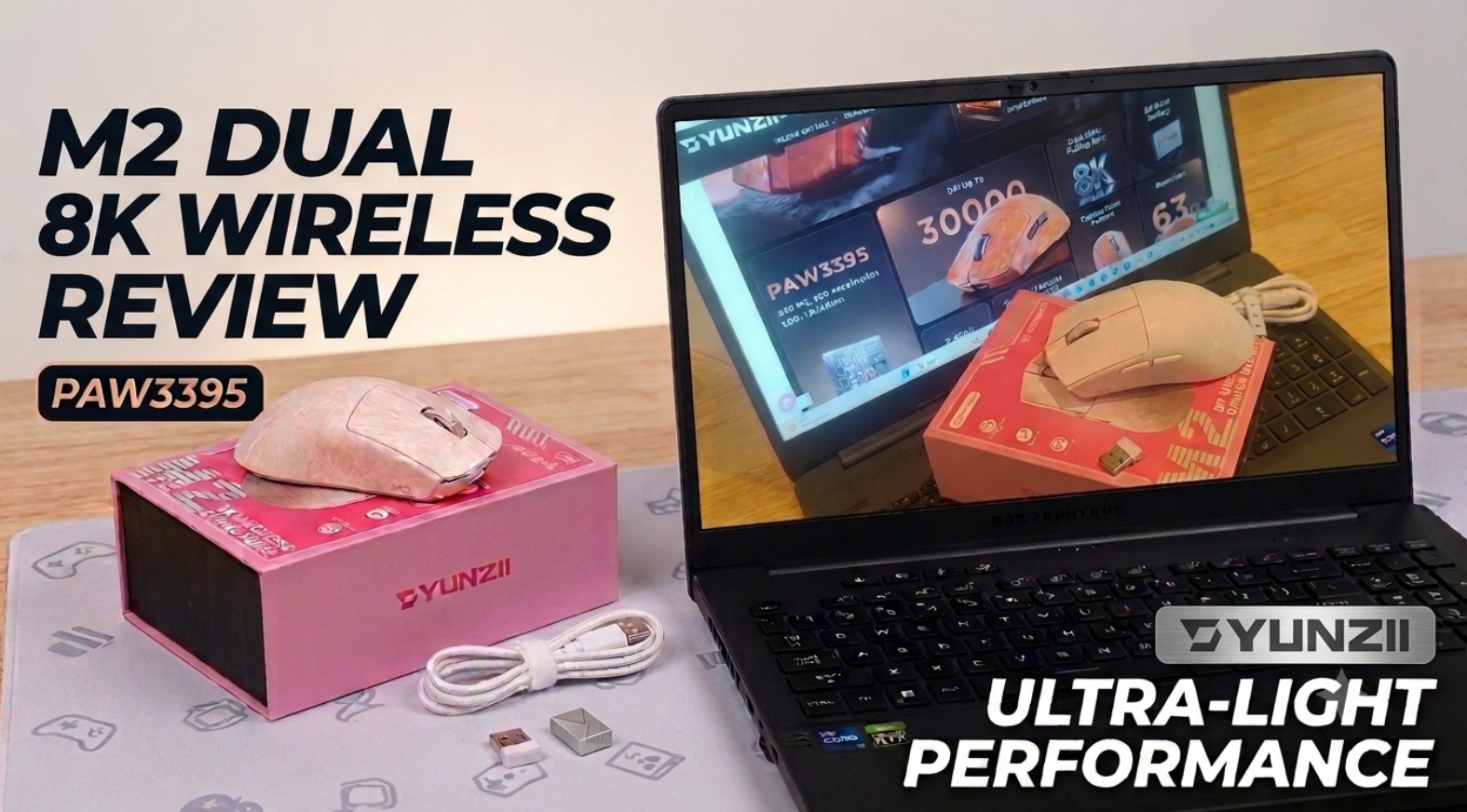
The gaming mouse market is a crowded one, so it can be difficult for a product to stand out. The YUNZII M2 Dual 8K Wireless Gaming Mouse manages to do just that, thanks to its exceptionally lightweight design, tri-mode connectivity and gaming-focused specifications. At just 63.5g, it is one of the lightest gaming mice I have used, and that is the first thing that stands out when you take it out of the box. The mouse has a familiar design that will not look out of place on either a gaming setup or an office desk, but beneath the surface there is far more going on than first appearances suggest.
Another nice touch is the inclusion of a hidden compartment underneath the mouse which houses the 2.4GHz wireless dongle. The compartment is held in place magnetically, ensuring the dongle is secure and less likely to be misplaced when travelling or switching devices.
Specifications
Product: YUNZII M2
Type: Dual 8K Custom Tri-Mode Wireless Gaming Mouse
Colour Options: White, Black, Pink, Orange
Battery: 500mAh
Sensor: PAW3395
Switch Type: Optical
Tracking Speed: 650 IPS
Acceleration: 50G
Lift-Off Distance: 1.0mm / 2.0mm
Connectivity: 2.4GHz Wireless, Bluetooth 5.2, Wired USB-C
Polling Rate: Up to 8000Hz via Wired and 2.4GHz Wireless, 125Hz via Bluetooth
Weight: 63.5g
- Buttons: 5
- DPI Range: 50-30,000 DPI
- Software Support: Windows software and web-based customisation tools for Windows and Mac users.
Dual 8KHz polling for competitive gaming
One of the headline features of the YUNZII M2 is the Dual 8KHz polling rate. The mouse supports an 8000Hz polling rate in both wired and 2.4GHz wireless modes, helping reduce input latency and allowing movements and clicks to be transmitted with minimal delay. This creates a noticeably responsive feel, particularly in fast-paced games where precision matters. The polling rate can also be adjusted through software, allowing users to balance performance against battery usage.
Combined with the PAW3395 sensor, which supports tracking speeds up to 650 IPS, acceleration up to 50G and a DPI range extending to 30,000, the hardware specification puts this mouse firmly in enthusiast territory.
Setup and use
Getting started with the YUNZII M2 is straightforward. It can be connected in three different ways:
- Bluetooth 5.2
- 2.4GHz wireless
- Wired USB-C
The switching controls are located on the underside of the mouse and all three connection methods worked seamlessly during testing. Pairing was quick and I experienced no connection issues throughout the review period.
One thing that may initially catch users by surprise is the absence of a traditional power button. Instead, the mouse automatically enters sleep mode after a period of inactivity and wakes immediately when moved. At first this felt unusual, but after using the mouse for several weeks it made sense and never proved to be an issue.
The 500mAh battery is rated for up to 50 hours of gaming use. During testing across both gaming and office work, battery life was generally solid. However, there was one occasion where the battery ran flat without any clear warning notification appearing on my Windows laptop. A more obvious low-battery alert would be a welcome addition.


Software and customisation
The YUNZII M2 supports both downloadable Windows software and web-based configuration tools, allowing users to tailor the mouse to their own preferences. https://mega.nz/file/rJMhRAaQ#NlvqgaG1pJ3LCbBVbfoJBzYv2_MLyh8wt5EKCOXEiUQ
Users can:
- Remap all five buttons
- Adjust DPI between 50 and 30,000
- Change polling rate settings
- Configure performance settings
- Create customised profiles
The flexibility offered here means the M2 is as suitable for productivity tasks as it is for gaming, allowing users to configure shortcuts and settings specific to their workflow.
Software can be downloaded from the manufacturer’s provided link, with browser-based configuration also available for users who prefer not to install software.

Design and build quality
The review sample supplied was the pink version, though describing it simply as pink does not really do it justice. The finish has more of a marble-effect appearance that gives it a premium look and helps it stand apart from the countless plain black gaming mice currently available.
Attention to detail is evident throughout the design. The magnetic storage compartment is practical and secure, while the branding on the wireless dongle itself adds a small touch of refinement that many manufacturers overlook.
That said, the lightweight nature of the mouse may not appeal to everyone. While many gamers actively seek out lighter mice, I personally found it almost too light at first. Having used heavier and more substantial mice for years, there was a short adjustment period before becoming comfortable with it. This is very much a matter of personal preference rather than a criticism of the design itself.
Another area where opinions may differ is the use of physical switches on the underside to move between connection options. Personally, I would have preferred a more automated switching system once devices had been paired and configured.
Warranty
One area where the package feels slightly less competitive is the warranty. YUNZII provides a one-year warranty from the date of purchase, which feels somewhat limited in a market where some buyers may expect longer cover on gaming peripherals.
About YUNZII
Founded in 2018, YUNZII is best known for its mechanical keyboards and enthusiast-focused peripherals. The company has built a reputation around customisation and user-focused designs, and the M2 follows that same philosophy by providing extensive configuration options alongside its gaming-focused hardware.
Final Thoughts
The YUNZII M2 stands out primarily because of its exceptionally lightweight design, weighing just 63.5g, making it one of the lightest gaming mice I have used. Combined with its tri-mode connectivity, support for both wired and wireless 8KHz polling rates, and the capable PAW3395 sensor, it offers a responsive experience whether gaming or carrying out day-to-day work tasks. The extensive software customisation options and practical magnetic storage compartment for the wireless dongle also add genuine value.
There are, however, a few areas where improvements could be made. The lack of a dedicated power button feels unusual at first, while the connection mode switches located underneath the mouse may not be to everyone’s taste. During testing, I would also have preferred a clearer low-battery notification, as there was little warning before the battery required charging. Finally, the one-year warranty feels somewhat limited compared to what some buyers may expect from a premium gaming peripheral.
That said, none of these points are major dealbreakers. If your priority is a highly responsive gaming mouse with an ultra-lightweight design, flexible connectivity options and extensive customisation features, the YUNZII M2 makes a strong case for itself. It successfully bridges the gap between competitive gaming performance and everyday usability, while offering a distinctive design that stands out from the crowd. For gamers seeking a lightweight wireless mouse with modern connectivity and extensive tuning options, the YUNZII M2 is certainly worth considering.