Pivo Inc, leading AI technology developer that aids self-improvement by turning smart devices into a user’s personal camera crew, has launched their new premium offering: Pivo Max. Building on the success of their hero products Pivo Pod and Pivo Pod Lite, Max offers compatibility with tablets and cameras for the first time.
Pivo Max, named an Innovation Awards Honoree at CES® 2023, builds upon Pivo Pod’s existing capabilities. By simply attaching the smart mount to their tripod, users can capture stunning 360° footage with Pivo’s AI-powered technology. When synced with the Pivo+ and Pivo Play apps, Pivo’s Face and Body Auto-Tracking feature means users can move freely, never having to worry about leaving the frame.
The all-new Pivo Max has a wide range of uses – much like the Pivo Pod and Pivo Pod Lite models, it is ideal for fitness, coaching, equestrian and sports practice. With its larger, 2kg payload and tablet and camera compatibility, Pivo Max has a wider professional appeal, perfect for established creators, real estate agents and even those in education or business settings.
Like the Pivo Pod, Pivo Max maintains horse and dog [now out of beta] tracking capabilities, so users can capture training routines and coaches can join remotely.
Pivo Max comes equipped with six different rotation speeds: Slower, Slow, Normal, Fast, Frenzy, Turbo. Whether users are recording a presentation in-class or a dance tutorial at the studio, they can rest assured Pivo Max will keep up with them.
Pivo Max comes with an integrated LED status, so users can easily view power, pairing, connection, charge, capture and recording statuses. Also new is the Pivo Max Power Bank, available for purchase separately. The Power Bank allows users to simultaneously charge their Pod and personal device during use.
Ken Kim, CEO of Pivo says of the release, “Following the success of our other mounts – the Pivo Pod and Pivo Pod Lite, we wanted to offer a model that not only offers more premium features, but is also geared towards professionals in their field. Pivo Max is a game changer for markets like real estate and education, and we’re excited to see the technology that worked so well for our earlier models continue to reach new heights.”
Pivo Max, which comes with a remote control and is compatible with both Pivo apps, is available in the UK now from uk.pivo.ai with an RRP of £239.99. Between June 19th – 30th Pivo will be offering up to 30% off Pods as part of their Summer Flash Sale.
The Maynooth University Foundation is delighted to announce the creation of a state-of-the-art robotics lab, which will be supported by a donation from Intel Ireland. The lab will provide MU students with invaluable hands-on learning experiences using cutting-edge robotic technologies.
The establishment of the robotics lab at a total cost of €150,000 will equip Maynooth University students with access to innovative robotic technologies and equipment used by engineers from Intel and other companies. This hands-on experience will enable them to bridge the gap between classroom learning and real-world application, empowering them to develop and refine their skills in robotics.
The new robotics lab is set to become a hub of innovation, where students can explore and experiment with robotics, pushing the boundaries of technology and unlocking new possibilities. This new lab will support students in MU’s current degree programmes in Robotics and Intelligent Devices, Electronic Engineering and Computer Science.
The gift from Intel is coupled with an investment from the University, demonstrating the power of public-private partnerships to fuel innovation and improve student learning experiences.
The establishment of the robotics lab further strengthens the ties between Intel and Maynooth University.
Dave Selkirk, the Director of Advanced Analytics MSO Automation at Intel Ireland, said: “We are very proud of our close partnership with Maynooth University, a close neighbour of ours here in North Kildare. The development of key infrastructure in the area of robotics will provide an important opportunity for students to gain practical experience in an evolving technology field that has massive potential in Advanced High-Volume Manufacturing.”
Vice-President External Affairs at Maynooth University Rebecca Doolin said: “We are tremendously grateful to our neighbour and partner Intel for supporting the development of a new robotics lab, which will give Maynooth students hands-on learning opportunities to work with the same robots Intel engineers down the road are using, bringing their classroom learning to life.”
Doolin noted a Memorandum of Understanding (MOU) signed by Maynooth University and Intel in 2019, and its significance in creating a strategic research and innovation partnership.
“Over the years, Maynooth University has developed a strong partnership with Intel that has fostered collaboration in various areas, including student skills and experiences, research, innovation, and community engagement. As neighbours in a vibrant and fast-growing region of Ireland, today’s announcement not only deepens the ties between Intel and MU, but also demonstrates the positive impacts on student learning and innovation that such partnerships can yield.”
Prof Gerry Lacey, Head of Engineering at Maynooth University, said: “Robotics and AI are creating new industries, making agriculture more sustainable and revolutionising transportation. We are excited that Intel’s support will help our students to become leaders in creating this new future.”
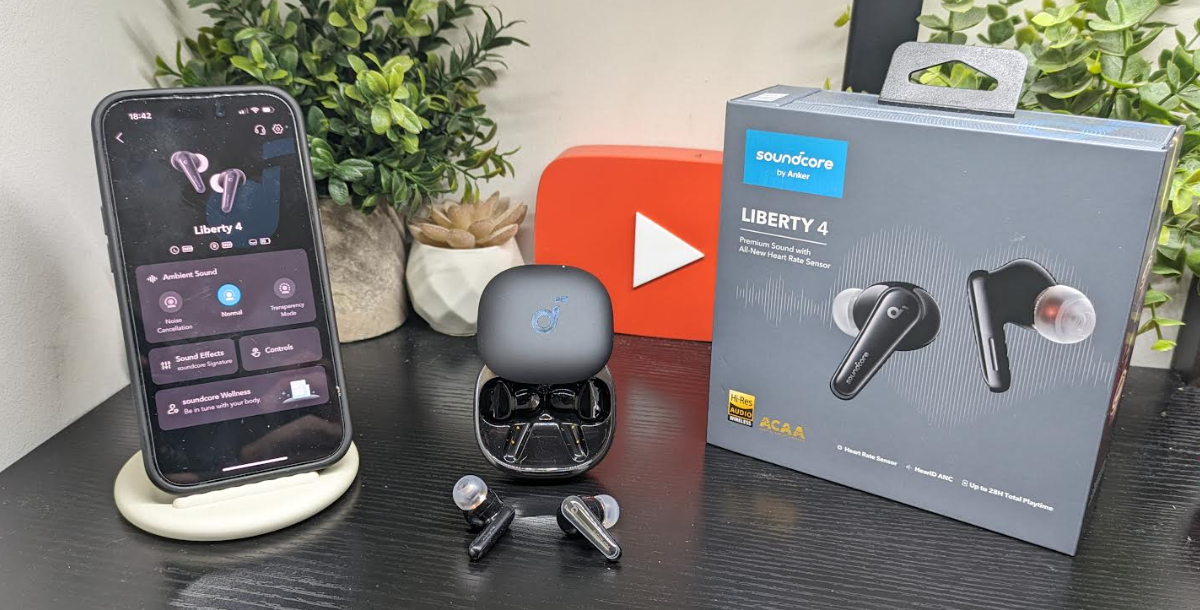
The last pair of earbuds reviewed from Soundcore was the Liberty 3 pro which was one of my top earbuds at the time for that year and still remain high on the list still today and a pair of earbuds which can be now got fairly cheap which is something you could do if on a budget and when the Liberty 4 arrived I was really interested to see how these would sound coming off the back of the Liberty 3 pro even though the shape and style is different with no wings either. These earbuds however come packed with technology for those into fitness and of course sound which is important but there is much more tech in this pair and are an ideal for those who want to log fitness data which being honest is not me but the tech is there and there is many who will certainly take the company up on thes featured more aligned with smartwatches.
These are stem styled earbuds and look clean and fit well and before you get moving you need to download their app and do the HearID ANC test to get them set up properly for the best quality and they certainly deliver on the ANC aspect. They are comfortable to wear for long spells and will not fall out and once the right tips fitted you are good to go. The ANC is not up with the Liberty pro 3 but still good overall. Rather than having a touch sensitive are here or button these earbuds operate by squeezing them and there is different squeeze forces you could apply but this is down to the individual user to set up.
The fitness aspects of the app are great and they use your mobile phone to set some things up like the calibration for example which you will see in the video review below. As mentioned above these are more targeted at people into fitness however the audio is for everyone but with the fitness element thrown in they offer super value for money.
The app is packed with features and settings and you should explore them all to get the maximum effect out of them, for me all instances not used plus I have so many earbuds into test but I go over what is on these which you will not find on other earbuds, these earbuds would need be in your ears quite a lot to use the full suite of features and get the results you want..
When it comes to sound there is lots on offer and they sound great for the money and overall give other more expensive offerings a run for their money but again not up their with the Liberty Pro 3 however still excellent overall..The sound is in short great loud and punchy with no lag latency no distortion when maxed out and overall just spot on and with the app these deliver excellent value for the money and put it up to the rest that are more expensive, so if you are a fan of the brand and need new earbuds and on a certain budget put these on your list to check out.
The App
Features
Crisp, clear sound via ACAA™️ 3.0 Coaxial Acoustic System
360° immersive spatial audio with music and movie modes
Google Maps is expanding Immersive View to new cities and landmarks, introducing a simpler way to navigate, and updating Recents on desktop Google Maps. The great news is this includes Dublin and for those who will now begin their holidays or those who will travel to Dublin should check the latest update out, check out the news below.
In many parts of the world, summer is here —- which often means time for trip planning and exploration. Today, we’re sharing three new updates from Google Maps to help you make the most of your summer adventures.
Immersive View: rolling out to new cities and available for 500+ landmarks around the
Earlier this year, we launched Immersive View to transform the way you explore — using AI to fuse together billions of images and create a multidimensional view of the world with trusted information layered on top. Today, we’re starting to roll out Immersive View in four new cities: Amsterdam, Dublin, Florence and Venice — and are expanding it to over 500 iconic landmarks around the world, from Prague Castle to the Sydney Harbour Bridge on Android and iOS.
So if you’re planning a trip to Boston and want to see the historic Faneuil Hall, you can get a jump start on familiarizing yourself with the area before you visit. Just search for it in Google Maps and tap on the first video to virtually soar over the building and find places nearby. With the time slider, you can see what the weather will be like at different times of day and how crowded it will be so you can plan ahead. And where we have data available, you can peek inside of restaurants and cafes to help you decide whether you want to make a reservation — thanks to an advanced AI technique called neural radiance fields, or NeRF — which was developed right here at Google.
Track your trip progress with glanceable directions, which start rolling out this month
While we love the rich details of Immersive View, we also know that sometimes less is more — especially when you’re somewhat familiar with your route and just need to see when the next turn is. That’s why we’re launching glanceable directions in Maps, helping you easily track your trip progress right from your lock screen or route overview.
Once you opt in, just request directions to your destination and get going. You’ll see updated ETAs and where to make your next turn — information that was previously only available in comprehensive navigation mode. And if you decide to take another path, we’ll update your trip automatically. Glanceable directions start rolling out globally this month for walking, cycling and driving modes on Android and iOS.
Stay organized and plan trips with new updates to Recents on desktop
One of the most difficult parts of planning a trip is keeping track of all the places you want to visit — especially if you’re visiting multiple cities. We built Recents on desktop to help with just that. It automatically organizes places you’ve researched into a handy highlight on the left side of your screen when you open Maps.
Now, with new updates rolling out globally next month, we’ll save places in your Recent highlights even after you close your Google Maps window — so you can take a break from planning and come back to it later without ever losing your progress. You can remove places you’ve viewed, plan multiple trips at once and share a selection of places — like attractions or hotels — with your travel buddy to get their thoughts. Once you know where you want to visit, select three or more destinations, click “directions,” and Maps will even create a custom route that hits all your stops and saves it to your Recents. Who’s up for a summer road trip!
Whether you’re hitting up local gems, a national park or flying halfway around the world, let Google Maps be your ultimate travel companion this year.
We’re going discuss the top 7 no-watermark video editors for PC in 2023. We’re going to mention their distinctive features and the pros of using each one. After reading this article, you should easily be able to choose the one that fits your needs.
1. Movavi Video Editor
This no-watermark video editor stands out with its user-friendly interface and intuitive controls, making it a popular choice for beginners seeking a hassle-free video editing experience. Here are the pros of using it in comparison to other tools:
Built-in media content: It includes a library of royalty-free music tracks and sample videos to enhance and complement your projects.
Fast rendering and exporting: The software offers efficient rendering and exporting options, enabling users to save time during the final production process.
Audio editing and enhancement features: Alongside video editing, it allows users to edit and enhance audio tracks to achieve optimal audio quality. We don’t want sloppy audio in our videos.
Screen recording: It enables users to capture and record their screen activity, which is ideal for creating tutorials, demonstrations, or gameplay videos.
Automatic video creation: There’s a feature called The Montage Wizard which provides a quick and automated way to create professional-looking videos by guiding users through the editing process.
2. Clideo
Thisedgy video-making tool features cloud-based functionality, allowing users to edit videos online without the need for software downloads or installations, making it accessible and convenient for users across various devices and systems. Other pros:
Online accessibility: It allows users to edit videos online from anywhere with an internet connection, eliminating the need for specific hardware or software installations. It’s an awesome feature.
Privacy and security: The developers value your privacy and ensure that your uploaded videos are not shared with any third parties, providing a secure environment for your editing projects.
Quick processing: The powerful cloud infrastructure enables fast processing times, allowing you to edit and save your videos efficiently. However, it depends on the length and complexity of the videos.
3. Kapwing
Another program that has a unique feature of collaborative video editing where it allows multiple users to work together on a video project simultaneously, making it ideal for teamwork and cooperative content creation. Other pros include:
Creative templates: The software features a library of pre-designed templates for quick and easy video creation. Something suitable for both professionals and beginners trying to make great videos.
Subtitle generation: It allows users to automatically generate subtitles for their videos or manually add and customize them. The possibility to customize subtitles is more than welcome in many cases.
Cloud storage: Similar to the previous one, it offers secure cloud storage for edited videos so you can easily access and share them.
Social media optimization: This video editor provides features that are tailored for social media platforms, including resizing, aspect ratio adjustments, and meme creation.
4.OpenShot video editor
This universal video editor is great because it’s available across all platforms, including Windows, Mac, and Linux. It allows users to enjoy its features and capabilities regardless of the preferred platform. These are the pros of using it:
Keyframe animation: This feature empowers users to have precise control over animated elements, allowing them to create dynamic and customized visual effects.
Multi-track editing and timeline: It enables users to work with multiple audio and video tracks simultaneously, providing greater flexibility and control over the editing process.
Real-time preview: The software allows users to preview their edits in real-time, providing instant feedback on how changes impact the final result, enhancing the editing workflow and efficiency.
5. Animoto
As another video editor without watermark branding, it has intelligent video creation technology that automatically generates professional-quality videos by analyzing the content you choose, making it effortless to create polished videos with minimal effort or expertise. Other pros are:
Analytics and insights: It allows you to gain valuable insights into the performance of your videos with built-in analytics, helping you understand audience engagement. You can optimize your videos according to that.
Branding and customization: The software lets the users customize videos with their brands, logos, watermarks, colors, and fonts to maintain their brand consistency.
Drag and drop: The intuitive drag-and-drop interface allows us to easily arrange and edit our media files. It requires no technical expertise. It’s great for beginners.
Text and caption options: We can add text overlays, captions, and subtitles to our videos to convey messages, enhance storytelling, or provide context. This can be great for tutorials.
6. CyberLink PowerDirector
There’s one feature that sets this Windows PC video editor, its AI-powered style effects which utilize artificial intelligence algorithms to transform videos into stylized visual effects, giving them a distinct and artistic look not easily replicated by other editors:
360-degree video editing: The editor allows us to edit and enhance immersive 360-degree videos with dedicated tools for trimming, adding effects, and creating dynamic perspectives.
Professional-grade color correction: It lets us utilize powerful color grading tools, including LUTs(Look-Up Tables), color wheels, and advanced adjustment controls for precise color manipulation.
Customizable design tools: The software allows the user to create custom titles, menus, and graphics with its built-in design tools and templates for a polished and professional look.
Dynamic video effects: There’s a possibility to access a wide range of visual effects, transitions, titles, and animated overlays to add flair and creativity to your videos. Most video editors have effects, but this one has great effects.
7. Shotcut
The final cross-platform video app on this list has a powerful and customizable filter system, which allows users to apply a wide variety of visual and audio effects to their videos, giving them extensive creative control over their projects. Here are the other pros of using it:
Native timeline editing with multitrack functionality: It enables users to create intricate and layered video compositions by stacking and arranging multiple video and audio elements, resulting in visually dynamic and immersive storytelling.
Hardware encoding and decoding for improved performance: The software leverages hardware encoding and decoding capabilities, utilizing the power of the user’s hardware to enhance performance and ensure smooth editing and playback of videos.
Wide selection of video and audio filters and effects: It provides a broad range of video and audio filters and effects, including color grading tools, transitions, visual effects, and audio effects, providing users with extensive creative options.
Customizable interface and keyboard shortcuts: The software allows users to customize the interface layout and create personalized keyboard shortcuts, optimizing the editing workflow based on individual preferences.
Conclusion
These 7 pieces of software are the top no-watermark video editors for PC available. They all have their distinctive unique features based on which you can choose your preferred one. Hopefully, we made your decision much easier for you.
FUJIFILM Europe GmbH, Imaging Division, announced today the launch of its new INSTAX SQUARE SQ40 instant camera (SQ40), a new addition to the INSTAX SQUARE lineup of instant cameras. Fujifilm has also introduced a new INSTAX SQUARE instant film variety, “Sunset”, featuring a variety of film borders with soft color gradients designed to be reminiscent of a serene, peaceful sunset.
“Consumers love our INSTAX MINI 40 instant camera, so expanding the line to also include a SQUARE format option just made sense,” said Shin Udono, Senior Vice President, Imaging Solutions, FUJIFILM Europe. “Not only can INSTAX fans now have another instant camera with a classic look, but they can also now enjoy the SQ40’s large, square image area.”
Key SQ40 features include:
Automatic Exposure function
The SQ40’s Automatic Exposure function automatically senses the level of ambient light when the shutter button is pressed, optimizing the shutter speed and flash output according to the scene. It allows even novice INSTAX instant camera users to take photos that are automatically adjusted regardless of interior or exterior conditions, producing high-quality photos on-the-spot.
Selfie Mode for quicker and easier selfies
Users can activate the Selfie Mode, perfect for taking selfies and close-up shots, by simply twisting the lens after powering the SQ40 on. Using this mode to take amazing selfies and close-ups is incredibly easy and convenient.
New Film Variety Introduced:
Also accompanying the launch of SQ40 is Fujifilm’s launch of the new INSTAX SQUARE “Sunset” variety of instant film. The design of this new square format instant film is inspired by the gentle gradation of the colors in the sky during a sunset. As with all INSTAX SQUARE instant film varieties, Sunset will be available in a single pack with 10 exposures.
INSTAX MINI EVO Now Available in Brown:
Fujifilm is also pleased to introduce brown as a new color option for its FUJIFILM INSTAX MINI EVO hybrid instant camera (MINI EVO) product line. Initially introduced in 2021 in a black camera body, MINI EVO’s unique hybrid format combines the excitement and satisfaction of traditional instant camera functionality with the capabilities of digital imaging technology to select, share, and store specific images. Paired with INSTAX MINI instant film, MINI EVOcreates high-quality prints directly from the camera. Images can also be printed from a paired Smartphone camera roll using the INSTAX MINI EVO Smartphone App.
Pricing and Availability:
Fujifilm’s INSTAX SQUARE SQ40 instant camera will be available at Fujifilm stockist’s nationwide at a manufacturer’s suggested retail price EUR 150.00 (incl. VAT) and is expected to be available for purchase on 29th June 2023. For more product information, visit www.instax.ie/cameras/square-sq40/
INSTAX SQUARE Sunset instant film is also expected to be available on 29th June 2023 at a manufacturer’s suggested retail price of EUR 11.00 (incl. VAT) per pack (10 sheets). For more information about this new INSTAX SQUARE instant film variety, visit www.instax.ie/film/#film-selector.
Fujifilm’s INSTAX MINI EVO hybrid instant camera in brown will be available at a manufacturer’s suggested retail price of EUR 200.00 (incl. VAT) and is also expected to be available for purchase on 29th June 2023. For more information regarding the INSTAX MINI EVO product, visit www.instax.ie/cameras/mini-evo/
HP Ireland today issued its quarterly HP Wolf Security Threat Insights Report, showing threat actors are hijacking users’ Chrome browsers if they try to download popular movies or video games from pirating websites.
By isolating threats that have evaded detection tools on PCs, HP Wolf Security has specific insight into the latest techniques being used by cybercriminals in the fast-changing cybercrime landscape. To date, HP Wolf Security customers have clicked on over 30 billion email attachments, web pages, and downloaded files with no reported breaches.
Based on data from millions of endpoints running HP Wolf Security, the researchers found:
The Shampoo Chrome extension is hard to wash out: A campaign distributing the ChromeLoader malware tricks users into installing a malicious Chrome extension called Shampoo. It can redirect the victim’s search queries to malicious websites, or pages that will earn the criminal group money through ad campaigns. The malware is highly persistent, using Task Scheduler to re-launch itself every 50 minutes.
Attackers bypass macro policies by using trusted domains: While macros from untrusted sources are now disabled, HP saw attackers bypass these controls by compromising a trusted Office 365 account, setting up a new company email, and distributing a malicious excel file that infects victims with the Formbook infostealer.
Firms must beware of what lurks beneath: OneNote documents can act as digital scrapbooks, so any file can be attached within. Attackers are taking advantage of this to embed malicious files behind fake “click here” icons. Clicking the fake icon opens the hidden file, executing malware to give attackers access to the users’ machine – this access can then be sold on to other cybercriminal groups and ransomware gangs.
Sophisticated groups like Qakbot and IcedID first embedded malware into OneNote files in January. With OneNote kits now available on cybercrime marketplaces and requiring little technical skill to use, their malware campaigns look set to continue over the coming months.
“To limit the chances of a security breach, businesses and users should avoid downloading files from untrusted sites. We have observed that threat actors are hijacking users’ Chrome browsers at times when downloading popular movies or video games from pirating websites. To protect against the latest threats, employees should be cautious of suspicious internal documents and check with the sender before opening. Organisations should also configure email gateway and security tool policies to block OneNote files from unknown external sources,” explains Val Gabriel, Managing Director of HP Ireland.
From malicious archive files to HTML smuggling, the report also shows cybercrime groups continue to diversify attack methods to bypass email gateways, as threat actors move away from Office formats. Key findings include:
Archives were the most popular malware delivery type (42%) for the fourth quarter running when examining threats stopped by HP Wolf Security in Q1.
There was a 37-percentage-point rise in HTML smuggling threats in Q1 versus Q4.
There was a 4-point rise in PDF threats in Q1 versus Q4.
There was a 6-point drop in Excel malware (19% to 13%) in Q1 versus Q4, as the format has become more difficult to run macros in.
14% of email threats identified by HP Sure Click bypassed one or more email gateway scanner in Q1 2023.
The top threat vector in Q1 was email (80%) followed by browser downloads (13%).
“To protect against increasingly varied attacks, organisations must follow zero trust principles to isolate and contain risky activities such as opening email attachments, clicking on links, or browser downloads. This greatly reduces the attack surface along with the risk of a breach,” comments Dr. Ian Pratt, Global Head of Security for Personal Systems, HP Inc.
HP Wolf Security runs risky tasks like opening email attachments, downloading files and clicking links in isolated, micro-virtual machines (micro-VMs) to protect users. It also captures detailed traces of attempted infections. HP’s application isolation technology mitigates threats that might slip past other security tools and provides unique insights into novel intrusion techniques and threat actor behavior
Expleo, a global engineering, technology and consulting service provider, today announces the results of new research, which found that 49% of enterprises on the island of Ireland will spend less on sustainability initiatives in the next 12 months, compared to the previous 12 months, due to concerns about the current economic outlook. This comes despite 84% of business leaders believing that their organisation could do more to make their IT infrastructure and projects more environmentally friendly. The research is published in Expleo’s Business Transformation Index (BTI) 2023 Ireland Spotlight report, which is launched today.
The global study, which included a survey of 141 business leaders in medium to large-sized enterprises on the island of Ireland, suggests a softening of the importance being placed on sustainability by businesses operating in Ireland. Along with reduced investments in sustainability efforts, the proportion of organisations reporting to have clear plans that will help Ireland to meet its decarbonisation targets has gone down from 90% to 80%. Meanwhile, just 22% of business leaders surveyed said that they are focussing on climate action as part of the UN Sustainable Development Goals, versus a considerably higher 37% globally.
While economic uncertainty is squeezing sustainability budgets, business leaders also expressed concerns that too great a focus on sustainability can hamper innovation. Expleo’s research found that more than a third (35%) believe that focusing too much on sustainability will limit their organisation’s ability to innovate. This is in contrast to a larger proportion (49%), who believe a focus on sustainability is, in fact, a strong catalyst for innovation.
The BTI research found that a failure to act on sustainability is proving costly for businesses in Ireland, as 54% – versus 41% globally – reported having lost customers due to dissatisfaction with their sustainability performance last year. Conversely, 47% of businesses said that they themselves had stopped working with suppliers or customers who were not meeting their sustainability expectations.
In addition to reviewing their customer and supply chains, businesses are also offsetting the environmental impact of their technologies and IT infrastructure. Expleo’s research found that the average business is currently offsetting 43% of the carbon footprint of their technologies and IT infrastructure. In the next 12 months, the average enterprise in Ireland will spend €1.4M on offsetting their IT and technologies.
Other sustainability initiatives that medium to large-sized businesses are pursuing include: developing more environmentally sustainable products and services (53%); using technology to monitor where resources are being wasted and therefore reduce consumption (45%); using renewable energy sources to power facilities and technologies (45%); and sourcing from environmentally responsible technology suppliers and partners where possible (43%).
Looking to the future, the most common plans of action amongst those surveyed included mapping out a Net Zero future for their company (58%) and shifting to a circular business model (57%).
Phil Codd, Managing Director, Expleo Ireland, said: “Our Business Transformation Index 2023 Ireland Spotlight provides valuable insights and recommendations on the challenges facing organisations today and the transformative business practices that can pave the way to success. Sustainability has become core to this success to the point where it is not just the right thing to do anymore; it is a deal-breaker for doing business. Our research shows that without it, organisations are suffering reputational damage and the lost revenues that come with it – something that we expect will continue and even intensify in tandem with the widespread focus on sustainability.
“While it is important to keep a watchful eye on the economic outlook, businesses must realise that sustainability is not optional. Becoming a more sustainable enterprise may require upfront investment, but in the long-term, the resulting initiatives promote innovation, efficiency and cost-saving. Reducing sustainability investments is therefore by far the more costly option.”
Jabra, a leader in personal sound and hybrid work solutions, announces new AI-powered features for its PanaCast 50 and PanaCast 50 Room System today at InfoComm 2023. Hybrid meetings are top of mind for businesses, with Jabra research* revealing that 80% of all meetings globally are either fully virtual or hybrid. So, it is important that employees get the most out of their meetings, regardless of where they are joining from. rom.
To address this need, in collaboration with Microsoft, Jabra is introducing new updates to its PanaCast 50 video bar, including Microsoft IntelliFrame with multiple video streams, as well as face and voice recognition functionality**. These new features aid Microsoft’s next-generation AI tools, including intelligent meeting recap in Teams Premium to revolutionise meeting experiences.
PanaCast 50 enable productivity powered by AI
As organisations strive to increase productivity in light of hybrid working, Jabra’s collaboration with Microsoft unlocks a new era of inclusive and dynamic communication. The PanaCast 50 will be one of the first intelligent front-of-the-room Teams Rooms on Windows video bar to enable Microsoft IntelliFrame with multiple video streams. Additionally, with Teams’ voice recognition capabilities, the PanaCast 50 allows in-room participants to maintain their identity in the meeting transcript, aiding AI based productivity tools.
With intelligent recap in Teams Premium, you’ll get automatically generated meeting notes, recommended tasks, and personalised highlights to help you get the information most important to you, even if you miss the meeting. Meanwhile, Microsoft IntelliFrame giveseach in-room participant a dedicated camera view, providing a more inclusive remote experience and providing an optimised front row experience in room-to-room meetings.
Both features play a key role in helping employees to have more productive meetings, get up to speed on focus topics, organise key discussion points, and summarise actions so that the entire group understands the next steps.
PanaCast 50 enables dynamic communication by facial and vocal identity technology
The new multiple video stream functionality enables remote users in the Teams meeting to have a better view of who is in the meeting room with three video streams: the first stream is the current speaker, the second stream is for the previous speaker, and the third stream is the full panoramic room view of the meeting room or space, so no individual is excluded. The upcoming face recognition functionality allows in room participants – upon authorisation with individual enrollment – to display their names to remote users and populate the meeting room roster.
Voice recognition functionality – upon individual enrollment – enables in room participants to maintain their identify in the meeting transcript, enabling more precise intelligent recaps for users with a Teams Premium license.
Hybrid meetings are also taken to the next level as the system comes equipped with the Jabra Intelligent Meeting Space. The new features allow customers to set a meeting room or space virtual boundary with PanaCast 50, so that people within the defined space are fully included, whereas people outside of the boundary are not inadvertently included. The new feature allows PanaCast50 to exclude people who are visible through glass walls and are not part of the meeting.
Aurangzeb Khan, Senior Vice President of Intelligent Vision Systems at Jabra, says, “At Jabra, we are always looking for ways to harness the power of cutting-edge AI technologies to revolutionise hybrid and remote meetings. This is why we are thrilled to introduce these new PanaCast 50 capabilities for collaboration with Microsoft Teams. These features are set to give professionals immediate productivity benefits, helping them better navigate the hybrid working era seamlessly, online and offline.”
Albert Kooiman,Senior Director, Microsoft Teams Devices Partner Engineering and Certification at Microsoft says, “Microsoft Teams leverages the power of AI to create unique user experiences before, during and after Teams meetings, to enhance employee inclusion and drive natural collaboration. Jabra and Microsoft closely worked together on the PanaCast 50 to make this device an essential component of unlocking these AI powered features for individuals, teams, and businesses.”
Building a next generation device management platform.
Jabra is looking to bring the same level of innovation into the device management side of our collaboration solution space. With IT managers and partners, the task of managing their installed devices is a vital success factor and Jabra PanaCast customers are no different. Jabra’s intelligent meeting room solutions require a management platform that takes full advantage of all the capabilities on offer, while also ensuring we reduce time and effort spent managing them. This reimagined management platform is planned for wider availability by the end of this year.