Mozo have sent us their latest cases for the Nokia 7.1 and for those who are familiar with the company they make really stylish simple cases for smartphones giving them a really nice look and feel. The Nokia 7.1 is a tad slippy but these case sort that issue out and give you some form or protection too.
These cases are minimalist yet offer some protection with a small lip on the front of the device and all the corners are catered for. All ports and keys are easily accessible and there is not much thickness added to the device yet you gain extra grip. The two tone look is really nice and stands out sat on a table or flat surface yet will last some time depending on the person themselves.
1 / 14
Designed in Helsinki, this case is a classic example of Mozo design and represents Mozo’s long legacy and passion for Nokia devices!
Created to be the perfect fit, this handmade case with light grey texture and beautiful Spanish leather seamlessly styles up your Nokia 7.1. Slim yet protective, it adds extra grip which is essential in everyday use.
Minimal and sophisticated.
Ultra slim & a perfect fit for Nokia 7.1
Material: textile, premium Spanish leather, non-toxic water-based edge paint, and PU
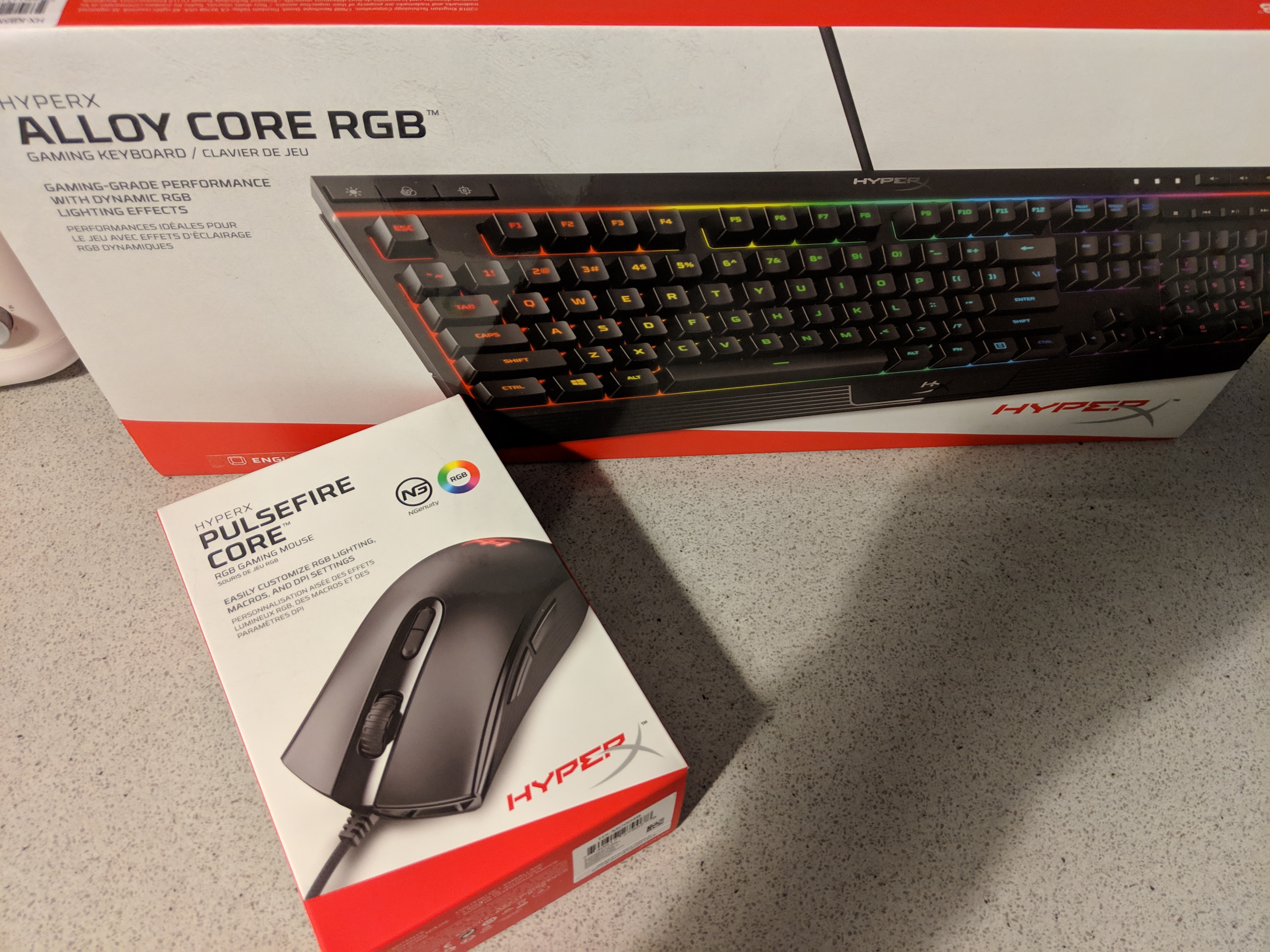
For the gamers we have two new products in from HYPERX. We have the Pulsfire Core RGB gaming Mouse and to match it we also have the Alloy Core RGB keyboard which when lit together both look really cool under dark conditions. Today is a quick first look and unboxing of the pair and we will have a review in the coming week or two, If these are something that you might be interested in head to the links below to check em out.
The Devolo Magic 2 Wi-Fi box is heavy with typical Devolo features clearly visible on the box. The three sockets are heavy and solid. The most noticeable feature of the kit is the plug socket allowing a separate plug to be plugged into the socket. The traditional socket means that you lose a wall socket when using a power extender. The socket is physically wider than a typical plug which may result in two plugs not fitting into the same socket. The Devolo focuses on magic but the technology via the home plugs allows broadband via the plug socket and then Wi-Fi to the other area expanding the home. The Devolo Magic 2 Wi-Fi Powerline used the power cable in the property to carry the data around your home or office.
Box Contains:
2 x Devolo magic 2 Wi-Fi add-on adapters
1 x Devolo magic 2 LAN add-on adapter
1 x Ethernet
User guide
The Devolo Magic 2 Wi-Fi features:
Powerline
Speeds up to 2400 Mbps
Over distances up to 500 metres
Security – with 128-bit AES Powerline encryption
An integrated electrical socket
A PLC button with LED status display
A Wi-Fi button with LED status display
Four internal Wi-Fi antennas,
Two gigabit network connectors
A reset button (next to the network connectors).
Enchanting mesh Wi-Fi: Devolo Magic 2 Wi-Fi transmits data amazingly fast via the power lines thanks to the latest G.hn-standard, setting up its magical Wi-Fi umbrella with Wi-Fi ac, at any power socket
Compatible with all routers, Devolo Magic adapters and HomeGrid Forum certified products; dLAN Powerline adapters and other HomePlug AV products are not supported
Magical Internet from your wall socket: Incredible transmission speeds of up to 2400 Mbps and a range of up to 500 metres characterise the Devolo Powerline adapters;
Enchantingly integrated: You can use Devolo Magic two Wi-Fi to connect mobile and stationary terminal devices quickly with the home network – wirelessly or via two Gigabit LAN connections on the housing
Devolo Magic 2 Wi-Fi is compatible with all routers, Devolo Magic adapters and G.hn-based products.
2 / 12
Setup:
The basic setup is easy; plug in the Devolo Magic Lan directly to the router, initially plug the other plug in the same room and allow the light to change to white (max 3 minutes). The initial setup requires the home plug connected to a max of 10 meters and wait for a white light. Press the home button and press the WPS button on the router within 2 min. Take a note of the Wi-Fi code on the back of the 2 Wi-Fi add-on adapters for use afterwards. Once the setup is done the individual Wi-Fi add-on adapters can be moved to other sockets in the house or garden. The plug socket must be on the same supply line and cannot be used with a surge protection extension socket.
Search for the Wi-Fi as normal and enter the Wi-Fi code on the back on the plugs. Once the setup has been completed the display is a white light which is better than a red light which is less distracting. Once set up, the speed was increased in the furthest bedroom. One of the Wi-Fi add-on adapters was placed in an external shed, this resulted in Wi-Fi signal at the end of the garden which normally had no Wi-Fi coverage. The internet speed increased with increased stability. The speed was listed as 2400 Mbps with a range of 500 m.
Software: Devolo Cockpit 5.0.1 – Windows
The software is optional and not required for normal use but if used it can give the option to use advanced features which you would expect in a business environment, this can enhance the security in your network. The setup of the software was not as straight forward as the initial setup. The initial setup required my antivirus to change and a reboot to pick up the Wi-Fi add-on adapter on the network.
The basic setup is easy for use with a standard setup to extend the coverage in a home. The advance (optional) setup in the software Devolo Cockpit had a few setup issues. The unit was connected in areas in the home that traditionally would have dropouts when watching Netflix and WhatsApp videos. These areas normally had no coverage or limited coverage. When using the Devolo Magic 2 Wi-Fi add-on adapters the coverage was excellent, validated with speed test sites getting a similar speed as connected beside the router. The Wi-Fi add-on adapter was connected to an IP CCTV, the connection was instant with no manual adjustment required, allowing IP video feeds to transfer clearly without latency. The Devolo kit will only expand the range of the current broadband from the router. If the Broadband speed is poor to the router / home the Wi-Fi add-on adapter will only expand the signal and not improve this.
The use of the Powerline cable within a property that has thick walls, floors, ceilings or foil back stud partitions block the signal and is overcome using the Devolo Magic 2 Wi-Fi box which used the internal wiring of the property. The Devolo Magic 2 Wi-Fi box has the added advantage of creating a new Wi-Fi hotspot or a wireless Mesh network which extends the range of the broadband. This is a genius bonus over the lower range having the extended Wi-Fi. The Devolo Magic 2 Wi-Fi has an advantage of allowing the use of a pass through plug but can be classed as large visually out of place in a home setting.
The initial cost of the unit may be classed as expensive but when struggling with poor broadband in an area, the Devolo Magic 2 Wi-Fi solves this problem effectively and easily. Technically this product does exactly as one would expect from a quality brand with a big thumbs up.
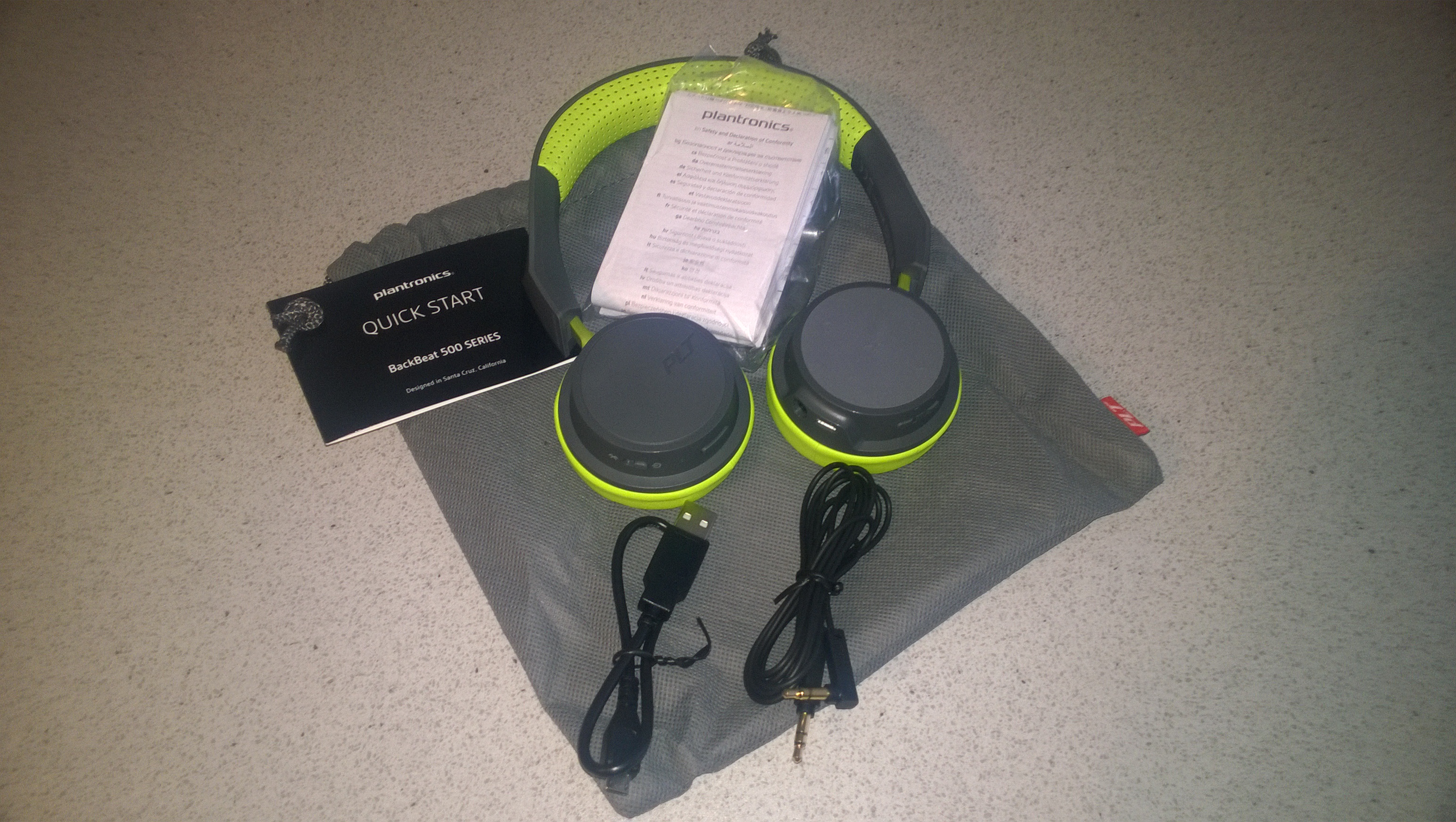
The BackBeat 500 are a stylish colourful headset offering all your needs bar ANC. ANC seems to be the talk of the day but these headphones are durable,comfortable,lightweight and give you crisp and clear sound killing most of the outside world regardless.
Built well,these are robust and will last with a nice matt finish on the exterior headband flanked by a nice padded material which is perfect for long term usage be it for gaming or long commutes to work or even the gym and you do get a carry bag should you want to store them.
The pads are comfy which is important but not too deep and one thing that is good here they do not sweat but this may depend on the individual or environment. They sport adjustable arms each side which are solid and will not move during activities.
The cups have a really nice finish to them with its rubber like feel and on the left side you will have easy access to control buttons for music selection,skip,pause and so on and the keys are slightly raised so you can easily navigate blindly. The right side has a plastic cover instead and has no function side but the rest of the action here is done with raised buttons place around the sides being your power-on/off and you have your quick access key to Siri/ Google Assistant which all work well
The Left side also has your 3.5mm socket and Micro USB Port and volume up/down keys so there is a mix between the two sides to avail of all the functions.
Sound wise these are well-balanced but no app to control EQ so you will have to use your own built-in app or a third-party one. The is an app you can use though which will see in the video below but overall these are well-balanced with highs,lows and mids and offer a crisp sound which is clear with some bass and overall I would not complain looking at it from your average users point of view. For those whom are audiophiles they might feel shortchanged with quality and the lack of an app but these are not intended for such but they pass the test here with me when it comes to someone looking for decent cans at an affordable price.
Listen/talk time
Up to 18 hours of listening and talk time on a single charge
Range
Stream up to 10 meters/33 feet from Bluetooth-compatible devices
Audio
40 mm drivers and advanced acoustic technology provide premium audio
Wideband enabled mic
Take calls with a wideband-enabled mic and access Siri, Google Now, or Cortana straight from the headphones
On-ear controls
On-ear controls let you play/pause, skip tracks, adjust volume, and easily take calls
Connect multiple devices
Multipoint Bluetooth lets you automatically connect up to two devices simultaneously and pair up to eight
Power conservation
Maintain battery charge for up to six months with DeepSleep hibernation mode
3.5 mm jack
Design enables analog cable to be plugged in for uninterrupted listening
The Nokia 7.1 has just landed here and we also have some cases to follow this week to and we will have them reviews up soon. For now we take a first look at the 7.1 and we will have a full review which will consist of sample videos and images taken and an overall performance in a week or two. Off the bat the 7.1 is a sleek device and fits nicely in the had and great for one handed use and comes with the ZEISS optics and PureDisplay screen technology. The 7.1 is also part of the Android One family.
Guest post by Luke Fernandez….No matter where you are in life — student, in-between jobs, executive, retired, etc. — it’s crucial to stay on top of your finances. Keeping track of cash inflows and outflows doesn’t require a keen eye or a rocket scientist, just time and effort. Now that everything is digitized, you can monitor your financial status without the headache of paper everywhere.
Receipts and bank statements are emailed, account information is available online, and smartphones allow instantaneous Internet access nearly anywhere. So you can easily attain your financial records, but how exactly are you supposed to track them? The answer is apps.
Scroll to the infographic below to see the best financial apps to organize your money in 2019, according to Wikibuy. These 21 apps are segmented based on the function they’re best used for. There are apps for overall financial management, budgeting, tracking expenses, saving money, managing debt, sharing expenses, and investing.
No longer will you have to let your finances spiral into a blackhole, never to be reviewed again. Nor will you have to painstakingly review bank statements and monitor spreadsheets. These apps will make managing your finances easy and, dare we say, fun.
Use tools like a calendar or color coding system to organize your spending. Some apps function automatically once you set it up. For example, Acorns automatically helps you save money by investing the difference between purchases on linked accounts.
Maintaining organized finances ultimately leads to a better life. You’ll feel less stress overall, and you can even begin saving up for your dream vacation. Read the visual below for the best apps to track your financial life in 2019.
GUEST POST by Kevin Austin VPN is one of the many techniques employed by internet users to mask their identity. However, several questions have been raised in regards to its use. Some countries have moved to legalize the use of VPNs while others have legalized the use citing different reasons. It is vital that one gets to understand what a VPN is and the various laws that are in place concerning its use. There is also the need to ensure that while using a VPN, one does not engage in illegal activities.
What is a VPN?
A Virtual Private Network or a VPN allows users to make online connections while remaining anonymous. This is by routing the traffic via a server that masks the users’ identities. There are different reasons , why people may opt to use a VPN. One of the reasons is while accessing the internet over public connections which are not secured. The VPN service also helps people to access geographically restricted content from certain regions by using a VPN server. People who use peer-to-peer file-sharing services such as torrents also prefer the use of VPNs to prevent being tracked or caught while torrenting.
Is it safe to use a VPN?
Using a VPN is safe as it helps you to encrypt your online connection. However, there is the need to understand that the use of VPNs does not make illegal activities legal for you. Issues such as copyright infringement while torrenting might be raised, and therefore it is essential that you distinguish between the two. The other important thing that you must understand is to find out whether the use of VPNs is allowed or not in your country. Some countries allow the use of VPNs while others do not. Some of the things that users usually take into consideration when selecting the best VPN for torrenting are the costs, speed and the location of the servers.
Is a VPN Legal in the Ireland?
The use of VPNs is legal in the Ireland. This is due to the robust freedom of expression laws and values that the country has. However, it is essential to understand that the use of VPNs is only sanctioned while undertaking legal activities. The other important aspect to note is that the law does not require service providers to retain any information about the users.
Top legal VPN providers in the Ireland
Several companies offer VPN services in the Ireland. A user can choose any of the services depending on what they want. Some of the things that users usually take into consideration when selecting a VPN service provider are the costs, speed and the location of the servers.
ExpressVPN
ExpressVPN is also another service that is recommended by many people. One of the benefits of the service is that it is fast. The company’s servers are also located outside the US in the Virgin Islands thus making it impossible for the government to retrieve the data. There is the need to understand that it is not illegal to have servers hosted in other countries.
PureVPN
This is another service provider that is recommended by many people due to its speeds. It is essential to note that service providers throttle internet speeds and PureVPN is fast enough to accommodate streaming services. The company hosts servers in over 140 countries including great UK and Irish VPN servers thus making it difficult for one’s identity to be found, and also make easier to access the geo restricted content of different regions.
Buffered
Buffered also offers IP masking services to its users. This is a premium service, and users must pay for its services. One of the benefits of this VPN service is that it is user-friendly to new users and that’s why many people prefer to use it.
Hide.me
Hide.me is also a high-speed VPN service provider that can be used in the Ireland. There is the need to understand that with the VPN service, users can comfortably stream geo-blocked content and services from anywhere in the world.
Countries where the Use of VPN is Illegal
Different countries have banned the use of VPNs citing various reasons. Most people believe that the use of VPNs fosters freedom of expression, but this is not the same in these countries. Some of the countries that have prohibited the use of VPNs are:
China
This is one of the countries that has been able to deter people from using VPNs in order to block them from accessing overseas services. As a result of this, the state has been able to promote local products and services.
Russia
Russia has also prohibited the use of VPNs because of political reasons. The government had reasons to believe that their use resulted in the spread of extremist material and therefore there was the need to ensure that the same was prohibited.
Syria
The use of VPNs in Syria is also banned. This was after the Arab spring when the government felt the need to regulate the use of the internet to prevent the spread of propaganda.
Conclusion
It is essential to understand that the use of VPNs is necessary for people who value their privacy while online. Although there are several countries that prohibit their use, the Ireland allows VPNs. However, this is only permitted when one is doing legal activities online and not otherwise. There are many VPN service providers, and one can opt to use their services depending on their services and preferences. This is in terms of costs, speed and location.
Many soundbars have passed through here and they are a great addition to your home setup if you want that extra audio experience immersing you more into what you watch on your TV. Built in soundbars on many TVs are not really effective and point downwards and there is some out there that point at you but the sound is weak. This soundbar however really impressed me and you can mount it wherever you like too or leave it sat under your TV as I did.
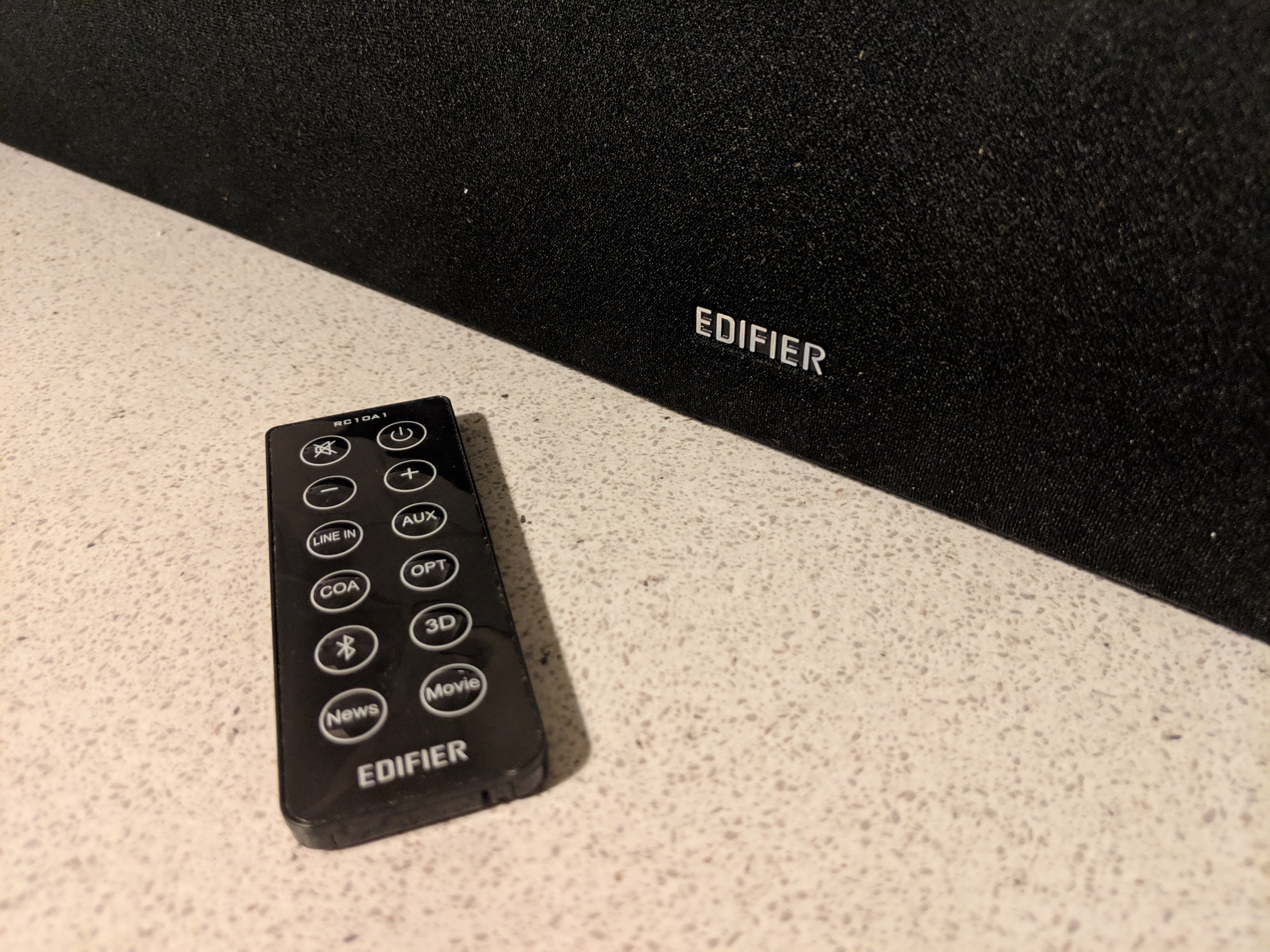
The sound that comes from this is exceptional and something I would expect from Edifier and they did not disappoint again. You have plenty of connection types this time but no HDMI connection and you get a small remote control that is simple to use and offers all you need on it.
The 3D sound option is fantastic and the floors will rattle at full volume which is loud and just the way I like it. Sound via TV your phone or streaming or any source is replicated well and balanced with some nice bass for the bass lovers. This also could be used at a house party and you can use your mobile phone or just use through your TV and listen to the radio or watch your favourite TV show or film and you will really feel the quality of sound that comes out of this unit and it is also portable around the house too which is handy if you have multiple TVs.
Check out the video below and if you have any questions feel free to ask. Once again thanks to EDIFIER and they are a company you should check out when it comes to having a really great audio experience.
Chromecast caused a stir when it was first launched in 2013, bringing smart TVs to the masses. With Chromecast, any screen with a HDMI port could instantly access the burgeoning world of streaming video services such as YouTube and Netflix, opening up a whole new viewing experience and disrupting the traditional TV delivery model. If you dont own one of these now is the time to pick one up they are a great idea solving many issues..
Google today is proud to launch in Ireland the 3rd generation of Chromecast. With a 15 percent improvement in hardware speed, increased framerate support to 60fps, better integration with Google Assistant, and a slick redesign in two colours, the new Chromecast is the ideal accompaniment to the many great devices that Google has launched in Ireland over the past year, such as Google Home, Google Wifi and Pixel 3.
The 3rd gen Chromecast is still just €39, and is available online from the Google Store or Harvey Norman nationwide.
Highlights from the new Chromecast:
Same size, but even more powerful. Thanks to a 15 percent improvement in hardware speed, our newest Chromecast supports smooth streaming in 1080p at 60 frames per second, giving you a more lifelike image. So when you’re watching the game, it will feel even more like you’re there.
Works with the apps and devices you know and love. Stream from thousands of apps such as YouTube, Netflix, BBC iPlayer, ITV, All4 and more.1 Chromecast works across platforms, whether you use an iPhone®, iPad®, Android device, Windows® or Mac® laptop, or a Chromebook.
In App controls..
Go hands-free. Chromecast and Google Home work seamlessly together. Just say what you want to watch from compatible services, like YouTube or Netflix, and control your TV just by asking. Additionally, you’ll also get visual answers on your TV when you ask Google Home about sports scores, stocks, weather and more.
Fits right in. With curved edges, a smooth finish, and available in two colours – Chalk and Charcoal – the newest Chromecast was designed to beautifully blend in with your home decor. Google paid attention to every detail, even for a product that tucks away neatly behind your TV.
More than a screen—it’s a canvas. When you’re not streaming, you can personalize your TV with new Live Albums from Google Photos. Enjoy a constantly updating stream of photos of the people and pets you care about and skip blurry ones and duplicates—all without lifting a finger. Plus, new photos will show up automatically on your TV.