Be a better driver and get rewarded with #Drivies. (Spain) #Android #iOS #Driving #App

The years on those boring and cumbersome to use GPS systems when driving are more than over now. Each day, more and more of us use our phones as a main tool on this activity.

Well, what would you say if I told you that now you can prove you’re a good driver to your insurance company and besides, get discounts while doing it?

Let me introduce Drivies a new app to help you achieve that goal.

Well! Unfortunately not all of you out there, as right now, the app is mostly focused on Spain, and ruled by deals with Telefonica.

But lets hope this changes soon, as the app is really promising.

First of all, How it works?

All you need to do is use your phone as you’d normally do with any other app, using the GPS and others sensors, the app will tell “everything” about your driving technique, how much time you spend on it and so on.

With a deal made with “Pléyade” an Spanish ensuring company, using the app will help you to get discounts. The better you drive the more you get.

Within the app you’ll find the DrivieCoins which you can exchange for discounts on the ensurance, Taxi bonus or even on GAS comsuption.

And if you’re worried cuase you are not that good while driving, the app will help you to improve and also get some money for it. (sounds good, doesn’t it?)

As you can see, the app is fairly simple but helpful. Available on Android and iOS is also totally free to download.


So, if you live in Spain and want to try it out:

You can get the Android version HERE and the iOS version HERE

What do you think of these? Would you use it if available on yout region or your insurance company?  Let us know in the comment section down below.


Blackberry is killing it Classic #Blackberry #Classic #Tech

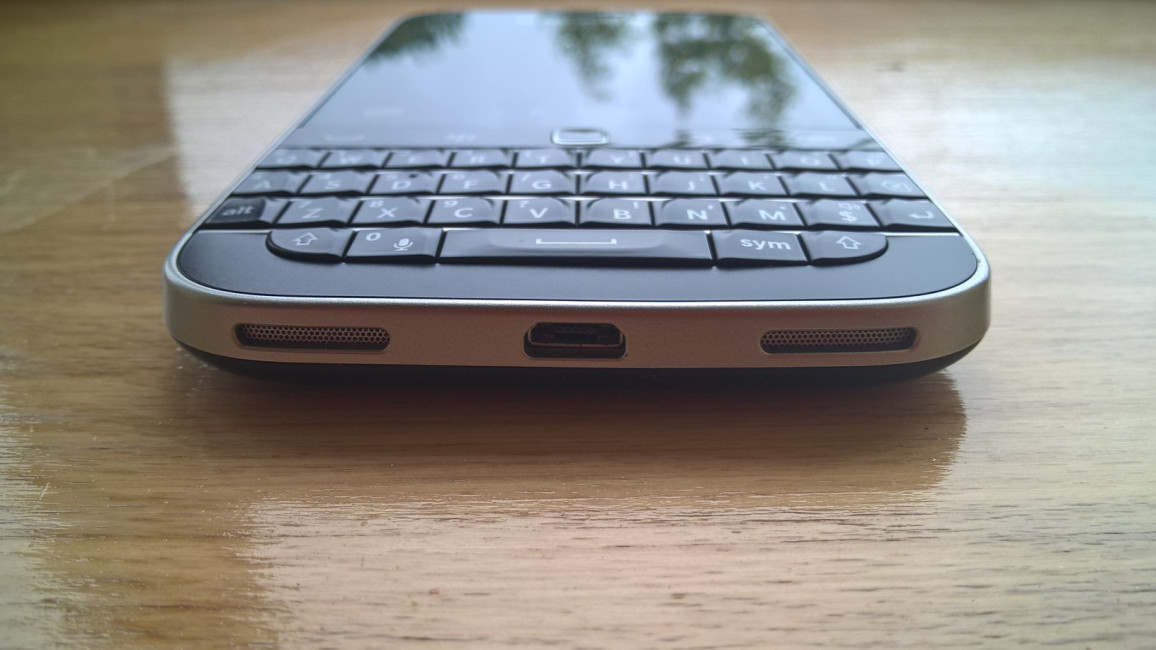
Blackberry have been having it rough of late,even with sales of the PRIV their first Android device sales have not been great by any means,The PRIV is a unique device and stands out in the crowd with that hidden keyboard underneath its screen when I even showed people they where impressed. With new Android handsets set to come on board soon their direction is clear because they have announced they are to discontinue the Blackberry classic which is another device I own along with the Silver Passport and PRIV..


On their Blog where I have been featured before Ralph Pini writes

Sometimes it can be very tough to let go. For BlackBerry, and more importantly for our customers, the hardest part in letting go is accepting that change makes way for new and better experiences.

These are the tenets that help keep us focused and the reasons why we are committed to the success of both BlackBerry 10 and Android devices. To keep innovating and advancing our portfolio, we are updating our smartphone lineup with state of the art devices. As part of this, and after many successful years in the market, we will no longer manufacture BlackBerry Classic. For many years, Classic (and its BBOS predecessors) has been in our portfolio. It has been an incredible workhorse device for customers, exceeding all expectations. But, the Classic has long surpassed the average lifespan for a smartphone in today’s market. We are ready for this change so we can give our customers something better – entrenched in our legacy in security and pedigree in making the most productive smartphones.

More sad news for some die hard fans I guess.

Via

Empire – #Review – Kids Over-Ear headphones with parental volume lock. #Headphones

Empire cases dont only do cases they have a wide range of accessories for you to pick from and a new addition to their catalogue is the Kids Over-Ear headphones with a built in parental volume lock,these come in a variety of colours such as Blue,Green Pink and Red to begin with. With a price of $24.99 and free worldwide shipping are they worth it,well lets see..

Disclaimer.These are a preview unit sent to us for testing..

To begin with we had no actual packaging to check out as these are a preview unit which is now in mass production and on that point we where disappointed to not have the official packaging but nice to try them out at this early stage,So we cant complain really..

On the upside the product is good,quite good to be fair,With kids these days now sporting tablets and mobiles you will see many sporting headphones to boot,but the issue here is volume control and another one to refresh your memory is how close the screen is to your childs face but Samsung took care of that with a recent app..

My daughter who is 7 has tried several headphones in her time and she enjoys some time on her tablet during the day and evening which is monitored,At times having called her I did notice from time to time she couldn’t here me but this issue is now gone due to having the option to lock the volume on the headphones manually and most importantly the child cant undo this. There is a box like fitting on the cable which requires a small philips screwdriver and you can test the volume level out yourself first then set it and lock it,the close the box up again,but a safety note I would hide the screwdriver,kids are inquisitive and will investigate and try anything especially mine since she is surrounded with tech all the time but again this is monitored and access is limited.


Image Gallery

1 / 8

Comfortable sums them up too my daughter was happy with them and with adjustable arms each side again it was an easy manoeuvre for her to set to her own accord,With the both cups again lined with leather and cushioning they again made her feel comfortable,the cups also move in one direction to nestle over the ears and do not apply extra pressure making them sit nicely.

Build quality is good,flexible on the headband where kids might just spread them too much they seem they will have some longevity in them too and the plastic is easy to clean should they get and dirt on them which can be expected from kids.. Even the adjustable arms seem solid and feel like they can take a beating too and dont seem flimsy.

Sound quality is fine,nothing to write a book about but they are for kids and at that age whats provided here is enough but if you are and adult there is a notable difference in quality compared to mainstream options but again to note they are for kids and not us..

Check out our video review below and if you want to pick up a pair see HERE for all the options available.We would like to thank Empire case again for sending these over to check out…


Discover new incredible worlds with #Coastiality #VR app #VirtualReality #360° #Googlecardboard

A new VR app has launched called Coastiality  by Europa Park and it has quite a bit to offer to the fore and for rollercoaster fans you are in for a treat,There is a lack of good rollercoaster apps that give a real immersive feeling but not here with several on board the app,the intro on the app is also excellent with great music to boot.

The app is also well presented with apps on display right from the start,Also you can pick to either download or stream the experience and then you can pick between 2K and 4K resolution.. I have tried out the apps and they are quite good..


App description

Fancy enjoying a real rollercoaster ride in 360° or VR from the comfort of your home?

Do you want to experience how virtual worlds come to life on board Coastiality rides throughout theme parks around the world?

Welcome to Coastiality, your home for unique, high quality virtual reality experiences!

Viewable with and without VR glasses (e.g. Google Cardboard).


Never miss a train station again with #Trainzzz app (UK) #travel #apps #trains

A handy app to have as it happens to us all and if not yet it will. Missed your train station by nodding off,head buried in your laptop or  mobile phone… This new app is here to help you though and its called Trainzzz, Now only if there was a similar app here for not only trains but the bus too..

Trainzzz is a simple FREE app that allows you to select your UK train station destination and using your phones GPS signal aims to alert you to your approaching destination 

A great option for the distracted commuter, person unsure of the stop, or maybe a person travelling home after an enjoyable evening and may be a little sleepy 

1) Select your destination station, or stations on your route as required
2) Select the distance from the station you wish to be notified (1,3,5,+ miles etc.)
3) Decide what tone you wish to use
3) Decide if you want to SMS someone in your phone to advise them you are near – or “put the kettle on”
5) Leave the app open in the background and await your GPS driven alarm