New Dell Latitude Rugged Extreme Tablet Unveiled

Dell has announced the launch of the Latitude 7030 Rugged Extreme Tablet, setting a new standard for portability and durability in the world of rugged technology.

The new device is designed to meet the demanding needs of professionals working in harsh environments, offering a perfect balance between rugged durability and lightweight portability.

The Latitude 7030 Rugged Extreme Tablet is one of the world’s lightest 10-inch fully rugged Windows tablet, weighing just 2.2 pounds. Its compact design, coupled with a range of convenient accessories, ensures that users won’t be burdened by the weight of their technology, even during extended shifts in challenging environments.

In 2022, Dell launched the Latitude 7230 Rugged Extreme Tablet, a 12-inch fully rugged device known for its performance, security, and durability. The 7030 Rugged Extreme Tablet, at 10 inches, complements its larger counterpart by offering exceptional mobility. While the 12-inch model is ideal for shorter commutes or extended shifts on the factory floor, the 10-inch tablet is built for on-the-go tasks like line inspections.

Charlie Walker, Senior Director and GM, Precision Workstations and Rugged, Dell Technologies said: “Professionals working in harsh environments require not only rugged durability but portable solutions that don’t weigh them down in the field. Dell’s Rugged portfolio achieves this combination. In fact, it is the world’s lightest 10-inch fully rugged Windows tablet.

“Featuring a robust ecosystem of accessories and hot-swappable batteries for extended performance, the 7030 Rugged Extreme Tablet was designed for workers who spend most of their time away from a desk. So, whether you’re on a rig, in a machine shop or atop a snowy mountain, the 7030 Rugged Extreme Tablet will make for the ultimate companion.”

One of the standout features of this device is its dual hot-swappable battery option, which allows users to easily switch out batteries, ensuring uninterrupted power throughout their workday.

Swappable Batteries for All-Day Endurance

The 7030 Rugged Extreme boasts impressive durability with IP-65 and MIL-STD 810 ratings. This means it can survive extreme conditions, including drop tests from up to four feet and temperature tests ranging from -20°F to 145°F. The IP-65 rating provides maximum protection against dust, dirt, and water ingress, guaranteeing the safety of both the tablet and the sensitive data stored within it.

Small in Size, Big on Durability and Security

Security is a top priority, and Dell has incorporated modern security features, including facial recognition, a fingerprint reader, and smartcard reader, to protect the tablet and the data it holds. It includes TPM 2.0 ControlVault, a hardware-based encryption tool for data security.

Powerful Performance and Modern Features

The 7030 Rugged Extreme Tablet doesn’t compromise on performance, offering up to a 12th Gen Intel® Core™ i7 processor, integrated Iris® Xe® graphics, and up to 32GB of LPDDR5 memory. With support for up to a 2TB NVMe SSD, users can store a vast amount of data without worry. Strong connectivity options, including Wi-Fi 6E, GPS, and 5G, provide fast and reliable connections in any location.

The tablet features a 10.1-inch FHD+ display with a 16:10 aspect ratio, delivering an exceptional visual experience even in direct sunlight, thanks to its 1000-nit panel. Additionally, the glove-touch capability ensures safety for those working with harsh chemicals or dangerous equipment.

Purpose-Built Accessories for Every Industry

Dell offers a range of purpose-built accessories for the 7030 Rugged Extreme Tablet to meet the specific demands of various industries, including a rigid handle and passive stylus, detachable keyboard, and a rotating hand strap. Users can customise the tablet’s ports with options like a barcode scanner, RJ-45, universal audio jack, or USB-A. The tablet’s configurability extends to two hardware buttons that can be programmed through the Rugged Control Center application.

The Latitude 7030 Rugged Extreme Tablet is set to be available globally later this year, with pricing to be announced closer to the shipping date. For companies looking to deploy rugged devices at scale, Dell offers seamless deployment, management, and security through the cloud, along with support services such as next business day on-site support and predictive ProSupport tools. Dell provides a one-stop shop for all commercial needs, including PCs, workstations, rugged devices, monitors, servers, and services, with the assurance of scalability to meet individual requirements.

Tech Review – HUION Inspiroy Dial 2 ( Model Q630M)

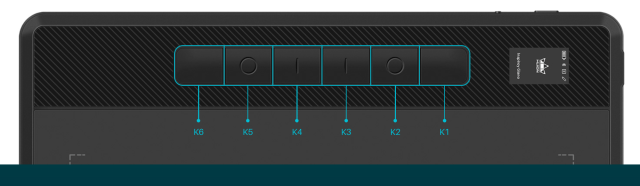
The HUION Inspiroy Dial 2  professional-grade drawing tablet with and slim design with 6 buttons which can be configured and 2 dials. The two dials can be set to cycle between three different controls (scroll, zoom, and brush size) by pressing the dial. The texture of the tablet is similar to paper without the rubber feeling you might expect.

Accessories


Setup and use:

The setup is standard in terms of plugging in the USB cable to the laptop and downloading software from the website with the supplier user guide giving clear instructions. Alternatively, this can be connected via Bluetooth 5.0 with a range of 10 meters. The Bluetooth while good to have seems impractical as to use the drawing tablet required the use of a monitor to view the work.

The supplied software allows the configuration of the dual dial controllers and supports the quick-access Windows Radial Menu. These can be programmed with a  menu of options in terms of Zooming in or out, changing the brush size,  scrolling through the pages, adjusting the volume and my favourite  – Undo.

The software allows the configuration to allow for “Left hand / right hand “  use,  & the monitor to use as a selected area,  if using dual monitors

The tablet came with a pen that is responsive and accurate, making it easy to create detailed and intricate drawings. The holder stores 5 standard pen nibs and 5 felt pen nibs made of fibre, the latter of which can provide a greater level of resistance, thus making you feel like you are drawing with a traditional pen.

Warranty  This came with a two-year warranty,

Conclusion 

The HUION Inspiroy Dial 2   is solid, slim and lightweight  ( 10.5 x6.5″active area is ideal. 0.3″ ultra-thin design) while does not come with a travel case if moving in a laptop bag etc, the drawing tablet allows a multitude of configurations in terms of the 2 dials and 6 buttons which can be configured via the supplied software. The setup in terms of the mechanics is standard with no latency noticed in the pen use. Once set up this works but required a lot of practice to allow drawing on the tablet while viewing a separate monitor to see where the pen is located.

The drawing tablet does have coordinated listed when the pen is located and is compatible with Windows. Mac, chrome, Linus, and Android allow for a  versatile experience  with 18 hours of battery  life if used via Bluetooth, this can be used with  most  creative software like Adobe Photoshop, Clip Studio Paint, SAI, Lightroom, Affinity Designer, ZBrush, etc

Overall a response drawing tablet with a multitude of configuration options with a pen-like feel of a standard pen used with an array of options to provide a delightful drawing experience.

Buy

https://www.amazon.co.uk/HUION-Inspiroy-Bluetooth-Battery-Free-Compatible-Black-Silver/dp/B0B1V1JBNX

Video Review

Tech Review – UGEE S640 Pen Tablet

The UGEE S640 is a portable drawing tablet designed with an active area of   6.3’’ X 4’’. The tablet is slim and light (280 g) and comes with a battery-free stylus. The tablet has 10 Customized Press Keys, which are customizable via the supplied software. This kit comes from the UGEE brand which was founded in 1998 and a pioneer in the development of handwritten digital hardware and software technology.

Contents

Note: This model did not come with a Wireless receiver.

Key features

  •         Widely ApplicationThis easy-to-use pen tablet is perfect for kids and beginners for drawing, animation,photo-editing or design work in most programs including Adobe Photoshop, paint tool sai, illustrator, Corel draw, corel painter, sketchbook, manga studio, clip studio paint and more, meet all your needs for every subject with online tutoring software: Power Point, Wrod, OneNote, PDF etc.
  •         System requirementsPen tablet support Mac/Windows/Android: Not only compatible with Mac,Windows and Linux, UGEE S640 drawing tablet also supports Android 6.0 or later via an included OTG adapter to turn your phones or tablets into a digital drawing canvas.
  •         PortableDrawing tablet is slim and light design that allows you to take it anywhere like classroom, business trip,etc. UGEE S640 graphics tablet is a convenient tool for e-learning and remote teaching. It will help you engage in an interactive virtual classroom anywhere, anytime. UGEE S640 only needs 2 hours for charging, enough for 10 hours of full-time drawing.
  •         Digital padCustomizable Shortcut Keys – Drawing tablet with 10 Customized Press Keys, all customizable and easy to set up. 6.3×4 inches sufficient compact working area. Digital pad with USB-C interface, simpler and faster connection. Anti-slip Mats on the back can prevent the drawing tablet from dropping easily down when you focus on drawing.
  •         Batterry-free digital pen Digital stylus is always ready whenever you want to create. 8192 levels of pressure sensitivity and virtually no lag delivers both precision and control to your drawing and writing. 60°Tilt control bring more natural lines and enhance creative performance, provide you better pressure detection and accurate cursor positioning with different angles, restore the true feeling of painting. You will feel like your are using a real pen.


Setup and use

The set is standard allowing the tablet to be plugged directly into a laptop and used with the option to use a dual monitor. ( Downloading of required free software required )


The stylus is battery-free while the tables require 2 hours of charging to facilitate 10 hours of drawing. During the use of the tablet, there was no noticeable latency from drawing to screen capture with a comfortable feel pen, while the nips supplied did not come in a case and were easily lost if not put away tidily.

Some models come with a Wireless receiver but during our testing, this is not a requirement as to use the tablet required to be placed in front of a monitor to see what you are drawing.

Compatibility


Warranty 1 year


Conclusion

The tablet looks good and feels solid with an anti-slip mat but is let down by the packaging of the replacement nibs which are sure to get lost if used by a younger person. The supplied adapters, USB-C allows increased functionality to connect to an Android device with the customizable shortcut keys great allowing for a truly customised experience. The drawing tablet takes time to become familiar with, though handy to have a dual screen option to see the actual options of the shortcut keys (or required a play around with to become familiar with all shortcuts)

The product is designed for   beginners for drawing with the setup easy to use but requires a lot of practice in terms of hand-to-eye coordination and memory of the short key is used,

An ideal started Drawing tablet that won’t break the bank that has multiple customised options and uses.

Features

  • Active Area: With a 6×4 inch active drawing area, the S640 provides ample space for your creativity.
  • High Accuracy: The tablet comes with a high-precision passive pen that offers 8192 levels of pressure sensitivity, making it ideal for drawing, sketching, and painting.
  • Compatibility: The S640 drawing tablet is compatible with both Windows and Mac operating systems, and can work with popular creative software like Photoshop, Illustrator, and Corel Painter.
  • Battery-Free Pen: The pen that comes with the tablet is battery-free and requires no charging, making it easy to use and always available when inspiration strikes.
  • Easy to Set Up: The tablet is easy to set up and use, and comes with a quick start guide to help you get started right away.

Supports., Windows 11/10/8/7, Mac OS X 10.13~10.10, Chromebooks (Note: Chrome Os 88.0.4324.109 And Newer Versions Are Required), Android 6 (or latter) and Linux systems. Support Medibang, Clip Studio Paint, SAI, Adobe Photoshop, , Illustrator, Corel Draw, Corel Painter, Sketchbook, Manga Studio, Etc.

Buy

Video Review

Are You Using Adobe Illustrator On A Tablet? Here’s How To Make It Work

Are you a graphic designer who wants to use Adobe Illustrator on a tablet? If that’s the case, it’s crucial to be aware of the best tablets for Adobe Illustrator

This article will discuss how you can use Adobe Illustrator on any tablet. We understand that being a graphic designer or an artist looking to start your artistry career, you must be familiar with the best tool. And Adobe Illustrator is one of them. Without further ado, let’s get started!

Adobe Illustrator Compatibility on a Tablet

Several tablet operating systems, including Android and iOS, are supported by Adobe Illustrator. The tablet’s computing capacity must be adequate for the program to function correctly. 

There are many benefits to using Adobe Illustrator on a tablet, including portability and the ability to sketch more naturally and precisely with a pen. In addition, many devices have touch displays that simplify using the app’s various features.

How to Set Up Adobe Illustrator on a Tablet

It would help if you took a few steps when installing Adobe Illustrator on a tablet to ensure everything goes quickly. Follow the steps below:

Step 1: First, download the program from the Adobe website or your tablet’s app. 

Step 2: When the file is downloaded, you can install it by following the on-screen prompts. 

Note: Not all tablets will automatically be compatible with Adobe Illustrator; you can need to update the tablet’s running system or change some options on the tablet itself. 

You can try several things to fix the download process if you run into problems like warning notices or the program stopping. Follow the tips below:

  • Ensure your device has the necessary specs to run Adobe Illustrator before continuing. 
  • You can also attempt upgrading your tablet’s operating system or restarting the program. 
  • If you still have problems after trying these solutions, you can want to call Adobe’s client help.

Tips for Using Adobe Illustrator on a Tablet

For designers and illustrators seeking more freedom and movement in their process, using Adobe Illustrator on a tablet can be a game changer. Here are some suggestions for customizing apps for a tablet’s touchscreen and pen to get the most out of it:

Tip 1: Use the Stylus for Precision

Most tablets include a pen, allowing a more intuitive and accurate sketching experience. Ensure that the pen’s pressure sensitivity and motion features are enabled in Adobe Illustrator.

Tip 2: Use Touch Gestures

Tablets have touch displays that enable you to communicate with applications using movements. Adobe Illustrator recognizes touch movements such as pinch-to-zoom and two-finger press to erase.

Tip 3: Customize the Workspace

Adobe Illustrator enables you to tailor the UI to your specific requirements. Expanding the sections and symbols will make the desktop more visible to a tablet’s touch screen.

Tip 4: Experiment with Different Brush Settings

Adobe Illustrator includes various tools and parameters that can be tweaked to achieve different effects. Experiment with multiple drawing options to determine which works best with the tablet’s touch screen and pen.

How to Customize Adobe Illustrator Settings on a Tablet 

Adapting Adobe Illustrator to a tablet can streamline your processes and help you produce professional-looking designs and drawings faster. Here is how to adjust Illustrator’s settings so that it works better with a tablet:

  • Enabling Touch Workspace – Adobe Illustrator has a tablet-friendly touch desktop option. Select “Touch” from the “Workspace” option to activate this setting. This will streamline the UI and make it more conducive to fingertip input.


  • Adjusting the Workspace – Adjusting the workspace is vital. Modifying the height of windows, symbols, and toolbars is part of this process. You can designate a dedicated area to maximize your tablet’s display.

Aside from personalizing the environment, Adobe Illustrator has several tools and features that are especially helpful for tablet users. These are some examples:

Adobe Capture 

Adobe Capture is a tablet software that converts photos into vector drawings that can be used in Adobe Illustrator. This is especially helpful for making drawings on the fly.

Live Shapes and Corners

Live forms and angles enable you to make and modify objects quickly on a touch device. Press and drag to draw a shape, then use touch motions to adjust the edges.

Brushes and Pencils 

Adobe Illustrator includes various tools and pens that can be modified to meet your requirements. Experiment with multiple drawing options to determine which works best with the tablet’s touch screen and pen.

Conclusion

Creating beautiful patterns and images in Adobe Illustrator on a tablet can enhance your productivity. You can use a tablet’s touch screen and pen by assuring interoperability, installing the software properly, and tweaking the UI. 

In addition, Adobe Illustrator’s most helpful tools and features, such as strokes and pencils, live forms and edges, and Adobe Capture, make it simple to create drawings and designs that look like an expert drew them.

Tech Review – Benks Infinity Basic Tablet Stand for iPads and more.

Many of us have more than one device to play with or work on be it at home or in the office but having that second device like a tablet or phone is sat beside you on the table which can get in the way but what if there was a premium product that solved that and kept it out of the way but in a position to use it and the product looks good on your desk? Well here is the answer right here from Benks who have some really nice innovative products and we have test some of these before which you will get a glimpse of in this video or by searching Benks on site.

Boasting a solid aluminum construction and designed to be easily portable, Benks Infinity Basic Pad Stand is the perfect accessory to transform your Pad into an efficient workstation. This foldable stand will keep your Pad secure, offering compatibility with all Pads.

As the company states the solid build of the product alone and design gives this a leap over your typical plastic made offerings on the market and this can not only hold your tablet you can use a phone a phone or tablet if it is small for example or your iPad if you have one which I do not personally own at the minute but that might change yet.

This can swivel from the base and again something you do not see too often and is more a fixed option you tend to find in stores etc and this can also be folded away which means portability again unlike others which are again a fixed alternative and makes it ideal to fit in your travel bag or bring it to your office or even have on your bedside locker giving you easy access to whatever device you may use and for me I could also put my chromebook on it and it remains super stable and another way it can be used and nicely raised and easy to access and use as normal if working on two laptops at a time which can be the case.

Top top it off it allows heat dissipation on the back unlike other stands which would be a solid piece so what is there not to like about this? Check out the video below for more.

Ideally this is for someone who wants to have clean desk who uses more than one device and have them at hand to do other things on another device such as social media emails and more and do it in style.

BUY

Video Review

Tech Review – HUION Inspiroy Giano digital tablet and pen

This is a first for me and is a very niche product but can appreciate it, it was not what I expected either and can see the use for such a product and it is ideal for those into art and kids. For me though not something I would use every day but it is fun to use and cross platform too so this can be used with your mobile phone a tablet mac and windows and of course a chromebook which  I tested it out on along with my phone, you do need a bigger screen though to get the most out of it, you could hook up to your smart tv too and keep the kids entertained.

This in short saves you on paper too and feels like writing on paper in fact there is several tips to pick from in the cleverly designed pen holder that does not require a battery which is excellent so no need to worry there which is something more traditional tablet users would not be use to.

The tablet is on the large side making it a nice space to get creative with it does have boundaries marked on each corner and will take time to get use to them, there is a mini display on the top left which is nice and you also have some buttons on the left below them which can be changed to suit your needs, there is hundreds of apps to pick from and basically any sketch app in the play store will work with this which is nice and makes it easier to use with no shortage of ideas.

The smart LCD screen on the upper left of the tablet indicates the status of Inspiroy Giano and digital pen such as the power, connectivity, and whether the press keys are pressed or not, allowing you to quickly check the information at a glance. A special icon (phone/Huion logo/moon) shows up at the center of the screen to reveal if the tablet is connected to a phone/computer or enters sleeping mode. In addition, a flashing exercise icon appears to remind you that it is time to get out of your seat after 2 hours of working with the pen tablet.


Sketch apps

Bluetooth 5.0 guarantees improved speed, greater range, and more stable data transmission compared with the old versions. Besides promising an easy connection between Inspiroy Giano and a computer, a Mac laptop, or an Android device, Bluetooth 5.0 frees you from the messy cables and keeps a tidy tabletop.

The build quality of the tablet too is excellent and makes for and ideal gift for the artist or kids and will keep them busy for hours on end.

Check the video review below for more.

BUY

Video Review


Dell releases new 7230 Rugged Extreme tablet for professionals working in harsh environments

Built for professionals in some of today’s most extreme environments, Dell Technologies has announced its newly redesigned Latitude 7230 Rugged Extreme, a premium tablet delivering the ultimate in-field performance and productivity.

The lightest and most powerful 12” fully rugged tablet on the market, the new Rugged Extreme is designed specifically for professionals in arduous roles demanding critical reliability. The 7230 Rugged Extreme Tablet’s durability and mobility, perfect for Emergency Medical Services (EMS) and other first responders, are matched by its reliability and security features required to help military and government officials, for example, safely manage highly sensitive information.

Regardless of the environment, the tablet now provides up to 20 hours of battery life, with dual hot-swap batteries for continuous operation of the device. This is critical for shift work in manufacturing, the military, first responders and more.

A true 16:10 aspect ratio display now provides 13% more active screen area than previous generations giving the 7230 Rugged Extreme the largest screen area in a 12” fully rugged tablet. Plus, glove-touch capability allows optimal screen interactivity.

The 7230 Rugged Extreme is drop-tested from up to 1.2m (4 feet) and temperature-tested from -28C to 62C (-20F to 145F) to withstand the most strenuous circumstances.

Commenting on the launch of the new device, Tom Tobul, Vice President and General Manager for the Performance PCs portfolio of products at Dell Technologies, said: “From factories to ambulances, deserts to the Arctic, professionals working in harsh edge environments turn to Dell Latitude Rugged for peace of mind. The new Latitude 7230 Rugged Extreme Tablet is no exception – it’s the latest in a line of trusted devices for workers in some of today’s most challenging environments. This premium tablet is built for outstanding field performance and productivity, delivering critical reliability, all while withstanding extreme surroundings.”

In addition, new and enhanced accessories are built to match the ruggedness of the tablet and support its use in a broad range of environments. Some of those accessories include:

  • New detachable keyboard
  • Active pen to further enhance screen interactivity
  • Rotating hand strap and shoulder strap built with durable and cleanable materials
  • Magnetic mount that enables users to attach the tablet to any metallic wall or surface
  • Rigid handle that supports ease of mobility and is reversible, according to preference and ergonomics

Showing the device in action, Dell released a video of Mike Libecki, National Geographic Explorer and Dell Ambassador, who used the Rugged Extreme tablet in the extremes of Antarctica to study the environmental impact of microplastics.

The 7230 Rugged Extreme tablet will be available globally by the end of 2022.


Nokia announces the X30 5G – G60 5G – C31 phones T21 tablet, new accessories and Circular

HMD Global, the home of Nokia phones, today announces Circular, a revolutionary new subscription service with sustainability at its core. Alongside this, three new devices launch including our most eco-friendly smartphone yet, Nokia X30 5G, made with 100% recycled aluminium and 65% recycled plastic. Plus, more responsible packaging, as well as our standard longevity promises to revamp the Nokia devices portfolio across all ranges.

Florian Seiche, CEO, HMD Global, the home of Nokia phones: “At HMD Global, home of Nokia phones, we want people to keep their phones for longer and this can be seen across three areas. We have introduced Circular, a truly circular subscription model that rewards people who extend the lifecycle of their phones. We build our devices with more recycled materials and continue to boost our longevity heritage with software and security updates. And we are working hard to live this approach as a company, with our business-wide sustainability pledges that shows our commitment to continue to work harder to protect tomorrow.”

Circular – a subscription service redefining mobile phone ownership with sustainability at its core

Introducing Circular – a revolutionary new subscription service offering a more sustainable and hassle-free way to use Nokia smartphones and tablets. We are incentivising people to keep their phones for longer with a range of eco-friendly rewards. Circular minimises the negative impact phone ownership can have on the planet by keeping smartphones and tablets out of landfill and giving them a second life. Within our subscription model, Nokia devices go through recycling, refurbishing and re-subscribing or they go to a charitable cause that needs it the most. In addition, it provides people with complete freedom to choose and change their subscription. Any accidental damage, loss, or theft will be taken care of without a separate monthly cost, and a quick replacement arranged if needed.

Ben Wood, CCS Insight: Sustainability is important to customers when it comes to connected electronics devices. CCS Insight’s research shows that roughly half of consumers in key European markets believe that creating products that last longer is helpful and positive for the environment. HMD continues to encourage consumers to keep their device for longer and with Circular, it also means devices stay out of landfill. Electronic waste is an issue the whole industry must address and services like Circular are a positive step towards creating change.”

Nokia X30 5G delivers our smallest eco footprint yet and our best-ever PureView photography experience

Nokia X30 5G is built with a 100% recycled aluminium frame and a 65% recycled plastic back, making it our most eco-friendly smartphone, right down to the box. Using 100% FSC-certified and 94% recycled paper box at a reduced packaging size saves on transportation CO2 emissions, made possible by removing the charger to tackle e-waste.

With zero compromise on the phone’s performance, Nokia X30 5G comes with premium features including our best photo experience to date. The 50MP PureView camera uses Optical Image Stabilization (OIS) and AI to capture stunning ultra-wide angle and vibrant night time shots. The camera is protected by scratch-resistant Corning® Gorilla® Glass with DX+ that lets 98% of all light reach the large sensor and content is brought to life on the 6.43” PureDisplay with bright colors and smooth viewing.

Nokia G60 5G brings sustainability through longevity to as many people as possible

Sustainably crafted with 100% recycled plastic back and 60% recycled plastic frame, Nokia G60 5G brings X-series longevity to the G-series for the first time. Helping people keep their phone for longer, it comes with the ‘3-3-3’ promise – three years of Android upgrades, three years of monthly security updates, and an extended three-year warranty at no extra cost. Complete with a 6.58” FHD+ 120Hz display for super-smooth scrolling and a 50MP AI triple camera, Nokia G60 5G makes premium experiences more accessible.

Nokia T21 is a reliable, family-friendly powerhouse that is built to last

Designed with a tough body made with aluminium that features a 60% recycled plastic cover for the antenna, the new Nokia T21 brings all the durability and promises you would expect from a Nokia tablet. Two years of Android upgrades ensure it remains fresh on the inside as well. Industry-leading protection with up to three years of monthly security updates make it perfect for the entire family. Building on the success of its predecessor, it’s loaded with fan-requested features, such as HD video streaming, voice calling and NFC payment capability.

NFC4 will help your business with payments and scan NFC tags, while Second Screen will allow you expand and control your Windows PC. And if you’re feeling creative, sketch out your ideas, jot down notes or draw your next masterpiece with an active pen

New Nokia audio accessories join the sustainability journey

Bringing reliable sound on the go, the new, fully waterproof Nokia Portable Wireless Speaker 2 comes with a 100% recycled outer design and a whopping 22-hour battery life.

Pricing and availability

The new devices will be available in select markets globally starting today.

  • Nokia X30 5G comes in Cloudy Blue or Ice White and is available in 6/128 GB and 8/256 GB memory and storage configurations starting at RRP of 499 EUR and 529 EUR
  • Nokia G60 5G comes in Pure Black or Ice Grey and is available in 4/64 GB and 4/128 GB memory and storage configurations starting at RRP of 309 EUR and 329 EUR
  • Nokia C31 comes in Mint, Charcoal and Cyan and is available in 3/32 GB, 4/64 GB, and 4/128 GB memory and storage configurations starting at global average RRP of 129 EUR
  • Nokia T21 comes in Charcoal Grey and is available in 4/64 GB and 4/128 GB memory and storage configuration in a Wi-Fi and 4G/LTE options starting at RRP of 249 EUR and 279 EUR

Accessories

  • Nokia Portable Wireless Speaker 2 will be available in Ireland from for RRP of 59.99 EUR

Circular is available for select devices from Nokia.com/phones in the UK and Germany with global roll out planned in the coming months. Check local availability.