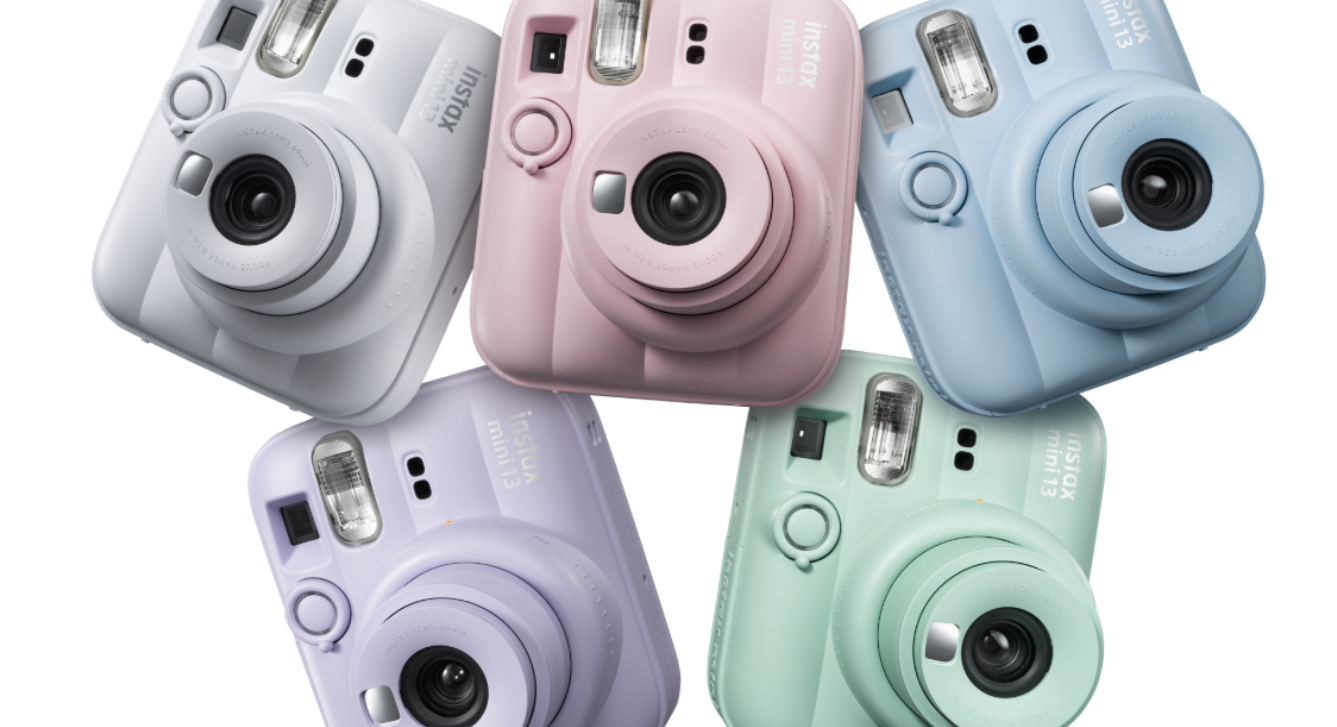
FUJIFILM Europe GmbH, Imaging Solutions Division, has announcedthe introduction of its instax mini 13™ instant camera (mini 13). Following in the footsteps of the popular instax mini 12™ instant camera launched in 2023, mini 13 brings a fun, playful new look and feel with its soft, sculpted shape and a metallic silver logo that accents the front of the camera.
New for mini 13 is the introduction of a self-timer, with options for 2 or 10 seconds, giving the photographer the opportunity to be in the shot themselves with their subjects, or for easy hands-free selfies (with the help of the included wedge-shaped angle adjustment accessory). The mini 13’s main features also include a Close-Up Mode, Selfie Mirror, and Auto Exposure capabilities, as well as the Parallax Correction feature, in which the camera’s viewfinder aligns with the lens when using Close-Up Mode, minimizing object shifts to produce a centered photo. The mini 13 also features Automatic Flash Control, which optimizes image quality in bright or low light situations. The lens structure is designed to provide intuitive steps both for powering the camera on/off and for accessing the popular Close-Up Mode with a simple twist of the lens.
“Our instax™ mini line of mini instant cameras, smartphone printers, and film represents not only an incredible value for our users, but in many cases, it’s a user’s first foray into analog photography,” said Shin Udono, Senior Vice President, Imaging Solutions, FUJIFILM Europe. “The mini 13 is a perfect fit because experimenting with instant photography – trying out new lighting, poses, or scenes (especially by using the new self-timer feature), are all fantastic ways to express oneself artistically and be a part of your art. We’re looking forward to seeing what our community creates with the mini 13!”
instax UP!™ Smartphone App Update Announced
Along with the introduction of mini 13, the free, downloadable instax™ UP! smartphone app is debuting new and enhanced features. This app is designed for instax™ users to digitally scan, import, organize, and store their photos in one place, regardless of which instax™ instant film, camera or printer product they use. The updated version brings increased image scanning precision by integrating the use of AI. The overall learning capability of the app has been greatly enhanced so that it can recognize images versus backgrounds or other extraneous content, resulting in cleaner, more precise scans.
New Film Variety Introduced
Pastel Galaxy, the new instax™ mini instant film, will be introduced along with mini 13, featuring a fun cosmic theme complete with sparkly, glossy embellishments, and soothing colors to add a cool vibe to a user’s instax™ photos.
Colors, Pricing, and Availability
Fujifilm’s instax mini 13™ instant camera will be available in Dreamy Purple, Frost Blue, Candy Pink, Lagoon Green, and Clay White. It will be available to purchase at Fujifilm retailers nationwide from 25th June 2026 at a Manufacturer’s Suggested Retail Price of €90.00 (inc. VAT). The instax™ mini Pastel Galaxy film will also be available to purchase from 25th June 2026 at a Manufacturer’s Suggested Retail Price of €11.50 (inc. VAT).
For more information on instax, please visit www.instax.ie
The FUJIFILM instax mini Evo Cinema has been one of the most questioned about devices I have had to date and quite the talking point at home and when out and about especially when testing it out along with the instax mini Link+ smartphone printer.
This camera also comes with an on board printer and an app which transfers data from the camera to your phone and you can edit shots in there and see all your videos an photos you have taken.
This is a one handed device looks cool and full of switches and dials and the main feautre is the dial that allows you to turn back time giving your videos that retro look we have some samples below so you can see what this is all about. You can pick between the 1920s up to the 2020s on the dial and see the differences with them.
On the side there is the on/off button still and cine and framing button along with the zoom and print options. You can also adjust the lens for more effects and there is a clip on eye piece there. All of this might sound cumbersome but it is not and still looks super cool and again you can print on the go which is neat. On the back is an LCD monitors a naviwheel for adjusting settings and several other buttons one being a back button play button and menu button.
On the front is your adjustable lens your mirror for selfies for photos and videos your flash and the capture button for videos and photos, the clips can be up to 15 seconds for videos only.
After you go through the settings let the nostalgia begin with videos and photos you can replay or look and images and videos on the camera itself or have them auto transfer to your smartphone and do some more like editing and so on, we have some clips to shows you with different years and editing below..
Overall this is a niche camera but fun and looks great, there was some lag during testing and battery life not great but enough for what most will use it for and with USB-C charging it will charge faster than previous cameras and it is a joy to use looks great and a great conversation starter and not forgetting you do not need a separate printer as there is on built in which makes this shine even more.
Mini Evo App
Main Features:
Eras Dial™
The mini Evo Cinema hybrid instant camera features a first for instax™ cameras – the Eras Dial™, which allows users to apply photo effects from 10 different eras to their image – from the grainy, pale tones of the 1930s, to a 1960s effect inspired by 8mm film cameras, to the vibrant colors of the 1980s, and to the sharp, rich imagery of the 2020s. Each era is designed to capture the look and feel of the imagery of that time.
Degree Control Dial
Content created in each era can be fine-tuned with any of the 10 effects from the Degree Control Dial on the lens. By simply rotating the dial to precisely adjust color, contrast, and noise expression – users can create up to 10 creative variations per era.
Frame Switch
Once an era is chosen and the intensity of the era is selected via the Degree Control Dial, users can continue to personalize by adding a frame to every shot or video clip utilizing the Frame Switch. There’s a frame for every era, each paying homage to the characteristics, media, and playback devices that defined that time.
CINE/STILL Modes
Users can easily switch between “CINE” and ”STILL” modes to capture either a video or photo, respectively, with ease. In CINE mode, users can shoot a series of clips – up to 15 seconds in total – and the camera will stitch them into one smooth video automatically. Via the free, downloadable instax mini EvoTM smartphone app, users can connect via Bluetooth® and extend video creations to 30 seconds by adding or reordering clips.
Zoom Lever
The mini Evo Cinema features built-in digital zoom. The tactile Zoom Lever lets you dial up the intimacy of the shot or pull back for greater scope and more atmosphere.
“My Gallery”
Within the instax mini Evo™ app, the My Gallery section provides users a secure place to store the images and videos they create, segmented into categories including Favorites, Printed, Video, Photo, Projects. Through this function, users can also save printed images digitally to their smartphone’s camera roll, finished with the iconic instaxTM mini border.
Video Printing
Users can access videos via a one-of-a-kind instax™ mini instant photo printed with a QR code ready to be scanned and played back on a smartphone. Video is captured as standard at 600 x 800, and with the 2020 Era selection is captured at 1080 x 1440.
Timeless Design
With sleek black, vertical grip design (inspired by Fujifilm’s “FUJICA Single-8”, an 8mm camera introduced in 1965); and analog-inspired details, this hybrid instant camera is meticulously crafted for those who appreciate tactile functions alongside beauty and elegance.
Additional camera features include:
Remote shooting capability (via app)
Integrated Selfie Mirror and Self-Timer
1.54-inch high-resolution LCD Monitor
Print Lever
The camera features an analog-style printing operation lever – lift and twist to print a photo.
Accessories
The mini Evo Cinema includes viewfinder and grip attachments, and a premium hand strap.
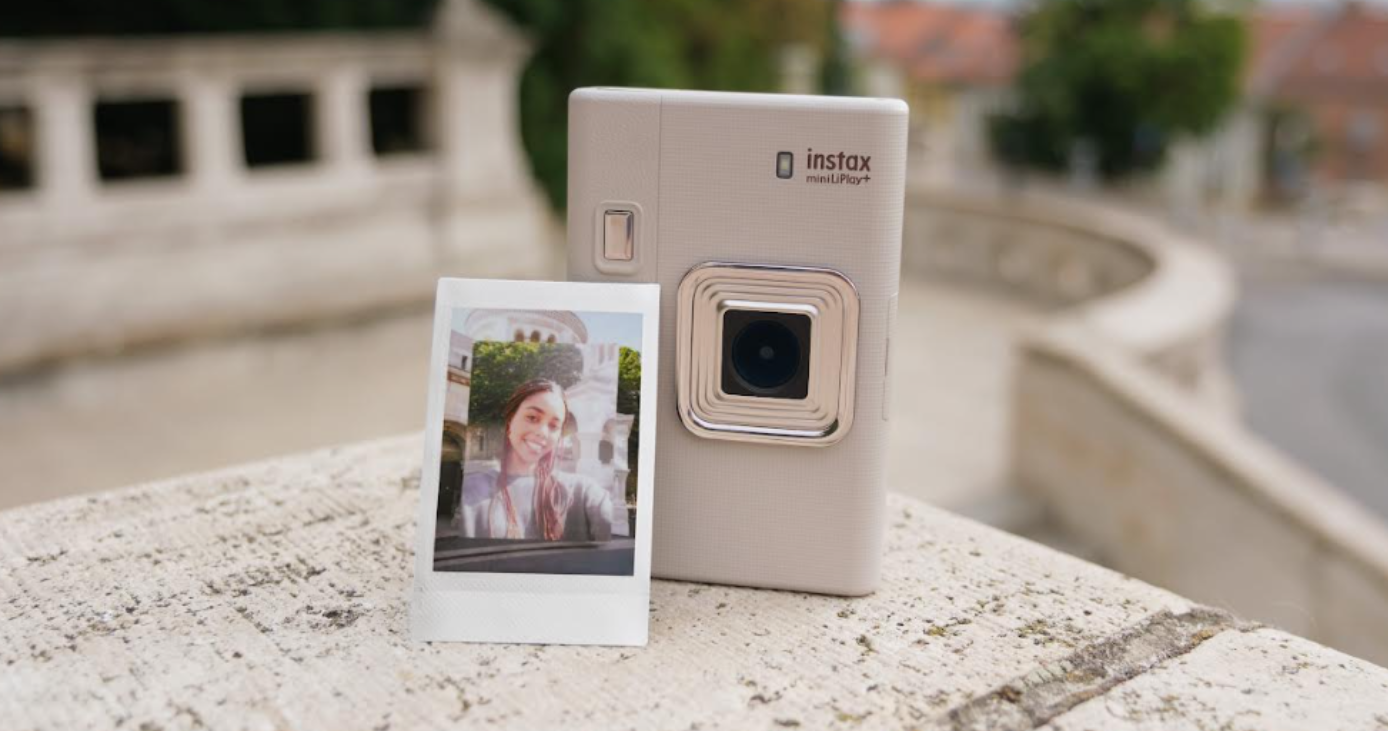
FUJIFILM Europe GmbH, Imaging Solutions Division, is proud to announce the introduction of its instax mini LiPlay+™ hybrid instant camera (mini LiPlay+), an update to the popular instax mini LiPlay™ line that debuted in 2019. This new camera debuts a variety of new features including dual cameras (a main camera plus a wide-angle selfie camera) with new capabilities for image makers, various enhanced sound capabilities that allow the user to integrate sound into their images (through the use of an integrated QR code printed onto the image), and tasteful upgrades to the camera body.
“As Fujifilm’s first hybrid instant camera, and the first camera with the unique capability to integrate sound into photos, our mini LiPlay™ line of hybrid instant cameras has always been one of our most unique offerings,” said Shin Udono, Senior Vice President, Imaging Solutions, FUJIFILM Europe. “mini LiPlay+™ builds on the distinctive features of the original mini LiPlay™, giving users even more creative ways to express themselves through photos and sound. It’s a truly versatile hybrid camera with a unique set of attributes to suit every skill and interest level”
1
2
Main Features:
instax mini LiPlay+™ Smartphone App
The free, downloadable instax mini LiPlay™ App allows users to capture images remotely via Bluetooth connection, add finishing touches to images with frames, and print photos from a connected smartphone. Users can further embellish their images by adding sticker icons or overlay text, making each image a true custom creation.
Dual camera functionality
The mini LiPlay+™ hybrid instant camera features both a front main camera and a rear-facing wide-angle selfie camera. New to mini LiPlay+™ is layered photo mode, in which images created with both the front and rear cameras can be combined so the images appear in layers, one in the foreground and one in the background. When editing images, users can choose between instax-Rich mode™ and instax-Natural mode™ to accentuate their images and choose from a selection of artful filters to express themselves further. mini LiPlay+™ also features automatic exposure and flash control to enhance image quality and includes either 2 or 10 second timers.
Instax Sound Print™ and instax Sound Album™
Users can utilise the free, downloadable instax mini LiPlay+™ App to add sound features to their images. With the instax Sound Print™ feature users have four unique ways to record 3-second audio clips to add to their images, then listen back by scanning the printed QR code on your photo (instax™ instant film required and sold separately) with their smartphone. Alternatively, the instax Sound Album™ feature turns adventures into custom animated videos with sound, vibrant backgrounds, and standout music.
New instax™ mini film variety introduced
Also being announced at the same time as the mini LiPlay+™ camera is instax™ mini Soft Glitter instant film available in a 10-exposure pack. Gold accents combine with soothing hues to bring a calming shimmer to the frames around each photo.
Pricing and Availability
The instax mini LiPlay+™ hybrid instant camera will be available in Sand Beige and Midnight Blue colors from 30th October 2025 at a manufacturer’s suggested retail price of €220.00 (inc. VAT). The updated instax mini LiPlay+™ smartphone App will also be available at this time. Available from Fujifilm retailers nationwide.
instax™ mini Soft Glitter instant film will be available from 30th October 2025 at a manufacturer’s suggested retail price of €10.50 (inc. VAT). Available from Fujifilm retailers nationwide.
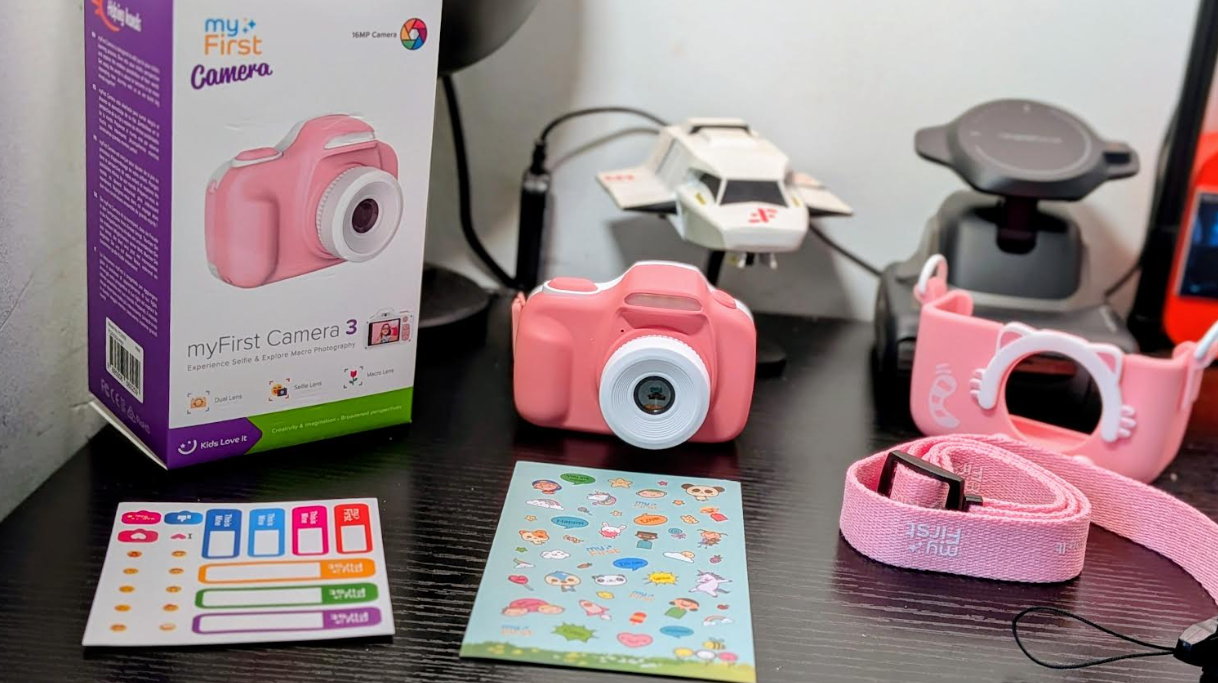
The MyFirst Camera 3 16MP Full HD Kids Digital Camera is a fun simple to use kids camera to get them started in photography in their early years.
Presented again in a nice package this has all you need inside which is a lanyard strap a cover for the camera itself and includes a micro sd card which is a rare thing these days.
The cover is perfect to protect the camera at home or if on the go out with your child and will protect it if dropped also it does not interfere with the use of the camera.
The camera itself is small and robust with a nice texture to it with a flash, navigation buttons a shooter button and button to toggle between selfies and normal photos. The buttons are all tactile and work well and allow you to navigate through the controls which we go through in the full video review below.
There is a dual lens macro lens and selfie lens on board this camera and you can also take videos with this camera making it a fun gadget for younger kids, the pictures and videos are decent and can be transferred to your laptop via micro sd card and there you can see them in full format and print or share them.
Overall this is an excellent camera for kids to get started and learn photography, see the video for more below.
Features that Your Kids Will Love
Dual Lens
Macro Lens
Selfie Lens
Video Recording
HD Photos & Video
16MP Camera
Photo Templates
Memory Up to 32GB
New Macro Lens
Your child can now take close up pics with the new macro lens in our camera! Perfect for those close-ups of lettuce and ladybugs.
Use the lens selector button to switch to a macro lens and see the little things in life. We’ve removed the bars to your child’s photographic creativity!
Quality Photos
With our 16MP camera, you’re assured of quality, high pixel images from your child’s perspective. Your child will take some fantastic HD photos and videos! Share the memories and see the beauty in your child’s eyes.
Selfie Lens
We know how difficult it is to take selfies without dropping your camera. So we’ve added a selfie lens above the screen. With a push of our lens selector button, take selfies with ease. Selfies made easy with myFirst Camera 3.
Durable and Powerful
We’re also throwing in a shockproof pouch. The pouch is made of high tensile strength polymers which resist drops, knocks, and bumps. With 1000mAh battery and supporting up to 32GB microSD card, you can be sure you and your child take plenty of photos and videos, anytime, anywhere! Sweet!
Preloaded Frames
Like its predecessors, our Camera 3 comes with preloaded frames to give your child insta-like photos! Your kid will be spoilt for choice when it comes to myFirst!
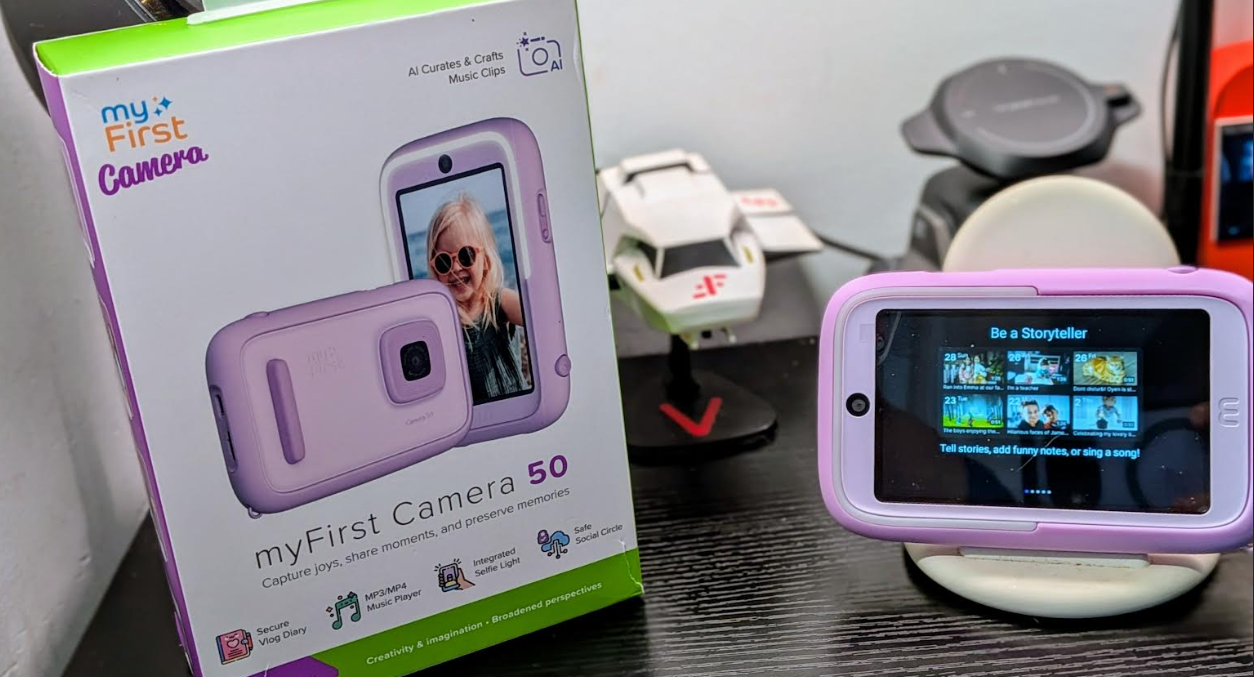
The myFirst Camera 50 20MP AI Kids Camera is a step up from the myFirst Camera 3 we recently reviewed and comes with AI and an app to get your kids into a creative mode and all this is also kept safe and private within a selected circle of family or friends via the myFirst Circle app which is ideal for kids.
More advanced this might seem like a challenging task however it is not that hard to use and your parents can assist you along the way with nothing too difficult to digest on the way to learning more about technology in a good way.
This time around we get features to add to your photos create a diary and more you can share and saved and create your own videos with voice-overs and templates.
The camera itself is pretty good and so is the video for the target market I was impressed with the images and video given as you will see in the video below. You get on board storage and you can add storage via a micro sd card giving you ample room to get creative and take photos and videos to your hearts content and sift through them later on.
Kids can also create a journal which I like here and this is good for mental health and your wellbeing and your child can express themselves in a more realistic manner with videos images and by writing down things which is good.
The device has 20mp front camera and 16mp selfie camera and allows 1080p recording for decent images and video and all this is housed in a robust frame built to last there is also a incremental light on the front too for your selfies. One press on the shutter key is for photos and holding it down is for video.
Overall this is a great product for your child to learn about technology while having fun and being kept safe from the internet and with the app and journal here it is perfect for any child or teenager
myFirst Circle App
AI-Assisted Curation
Pin-Code Protected Video Diary
Child-Safety Focused Social Circle
Integrated Selfie Light
Physical Shutter Button
1080P Video Recording
20MP Rear Lens, 16MP Selfie Lens
1GB RAM, 16GB Storage, up to 128GB Expandable Storage
Light and Ergonomic Design
Empower Your Child’s Creativity with AI
Designed specifically for young minds aged 5-12, Camera 50 makes it easier than ever for children to transform everyday moments into creative masterpieces, all with the help of AI. The inclusion of myDiary and our myFirst Circle app fosters good mental health practices from an early age by allowing them to better express themselves, and provide a safe space for them to store their video journal entries and share their stories.
Photo & Video Editing
AI-Assisted Curation
Child-Safety Focused Social Circle
Lightweight and Ergonomic
Wifi Connectivity
Up To 128GB Storage
Why Integrate AI in myFirst Camera 50?
Camera 50 makes video editing easy and fun for kids! Our AI helps kids create amazing videos without the hassle. With simple tools and cool effects, they can add their own touch with stickers, drawings, and even their own voice!
Cultivating Young Storytellers with AI
Help kids become filmmakers and vloggers! Our camera teaches them storytelling, boosts confidence, and lets them explore their creative side. It’s a safe and fun way to learn about making videos without needing a phone.
myFirst Camera 50 AI – Prioritizing Safety and Privacy
Not all AI cameras are the same, and the myFirst Camera 50 stands out. Unlike others, our Camera 50 helps kids create unique stories by analyzing their mood to make perfect videos, all while keeping privacy and security a top priority.
Privacy First: Camera 50 enhances photos and videos without tracking or collecting personal data. Our AI is focused only on content enhancement
Data Protection: No personal data storage or facial recognition. Your content stays secure and private, free from unauthorized access or data breaches
myFirst Camera 50 & Circle App – Safety is Our Priority
myFirst Camera 50 is designed with a safe and controlled environment for young creators, and our myFirst Circle app is the cornerstone of this safety. Here’s how Camera 50 and Circle app ensure safety:
Audible Shuttler: Our camera’s audible shutter lets you know when a photo is taken, safeguarding your privacy, guarantees no hidden photography
Limited Sharing: Through myFirst Circle, parents can control who can see their child’s creations, ensuring content stays within a trusted circle. Children can post photos in a child-friendly social circle, categorized by relationship type (Family, Besties, Friends, Acquaintances), with parents managing visibility and editing posts if necessary
A Boost for Mental Wellbeing with myDiary
Journaling helps kids’ mental health by providing a safe space to express emotions and reduce stress. It improves self-awareness and mental clarity, boosts creativity, enhances communication skills, and builds resilience by reflecting on experiences and solving problems.
myDiary – Build Your Own Journal
Kids love tech, but it’s important they use it for more than just fun. The myFirst Camera 50’s “myDiary” feature is a great way for kids to express themselves and learn about their feelings. It lets them take photos, videos, and write about their adventures. This helps them:
AI-powered growth: The camera offers prompts and suggestions to encourage self-expression in a fun way
Fun Colors and Accessories
Pick your favorite – cool purple then make it unique with fun stickers that reflect your style. For worry-free adventures, it includes a handy anti-drop hand strap and a comfortable neck lanyard.
Kid-Proof Protection
Give your child the freedom to explore without worry. This case features rounded edges, a thick TPU frame, shock absorption, and scratch resistance, making it the perfect shield for their device during all their adventures.
Advanced Shutter Control
Understanding the nuances of photography is crucial for young creators, and the myFirst Camera 50 introduces them to professional techniques with its advanced shutter control system. The camera features a dual-function shutter button that operates on a half-press and full-press mechanism, designed specifically to enhance the shooting experience and photo quality.
The Ultimate Selfie Machine
Capture flawless selfies with the Camera 50’s built-in, adjustable Selfie Light Bar. This game-changer offers three warm lighting modes from cozy to neutral, all set to a gentle 4000K temperature, our Selfie Light Bar makes sure every selfie looks naturally awesome.
On-screen Button Tailored for Selfie Mode
Camera 50 is also designed with human natural movements in mind, the on-screen shutter button is easy to use in any hand position, making it simple to shoot the perfect selfie every time.
Enhanced Photography Features
Camera 50 takes your pictures to the next level. It features a high-resolution (20MP) rear camera with a wider-angle lens, perfect for capturing all the action and scenery. Plus, get up close and personal with the 20mm macro lens, ideal for revealing the hidden details in the world around you.
Bringing Families Closer One Memory At A Time
Camera 50 captures memories and connects families. Share photos and videos instantly with loved ones through our myFirst Circle app and all myFirst devices.
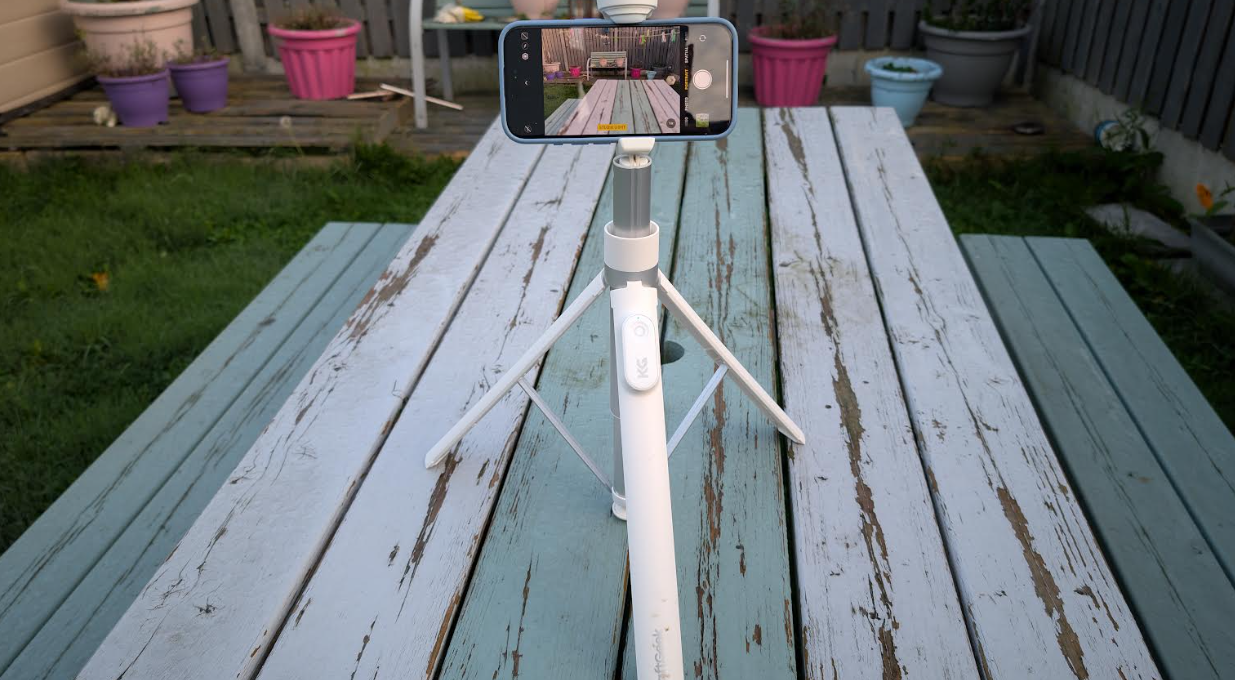
The KraftGeek – JustTap Tap-To-Open Tripod is a handy new tripod on offer for those who want to keep things that bit easier and with this new product it does just that but keeping everything else within the companies ethos intact. If you want another selfie stick check out this one.
If you are familiar with their products which we are this is another new offering making one less slightly annoying thing to deal with and that is opening the tripod legs, no that they have this can they make one that closes just as simple?
Again the product is well built and looks good and is solid there is also a bluetooth remote on the leg so it makes for ease of use when out and about or you want to get that extra wide shot with everyone in it including yourself.
It again goes to a decent height too which makes it more useful in some scenarios and it is very light and will fit in any travel or tech bag which again is excellent. See the video below for more.
Patented Tap-to-Open Design: Simply tap the bottom of the tripod on the ground to automatically open it, allowing for quick, one-handed setup. A true hands-free solution for convenience.
Versatile Shooting Angles: The dual-axis 180° rotation enables a wide range of shooting angles, from overhead and low-angle to landscape and portrait, adapting to any scenario.
Safe and Secure: The center-open phone clamp eliminates the risk of pinched fingers, while the silicone padding safeguards your phone from scratches.
Higher & More Stable: With a maximum height of 1680mm, it’s ideal for panoramic and group shots. The widened tripod base, zinc-alloy legs, and silicone anti-slip pads ensure maximum stability, even outdoors.
Lightweight & Durable: Crafted from lightweight yet durable aluminum, the extended pole offers strength and portability, backed by a 1-year warrantyOnline Store: https://bit.ly/3NF8Am2Discount Code: JIMAmazon US: https://amzn.to/3C3nGzm
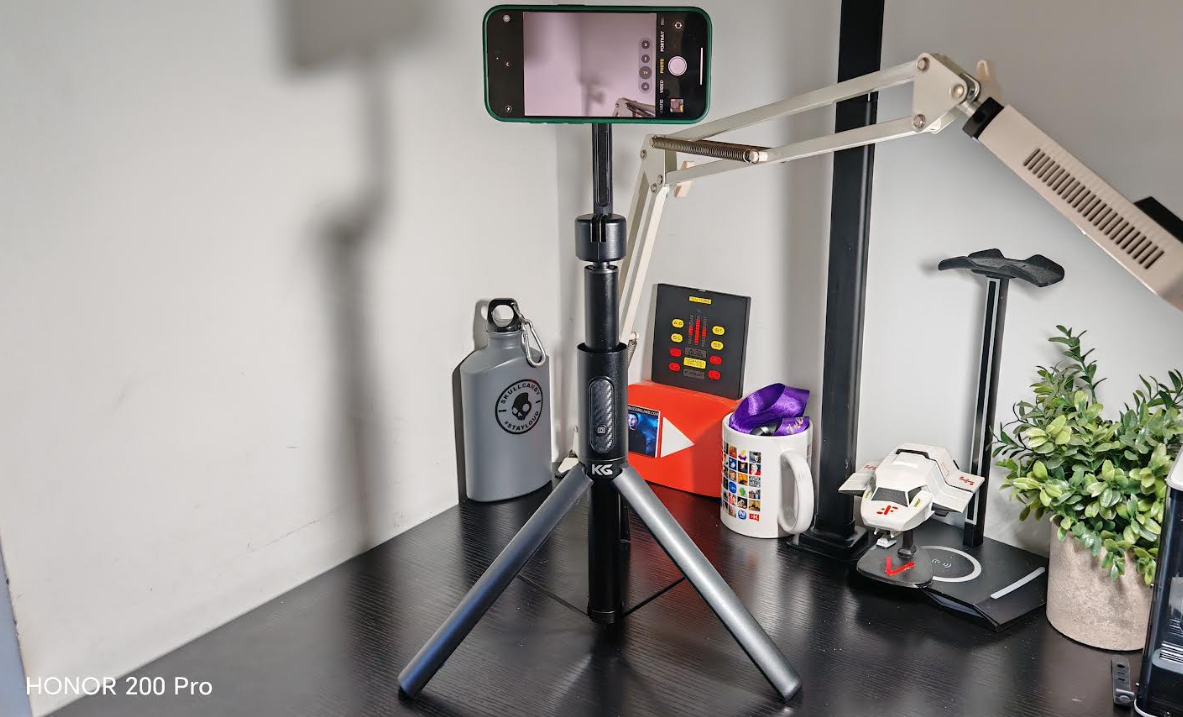
The KraftGeek MagStand Selfie Stick Phone Tripod is an ideal kit for content creators and even just your average Joe soap so to speak.
Slim light and portable this can be carried in most tech bags or just a regular bag depending on your own personal set-up this would also fit in a laptop bag that has enough space inside and not just a laptop cover pouch, most laptop bags would suffice.
This is simple to use with no app installation required, as you will see in the video below there is a removable bluetooth switch and it is simple to use once paired to your smartphone.
The tripod legs are solid and can take the weight of your phone, some I have tried in the past had difficulty here depending on the angles the phone was at but no issue here, as a selfie stick this is perfect with the solid telescopic poole holding its own as it is when standing freely even with a heavy device attached.
Overall if you are a content creator or just an average user who like to take selfies and more this is an ideal solid piece of kit to have at your disposal and is light and portable and ideal for travelling. This is also ideal if you work at a desk from home too so overall very useful for anyone and can be tilted and rotated to get the desired effect or finish you want in your photos
1
2
3
Features
Bluetooth Wireless Magnetic Remote: Go hands-free with the included Magnetic Bluetooth Remote, which features wireless connectivity at distances up to 33′ without the need for phone apps.
Extended Legs and Non-slip silicone pads ensure stability and optimal framing for video creation and life documentation.
Adjustable Height: Built with a sturdy aluminum alloy pole, it extends from 32 to 150cm (12.6 -60 inches) tall to suit your shooting needs
OK, let’s start by saying this: Things are going out of control!
If you’re a assiduous reader you’ll know by now that neither Jim or I are fans of Selfie sticks and similar, even though that we’ve published some articles regarding this area.
Now the Selfie market has a new addition, meet “The Selfie Spoon”
Apparently someone wants to take the Food Photography to a whole new level, now you can do more than take a photo to your delicious breakfast, you can capture your face while eating.
Is practically a normal Selfie Stick, extends over 80 cm with a holder at the end for your phone, but in this case the other side has an extra….. A spoon.
The company behind this invention is no other than Cinnamon Toast Crunch a cereal company that apparently, hasn’t anything else to do.
You can order one for FREE just paying shipping and handling
Dubsmash is a new app thats gained much attention of late and its easy to see why,i have had a few clips sent to me from friends but never looked into it that much partly to been too busy but i have had the chance now to have a good look at the app and the feedback its been getting and in short is that everyone loves it.
How it works..
Well its simple ,you download the app to your compatible device and its simple to proceed from there.There is a huge array of preloaded scenarios for you to pick from such as Animals,Comedy,Horror,Cartoon,Swag,Business,Sci-Fi,Love,Food,Musicals,Parody,Action Heros,Video Games,Politicians,Sports,Names,Tv Shows.
On opening the app you can create a Dub,see your dubs,send feedback,pick a language,In Settings you can decide if you want push notifications on a daily or weekly basis or no notifications,im sure that option will never be used,you do not use an app like this not knowing what others are doing with the app.
Above is a portion of the list as mentioned earlier which is pretty impressive there is no shortage of items to pic from at all ,once in this list there is a drop down menu then hosting more to pick from so you will not fall short on being creative or funny or whatever your mood maybe there is plenty here to pick from and you will also have fun looking at what is there too..
Overall im impressed with this app and its a great idea, the fact you can share the recording to WhatsApp or facebook messenger direct from the app itself, you can also save it to your gallery and share further afield,all my samples came through Viber so we can say it works a treat..Dubstep is free to download too..