MacBook Logic Board Repair: Fix vs Replace Your Mac in 2025

The kernel panic screen, the folder with a question mark, or simply nothing at all – when your MacBook’s logic board fails, the immediate assumption is that your machine has reached its end. Yet at iPhix Tech NI, Belfast’s premier repair facility, we’ve restored thousands of MacBooks that Apple Stores declared beyond economic repair, using advanced Mac repair techniques that make logic board restoration both viable and valuable. Whether you’re facing graphics failures on your 2019 MacBook Pro or dealing with liquid damage on an M1 Air, understanding the economics and possibilities of logic board repair versus replacement could save you significant money whilst extending your Mac’s productive life by years.

The decision between repair and replacement has become increasingly complex as Apple’s shift to unified architecture makes newer machines less repairable whilst simultaneously more expensive to replace. Our specialist repair services tackle everything from vintage Intel machines to the latest Apple Silicon models, providing honest assessments about when repair makes financial sense versus when replacement becomes inevitable. For businesses and creative professionals across Ireland who depend on their MacBooks, this decision impacts not just budgets but productivity, data security, and environmental responsibility.

Understanding Logic Board Failures: Symptoms and Causes

Common Failure Patterns

Logic board failures manifest in various ways, from subtle performance degradation to complete system failure. The dreaded kernel panics appearing randomly during work signal underlying hardware instability. Graphics glitches – flickering screens, coloured lines, or distorted images – often indicate GPU failures on the logic board. Random restarts, especially under load, suggest power delivery issues within the board’s complex circuitry.

Boot failures present particularly frustrating scenarios. The prohibitory symbol, question mark folder, or endless boot loops indicate logic board components failing to communicate properly. Some MacBooks power on but display nothing, fans spinning at maximum whilst the screen remains black. Others work normally until reaching specific temperatures, then shut down or freeze consistently.

Less obvious symptoms include specific ports stopping working whilst others function normally, Wi-Fi or Bluetooth disappearing from system preferences, or battery charging becoming erratic despite good battery health. These isolated failures often indicate localised logic board damage that targeted repair can address without full board replacement.

Root Causes of Logic Board Damage

Liquid damage remains the leading cause of logic board failures, with coffee, tea, and water creating conductive paths between components never meant to connect. Even small spills reaching keyboard gaps can flow directly onto logic boards below. Humidity and condensation cause slower but equally destructive corrosion, particularly in Ireland’s damp climate where temperature changes create internal condensation.

Thermal stress from inadequate cooling creates another failure category. Dust accumulation blocking ventilation, failed fans, or degraded thermal paste causes components to overheat repeatedly. This thermal cycling weakens solder joints, leading to intermittent connections that worsen over time. Graphics chips prove particularly vulnerable, explaining why many MacBook Pros experience GPU failures around the 3-4 year mark.

Power irregularities cause sudden catastrophic failures. Using incorrect chargers, power surges during storms, or faulty batteries sending irregular voltage all stress logic board components beyond design limits. Static discharge through ports, though rare, can instantly destroy sensitive chips. Manufacturing defects, whilst uncommon, create time-bomb scenarios where components fail predictably after specific usage periods.

The Economics of Logic Board Repair

Cost Analysis Framework

Logic board repair costs vary dramatically based on failure type and MacBook model. Component-level repairs addressing specific failed chips cost significantly less than full board replacements. Micro-soldering services replacing individual capacitors or resistors might solve issues relatively affordably, whilst GPU reballing or chip replacement requires more investment but still costs less than new logic boards.

Comparing repair costs against replacement values requires honest assessment. A MacBook worth considerable money justifies substantial repair investment. Older machines worth less might not warrant expensive repairs unless they contain valuable data or specialised software configurations. The calculation changes for businesses where setup time and software licensing costs make repairs more attractive than replacement.

Consider total ownership costs beyond immediate repair expenses. New MacBooks require migration time, potential software upgrades, and accessory replacement if ports change. Repairs maintain familiar workflows, preserve software configurations, and avoid the productivity loss of adapting to new machines. These hidden replacement costs often tip scales toward repair for working professionals.

Depreciation and Residual Value

MacBooks depreciate predictably, losing roughly 20-30% value annually for the first three years, then stabilising. Logic board repairs can restore machines to full functionality, maintaining higher resale values than partially-working units. A repaired MacBook with documented professional service often commands better prices than identical models with unknown history.

The repair versus replace calculation shifts at certain age thresholds. MacBooks under two years old almost always justify repair given their high replacement cost. Three to five-year-old machines require careful evaluation based on specific models and failure types. Machines over five years old need exceptional circumstances – rare configurations, sentimental value, or specific software requirements – to justify major repairs.

Apple’s vintage and obsolete designations affect parts availability and long-term viability. Machines approaching vintage status (5-7 years) face declining parts availability. Obsolete status (7+ years) means Apple stops all hardware service. However, independent repair specialists often support machines years after Apple abandons them, using salvaged parts and third-party solutions.

Technical Repair Processes and Capabilities

Micro-Soldering and Component-Level Repair

Modern logic board repair requires microscopic precision impossible without specialised equipment. Micro-soldering stations with high-magnification microscopes enable technicians to work on components smaller than rice grains. Hot air rework stations precisely control temperatures for removing and replacing chips without damaging surrounding components. Ultrasonic cleaners remove corrosion and flux residues that prevent proper connections.

Component-level diagnosis identifies specific failed parts rather than condemning entire boards. Multimeters, oscilloscopes, and thermal cameras reveal failing components through electrical and thermal signatures. Schematic reading skills enable technicians to trace signal paths, identifying failure points. This targeted approach replaces individual failed components rather than entire boards, dramatically reducing costs.

BGA (Ball Grid Array) reballing represents one of the most complex repair procedures. Graphics chips and processors attach to boards through hundreds of tiny solder balls that crack over time. Reballing involves removing chips, cleaning attachment points, applying new solder balls with precise templates, and reattaching chips with exact temperature profiles. Success requires exceptional skill and proper equipment.

Data Recovery During Logic Board Failure

Data recovery often becomes the primary concern when logic boards fail. Modern MacBooks with soldered storage make data recovery challenging but not impossible. NAND chip transplantation moves storage chips to functional boards, though encryption and security features complicate this process. Specialised tools read data directly from chips when transplantation isn’t viable.

T2 and Apple Silicon security creates additional challenges. These security chips tie storage encryption to specific logic boards, preventing simple chip swaps. However, partial board repairs that restore enough functionality for data access often succeed where complete restoration isn’t possible. The goal shifts from full repair to temporary functionality enabling data extraction.

Professional data recovery from failed logic boards requires clean room environments, specialised readers, and deep understanding of Apple’s security architecture. Success rates vary based on failure types and encryption status, but professional recovery often retrieves data considered lost. The value of recovered data frequently exceeds repair costs, making attempts worthwhile even with uncertain outcomes.

MacBook Model-Specific Considerations

Intel MacBooks (2016-2020)

Intel-based MacBooks present repairable architectures with modular components. The infamous butterfly keyboard generation (2016-2019) suffered numerous issues beyond keyboards, including display cable failures and thermal problems causing logic board stress. These machines often benefit from preventive maintenance alongside logic board repairs.

The 2016-2017 15-inch MacBook Pros experienced widespread GPU failures requiring board replacement or chip reballing. Touch Bar models introduced additional complexity with separate logic boards for Touch Bar functions. The 2018-2020 generations improved reliability but maintained similar repair challenges with densely packed components and thermal constraints.

Intel MacBooks benefit from mature repair ecosystems with abundant parts availability and well-documented procedures. Third-party parts provide affordable alternatives to Apple components. Established repair techniques achieve high success rates for common failures. These factors make Intel MacBook repair economically attractive despite Apple’s design choices limiting repairability.

Apple Silicon MacBooks (2020-Present)

M1, M2, and newer Apple Silicon MacBooks revolutionised performance but complicated repairs. Unified memory architecture means RAM failures require complete logic board replacement. Integrated design reduces component modularity, limiting repair options. However, improved reliability means fewer failures overall, and superior thermal efficiency reduces heat-related failures common in Intel models.

When Apple Silicon logic boards fail, repair options become limited but not impossible. Micro-soldering still addresses power delivery issues, port failures, and certain component problems. The exceptional performance and efficiency of these machines often justifies higher repair investments given replacement costs. Data recovery remains possible though more challenging due to enhanced security integration.

The longevity question for Apple Silicon machines remains open. Their improved efficiency suggests longer useful lives, potentially justifying repair investments. However, integrated architecture means single component failures might condemn entire boards. Early adoption risks exist, but initial reliability data suggests these machines require fewer repairs whilst delivering superior performance.

Environmental and Sustainability Considerations

Electronic Waste Impact

Every repaired MacBook avoids contributing to the growing electronic waste crisis. Manufacturing new MacBooks requires extensive resources – rare earth minerals, water, and energy – with significant carbon footprints. Repairs extend existing device lifecycles, maximising return on already-invested resources. The environmental cost of repair pales compared to replacement manufacturing impact.

Ireland’s commitment to environmental sustainability makes repair particularly relevant. EU right-to-repair legislation supports independent repair, challenging manufacturers’ monopolistic practices. Choosing repair over replacement aligns with circular economy principles, reducing waste whilst maintaining technological capability. Businesses demonstrating environmental responsibility through repair choices enhance their sustainability credentials.

Corporate Responsibility

Organisations increasingly recognise repair’s role in meeting environmental commitments. Extending device lifecycles through professional repair reduces procurement costs whilst demonstrating environmental stewardship. Employee satisfaction improves when companies show commitment to sustainability. Repair choices reflect corporate values beyond simple financial calculations.

Making the Decision: Repair or Replace?

Decision Framework

Evaluate repair viability through systematic assessment. Calculate repair costs as percentage of replacement cost – repairs under 50% of replacement value generally make sense. Consider device age and expected additional lifespan post-repair. Factor in data value and recovery needs. Assess environmental priorities and sustainability commitments.

Time sensitivity affects decisions significantly. Repairs might take days or weeks for complex issues, whilst replacement provides immediate solutions. Loan machines during repair periods mitigate productivity loss. Backup devices enable repair without workflow disruption. Planning for potential failures prevents rushed decisions under pressure.

When Repair Makes Sense

Repair becomes compelling for newer machines with high replacement costs, devices with valuable data requiring recovery, specialised configurations expensive to replicate, and machines with sentimental or historical value. Businesses with standardised fleets benefit from maintaining consistency. Environmental priorities favouring sustainability over convenience support repair choices.

When Replacement Becomes Necessary

Replacement makes sense when repair costs approach or exceed 70% of replacement value, multiple major components fail simultaneously, obsolete machines lack parts availability, or significant performance improvements justify upgrades. Security requirements mandating latest OS versions that older hardware cannot support force replacement. Business growth requiring capabilities current machines cannot provide necessitates upgrades.

Frequently Asked Questions

How long do logic board repairs typically last?

Professional logic board repairs using quality components typically provide years of additional service. Component-level repairs addressing specific failures often last the remaining lifetime of the device. However, age-related failures might continue appearing in other components. Regular maintenance extends repair longevity.

Can liquid-damaged logic boards be reliably repaired?

Many liquid-damaged boards recover fully with proper treatment. Success depends on liquid type, exposure duration, and response speed. Immediate professional intervention dramatically improves outcomes. Even severely corroded boards sometimes restore to full functionality through comprehensive cleaning and component replacement.

Will repaired MacBooks maintain their resale value?

Professionally repaired MacBooks with documentation often maintain good resale values. Quality repairs using genuine or high-grade components preserve functionality and reliability. Transparency about repair history builds buyer confidence. Repaired machines typically command better prices than faulty units needing repair.

Do logic board repairs void remaining warranty or AppleCare?

Third-party repairs generally void Apple warranties, though EU legislation provides some consumer protections. However, machines needing logic board repairs often already exceed warranty periods. Independent repair warranties sometimes provide better coverage than expired Apple protection.

Conclusion

Logic board repair represents a viable alternative to MacBook replacement in many scenarios, offering economic, practical, and environmental benefits. Understanding failure causes, repair possibilities, and decision frameworks enables informed choices between repair and replacement. Professional assessment provides clarity about specific situations, preventing both unnecessary replacements and uneconomical repairs.

As MacBooks become increasingly expensive whilst simultaneously less user-repairable, professional logic board repair services become more valuable. The expertise and equipment required for successful repairs justify professional service costs, particularly when considering data value, productivity impacts, and environmental responsibilities.

The fix versus replace decision ultimately depends on individual circumstances, but dismissing repair without professional evaluation often means unnecessary expense and environmental impact. For many MacBook users across Ireland, logic board repair provides the optimal balance of cost, performance, and sustainability.


Power Up Your College Year With Tech from eBay Ireland

As the back-to-school season rapidly approaches, college students across Ireland are gearing up for another academic year. eBay Ireland offers a smart solution for savvy students looking to upgrade their tech setup without breaking the bank, while also providing a simple way to earn extra cash. The secret? Selling old tech and buying refurbished.
eBay Ireland is the ultimate destination for students seeking high-quality, affordable, and sustainable tech. More than just a marketplace, eBay connects millions of buyers and sellers, extending the lifespan of products and significantly reducing waste. From top-of-the-range laptops and versatile tablets to reliable smartphones and essential tech accessories, eBay Ireland offers a vast selection of both new and quality refurbished tech, all delivered directly to your door.
Study Smarter, Save More with eBay Refurbished
For students looking to make the most of their budget and make sustainable choices, shoppers can lean on eBay Refurbished as the perfect secret weapon to source the best pre-loved products.
Featuring thousands of amazing Irish sellers offering an incredible variety and value that’s hard to find elsewhere, students can discover deals like Refurbished Apple AirPod Pros for just €50.00 – over 50% less than the RRP (eBay seller: rymcna_47).
Turn Old Tech into New Opportunities
Beyond buying, eBay connects millions of buyers and sellers to extend the lifespan of products and reduce waste through selling on the platform. This summer, eBay is empowering students to generate funds for their new academic year. Got tech you no longer need? Listing it on eBay is a simple way to declutter and put those funds towards your next essential upgrade, and with eBay’s innovative product development and investments in AI, selling on the platform has never been easier, making the back-to-college transition even smoother.

MacBook Bluetooth isn’t working: 8 tips to fix it

Apple laptop users sometimes face the problem of MacBook Bluetooth not working. In this article, we will tell you the reasons why Bluetooth is not working properly and how to fix the issue.

Why Bluetooth is not working on my MacBook

Common causes include:

  • configuration failure;
  • outdated macOS;
  • a lot of devices are connected;
  • the system is not optimized;
  • .plist files are corrupted.

8 tips to fix Bluetooth on your MacBook

You can fix the Bluetooth problem yourself if you use our step-by-step instructions.

1. Rebooting Bluetooth

The module does not always detect and connect wireless devices. In this case, a simple reboot can help – turn Bluetooth off and on again.

2. Restart your MacBook.

To fix the software not working properly, restart your computer. To do this, click on the Apple icon and click on “Reboot”.

3. Resetting the Bluetooth module

If the problem is on a MacBook with macOS Monterey:

  1. Press Command+Option.
  2. In the Spotlight search, type “Terminal” and press Return.
  3. Paste “sudo pkill bluetoothd” and confirm the action by pressing Return.
  4. Reboot the device.

For MacBooks with Big Sur or older versions of macOS:

  1. Press Shift+Option+Bluetooth icon.
  2. Click on the “Reset Bluetooth module” option.

If your laptop is running macOS Catalina or earlier, click “Debug” and then “Reset Bluetooth module” in the system settings.

4. disconnecting peripheral devices

Sometimes reconnecting peripherals can help solve the problem:

  1. From the Apple menu, go to System Preferences.
  2. Select Bluetooth and click on “X” to deactivate the selected device.
  3. Restart your MacBook and reconnect the device after a few minutes.

5. System optimization and cleaning

You can perform optimization with CleanMyMacX which cleans the system of junk, removes malware, etc. Launch the program, go to the system partition, and click “Scan”. Once the process is complete, run the automatic cleanup.

6. Upgrading macOS and Bluetooth

Go to System Preferences through the Apple menu and then to the Software Update option. Update macOS when a newer version is available.

7. Delete Bluetooth.plist files.

If the module property list files are corrupted, this can cause malfunctions. How to fix it:

  1. From the Finder menu, select “Go to” and then “Go to Folder”.
  2. Insert /Library/Preferences, click Go, and delete the com.apple.Bluetooth.plist file.
  3. Paste ~/Library/Preferences/ByHost, hit Go, and delete com.apple.Bluetooth.xxx.plist.
  4. Restart your MacBook so that the system creates new files.

8. Alternative connection method

If you’re having trouble connecting Bluetooth, try using the AirBuddy or ToothFairy apps. They are available for free after you subscribe to Setapp.

Source: Techtoro.io Blog

Tech Review – chargeasap Connect Pro Magnetic USB-C data cable

In a world of cables there is plenty to pick from and we have tested many our over the years some offer more than others and some less some look better than others and some don’t but is it looks that matter? In some cases that would be a yes but functionality is a key feature for me and good cable that will last unlike others do..

The latest cable now on offer from chargeasap is a pretty cool one offering more than one would expect from a cable, yeah I know reviewing cable and plugs are tedious to a degree because most people just plug it in connect device and that is the end of it there they do not stop and think what else is behind this cable.hmmm..

This cable is magnetic with a built in power reader and interchangeable tips which is handy and what this means in not fussing about plugging in a device although it has got better since USB-C has become more mainstream now however there is still plenty of tech out there with the older ports and will be around for some years to come yet.

chargeasap have thought of this and these also work with the best of charging plugs out there including GaN chargers which we are no stranger to.

There is several things to note with such a cable/product, you can easily swap out the device, so headphones earbuds, tablets laptops and more can be used and the safety feature here is great with the snap /on/off feature, now we all know we have all tripped over a cable at some stage and took the desk with us do not deny it. Now this is a thing of the past.

With a built in LED screen with built in amp reader you can also see that you are connected and with the support of up to 100W to charge an extensive array of devices, including USB-C laptops, phones, tablets, and more. Also take into account this keeps your ports covered and dust free which is another bonus and something for people think about.

Check out the video below for more.


chargeasap connect pro magnetic USB-C cable – techbuzzireland


Features

  • World’s first magnetic cable featuring a built-in power reader, showcasing real-time power output in watts on a LED screen
  • World’s first magnetic cable with interchangeable tips to support 100W USB-C and 27W Apple Fast charge for lightning devices
  • Supports up to 100W to charge an extensive array of devices, including USB-C laptops, phones, tablets, and more.
  • Supports full 27W Apple Fast charging for lightning devices, a feat previously hindered by Apple chip constraints.
  • With interchangeable tips, you only need one cable to charge all your USB-C, Apple, and Micro USB devices.
  • The new patented 11-pin design, upgraded from 10 pins also delivers the strongest magnetic connection yet, thanks to the use of neodymium magnets—the most powerful magnets known to man.
  • supports USB 2.0 fast data transfer
  • The USB-C cable end that connects to the wall charger enables higher power input and output.
  • Easy To Connect: User-friendly magnetic connection eliminates the need for precise plug insertions, making it easier for individuals with dexterity challenges to connect and disconnect their devices. No more fumbling around to connect your devices, even in the dark.  
  • LED Indicator: Turns on when your device has been connected and is successfully charging
  • No More Accidents: Tripping over and breaking your laptop is a thing of the past, with our Magsafe connector bringing back the Macbook snag-free feature
  • Protect your phone port: from dust and dirt entering. By leaving the tip in there, it will also extend the life of your phone port from the normal wear and tear of cables being inserted and pulled out on a daily basis.   
  • Crafted from high-quality materials with thicker cables, enabling higher current flow for faster charging.
  • 15 year warranty


Product Specifications:

  • USB-C Output: 9V 1.67A/ 9V 2A/ 20V 3A/ 20.2V 4.35A/ 20V 5A
  • Apple Output: 9V 3A
  • Micro USB Output: 5V 2.4A

BUY 

Video review

Twelve South reveals new HiRise Pro for MacBook with redesign and MagSafe base

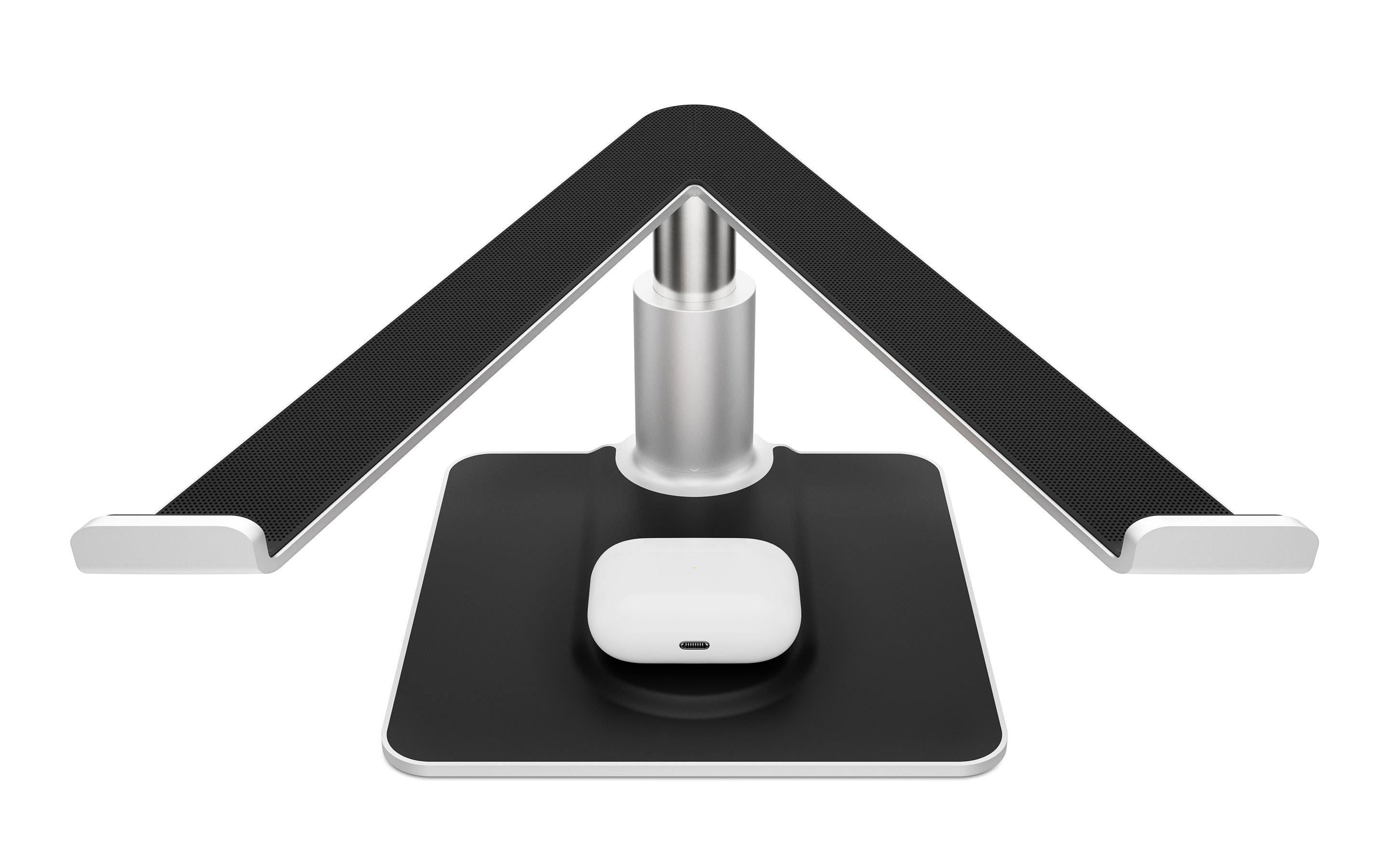
Twelve South, a leading designer of Apple accessories, today introduces the new HiRise Pro, the first height-adjustable, MagSafe compatible MacBook stand. More flexible than a fixed stand, the HiRise Pro adjusts up and down to the perfect height for eye-level video calls or to align perfectly with an external display. HiRise Pro is also the first and only stand with room in the base to add a MagSafe charger, providing users with a streamlined workspace. HiRise Pro is available now for £99.99 from Amazon UK.

With a sleek metal design and vegan leather-trim, Twelve South’s latest MacBook stand beautifully matches the silver and black aesthetic of Apple’s Pro accessory line. Height-adjustable, the HiRise Pro allows users to elevate their MacBook 6-inches off their desk, placing their webcam at eye level for more natural video calls. After the call, the laptop can then be repositioned to seamlessly align with an external display or lowered to as little as 2.5-inches off the desk, for a comfortable working height if using one screen. Perfect for creative professionals, an adjustable laptop stand such as the HiRise Pro enables them to align external monitors to create one huge panoramic screen, making it easier to work.

An ideal addition to any desk or home office, the option to add a MagSafe charger into the base of the HiRise Pro also means users have somewhere to power their iPhone or AirPods while working, without taking up space on the desk or needing extra cables.  Completely redesigned, the HiRise Pro picks up from the original HiRise for MacBook, the very first adjustable laptop stand in the world which was launched over 10-years ago.

Andrew Green, Founder of Twelve South comments: “At Twelve South we’re always striving to create innovative new products that help users’ daily lives. Despite the first edition being over ten years old, HighRise is still a best-selling range for us and we’re so excited to have modernized it further by integrating a MagSafe charging slot in the base”.

The Twelve South HiRise Pro fits all laptops and MacBooks from 11-inch Air to 16-inch Pro and is available now for £99.99 from Amazon.

Twelve South introduces Curve Flex – MacBook’s most versatile and portable stand

Twelve South, a leading Apple accessories designer, today introduces a new highly customisable MacBook stand, Curve Flex, to its range.

Building upon the features of its best-selling stand Curve, Curve Flex is ideal for users who enjoy using their MacBook in different environments, offering unrivalled adjustability and portability thanks to its customisable heights and angles.

The stand can elevate a MacBook’s screen and camera anywhere up to 55cm, offering improved ergonomics for working and more flattering angles for video calls. Rather than having a fixed height, users can adjust Curve Flex to a height and keyboard angle (up to 45 degrees) that works for them, aligning with an external monitor and eliminating the dreaded tech neck.

Weighing less than 1kg, Curve Flex is also highly portable. Adjust the stand to a low desktop wedge for a comfortable coffee shop/on-the-go setup that allows for wrist-friendly typing. When it’s time to leave, fold Curve Flex down flat and slide it into its padded neoprene travel sleeve which can easily slip inside a laptop bag.


It’s not all substance either, available in matte white or matte black, Curve Flex is sleek, stylish and blends into any colour scheme seamlessly.

Although designed specially for MacBook, Curve Flex is compatible with all laptops at least 8.66-inch wide and up to 3kg.

Available mid-September for £79.99 from Amazon UK.

Five Methods to Fix Frozen MacBook when Booting Up

Introduction

MacBook laptops sometimes run into the issue of not booting up for some reason. It could be because of corrupted startup file, incompatible operating systems with the MacBook model, bad startup disk, and so on. When these issues exist, it becomes harder to start up the MacBook normally. 

This article provides five simple methods to fix frozen MacBook that is not booting up. It explains these step processes and applicable solutions to scenarios when the Mac is not booting up.

Methods of Fixing MacBook That Is Not Booting Up

Below are the top five recommendations to get your MacBook up and running once again. They are:

  1. Safe Mode Boot

Booting in Safe Mode limits the number of checks and processes that Mac focuses on while trying to boot. It is very useful for performing certain diagnostics to discover the real issue with the laptop not booting. 

To proceed with safe mode, first force shut down the Mac. Next, press and hold down the shift key immediately after restarting the Mac. To get some feedback on the actions you are taking while trying to boot in safe mode, press and hold the ‘Shift + Command + V’ key combination when you restart the Mac. This will boot into safe mode alongside verbose mode. 

You should see safe mode written on the top right corner if you are successful. The safe mode interface also looks a bit different with blocks of color in comparison with the usual transparency. Once you are in safe mode, try uninstalling recent software or undoing recent settings changes. 

  1. PRAM/NVRAM reset

Parameter Random Access Memory is a special memory section that stores data in the Mac for shutting down, volume settings, and screen resolution. Resetting PRAM helps to reset the parameters to the default value and helps to end any process disrupting proper boot-up. 

To reset PRAM/NVRAM, first shut down your Mac. Click and hold down the ‘Command + Option (alt) + P + R’ key combination immediately after restarting. Keep holding down these keys for at least 5 seconds before releasing the keys. This should reset your Mac and allow it to restart normally. In other cases, you boot to the progress bar and your Mac starts up after some minutes.

  1. System Management Controller (SMC) Reset

The SMC is responsible for low-level hardware functions like power button action, battery management, LED, and so on. Resetting the SMC will return the power management settings to default and help to fix the boot failure. 

To begin the reset process, make sure the Mac is shut down by long pressing the power button. After about 15 to 20 seconds, hold down the ‘Shift + Control + Option’ key combinations and press the power button for about 10 seconds. Release the button and restart the Mac to see the result.

  1. Disk Utility option in Recovery mode

A corrupt drive might prove to be incompatible with the startup process because of some corrupt files. Using the recovery mode, a fix for the drive can happen with the ‘First Aid’ feature in the Disk Utility option. The first step is to get the laptop to boot in recovery mode. To do this, first force shut down the laptop. Then proceed to click the ‘Command + Option + R’ key combination immediately after restarting.

When the screen shows the ‘macOS utilities’ menu, your Mac is in recovery mode. Proceed to navigate to the Disk Utility option. From the Disk Utility, select the startup drive and apply for the ‘First Aid’ program on the drive. If there are errors with the startup disk, the Disk Utility will help fix them.

  1. File system check

In a scenario where the file system is the reason why MacBook is not booting up, running a check and slightly modifying it will help fix the issue. Although this step is a bit technical, it is easy and quite straightforward. To begin this process, first shut down your Mac. Restart with and press the ‘Command + S’ key combination. This launches the Mac in single-user mode. You should release the keypress only when a black screen and white text appears on the screen. 

Next, enter the ‘fsck –fy’ command in the command line prompt and click the return key. Wait while the file system modification is ongoing. After the checks are over, you should see either one of the two messages: ‘The volume (Mac name) appear to be OK’ or ‘FILE SYSTEM WAS MODIFIED’.

Proceed to type reboot and press enter to restart your MacBook. 

Data Recovery with iBoysoft

One thing you worry about the frozen MacBook is the data within. There is one effective solution from iBoysoft Data Recovery for Mac to recover data from a dead MacBook. iBoysoft offers an effective and efficient data recovery software that helps to recover important data from your laptop. It offers the option to recover your files from the laptop that might have some fault. 

In three easy steps, you can recover your files. First, download and install the iBoysoft tool free from the internet. The second step is to launch and perform a quick or deep scan of the disk you select. Thirdly, preview and recover the files you choose to recover. You are suggested to store these files on an external hard drive instead of saving them in the original location. 

Fortunately, when your MacBook refuses to boot up, iBoysoft data recovery can help you recover your data. Through the terminal, you can launch the iBoysoft tool and save your data to an external device. From the recovery mode, select terminal on the ‘macOS utilities’ screen. 

In the terminal command window, enter the following command: ‘sh <(curl http://boot.iboysoft.com/boot.sh) command to launch the iBoysoft data recovery. From the software interface, select the disk you wish to scan and perform the scanning process. Select the files you need to recover and select ‘recover’. For this data recovery process to work, make sure your Mac has an active internet connection.  

Tech21 launches its Evo Hardshell cases for MacBook Pro offering the ultimate in style and protection

Tech21, the leader in impact protection for smartphones, tablets and laptops, today launches its new Evo Hardshell cases for the recently introduced 14- inch and 16- inch MacBook Pro. They are now available in Clear and Ash from all Apple stores, from Apple.com and Tech21 for an RRP of £79.95/$89.95.

The Evo Hardshell cases offer incredible levels of protection against everyday bumps and scratches whilst at the same time being lightweight and ultra-thin, so ideal for those commuting to the office or heading to a local coffee shop. Tech21 combines science, engineering, and unrivalled British design to create cases that address three core benefits: style, protection and performance.

There is a choice of an ash colour, designed to complement MacBook Pro, or a clear case which is made with an anti-yellowing formula that keeps things clear for the lifetime of the device. It also has low-profile non-slip feet for a stable typing platform and offers comfortable access to all ports and functions.

Tech21 Ash case for the Macbook Pro

Tech21 is one of only a few case manufacturers to have an in-house science and materials team and the only one to have been tested by physicists at the UK’s National Physical Laboratory. Each case collection is rigorously tested to Tech21’s own demanding standards to ensure compatibility with the  MacBook Pro. When buying an Evo Hardshell case, users can thus be fully assured of incredible impact protection, super-smooth scratch resistance and easy access to every connection needed. They are now available in Clear and Ash from all Apple stores, from Apple.com and Tech21 for an RRP of £79.95/$89.95.


Twelve South introduces the redesigned ParcSlope stand for MacBook and iPad. #Apple #TwelveSouth #Tech

Twelve South, a leading designer of Apple accessories, today introduces the new redesigned ParcSlope, a sleek metal dual-purpose stand that elevates MacBook screens and angles iPads for more comfort and productivity. ParcSlope is available now for £49.99 from Amazon.co.uk.

The Twelve South ParcSlope is a one-piece metal stand that raises a MacBook screen to an optimum viewing position while keeping the keyboard angled and low to the desk for comfortable typing. Whilst the ParcSlope is a great addition to any home office set up, it is also small and light enough that it can be moved around the home in the event users want to work from their kitchen island or dining room table. With ParcSlope, MacBook users will enjoy better ergonomics that help to relieve shoulder and wrist pain, a video call friendly viewing angle and an open wedge design that allows for increased airflow and a cooler, quieter MacBook.

For iPad users, ParcSlope angles the device to a wrist-friendly 18-degree angle that’s perfect for sketching, creative work, note taking or performing music. The matte black easel stand is sturdy and holds every iPad (except iPad mini) in a landscape or portrait mode. ParcSlope even allows users to turn their iPad into a mini desktop by pairing it with a wireless keyboard providing an even smarter way to work.

A must-have for MacBook and iPad users, this versatile modern stand also features tiny ridges along the top that are just enough to allow the MacBook screen to swing freely open, while a lip at the front of the stand enables users to open their MacBook with one hand while gravity holds the notebook in place. Additionally, an oval cutout at the back of the stand holds cables securely when an iPad or MacBook is not in use.

The Twelve South ParcSlope is available now for £49.99 from Amazon.co.uk.