FUJIFILM launches the INSTAX MINI 99 instant camera – First Look

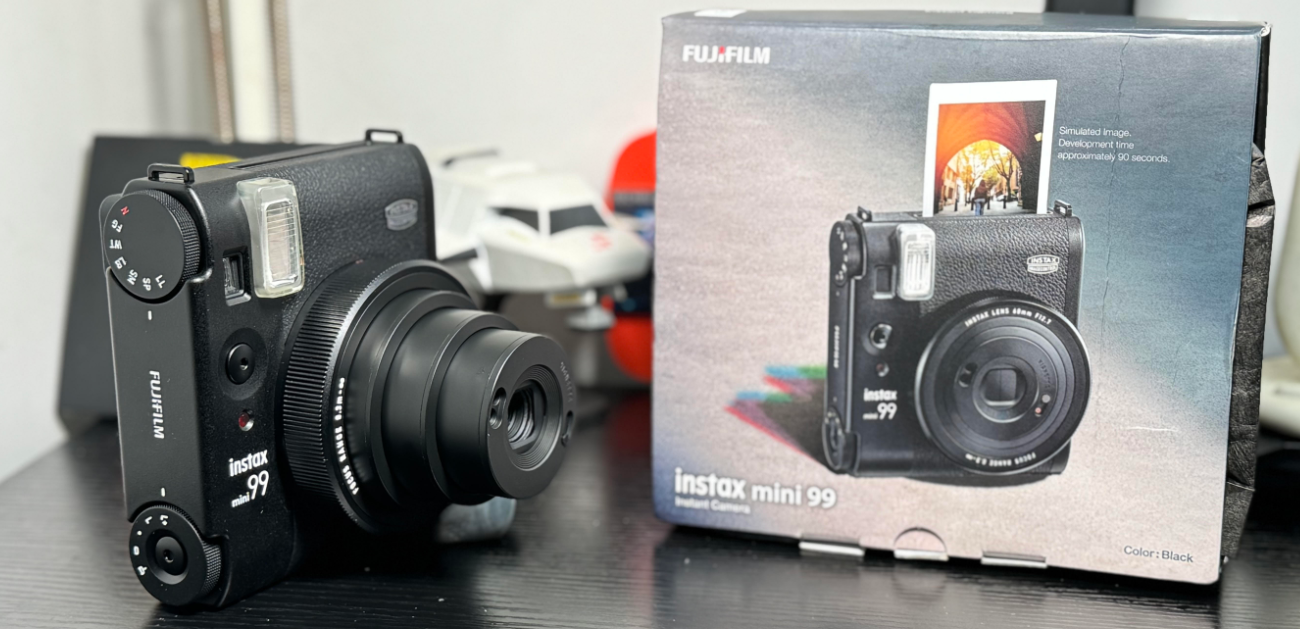
RATINGEN, Germany, 14th March 2024: FUJIFILM Europe GmbH, Imaging Solutions Division, announced today the launch of its’ high-end, analog instant camera, the INSTAX MINI 99 instant camera (MINI 99). With its classic and stylish matte black finish, the MINI 99 brings advanced new features including color effect dials, a unique Vignette Switch, plus brightness and focus modes to maximize the potential of each photo while maintaining the traditional INSTAX aesthetic.  

The MINI 99 features a first of its kind Color Effect Dial. This unique dial control has six effects – Faded Green, Warm Tone, Light Blue, Soft Magenta, Sepia, and Light Leak – which allows the user to customize, create and curate a one-time only unique image. Driven by LED lights within the camera, the Color Effect feature exposes the chosen color onto the INSTAX MINI instant film, creating the desired effect on the printed INSTAX MINI photo.

The MINI 99 also comes with an exciting new switch, the new Manual Vignette Switch. Located on the lens housing it can be used to add an artistic shaded frame around the image. 

“Advances in instant photography technology has allowed us to maintain the look and feel our users love, while adding exciting new technology, that will allow them to truly reflect their creativity and artistic expression,” states Shin Udono, Senior Vice President, Imaging Solutions, FUJIFILM Europe GmbH. “This is why INSTAX MINI 99 is especially exciting to Fujifilm, and we believe for image makers as well.” 

Other INSTAX MINI 99 Product Features Include:

Brightness Control Dial: This feature offers five distinct levels of brightness: the Light (“L+”) setting indicates the brightest exposure, the “L”, “D”, and “N” settings offer the normal range of brightness, and the Dark (“D-”) setting represents the darkest available brightness level. 

Shooting Modes: A variety of shooting modes enhance the user experience, with Indoor Mode designed for low light situations, Sports Mode, which increases the shutter speed to grab the perfect action shot, Double Exposure Mode, which lets the user combine two images into one, and Bulb Mode, which increases the amount of light let in when creating the image, creating a brightened effect on the print. 

The camera’s Landscape, Standard, and Macro Focus Modes are easily accessible by adjusting the lens dial. Landscape Mode focuses on subjects positioned at a distance reference of “3.0m and beyond”. Macro Mode is perfect for close-ups and selfies at a distance reference of “0.3m to 0.6m”. Users can select Standard Mode for everything in between. 

Self-timer: It is at hand to help create the perfect group image, and MINI 99’s flash controls include Auto mode, Fill-in (flash will always fire regardless of lighting), Red-eye Removal, or the option to turn the flash off, depending on the user’s lighting situation.

Grip and Tripod Mount: To enhance grip in even the most active image-making situations, MINI 99 comes with a precision-milled, Base Grip with Tripod Mount that also acts as a grip when attached to the camera (tripod sold separately).

Accompanying the launch of the INSTAX MINI 99 is the introduction of a new INSTAX MINI film, PHOTO SLIDE. This new film has been inspired by the design of motifs featured on photographic film mounts and complements the print expression of an INSTAX MINI 99. 

Pricing and Availability:

Fujifilm’s INSTAX MINI 99 instant camera will be available at a manufacturer’s suggested retail price of EUR 200.00 (incl. VAT). It is expected to be available for purchase on 4th April 2024 at Fujifilm stockists nationwide. For more product information, visit https://www.instax.ie/cameras/mini-99/

INSTAX MINI PHOTO SLIDE instant film is expected to be available on 4th April 2024 at a manufacturer’s suggested retail price of EUR 10.00 (incl. VAT) per pack (10 sheets), for more information about this new INSTAX mini instant film variety, visit www.instax.ie/film/#film-selector

INSTAX UP! Smartphone App Update

And that’s not it! Fujifilm also announces an update to its free, downloadable INSTAX UP! Smartphone App. The INSTAX UP! Smartphone App is designed for INSTAX users to digitally scan, import, organize, and store their photos in one place, regardless of which FUJIFILM INSTAX instant film, instant camera or instant Smartphone printer product they use. 

The latest addition to the INSTAX UP! Smartphone App is its album feature. Utilizing this clever new feature, users can easily organize and store their digital FUJIFILM INSTAX photos by themes, such as holidays, friends, and favorites. Within the album feature, users can add, tag, share, download and delete INSTAX images from the digital album, encouraging easy organization of the INSTAX digital image collection. A list/box view can be created for each album. The updated INSTAX UP! App is available today.

Unboxing and First Look 


Tech Review – INSTAX Pal from FUJIFILM

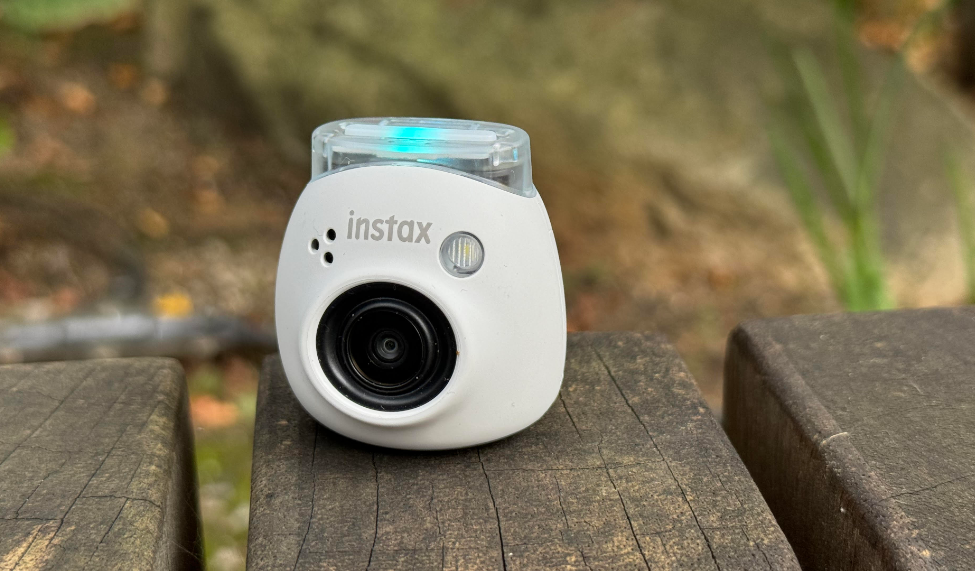
The INSTAX Pal from FUJIFILM is the latest new gadget on offer and has been a huge hit in my house and with friends that have seen it, how it works is also really great and simple to use and you can connect to compatible printers from the brand too, not only that it also comes with a brand new app which is again simple to use and we go through this in full in the video review below which gives you an insight if you have not yet pulled the trigger on this tiny little camera which should be a gift on your Christmas list this year for sure.

Size is of the importance here and no you do not need to carry a printer with you unless you want to hand out snaps there and then which I guess has been the brands main points over the last few years since they were introduced, for me it is all about the size of the INSTAX cam which is tiny and mega portable and can be used remotely by your phone too via the app or use the shutter key on the rear which you can pre-record the shutter sounds if you wish to do so and you should sure why not the feature is there so avail of it and surprise the folks the other end of the camera.

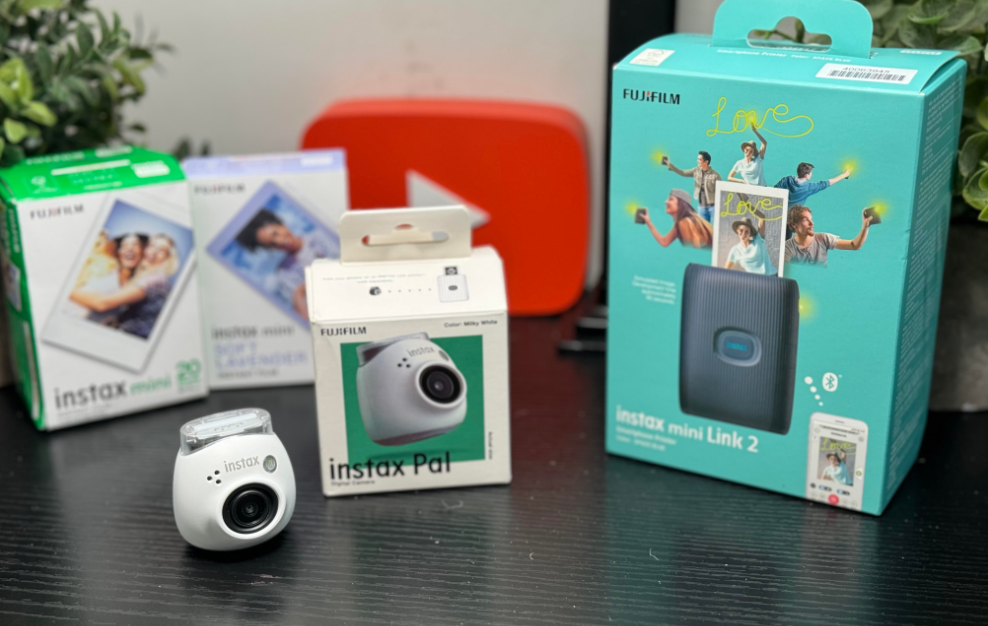
Note compatible INSTAX – INSTAX mini LinkINSTAX mini Link2INSTAX SQUARE Link and  INSTAX Link WIDE smartphone printers.

The camera itself has simple functionality which is great to use, there is two apps you can use or just print directly from the Pal camera, you have main shutter button and you have a switch on the bottom showing F and L being Fun and Link you can also tilt the printer to change modes if you wish, we show you all this in the video review below. You can also add storage via micro SD card or store locally.

With the apps you can get super creative and create slides and videos add text, colour, design and much more which is what I like most here and it does more than just print images, this has been present before so if you are familiar with these cameras you know the story if you are creative you can get creative with what is on offer, again see the video and samples if you are not familiar with the options at your fingertips here.

I am by no means a professional photographer nor ever claimed to be but the camera takes nice pictures which you will see on your smartphone the prints may not reflect this at all times but it is best used in brighter scenarios there is also a flash on the PAl camera which helps the situation though and in short it is about fun here and simplicity and most importantly having a photo there and then in your hand as I always say with INSTAX printers and cameras, as mentioned you don’t need to carry the printer as the images taken will transfer across anyway you can save them for later on though after being out testing it is best to have it with you and have prints at the ready be it for family or friends in the office or at home.


The Apps

Instax mini Link 2

Pricing and Availability: 

Fujifilm’s INSTAX Pal digital camera is available to purchase at Fujifilm stockist’s nationwide at a manufacturer’s suggested retail price of EUR 100.00 (incl. VAT) for Milky White, Powder Pink, Pistachio  Green, Lavender Blue versions and EUR 120.00 (incl. VAT) for the Gem Black version. For more product information, visit  https://www.instax.ie/instax-pal/

Video review


First Look FUJIFILM INSTAX Pal – A Palm-sized digital camera

The latest offering from INSTAX has just dropped and knowing the brand so well over the years they are right when they say it is a first of its kind, it is tiny and the smallest camera I have used, Today we give you a first look at the cute little thing and while we test it out feel free to ask any questions on our channels and stay tuned for a full review in the coming weeks.

The pocket-sized digital camera allows you to easily take pictures with one hand, and the wide-angle lens  makes it perfect for group photos. But the exciting features don’t stop there.

Remote Shooting using the dedicated smartphone app enables users to be part of the picture. The app allows users to check the composition of the image via their smartphone before taking  the photo with the INSTAX Pal.

Interval Shooting allows the user to take continuous shots at 3-second intervals, which can then be edited in the app to choose the best shot.

INSTAX Animation combines multiple images into a single video similar to a flipbook. If the user  prints the INSTAX Animation, it becomes an INSTAX print with QR code. Scan the QR code to  play the video.

[Link] Mode lets users connect the INSTAX Pal directly to their INSTAX Link series printer via  Bluetooth. Then, just like our other instant cameras, the images automatically print out  immediately after they are taken.

Multi-use detachable ring can be used as a handy strap, as a simple viewfinder and as a camera  stand when remote shooting.

Additionally, personal audio can be recorded and set as the camera’s Pre-shutter sound, creating a  moment of personalization for every user. The INSTAX Pal is available in 5 colors: Milky White, Powder  Pink, Pistachio Green, Lavender Blue, and Gem Black. An INSTAX Pal Design Silicone Case in five  colors and a new mini film, “Soft Lavender,” will also be available at launch.

Pricing and Availability: 

Fujifilm’s INSTAX Pal digital camera will be available to purchase at Fujifilm stockist’s nationwide at a  manufacturer’s suggested retail price of EUR 100.00 (incl. VAT) for Milky White, Powder Pink, Pistachio  Green, Lavender Blue versions and EUR 120.00 (incl. VAT) for the Gem Black version. It is expected to  be available for purchase on 5 October 2023. For more product information, visit  https://www.instax.ie/instax-pal/


UNBOXING VIDEO

Tech Review – Instax Mini 12 instant camera

I am a huge fan of Instax cameras and some might see it as a niche thing which is fine and due to how powerful our smartphones are today the sales of cameras have dropped over the years but there is still a market out there for all things camera and including retro cameras like Instax from FUJIFILM.

OK OK I say it every time an Instax camera comes in for a review “do you remember when we used to take photos with disposable cameras and so on or even your DSLRs etc and go get them sent off and you could not wait to get the envelope stuff with photos back?” Well do you? Have you changed or picked up a camera from Instax and actually tried to bring back how things used to be like all the retro tech we now are seeing more of?

The latest offering from the company the Mini 12 instant camera is not what I expected at first glance when it comes to the tech side of things using their app and probably because they launched a new app called the Instax Up app the same day which we will review another day but unlike previous cameras this does not require an app to use it to edit photos etc it is just a simple point and shoot camera, with the Instax app you can scan INSTAX prints and store them digitally in one place, Organize photos by category/list views for easy locating, Easily share stored photos and collections via social media or text, Import photos from other INSTAX apps (INSTAX mini LINK, INSTAX Link WIDE etc.) into the INSTAX Up. There is no app for this camera however we are testing today which I thought initially there was and this might make the case for making things easier if you look at it another way.

On testing this camera I found it is ideal for the selfie fan which myself is not someone who posts the likes on a daily basis and it does well mostly so on outdoors and takes decent images as you will see in the video review below, it is on the bulky side however these cameras always have been and certainly will be a talking point when you take it out to get some photos you can hold in your hand.

Specs

Viewfinder
  • Real image finder, 0.37x, with target spot
  • Parallax correction function for close-up mode
Lens
  • 2 components, 2 elements
  • Focal length – f = 60 mm, 1:12.7
  • Shooting range – 0.3 m and beyond (use close-up mode for 0.3 m to 0.5 m)
Exposure
  • Programmed electronic shutter – 1/2 to 1/250 sec. Slow synchro for low light.
  • Sensitivity – Lv 5.0 to 14.5 (ISO 800)
  • Exposure control – Automatic
Flash
  • Constant firing flash (automatic light adjustment), recycle time: 7 seconds or less (when using new batteries)
  • Effective flash range: 0.3 to 2.2 m
Film
  • Film – Fujifilm Instant Colour Film “instax mini” (separately available)
  • Film Size – 86mm x 54mm Picture Size 62mm x 46mm
  • Film Developing Time – Approximately 90 seconds (Varies depending on the ambient temperature)
    Battery Specs
    • Two AA-size alkaline batteries (LR6), capacity: approx. 10 instax mini film packs of 10 exposures each

BUY

Video Review

First LOOK – Fujifilm INSTAX MINI 12 Instant Camera and the new INSTAX UP App!

FUJIFILM Europe GmbH, Imaging Division, has launched the new INSTAX MINI 12 Instant Camera (hereinafter “MINI 12”). Built with all the best bits of the popular INSTAX MINI instant camera series in mind, plus impressive upgrades, MINI 12 combines a fun aesthetic and enhanced features in a camera designed to fill the world with joy.

With its inflated, bubble design, MINI 12 carries over the main features of the most recent INSTAX MINI 11 Instant Camera (launched in 2020), including Close-Up/Selfie Mode and Auto Exposure adjustment capabilities, but also features a new Parallax Correction feature, in which the camera’s viewfinder aligns with the lens when using Close-Up Mode, reducing object shifts, resulting in a centered photo. MINI 12 also features automatic flash control, which helps create beautiful images in both bright or low-light situations. Its updated lens structure provides intuitive steps for both powering the camera on and off and accessing the popular Close-Up/Selfie Mode with a simple twist of the lens.

“The INSTAX MINI series has long been an incredibly popular choice to introduce the fun of instant cameras to photography lovers, old and new, thanks to its playful design, ease of use, and affordable price,” said Shin Udono, Senior Vice President, Imaging Solutions, FUJIFILM Europe.  “MINI 12 takes this series to the next level with an iconic bubble design that pops with joy and creativity. How you see the world is shaped by the lens you see it through, and MINI 12 brings users a new unique perspective.”

Five exciting colorways

MINI 12 will be available in Blossom Pink, Mint Green, Clay White, Lilac Purple, and Pastel Blue. It is expected to be available from 16th March 2023 at a Manufacturer’s Suggested Retail Price of €90.00. The INSTAX MINI 12 will be available for purchase at FUJIFILMI stockists nationwide.  For more information, please visit  www.instax.ie/cameras/mini-12 

And that’s not all – FUJIFILM Europe GmbH, Imaging Division, have also 

announced the launch of Fujifilm’s free, downloadable INSTAX UP! Smartphone App (hereinafter “INSTAX UP!”), designed for INSTAX instant photography fans to digitally scan, store, and share their photos in one place. 

With INSTAX UP! users can:


  • Scan their INSTAX prints and store them digitally in one place
  • Organize their photos by category/list views for easy locating
  • Easily share stored photos and collections via social media or text
  • Import photos from other INSTAX apps (INSTAX mini LINK, INSTAX Link WIDE etc.) into the INSTAX Up! 
  • Keep informed about the latest INSTAX updates, tips, and other creative content

INSTAX UP! has been developed with the help of consumer feedback; where users wanting to digitally store and share INSTAX prints have previously used simple smartphone picture taking of photographs. This technique can result in the glossy surface of the print to cause reflections, as well some distortion including loss of texture of the border film. INSTAX UP! simplifies and improves the process for storing your favourite INSTAX prints digitally and turning them into shareable posts.

“INSTAX UP! is a new solution that solves the problem of easily digitizing and sharing high-quality INSTAX prints,” said Shin Udono, Senior Vice President, Imaging Solutions, FUJIFILM Europe. “Enhancing the overall INSTAX experience, INSTAX UP! will enable instant photo fans to digitally organize and archive their creativity, and easily share their photos with the world, helping preserve special memories and inspire more.”


INSTAX UP! is available to download today. 

https://apps.apple.com/app/instax-up/id1664064756

OR 

https://play.google.com/store/apps/details?id=com.fujifilm.instaxup

Unboxing Video 


DxO releases 1,693 new Optics Modules, providing unrivaled corrections for Canon EOS R6 Mark II, Fujifilm X-T5, Sony A7R V, and a selection of Sigma lenses

DxO’s Optics Modules offer unparalleled corrections, including unique lens softness improvements and distortion corrections that maximize field of view. DxO’s software now corrects more than 80,000 lens and camera combinations.

Paris (France): DxO, the company that has pioneered calibration-based optical corrections for 20 years, today announces its latest batch of Optics Modules. The release of 1,693 DxO Optics Modules includes support for the Canon EOS R6 Mark II, the Fujifilm X-T5, the Sony A7R V, five lenses from Sigma, and more.

For quality-conscious photographers, DxO Optics Modules are a wealth of individually tailored, laboratory-grade corrections, which present the most accurate and powerful route to improving image quality on the market. Superior to other optical correction software, DxO’s adjustments vastly improve results, whether they are applied to entry-level lenses or professional-grade glass.

Essentially, the performance of any lens can be boosted by processing RAW files with DxO software: PhotoLab, PureRAW, FilmPack, and ViewPoint.

A unique approach to defeating lens softness

All correction software offers digital sharpening to combat lens softness, but DxO’s approach is unique and superior, taking into account the varying levels of sharpness across a lens’s entire field of view. Rather than applying general sharpening across the entire image (as with lesser software), DxO Optics Modules target sharpening as required, such as when a lens gets progressively softer towards its edges.

As seen with the Sigma 65mm F2 DG DN, the boost in image quality by DxO Optics Modules makes it perform better in terms of sharpness and distortion (while also eliminating vignetting and aberrations). As illustrated below, nowhere is this clearer than in combating lens softness. 


  • The uncorrected lens displays a significant difference in sharpness between the center of the frame and the corners.


  • Typically, photo editing software uses a generic profile to make a global correction across the entire image based on the sharpening required at the center.


  • Edge of frame sharpening from Adobe Lightroom® (left) and DxO Optics Modules (right). Unlike Adobe Lightroom, DxO Optics Modules are able to progressively increase corrections away from the frame’s center, allowing for a sharper overall image.

Sophisticated distortion corrections deliver greater image area

DxO’s Optics Modules frequently deliver a greater image area thanks to more refined assessments when correcting distortions. When needed, DxO Optics Modules give photographers the option to gain extra image area when compared with the crop applied as the result of Lightroom’s corrections.

Intelligent control of chromatic aberration

In addition, DxO’s Optics Modules remove chromatic aberrations — both longitudinal, and lateral. Chromatic aberrations vary depending on the focal length and distance, and DxO’s algorithms take these into account in order to perform more accurate corrections. Colored outlines are removed without degrading the image’s color or detail.

Vignetting accurately removed

Finally, vignetting is resolved, correcting the darker edges of the frame that can occur in certain lenses and at specific focal lengths.

The most exacting science, the highest quality

Each DxO Optics Module is created using individual camera and lens combinations. This means that any minor differences in the performance of a sensor can be measured across all the examples of it in a manufacturer’s lens mount range. 

For instance, with the new Optics Modules for the Sigma 150-600mm F5-6.3 DG DN OS S, measurements were not made using just a single full-frame Alpha camera, but with almost every Sony camera on the market.

Latest DxO Optics Modules

The latest DxO Optics Modules update — available now — includes the following cameras and lenses, each optimized for specific camera and lens combinations:


  • Canon EOS R6 Mark II
  • Fujifilm X-T5
  • OM System OM-5
  • Sony A7R V


  • Sigma 18-50mm F2.8 DC DN | C (L-mount)
  • Sigma 16-28mm F2.8 DG DN | C (Sony FE)
  • Sigma 65mm F2 DG DN | C (Sony FE)
  • Sigma 65mm F2 DG DN | C (L-mount)
  • Sigma 150-600mm F5-6.3 DG DN OS S (Sony FE)
  • Tokina ATX-M 11-18mm F2.8 (Sony E)


About DxO

For over 20 years, DxO has blazed a pioneering trail in the fields of photographic science and digital image processing. Built on principles of technical rigor and ceaseless innovation, we were at the forefront of bringing RAW development to photographers, and continue to build the most powerful and versatile software on the market, all designed to offer the greatest image quality and creative freedom. Along with its exacting Optics Modules, available in all our products, we publish DxO PhotoLab, which won the EISA 2020-2021 award for Best Photo Software and the TIPA award for Best Imaging Software in 2020, 2021, and 2022; the award-winning RAW preprocessing and noise reduction software, DxO PureRAW; and Nik Collection, the renowned suite of creative plug-ins for Adobe Photoshop®, Lightroom Classic®, and DxO PhotoLab.

Tech Review – Instax Square Link smartphone printer

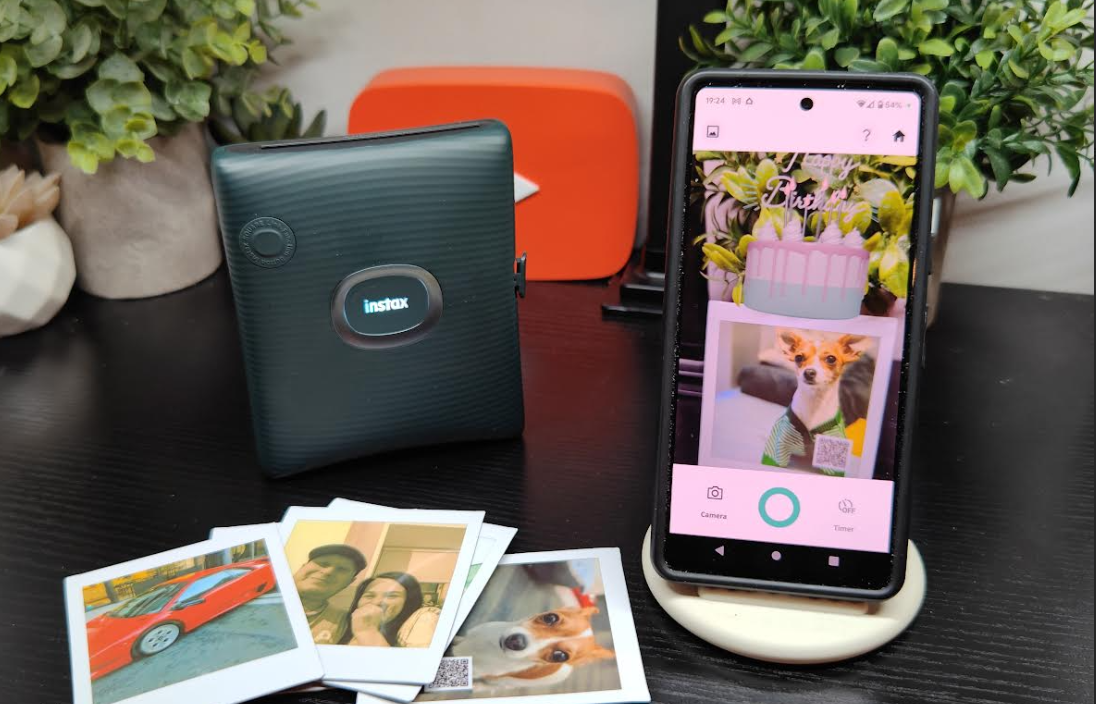
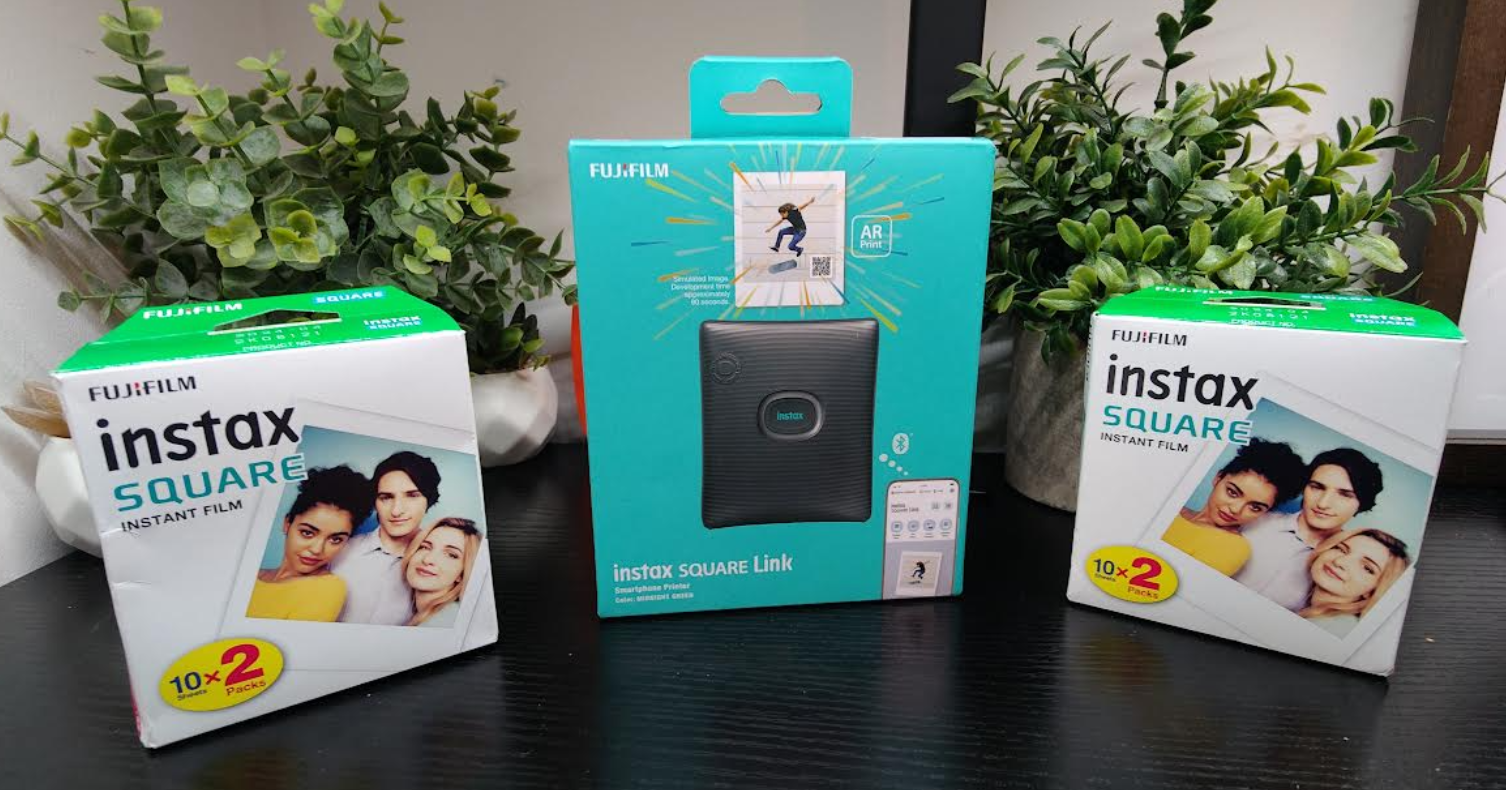
The FUJIFILM Instax Square link is another addition to their popular range of smartphone printers whereby users can actually hold a photograph in their hand not long after it has been taken, the days of sending off your camera prints are long gone it seems and is a nice throwback to how things were done back in the day only better with just a few seconds to wait to hold the photo in your hand, I have loads of these dotted around the house and some of them framed having tested many of their printers and love it.

The latest model is no different and has some new features like AR prints which you can see how it works in the video review and also a sample there in the header image it is really cool and can add some flair to the bog standard photos which this machine also does.

You can also share images to others via the Connect feature which can be then edited or kept as is which again is a handy tool for some, speaking of tools there is plenty inside the app to get creative as before which is fun and you can really add some cool effects to your image taken or what’s already on your smartphone and it is a clean easy to use UI and everyone should have no issues navigating the menu but we show you this also in the video below if you have not seen previous reviews.

The printer is portable and robust and can fit in a bag or big pocket and the battery life is decent too and makes it a great gadget to bring out to take photos and create real memories which you can then edit and more and have that photo in your hand rather than all over social media.

Key features of SQUARE Link include:

AR (Augmented Reality) Print: 

SQUARE Link offers the ability to add Augmented Reality features to images, including special effects, text, images, background colours, doodles, and animations. A QR code printed on the photo unlocks the augmented reality content that users can then view on and around their print by simply scanning the code with their Smartphone to see the effects in action.

INSTAX Connect:

Using the SQUARE Link App, the INSTAX Connect feature allows users to share INSTAX images digitally by selecting a smartphone image, adding text content and/or effects, and sending it to any connected device (i.e. smartphone, tablet, etc.). Users can add text to their images and get text responses sent back directly on the image. Recipients who are also SQUARE Link users can even print a copy of the image with or without the text included.

Ability to customize your INSTAX prints with Image Modes, Design Frames, and Stickers

Like all products in the INSTAX Link Smartphone printer line-up, SQUARE Link includes a variety of frame templates, digital stickers, and print mode options that allow the image maker to creatively enhance the image. Users can choose between two print mode options – INSTAX-Rich Mode for deep, enhanced colours and INSTAX-Natural Mode for a more classic look. Smartphone images can also be enhanced with artistic filters or by adjusting brightness, contrast, and saturation of the image. Users of SQUARE Link also can combine up to nine pictures into a single INSTAX print collage via the collage feature of the App.

Lightweight Portability and Speed 

Compact, lightweight, and finished with a striped texture, SQUARE Link transfers an image from the user’s smartphone and commences printing in about 12 seconds, supports continuous printing, and is capable of printing about 100 INSTAX prints per charge seamlessly via Bluetooth.

For more information about the INSTAX SQUARE LINK, visit https://INSTAX.ie/printers/square-link

Video Review

First look – FUJIFILM INSTAX SQUARE Link Smartphone printer

It is coming up to the holiday season and what a great time to take photos and have the right tools to do so, not only that you can have a copy, remember we used to always get our photos printed all them years ago well now you can those special memories there and then with the latest from FUJIFILM and the Instax square link smartphone printer.

And we have one here to check out so you can see what to expect and with a full hands on review soon stay tuned for what is on offer and be sure to check out their last smartphone printer we reviewed the Instax mini Link 2 which we still use today and will give you some idea of what is to come.

Any questions feel free to drop them below and we will as always answer all and have a detailed review soon.

See more about the latest smartphone printer HERE

Unboxing

DxO PureRAW 2: Versatility, speed, and support for Fujifilm X-Trans cameras

A revolution for RAW files, DxO PureRAW 2 now allows users to pre-process images without leaving Lightroom and offers significant speed improvements. Support arrives for X-Trans cameras, offering Fujifilm photographers excellent image quality, and improved OS integration brings access via context menus.

Awarded the EISA Best Advanced Photo Software 2021 upon its release, DxO PureRAW set a new standard in RAW conversion through its pioneering use of artificial intelligence, establishing superior image quality at the beginning of the editing process — all without disrupting photographers’ existing workflows. DxO PureRAW 2 builds on this success, offering new features and greater efficiency.

New integrations offer a smoother workflow.

DxO PureRAW 2 acquires two new integrations to make the workflow even smoother. In Lightroom Classic, users can right-click on a number of RAW files and have DxO PureRAW 2 process the images, creating newly enhanced Linear DNG files back into the same folder, without having to step outside of the application. Similar functionality is now integrated into Windows File Explorer and macOS Finder: simply right-click files and choose from the context menu to start the process.

Support for Fujifilm X-Trans cameras.

DxO PureRAW 2 now supports RAW files from X-Trans sensors, bringing the significant benefits of DeepPRIME to Fujifilm XT photographers. Expect clean images, free of noise and artifacts, with deep, vibrant colours even at high ISO levels.

Faster and more efficient.

DxO DeepPRIME receives a significant upgrade in speed. Not only more responsive, processing and export times have been improved — up to four times faster on Apple Silicon machines and up to 1.5 times faster on the latest Windows computers.

Support for HiDPI displays and a host of new camera/lens combinations.

HiDPI displays are now supported, offering greater comfort to photographers on Windows machines.

Updates to DxO’s Optics Modules brings the total number of supported camera and lens combinations to more than 70,000.

Support for even more equipment.

DxO PureRAW 2 supports 40 new cameras: 

Canon EOS R3 (Canon RF) – sensor Bayer

DJI Mavic 3 / Mavic 3 Cine (Drone) – sensor Bayer

Fuji GFX 50S II (Fuji GFX) – sensor Bayer

Fuji X100F (Compact) – sensor X-Trans

Fuji X100S (Fuji X) – sensor X-Trans

Fuji X100T (Compact) – sensor X-Trans

Fuji X100V (Compact) – sensor X-Trans

Fuji X20 (Compact) – sensor X-Trans

Fuji X30 (Compact) – sensor X-Trans

Fuji X70 (Compact) – sensor X-Trans

Fuji X-E1 (Fuji X) – sensor X-Trans

Fuji X-E2 (Fuji X) – sensor X-Trans

Fuji X-E2S (Fuji X) – sensor X-Trans

Fuji X-E3 (Fuji X) – sensor X-Trans

Fuji X-E4 (Fuji X) – sensor X-Trans

Fuji XF10 (Compact) – sensor Bayer

Fuji X-H1 (Fuji X) – sensor X-Trans

Fuji X-M1 (Fuji X) – sensor X-Trans

Fuji X-Pro1 (Fuji X) – sensor X-Trans

Fuji X-Pro2 (Fuji X) – sensor X-Trans

Fuji X-Pro3 (Fuji X) – sensor X-Trans

Fuji X-S10 (Fuji X) – sensor X-Trans

Fuji X-T1 (Fuji X) – sensor X-Trans

Fuji X-T10 (Fuji X) – sensor X-Trans

Fuji X-T2 (Fuji X) – sensor X-Trans

Fuji X-T20 (Fuji X) – sensor X-Trans

Fuji X-T3 (Fuji X) – sensor X-Trans

Fuji X-T30 (Fuji X) – sensor X-Trans

Fuji X-T30 II (Fuji X) – sensor X-Trans

Fuji X-T4 (Fuji X) – sensor X-Trans

Leica M10-R (Leica M) – sensor Bayer

Leica SL2 (L-mount) – sensor Bayer

Leica SL2-S (L-mount) – sensor Bayer

Nikon Z9 (Nikon Z) – sensor Bayer

Ricoh GRIIIx (Compact) – sensor Bayer

Sigma Fp-L (L-mount) – sensor Bayer

Sony A7 IV (Sony FE) – sensor Bayer

Sony A7R IIIA (Sony FE) – sensor Bayer

Sony A7R IVA (Sony FE) – sensor Bayer

Sony FX3 (Sony FE) – sensor Bayer