Galaxy Buds3 Series Offers Enhanced Convenience on the Galaxy S25 Series

The Galaxy S25 series has redefined how we interact with our phones and the world around us, helping elevate the power of Galaxy AI to the next level. These more natural, context-aware and personalized mobile experiences bring new possibilities to Samsung’s full device ecosystem, including the Galaxy Buds3 series.

And now, with the rollout of One UI 7, you can access the most convenient and intelligent audio with Galaxy Buds3 and Buds3 Pro. Easily change sound settings on the quick settings panel and have your preferences applied to specific apps, all for your convenience. Plus, users can enjoy the more accessible, personalized audio experience enabled by Adapt sound feature.

Let’s take a closer look at how the Galaxy Buds3 series can enhance and transform your everyday soundscape.

New Features for Advanced Customization and Convenient Control

Adjust Sound Settings with More Convenience  

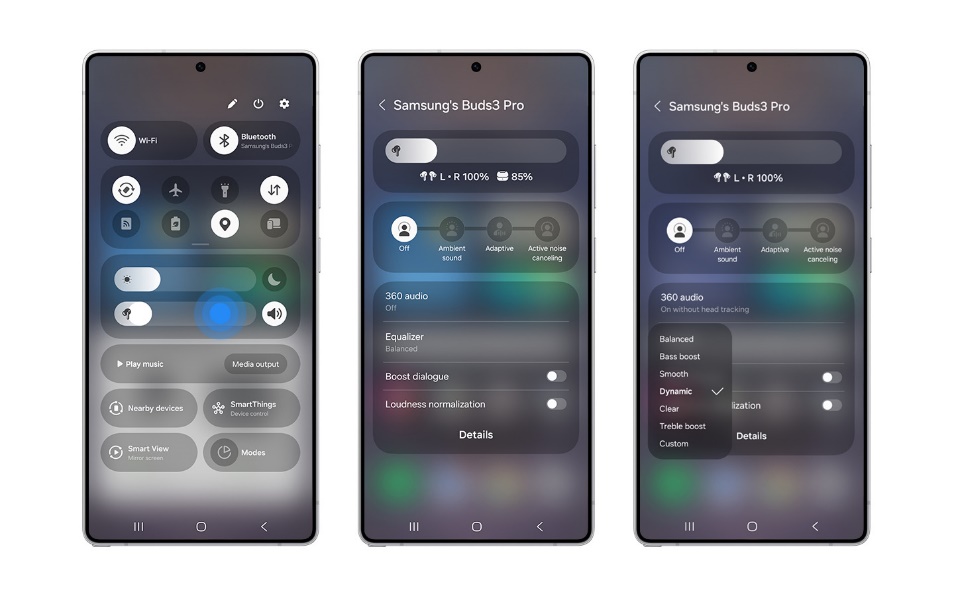
Fine-tuning your audio should be quick and easy so you can enjoy whatever you’re listening to anytime, anywhere. Galaxy Buds3 series makes the job much simpler with One UI 7, eliminating the need to separately access the Galaxy Wearable app on your smartphone each time you want to adjust the settings for your device. Now for the first time, conveniently adjust volume, noise control, and sound settings all from your device’s quick settings panel for a hassle-free listening experience.


How to Adjust Buds Setting on Quick settings panel


  1. Open Quick settings panel on your connected smartphone
  2. Touch and hold the Volume slider in the panel
  3. Tap which setting you would like to change

Personalize Sound Settings for Specific Apps

Sound setting preferences often vary by the app you’re using. For instance, when listening to music you may prefer the bass turned high, but when watching a movie, you prefer a more immersive 360-degree sound experience. With App sound settings, you no longer need to adjust sound settings each time you visit an app. Simply set your sound preferences for individual apps[ii] once via quick settings panel, and the Galaxy Buds3 series will automatically apply them whenever the app starts playing media. A first-of-its-kind feature, this capability delivers a more seamless daily audio routine, tailored to your liking.

How to Use App sound settings


  1. Open Quick settings panel on your connected smartphone
  2. Touch the Earbuds icon in the media panel or touch and hold the Volume slider above the media panel
  3. Tap on the sound setting you would like to adjust for the application that is being played.

Tailored Sound for Personal Hearing Needs

One UI 7 expands ambient sound capabilities even further with the updated Adapt sound feature[iii], allowing you to curate the personalized sound experience with clearer and more accurate sound when on calls or watching videos so you don’t miss a line of dialogue. The advanced hearing test helps you create your own sound profile unique to you, or if you’re pressed for time, simply choose from three preset profiles based on your age groups.

How to Enable Adapt sound 1


  1. Open the Galaxy Wearable app on your connected smartphone
  2. Tap on Earbuds settings
  3. Tap on Accessibility
  4. Tap on Adapt sound
  5. Choose among three preset profiles or do Hearing test

How to Enable Adapt sound 2


  1. Open the Galaxy Wearable app on your connected smartphone
  2. Tap on Sound quality and effects
  3. Tap on Adapt sound
  4. Choose among three preset profiles or do Hearing test

An Intelligent Audio Experience for All

With the power of Galaxy AI, the Galaxy Buds3 series not only offers greater convenience, but supports enhance communication with features that eliminate language barriers and enrich sound regardless of how you wear your earbuds or your environment, for more intelligently tailored moments.

Seamless Communication in 20 Languages

With Interpreter in Listening mode, language barriers are no longer an obstacle. Whether listening to a lecture in a foreign language or having a conversation with someone in another language, Interpreter in Listening Mode allows you to hear the translation directly through your Galaxy Buds plugged into your ears without needing to look at your smartphone. Now, you can focus solely on the conversation and engage with others face-to-face.

How to Use Interpreter in Listening mode


  1. Open the Interpreter app on your connected smartphone
  2. Place the earbuds in your ears
  3. Tap on Listening mode on the left side
  4. Select your desired language
  5. Tap on the microphone icon to start the translation
  6. Tap on the microphone icon again to stop the translation
  7. Pause, resume the translation using the Buds’ pinch control


Intelligently Optimized Sound, Anytime, Anywhere

Regardless of how you choose to wear your earbuds, the microphones in the Galaxy Buds3 series analyze both internal and external sound in real time to apply the optimal sound and Active Noise Cancellation (ANC) through Adaptive EQ and Adaptive ANC for each user.

What’s more, Galaxy Buds3 Pro can intelligently optimize sound in any environment. You can still enjoy your music fully when walking at a park, with Adaptive Noise Control constantly analyzing surrounding sound and automatically adjusting the optimal level of noise without you needing to make any manual adjustments. Siren Detect and Voice Detect[v] automatically recognizes emergency siren or your voice and raises the ambient sound, allowing you to stay aware of your surroundings or focus your attention on your conversation.

How to Enable Adaptive Noise Control


  1. Open the Galaxy Wearable app on your connected smartphone
  2. Tap on Adaptive


How to Enable Siren Detect


  1. Open the Galaxy Wearable app on your connected smartphone
  2. Tap on Auto switch to ambient sound
  3. Select Siren detect


How to Enable Voice Detect


  1. Open the Galaxy Wearable app on your connected smartphone
  2. Tap on Auto switch to ambient sound
  3. Select Voice detect

Sound Innovation for Everyone

With the launch of the Galaxy S25 series, Samsung has set a new standard for mobile AI, introducing a true AI companion that offers the most natural and effortless interactions between you and your world. As these intuitive and intelligent capabilities spread across the Galaxy ecosystem, the Galaxy Buds series will remain at the forefront of sound innovation — unlocking immersive and convenient audio experience for all.

See our Samsung reviews

Tech Review – Skullcandy Smokin Buds True Wireless Earbuds

The Skullcandy smokin buds true wireless is another brand that has dropped a super affordable pair of earbuds for just 30 euro this year which is welcome for those who are on a budget and again those who like the brand itself which we do, Again this company is bringing the cost to performance ratio down which has been happening some time now on the earbuds front and there is no need to spend silly money on earbuds anymore these days and take that from the person who reviews the most earbuds in Ireland by a country mile.

First up is the fit and they fit well and have small stems again apply the right tips for the best noise isolation and secure fit this goes along way to getting the best audio experience. They are sleek and discreet enough too and not standoffish looking either.

So at this price point we will be missing features,we have no app access this time but EQs are built in with 4 taps and are preset and are podcast mode,movie mode and music mode, so this is plenty given on top of similar offerings with no app access so this is a win here. There is no auto play or pause and no wireless charging but you have rapid charging. Overall though these are offering a bit more than the competition we have tested. There was no option to skip/reverse tracks in the manual or Voice assistant but you tap and hold the earbud to activate voice assistant and you can ask to skip or reverse track there.

The controls work well although sometimes I could feel them pushing in on my ears but this be my stupid meat hook fingers tapping too hard but they work well regardless of their size.

The sound is decent here with Three EQs to use there is a meaningful difference between the three so you has a choice, they are not base heavy and sound good all round with highs lows and mids and feel more centre mid back. No lag latency noted and no distortion when maxed out either.

Battery life is of course one area hit here like similar products but we have fast charge which makes up for this, call quality is ok with just one mic each side and overall a decent pair of earbuds that are well built and solid for the price so you can’t really go that much wrong here if you are in the market for something that gets the job done out of the box.

Smokin Buds From Skullcandy – techbuzzireland


Features

  • Up to 20 Hours of Battery Life + Rapid Charge – Listen longer with 8 hours of battery life in the earbuds and 12 hours in the charging case + With Rapid Charge, 10 minutes of charge equals 2 hours of playtime
  • IPX4 Sweat and Water Resistant – Go on any adventure without missing a beat ● Skullcandy Supreme Sound® – Unique audio-tuning process enables users to maximize the depth and detail of each sound. Premium audio quality features drivers that have been selected and expertly tuned
  • Music, Movie & Podcast EQ Modes – Delivers best audio quality for music, movies or podcasts ● Noise Isolating Fit – Ergonomic, ovalized design provides all-day comfort and a noise-isolating fit
  • Call and Media Controls via Capacitive Touch – Control volume, calls, EQ modes and activate your devices local Assistant with a tap on either earbud.
  • Microphone in Each Earbud – Allows use of either bud solo without losing the ability to take calls
  • Auto On/Connect – Enjoy automatic turn on and pairing with the last device used ● True Wireless via Bluetooth® 5.2 – Bluetooth® technology offering efficiency improvements and faster pairing

BUY 

Video review


Tech Review – Jabra Evolve2 buds

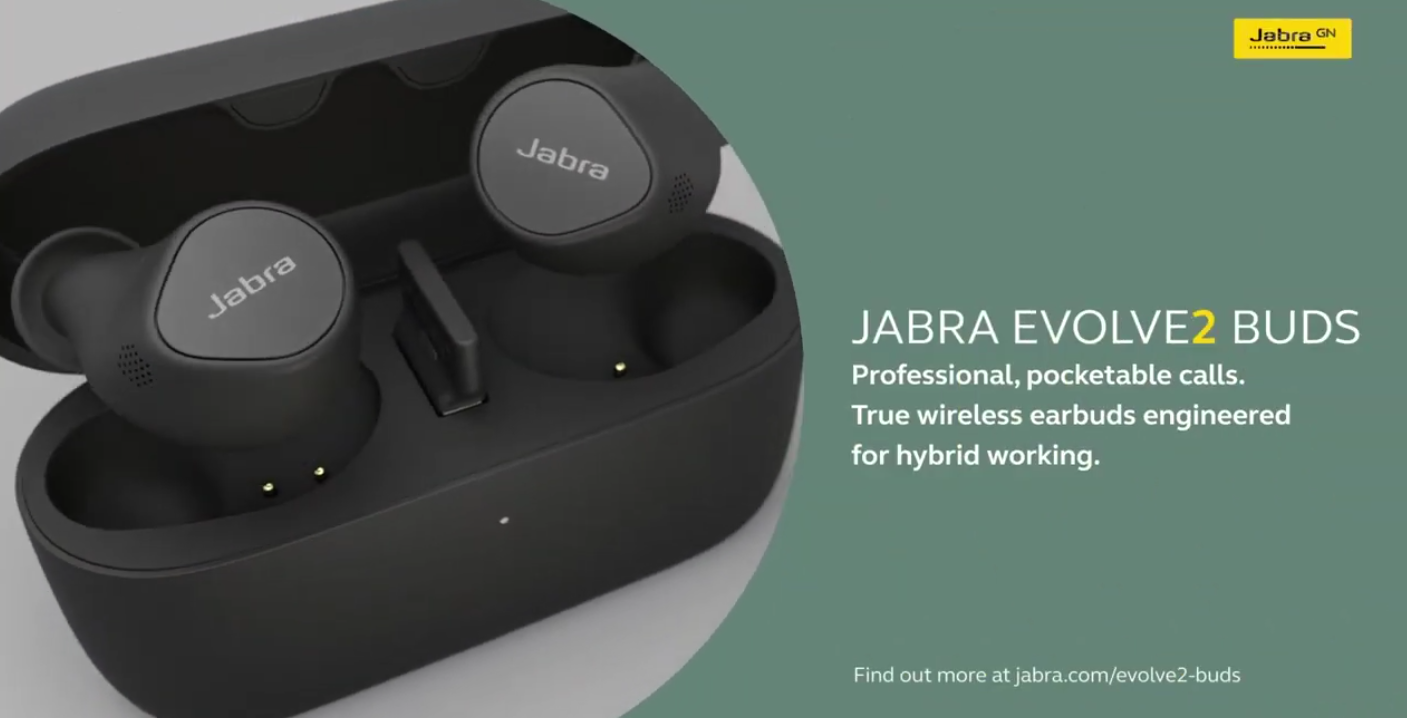
The Jabra Evolve2 buds are the ideal partner to have if you work from home or in the office and use more than one device and if you are into meetings which is more common than ever these days these earbuds is what you need and if you like your music too well then these solve all these problems in one go and the thing is they are portable and can be brought anywhere and it is a super simple set-up with the dongle to switch between two devices which for me is key and a multipoint connection is for me something that is a must and again for those who work in either closed or open office space environments.

The design of the earbuds is familiar with their current range and for me is fine they work well and fit perfectly with the right tips and again this is something I always point out when using earbuds to get the best out of them and these also come with the MyFit option to ensure you have them set up at optimum levels which will benefit you in the end so do not skip the process, you can if you life however you will not get the full performance they offer if not, it only takes a few minutes and is worth it, trust me.

The App

The app as always is excellent although this time around it has being tailored towards the use of teams we have covered the app multiple times here on site but we do take a look in more detail in the video review below.. As expected the app is full of features and allows you take control of what you want and need with a nice UI and it is simple to navigate.

The sound

OK well what more would you expect from Jabra then? They sound great from all aspects of use be it connected to PC or phone and the same applies for using teams on both, there was some lag latency noted at first but an updated chimed through during testing and seems to have fixed it, like any other pair of Jabra earbuds I have used the I was confident these would not disappoint and that they did not given they are geared for Teams and UC platforms. In short these Evolve2 buds are a one stop shop for those who want to still enjoy their music and spend much of their day on Teams calls with no issues at all noted and drop outs during my testing.

The only thing noted was the ANC is not up to par at this price-point however these are a more targeted pair of earbuds towards the office if you will rather than a whole music experience but they overall as mentioned still are a one stop shop for those who are in the environments and you have a nice widget you can use on your phone to swap between modes also giving you the stats at hand for reference.

Key features of the Evolve2 Buds: 

  • Certified for Microsoft Teams and leading UC platforms – for enhanced collaboration experience 
  • MultiSensor Voice technology – ensures professional call performance by using multiple mics and Jabra algorithms to block out noise 
  • Plug-and-play USB adapter for enhanced connectivity – 20 metre/65 feet range allows users the freedom to move around their work environment 
  • Advanced Multipoint connection – connect to two devices at one time 
  • Adjustable Active Noise Cancellation – filters out background noise allowing for increased focus 
  • HearThrough and single earbud use – allows the user to hear surrounding sounds through the earbuds whilst wearing them 
  • Increased battery life – with 33 hours of battery, including the case and wireless charging 
  • Ultra-discreet design – for ultimate comfort and a professional look  

BUY 

Video review

Jabra Evolve2 Buds first look

Jabra recently announced some new products at CES 2023 but prior that they had another new pair they announced aimed at hybrid workers called the Evolve2 buds which are certified for leading virtual meeting platforms, including Microsoft Teams and Zoom so in effect this makes an ideal product for those who work in the hybrid space and more and an interesting product no doubt. Today we take a quick first look and if you have  any questions feel free to ask as always and stay tuned for a full hands on review soon.

Certified for leading virtual meeting platforms including Microsoft Teams and Zoom, the earbuds come with 5 hours of talk time and a total of 33 hours of battery including the charging case, avoiding the inconvenience of your earbuds running out of charge mid-meeting.  

“The world we live in today has made us crave freedom and flexibility to work from anywhere. At the same time, we also learnt from our Hybrid Ways of Working 2022 research about the role that technology plays in increasing employee inclusion in hybrid work. With all that in mind, we sought to create a product with our new Jabra Evolve2 Buds to empower professionals to look, sound and be professional on the go,” says Holger Reisinger, SVP at Jabra.

Key features of the Evolve2 Buds: 

  • Certified for Microsoft Teams and leading UC platforms – for enhanced collaboration experience 
  • MultiSensor Voice technology – ensures professional call performance by using multiple mics and Jabra algorithms to block out noise 
  • Plug-and-play USB adapter for enhanced connectivity – 20 metre/65 feet range allows users the freedom to move around their work environment 
  • Advanced Multipoint connection – connect to two devices at one time 
  • Adjustable Active Noise Cancellation – filters out background noise allowing for increased focus 
  • HearThrough and single earbud use – allows the user to hear surrounding sounds through the earbuds whilst wearing them 
  • Increased battery life – with 33 hours of battery, including the case and wireless charging 
  • Ultra-discreet design – for ultimate comfort and a professional look  

Full review soon any questions you know the drill

Buy

Unboxing Video


Jabra launches new true wireless earbuds engineered for hybrid working – Jabra Evolve2 Buds

Today, Jabra, leaders in personal sound and office solutions, launches the Jabra Evolve2 Buds, the newest product in Jabra’s Evolve series. In an age where hybrid working is standard for most professionals, having the freedom and flexibility to work from anywhere is important. The top-of-the-range, new Evolve2 Buds are designed to boost concentration and improve collaboration for professionals working on the go. Evolve2 Buds are certified for leading virtual meeting platforms, including Microsoft Teams and Zoom, and use the latest technology to reduce disruptive background noise and enable clearer calls.  

 Minimised distractions 

When working from home, the office or in a public space, we are often wrought with distractions everywhere: from the sounds of our washing machine churning to the sound of a barista working the coffee machine to colleagues chattering in the background. For this reason, the Evolve2 Buds come with an Adjustable Active Noise Cancellation (ANC) technology which hybrid-working professionals can use to personalise the ANC to their listening preferences, blocking out any external sounds and minimising distractions. The Evolve2 Buds also come with a sealing test feature called MyFit, as well as SafeTone™ with PeakStop, which ensures enhanced hearing protection and the most optimal seal for the best, personalised ANC experience

Greater call quality and crystal-clear conversations  

It’s more important than ever for employees to be heard on calls and to be able to talk freely with their co-workers without being interrupted, especially as virtual meetings become the norm. With many of us now used to the true wireless earbud form factor, Jabra developed the Evolve2 Buds to enable users to have high-quality conversations with Jabra MultiSensor Voice™. It uses a unique combination of four microphones, bone conduction sensors, and advanced algorithms to block out as much of the surrounding noise as possible so the user can be heard clearly by those on the call, contributing to more focused conversation experiences. 

Extensive range and connectivity for flexibility 

For those seeking stable connectivity and increased mobility, the Evolve2 Buds feature a long wireless range, owing to the unique, in-case dongle that can be plugged into your PC. With a wireless range of up to 20 metres/65 feet, the Evolve2 Buds give employees the ability to move around their home or hybrid/remote work environments without compromising call quality.  

Certified for leading virtual meeting platforms including Microsoft Teams and Zoom, the earbuds come with 5 hours of talk time and a total of 33 hours of battery including the charging case, avoiding the inconvenience of your earbuds running out of charge mid-meeting.  

“The world we live in today has made us crave freedom and flexibility to work from anywhere. At the same time, we also learnt from our Hybrid Ways of Working 2022 research about the role that technology plays in increasing employee inclusion in hybrid work. With all that in mind, we sought to create a product with our new Jabra Evolve2 Buds to empower professionals to look, sound and be professional on the go,” says Holger Reisinger, SVP at Jabra.  


Key features of the Evolve2 Buds: 

  • Certified for Microsoft Teams and leading UC platforms – for enhanced collaboration experience 
  • MultiSensor Voice technology – ensures professional call performance by using multiple mics and Jabra algorithms to block out noise 
  • Plug-and-play USB adapter for enhanced connectivity – 20 metre/65 feet range allows users the freedom to move around their work environment 
  • Advanced Multipoint connection – connect to two devices at one time 
  • Adjustable Active Noise Cancellation – filters out background noise allowing for increased focus 
  • HearThrough and single earbud use – allows the user to hear surrounding sounds through the earbuds whilst wearing them 
  • Increased battery life – with 33 hours of battery, including the case and wireless charging 
  • Ultra-discreet design – for ultimate comfort and a professional look  


The Evolve2 Buds will be available from end of November at MSRP £233. Find out more about the Jabra Evolve2 Buds at www.jabra.co.uk/evolve2-buds