
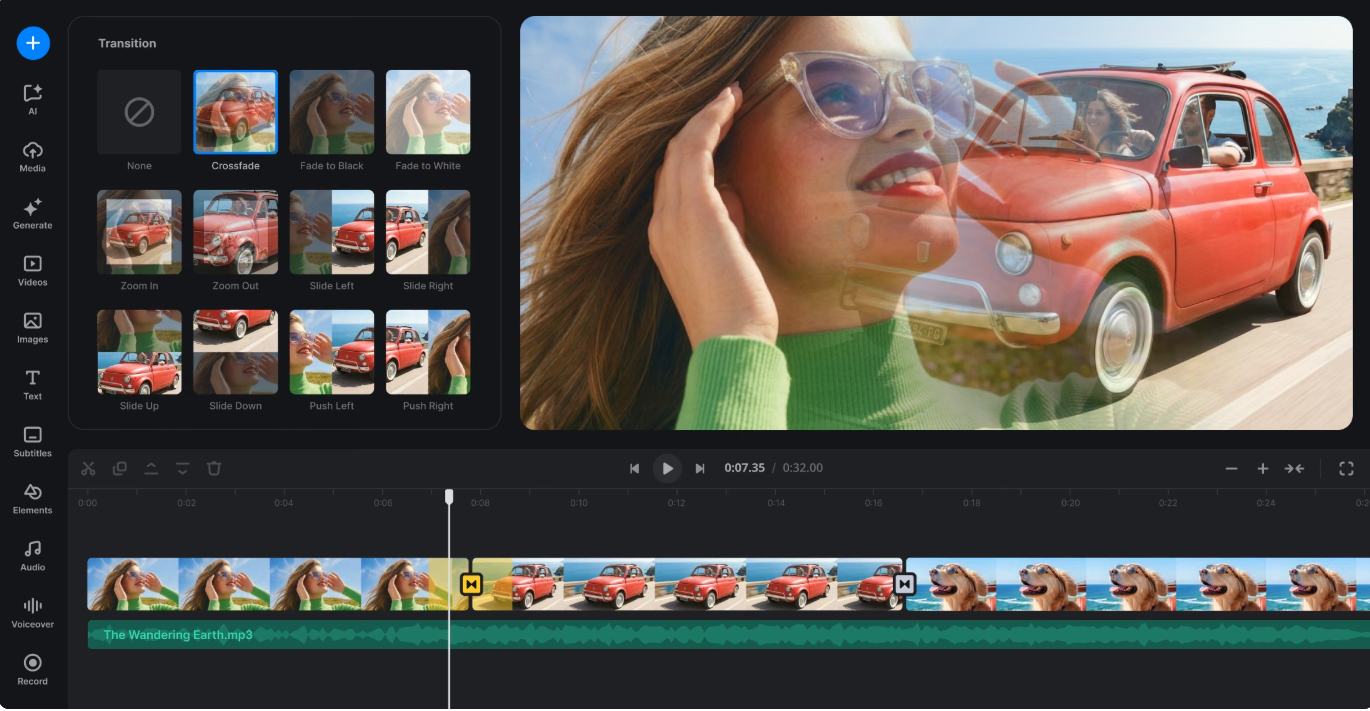
When a viewer watches a poorly edited video, the friction is almost palpable. Jarring cuts, random spinning effects, and mismatched audio tracks break the spell of the visual narrative instantly. Conversely, professional editing feels completely effortless. The viewer does not notice the mechanics of the timeline; instead, they sink completely into the story. At the heart of this seamless experience lies the art of the video transitions. Far from being mere digital fireworks or decorative flourishes, transitions act as the punctuation marks of moving images. They dictate how breath is taken between scenes, how time bends, and how emotional beats land with precision.
Understanding the True Purpose of Video Transitions
Every piece of raw footage consists of isolated fragments captured across different hours, locations, or setups. Editing brings these fragments together, but transitions give them coherence. At its core, a transition is the bridge connecting one shot to the next. Editors use these bridges to control cognitive load, ensuring that the audience’s brain can process spatial or temporal changes without confusion.
If a scene moves abruptly from a sunlit Dublin street to a dimly lit recording studio, the viewer requires a visual or auditory cue to bridge that gap. Without proper pacing, the shift creates disorientation. Thoughtful editing transforms individual clips into a unified stream of consciousness, steering the viewer’s focus directly to where it matters most.
The Spectrum of Transition Types and Their Functions
Professional editing suites offer countless presets, but seasoned editors rely on a core toolkit governed by specific storytelling functions.
The Standard Cut and Invisible Edits
The straight cut remains the most powerful and frequently used transition in media production. It requires no transition effect or frame overlap, moving instantly from one viewpoint to another. When executed with strong visual continuity, the straight cut feels entirely invisible.
To maintain auditory flow alongside these visual changes, editors utilize J-cuts and L-cuts. A J-cut allows the audio from the incoming clip to play before the visual appears, while an L-cut lets the audio from the preceding shot linger over the opening of the next scene. These techniques anchor dialogue-heavy scenes, preventing the edit from feeling rigid or robotic.
Optical and Motion Transitions
When time must pass or space must be crossed explicitly, optical transitions enter the workflow:
- Cross Dissolves: Blending the end of one shot seamlessly into the start of another signals a softer passage of time or a gentle shift in mood.
- Dips to Black or White: These serve as heavy punctuation marks, typically closing out chapters, sequences, or entire projects.
- Whip Pans and Zooms: Driven by rapid camera momentum or digital scaling, these high-energy effects match fast-paced content like travel vlogs or modern promotional clips.
- Match Cuts: Joining two distinct shots through a shared geometric shape, motion vector, or conceptual theme allows editors to jump across years or continents while maintaining absolute visual harmony.
How Transitions Shape Storytelling and Visual Continuity
Storytelling relies heavily on rhythm. A thriller sequence edited with rapid, aggressive cuts creates tension and anxiety, whereas a documentary focusing on nature employs slow dissolves to cultivate a sense of calm and scale. Transitions govern this psychological pacing.
Visual continuity protects the suspension of disbelief. If a subject walks out of frame to the right in shot one, they should generally enter from the left in shot two. Violating this rule disorients the audience. Smart transitions use environmental elements, motion vectors, or masking techniques such as an object passing directly across the camera lens to hide cuts organically while maintaining spatial logic.
Modern Production Workflows and AI Integration
The technical landscape of post-production has evolved rapidly. Modern NLE platforms feature advanced AI-assisted tools designed to streamline tedious mechanical tasks. Features like automatic scene detection, smart audio cleanup, and intelligent morph cuts which seamlessly bridge jump cuts in talking-head videos without awkward visual stutters have become standard industry assets.
Furthermore, the explosive growth of vertical video formats for social media platforms has changed how creators approach framing and transitions. Because portrait displays limit horizontal movement, editors rely heavily on dynamic zooms, kinetic text layers, and rapid push transitions to maintain high viewer retention within tight mobile environments. AI recommendations for pacing and mood-based clip matching also help creators prototype sequences faster than ever before, leaving more room for high-level creative polish.
Common Editing Mistakes to Avoid
Even with powerful software at hand, creators frequently fall into traps that undermine their work:
- Over-Editing: Applying a flashy, stylized transition between every single clip exhausts the viewer and degrades the impact of the video.
- Mismatched Energy: Pairing a sluggish cross dissolve with high-tempo, aggressive electronic music creates an uncomfortable dissonance.
- Ignoring Sound Design: Visual cuts rarely work in isolation. Neglecting to layer room tone, sound effects, or overlapping audio bridges makes even the cleanest visual edit feel abrupt.
- Failing to Capture Handles: When exporting or cutting clips, forgetting to leave extra head and tail frames means software cannot generate proper optical overlaps, resulting in choppy execution.

Practical Rules for Cleaner Editing
Achieving a professional finish requires discipline. Default to straight cuts for the vast majority of your timeline, reserving stylized effects for genuine narrative shifts. Limit your project to two or three consistent transition styles to maintain visual unity. Always preview your edit sequence in full context rather than judging transitions in isolation. If an effect does not explicitly clarify the story or improve pacing, cut it.
Frequently Asked Questions
What are the most commonly used video transitions in professional editing?
The straight cut is used most frequently because it preserves natural pacing without drawing attention to itself. Among optical effects, cross dissolves and dips to black remain industry standards for indicating time passage or scene breaks.
How do J-cuts and L-cuts improve dialogue scenes?
J-cuts and L-cuts decouple audio from video timing. By letting dialogue lead the visual change or linger past the cut, editors create a conversational flow that feels much more natural than rigid, simultaneous audio-visual switches.
When should I use a morph cut?
Morph cuts are designed primarily for interview or talking-head footage. They use optical flow analysis to smooth out jump cuts when removing filler words or stumbles, creating the illusion of a continuous, uninterrupted shot.
Do flashy transitions work well for corporate and promotional videos?
Most corporate and professional productions benefit from restraint. Clean cuts, subtle fades, and intentional matching keep the focus on clarity and messaging rather than decorative software presets.
How has artificial intelligence changed transition editing?
AI tools now assist editors by automatically detecting scene changes, suggesting optimal cut points based on audio beats, and executing complex masking or morphing tasks that previously required extensive manual keyframing.