
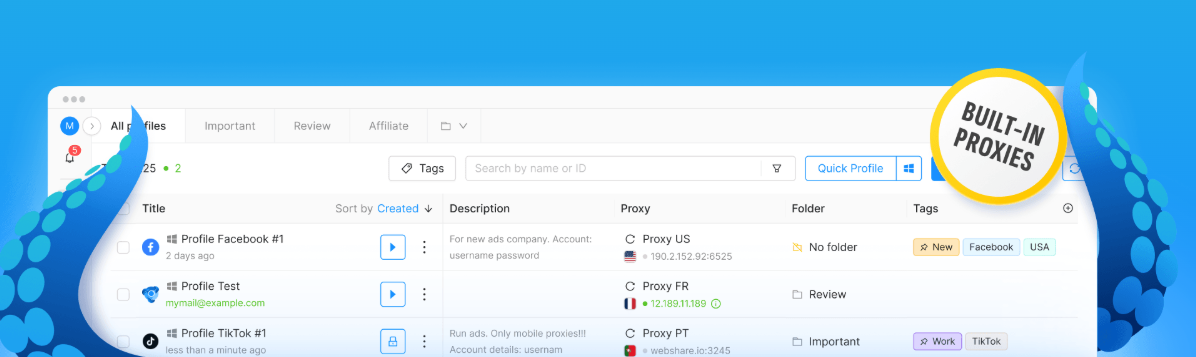
Web browsers are so much a part of daily life that most people barely think about them. They open one to check the news, pay a bill, answer a work email or order something for dinner. Behind the scenes, though, websites are quietly gathering details about every visitor through cookies, IP addresses, browser settings and the characteristics of the device itself. That information lets a site recognise someone who has been before, tailor what they see and flag anything that looks suspicious. Most of the time, nobody minds. In some situations, however, people need a clearer wall between one browsing environment and another, and that’s where antidetect browsers come in.
An antidetect browser is a specialised browser built to create separate browsing profiles, each with its own digital identity. It lets people manage several online accounts while keeping the overlap between those environments to a minimum. Anyone weighing up whether this kind of tool makes sense benefits from understanding how it works, what it’s genuinely useful for and where its limits lie, because the gap between what it does and what people assume it does can be surprisingly wide.
What Is an Antidetect Browser?
At its simplest, an antidetect browser is a web browser or browser-management tool that lets people set up different profiles, each with its own distinct fingerprint characteristics. Every profile can keep its own cookies, local storage, browsing sessions and selected device-related settings, a bit like giving each one its own desk with its own drawers.
Ordinary browsers usually share the same basic configuration across every tab and window. Separate profiles and private browsing modes do offer some isolation, but only up to a point. Antidetect browsers push that separation much further by letting people adjust the very characteristics a website might use to recognise a browser.
Those characteristics can include the browser version, details about the operating system, screen resolution, language settings, time zone and certain graphics or hardware-related signals. On their own, none of them says very much. Put together, they can form a fairly recognisable browser fingerprint.
The main job of an antidetect browser is keeping multiple browsing identities organised and apart. It doesn’t make anyone invisible. It doesn’t promise that a website will never identify a person or connect the dots between their activities, either, and treating it as though it does is a common and costly mistake.
How Does an Antidetect Browser Work?
Antidetect browsers usually rely on several connected features that work together to keep profiles from bleeding into one another.
- Browser Fingerprint Management
A browser fingerprint is a collection of technical details that websites can use to tell one browser apart from another. Cookies can usually be wiped with a couple of clicks. Fingerprints are stubborner, and they can stay useful for identification even after someone has cleared all their browsing data.
Antidetect browsers let people configure certain fingerprint attributes for each individual profile. How well that works depends on how consistently those attributes are presented and how a particular website weighs up fingerprint information. A profile whose details don’t quite add up can stand out more, not less.

- Separate Browser Profiles
Each profile can act as its own self-contained browsing environment. Cookies, login sessions, saved website data and other local information stay put in one profile and don’t spill over into the others.
Take a freelancer looking after social media for five different clients. Without separate profiles, it’s all too easy to post a client’s update from the wrong account at eleven o’clock at night, which is exactly the kind of slip nobody wants to explain the next morning. Keeping each account in its own profile makes everyday work tidier and cuts down on mix-ups like that.
- Proxy and Network Configuration
Some antidetect browsers support proxy connections, which send internet traffic through another server along the way. Depending on how it’s set up, a proxy can mean a website sees the proxy server’s IP address instead of the person’s own public IP address.
Changing an IP address doesn’t wipe out every identifying signal, though. Websites can still look at browser fingerprints, account activity, device characteristics and plenty of other information. A proxy on its own doesn’t provide full encryption either. It changes one piece of the picture, not the whole thing.
- Profile Storage and Synchronization
Certain tools let people store profile information locally or sync it across several devices. That can be handy for someone who switches between an office desktop and a laptop at home and wants the same settings waiting for them on both.
Browser profiles can hold sensitive session information, though, so secure storage, access controls and careful handling of login data really matter. A profile synced carelessly is a profile that someone else might end up opening.
Common Uses of Antidetect Browsers
Antidetect browsers have a number of legitimate uses, provided they’re used within the law and in line with the rules of the platforms involved.
Digital marketing and advertising: Marketing professionals often juggle separate client accounts, check advertising dashboards for several brands in a single afternoon or test how a website looks under different browser setups.
E-commerce account management: Online sellers who run several authorised storefronts can use separate profiles to keep each shop’s sessions organised and its business information neatly apart.
Web development and quality assurance: Developers and testers can try out different browser configurations to check website compatibility, chase down display glitches and recreate bugs that only seem to appear in one particular environment.
Research and data collection: Researchers can use isolated browser profiles to study how websites behave under different settings. Any data collection still needs to respect privacy requirements, website terms and the relevant restrictions.
Privacy-conscious browsing: Some people simply want fewer links between their different browsing sessions. Keeping profiles separate can help with that, although it’s a long way from complete online anonymity, and confusing the two can give people a false sense of security.
Antidetect Browsers vs. Regular Browsers
The biggest difference comes down to how much control people have over browser profiles and fingerprint-related settings.
Regular browsers such as Chrome, Firefox and Edge already offer privacy controls, private browsing modes and, in many cases, decent profile management. For most everyday needs, that’s plenty.
Antidetect browsers usually go further, with more specialised controls for setting up many independent environments. Some also bring everything together in one central dashboard and include features that let teams work on profiles together.
Still, ordinary browser profiles are often the better choice for someone who just wants to keep personal browsing apart from work. There’s little point in a complex tool for a simple job. Antidetect software makes more sense when someone genuinely has to manage lots of separate environments day in, day out.
Limitations and Security Considerations
Antidetect browsers come with some important limits. No tool can promise that a website won’t recognise someone or link their activity together. Alongside browser fingerprinting, websites can look at behaviour patterns, account details, payment information, network signals and a range of other clues.
A badly configured profile can also look inconsistent, which may actually make it easier to spot. Then there’s the software itself. Downloading a browser from an untrustworthy source can open the door to malware or stolen passwords, turning a privacy tool into a security problem.
Before choosing a browser, it pays to look into the developer’s reputation, how often updates arrive, what the privacy policy says and where data is stored. Strong passwords, multifactor authentication and good habits on every device still matter just as much. No browser makes up for a password like “123456”.
Respecting website rules matters too. Using separate browser profiles doesn’t give anyone permission to get round access restrictions, set up fake accounts or take part in activities a platform prohibits. The tool changes how browsing is organised. It doesn’t change the rules.
How to Choose an Antidetect Browser
Choosing the right tool starts with being honest about what’s actually needed. That might be independent profiles, adjustable browser settings, proxy support, team collaboration or syncing across devices. Someone who only needs two of those has little reason to pay for all five.
Security controls deserve a close look, including whether sensitive information stays on the local device or gets sent to outside servers. Clear documentation, reliable updates, straightforward pricing and technical support that answers within a reasonable time are all worth weighing up as well.
Some tools, including Octo Browser, operate in the antidetect browser category. With any option, it makes sense to judge it on its documented features, its security practices and how well it fits the intended workflow, instead of assuming every product offers the same level of protection. They don’t, and the differences can matter a great deal.