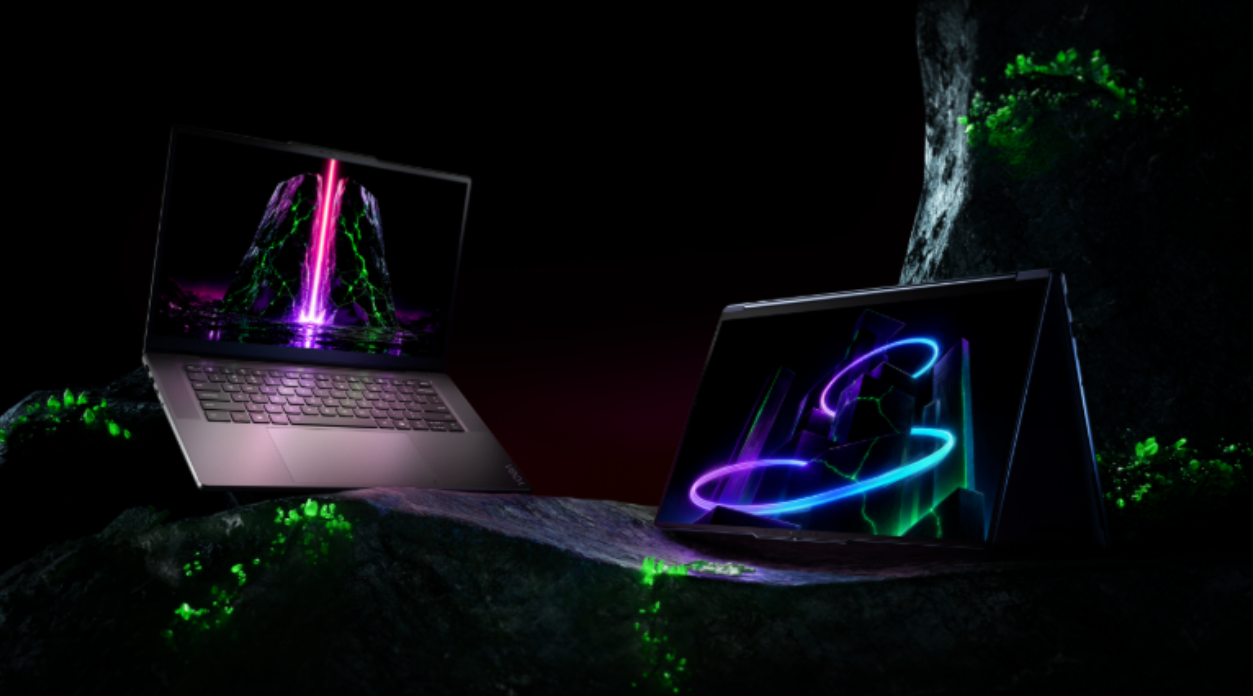
Today at Lenovo Innovation World at IFA 2026, Lenovo announced the newest additions to the Lenovo Yoga portfolio, including two premium laptops powered by NVIDIA RTX Spark, two pen-first tablets, Lenovo Smart Canvas Concept, and newly released Lenovo Qira features. The additions span high-performance local computing for demanding creative and development workloads, natural interaction across multiple input modes, and connected experiences designed to help ideas move more easily between devices.
Creative work often moves across applications, devices, and ways of interacting. A project might begin as a sketch or a spoken idea, continue through editing, coding, or model development, and involve both individual and collaborative work. The latest Yoga portfolio brings together specialized devices and software experiences designed to support different stages of that process.
The products and experiences include:
- The Lenovo Yoga Pro 9n (15”, 11), a premium creator laptop powered by NVIDIA RTX Spark, designed for creators and developers running demanding AI development, content creation, and software development workloads locally. It also brings advanced RTX gaming capabilities to the Yoga portfolio.
- The Lenovo Yoga 9n 2-in-1 (16”, 11), a versatile convertible that combines NVIDIA RTX Spark with a 360-degree design and dual-surface pen input for creators who need high performance and the flexibility to work independently or collaborate.
- The Lenovo Yoga Tab Plus Gen 2 and Lenovo Yoga Tab Gen 2, which support natural interaction across pen, voice, vision, and touch for ideation, creation, productivity, and collaboration.
- Lenovo Smart Canvas Concept, a new conceptual cross-device experience designed to help users capture ideas and continue their work across compatible Lenovo devices.
- Lenovo Qira, Lenovo’s built-in personal ambient intelligence, brings a single, context-aware AI experience across supported Yoga PCs and tablets. It helps creators capture inspiration, retain relevant context, and pick up where they left off as ideas move between devices and through each stage of the creative process.
Together, these products and experiences extend the Yoga portfolio across ideation, production, and collaboration—from portable systems built for advanced local workloads to pen-first tablets and connected software experiences.
“Creative work increasingly spans multiple applications, devices, and ways of interacting,” said Jun Ouyang, Senior Vice President & General Manager, Consumer Segment, Lenovo Intelligent Devices Group. “With the latest Yoga portfolio, we’re bringing together high-performance local computing, flexible form factors, and more personal cross-device experiences. This gives creators and developers specialized tools for different stages of their work while reducing friction as projects move between devices and applications.”
“Great ideas don’t always happen at a desk, and they don’t always begin with a keyboard,” said Johnson Jia, Senior Vice President, Global Innovation Center, Lenovo Intelligent Devices Group. “The latest Yoga tablets allow users to capture and develop ideas through pen, voice, vision, and touch. Together with Lenovo Qira and Lenovo Smart Canvas Concept, they make it easier to continue creating across devices as the work evolves.”

The Lenovo Yoga Pro 9n (15”, 11)
Advanced Local Creation, Development, and RTX Gaming—The Lenovo Yoga Pro 9n (15”, 11)
The Lenovo Yoga Pro 9n (15”, 11) is built for creators and developers whose work demands substantial local computing capability in a premium, portable design. Powered by NVIDIA RTX Spark and equipped with up to 128GB¹ of 9400 MT/s unified memory, it supports local AI and software development, content creation, and 3D rendering.
NVIDIA RTX Spark brings together NVIDIA AI and RTX technologies with the CUDA® stack to enable increasingly sophisticated AI models to run locally on the device. By coordinating multiple specialized AI agents behind the scenes, the platform automates complex creative tasks across applications, moving beyond the acceleration of isolated AI features to support more complete workflows.

The Lenovo Yoga Pro 9n (15”, 11) with Yoga Pen Gen 2
Built on the NVIDIA® RTX™ platform, the Lenovo Yoga Pro 9n (15”, 11) also delivers immersive RTX gaming. This gives creators and developers who use the same system for work and entertainment a single device for developing AI applications, editing high-resolution video, rendering complex 3D scenes, compiling software, and playing the latest RTX-enabled titles.
Lenovo X Power thermal architecture supports sustained performance within the Yoga Pro 9n (15”, 11)’s slim and portable form factor. A PureSight Pro OLED display² provides the color accuracy, contrast, and visual detail for creative work, while creator-focused connectivity options support professional peripherals and external displays. A high-resolution 9.2MP IR camera supports clear video calls and content capture, and a haptic Force Pad¹¹ with pen support provides another precise input option for editing, navigation, and creative work.
Within the latest Yoga portfolio, the Lenovo Yoga Pro 9n (15”, 11) is the performance-led choice for creators and developers who prioritize advanced local workloads, substantial unified memory, and RTX capabilities in a portable system.

The Lenovo Yoga 9n 2-in-1 (16”, 11)
Flexible Creation and Collaboration—The Lenovo Yoga 9n 2-in-1 (16”, 11)
The Lenovo Yoga 9n 2-in-1 (16”, 11) is designed for creators who need substantial local performance together with the flexibility to sketch, annotate, edit, present, and collaborate in different ways. Powered by NVIDIA RTX Spark and equipped with up to 64GB¹ of 9400 MT/s unified memory, it supports demanding creative workloads and AI models locally in a premium convertible design.
One of the Yoga 9n 2-in-1 (16”, 11)’s most distinctive features is its dual-surface pen experience. Users can write or draw directly on either the PureSight Pro OLED display² or the haptic Force Pad, choosing the input surface that best suits the task at hand. Paired with the Yoga Pen Gen 2, which delivers low-latency input, tilt sensitivity, palm rejection, and customizable controls, the dual-surface experience provides natural precision for sketching, annotation, illustration, timeline navigation, and detailed editing.
The signature 360-degree convertible design allows users to move fluidly between Laptop, Tablet, Tent, Stand, and Canvas modes as their work progresses from early concepts to production, presentation, and collaboration. The NVIDIA RTX platform accelerates creative and AI tools like Adobe Premiere Pro and ComfyUI, along with local models like FLUX and LTX, across the creative workflow.
The expansive 16-inch PureSight Pro OLED display² provides creator-grade color accuracy, rich contrast, and vivid detail for visual work. A 120 Hz variable refresh rate³ keeps pen input, animation previews, gaming, and everyday interactions fluid.
Comfort Edge craftsmanship and creator-focused connectivity options help the Yoga 9n 2-in-1 (16”, 11) integrate into professional workflows at home, in the studio, or on the move. Its six-speaker Dolby Atmos® audio system features two tweeters integrated into the rotating soundbar, ensuring they remain front-firing in every mode, together with two pairs of woofers for rich, balanced sound. High-resolution imaging, intelligent noise suppression, and spatial audio further support meetings, livestreams, presentations, and entertainment.
Within the latest Yoga portfolio, the Lenovo Yoga 9n 2-in-1 (16”, 11) is the flexibility-led choice for creators who prioritize convertible versatility and precise pen input alongside advanced local performance.

The Lenovo Yoga Tab Gen 2 and Lenovo Yoga Tab Plus Gen 2 with optional keyboards
Natural Creation Across Pen, Voice, Vision, and Touch—The New Lenovo Yoga Tablets
Ideas can begin in different ways: as a sketch, a handwritten note, a spoken thought, or an image captured in the moment. The Lenovo Yoga Tab Plus Gen 2 and Lenovo Yoga Tab Gen 2 are designed to support these different forms of interactive experiences, combining pen-first interaction, premium displays, and Lenovo Qira in portable devices built for creation, productivity, collaboration, and entertainment.
The built-in native AI experiences⁴ across both tablets—Lenovo AI Vision, Lenovo Qira, Smart AI Input, AI Creation Tools, AI Note, and Live Transcript—help users capture, develop, and refine ideas through pen, voice, vision, and touch. Rather than the user adapting to the technology, interactions happen naturally through gesture, gaze, voice, pen, and touch while AI quietly works in the background to help ideas flow from inspiration to creation.
The new additions to the Yoga Tablet Series complement these experiences with intuitive gesture controls including Click to Draw, Squeeze to Select, and Flip to Erase, together with 8,192 levels of pressure sensitivity, tilt detection, and palm rejection for precise writing and sketching. Combined with Lenovo’s 4K PureSight Pro display technology⁵, the pen and display provide a detailed, responsive Canvas for illustration, annotation, note-taking, and other creative work across both tablets.
Both tablets launch with Android 17¹² and include seven OS upgrades¹² through Android 24, as well as up to seven years of security updates through 2033¹², helping them remain current and secure for longer.
While both tablets share the same multi-modal native AI experiences and pen-first foundation, the two are designed for different creative priorities.

The Yoga Tab Plus Gen 2 in Cosmic Blue
Unlock Creativity, Empower Your Flow—Lenovo Yoga Tab Plus Gen 2
The Lenovo Yoga Tab Plus Gen 2 is Lenovo’s newest native AI tablet, designed for digital artists, designers, and other creators who want a portable device for detailed creative work, productivity, and collaboration. Powered by the Snapdragon® 8 Elite Mobile Platform with Qualcomm Oryon™ CPU, it delivers blazing speeds, smarter multitasking, and seamless multi-modal AI interactions.
The 13-inch 4K PureSight Pro display⁵ provides an expansive, detailed canvas for illustration, editing, note-taking, and media. The available all-in-one magnetic clamshell keyboard allows the tablet to transition from a pen-first creative device to a more conventional productivity setup, while the Harman Kardon audio system supports calls, media creation, and entertainment.
Combined with the Tab Pen Pro 2 and the shared creation, transcription, and cross-device features available across the new Yoga tablets, the Lenovo Yoga Tab Plus Gen 2 provides a more complete creation and productivity experience for users who prioritize performance and versatility.
Create Intelligently, Move on Your Terms—Lenovo Yoga Tab Gen 2
The Lenovo Yoga Tab Gen 2 brings the shared pen, voice, vision, and touch experiences of the new Yoga tablet portfolio into a sleek, 11-inch lightweight (480g) design built for users who create wherever inspiration strikes. Powered by the MediaTek Dimensity 9500s with native AI optimization, it delivers fast, responsive performance for sketching, note-taking, productivity, and entertainment throughout the day.
Paired with the detachable 2-in-1 keyboard pack and Tab Pen Pro 2, the Lenovo Yoga Tab Gen 2 can transition between pen-first creation and keyboard-based productivity. Its compact, lightweight design makes it the portability-led option in the new Yoga tablet portfolio for users who prioritize mobility and everyday versatility.
Carry Ideas Across Devices—Lenovo Smart Canvas Concept
Lenovo Smart Canvas Concept is a new cross-device experience concept designed to help users capture ideas and continue their work across compatible Lenovo devices. It is designed to bring together voice, pen, camera, and touch input, allowing users to begin a task on one device and carry it forward as their work develops.
At Lenovo Innovation World, Lenovo is demonstrating Lenovo Smart Canvas Concept with the Lenovo Yoga AIO i Aura Edition (32″, 11) and Lenovo Yoga Tab Gen 2, showing how the two devices can support different stages of ideation, creation, and refinement within a connected workspace.
By making it easier to move between compatible devices and input methods, Lenovo Smart Canvas Concept helps simplify the technology behind cross-device creative workflows.
Pricing & Availability
Pricing and availability for the Yoga Pro 9n, Yoga 9n 2-in-1, Yoga Tab Plus Gen 2, and Yoga Tab Gen 2 will be announced at a later date.
Technical Specifications
| Feature | Lenovo Yoga Pro 9n (15″, 11) | Lenovo Yoga 9n 2-in-1 (16″, 11) |
| Dimensions & Weight
(L × W × D) |
(mm): 347 × 242 × as thin as 16.7⁶ (inches): 13.66″ × 9.53″ × as thin as 0.66″⁶ Weight: Starting at 3.64lbs (1.65kg) |
(mm): 360 × 243.1 × 17.5 (inches): 14.17 × 9.57 × 0.69 Weight: 1.94 kg / 4.28 lbs. |
| Display | 15.3″ 2.5K (2560 × 1600), 48-165Hz, VRR², 16:10 PureSight Pro OLED 1100 nits peak brightness (HDR), 100% sRGB, 100% P3 Delta E < 0.5 Dolby Vision® VESA Certified DisplayHDR™ True Black 1000 Eyesafe® Certification 2.0 TÜV Flicker Free, Pantone Validated, Pantone SkinTone Validated Glass, Touch (optional) |
16″ 2.8K (2880 x 1800), 30-120Hz³, VRR, 16:10 PureSight Pro OLED 1100 nits peak brightness (HDR), 100% sRGB, 100% P3 Delta E <1 Dolby Vision® VESA Certified DisplayHDR™ True Black 1000 Eyesafe® Certification 2.0 TÜV Flicker Free, Pantone Validated, Pantone SkinTone Validated Glass, Touch |
| Design | 100% Aluminum Chassis One-finger Opening Hinge |
360° convertible design 100% aluminum chassis |
| Processor | NVIDIA RTX Spark™ | |
| GPU | NVIDIA Blackwell RTX GPU with up to 6 144- cores | |
| CPU | NVIDIA Grace CPU with up to 20-cores | |
| AI Definition | AI agents, CUDA software stack, Local AI workflows | AI agents, CUDA software stack, Local AI workflows |
| Memory¹ | Up to 128GB 256-bit 9400MT/s LPDDR5X, 16 channel | Up to 64GB 256-bit 9400MT/s LPDDR5X, 16 channel |
| Storage⁷ | 2 SOD Slots, Up to 4TB total storage
Slot 1: PCIe SOD Gen 4 / M.2 2242: 512GB/1TB⁷
PCIe SOD Gen 5 M.2 2242: 2TB⁷ |
Up to 2TB⁷ PCIe SOD Gen 4 QLC M.2 2242 |
| OS | Windows 11 | |
| Battery⁸ | 92.5Whr⁸ Rapid Charge Express: 15 minutes = 3 hours |
99.9Whr battery⁸ Rapid Charge Express: 15 minutes @ up to 3 Hours |
| Power Adapter | 140W | |
| Keyboard / Touchpad | Key Travel: 1.5mm key travel, 0.3mm keycap dish Haptic Force Pad with Pen Support |
Key Travel: 1.5mm key travel, 0.3mm key dish, Silk-touch finish, LED backlight Dynamic Force Feedback Haptic Force Pad with Pen Support |
| Camera | 9.2MP MIPI IR camera | |
| Ports | Left : 1 × HDMI® 2.1 (up to 8K/60Hz) 1 × USB-A (USB 10Gbps / USB 3.2 Gen 2) 1 × USB4® (40Gbps, with USB PD 3.0 and DisplayPort™ 2.1) 1 × Headphone / microphone combo jack (3.5mm) Right: 1 × USB-A (USB 10Gbps / USB 3.2 Gen 2), Always On 1 × USB4® (40Gbps, with USB PD 3.0 and DisplayPort™ 2.1) 1 × UHS-II SD Port |
Left: 1x HDMI® 2.1 FRL 1 x USB-A (USB 10Gbps / USB 3.2 Gen 2) 1 x USB4® (40Gbps), with USB PD 3.0 and DisplayPort™ 2.1 1 x Headphone / microphone combo jack (3.5mm) Right: 1 x USB-A (USB 10Gbps / USB 3.2 Gen 2), Always On 1 x USB4® (40Gbps), with USB PD 3.0 and DisplayPort™ 2.1 1 x UHS-I SD Port |
| Audio | 4 × Lenovo Speakers (2 × 2W tweeter, 2 × 2W woofer) Dolby Atmos® Audio Smart Amplifier (AMP) |
6-speaker system (2x2W Tweeters, 4x2W Woofers), Dolby Atmos®, Smart Amp, Two tweeters integrated into rotating soundbar |
| Connectivity⁹ | Wi-Fi 7 Bluetooth® 5.4 |
|
| Color¹⁰ | Thunder Grey | Cosmic Blue |
| Creative Input | Haptic Force Pad¹¹ with pen support | Dual-surface pen experience with PureSight Pro OLED display and haptic Force Pad¹¹ |
| Yoga Pen11 | AES 3.0 technology¹¹, High pressure sensitivity, Low latency, Tilt sensitivity, Palm rejection, Customizable buttons, Extended hover height, Magnetic pen case / stand (optional) | AES 3.0 technology¹¹, Pixel-perfect accuracy, Low latency, Tilt sensitivity, Palm rejection, Customizable buttons, Extended hover height, Magnetic pen case doubles as a stand |
| Thermal Technology | 80W TDP & Lenovo X Power improved thermal solution Enlarged vent and thermal bump design Up to 128GB¹ unified memory Quiet <22 dB |
70W TDP & Lenovo X Power improved thermal solution Enlarged vent and thermal bump design Up to 128GB¹ unified memory Quiet <22 dB |
| Feature | Lenovo Yoga Tab Plus Gen 2 | Lenovo Yoga Tab Gen 2 |
| Dimensions & Weight
(L x W x D) |
291.78 mm (W) x 200.35 mm (H) x 8.27 mm (T) (including camera bump) Weight: Starting at 1.33 lbs. (605 g) (tablet only) |
250.60 mm (W) x 172.98 mm (H) x 8.56 mm (T) (including camera bump) Weight: Starting at 1.06 lbs. (~480 g) (tablet only) |
| Display⁵ | 13″ 4K (3840 x 2560) / 3:2 / 144Hz, 120Hz, 90Hz, 60Hz, 30Hz / 100% DCI-P3 / 1100nits (Peak) / 355 ppi / Dolby Vision support | 11.1″ 4K (3840 x 2560) / 3:2 / 144Hz, 120Hz, 90Hz, 60Hz, 30Hz / 1100nits (Peak) / 415 ppi / Dolby Vision support |
| Processor | Snapdragon® 8 Elite Mobile Platform | MediaTek Dimensity 9500s |
| Memory⁷ | RAM + ROM: 12 GB + 256 GB | 16 GB + 256 GB | 16 GB + 512 GB | RAM + ROM: 8 GB + 128 GB | 8 GB + 256 GB | 12 GB + 256 GB |
| Storage⁷ | Card Slot : Expandable MicroSD Card up to 2 TB | Card Slot : Expandable MicroSD Card up to 2 TB |
| Operating System¹² | Android™ 17¹² | |
| Battery⁸ | 12700⁸ mAh (Typical) Support of 68W Quick Charger |
11000⁸ mAh (Typical) Support of 68W Quick Charge |
| Camera | Front 8MP FF + 0.3MP FF (VGA) Rear 13MP AF + 2MP FF (Macro) |
Front 8MP FF + 0.3MP FF (VGA) Rear 13MP AF |
| Ports | USB Type-C® 3.2 Gen 1 3-point Pogo Pin MicroSD Card Slot |
|
| Audio | 6 x SLS Harman Kardon® Speakers 2 x Microphones |
4 x SLS Speakers 2 x Microphones |
| Connectivity⁹ | WLAN: 802.11 a/b/g/n/ac/ax/be Wi-Fi 7 Certified; (2.4 GHz + 5 GHz) Bluetooth®: 6.0 Wi-Fi Antenna: 2×2 MIMO Wi-Fi Direct : Yes Wi-Fi Display : Yes |
WLAN: 802.11 a/b/g/n/ac/ax/be Wi-Fi 7 Certified; (2.4 GHz + 5 GHz) Bluetooth®: 6.0 Wi-Fi Antenna: 2×2 MIMO Wi-Fi Direct : Yes Wi-Fi Display : Yes |
| Keyboard | One-step clamshell magnetic keyboard | Detachable 2-in-1 keyboard pack (stand + keyboard) |
| Colors¹⁰ | Cosmic Blue | Cosmic Blue Seashell |
| Stylus | Tab Pen Pro 2 with Smart Interactive UX Squeeze to Select Click pen tail to Draw Double-click pen tail to Record Flip to Erase Double Tap |
Tab Pen Pro 2 with Smart Interactive UX Squeeze to Select Click pen tail to Draw Double-click pen tail to Record Flip to Erase Double Tap |
| Lenovo Qira | Yes | Yes |