Dell’s new UltraSharp lineup includes a super-sharp 32-inch 6K IPS monitor

Dell has unveiled its latest monitor and peripheral releases of the year including the world’s first 6K monitor with IPS Black and world’s first Zoom certified collaboration keyboard.

Dell UltraSharp 32 6K Monitor

Fully compatible with both Windows and Mac operating systems, the Dell UltraSharp 32 6K Monitor (U3224KB) raises the bar with exceptional details, sharpness and color accuracy in stunning 6K resolution and VESA DisplayHDR 600 for detail-oriented professionals like graphic designers, engineers, and data scientists where every pixel counts. With 150% more pixels on 6K resolution  compared to 4K, the new UltraSharp 32 6K Monitor brings extra details and additional clarity.

The inclusion of IPS Black technology means an increase in depth for dark objects. even in dark environments, and accurate colors viewed from virtually every angle. Dell’s recently commissioned Hot Tech study revealed monitors with IPS Black technology offer up to 41% deeper black levels and up to 1.2 times better color accuracy than conventional IPSespecially in displaying low grays.

The UltraSharp 32 6K Monitor is also ideal for users looking for excellent video conferencing capabilities especially under low light conditions. It features a built-in dual gain HDR 4K webcam and provides auto framing, light adjustments plus enhanced clarity, automatic SafeShutter, echo cancellation mic and dual 14W speakers for an intelligent and more secure collaboration experience.

More Productivity Powerhouses

For creatives and business users who don’t require 6K resolution, Dell is also introducing two new UltraSharp monitors to suit users’ everyday needs.

The first curved WQHD monitor with IPS Black technology, the Dell UltraSharp 34 Curved USB-C Hub Monitor (U3423WE) allows users to connect and display content from two PCs using Picture-by-Picture (PBP) and Picture-in-Picture (PIP) features, while enjoying clear audio with the integrated dual 5W speakers.

A productivity powerhouse and a collaboration dream wrapped into one, the Dell UltraSharp 43 4K USB-C Hub Monitor (U4323QE) allows users to connect one PC to the monitor and split it into multiple (up to four) screen partitions, as well as the ability to connect up to four different PCs to the monitor, view all four inputs, and switch between them using KVM.

Innovative Peripherals for Maximized Collaboration

Dell has kicked off 2023 by also unveiling the world’s first Zoom-certified6 collaboration keyboard, the Dell Premier Collaboration Keyboard (KB900). Its sleek design features dedicated touch controls to easily manage Zoom calls easily, allowing users to mute and unmute the microphone, toggle between video on and off, easily screen share and bring up the chat panel. The device has 15 programmable keys and fast one-minute USB-C charging for a full day of battery life or up to 20 days on a single charge.

Dell Premier Collaboration Keyboard and Mouse

Dell is pairing the keyboard with the new Dell Premier Rechargeable Mouse (MS900), featuring a design with a comfortable palm grip. This mouse has a track-on-glass sensor that allows users to work seamlessly on virtually any surface, while smooth gliding advanced four-way scrolling provides a more intuitive navigating experience. The device allows for seamless switching between three devices and fine tune speed, tracking (with up to 8K dpi) and precision with Dell Peripheral Manager. The mouse provides half a day of use with one-minute USB-C quick charging and up to three months of battery life on a full charge. Both devices are seamless and more secure with Dell Pair one click connectivity and transmission is encrypted to help keep users’ data safe.

Commenting on the new releases, Yoon Lee, VP, Monitors, Dell Technologies, said: “Regardless of where you work, technology remains a staple in facilitating productive and collaborative employee experiences. At the center is the overarching PC experience driven largely by an entire ecosystem of devices bringing employees closer to their teams, customers and clients. With more than 50% of employees surveyed rating monitors as the most important device to improve productivity across different workspaces in a recent Dell-Forrester study, our newest additions to the UltraSharp family promise to up-level the performance and experience on which  you’ve grown to depend on.”

Availability

The Dell UltraSharp 32 6K Monitor (U3224KB) will be available in the first half of 2023, while the Dell UltraSharp 34 Curved USB-C Hub Monitor (U3423WE) and Dell UltraSharp 43 4K USB-C Hub Monitor (U4323QE) will be available on January 31st, 2023. The Dell Premier Collaboration Keyboard (KB900) and Dell Premier Rechargeable Mouse (MS900) will be available January 31st, 2023 or as a bundle on March 23rd, 2023. Pricing will be announced upon release.


Tech Review – ZHIYUN Smooth 5S Combo gimbal

The kit came in a professional-looking box, clean and smart with all the accessories listed on the side with the QR code directly for the app. Inside the box came a solid practical carry case with all the accessories located with the additional slots to allow to add additional accessories. The carry case allows the portability to carry the case without the worries of losing odd accessories. The Zhiyun Smooth 5S is solid yet lightweight with 3-Axis Stabilizer which an appropriate locking mechanism, the kit has a Detachable Tripod, and USB-C Charging Cable. There is a digital display while minimal in terms of size of the screen, with a Light as required controlled via the dials. The Light has Dual-Side Magnetic to allow the colours to change with an extensive  Smartphone Compatibility List

Contents:

  •       1x Zhiyun Smooth 5S
  •       1x Mini Tripod For Smooth 5S
  •       1x USB Type-C Cable
  •       1x Wrist Strap
  •       1x Protective Bag
  •       1x Magnetic Fill Light
  •       4x Fill Light Filter
  •       1x Zhiyun Prime 1-Year Membership Card


Key features:

  •       3-Axis Stabilizer for 1-Person Capture
  •       Integrated & Magnetic Fill Lights
  •       Supports Larger Smartphones 5.3-10.6 oz
  •       For Phones 2 to 3.5″ Wide, 0.4″ Thick
  •       Sturdy Motors, Upgraded Algorithm
  •       Livestreaming via Mobile App
  •       Various Templates & Gimbal Modes
  •       2-Hour PD Charging/Up to 25-Hour Runtime
  •       Detachable Tripod, USB-C Charging Cable
  •       Zhiyun Prime 1-Year Membership

Setup and use:

The Smooth 5S Combo come with clear instructions with a QR code available to download the instructions easily. The setup for an android phone is relatively easy and playing with the Stabilizes and balances the phone to the correct settings. Allow at least 30 minutes to play with the setting and balancing on the first go. If you have the same phone taking note of the setting on the scale ( or Tipp-Ex to the mark ) allows for easy future setting up which can be done in a minute or 2 once familiar with the balancing. This model was found to be easy and practical to set up as compared to other models use. Once set up and balanced the choice then becomes on the shooting modes including PF, L, F, POV and V  which is technically easy rather than a user-artistic approach to filming.

Zhiyun Smooth 5S Combo,  buttons

Multiple classic shooting modes including PF, L, F, POV and V

  •       Pan Follow mode (PF): The tilt axis and roll axis motors are locked, and the camera rotates with the handle while panning horizontally. Push the joystick up/down to control the tilt axis angle, and push it left/right to control the pan axis of the camera.


  •       Follow mode (F): The roll axis motor is locked, and the tilt axis and pan axis motors follow the rotation of the handle. Push the joystick up/down to change the tilt angle of the camera and the left/right to change the horizontal orientation of the camera.


  •       Point of View mode (POV): All three motors move when the handle is rotated.


  •       Vortex mode (V): The tilt axis motor rotates upward by 90°, and the tilt axis, roll axis, and pan axis motors follow the rotation of the handle. Push the joystick to the left/ right to control the rotation of the pan axis. How to Use CRANE-M2 S


  •       Go mode (GO): The roll axis motor is locked, and the tilt axis and pan axis motors quickly follow the rotation of the handle.

App use: ZY Cami

The app got a rating of 1.6 out of 1.59 k reviews. I would agree with this poor rating for an Android phone. This app requires getting a verification code matching certain pictures in the background, sounds simple,  similar to eg ticks of boats on a screen but is made more complicated by the system used in a different format. this is further complicated by when getting a code the email states must be used within 10 minutes while the phone has a timer count down of 60 seconds, This is before you get to log in to the software. The experience of using the app with an iPhone is much improved as per conversations with colleagues and feedback but not tried it during this review.

Warranty:  1 year

Models comparison

 Conclusion:

The physical setup of the gimble works well with the calibration process easier than others used before with minimal effort / technical knowledge/experience required.  This product is let down by the Android App if used as this has an overly complicated setup process and depending on the model used results in a different experience having tried it on a few phones.

This Zhiyun brand stands out in terms of accessories supplied and case, A lot of work has gone into this area with a well-designed case with all the accessories compartmentalised and the option to carry additional bits in the strong carry case.  The shooting modes are easy to use for the PF, L, F, POV and V to allow a variety of filming tableau and artistic presentations.

Overall a sturdy easy-to-use gimbal with an abundance of accessories and features for any budding filming enthusiastic to allow creative filming.

BUY

Video review

Sennheiser launches the Conversation Clear Plus

Many people find it difficult to clearly understand conversations in noisy environments, such as in a busy restaurant or on a loud street. Conversation Clear Plus features advanced speech enhancement technology to let your conversation take centre stage in every interaction. With their smart, intuitive features, these stylish earbuds set a new standard for speech-enhanced consumer wearables

Effortlessly clear conversations in noisy environments

Utilising sophisticated Sonova chip technology, conversations and calls are enhanced thanks to the Sennheiser Automatic Scene Detection feature, which analyses the noise level of a user’s environment and matches the speech enhancement level to their surroundings.

​Integrated into the compact and modern earbuds, Automatic Scene Detection ensures the clearest speech in challenging environments, be it in person or on the phone. In concert with Active Noise Cancellation, Conversation Clear Plus works dynamically to block distracting noises and improve the clarity of conversations for every level of background noise.

​Conversation Clear Plus lets you choose how much background noise you want to hear. Active Noise Cancellation blocks out distractions, while the Ambient Awareness mode enables more connection with the outside environment when desired.

​”Sennheiser Conversation Clear Plus reflects our customers’ dynamic lives, allowing users to follow every conversation with ease, wherever they are,” says Daniel Holenstein, Sennheiser Senior Product Manager. “An independent study showed 95% of users experienced significant speech enhancement in noisy situations when using the product.”

Easy set-up and operation
With step-by-step guidance in the companion app, getting started with Conversation Clear Plus is easy. In combination with the Conversation Clear Plus app, the earbuds deliver an intuitive, hassle-free user experience for tailoring listening preferences.

​Dedicated settings for three different listening scenarios make personalising the audio experience effortless. The ‘Relax’ listening scenario lets sound enthusiasts customise the amount of background noise they want to block, while the ‘Communication’ and ‘Streaming’ scenarios automatically adjust settings for the best performance and clarity during conversations and while streaming content, respectively.

​Connecting is a breeze with integrated true wireless technology, making pairing with any Bluetooth-enabled device quick and hassle-free. Offering excellent comfort with its ergonomic design, the Conversation Clear Plus earbuds feature an outstanding nine-hour battery life so that they are charged and ready for whenever they are needed. The charging case makes recharging user-friendly on the go, offering another 27 hours of usage time.

​Conversation Clear Plus complements the new Sennheiser hearing solutions product category, with best-in-class products for different situations to come in 2023 and beyond.

Pricing and availability
The Sennheiser Conversation Clear Plus will be available for pre-order on January 5, 2023, and on sale on January 20 with an MSRP of £749.

Tech Review – Tronsmart Bang SE portable party speaker

Tronmsart have released a new Party Speaker and we had early access to it so we could check it out and give you our thoughts, Tronsmart are well know for delivering great speakers at affordable prices and this one is no different and if you have not seen the Tronsmart Bang review check it out HERE.

Again we have got RGB on board with beat driven breathing and circling RGB lights on the device and not only on the sides this time as there is  behind the mesh grill on the front of the speaker to make it stand out and it looks well in action as you will see in the video review below.

The speaker is IPX6 waterproof and can be used indoors and outdoors making this super portable and can enhance that beach or pool party no matter where you go. We have again soundpulse technology but no app access and 40w speakers and from my testing this packs a real punch is loud and will easily fill a large room or garden.

When it comes to the audio experience it is exactly what you need for that indoor or outdoor party with great bass and volume highs lows and mids are fine and no tinny or distortion at maxed out volume, the speaker also takes a Micro SD card which is handy for those who have the tunes on a chip which many still do today.

The build quality is also excellent here and is very robust with easy to use control on top of the speaker with your I/O ports on the rear and the speaker itself is not heavy by any means.

Overall an affordable speaking keeping inline with its current portfolio giving decent sound with additional light effects.

Check the video below for a full demo and audio experience.

Technical Specifications

Model Bang SE
Bluetooth Version 5.3
Bluetooth Profile HSP / HFP / A2DP /AVRCP
Audio Codec SBC
Bluetooth Range Up to 15m/49ft (open area)
IP Rating IPX6
Output Power 40W
Input Power 5V/2A, via Type-C port
Frequency Range 60Hz – 20kHz 
Battery  8000mAh(7,4V/4000mAh) 
Playtime(Varied by Volume Level & Audio Content) Up to 24 Hours(Varied by Light Display) 

Up to 16 Hours(Varied by Light Display)

Charging Time ≤5 Hours
Dimension 298 x 164.5 x 118.8mm/11.73 x 6.48 x 4.68inch
Weight 2.16kg/4.76 lbs


Special offer:  https://bit.ly/3B2JUhx
Sold on Amazon:  https://www.amazon.co.uk/dp/B0BG93TZ5N/

Video Review

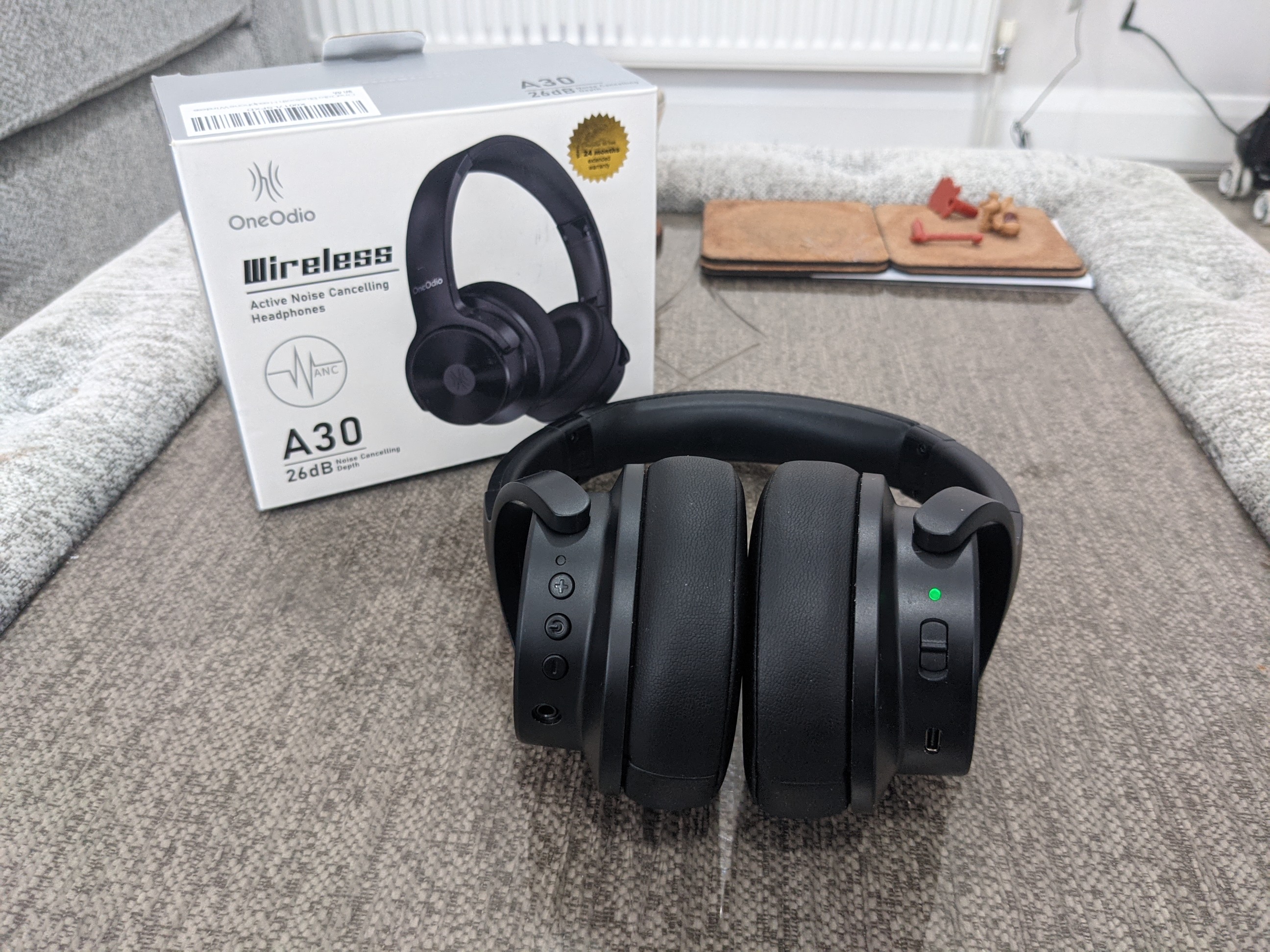
Tech Review – OneOdio A30 ANC headphones

Stuck for a pair of ANC headphones and on a budget well these might be something to look at coming in under 60 euro, From testing and owning countless pairs of leading headphones myself it is great to see how much the cost to performance ratio has hit headphones and TWS earbuds and with ANC being a must have these do rather well given the cost here.

Having tested these over the Xmas period these do a really good job overall and this includes sound. More on the bass heavy side those who like bass will like these and the also get really loud too which is a personal feature I like however if using an iPhone APPLE will tell you otherwise and from testing these for a week solid several hours a day APPLE turned the volume down on my behalf.

So they are loud and the sound is great, especially watching films, I had these paired with my Projector too and they really give you that immersive feel to whatever you watch, direction is good highs lows and mids are fine and voice, background noises also picked up really well, the controls are simple to use with raised buttons and these are easy to navigate blindly too and work very well and all housed on the left side, on the right side you have got your ANC switch too and this works well, I have a fan beside my bed and once switched on the noise is gone and a good indicator as some headphones I have used you could still here it but not this time. Given once placed on the ears most of the external noise is gone but I could hear the fan but not after turning on the ANC.

For the money you cant complain really they are built well they are comfortable good battery life and they have decent ANC compared to more expensive headphones out there..

BUY HERE 

Tech Review – OneOdio Fusion A70 headphones

OneOdio is brand we have worked with before and they have some new headphones to check out and first out to test was the A70 fusion which are super affordable and thats what people like these days with the cost of living crisis. But what most people are interested in is how a product that is affordable sounds and it is a good report here.

Bass driven is the word I would use here after testing these for a few days, comfort too with soft plush cups they can be worn for long periods of time, with the controls on one side it makes navigation easy and works well and for me I had no issues with them and they just simply work..

You can use these if you are a DJ or have equipment to do the same but for my testing they were tested on a smartphone, there is no app and it is a simple pairing process and off you go and listen to your hearts content.

The controls allow you to make your last phone call, access your voice assistant, skip and reverse tracks and of course volume and call control and all kept simple as mentioned placed on one side.

The sound is bass driven as mentioned above with no overlapping or distortion at max volume,highs lows and mids are fine and overall these are a great pair of headphones with really good bass powered with 40mm drivers and battery life is decent too at 70 hrs at 80% volume and less on full volume, there is no ANC present but the cups cover your ears and block out most of the outside world and with no ANC present this also gives them better longevity with the battery.

See the video below for more.

  • Hi-Res Sound Quality by Professional Audio Team – Equipped with custom-made Aluminium Fascia for Punchy Bass & Dynamic 40-millimeter Neodymium drivers, we provide you with stereo sound & powerful bass. Wearing this over-ear headphone, you can hear every detail of the music, and will be amazed by its sound quality
  • Dual Mode & Never Power Off – 1) Wireless mode, OneOdio Fusion A70 provides up to 72 hrs playtime on a single charge. 2) Wired mode, you can also use it as a wired headphone with the provided 2 different audio jack cables (6.35mm to 3.5mm; 3.5mm to 3.5mm), so the headphone will be never powered off
  • Maximum Comfort & Space Saving – Over-ear ergonomic design ensures long-lasting wearing. The rotatable and foldable structure ensures this over-ear headphone fits your head properly and gives great sound isolation. Soft memory cotton and skin-friendly protein leather ensure long-lasting comfort. The foldable headband for saving space and is convenient for carrying
  • Music or Audio Sharing – Our headphones have developed and applied this technology for allowing 2 or more people to listen to music or watch TV simultaneously. Pair the 1st main headphones with your device via Bluetooth, plug the 6.35mm jack into the headphone and the other side 3.5mm jack into the 2nd headphone, and so on, then be ready to share your tunes with your friends or families
  • Wired Aux Jack Lock Design – To make sure the cable lock is in place for a stable connection, we add a jack lock system on the Aux plug. You don’t need to worry about any connection problems when connecting the jacks and sockets

BUY

Video Review

Reasons to Choose Operators Not on GamStop

The self-exclusion GamStop scheme was approved by the gambling regulatory body UK Gambling Commission on 31 March 2020. This programme was implemented in order to reduce gambling addiction as well as regulate the British online gambling industry. As some online casino operators hold licences from other jurisdictions, the UK regulation that makes GamStop compulsory has given rise to two different sides; the GamStop and non-GamStop websites. The players are, therefore, able to entertain with their chosen platforms regardless of licence suppliers. If you are spoilt for choice with the gambling sites you want to visit, here are the main reasons to choose the web-based casinos that don’t register at GamStop.

What Are Gamstop-Excluded Sites?

The free tool GamStop is a solution for gambling-related problems for UK residents. With this service, you are allowed to self-exclude from online gambling sites licensed by the British gambling protection, UKGC. Actually, those who feel to have problem gambling habits should control themselves by registering at GamStop. The registration will be approved within 24 hours, and as this programme is 100% confidential, the registers’ sensitive information will be kept secure. 

Depending on your choice, the restriction can be 6 months, 1 year, or 5 years until your chosen period has expired. The GamStop-excluded online operators are those who register under the regulation of the UKGC. Holding a licence from the UK-based regulatory authority means participating in the multi-operator self-exclusion tool GamStop. These days, the gambling websites that acquire GamStop are around 2,439 and 599 of which provide online services.

Benefits from Non-GamStop Casinos

When you’ve tried a new experience and signed up with the GamStop website, you are banned from licenced online casinos until your chosen period has expired. The good news is that non-GamStop casinos have become more accessible to players worldwide. It is never too late to register on these platforms! Before starting, consider understanding the following.

Large Game Libraries

One of the factors that push us to register in an online casino that is not on Gamstop is the wide selection of games supplied by leading developers. After all, who doesn’t want to entertain with a variety of exciting games? When you choose the reliable casinos that don’t register at the national self-exclusion service GamStop, be sure that you will experience as thrills as in the UK-based licenced ones. 

For instance, slot lovers will enjoy a wide range of games that cater to their playing needs. From the classic to the sophisticated slots, they will certainly find your favourite titles. For table game lovers, a casino without these common games is unimaginable. Whether you want to feel the outstanding gambling experience from Blackjack or poker, a diverse game library is waiting for you. 

Bigger GamStop-Free Bonuses

Though the non-GamStop iGaming sites operate without the regulations of the UKGC, they are licensed by other reputable regulatory bodies. Apart from the payment options and the game variations, the great bonuses and promotions are considerable perks that you should accept. 

Not only can these bonuses permit you to maximise your chance of winning, but you are also able to try your beloved games without investing. You can check no-deposit bonuses via https://casinogap.org/non-gamstop-no-deposit/ and discover the latest free offers available in the best online casinos. The fact that these rewards come with fairly T&C makes them seductive among both newbies and existing gamblers.

Credit Card & Crypto Payments

When you register in an online casino, you always worry about your fairness and safety when you transfer money. Before registering in a virtual casino, it is crucial to check whether it accepts various baking methods or not. Although credit card payment option is common in online gambling site around the world, UK gamblers are not allowed to use them as gambling payment solutions. In effect, on 14 April 2020, the UKGC released a new regulation to ban the use of credit cards as banking systems in the British online gambling market. 

Hence, credit card punters are no longer able to transfer funds or withdraw their payouts with these popular means of payment. Fortunately, picking a non-GamStop casino is an effective way to avoid credit card gambling prohibition.

Conclusion

When you feel that your gambling is harmful, you should take a decision to remove yourself from gambling websites. That is why GamStop was created to help vulnerable players and reduce gambling addiction in the UK. However, the non-GamStop operators are always accessible for both British and non-UK-based punters. 

These websites come with attractive benefits such as a high level of safety and security, a larger library of games, bigger bonus deals, a credit card gambling option, the absence of an ID verification procedure and more. If you are in quest of flexible gambling platforms, the non-Gamstop operators are probably excellent options.


Make Business Communication Easier With These Professional Tips

With today’s advances in technology, there are more ways than ever for companies to connect with colleagues and customers around the world. That’s why businesses study the difference between decentralized VPNs and regular VPNs, and use videoconferencing software. However, the challenge lies in using the technology correctly and efficiently, and adopting the best communication strategies. In this article, we’ll provide some professional tips to make it easier for your business to communicate.

Consider Outsourcing

Why not outsource your customer service communication with a professional call center or contact center? They specialize in helping companies create an efficient system for responding to customer inquiries and providing support. Outsourcing can reduce costs, shorten response times, and improve customer relationships. It achieves this by giving customers access to knowledgeable professionals who are available 24/7.

These centers can provide comprehensive services such as phone support, online chat assistance, email responses, web ticketing systems, social media management, and more. If you go online to research popular contact center services you can request free quotes and read about the pros and cons. You can discover the best countries for outsourcing, and the difference between contact centers and call centers.

Use Smart Technology

Smart technology such as cloud computing, smartphones, and tablets are making it easier for professionals to manage their day-to-day tasks. Whether you’re running a small business or managing a large enterprise, these tools can help make business communication more efficient.

Cloud computing is becoming increasingly popular with businesses due to its flexibility and affordability. By storing data in the cloud, companies can access information from any device with an internet connection. Additionally, cloud storage makes sharing documents between teams much simpler. Smartphones are also allowing workers to stay connected outside of the office. With mobile apps and instant messaging capabilities, team members can easily keep in touch while on the go.

Monitoring employee behavior is another crucial factor in maintaining efficiency and professionalism in a cloud-based work environment. With proper call screening methods applied, businesses can ensure that employees are effectively handling client interactions and that any inappropriate or unnecessary calls are minimized, allowing staff to focus on their core tasks. This level of oversight can enhance overall productivity and reinforce a secure, organized communication system within a company, making it an ideal pairing with the flexibility offered by cloud computing.

Use Videoconferencing Software

Videoconferencing tools offer many benefits in terms of convenience and cost savings. Some major examples include Skype, Zoom and Google Meet. With such platforms, you can easily create virtual conference rooms where multiple participants can simultaneously interact with each other. In addition, participants don’t need to travel to a physical meeting space – they’re able to join remotely from anywhere. This saves both time and money by eliminating any travel costs associated with traditional meetings or conferences.

Whilst conducting a videoconferencing call, you can add extra attendees if and when required. Applications such as Zoom allow you to create meeting rooms where staff communicate in smaller numbers before returning to the main conversation.

Use Clear, Concise Language

When communicating with colleagues, customers, and clients, it’s important to ensure that the message is easily understood. When writing emails or other forms of correspondence always strive for brevity. This will help you get your point across swiftly and succinctly. It’s also helpful to avoid using jargon or overly technical terms. Instead, use simple words so anyone reading your message will understand exactly what you mean (without having to look up a definition).

Additionally, be sure to proofread all communications before sending them out. Double-check the grammar and spelling as any typos or errors can give an unprofessional impression.

Encourage Feedback

Not only does this help to ensure that everyone’s on the same page, but it allows businesses to develop meaningful relationships with their customers. Feedback should be encouraged at every stage of a project or transaction. This provides an opportunity for both parties to communicate any issues or concerns in an open forum. In turn, this can help avoid misunderstandings down the road.

Providing employees with a platform to offer feedback will allow them to contribute ideas that could enhance operations and increase productivity. This can include evaluating processes, equipment, customer service techniques, and much more. Encouraging honest feedback on a regular basis helps foster healthy communication within an organization, which in turn leads to greater success. When receiving feedback, make sure you don’t respond defensively or interrupt the other person.

Provide Training Courses On Communication Skills

From writing emails to presenting ideas in the boardroom – good written and verbal skills are key for businesses today. Training courses can help equip employees with the knowledge they need to communicate effectively within the workplace, as well as externally with clients and customers.

You may wish to conduct internal training courses or involve an external consultant or specialist agency. Some topics to cover could include listening skills (e.g. active listening) and body language. You could also discuss conflict management, presentations, public speaking and cross-cultural communication. The benefits include empowering your staff to build successful relationships and work together as a team.

Create Templates

Creating templates can be a great way to save time, money and effort when dealing with day-to-day tasks. Templates are reusable documents that contain prewritten text, allowing you to quickly generate the same type of message each time. This can ensure that your communication is consistent and accurate, no matter who is sending the message.

First, determine what types of messages and documents are frequently used in your business communications. This could include emails, letters or forms that need to be sent out on a regular basis. Once you’ve identified the key documents needed in your business communications, create a template for each one. When creating these, keep them simple so they can easily be modified as needed.

Use Telephone Scripts

A telephone script is a prepared written dialogue that helps guide conversations between two people on the phone. It assists both parties in staying on topic and ensures professionalism throughout the conversation. 

Telephone scripts also help keep your conversations consistent when dealing with multiple customers or clients. They can be customized for different scenarios, such as customer service inquiries or sales inquiries. By employing this method of communication you can improve your overall customer satisfaction rating in the long run.

It’s also worth investigating Customer Relationship Management (CRM) systems and automated email marketing campaigns. With the right tools and practices, you can enhance your business communication as never before. In turn, you’ll have happy employees, satisfied customers and an increase in revenue.

How to Find Out When a Website Was Created

Under DataReportal, about 63% of people worldwide use the internet nowadays. And they frequently need to know various information about websites. E.g., it’s quite often necessary for users to know how to find out when a website was created. So, let’s learn more about this topic.

Site and Domain Name

Simply put, a website is a set of webpages with certain video, text, or graphic information. And domains are addresses of sites. So, users should enter a domain name in the appropriate line of a browser to access a particular online platform and view its webpages.

Thus, websites can’t exist without domains. Domain names should be fully unique. So, users cannot pick any domain for their sites. That’s because numerous online platforms on different topics already exist, and they have their own domain names. So, to launch a website, online clients should come up with a domain different from millions of existing ones.

On the other hand, the sites themselves may contain any content. Website holders can even publish the same article that some other online platform already has. Search engines may block sites with such content. But these platforms will still work if users enter their domain names directly in a browser.

Who Does Need to Know How to Find the Publication Date of a Website?

Usually, such information may be required, e.g., by:

  • students who study in programming faculties to protect qualifying works;
  • pupils to specify such information in their essays;
  • scientists to check the authority of online sources.

Moreover, website holders may need to know how to tell when a website was created to check an online project payback. This is especially true if site owners take expensive dedicated servers for rent.

How to See When a Website Was Created

Some developers publish such information in the ‘About Us’ section. Also, the specified data is occasionally noted in the bottom part of the necessary site homepage. Moreover, users can employ a specific online platform called ‘Internet Archive’ to find a particular website creation date. Here, online clients should only enter the site name to receive the necessary information. 

How to Find Out the Date of Domain Registration

Those wanting to know the answer to the question ‘When was a website created?’ also are frequently interested in the same information about domains. Numerous experts advise searching for such data on an online platform called ICANN Lookup. Here, users may see the creation date, current status, ID, and other information about domain names.

How to Find Out When a Webpage Was Published

There are several ways to get such information. But let’s see one of the plainest methods. It has the next algorithm:

  1. Type ‘site:’ and a certain webpage domain in a search bar. Let’s say it’s the homepage of ishosting.com. So, it would look like in the picture below.

2. Push ‘Enter’ on a PC keyboard.

3. Insert at the end of the received URL ‘&as_qdr=y15’. Press ‘Enter’ again.

4. Get a response to the point, ‘When was this website created?’

This method suits any webpage. And this algorithm is simple enough for anyone to employ it. Users can find more information on this theme in topical blogs (e.g., on the is*hosting official website).