6 factors to consider when choosing app development tools

Choosing the right software component for your project can be a big decision. There’s always a chance that you may miss out on potential options, especially when things are constantly changing and evolving in the market.

When it comes to choosing the right app development tools, there are a number of factors you need to take into account. Unfortunately, no single tool can do it all, so you’ll need to choose one or a few that fit your specific needs.

Here are 6 factors to keep in mind when selecting an app development tool;

Licensing

Licensing can determine how much access you have to the tool, what features are available, and whether or not you can distribute your apps. For example, some tools may require that you license every app that you create with the tool, while others may allow for per-user licenses or subscription models.

Most app development tools offer flexible licensing models that allow users to upgrade or purchase additional licenses as needed. A good example here is Microsoft with its Powerapps licensing.

When choosing a license, it’s important to read the terms and conditions carefully. Some tools may have restrictions on how they can be used or what features they offer. It’s also crucial that you understand any limitations that may apply to specific countries or regions.

Costs

There’s no escaping the fact that app development tools come with a cost. However, not all features are created equal.

Some tools may be more expensive than others, but ultimately the cost of a tool will depend on how much functionality it offers and whether or not there are any additional fees for premium features.

Try to find a tool that offers features and functionality at a reasonable price point so that you can affordably develop your project. Also, make sure the pricing model allows you to upgrade or purchase additional features as needed.

Usability

When it comes to selecting an app development tool, usability is key. Simply put, a tool that is easy to use will make your life as a developer much easier.

Look for platforms that are easy to learn and work with, both on your own and with other developers. Consider how well the tool integrates with other software, such as project management tools or online collaboration platforms.

Also, ensure that it has built-in features that will help you speed up your productivity such as intuitiveness of menus and user interface, build quality and stability, code editor support, version control capabilities, auto-completion features, unit testing tools, and templates.

Additionally, make sure that the tool maintains backward compatibility with older versions of apps so you don’t have to rebuild old ones when new features are added.

Security

Security is of utmost importance when developing apps. In order to create an app that is safe and robust, you must take into account the software’s security features and how easy it is to use those features.

Some platforms offer built-in security controls such as authentication and authorisation for users, performance monitoring and logging, and data encryption, while others require you to customise your own security controls. The choice depends on your needs and the type of app you want to create.

Regardless of the platform you choose, you’ll also want to make sure that your app’s vulnerabilities are properly addressed so that even if an attacker manages to penetrate your system, they won’t be able to do much damage.

Finally, be sure to review its security features and documentation so that you can ensure your apps are safe.

Expertise

App development tools come with different levels of expertise and support that can help ensure your project runs smoothly. However, some tools are designed for experienced developers, while others are more beginner-friendly.

When choosing an app development tool, it’s important to think about the skill set required for using the tool. This can affect how easy it is to use the tool and whether you will need to invest in additional resources (such as training) to be able to use it effectively.

If you’re unfamiliar with programming or coding, for example, a tool that offers drag-and-drop editing might be more suited for you. Conversely, if you have experience writing code, you may want to choose a tool that gives you more control over how your apps are built.

Integration

Integration refers to the ways in which your code can interact with other software systems. Your chosen tool should have features that allow it to communicate with other systems easily; for example, it should be able to communicate with databases or cloud storage accounts.

This allows you to integrate your app with other systems more easily and make it easier for users to access your content or functionality from different devices.

Conclusion

There are many different app development tools on the market today and it can be difficult to decide which one is the best for your project.

Whether you’re just getting started or you’re looking for an upgrade, we hope that this information will help you make a more informed decision about which tool best suits your needs and budget.

Good luck with your search!

Two-thirds of Irish adults attempt to offset cost-of-living crisis using online tools

Pure Telecom, the Irish-owned high-speed broadband company, today announces the results of a survey, which found that adults in Ireland are turning to online resources en masse as they battle the impact of soaring prices on their personal finances. The research found that 66% of adults in Ireland are resorting to tools such as internet banking, budgeting apps and cashback apps to combat the rising cost of living.

The online research, conducted by Censuswide on behalf of Pure Telecom, surveyed 1,002 people as part of a nationally representative study and found that 94% of adults in Ireland are being negatively impacted by the cost-of-living crisis. As a result, 50% of respondents report that they have cancelled streaming or TV subscriptions in the last 12 months to reduce their outgoings.

The survey found that a quarter of adults in Ireland are now using cashback apps – which enable consumers to get discount codes and vouchers, or cash back, on select purchases – in an effort to offset the rising cost of living.

A similar proportion (24%) are using apps and websites that help them to find the best local deals for items on their shopping list, while 16% are using personal finance apps that can monitor their spending. Four-in-10, meanwhile, credit internet banking for helping them to keep track of their spending during the cost-of-living crisis.

Pure Telecom’s research found that the internet is also helping adults in Ireland to make more informed buying decisions. Some 61% of respondents said that they are spending more time researching prices online before making a final purchase.

The survey also found that remote working is helping workers to combat rising prices. Of those who are working remotely or on a hybrid basis, 44% say working from home helps them to reduce their cost of living. From this cohort, 69% say it is reducing their spend on fuel, 53% report that they are saving money on food and 42% are saving on public transport. A quarter of those working remotely or on a hybrid basis believe that remote working is increasing their cost of living.

Paul Connell, CEO, Pure Telecom, said: “With inflation and the ever-rising cost of living, we found that almost everyone is feeling the financial pinch and most are looking for ways to tighten the purse strings. Our survey found that adults in Ireland are getting creative and many are using multiple online resources to ensure they don’t pay a cent more than they need to.

 “It is natural that in this current climate, people are looking at their monthly outgoings and cutting back where they can, so it is interesting to see that half of all adults have cancelled at least one streaming or TV subscription in the past year. At Pure Telecom, we are always conscious of customer needs for great quality at an affordable price, which is why we are so proud of our extremely competitively priced Pure TV offering and broadband packages. We want to help people to reduce their cost of living without cutting back on the things they enjoy most.”

IDA Ireland launches two online self-assessment tools for client companies that will help companies assess current activities that enable advanced manufacturing or digitalisation of services

IDA Ireland today launched two online self-assessment tools for client companies that will help companies assess current activities that enable advanced manufacturing or digitalisation of services, in addition to helping define and prioritise activities needed to build future capacity and capabilities to achieve successful transformation and growth. The tools launched today are:

  1. Advanced Manufacturing Diagnostic that assesses the organisational maturity of disruptive digital and sustainable technologies of manufacturing organisations.
  2. Digitalisation Diagnostic for Services that assesses the digitalisation maturity of services organisations.

IDA Ireland is focused on supporting our client companies’ transformation to enhance their overall competitiveness using digital disruptive and sustainable technologies.

These diagnostics are targeted at companies that want to equip their people for change, to increase their organisational resilience and become more sustainable.

These main functions of these online self-assessment diagnostics are as follows:

  • Assess current and future technology capability and capacity levels for IDA clients for both manufacturing and services organisations
  • Identify existing gaps and highlight strengths
  • Define and prioritise digitalisation activities enabling advanced manufacturing and digital enterprise
  • Provide recommendations/action plan for future proofing Irish multinational companies.

Commenting on the launch of these tools, Michael Lohan, Divisional Manager Life Sciences and Talent Transformation & Innovation at IDA Ireland said: “One of the key elements of IDA Ireland’s strategy, ‘Driving Recovery and Sustainable Growth’ is to support company transformation and these diagnostic tools will help our clients to establish their current and future technology & talent or skills needs.  This will be essential in positioning them for growth as technology adoption and digital transformation accelerates.”

Best Tips to Optimize your Website for Google’s Page Experience Update!

Recent studies indicate that Google processes 3.5 million searches per day and processes 40,000 searches approximately every second.

Research also indicates that 75% of the users never go beyond the 1st page of the SERPs (search engine result pages). 

These figures are enough to specify the impact of search engine ranking on digital business. Google constantly keeps on expanding its criteria for a better user experience. Introduction of Page Experience Signal is one of the new criteria announced by Google.


Decoding Google Page Experience Update:

Page experience is a set of rules that quantify the user experience during a web page visit. Last year (Nov 2020), Google announced page experience as a ranking signal implemented in April 2021 in the Google Search Criteria. 

The motto of page experience update is to provide an improved web experience for all users, be it for desktop or mobile. Of course, multiple factors will impact the same, so let’s check them out.


Factors to be Included in Page Experience Update:

Apart from an enjoyable and memorable user experience, page experience is also measured by factors like website performance, page/site load speed, mobile-friendliness, visual stability, secured browsing, HTTPS (Hyper-text Transfer Protocol Secure), and display of intrusions (Ads). Also if you are a wordpress user check out the best WordPress theme for core web vitals.

In a nutshell, a page experience update will check the user experience and rank the same in the search results accordingly. Undoubtedly the good experiences have an advantage over bad ones. Though a few of these factors already exist in SEO, there are some new additions for gaining better precision in user experience. 

Five signals cover the entire Google Page Experience Update, as shown in the below image.


1: Core Web Vitals:

Core Web Vitals measure the page performance with the help of 3 basic aspects. 

  • Largest Contentful Paint (LCP): 

LCP measures the complete page load time, including the content, images, if any, videos, etc. 

An LCP of 2.5 seconds or less is ideal. 

Removing any unused CSS (Cascading Style Sheets) or shifting them to another style sheet may also help reduce LCP time.

  • First Input Delay (FID):

FID tests the time between the user’s first interaction or the first click on a web page and the actual page response time. 

An ideal FID score is 100 milliseconds or less. 

  • Cumulative Layout Shift (CLS):

Visual stability of your content is important, which is measured by CLS. Unstable visuals or site layouts are responsible for a weak user experience. Ensure a CLS score of 0.1 or less to be in the ranking game.

2: Mobile-Friendly: 

This signal verifies your page responsiveness for mobile devices.

3: Safe Browsing:

This signal checks the page’s security in terms of viruses and malware and verifies whether the same is free from other malicious content, links, bad downloads, etc., or not.

4: HTTPS: 

This signal checks whether HTTPS security is present on your page or not by checking whether SSL certificate is installed on the website or not

5: No Intrusive Interstitials:

This signal checks the ease with which your content is displayed to the end-users. For example, intrusive interstitials like ads, while the page download process is on, will be checked and confirmed before the ranking for page experience update takes place.


Expectations from the Page Experience Update

Google gives an advance intimation of approximately six months regarding every update, and this portrays its sincerity and desire to web developers, business owners, SEO/IT team for making the necessary changes in their digital infrastructure before the update is finally rolled out in the market. 

Example: For page experience update, the announcement was made in November 2020 and went partly live from April 2021, though it would take a few more months (August 2021) to be completely intertwined with all systems. 

So slowly and steadily, page experience updates will start playing their complete role in SEO.


How to Prepare for the Page Experience Signal?

After this announcement, there has been a phenomenal rise in the usage of page performance tools like Google Page Speed Insights and KeyCDN Speed Test, etc.

You can also monitor the Core Web Vitals of your website with Core Web Vitals Report (on Google Search Console), which portrays your page performance and picks out the pages which need improvement. Fix these issues by using any page performance tools, and you’re back in business. 

Mobile-Friendly Test to check out the site and page performance on mobile devices and Security Issues Report for checking the page for security issues can help in better page optimization.


Tips to Optimize your Website for Google’s Page Experience Update:


  • Make sure Your Site is Secured With SSL Certificate:

In an online business, if you wish to provide a memorable user experience to your visitors, website security is a must. No one likes to ponder on unsecured sites or risk purchases by punching in card details when unsure about their data privacy. Security lapses in site security can harm your SEO ranks.

Apart from using web security check tools like WPScan or Sucuri SiteCheck, for checking security issues on the website for fixing them, installing an SSL certificate for site and data security is a must. 

SSL certificate encrypts all the website data (browser-server communications) by converting it into ciphertext, which looks like gibberish language. As a result, hackers cannot penetrate or misuse encrypted text, and hence customer and site data privacy is maintained.

This digital certificate transforms your website from HTTP to HTTPS, thus enhancing the page experience update signal. 


I would recommend purchasing an SSL certificate from ClickSSL, which provides web securities at nominal rates for a decade. Offering all global brands as a choice to customers, this platinum SSL certificate provider provides top-notch quality customer service, money-back options, and other VAS (value-added services).

  • Make sure Your Site is Responsive to Mobile and Other Devices:

Since mobile users cover almost half of the entire web traffic, your website and web pages need to be responsive to mobiles and tablets. 

Statistics indicate that in the first quarter of 2021, mobile devices accounted for 54.8% of the global web traffic and are increasing every year.


One section of page experience update needs your website to be mobile-friendly for a better ranking. As stated above, Google’s Mobile-Friendly Test tool helps test your website’s responsiveness and pinpoint other page load issues.

It’s simple. Just click “view details” near the page loading issues and fix them as suggested by the tool.

WordPress plugins like OBox Mobile help in making your site mobile-friendly.

  • Make sure Your Site Speed is Swift:

Since page load time is one of the major factors of Core Web Vitals, being a site owner, you need to ensure that the faster the page load time, the better the user experience. Therefore, Google, too, condemns slow load time and gives priority to fast-loading sites.

An ideal page load time is less than 2 seconds. But, unfortunately, 40% of the customers abandon sites that take more than 3 seconds to load. 

As stated above, Google’s Page Speed Insight Tool helps determine your site speed and scores your website from 1-100 where 0-49=poor, 50-89=improvement, and 90-100=good.


  • Make sure Your Site is Free from Intrusive Interstitials:

Ensure that your visitors are not displayed intrusive interstitials when they click your site from Google. These intrusions are pop-up ads that make site content inaccessible, specifically in mobiles, since they are visible on the entire screen. 

To be more specific, interstitials that are not blocking the content are still fine, but Google does not favour interstitials that block the primary content.

The below image clearly states that in the 1st image, the pop-up is at the top of the screen, making the page content visible, whereas, in the 2nd image, the pop-up covers the entire screen, which creates a negative website impression and provides a bad user experience, which Google disapproves of.


Avoid these intrusions for a better Google page experience update.

Wrapping Up:

Ample variables are responsible for gaining a successful SEO rank. After all, everything ends up giving a good user experience. The same rule applies to Page Experience Update too. Checkout on the metrics which Google uses for the same and ensure that your site is up to the expectations set by Google. 

Your SEO is bound to be successful if you secure your current rankings and follow all the Page Experience Update signals so that when the same gets rolling, you are ready to maintain your current SEO position.

Instagram launches new fundraising tools for Earth Week

Instagram is launching a new fundraising feature within Instagram Reels to give people a new way to do this. Now available in more than 30 countries, including Ireland, people can donate and create fundraisers for important environmental causes directly from Reels. Globally, more than 4 million people have donated over $150M (c. 140M EURO) to date through Facebook and Instagram Fundraisers to combat climate change and support environmental protection.

Most popular Earth Day related emojis and hashtags in Ireland

  • Emojis:
    •  (Green heart)
    •  (Globe)
    •  (Honeybee)
    •  (Deciduous tree)
    • ️ (Recycling symbol)
  • Hashtags:
    • #earthday
    • #climatechange
    • #earthdayeveryday

Learn More About Climate Change and Make an Impact for Earth Day:

 Here are some ways you can help tackle climate change across Meta technologies, whether that’s leading the charge on fundraising for a cause on Instagram Reels or just learning more about climate issues:

  • Visit the Climate Science Centre: We’re adding new features, including highlighting everyday actions people can take and showcasing new data that shows country-level emissions. More than 200 million people have visited the Climate Science Centre, now available in 150 countries.
  • Shop second-hand on Facebook Marketplace: Currently in Ireland, there are over 3,500 zero-waste, recycled or up-cycled items listed on Facebook Marketplace. You can use Marketplace to buy, and sell secondhand items in your local community — from bicycles and plants to clothes and home decor.
  • Show support for the environment: 
    • On Instagram, we’ve collaborated with illustrator Ping Zhu to create stickers that encourage people to express their support for Earth Day and the environment. When someone uses one of the stickers in a story, they’ll get added to a multi-author story that shows up in the first spot of the Stories tray at the top of Instagram.
    • On Facebook, we’re adding profile frames that let people show their support. 
    • On Messenger, we’re releasing a custom sticker pack and 3D avatar stickers built just for Earth Day. We’ve also partnered with Ellen DeGeneres to bring an Earth Day-friendly version of her mobile game Heads Up! to video calling on Messenger and Instagram.
  • Explore environmental VR content on Quest: Immerse yourself in conservation experiences across the globe with virtual reality apps and experiences from Meta Quest. Encounter endangered mountain gorillas in the volcanic jungles of northern Rwanda and walk with giant pandas rescued from the wilds of China, or sit with the children of Cabo Pulmo to learn how overfishing is impacting their local reef and livelihood.

Commitment to the Environment

We’re sharing new efforts towards our goals of net zero emissions across our value chain and accelerating the renewable energy transition which you can read on our latest Newsroom Post https://about.fb.com/news/2022/04/make-an-impact-for-earth-day/

The Rise of the Digital Nomad and Tools You’ll Need for the Nomadic Lifestyle

There’s little doubting the world of work is changing – and changing rapidly. Where once it was the case employees were required to suffer the humdrum Monday-Friday, 9-5 (including the often-draining daily commute), the considerable advances in connection speeds, technology and devices in recent years have heralded a new age of the remote workforce. 

The move to freelance and gig working had already been growing momentum towards the end of the last decade however, with the emergence of Coronavirus and the resulting lockdown and isolation measures that ensued, employers had little choice but to embrace the concept of a geographically remote workforce. 

Of course, the tech required to let full-time staff work from home is pretty much identical to that needed to allow freelancers to also join the throng, helping increase the trend for so-called digital nomads – employees happily working in a third-party capacity, untethered by the traditional confines of office space and geographical proximity. 

Jobs best suited to the digital nomad model

As the web and technology have come to play an increasingly important role in all aspects of our business and social lives, so the blurring between the real and virtual worlds has continued apace and, these days, it’s almost impossible to think of any aspect of life that isn’t (at least to some degree) mirrored in the digital realm. With so much real-world information now also stored digitally, there is barely a single aspect of commerce that doesn’t now rely on electronic assets. 

While there are certainly some jobs that are particularly suited to nomadic workers (e.g., programming, design, Search Engine Optimisation (SEO), online marketing, etc), in truth, the majority of jobs now rely on working with computers and data. Any job that involves the production of information in a digital format could, feasibly, be performed remotely by a nomadic workforce. 

The minimum requirements

Of course, to work online, you’re going to need a reasonably fast connection (the faster the better) and some kind of input device – a laptop is typically the preferred tool of choice. With WiFi now so ubiquitous in most developed nations around the world (not to mention the fact we pretty much all own connected smartphones these days), getting online should not prove a problem. Don’t forget a pair of classic Ray-Ban​, they’ll protect your eyes wherever you go!

Other tools you might want to consider

A laptop and means of connection are prerequisites; however, you could also consider:

Cloud storage – Essential for backing up files

SpeakersSpeakers are particularly useful if you’re producing multimedia work but are also great for powering your Spotify work playlist

External hard drive – For when your cloud connection is running slow

A capacious, secure backpack – Required to carry work essentials safely

Travel sleep kit – Handy for when you’re pulling long hours on the road

Universal travel adaptor – An extension lead capable of plugging into any foreign power supply to keep your devices charged and working

All-in-one external power bank – Essential for when you can’t find power but need to get some juice to your gadgets. Choose a model that can power all your kit – from your laptop to mobile phone and speakers.

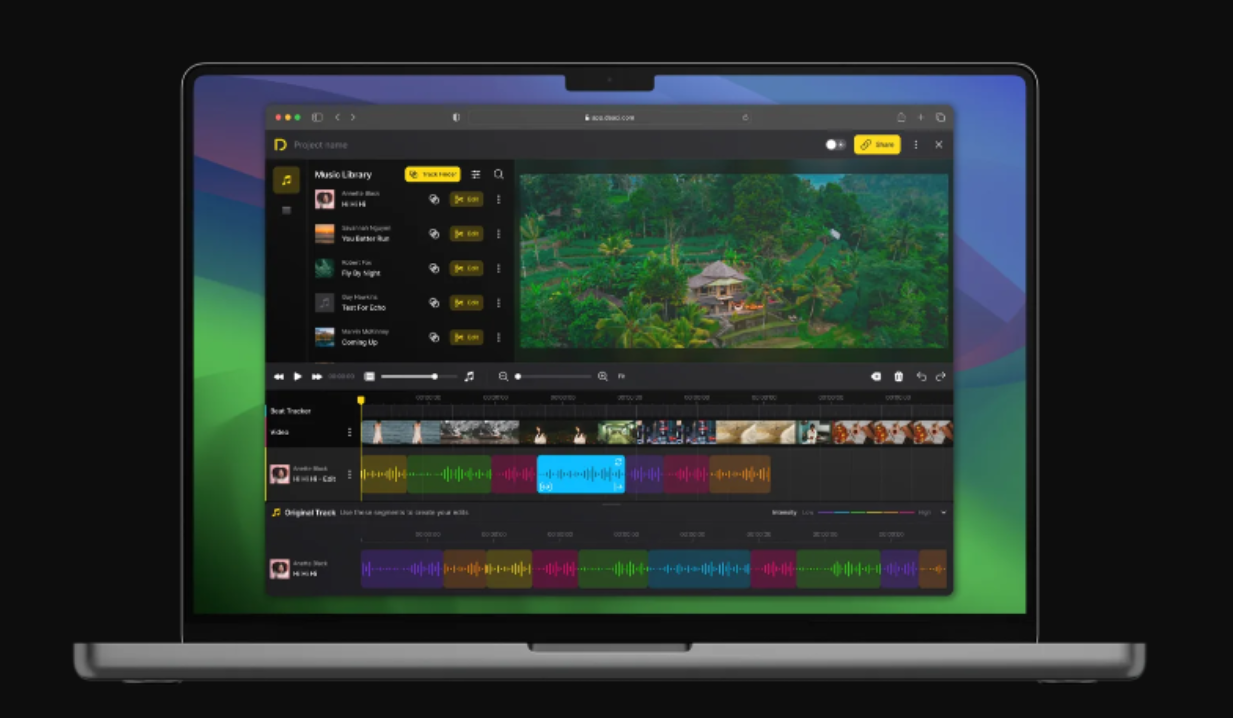
Top Video Editing Software Tools in 2020 (FREE).

Videography includes production and post-production. We are in the digital- world, where high-quality cameras are available for creating professional and personal videos. With excellent footage, you can create short films with a superior soundtrack using video editing software.

Years ago, editing videos required expensive equipment and software. Today, we have a lot of free editing tools for professionals with little or no expertise. There are many open-source video editing tools with flagship set features and a robust framework that delivers the output equal to a Hollywood movie. Fully featured video editors are polished and well organized with brawny capabilities. If you have little interest in creating and editing videos, then that software is for your hunger minds.

For Beginners, we recommend free editing software before choosing paid versions. Most free editing softwares have almost all features present in the paid versions and limit the users to some advanced techniques that only professional and experienced persons require.


So which free video editing software to use?

There are lots of free editing software suitable for desktop for creating promotional videos. Here is the compilation of the best video editing software across the web.


Adobe Premiere Pro CC.

Adobe Premiere Pro CC has various tools to create videos, edit them, and fine-tune them without pressure. It is an easy and elaborate tool to collaborate with multiple people. Premiere Pro works on all platforms and does more than basic video editing. It integrates with Adobe, and you can get many latest features from the Adobe store for your editing jobs. The key features of the software are 3D editing and Multi-cam editing. All the top professionals use it for creating videos from commercials to YouTube. Its integration with Adobe enables you to access Adobe after effects to adobe stock. 

Features:

  • Creative cloud library. 
  • Multiple video types and formats.
  • Lumetri color tool.
  • Motion graphic templates.
  • VR video and audio editing. 
  • 360- degree VR footage.
  • Multiple user interfaces.
  • Multi-cam support.
  • It provides a sharable link and enables direct publishing.
  • Graphics and Tilting enabled videos.
  • Transitions effects and labels. 
  • Video trimming during playback.

Premiere Pro CC provides a high degree of precision and control for trimming and editing the videos. The auto-sync mode can handle multi-angle shots and can be imported from any source. The latest features of the 14.4 release have an auto-detect option to detect the cuts and add edits to the video. With a limited-time free trial software, you can learn the basics used in the professional editing tools.


Moviemaker 10

Moviemaker is a simple free video editing software suitable for Windows applications. If you want to learn the basics and make quick edits, then you can use this tool. The free version contains pictures and video editing tools with many auto modes. The animation’s tabs are simple to add titles and music. You can download this from the Microsoft store to your system. The photos and videos stored in the default pictures are chosen and arranged in the app for customization.

Features: 

  • Auto preview.
  • Transition Overlays.
  • Great stabilization.
  • Voice over and audio features with timeline narration.
  • Video trimming.
  • Title customization.

The benefit of movie maker 10 is its automatic preview, user-friendliness, and simple controls. It has both basic features and workflow elements made for professional editors. It has excellent customer service and supports smartphones and desktops. If you want to create business videos for small and medium businesses, movie maker 10 is the right choice.


InVideo

InVideo.io is the best tool for beginners and professionals. It is an excellent choice for publishers, agencies, marketers, and individuals who want to create and edit videos without previous editing experience in minutes. You can make an excellent presentation and all types of engaging videos with optimum quality using this tool. 

Large corporations, agencies, and small businesses use their templates and editing tools for creating marketing and news videos for social media.

Features:

  • Big library of templates.
  • It has high- definition video exports.
  • Image and video library.
  • Multi-language support.
  • Excellent 24/7 customer care.
  • ON – screen editing.
  • AI-enabled video assistant.
  • Shareable links.

InVideo’s online platform helps you create videos to reflect your branding with more than 35,000 ready- to- use templates, a million videos, and 3 million footages. It has almost every feature required for creating a video, such as drag and drop, image animation, text- to –speech conversion, auto-preview, voice-overs addition, adding team members, and advanced editing options.


Corel Videostudio Ultimate 

Corel VideoStudio Ultimate is a reliable video editor with optimum features to guide beginners in creating high-quality videos. It is one of the software that can edit 4k, 360 – degree video editing options and powerful features required by an intuitive video editor. It is simple to use. All you need is to select a template and add your media to it. While playing the video, you can add the soundtrack and other effects. It also has a screen recorder to record both the webcam and screen simultaneously.

Features:

  • 4K display.
  • It has video masking and blending options.
  • Creative content and titles addition.
  • It has editing tools and shortcuts.
  • 360- degree VR footage.
  • Painting creator.
  • Enhanced User Interface ( UI).
  • Multi-cam addition.
  • Stop-motion creator.
  • It has lens correction for equirectangular videos and dual fisheye.

Corel is a good choice for beginners and is easy to use. The software was developed as a non-linear editing tool with excellent customer support. They listen to the suggestion from the customers for improvements. 360- degrees VR support has rabbit hole effects, transitions and filters, tiny planet effects, and 360- degree title effects. This software runs on Windows only.


CONCLUSION:

Video content holds the top-notch in social media. If you want to hone your brand, you need excellent videos. There are many intro makers for YouTube videos like this one here, Instagram, and Twitter accounts in the market. Among those, I prefer InVideo for beginners and intermediates. InVideo understands the requirement of the customer’s uploads new features and provides extensive customer support.

How‌ ‌to‌ ‌Choose‌ ‌the‌ ‌Right‌ ‌Data‌ ‌Migration‌ ‌Tools‌ ‌for‌ ‌Your‌ ‌Company‌

Most companies will need to transport large sets of data at some point in their lifetimes. Whether you are upgrading your storage hardware or replacing a database, you will need to employ a reliable set of data migration tools to get the job done. But if you’re new to this sort of job, finding the right tools can be difficult. In our latest blog post, we’re offering a comprehensive guide to data migration as well as tips for finding the right tools for your organization.

We will review:


  • The basics of data migration
  • Different tools your company can use for data migration
  • Challenges and risks of data migration
  • Tips for successfully planning your data migration

Let’s get started!

What is Data Migration? 

Data migration is a key focus for data storage professionals. 

So, what is data migration exactly? The concept is actually quite simple. Data migration is the process of transferring data from one storage location to another. During this process, a company must prepare, extract, and even transform the data. Not to be confused with data replication, which occurs when someone copies data from one platform before sending it to another, data migration can be a long and tedious process. 

Purpose of Data Migration Projects

There are a number of different reasons why a company needs to invest in a data migration project. They might be upgrading a server or launching a new application. If they acquired another company, they will need to transfer the data from the old company into their current one. Some other common types of data migrations include:


  • Performing storage migration for a technology refresh
  • Moving a database into cloud storage or some other platform
  • Transitioning data between different applications after switching software platforms

While transferring the data, the company wants to complete the process with no data loss. When possible, it will also want to minimise the amount of data that requires manipulation or recreation. 

Data Migrations Tools Your Company Might Use

Self-scripted, on-premises, cloud-based, and more services can be used for data migration.

Data migration tools are not all built the same. There are a number of different data migration tools you can use to successfully complete your project. Smaller companies might prefer to use a self-scripted, “do-it-yourself” tool while larger ones might require extra assistance for developing a cloud-based program. The three main types of data migration tools include:


  • Self-scripted programs
  • On-premises tools
  • Cloud-based sources


Understanding the basics of these programs as well as the needs of your organisation can help you pick the right tools for your company. Make sure you weigh the key points of these programs against the key goals of the data migration project you’re organising. Another great tool you could use is Sharegate’s teams migration tool.

Self-scripted Programs

Self-scripted programs are best suited for small data migration projects. They are great for companies in need of a quick fix or who have a source-destination that isn’t supported by other tools. They also tend to be cheaper than the other programs listed. 

However, you will need someone on your team with coding skills if you want to use a self-scripted program. Because your company’s need will be constantly changing, the increase in cost for using these self-scripted programs can seriously add up over time. 

On-premises Tools

Certain compliance requirements prevent businesses from using cloud-based solutions for data migration. As a result, they turn to on-premises tools. On-premises programs are great for IT teams that can handle their management and upkeep. 

Cloud-based Sources

If you have multiple destinations for your data, a cloud-based program might be the best fit for you. Cloud-based solutions are great for companies that need to scale up or down. If you are managing a geographically dispersed team, cloud-based programs are great for helping everyone stay in the loop. 

Some people do have concerns over the security that cloud-based sources offer. As a result, you might need to take extra steps in ensuring the safety and security of your chosen program. 

Challenges and Risks of Data Migration

Businesses rely on properly-run data management projects for the success of their overall operations. 

Data migration does come with its own challenges and risks. You might be faced with data loss or compatibility issues that impede the process of your data migration. Poorly run projects can also cause your company to lose money in the long-run. 

That’s why it’s crucial to select a tool that can handle the needs of your organization. Some companies try to save money by completing the process in-house. But if they don’t have enough time and resources to give their team to complete the migration, they are at risk of setting themselves up for failure. If necessary, you might need to recruit some outside help for planning the migration. 

How to Build the Right Data Migration Strategy for Your Company

Make sure you find the right tools for your company. 

When building a data migration strategy, you need to consider your company’s budget and unique needs. In general, you should include enough money in your budget to hire data migration consultants, this might mean you need financing through means like revenue based loans. Planning out the strategy with these consultants can help set your organisation up for success. Make sure you consult with the end-users of this project as well. They might need help with understanding and managing the data.

If you’re planning a data migration project for your organisation, you need to find the right tools to help you pull it off. Some companies prefer to perform this process in-house, if for example they are preparing to move to an open banking system to help with finances. Others need extra assistance for such a large job. Whatever you decide, you need to review the basics of data migration. Familiarising yourself with them can help you find the right tools and expert assistance for your company.