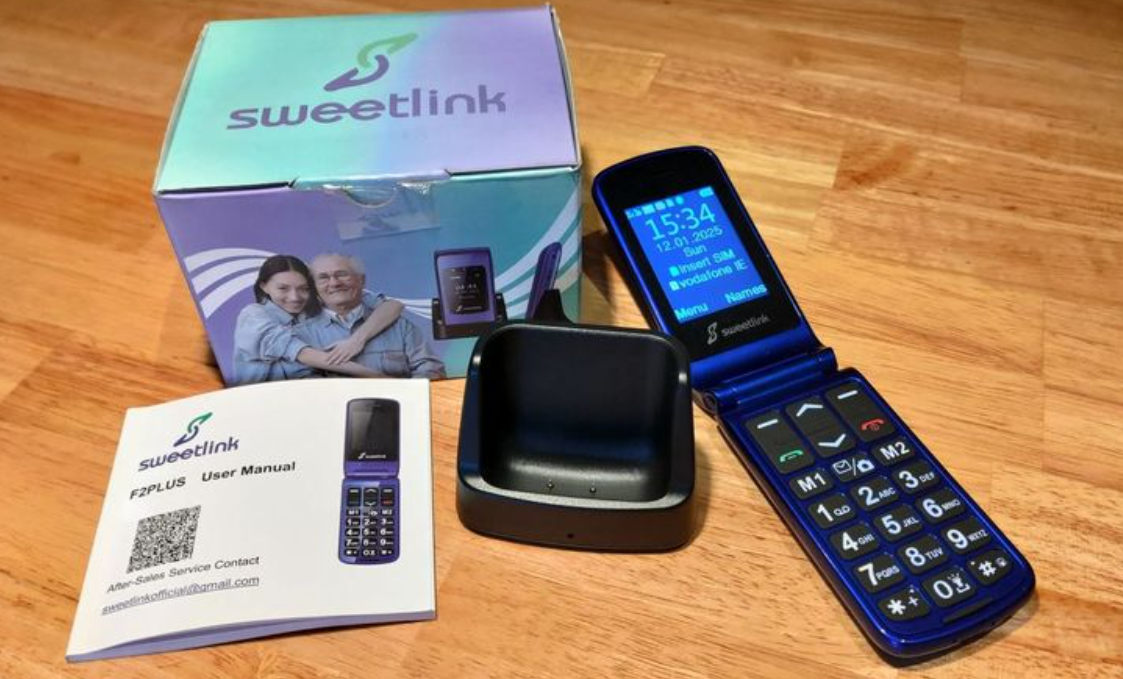
Sweetlink F2 Plus Big Button Mobile Phone Review

The Sweetlink F2 Plus Big Button Mobile Phone is designed specifically for the elderly and offers a range of features that cater to the unique needs of senior users.

Overview

The Sweetlink F2 Plus is a dual-SIM flip phone with a focus on simplicity and ease of use. Manufactured by Sweetlink, a tech company founded in 2022 specializing in senior-friendly button phones, this device aims to provide a straightforward communication solution for older adults.

Key Features

  •         Dual Display: 2.4″ main screen and 1.77″ external display
  •         Large Buttons: Designed for easy visibility and use
  •         SOS Emergency Button: Quick access to help in urgent situations
  •         Speed Dial: Up to 10 contacts for rapid calling
  •         Dual SIM Support: Flexibility in network choices
  •         1000mAh Battery: Long-lasting power with dual charging options

What’s in the Box

  •         USB Cable
  •         Charging Base
  •         User Manual
  •         SIM Adapter
  •         Lanyard

Setup and Usability

While the setup process is generally straightforward, removing the back panel to insert SIM and SD cards may prove challenging for some seniors. The included manual provides detailed instructions, but the initial setup might require assistance.

The menu structure is clear and well-defined, with excellent keyboard buttons and shortcuts for quick access to features like the flashlight and camera.

Logging on to the Sweetlink website this was observed

Your connection is not private

Attackers might be trying to steal your information from http://www.isweetlink.com (for example, passwords, messages, or credit cards). Learn more about this warning

net::ERR_CERT_AUTHORITY_INVALID

http://www.isweetlink.com/product/349.html

Attempting to download the user manual, resulted in this error message.

Camera Performance

The camera quality, as expected, doesn’t compare to modern smartphones. However, it’s important to note that an SD card (up to 32GB) is required for photo storage, as the phone lacks internal memory for images. Once an SD card is installed, the camera functions normally however images are nothing to write home about and not the phones USP.

Battery Life and Charging

With approximately 5 days of standby time, the battery life is impressive. The inclusion of a charging stand is a thoughtful addition, making it easy for seniors to keep their phones powered up.

Warranty

The 2-year warranty provided with the Sweetlink F2 Plus is a positive aspect, offering peace of mind to users and their families.

Pros and Cons

Pros:

  •         Large, easy-to-use buttons
  •         Clear dual display
  •         SOS emergency function
  •         Long battery life
  •         Included charging stand

Cons:

  •         Challenging initial setup
  •         The marketing in terms of the website, QR codes, and security settings has let down the overall experience of using the phone.
  •         Lack of internal memory for photos
  •         Date and time reset required after battery removal


Conclusion

The Sweetlink F2 Plus Big Button Mobile Phone successfully delivers on its promise of providing a user-friendly communication device for the elderly. Its large buttons, clear displays, and essential features like the SOS button make it an excellent choice for seniors seeking a simple, reliable phone.

While there are minor drawbacks, such as the lack of internal memory and the need to reset the time after battery removal, these issues are unlikely to significantly impact the target user base. The inclusion of a charging stand and the impressive battery life are particularly noteworthy features.

Overall, the Sweetlink F2 Plus offers great value for its price point, providing essential functionality in an easy-to-use package. It’s an ideal choice for seniors or anyone looking for a straightforward, no-frills mobile phone experience for calls and text.

Buy

Other older person phone reviews 

Video review

Get to the Bottom of It: How to Read My Wifes Text Messages From My Phone

Even trustful husbands sometimes question their wives, wondering how to read my wifes text messages from my phone. If you’re finding yourself going through their phone trying to figure out who is my wife texting and why, this blog post will come in handy.

Here, you will learn how to access your partner’s text messages on your phone. We will cover the necessary information and steps to take this discreetly. By the end of this post, you should have all the answers you need about who your significant other is texting.

How to See Who My Wife Is Texting for Free: 3 Ways 

Are you curious about what your partner is up to? Do you want to know who they are messaging and why? With technological advances, it’s now easier to read someone else’s text messages from your device. At least, more accessible than before. Here are 3 ways how to read my wifes text messages from my phone.

Using a Third-Party App

The easiest way how to see who my wife is texting for free is through a third-party app. Many apps on the market allow users to monitor their partner’s texts without them knowing. You must install the app on your target device (your partner’s phone), and then you can view their messages directly from your device.

Here’s a list of a few popular third-party apps you can use to read your partner’s text messages:

  • FlexiSPY
  • Highster Mobile
  • iKeyMonitor

Eyezy

Eyezy is a monitoring app that lets you see what your wife is doing on her phone. Whether she’s having inappropriate conversations with men, trying to meet new people on Tinder or doing nothing at all, Eyezy will help you find out what’s going on.
With Eyezy, you can read texts, see her private chats on social networks (WhatsApp Messenger, Snapchat, Tinder, etc.), see what apps she’s using, view her saved photos and videos, check what Wi-Fi networks she’s connected to, and much more.
Other powerful tools are also available, including a keylogger (which captures every keystroke), Pinpoint (which shows the location of your conversation partner on a map), Magic Alerts (which tells you if he uses a controversial word in a chat, and notifies you when he leaves or leaves a certain location), and a voice recorder (which takes pictures of his phone as he uses it).
Just install Eyezy on her phone, and you get access to her most intimate conversations. If it’s happening on his phone, you’ll know about it.   


mSpy

mSpy is just the app to put your mind at ease. By installing it on the user’s device, you can view text messages on their phone. This includes all of their iMessages (messages sent between two iOS devices) and plain texts (messages sent between iPhone and Android).
The monitoring app allows you to view your wife’s text messages on all kinds of social networks. mSpy covers Messenger, WhatsApp, Snapchat and Instagram. Just log in and view their texts at any time, including all photos and videos sent and received.
Worried about deleted messages? mSpy has thought about that, too. The app includes a screen recording tool that takes snapshots while you’re using your phone, so you can see their messages as they appear — even if they’ve deleted the message.
You only need to follow the instructions emailed to you when you sign up to access their phone. 


All of these apps have been designed to make it easy for people to monitor their partner’s activity without them knowing. They are also very reliable and secure, so you can be sure your partner will not find out. Depending on your chosen app, you may access their text messages, call logs, emails, and even their social media accounts.

Using iCloud Backup

How can i see my wife’s text messages without an app? If your partner uses an iPhone, then another option would be to use iCloud backups. All iPhones have iCloud enabled by default, so all of their data (including text messages) is automatically backed up every night at midnight.

All you need to do is log into their iCloud account and access the backup files directly. The only downside here is that this only works if they have an iPhone; if they have an Android device, this won’t work for you.

Note: You will need access to their Apple ID and password to log into iCloud and view the backups. If they have 2FA enabled on their account, you’ll also need access to their device to receive the verification code.

Using a Spy Camera

Another option how to read my wifes text messages without her knowing would be to use a spy or hidden camera to monitor what happens on your partner’s phone when they’re not around. This can be done by even using your own smartphone as a surveillance device.

You can set it up so that it records everything happening on the other person’s phone whenever they’re not around – including any incoming or outgoing text messages they might receive or send while away from home. The only downside here is that this requires quite a bit of setup and may not be feasible depending on where and how often your partner uses their phone away from home. 

Best Method How to See Who My Wife Is Texting for Free

The best way how to see who my wife is texting for free is by using a dedicated monitoring app. This app makes it easy to track incoming and outgoing texts on your partner’s phone without them ever knowing you’re doing so.

These apps are designed to be completely undetectable, meaning that even if someone checks their phone for suspicious activity, they won’t be able to spot the monitoring app running in the background.

You can also choose from various features depending on how much access you want (or need) to your partner’s messages, such as viewing deleted messages or setting up notifications for specific keywords.

Unlike iCloud access, which requires your partner’s password or remote camera access to their phone, these apps don’t require any of that information. The setup process is easy and straightforward, taking only a few minutes of your time.

Conclusion

As you can see, there are several different ways how to read my wifes text messages from my phone – whether it’s by using a third-party app, iCloud backups, or even setting up a hidden camera to monitor activity while they’re away from home. 

Each method has its own pros and cons, so be sure that whatever solution you choose will work best for both parties involved before taking action! Good luck!

What Is Text Translation? How Does Text Translation Work?

Text translation refers to converting written words from a source to a target language without losing the message’s meaning. The translation process is complex since you must communicate the same information in the target language without losing aspects such as humor, slang, expressions, and proverbs. People get their seminar transcripts, books, websites, legal documents, user manuals, product descriptions, and medical records translated all the time.

How Does Text Translation Work?

You can either use human translation or use translation software. Machine translation software is straightforward. It requires that you upload the source document into the translation software for it to convert the text to the language of your choice.

However, this first method is unreliable as it produces awkward errors. You can attribute these blunders to the fact that translation software does not understand the complexities of the human language and, therefore, cannot interpret aspects such as humor. Software usually translates the document word for word instead of looking at the big picture.

Human translation is more reliable because people can use their intelligence to understand the context of a document. Human translators can also apply their technical training in medicine, marketing, or law to deliver accurate translations. Here’s the process that a human translator follows when translating a document.

1. Understand the Scope of the Original Document

In this step, the translator must read the document and understand its scope and the required technical knowledge. Then, they can tell how long it will take to work on the project.

2. Get to Work

After reading through the document, the translator starts the translation process. Ideally, they’ll work on the text in bite-sized 5-10 words. They will constantly research terms and phrases they may not comprehend in the source language to convert them into the target language accurately.

3. Review the Work

Once done, the translator will read through the translated content to confirm aspects such as sentence structure, clarity, and adherence to regulations. They review the content while comparing it to the original text to ensure they have not misinterpreted or missed any part of the text.

4. Proofread the Translation

A translator should proofread the document after they have taken a break. This will ensure that they look at the translation with a clear mind to identify any errors.

5. Determine if the Translation Meets Quality Standards

When confidentiality allows, the translator hands the translated document to another professional dedicated chiefly to quality assurance. They go through the document keenly to help point out any errors the primary translator may have missed when proofreading. The second pair of eyes is also essential in ensuring that the translation retains the meaning of the source language.

6. Format the Document

The translator must confirm that the layout of the translated document matches that of the initial one. Aspects such as numbering, the hierarchy of headings, line breaks, and diagrams such as graphs should all maintain their appearance in the document as they were in the original text. Preserving a document’s general appearance is fundamental for comprehension.

7. Perform a Final Check Before Submission

The translator does one last verification of the entire document on the grammar, context, and appearance of the text. After they are satisfied that the document is correct, they send it to the client via email in an editable format. 

Final Thoughts

Human translation gives more accurate results compared to machine translation. When a translator follows all the steps of the translation process, they should deliver error-free translations. Whether you decide to hire a translation agency or a freelance translator, it is fundamental that you establish what approach they’ll follow when working on your project.

Translation agencies such as GoTranscript guarantee 100% human-generated translations produced by following due process. Click https://gotranscript.com/text-translation-services to learn more about its services and how you can work together on your next project.

WhatsApp records a 41% Jump in its user engagement in Q1, 2022

Meta’s WhatsApp platform continues to enjoy adoption. The platform saw a 41 percent increase in users in the first quarter of 2022, as per a MoneyTransfers.com study. The study showed that the platform is ideal for families, friends, and colleagues to keep in touch.

The study also revealed that the 18 to 34-year-old age cohort had the most growth in WhatsApp platform usage. Besides, this cohort increased their use of Facebook and Instagram. Other social platforms that have seen growth include Facebook and China’s WeChat and Weibo.

In quarter one of 2022, 55% of WhatsApp’s monthly average users (MAUs) were “power users” who used the app daily. Among the top apps evaluated, WhatsApp had the highest percentage of power users. Moreover, it had the highest year-over-year growth in this category.

Ukraine invasion and Whatsapp usage

The Russia Ukraine war saw WhatsApp and Telegram increase in MAUs engaging with respective apps daily. Telegram had 15.5% of its MAUs open the app every day during the first quarter, up 9% in Q1 2021.

Besides WhatsApp, LINE had the highest percentage of monthly active users (MAUs) at 45% in the first quarter of 2022. A 10% increase from 35 percent in quarter one 2021. Messenger ranked third, with 16.4 percent of MAUs using the app daily in 1Q22, up from over 12 percent.

WhatsApp and Messenger are by far the most popular messaging apps in the United States, according to MoneyTransfers.com. However, data shows that competitors have gained market share in the last two years.

Other social platforms

WhatsApp and Messenger are the most popular platforms in the United States and worldwide. Yet, users are eager to try new sites and even switch in some cases, as shown by the retention of apps like Discord and Telegram. Meta hopes to recoup any ground it has lost to opponents in past years. They are expanding the feature set of its platforms, as shown by the first Conversations event.

In August 2021, there were 39 million WhatsApp installations. Most of these came through Google Play (29 million), with the App Store accounting for 10 million. After TikTok, Facebook, and Instagram, WhatsApp was the fourth most downloaded app in September 2021.

Besides, people downloaded WhatsApp Business 18 million times on Google Play and App Store. Most of the downloads came through the android users.

Full story and statistics can be found here: WhatsApp records a 41% Jump in its user engagement in Q1, 2022