Why You Should Buy a Disposable SMS Number Secure Your Privacy with Ease

In today’s digital age, protecting your privacy has become more important than ever. With data breaches, spam, and unwanted marketing calls on the rise, many users are searching for ways to keep their personal information secure. A disposable SMS number is one of the most effective solutions to this problem.

In this article, we’ll explore what a disposable SMS number is, how it works, and why you should consider using one. Plus, I’ll show you where to get one and how to make the most of it.

What Is a Disposable SMS Number?

A disposable SMS number is a temporary phone number that can receive text messages. It functions just like a regular number but is often used for short-term purposes. These numbers are especially useful for situations where you don’t want to share your personal phone number but still need to receive SMS.

Think of it as a temporary email address you might use for signing up for a new service to avoid spam in your main inbox. Once you no longer need it, you can stop using it, protecting your real number from unwanted texts or calls.

Why Use a Disposable SMS Number?

There are countless reasons why using a disposable SMS number can be incredibly beneficial. Let’s break down a few of the most common use cases:

1. Online Verification

Many websites require phone number verification through one-time passwords (OTPs) for added security. But do you really want to give out your personal number to every service? By using a virtual number for OTP, you can complete the verification process without exposing your private information.

2. Signing Up for Free Trials

We’ve all been there – signing up for a service that promises free trials, only to forget to cancel, resulting in surprise charges. Using a disposable number lets you keep track of trial services without using your actual number.

3. Maintaining Privacy

Imagine you’re selling something online. Sharing your personal number with buyers might not feel secure, especially if you’re posting on public platforms. A disposable number keeps your real phone number out of the picture, ensuring your privacy is protected.

How Does It Work?

Buying a disposable SMS number is straightforward. Services like www.freeje.com offer easy access to temporary numbers. Here’s how the process generally works:

  1. Choose Your Country: Disposable numbers can be chosen from various countries, allowing you to select a region that fits your needs.
  2. Pick Your Plan: These numbers usually come with flexible plans – pay-per-use or a subscription for long-term use. You only pay for the duration you need it.
  3. Use It for SMS Verification: Once you’ve purchased the number, use it for whatever verification or communication you need. After the task is done, you can dispose of the number or keep it for future use.

Just like disposable cups are handy when you don’t want to wash dishes after a party, disposable SMS numbers are great for avoiding spam or excessive communication.

Practical Ways to Use a Disposable SMS Number

If you’re still unsure about how to integrate disposable numbers into your routine, here are some examples of where they can be helpful:

  • Social Media Accounts: Platforms like Instagram or Facebook often ask for phone verification. If you don’t want them to keep your personal number in their database, a disposable number does the trick.
  • Classified Ads: When selling items on websites like Craigslist, a temporary number gives you a layer of privacy, reducing the chances of getting spammed after the deal is done.
  • Dating Apps: For those who prefer keeping their personal life separate from their phone number, using a disposable SMS number for dating apps is a great solution.

Long-Term Security and Convenience

Many people believe disposable numbers are only useful for short-term purposes. However, they can also serve long-term needs. If you run a business, you may want to separate different areas of your work life – for example, having a separate line for customer inquiries without giving out your personal phone number.

Moreover, they are perfect for travel. If you’re in a foreign country and need a local number to receive messages or verify accounts, disposable SMS numbers are a convenient option.

Final Thoughts: The Smart Way to Protect Your Privacy

A disposable SMS number provides a smart, easy, and affordable way to protect your privacy and streamline communication. From online signups to selling products, there are numerous applications where having a temporary number can make a big difference.

Next time you need a quick solution for receiving texts without revealing your personal number, consider purchasing a virtual number for OTP. You’ll have peace of mind knowing your privacy is intact.

Sky Mobile reveals major savings hack for 2026

New research from Sky Mobile has revealed Irish customers’ habits when it comes to their monthly mobile bills and switching mobile providers – and some new opportunities for saving money in 2026. 
The study revealed that almost half (49%)* of Irish people are making financial New Year’s resolutions this January, from paying off debt to saving more money. Cutting back on impulse purchases (50%), following a budget (43%) and reducing food and drink spending (38%) are the top three ways Irish people plan to save money this year – but there’s one major savings hack that isn’t receiving the same attention. 
The same research revealed just 1 in 10 (10%) Irish people were likely to start switching mobile providers more regularly as a New Year’s money saving hack. For the remaining 90% who planned to stay put with their provider, there’s a huge, missed opportunity for saving. This January, customers who switch to Sky Mobile today will pay just €15 a month for unlimited data, calls and texts to any network in Ireland – and switching couldn’t be easier. 
The findings also show that customers aren’t as savvy at switching mobile providers as they are with other utilities, despite 70% saying they would switch for a better deal. While some Irish consumers are still not switching utility providers as often as they could, they are switching mobile providers far less frequently. Only just over a third of Irish consumers (37%) switch mobile provider within five years — while nearly double that number say they have switched electricity, gas, or broadband providers in the last five years (73%).  
What’s more, 1 in 3 consumers say they wait over five years to switch mobile provider, while 1 in 5 admit to never switching providers. Think of the savings they could have been making! 
Speaking about the findings, Irish budgeting creator and author, Caz Mooney, said: “One of my top budgeting tips for 2026 is to switch utility providers regularly but when it comes to mobile bills, it looks like many consumers are missing a big opportunity to save money.  Sky Mobile has some brilliant offers for anyone looking to switch, and the best thing is, switching is easy.”
Speaking on the benefits of Sky Mobile, Aideen Chambers, Connectivity Director, said:  “Since landing in the Irish market in 2024, Sky Mobile has offered customers fairness, flexibility and transparency when it comes to their mobile plan. However, our research tells us that a huge number of Irish customers are overpaying with their current provider. Switching to Sky Mobile could be the answer to your savings goals for 2026.”
Sky Mobile disrupted the mobile market in 2024, giving Irish customers the opportunity to Expect More versus other providers, with fairer contracts and greater transparency providing significant monthly savings. 
Sky Mobile is available in Sky’s retail stores across Ireland and online at sky.com/ie/shop/mobile

Bank of Ireland warns customers of “smishing” scams this Christmas

Bank of Ireland is urging customers to stay alert to ‘Smishing’ scams over the festive season, as fraudsters try to exploit consumer behaviour by sending them fraudulent text messages during the busy shopping period.

With online shopping and parcel deliveries at peak levels, scammers are sending texts that look like they’ve been sent by trusted delivery companies, motorway toll services, utility providers, Government agencies or even from the banks themselves.

These fraudulent messages often include links to fake websites designed to steal card or online banking details or trying to pressure consumers into paying a delivery or customs charge or update bank account details. Other “smishing” texts will contain a fake phone number that, when called, connects you to a fraudster posing as a representative of the company or from your own bank.

Bank of Ireland is also reminding customers that its dedicated fraud support team is available 24 hours a day, seven days a week throughout Christmas and into the New Year. Last year Bank of Ireland’s fraud prevention team received over 10,000 calls from customers during the peak holiday period (23 December to 29 December), with 550 calls received on Christmas day alone.

As part of Bank of Ireland’s four-point plan to prevent fraud, it has called for the introduction of legislation to allow an SMS scam filter to be deployed in Ireland. This filter would help stop SMS fraud attempts before they happen. Ireland is currently out of step with other English-speaking countries in not having an SMS scam filter in place. This filter would operate like the spam filters that are applied to email inboxes by detecting and blocking harmful links or content.

Key advice for consumers:

  • Do not click on links or reply to text messages looking for payment.
  • Remember toll operators, banks, delivery companies, utility providers and Government agencies will never send a text linking to a website that asks for your online banking details or full card details.
  • Check the identity of the sender. Call the company in question using their legitimate phone number.

Nicola Sadlier, Head of Fraud, Bank of Ireland said: “Unfortunately fraudsters see the Christmas holidays as an opportunity to exploit the consumer rush to get all the festive shopping done, and at this time of the year Bank of Ireland’s fraud team always sees a wide range of “smishing” scams impersonating well-known companies.”

“Our advice to consumers remains the same, keep your guard up and treat every unsolicited call, text, or email as a potential fraud attempt. Our dedicated fraud team is working around the clock, even over Christmas and into the New Year, to protect and support our customers. If something feels suspicious, trust your instincts and contact us straight away.

“Ireland is out of step with other English-speaking countries in not having an SMS scam filter, leaving Irish consumers more exposed to fraud attempts. We would strongly support the introduction of an SMS scam filter in Ireland, which requires legislation, as it would help block many of these fake text messages.”

Bank of Ireland customers can call the Fraud Team 24/7 on the Freephone line 1800 946 764.

Garmin introduces inReach Mini 3 Plus satellite communicator

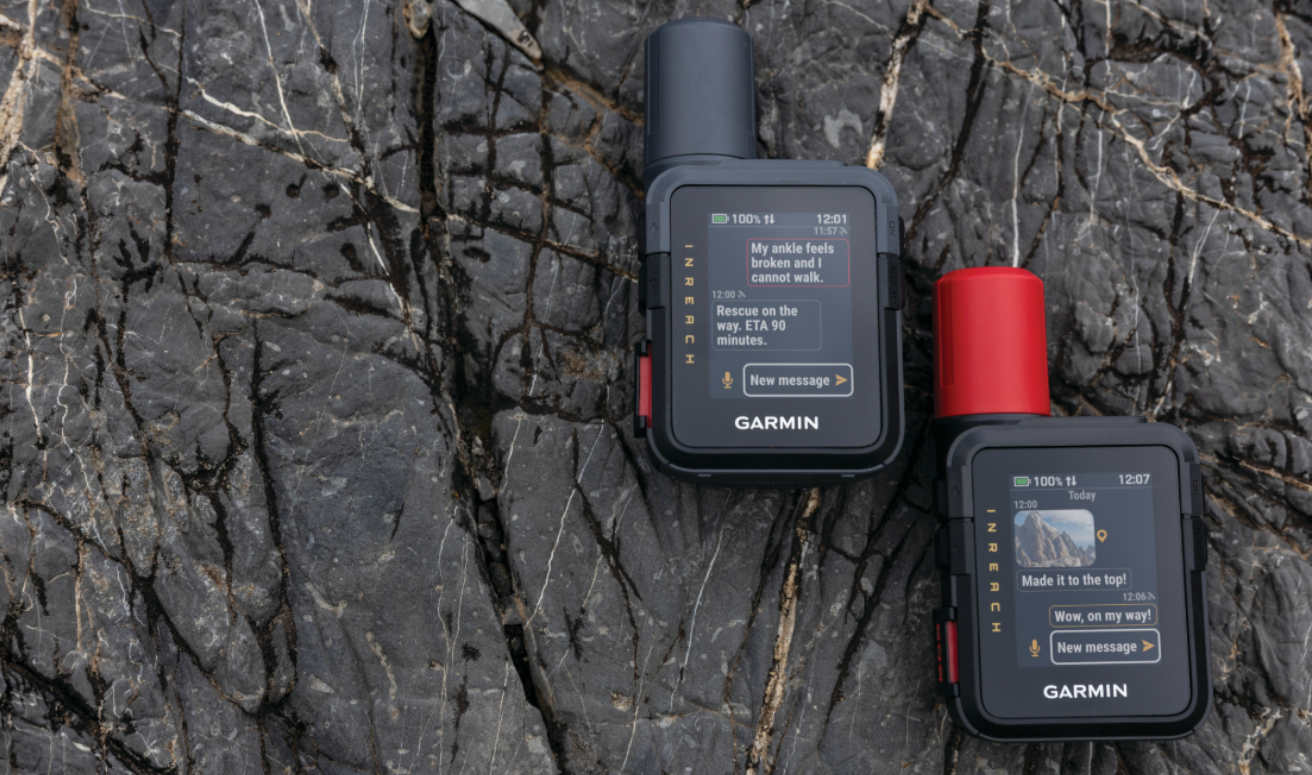
Garmin is expanding its popular lineup of compact satellite communicators with the introduction of inReach® Mini 3 PlusFeaturing a colour touchscreen display and built-in speaker and microphone, inReach Mini 3 Plus lets adventurers exchange voice messages, texts and photos1—making it easier to stay in touch with family and friends who are back home. Purpose-built to provide extra peace of mind while exploring beyond cell coverage, users can also trigger an interactive SOS message to the Garmin Response℠ centre should an emergency occur. And with up to 330 hours of battery life in 10-minute tracking mode, inReach Mini 3 Plus can be used on multi-day trips without the need for any extra plug-ins or battery chargers.

 “We understand just how important it is to stay connected during both short and long adventures, and that’s why we are excited to bring even more communication tools to the inReach Mini 3 Plus. Tell friends and family that they’re missed, show them the amazing view while standing at the summit and more—all from this compact and rugged device that can be clipped to a pack.”

—Susan Lyman, Garmin Vice President of Consumer Sales and Marketing

 More ways to stay in touch


  • Voice messaging: Check in with family and friends by exchanging 30-second voice messages right from the device.
  • Voice message transcription: While in an area where listening isn’t possible or it’s necessary to maintain silence in the field, read transcriptions of voice messages directly on the device.
  • Touchscreen texting: Quickly exchange text messages (up to 1,600 characters), emojis and reactions or start a group chat right from the device.
  • Photo sharing: View photos from back home right on the colourful display and share photos from every epic adventure when using the Garmin Messenger app.
  • LiveTrack location sharing: Let friends and family follow along on the adventure and track progress, including distance, time and elevation1.

 Emergency support when it’s needed the most

 When an SOS message is triggered, inReach Mini 3 Plus will send an interactive message to the Garmin Response centre, where a dedicated team of skilled emergency response coordinators are ready at any time. Photo and voice messages can also be shared during an SOS, giving coordinators the ability to see and hear details of the emergency firsthand. Response coordinators will communicate with the user, their listed emergency contacts, search and rescue organisations and other available local resources and provide updates. With nearly two decades of experience, the Garmin Response team has supported more than 18,000 inReach incident responses – from land to sea to air – in more than 150 countries on all seven continents.

Built for any adventure, inReach Mini 3 Plus is made to operate in extreme temperatures and features an impact-resistant design and IP67 water rating. When paired with the Garmin Explore app, adventurers can plan a trip, follow a course to a destination and even follow a track back to the start.

inReach Mini 3 Plus is available now and has a suggested retail price of £439.99. To learn more, visit www.garmin.com.

Engineered on the inside for life on the outside, Garmin products have revolutionised life for adventurers, athletes, off-road explorers, road warriors and outdoor enthusiasts everywhere. Committed to developing products that enhance experiences, enrich lives and help provide peace of mind, Garmin believes every day is an opportunity to innovate and a chance to beat yesterday.

1 Active satellite plan required. Some jurisdictions regulate or prohibit the use of satellite communication devices. It is the responsibility of the user to know and follow all applicable laws in the jurisdictions where the device is intended to be used.

See our Garmin Reviews

Finnish innovation stops scam calls – Rest of Europe is following

Scam calls cause up to €850 million in losses worldwide every year, but in Finland, this tool used by criminals has been practically defeated. At the end of November, the action Finland has taken to reduce scam calls will be competing for the European Crime Prevention Award, and Europol is highlighting it as a model case.

Elisa was the world’s first operator to develop a technical method to identify and block caller ID spoofing. As a result, criminals have no longer been able to use Finnish phone numbers in their scams. In 2023, the Finnish Transport and Communications Agency (Traficom) mandated that a scam call blocking solution based on Elisa’s innovation be implemented nationwide in Finland. Since then, a type of scam known as a “technical support scam” coming from abroad has been virtually eliminated in Finland. Elisa alone has blocked nearly 26 million scam calls since 2021. Elisa’s solution was granted a patent in Finland in 2023, and in November 2025, it was also patented in Europe.

“Our employees developed the solution themselves, and we deployed it in our network back in 2021. This solution has allowed us to eliminate the majority of scam calls received by our customers. Criminals’ profits in Finland have dropped from €7 million a year to just a few thousand, meaning Elisa’s actions have already made Finland an unprofitable target for criminals. In 2023, other operators also adopted the solution following Traficom’s decision”, says Karri Jäkkö, Director of Elisa’s Cybersecurity and Service Management Center.

Now this scam call blocking solution has been nominated for the prestigious European Crime Prevention Award. The prize will be awarded on 28 November as part of the EUCPN Best Practice Conference. At the end of September, Elisa and Traficom’s efforts to reduce scam calls also won Rikoksentorjuntakilpailu, a crime prevention competition held in Finland.

From the Finnish model to an international example
Caller ID spoofing remains a tool for criminals elsewhere in Europe: Scam calls are a significant problem, causing an estimated €850 million in losses worldwide annually, according to Europol.

In October, Europol published a report calling for action at EU level: unified technical standards, closer cross-border cooperation, and harmonised regulation to prevent scam calls and hold criminals accountable. The Finnish model is mentioned as a good example. Foreign operators are also actively seeking ways to block scam calls and are interested in the success of the measures adopted in Finland.

“Finland has succeeded in creating a model that effectively protects consumers and prevents criminals from making scam calls from disguised numbers. It’s great to see that this is also attracting international interest. Preventing scams is an arms race between us and the criminals, so we are constantly developing new solutions as well”, says Jäkkö.

In addition to blocking scam calls, Elisa has developed a solution to block calls from unknown foreign numbers. Scam text messages can also be tackled with a solution jointly developed by Traficom and operators.

Elisa’s actions to reduce scams in Finland

  • 2020 – Prevention of “wangiri” scam calls:
    Elisa can identify and block commonly known wangiri numbers (a scam involving missed calls to prompt a costly callback) as well as potential new numbers and prevent the number from being displayed, so the victim cannot call the attacker’s line back.
  • 2021 – Elisa develops solution to block number spoofing:
    Elisa creates a solution that blocks number spoofing, i.e. falsifying Finnish phone numbers and using them in scam calls.
  • 2023 – Nationwide implementation of the number spoofing blocking solution:
    The solution for blocking number spoofing is adopted nationwide by order of Traficom.
  • 2024 – Tackling scam text messages:
    If an organisation has registered their sender name with Traficom, Elisa can block scam messages claiming to be sent by that organisation. For example, the Finnish Tax Administration is one of those who have registered their sender ID, so scam messages claiming to be from the tax authorities will not get delivered.
  • May 2025 – Basic security features for consumer mobile subscriptions:
    Elisa introduces default basic features for consumer mobile subscriptions that protect people using the internet on their mobile phone. These include a secure authentication service (mobile certificate), malicious website blocking and monitoring for data breaches.
  • July 2025 – Ability to block calls from abroad entirely:
    Elisa adds the possibility to completely block incoming calls from abroad using its patented solution.

Garmin announces Bounce 2 Kids smartwatch

Garmin has announced Bounce™ 2, its reimagined smartwatch for kids with LTE connectivity1 that makes staying in touch even easier. Bounce 2 allows parents and caregivers to talk to and locate their child thanks to two-way calling, text messaging and real-time location tracking. Featuring a bright, colourful display, kids can also use the smartwatch to track their activities, play fun games, listen to Amazon Music2 and more.

“We are thrilled to introduce Bounce 2, a smartwatch for kids offering the perfect solution for families facing the decision to give their child a smartphone. The watch’s transformed design has a stylish look kids will want to wear, while the connectivity features give parents peace of mind knowing where their kids are 24/7.” 

–Susan Lyman, Garmin Vice President of Consumer Sales and Marketing

Connectivity features parents will love

When using the Garmin Jr. app on a compatible smartphone, parents and parent-approved contacts can communicate with and keep track of their child. 


    • Two-way calling and voice messaging: With the built-in speaker and microphone, kids can call their parents and send voice messages directly from their watch. From the app, parents can answer or call their child’s Bounce 2.
    • Text messaging: Parents can send text messages to their child’s Bounce 2; kids can respond or create their own messages using a full keyboard directly on the watch.
    • Voice message transcriptions: While in a work meeting or in an area where listening isn’t possible, read transcriptions of voice messages sent from the watch.
  • Real-time location tracking: Whether it’s a trip to the park or visiting a friend’s house, parents can see their child’s location in real-time and be notified when they enter or leave a parent-defined area with new temporary geofencing. 

Fun features for kids

  • Built-in sports apps: Kids can track a variety of activities like running, walking, bicycling, pickleball, jump roping, team sports and more. 
  • Immersive designs: Enjoy on-screen animations, watch faces and colour themes. 
  • Amazon Music: Download songs from Amazon Music directly to the watch (Amazon Prime or Amazon Music Unlimited subscription required) to listen to tunes out loud on the watch or through compatible headphones. 
  • Voice commands: Phrases like “call mum”, “start a timer” and more can be activated right from the watch.

Kid-friendly design

Built for all-day play, Bounce 2 features a round, vivid 1.2-inch AMOLED display, giving the watch a sleek look, while the swim-friendly design provides protection during all kinds of activities. And with two side buttons and a touchscreen, it’s easy for kids to navigate between screens and type out text messages on their watch. 

Available now, Bounce 2 offers up to 2 days of battery life3 and has a suggested retail price of £259.99/€299.99.  It comes in three colour options, including light purple, turquoise and slate grey. Kids smartwatch plans are managed by Garmin and are available for £9.99/€10.99 per month. To learn more about the suite of fitness, wellness and activity features available on Bounce 2, click here. 

Engineered on the inside for life on the outside, Garmin products have revolutionised the health and wellness industry. Committed to developing smartwatches and health measurement tools that help people of all activity levels lead healthier lives, Garmin believes every day is an opportunity to innovate and a chance to beat yesterday.

See our smartwatch reviews 

Garmin launches first microLED watch and brings inReach to your wrist

Garmin  is advancing the future of smartwatch technology with the introduction of fēnix® 8 Pro series. These premium GPS smartwatches are the first to feature inReach technology for satellite and cellular connectivity—letting athletes and adventurers leave their phone behind and still stay in touch. Further revolutionising the smartwatch industry, fēnix 8 Pro – MicroLED introduces a first-of-its-kind, high-resolution MicroLED display for superior readability.

“fēnix 8 Pro is changing the game for smartwatches. This new lineup is full of breakthrough innovations, bringing life-changing inReach technology to the wrist to help keep athletes and adventurers in touch with their family and friends and introducing the first-ever ultra-bright MicroLED display to a smartwatch so users can see their maps, stats, health and wellness metrics and more like never before.”

—Susan Lyman, Garmin Vice President of Consumer Sales and Marketing

Leave the phone behind and still stay connected

Designed for those pursuits that make it impractical to carry a phone, fēnix 8 Pro has built-in inReach technology for satellite and cellular connectivity.

Satellite connectivity

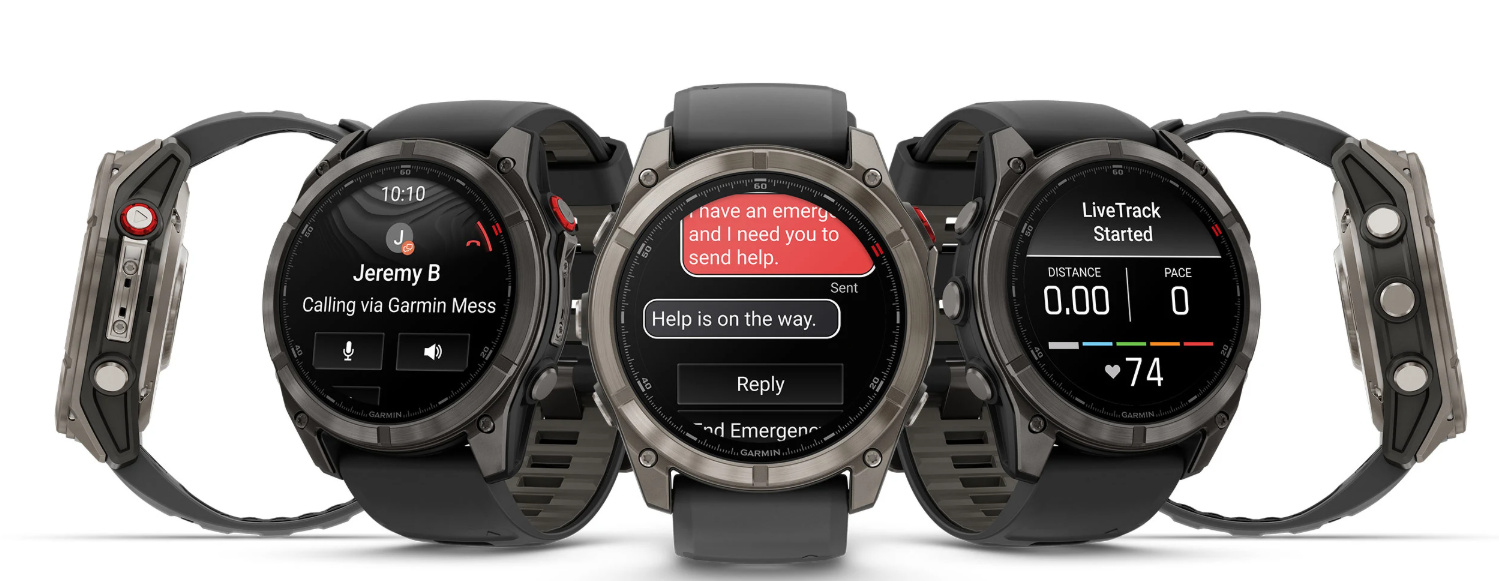
fēnix 8 Pro uses inReach technology to let explorers exchange messages and send location check-ins.

  • Text messages: Send and receive text messages with those using the Garmin Messenger app on their smartphone or compatible Garmin smartwatch.
  • Location check-ins: Send location updates to family and friends so they can keep track of trip progress.

Cellular connectivity

In addition to sending text messages or providing location check-ins, fēnix 8 Pro can be used to make phone calls, send voice messages, share LiveTrack links and view weather forecasts when connected to the LTE network.

  • Voice calls: Make and take voice calls from the watch with other fēnix 8 Pro users or those using the Garmin Messenger app on their smartphone.
  • Voice messages: Check in with family and friends by exchanging 30-second voice messages. Recipients can listen to the messages or read the transcriptions on their watch or in the Garmin Messenger app.
  • LiveTrack: Friends and family can follow the adventures with LiveTrack location sharing and location check-ins on their smartphone. Users can also alert their friends and family when a LiveTrack session has started, in case they want to follow along or reach out during an activity.
  • Weather forecasts: Access current weather conditions and multiday forecasts to stay prepared for what’s ahead.

SOS capability supported by Garmin Response

When an SOS is triggered, fēnix 8 Pro will send a message over satellite or cellular connectivity to the Garmin Response center, where a dedicated team of skilled emergency response coordinators are ready at any time. From there, Garmin Response will communicate with the user, their listed emergency contacts, search and rescue organisations and other available local resources. They provide updates to users and emergency contacts on the response effort, including confirmation when help is on the way, and remain available as the incident is being resolved. With nearly two decades of experience, the Garmin Response team has supported more than 17,000 inReach incident responses in more than 150 countries on all seven continents.

First-of-its-kind MicroLED display

Offering remarkable brightness in exquisite detail, fēnix 8 Pro – MicroLED features over 400,000 individual LEDs delivering up to 4,500 nits, making it the brightest smartwatch ever. The result is a revolutionary display that produces rich colors and high pixel densities with wide viewing angles and superior readability—even in direct sunlight.

Rugged design, premium features

Made for any adventure, all fēnix 8 Pro models are dive-rated and feature leakproof metal buttons, a metal sensor guard cover, AMOLED or MicroLED touchscreen displays and titanium bezels, plus an LED flashlight for greater visibility in dark environments.

Built for wherever the adventure leads, fēnix 8 Pro is loaded with Garmin’s full suite of performance, navigation, health and wellness2, and connected features, including endurance score, hill score, daily suggested workouts, preloaded TopoActive Maps, dynamic round-trip routing, the Garmin ECG App3, sleep coach, Garmin Pay, safety and tracking features and more. To learn more, visit https://www.garmin.com/en-IE/.

Design Custom Flyers Easily with Online Flyer Creators

Designing a flyer used to be difficult and time-consuming. Today, with online flyer creators, anyone can design high-quality flyers quickly and easily.

Whether you’re promoting an event, advertising a sale, or sharing information, online flyer tools make the process simple, affordable, and accessible to everyone.

If you’re ready to create your own custom flyer, follow these helpful steps and tips to get started.

Know the Purpose of Your Flyer

Before you begin designing, think about why you’re making a flyer. Understanding your purpose will help guide your design choices. Flyers can be used to promote business events, announce special sales, advertise community programs, or invite people to personal events like birthdays or fundraisers.

Knowing your goal will help you choose the right layout, style, and content. If your flyer is for a business, it should look professional and reflect your brand. If it’s for a fun event, it can be more colorful and casual.

Choose an Online Flyer Creator

Once you have a clear purpose, it’s time to pick an online flyer creator. These platforms are designed to help you create flyers quickly, without needing graphic design experience. Most flyer makers work directly in your web browser, and some even offer mobile apps for designing on the go.

Look for a flyer creator that offers user-friendly tools and a wide variety of templates. Some allow you to create a flyer for free, while others offer advanced features through paid plans.

Take your time to explore the different flyer maker offerings and pick the one that best fits your needs.

Select the Right Template

Most flyer creators start by letting you choose a template. Templates are pre-designed layouts that give your flyer a professional look from the start. You can browse through categories such as business, event, school, sale, or community.

Pick a template that matches the tone and style of your message. Don’t worry if it’s not perfect-you’ll be able to change the text, colors, and images later. A good template saves you time and gives you a strong foundation to build on.

Customize Text and Fonts

Once you have your template, start editing the text. Add your headline, main message, and contact information. Keep your message short and clear. People should be able to understand the main point quickly just by scanning the flyer.

Use larger fonts for headlines and smaller fonts for details. Choose fonts that are easy to read and match the tone of your flyer. For example, a modern font works well for business flyers, while a fun, rounded font might be better for a children’s event.

Add Images or Logos

Images can make your flyer more attractive and memorable. You can upload your own photos or use the images provided by the flyer maker’s built-in library. Make sure your image is clear and relevant to your message.

If you’re designing a flyer for your business or organization, be sure to add your logo. This helps people recognize who you are and gives your flyer a more professional look.

Images should be placed in a way that supports the text, not overcrowds it. Keep your layout clean and focused.

Adjust Colors and Design Elements

Most online flyer tools let you change colors easily. Choose colors that fit your brand or the theme of your event. Bright colors grab attention, while softer tones can give a calm and professional feel.

You can also move text boxes, resize images, and add design elements like shapes or icons. Play around with the layout until it feels balanced and easy to read. Don’t be afraid to experiment-you can always undo changes or try a different layout.

Keep Your Flyer Simple

One of the best design tips is to keep your flyer simple. Too much text or too many graphics can make your flyer look cluttered. Stick to one main message and make sure the most important details stand out.

Use clear headlines, space between sections, and a clean layout to guide the reader’s eye. A simple, well-organized flyer is more effective than one that tries to say too much.

Choose Print or Digital Format

After finishing your design, decide how you want to share your flyer. If you want to print copies, most flyer creators let you download your file in high-quality formats like PDF. You can then print it at home or send it to a print shop.

If you plan to share your flyer online, save it as an image file like JPG or PNG. You can post it on social media, email it to contacts, or add it to your website. Many flyer creators even offer options to share your design directly from the platform.

Check the Details Before You Share

Before printing or posting your flyer, take a few minutes to double-check everything. Make sure names, dates, times, and contact information are correct. Look for spelling and grammar mistakes. Ask someone else to review it if possible.

Even small errors can hurt your message or make your flyer look less professional. A careful final check helps you avoid problems and ensures your flyer is ready to go.

Save Your Flyer for Future Use

Many flyer creators allow you to save your designs. This is helpful if you plan to make similar flyers again in the future. You can update the text and images without starting from scratch. Saving your flyers also lets you keep a record of your past promotions or events.

If your flyer maker offers cloud storage or an account dashboard, take advantage of it. This makes it easy to organize and access your designs any time you need them.

Design Custom Flyers Now

Online flyer creators make it easy for anyone to design and share custom flyers. By following a few simple steps and design tips, you can create a flyer that grabs attention and delivers your message clearly.

Take the time to explore your options, plan your layout, and use the features available to you.

With just a little effort, you’ll be ready to design flyers that stand out without stress, high costs, or complex software.

Check out our other blog posts for more informative content!


imoo Z7 Smart Watch Phone Review

The imoo Z7 Smart Watch Phone is an ideal kit for your child or family member to keep track of even during school hours it is on the large side however it is robust and tough and you can get additional screen protection and watch protector for it making super tough for kids.

The watch is simple enough to set up which requires a sim card with a plan so keep this in mind before you purchase but this is how most work these days anyway.

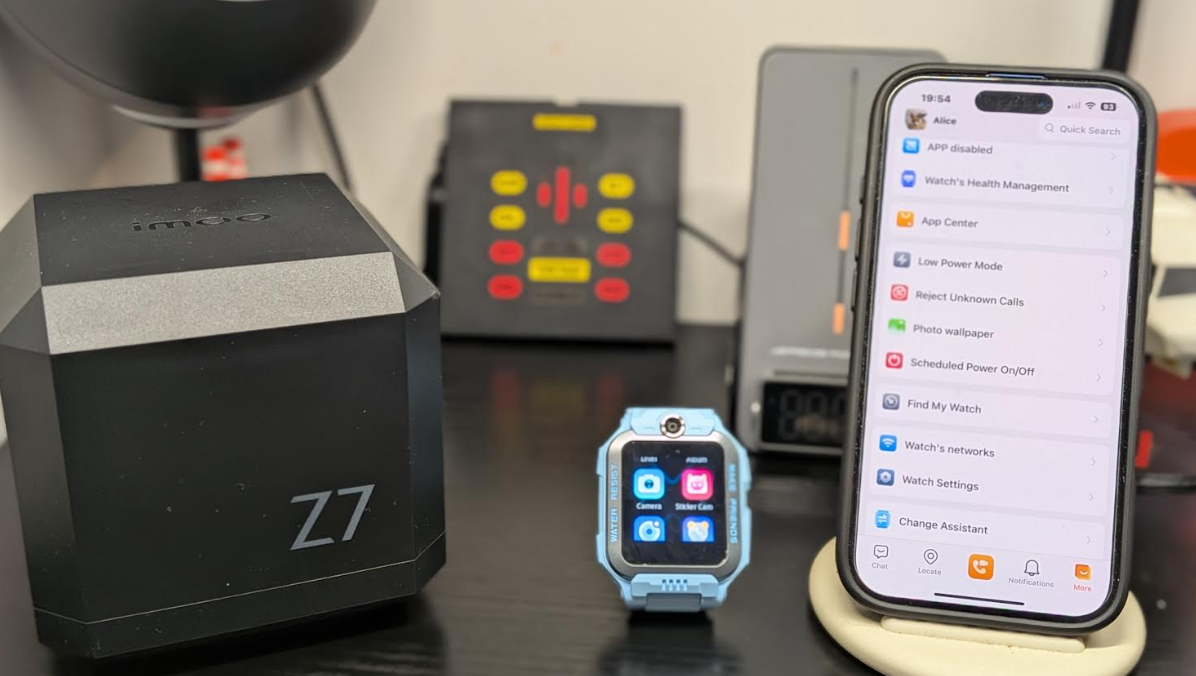
The UI on the watch is also simple to navigate and we go through all that and the app seen below in the video review down below so be sure to check this out after reading as you will find it helpful

The watch also keeps track of your child’s health and fitness plus many other features built in and a constant track of your child’s location.

You can send messages including voice and picture messages from the watch and to your parents have full control of the device you can also add more family members to talk to for messaging which is great and of course calls both video and standard.

When you call your child you get their location and the camera is live on call so your child can show their surroundings if required this also works if your child calls you on their watch. You can choose between Google Maps or Apple Maps which is nice.

The watch also has multisport fitness options and is IP68 water proof which means it can be taken anywhere.

Call and video quality is quite good once you have a decent signal and the battery will last between 2-5 days depending on use the location history also lasts 14 days in a cycle.

Overall this is a must have for parents who want to keep and in contact with their child at home  and again even better on a holiday and nit too expensive either and it also looks nice and comes in several colours again you also need a sim with a plan for it to work.


The APP


Features

  • 2-way HD video and voice call – Stay connected to your kids at all times: the imoo kids smartwatch, with its flip-up dual cameras, lets you see not only your kids’ real-time status, but also the environment they are in during video calls. Wherever they are, they’re just a call away! Perfect for kids going back to school.
  • Real-time Locating & 14-Day History: With one tap, the imoo kids smartwatch gives you your kid’s exact real-time location using GPS, GLONASS, BeiDou, QZSS and Galileo satellite systems. With 14-day history, parents can see where their child has been in the last 14 days.
  • Multi-sport & Workout Data: imoo kids smartwatch with 4 built-in sports modes: swimming, running, jumping rope and insights into professional workout data such as calories burned, cadence, stride etc. and rewards to encourage kids to stay active.
  • IPX8 Swimming Water-resistant: imoo kids smartwatch allows kids to swim up to 20 metres underwater. Turn on the video function before entering the pool, and this kids’ smartwatch can record clear videos in the water.
  • Nano SIM Card Required: This kids smartwatch only accepts a standard nano-SIM card. Compatible operators include Vodafone, O2, Three and Giffgaff – please check for compatibility in your area. The watch’s default language is English, but it can be set to German, Spanish and Polish.

BUY

Other imoo reviews 

Video Review