Niryo Studio : The era of intuitive and accessible robotics

Niryo, a pioneer in the field of collaborative robotics, today launches Niryo Studio, a revolutionary application that simplifies the use of robots like never before. With this new software, no need to be a technology expert to try out robotics. The essence of Niryo lies in the democratization of Industry 4.0. which promotes harmonious interaction between man and machine.

A fluid and intuitive user experience

Niryo Studio is a revolution in robotic programming, offering a seamless user experience. Instant connection and configuration of Niryo’s NED2 robot in just a few minutes greatly simplifies the use of collaborative robotics. It’s even possible to connect all external devices linked to the robot and manage them from the application. With smooth navigation and guest access management, it guarantees simple, intuitive use, making access easy for teachers and students alike.Thanks to this application, anyone can learn to use a Niryo robot. The NED2 robot can be used for a wide range of applications, from programming practice to an introduction to artificial intelligence and Industry 5.0, or to reproduce real-life work situations. Just like a simple software program on your computer, Niryo Studio makes this variety of applications even simpler.

In addition to robot control, Niryo Studio offers 3D visualization of all previously connected components with its Unity tool. Combined with the Direct Move tool, this feature enables precise adjustment of robot positions, simplifying object handling and, more generally, providing the most precise robot operation.

Programming becomes child’s play

Niryo Studio’s integrated Python IDE marks a significant step forward in simplifying the programming process. This feature allows users to code directly in the Python language, offering a powerful alternative to programmers. It is also possible to transform a program coded in Blockly into Python, making it even easier to learn the world’s most widely used programming language. This new feature also makes it quicker and easier to connect to the robot. Combined with the application’s Blockly tool, the creation of complex programs becomes child’s play, helping to make collaborative robotics accessible to a wider audience. What’s more, the ability to save, play, modify and replay the programs created leaves room for unrivalled flexibility for users.

Niryo Studio redefines the use of its NED2 robot, offering advanced functionalities while maintaining a user-friendly interface. This new application bears witness to Niryo’s ongoing commitment to making collaborative robotics accessible to all, thus stimulating innovation in the field.

To find out more, watch the replay of the keynote presenting Niryo Studio : https://youtu.be/DDdtoNC6xVw

Dropbox Announces Web Redesign, Dropbox Studio & New Workflow Plans

Dropbox has announced a redesigned web experience, an all-in-one video tool Dropbox Studio, and three new workflow plans, along with the first investment partners of Dropbox Ventures.

A redesigned web experience to support all types of content and workflows

Dropbox is introducing a redesigned web experience to support the way its customers are working today and ensure the experience is easier than ever for customers to get work done — without ever leaving Dropbox.
The new redesign offers a cleaner experience for customers to organize their content, collaborate with team members, and seamlessly complete their most critical tasks with features like:
  • An updated left navigation streamlines the features customers need and includes an expandable folder tree to help them go directly to the content they need
  • new action bar sits across the browser page to let customers quickly record their screen, edit PDFs, upload files, create folders, get signatures, or send and track documents
  • Redesigned file previews offer dynamic content previews, making it easier to edit images, videos, and PDFs
The new experience is available to select customers starting today and will roll out to existing customers in the coming weeks and months. To learn more, visit http://www.dropbox.com/product-updates.

Own the video process from start to finish with Dropbox Studio

Over the last few years, video has emerged as one of the fastest-growing content types on Dropbox’s platform with over 1.5 billion videos uploaded to Dropbox every year. To address the growing demand, Dropbox introduced new tools like Dropbox Capture and Dropbox Replay to make it easier to record, edit, and get feedback on videos. But customers need more—a single place where they can take videos from start to finish. That’s why the company is introducing Dropbox Studio, a video collaboration tool that lets you seamlessly create, edit, review, approve, and publish high-quality videos.
Dropbox Studio supports the entire video process with:
  • A centralized page for users to conveniently access and kick off video projects
  • Editing capabilities like trimming and splitting content or removing filler words like “um” and “ah” with one click
  • AI-powered features that let customers edit videos by modifying their transcript
  • A feature to easily remove filler words like “um” and “ah” with just one click
  • Time-stamped comments to make it simpler to resolve feedback in one place
  • A way to post videos directly to Facebook or Instagram
Dropbox Studio will be available in the coming weeks to select customers in alpha in English. To learn more and join the waitlist, visit https://experience.dropbox.com/form/studio.

Introducing Dropbox Essentials, Business, and Business Plus

Dropbox is also launching new one-stop-shop subscription plans with all the tools customers need to find and use their content from a single place, so customers can focus on building and growing their business.
  • Dropbox Essentials helps self-employed professionals save time, collaborate seamlessly, and build a business. It works with existing tools, so they can manage content from one place, whether they’re editing PDFs, collecting eSignatures, or tracking analytics on shared documents.
    • Dropbox Essentials plan is €22/month (inc. tax) per user for monthly subscribers; €18/month (inc. tax) per user for annual subscribers
  • Dropbox Business is built for teams and includes everything in the Essentials plan along with branded signature requests, pooled storage among team members, external sharing controls and reporting, and an admin console to manage teams. Soon, teams will also have access to share and track team content features and aggregated visitor analytics.**
    • Dropbox Business plan is €20/month per user for monthly subscribers; €16/month per user for annual subscribers
  • Dropbox Business Plus is for larger teams looking for more storage, easier ways to collaborate remotely, and enhanced security features. In addition to what’s included in the Business plan, Business Plus offers the ability to transfer up to 250GB, one year of version history and recovery, added security and notification features, and more.
    • Dropbox Business Plus is €24/month per user for monthly subscribers; €20/month per user for annual subscribers
  • **The products or features described above may not be released yet. The decision to purchase our services should be made based on features that are currently available.
The Dropbox plans are available to new customers starting today. Customers on existing plans will automatically get the new experience in the coming weeks and months at the same price. To learn more, visit https://www.dropbox.com/overview.

Dropbox Ventures makes investments in Aug X Labs and LlamaIndex

Dropbox is also announcing Aug X Labs and LlamaIndex as the first partners of Dropbox Ventures, a $50 million initiative to invest in startups that are building the next generation of AI-powered apps and tools. With Aug X Labs’ video creation tool and LlamaIndex’s data framework, Dropbox is supporting startups that are shaping the modern work experience through the power of AI.
No matter what tools or content customers work with, Dropbox is powering the modern work experience to help people do their best work. To learn more, visit https://blog.dropbox.com/topics/company/updated-tools-new-plans-and-web-redesign.

Dropbox is also announcing enhancements to its category of AI-powered products, with updates to Dropbox Dash and Dropbox AI. These updates are currently not available in Ireland, but will be coming soon to all users.

Over the last few years, knowledge work has radically transformed, and the pandemic lockdown ushered in a new era of hybrid, distributed, and remote work. While there were clear benefits, like flexibility and more control over when and how to work, this shift also came with challenges as digital environments became more chaotic, and information overload and context switching consumed our time. As a result, knowledge workers struggle to find focus and be productive. Dropbox aims to address these challenges, and design distributed work 2.0.
“Our digital environments were never designed to be our primary work spaces. People are experiencing information overload and disjointed workflows at unprecedented levels, leading to a waste of brain power on ‘work about work.’ AI has the potential to help people thrive by automating routine tasks, increasing productivity, and freeing up mental space so people can get back to doing the work that matters most,” said Drew Houston, co-founder and CEO of Dropbox. “We combined the best of remote and in-person work with our Virtual First model and transformed Dropbox into a lab for distributed work 2.0 to design the tools to power this new era. The updates we’re launching today are just the first step on this journey.”

Search across tools, apps, and content with AI-powered Dropbox Dash

Dropbox Dash is now available to download in open beta and includes enhancements that improve search functionality and help customers get answers. Dash is AI-powered universal search that connects to people’s apps, tools and content in a single search bar to help them find their content. It also features Stacks, smart collections for links that offer a quick way to save, organize, and retrieve URLs, and a start page to access universal search, view Stacks, get shortcuts to recent work, and start meetings, making it easier for customers to navigate the work day.
Now that work spans hundreds of tabs and apps between the desktop and browser, it is painstaking for people to find what they need. Dropbox introduced Dash to solve this problem and help people spend more time on important work.
After iterating on feedback from customers over the past few months, Dash now supports search by keywords—so customers don’t have to remember long titles—and semantic search, which provides more contextually relevant search results. Customers can also ask Dash a question and it will use generative AI to gather and summarize relevant info from connected apps, files, and content to get people answers, fast.
Dash is currently available in English only. To learn more about the product and global availability, visit https://www.dropbox.com/dash.

Dropbox AI offers summaries and answers from content across entire accounts

Dropbox AI initially launched in June with file previews to help customers summarize and get answers on large pieces of content, like long videos and audio files, contracts, and white papers. Now, customers can ask questions and summarize content across their entire Dropbox account. Simply ask a question in the Dropbox search bar, and in seconds, Dropbox AI will sift through content to pull up answers and relevant files, along with a brief summary of each file, so people can find what they need faster.
Additionally, Dropbox AI can use natural language to understand prompts like “show me photos from my photoshoot yesterday.” Customers can also now manage what AI features are enabled in account settings, giving them more control over their use of AI in Dropbox.
Dropbox AI is currently in alpha and is expanding to more customers today, with broader availability coming soon. To learn more, visit https://www.dropbox.com/early-access.

Introducing JOBY Beamo Reel and Beamo Studio Kit

JOBY – the reference brand for content creator gear that empowers creators and helps uplift their creativity has announced the launch of the new Beamo Reel and Beamo Studio Kits as part of their extensive range of lighting for smartphones and cameras.

Designed to help creators achieve the perfect lighting in any on-the-go or at-home-studio situation, the JOBY Beamo Reel and Beamo Studio Kits will make any video content stand out.
Both products are part of JOBY’s ongoing dedication to empower over 40 million creators worldwide; helping to uplift creativity and provide an ecosystem of products that is simple to operate and capable of creating unconventional content. The Beamo Reel and Beamo Studio Kits are the latest additions to the popular Beamo range that help to light up the content creation process making it easier and more fun. 

The Beamo Studio Kit is JOBY’s one stop YouTube home studio lighting kit. Ideal for anyone looking to start up their own YouTube channel, it contains everything needed – including the Beamo Studio Key Light and Beamo Studio Background Light – to create top quality videos from home.

The built in soft-lens diffusion of the Key Light ensures the best image quality for recording a YouTube video from the comfort of a home studio. It features 10 brightness levels and 3 color temperatures to choose from to match the tones and effects to whatever content is planned. The table stand means the Key Light can be adjusted for use, raising it to the ideal height (68-85cm) as needed. The included phone mount is supported by a flexible GorillaPod Arm for easy angling and framing, and the cold shoes on both the key light and phone mount allow a JOBY Wavo mic to be added to improve audio quality.

Looking for a way to really make videos pop? The Beamo Studio Background Light is a one-of-a-kind addition that allows users to add color to a background without the need for background paper or paint. With 12 colors and 10 brightness levels to choose from, the lighting can be mixed up to create a unique look that reflects any content creator’s style.
Both lights are USB powered making them easy to use anywhere. 

The Beamo Studio Kit is available in various kits:

Beamo Studio Creator Kit: covers all you need to start a channel from your home, including a key light, a color background light and a microphone.
Beamo Studio Deluxe Kit: a one-stop lighting solution for your home video studio including a key light and a color background light to get your channel started.
Beamo Studio Key Light
Beamo Studio Background Light.

The Beamo Reel is designed for content creators who are always on the go. Perfect f

or a travel vlogger filming an action-packed video, or an IRL creator filming a daily routine, this compact and lightweight LED light is great for capturing high-quality footage anywhere, from a smartphone or camera. 

The brightness is controlled by simply twisting the rim of the light whilst vlogging – meaning users no longer have to reach to the back of the LED to guess where the buttons and dial are located. It could not be easier to adjust the lighting during a video thanks to this simple yet effective design.

The ergonomic design fits nicely into your palm for handheld lighting, and the standard ¼” thread on the bottom allows it to connect to any JOBY tripod. In addition, Beamo Reel can be easily mounted to a camera or smartphone clamp thanks to the included cold shoe adapter and it can also stand on the table or on the ground by itself, making it a versatile tool for content creation.


Available in 3 models:

Beamo Reel which produces super soft light with the built-in diffuser and offers three different white color temperature options.
Beamo Reel Color which produces super soft light with the built-in diffuser, offers three different white color temperature options and 12 additional preset RGB colors.
Beamo Reel Creator Kit, an all-in-one kit that includes the PodZilla Medium mobile tripod kit, Wavo Mobile vlogging microphone, and Beamo Reel LED light. This ready-to-vlog bundle stabilizes your phone, captures crispy audio, and provides easy-to-use soft lighting.

JOBY Beamo Reel and Beamo Studio Kit are the newest additions to the successful Beamo Range; the Beamo RingLight 12”, the Beamo RingLight for MagSafe, and the Beamo and Beamo Mini. The perfect integrations to the Beamo lighting suite, these innovative new products will help make any creators lighting goals a reality.

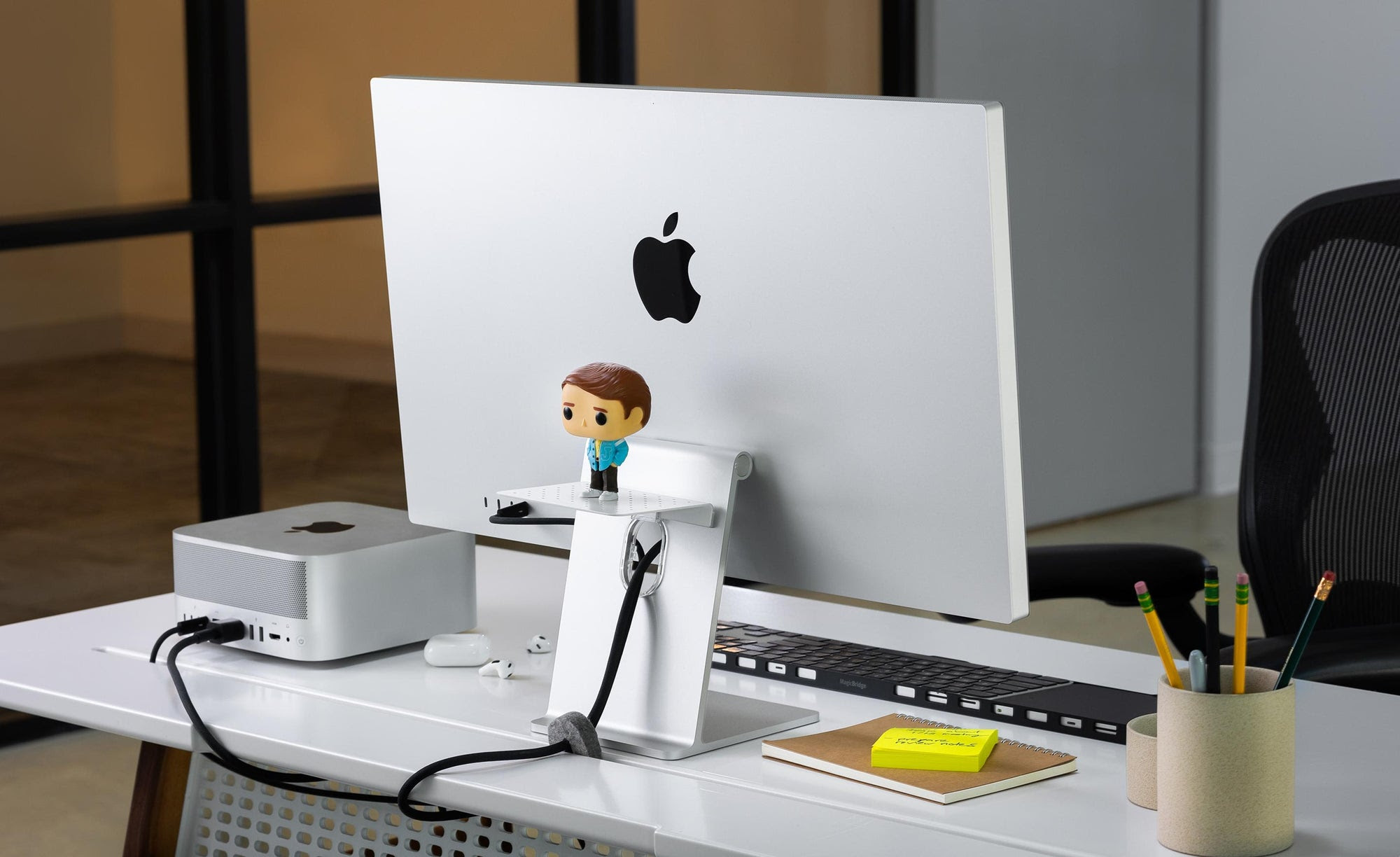
Twelve South’s BackPack storage shelf now available for Apple Studio Display & iMac

BackPack, Twelve South’s innovative and discreet storage shelf that was previously only available for iMac, is now available for Apple Studio Display and M1 iMacs.

BackPack gives users an additional storage solution without cluttering desks — use it to house hard drives and dongles or hide messy cables. The ventilation holes mean peripherals can be charged or plugged in without overheating concerns.

An included optional strap enables users to also attach items to the area underneath the BackPack too, ideal for those with limited desk space.

For setups where the rear of the monitor is visible to the rest of the office or customers, BackPack can be used as a display shelf for company branding, small awards trophies or perhaps even plants or figures, to inject a little personality.

No need for tools to assemble BackPack, simply attach to the L-shaped desk stands in seconds using the two included clips and allow gravity to do its work. iMac models and Apple Studio Display can hold multiple BackPack stands, offering even more storage space.

BackPack’s aluminium design blends in seamlessly with Apple’s displays and the silicone landing pad and gravity centric design ensures no scratches for monitors or peripherals.

The Twelve South BackPack is available now from Amazon for £39.99.

#Microsoft announces new Surface Studio PC and updated Surface Book i7. #Surface #Windows

During an event yesterday, Microsoft unveiled their two new offerings in the computer department.

Aiming not only to consumers that need portability but also the ones that need a powerhouse at home, we now see the company focusing once again in hardware…Well except mobile phones anyway..

Surface Book I7


There’s no big news on the portable side as what we have is a revindication of what I should have been the first offering.

The Surface Book is a great device, but for the more demanding professionals is was aimed, Not having the greatest battery life and some compatibility issues was a let down. But those flaws were attacked and now we have a new offer with the latest I7 processor (hence the name).

Also, they improved the graphics performance and increased the battery by 30%, everything else remains the same as previous models.

They even made a video just to say that, take a look:

The new model will be available starting in November and will start at $2,399 with pre-orders already open.

Surface Studio

This was the main attraction during the event, dubbed as “Surface Studio” this All-in-one PC is aimed to professional photographers, designers as well as Illustrators.

With a huge 28″ LCD PixelSense Display and a resolution of 4,500 x 3,000 (3:2 aspect), the Studio is Microsoft take on Apple’s iMac series.

Only one big difference though, the panel is completely tactile, which offer a whole new world of possibilities.

The spec sheet is quite impressive:

Display

Screen: 28″ PixelSense Display
Resolution: 4500 x 3000 (192 DPI)
Color settings: Adobe sRGB, DCI-P3 and Vivid Color Profiles, Individually color calibrated
Touch: 10-point multi-touch
Aspect Ratio: 3:2
Surface Pen
Zero Gravity Hinge

Processor

Quad-core 6th Gen Intel Core i5 or i7

Graphics

NVIDIA GeForce GTX 965M 2GB GPU GDDR5 memory or NVIDIA GeForce GTX 980M 4GB GPU GDDR5 memory

Storage

Rapid hybrid drive options: 1TB or 2TB

Memory

8GB, 16GB, or 32GB RAM

Wireless

Wi-Fi: 802.11ac Wi-Fi wireless networking, IEEE 802.11 a/b/g/n compatible
Bluetooth: Bluetooth 4.0 wireless technology
Xbox Wireless built-in3

Dimensions and weight

Display: 25.09 x 17.27 x 0.44 in (637.35 x 438.90 x 11.4 mm)
Base: 9.84 x 8.66 x 1.26 in (250.00 x 220.00 x 32.20 mm)
Weight: 21.07 lbs max (9.56 kg)

Connections and expansions

4 USB 3.0
Full-size SD card reader (SDXC compatible)
Mini Displayport
3.5mm headset jack
Compatible with Surface Dial onscreen interaction1

Cameras

Windows Hello2 face sign-in camera 5.0MP front-facing camera with 1080p HD video

Audio

Dual microphones
Stereo 2.1 speakers with Dolby Audio Premium
3.5mm headset jack

Buttons and keyboard

Physical buttons: Volume and power
Surface Pen
Surface Keyboard
Surface Mouse

In the box

Surface Studio
Surface Pen
Surface Keyboard
Surface Mouse
Power cord with grip-release cable

The Surface Studio will be available in December with some pre-orders being available for the holiday season, the next batch will have to wait till next year.

The price tag of the base model will be $2,999.00 going all the way up to $4,199.00 for the high-end model.

Capable of Pen input as you’d expect from a Surface product, that’s not the only trick under the sleeve.

Pair with the “Zero Gravity Hinge” that allows it to go from monitor to drawing desk, the addition we are really impressed is the Surface Dial.

As You can see from the video above, the Dial is not just an extra tool to have around, Its what will complement the experience when your primary work is on the designing or editing process.

With haptic feedback to let you know you’re changing option without seeing using the radial input, add free location on the screen and you ready to work whenever you want.

As extra, the little gadget with not only be compatible with the new Studio Pc, but also with the Surface Book and the Surface Pro 4.

The can get a standalone Dial once available for $99 with just one color option (looks fine to me), but if you pre-order the Surface Studio before next month you’ll one for free.

But tell us, Do you think Microsoft is offering a solid option against the iMac or the MacBook that are currently on the market? Will be good enough to compete with today’s announcements from Apple?

Let us know in the comment section or join the conversation on Twitter