Dell introduces AI PCs and smart dock portfolio to boost workplace productivity

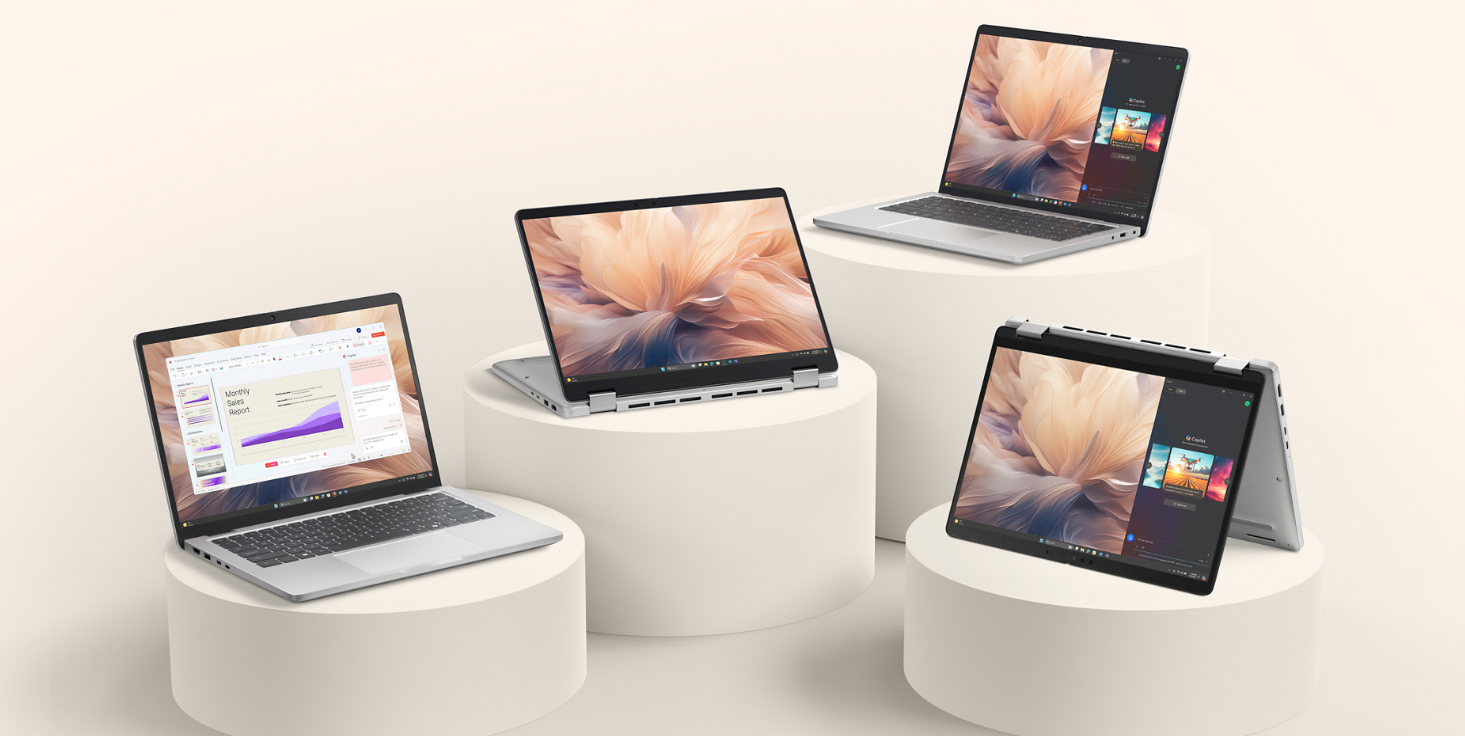
Today Dell Technologies announced the availability of its streamlined Dell Pro and Dell Pro Plus AI PCs, alongside the newly unveiled Smart Dock portfolio, designed to optimise AI-powered workflows and enhance workplace management.

Building on its commitment to simplifying computing solutions, Dell’s streamlined AI PC lineup is categorized into three distinct offerings: Dell (for play, school, and work), Dell Pro (for professional-grade productivity), and Dell Pro Max (for maximum performance). The Dell Pro range now features expanded silicon choices, including AMD Ryzen processors for the first time, as well as Intel® Core™ Ultra processors (Series 2), delivering extended battery life and improved performance.

Amongst the latest additions the Dell Pro 13/14/16 Plus business laptops, offers a sleek aluminum design, unified BIOS management, and a combined driver set across silicon options to simplify IT operations. Meanwhile the Dell Pro 14/16 models cater to everyday productivity with 14- and 16-inch displays featuring a 16:10 aspect ratio.

Introducing the Dell Pro Smart Dock Family

Dell’s latest Smart Docks portfolio offers industry-leading power and connectivity for AI-optimised workflows.

These docks include the Dell Pro Dock, Dell Pro Smart Dock, Dell Pro Thunderbolt 4 Smart Dock, and Dell Pro Thunderbolt 5 Smart Dock. Designed to support AI PC workstyles, the docks deliver impressive power ranging from 100W to 300W and allow simultaneous support for up to four high-resolution displays without unnecessary cable clutter, and feature USB-A PowerShare ports for charging additional devices.

To further streamline IT management, Dell’s Device Management Console and Display and Peripheral Manager introduce cloud-based remote management for dock and peripherals, enabling firmware updates, fleet-wide device oversight, and large-scale updates without requiring direct PC connections or additional software installations.

Security & Sustainability

Dell continues to prioritise security and sustainability across its product range. The new docks integrate tamper-resistant hardware-based encryption and Wi-Fi protection to safeguard sensitive data. Sustainability efforts include the use of up to 65% post-consumer recycled materials and packaging made from 100% recycled or renewable content. The Dell Pro Dock also reduces standby power usage by up to 72%, supporting businesses in their energy efficiency goals.

“For enterprises adopting AI PCs, the stakes are higher than ever,” said Ed Ellett, Senior Vice President & General Manager, Client Peripherals Product Group, Dell Technologies. “AI workloads require a strong infrastructure, streamlined management and tools to maximize user productivity. Dell Pro Docks and workspace management solutions meet these demands while paving the way for smarter workplaces.”

Whether powering intensive AI workloads or simplifying the management of thousands of devices, Dell offers a trusted lineup of premium devices and software.

Pricing and Availability


  • Dell Pro Dock (WD25) priced at €244.50 (IRL) and is now available, click here.
  • Dell Pro Smart Dock (SD25) priced at €295.36 (IRL) and is now available, click here.
  • Dell Pro Thunderbolt 4 Smart Dock (SD25TB4) priced at €381.51 (IRL) and is now available, click here.

SteelSeries Unveils Apex Pro Mini Gen 3 and Apex Pro TKL Gen 3 White

SteelSeries, the original esports brand that fuses gaming and culture, today unveiled the newest additions to the multi-award-winning Apex Pro Gen 3 Series keyboards: the black Apex Pro Mini Gen 3 and white Apex Pro TKL Gen 3. The new additions offer a sleek aesthetic – perfect for the spring season and all new games coming this year.
Embracing and embodying the mantra that “Mini is Mighty,” the Apex Pro Mini Gen 3 takes Gen 3 performance to new heights (and lengths) with its smaller, smarter, faster, and stronger silhouette. The compact 60% form factor is one of the fastest-growing genres of keyboards for both casual gamers and professional esports players.
Since its groundbreaking debut in 2019, SteelSeries revolutionized the gaming world by introducing fully adjustable actuation with the OmniPoint switch. The Apex franchise continues to gain widespread acclaim among casual gamers and esports pros and has solidified its reputation among the keyboard community. The Apex Pro Gen 3 Series has been designed and engineered to provide gamers with more control for all their use cases, whether gaming or other. The Apex Gen3 Series provides players and typists with the world’s fastest switches and the most customizable keyboard on the planet.
The Apex Pro Mini Gen 3 joins the Apex Pro Gen 3 family that includes the full-size, TKL (tenkeyless), and TKL Wireless models.
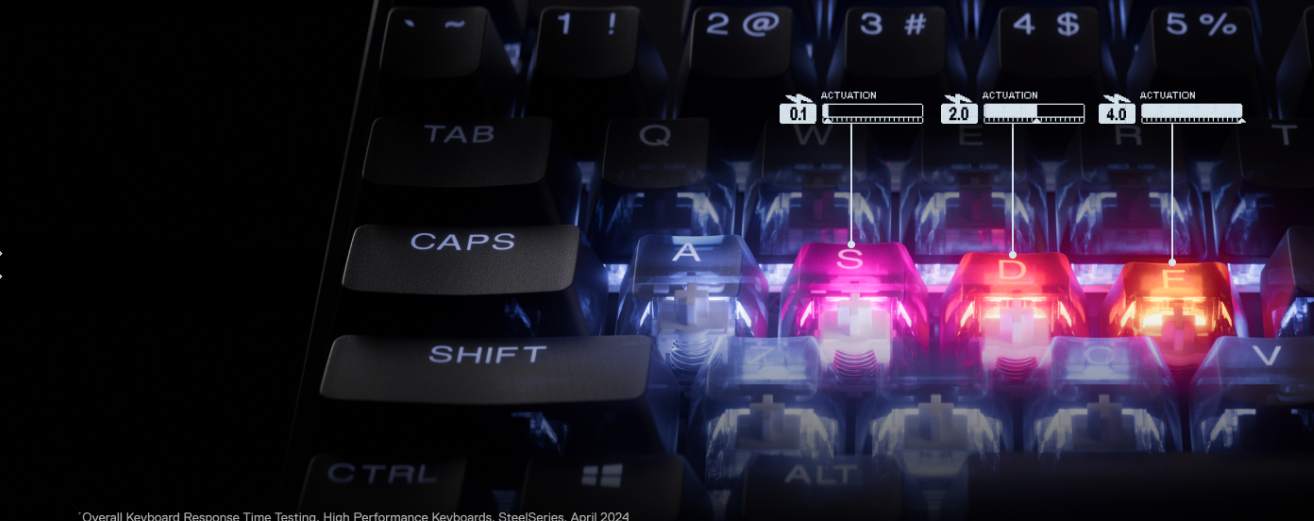
  • Apex Pro Mini Gen 3 – Combining the latest OmniPoint 3.0 with the world’s fastest key switches with 40 adjustable actuation levels from an ultra-responsive 0.1mm to 4.0mm in a small 60% compact form factor, the Apex Pro Mini Gen 3 allows gamers to reduce their desktop footprint and take a high-performance keyboard with them on the go. An enhanced build quality features include premium switch stabilizers to reduce key wobble, factory-lubed switches for a smoother feel and a “thockier” sound, and dampening foam for more satisfying keypresses, confirming the fact that “Mini is Mighty.” Armed with a new suite of advanced GG software features, including Rapid Tap, Rapid Trigger, and Protection Mode, gamers can utilize GG QuickSet to effortlessly access individual pro-grade profiles for the most played games, continuing the revolution that started it all.
    • Protection Mode – Say goodbye to accidental “fat-fingering” with Protection Mode, a SteelSeries-exclusive feature. This mode protects against accidental key presses by reducing the sensitivity of selected surrounding keys—never worry about blowing the most important cooldown again.
    • Rapid Tap – Rapid Tap prioritizes the last pressed key in a pair without needing to release the previous key, enabling faster input and improved aim. With up to five key pairings, your counter-strafing, peeking, crouch-jumping or slide-canceling becomes more responsive than ever.
    • Rapid Trigger – Discard the limitations of regular actuation. With Rapid Trigger, gamers can repeatedly press the same key without waiting for it to return, at the slightest lift of a finger. No more missing multiple key presses if players ever need to spam a button.
    • GG Quickset – Optimal settings for a player’s favorite games are just a few clicks away, making the gaming keyboard setup easier than ever. Gain a competitive edge with pro-grade presets that adjust actuation levels, Rapid Trigger, Protection Mode, Rapid Tap, RGB Lighting, and more on a per-game basis. Skip the complicated setup and get playing.
In addition to all the personalization and customization features of the Apex Gen 3 Series keyboards, SteelSeries introduces a new Apex Pro TKL Gen 3 White colorway for players to express their style across their gaming setups. The Apex Pro TKL White Gen 3 offers all the key features of the Apex Pro Mini Gen 3, in a slightly larger 75% format, best for those seamlessly transitioning between work and play. To complete the thematic white battle station featuring the Apex Pro TKL White Gen 3, SteelSeries offers gamers white versions of the Aerox 3 Wireless mouse, the award-winning Arctis GameBuds, and the entire Arctis Nova franchise (Nova Pro Wireless, Nova 7 Wireless, Nova 5 Wireless, and Nova 1).
**In additional Apex news… it’s Rapid Tap for one and all. In addition to adding new models to the Apex Pro Gen 3 series of keyboards, SteelSeries is bringing the wildly popular Rapid Tap feature to its Apex 7 and Apex 9 series keyboards beginning today.**
Available at SteelSeries.com and retailers around the world, the Apex Pro Mini Gen 3 and Apex Pro TKL White Gen 3 are available for the following MSRPs:
  • Apex Pro Mini Gen 3 – US $199.99| EMEA €219.99 | UK £189.99 | APAC $229.99
  • Apex Pro TKL White Gen 3  US $219.99 | EMEA €239.99 | UK £209.99 | APAC $249.99

Apple Vision Pro and Steam Deck gets Expanded GeForce NOW Support

Apple Vision Pro, Meta Quest 3, and Steam Deck now have expanded GeForce NOW support.  Several games are also set to join the cloud, as data centres powered by GeForce RTX launch. 

Cloud Gaming is Set to be Huge in 2025

Cloud gaming isn’t anything new, but with that said, it’s a huge focus for tech giants, like Nvidia, Steam, and Apple as we move into 2025. The cloud aims to provide more accessible experiences, without compromising offerings. The iGaming market is a prime example of how this could be possible, with the right advancements. For example, when you play slots at Paddy Power, you will notice that they offer hundreds of games, with many different variants; everything from classic slots to niche-themed games like KingFisher and Big Stack Lumberjack. These games are playable from a desktop PC or mobile device, and as a result, offer great accessibility to the vast world of online casino entertainment.

To play games like this, you don’t need to download or install software, and you can access them through a website browser or app. GeForce NOW has the same aim but with a focus on bringing additional niches into the fold. Games, including FPS, RPGs, and strategy games tend to be much bigger and have more intensive operating requirements. This makes it hard for them to be integrated into the cloud and offered on a huge scale. 

With that said, Nvidia is looking to change this. By expanding the support for the GeForce NOW platform, it becomes possible to offer games across different devices, ensuring that there are no limitations to the games people can play, or where they can play them. GeForce NOW essentially turns any device into a fully-fledged GeForce RTX gaming PC, and with cloud integration, it’s certainly an exciting concept when you look at current market trends.

Steam Libraries and the New GeForce NOW Announcement

The announcement was made at the CES trade show. NVIDIA has also announced that they want to bring cloud gaming to popular handheld devices as well. By partnering with Meta, Apple, and ByteDance, they have been able to expand their selection to Apple Vision spatial computers, Pico Virtual and mixed-reality devices. Meta Quest 3 now has full support with no essential features missed out. This includes NVIDIA DLSS and ray tracing.

As well as announcing this, they have also said that they are going to be launching a GeForce RTX-powered data center. This is going to be located in India, expanding the reach of the company while helping the company to grow its extensive library. Right now, there are over 2100 games supported, with several new titles arriving at the end of the year. Of course, bringing games to devices like this has not been without its challenges. Intensive games tend to drain the battery on devices more, but by making progress in cloud technology, issues like this have been eliminated, while paving the way for new and exciting advancements that are set to change the world of gaming as we know it.

mophie Celebrates rebrand with the launch of the Juice Pack for iPhone 16 series

mophie, a leading brand in power and innovator of intelligent solutions for mobile devices, has announced a new brand identity, including a refreshed corporate logo. The new branding represents a major evolution for mophie, reflecting the company’s commitment to innovation, user experience, and providing powerful charging solutions. The new brand identity aims to embody mophie’s forward-thinking approach and dedication to delivering top-tier charging solutions that empower users to stay powerful.
In celebration of the new logo and brand identity, mophie today announced the Juice Pack cellphone battery case for iPhone 16, iPhone 16 Pro, and iPhone 16 Pro Max that bear elements of the company’s new brand identity. The newest iteration of the Juice Pack expands mophie’s robust range of portable charging solutions, offering a convenient way to keep devices powered throughout the day. Tailored specifically for iPhone 16, Juice Pack contains an internal 2,800-3,600 mAh lithium-ion battery, providing ample capacity to ensure users stay powered without interruptions.
Product features include:
·         A key enhancement with the iPhone 16-compatible Juice Pack is its integrated passive magnet, allowing users to easily attach Qi2 and MagSafe-compatible accessories, such as car mounts, wallets, and stands. This feature offers greater flexibility and convenience, letting users easily secure iPhone in various setups whether at home, in the car, or on the move.
·         Staying true to mophie’s legacy of smart power management, the updated Juice Pack features the advanced Priority Plus pass-through charging technology. This intelligent feature delivers power first to iPhone when connected to an external power source, and then recharges the battery case itself. This guarantees a seamless and efficient charging experience, minimizing downtime for users.
·         Designed with user comfort in mind, Juice Pack for iPhone 16 offers a soft-touch finish using a premium acrylonitrile butadiene styrene (ABS) material, ensuring a comfortable grip that feels great in the hand. Despite the robust internal battery, the case maintains a slim and ergonomic profile, with strategically reinforced edges that provide protection against everyday bumps and drops.
In a continued effort toward sustainability, mophie has incorporated up to 50% post-consumer recycled materials into the Juice Pack for iPhone 16.1
Additional Juice Pack Technical Specifications:
iPhone 16: contains an internal 2,800 mAh battery
·         L: 16.91 mm (0.67 in)
·         W: 75.6 mm (2.97 in)
·         H: 161.34 mm (6.35 in)
iPhone 16 Pro: contains an internal 2,800 mAh battery
·         L: 17.3 mm (0.68 in)
·         W: 75.45 mm (2.97 in)
·         H: 163.85 mm (6.45 in)
iPhone 16 Pro Max: contains an internal 3,600 mAh battery
·         L: 17.3 mm (0.68 in)
·         W: 81.1 mm (3.19 in)
·         H: 174 mm (6.85 in)
Availability:
The mophie Juice Pack for iPhone 16, iPhone 16 Pro, and iPhone 16 Pro Max (£99.95) are available today at mophie.com. Each product includes a two-year manufacturer’s warranty, offering peace of mind with each purchase.2

Revolut enables Tap to Pay on iPhone for business and freelance customers in Ireland

Revolut, the global fintech with more than 45 million customers worldwide and over 2.8 million in Ireland, today announced that it has enabled Apple’s Tap to Pay on iPhone contactless payment acceptance technology for Revolut Pro and Revolut Business customers across Ireland.

With Tap to Pay on iPhone and the Revolut iOS app, designed for customers with a Pro account, such as sole proprietors or small business owners, or the Revolut Business iOS app for business of all sizes, Revolut customers will now be able to accept in-person, contactless payments with just an iPhone – no need for additional terminals or hardware. The feature provides an easy way for merchants to accept payments from contactless debit and credit cards, Apple Pay and other digital wallets that enable contactless transactions.

For payments to be accepted, customers simply need to hold their contactless card or payment device near the merchant’s iPhone until the transaction is complete, just as with a traditional contactless payment terminal. Apple’s Tap to Pay on iPhone technology uses the built-in features of iPhone to keep both business and customer data private and secure. 

Revolut Pro and Business customers can start using Tap to Pay on iPhone directly within the Revolut app or the Revolut Business app. New customers wishing to use Tap to Pay on iPhone can do so by downloading the Revolut app or the Revolut Business app on the Apple App Store using an iPhone XS or later running the latest iOS version. From there, they can sign up with a Revolut Pro or Revolut Business account directly within the app to start accepting contactless payments within minutes.*

James Gibson, GM of Revolut Business: “Since 2017, Revolut Business has been providing hundreds of thousands of business customers around the world with a comprehensive platform to manage business finances effectively. We are excited to be amongst the first to enable Tap to Pay on iPhone for our business customers in Ireland and to be providing this simple and secure solution that offers greater flexibility for accepting payments. We are continuously expanding the benefits of the Revolut Business platform, and this is another great tool to support customers to do business seamlessly.”

Alex Codina, GM of Merchant Acquiring at Revolut: “Our ambition in Merchant Acquiring is to provide customers with the products and services they need to accept payments in a secure and convenient manner. The launch of Tap to Pay on iPhone allows us to offer greater choice for both consumers and merchants in Ireland. We expect to see all kinds of businesses, from retail stores to barbershops and food stands, quickly start accepting in-person contactless payments with only an iPhone.” *Terms and Conditions apply.

Some contactless cards may not be accepted. The Contactless Symbol is a trademark owned by and used with permission of EMVCo, LLC. Tap to Pay on iPhone is not available in all markets.

Tech Review – Ellie Baby Plus, Baby Monitor Pro

The Ellie Baby Plus, Baby Monitor Pro is a simple to set up and use camera for your home and given it is aimed at babies in the house this can be used for basic security for your pet or even elder parents/ grandparents if they have a need to be monitored which is great.

What is great with this kit is there is a tablet that comes with it and an app which bot replicate each other in most instances so for example if you are in one room and your baby or child in another you can carry the portable tablet with you which is well built and robust and simple to use just like the app and you can see both in action in the video review below and what to expect.

The app is full of features and has a good UI  and works both on Android and iOS giving you control be it at home or if you are away and you can set notifications if you wish to do so and not miss a thing.

There is a two way speaker system and you can clearly hear if you are either listening or speaking from your phone not only this there is a suite of options for babies such as lullabies to help them sleep if they are not settling down. You can also use the split screen mode if you are not with the child.

The camera is also quite cool with a themed toy shape and look and is silent when it is being moved around so it will not disturb your child or pet unless you speak through it.

The camera also offers zoom, large angle rotation, 360° room view, and automatic movement tracking. Features 2.5K QHD night vision and Pan-Tilt rotation and comes with local storage and no monthly fees which for me is a real bonus as most security cameras no require this and tease you into a 30 day trial with no SD card option so this is a huge win for me and certainly is for the customer.

Of course AI being the big buzzword now this camera also offer AI features such as covered face & rollover detection, breathing detection, sleep quality reports, danger zone detection, cry detection, auto-soothing, person tracking, and auto photo capture and also offer sleep  and breathing reports we do not have a baby to try this part out but I gently went over it with my dog who kindly participated in some of the review which was hard work.

Overall this is a superb product if you have a new baby and if you are expecting one this needs to be on your radar as it offer more than most in this category.

The App


Key Features

  • The most complete AI features: Includes covered face & rollover detection, breathing detection, sleep quality reports, danger zone detection, cry detection, auto-soothing, person tracking, and auto photo capture.
  • 24-Hour Playback with AI Notification Check: Review video footage and AI notifications from the past 24 hours, ensuring not miss any important events.
  • Dual Control & 2.5K HD Camera: Connect to the split screen without Wi-Fi, or via Wi-Fi to the mobile app for remote monitoring. Features a 2.5K HD camera and 5″ HD LCD screen for clear day/night viewing.
  • Breathing Detection & Sleep Analytics: Provides sleep tracking and real-time breathing display. Generates 7-day sleep analysis reports.
  • 360° PTZ Rotation & Motion Detection: Offers zoom, large angle rotation, 360° room view, and automatic movement tracking. Features 2.5K QHD night vision and Pan-Tilt rotation.
  • Two-Way Communication: Talk to your babies through the split screen and app when you are not near them.
  • SD Card Local Storage: Ensures secure storage without cloud dependency and keep your privacy.
  • App with No Monthly Fees: Free app with up to 5 sub-accounts, includes features like sleep report generation and photo/video storage. Administrator can manage permissions.

Check out some other security camera reviews

EXTRA 10% off
Code: Jim10

Tech Review – Skullcandy SLYR Pro Wireless Headphones

The Skullcandy SLYR Pro Wireless headphones are their latest headphones for avid gamers who want that bit more than just a plug and play option as these come with extras and an app to give you a more immersive feel to you gaming.

What is an additional benefit here these are cross platform headphones unlike others out there who tend to limit their use case you have choice and not only that can be used as a standard pair of headphones although limited to the controls as they are a gaming headset but the music sounds good and after all it is Skullcandy we are talking about here.

These are comfortable and light and can be worn for long periods of time as gamers tend to do long sessions now myself and my nephew both tested these out for several hours and they are ideal for heavy gamers which I am not nut do some gaming on the weekends when I have time..

You can connect with the USB provided or Bluetooth device dependent and you can use your mobile phone just in case you are wondering, there is simple controls on the headphones on the Left side giving you a volume wheel and power button and sidetone control you also have your I/Os and a mute switch which works by tapping the cup.

The app offers a suite of features enhancing the audio experience with Game/Chat mix Mic Gain Voice prompts and Sidetone you also get an equaliser which is pretty cool and enhanced sound perception you will need to take a hearing test with beeps which is common on Skullcandy products so you need to do this to get the best results.

These can be also used for listening to music too which gives the a kind of hybrid option and you can toggle the EQs to get the best results so overall a decent pair of gaming and music headphones for anyone who likes both that delivers on the audio aspect quite well.

Skullcandy PLYR street fighter edition review 


The App 

Features

  • Rapid Charge: 10 min = 4 hrs
  • Platform Compatibility: PlayStation or XBOX, PC, Nintendo Switch
  • Connection Type: 2.4ghz, Bluetooth®, USB-A, 3.5mm Aux
  • 50mm Drivers
  • Bi-Directional Removable Boom Mic
  • LED Mic Mute Indicator
  • ChatMix & Sidetone Adjustment
  • EQ Modes
  • Call & Media Controls

BUY 

Video Review

First Look – Ellie Baby Plus, Baby Monitor Pro with Non-WiFi 5″ LCD Screen

The Ellie Baby Plus, Baby Monitor Pro is an all-in-one advanced AI monitor for babies, well since we have none we will have to use our dog/or me for samples and how it will work it basically does the same thing and is ideal for anyone with a new baby in the home.

These products can be also useful for the elderly in our family and act as a security camera too which is quite handy when you think of it but the sole purpose is to mind your new baby.

Sporting an app to this looks interesting and we look forward to testing the app out and the camera in action too so if you have any questions in the meantime feel free to ask and another thing to note there is an SD card in the box and no monthly subscriptions..

Any questions in the meantime feel free to ask and stay tuned for more and check out some other reviews


Key Features

  • The most complete AI features: Includes covered face & rollover detection, breathing detection, sleep quality reports, danger zone detection, cry detection, auto-soothing, person tracking, and auto photo capture.
  • 24-Hour Playback with AI Notification Check: Review video footage and AI notifications from the past 24 hours, ensuring not miss any important events.
  • Dual Control & 2.5K HD Camera: Connect to the split screen without Wi-Fi, or via Wi-Fi to the mobile app for remote monitoring. Features a 2.5K HD camera and 5″ HD LCD screen for clear day/night viewing.
  • Breathing Detection & Sleep Analytics: Provides sleep tracking and real-time breathing display. Generates 7-day sleep analysis reports.
  • 360° PTZ Rotation & Motion Detection: Offers zoom, large angle rotation, 360° room view, and automatic movement tracking. Features 2.5K QHD night vision and Pan-Tilt rotation.
  • Two-Way Communication: Talk to your babies through the split screen and app when you are not near them.
  • SD Card Local Storage: Ensures secure storage without cloud dependency and keep your privacy.
  • App with No Monthly Fees: Free app with up to 5 sub-accounts, includes features like sleep report generation and photo/video storage. Administrator can manage permissions.

BUY

Unboxing Video

Tech Review – Creative Zen Air Pro SXFI earbuds

The Creative Zen Air Pro SXFI earbuds with LE Audio is another new pair of earbuds from the brand that are affordable with great sound and features on board.

Recently we tested the Zen Air Plus which are really great value for money and worth looking at if you are unsure of what your requirements are. There is slight differences between the pair and to be honest either pair is great with the price you pay.

Again we have access to their apps which enhances the audio experience on a budget giving you the SXFI experience too which is great if you have not tested it out yet. On setting up there was an app update so be sure to do this before you move on to get the best features.

The case is a standard affair not as nice as the Zen Air Plus but still nice with the creative logo on the front and a button and on the  bottom is the USB port you can also charge these wirelessly too which for me is a win.

The earbuds again have a small stem and sit nicely in the ears giving a good seal so check you have the right tips for the best experience. The earbud is on the larger size but still fits well.

Creative Zen Air Pro – techbuzzireland

Sound is up next and again it’s good to report it is excellent slightly outdoing the sister product and anyone that does decide to check them out will be happy. Highs low and mids all good decent volume and with app access you have options. . No tinny sound when using with full volume lo lag latency or distortion noted either again here which just solidifies the product as before.

Creative App

Creative SXFI App

Features

  • NEXT-GEN BLUETOOTH LE AUDIO – With Bluetooth 5.3 LE Audio, high-quality LC3+ (ULL), LC3, AAC and SBC audio codecs, delivering rich and uninterrupted audio streaming all day long
  • NOISE CONTROL FEATURES- Hear what you want with Active Noise Cancellation and Ambient Mode, the Creative Zen Air Pro is decked with a total of 6 microphones
  • LONGER BATTERY LIFE -Offer up to 9 hours of playtime on a single charge, and up to 33 hours of total playtime when placed in a fully charged case
  • 6 MICS FOR ULTRA-CLEAR CALL EXPERIENCE – Creative Zen Air Pro is also further enhanced by advanced AI-powered Deep Neural Network (DNN)
  • POWERFUL AUDIO WITH IPX5 RATING – Equipped with 10 mm Dynamic drivers to accompany you through your gym workout or outdoor jog

BUY

Video Review