Gemini image editing just got a major upgrade with Nano Banana, unlocking a world of creative possibilities. With Nano Banana, anyone can turn a single photo into countless new imaginative creations, allowing people to transform, remix, and elevate their images like never before.
Nano Banana introduces an array of advanced features designed to empower every user. These include the ability to keep people or pets consistent across edits, blend multiple photos together, selectively alter parts of an image, and seamlessly apply styles from one object to another- all while maintaining the original photo’s essential details. An enhanced understanding of prompts also ensures that bringing creative visions to life is easier and more intuitive than ever.
Nano Banana democratises image editing, empowering everyone, regardless of design background or technical expertise, to bring their ideas to life by simply typing a prompt and watching it materialise in seconds.
Get creative with Nano Banana and reimagine existing photos as far as your imagination will take you, some exciting trends to get started with are:
Action-Figure Portraits: Transform yourself or your pet into a glossy custom miniature figurine
Retro Makeovers: Jump into the 70s,80s, 90s and beyond with everything from new hairstyles to fashion
Picture yourself anywhere: Transport yourself to different places, outfits, hairstyles or even decades
Career Swaps: Become a chef, pilot, or astronaut in seconds
You can try out Nano Banana now on the Gemini App or on gemini.google and transform your pictures instantly.
Professional video editing software plays an essential role in enhancing the quality and appeal of videos, whether for personal projects, business presentations, or content creation.
This article explores the best video editing software for PC users, emphasizing the significance of selecting the right software for the best outcomes.
How Useful Is Professional Video Editing Software for PC?
Professional video editing software is valuable for both beginners and experts. The best video editing software should include the following features:
1.Advanced Editing
Video editing software has several advanced options to help customers make great videos. This may involve multi-track editing, special effects, color correction, etc.
2. High-quality output
Professional software lets users export videos in multiple resolutions and formats with high-quality output. This is essential for creating social media and professional presentation content.
3. Productivity and efficiency
These tools boost productivity with streamlined workflows, keyboard shortcuts, and advanced editing. This efficiency is crucial for content creators and video editors with tight schedules.
4. Pro Effects and Transitions
Professional video editing software has several effects and transitions to improve video quality. Advanced transitions, motion graphics, and 3D effects give the product a professional look.
How Do You Select the Best Video Editing Software?
Choosing the best video editor software involves careful consideration of several factors. Here are three essential methods to guide you in making an informed decision:
Assess Your Editing Needs: Determine whether you need basic editing tools, advanced features, or professional-grade capabilities for your specific projects.
Compatibility Check: Ensure the selected software is compatible with your PC’s operating system, hardware specifications, and any additional peripherals you may use.
User Interface and Learning Curve: Evaluate the software’s user interface and consider the learning curve. Opt for software that aligns with your skill level, whether you are a beginner or an experienced video editor software.
Part 1. Top 10 Professional Video Editors for PC
Explore PC’s top 10 professional video editors, each offering unique features and capabilities.
HitPaw Edimakor – Perfect Automatic Video Editor
HitPaw Edimakor is a powerful automatic video editor designed for beginners and professionals. It simplifies the editing process with its user-friendly interface and automatic editing features.
Features:
Best Automatic video editing
intuitive interface
Wonderful and useful editing tools
Pros:
Suitable for beginners and time-saving
Powerful and various AI features
Excellent and smooth operation
Cons:
Limited advanced editing features
Overall Rating:
5.0(6.93K) reviews
100% safe. Try it right now. Guaranteed to be completely secure. There are 6 billion users. Lifetime Update. Simple to use.
Descript
Descript is a unique video editing software integrating advanced transcription and text-based editing. It allows users to edit videos by directly manipulating the text, making it an innovative tool for content creators.
Features:
Text-based editing
Automatic transcription
Collaborative editing
Voice synthesis.
Pros:
Unique text-based editing
Easy collaboration
Powerful transcription features.
Cons:
More advanced video editing features compared to traditional editors.
Overall Rating:
4.8 (163) Reviews
CyberLink PowerDirector
CyberLink PowerDirector is a versatile and user-friendly video editing software known for its robust features. It caters to beginners and professionals, offering various editing tools and effects.
Features:
Multi-track editing
360-degree video editing
Motion tracking
Color correction
Pros:
Intuitive interface
Powerful editing capabilities
Cons:
Some advanced features may have a learning curve for beginners.
Overall Rating:
4.5 (1.59M) Reviews
Vegas Pro 18
Vegas Pro 18 is a professional video editing software with a strong reputation for its advanced editing features and real-time collaboration capabilities. It is widely used in the film and broadcasting industry.
Features:
Multi-camera editing
3D editing
Advanced audio editing
Robust color grading.
Pros:
Professional-grade features
Real-time collaboration and efficient workflow.
Cons:
The steeper learning curve may be overwhelming for beginners.
Overall Rating:
4.2 (36) Reviews
Filmora
Filmora is a simple video editor for beginners. Pre-built effects and creative tools simplify video editing for new users.
Features:
Easy drag-and-drop interface
Built-in music library
Motion tracking
Pros:
It is intuitive for beginners
Affordable
Numerous pre-built effects.
Cons:
Limited advanced features for professionals.
Overall Rating:
(859K)reviews
CapCut
CapCut, developed by ByteDance, is a mobile-friendly video editing app that has gained popularity for its simplicity and ease of use. It offers basic to intermediate editing features.
Features:
Basic editing tools
Transitions, effects
Easy social media sharing
Pros:
The interface is designed to be user-friendly, making it quick and easy to edit.
Cons:
Lacks advanced features compared to desktop software.
Overall Rating:
4.5 (7.7M) reviews
Riverside
Riverside is a cloud-based video editing platform designed for remote collaboration. It provides tools for live streaming, recording, and editing content with real-time collaboration features.
Features:
Live streaming capabilities
Cloud-based collaboration
Real-time editing
Pros:
Ideal for remote collaboration and live streaming features.
Cons:
Limited compared to standalone editing software.
Overall Rating:
3.8 (2.24K) reviews
Lightworks
Lightworks has been used by professionals in the film and television industries. Anyone, from pros to new users, can benefit from its free edition with premium features.
Features:
Multi-format support
Professional-grade color correction
Real-time effects.
Pros:
Powerful editing tools
Professional-grade features
Free version available.
Cons:
Learning curve for beginners.
Overall Rating:
4.2 (33) reviews
Adobe Premiere Pro
Because of its extensive feature set and quick interaction with the rest of the Adobe Creative Cloud, Adobe Premiere Pro is popular among video editors.
Features:
Advanced editing tools
Seamless integration with Adobe products
Extensive effects library
Pros:
Professional-grade features
Industry-standard
Constant updates
Cons:
Subscription-based pricing.
Overall Rating:
4.9 (184) reviews
VideoProc Vlogger
VideoProc Vlogger is video editing software suitable for beginners and experienced users. It also includes several tools for transcoding and processing videos.
Features:
Video editing
Conversion
Screen recording
Webcam recording.
Pros:
All-in-one solution,
User-friendly interface.
Cons:
Some advanced features may be limited.
Overall Rating:
4.4 (5) Reviews
Part 2. Tips for Editing Videos with the Best Video Editor
Learn the essential steps to edit videos using HitPaw Edimakor:
Import Your Footage: Open HitPaw Edimakor and import your video footage into the editor.
Automatic Editing: Utilize Edimakor’s automatic editing feature to analyze and enhance your video with one click.
Manual Adjustments: Fine-tune your video by making manual adjustments such as trimming, cutting, or adding effects.
Export Your Video: Once satisfied, export your edited video in your preferred format and resolution.
Conclusion
In conclusion, choosing professional video editing software is crucial for achieving high-quality results. Among the options discussed, HitPaw Edimakor stands out for its user-friendly interface and efficient automatic editing capabilities, making it an excellent recommendation for beginners and experienced editors.
FAQ:
1. What do most YouTubers use to edit their videos?
Many YouTubers prefer to use Windows video editors like Adobe Premiere Pro and HitPaw Edimakor.
2. Which software is the best for video editing?
HitPaw Edimakor, a highly recognized alternative, is the best video editor.
3. What is the most recommended video editing software?
HitPaw Edimakor is a popular video editing tool due to its functionality and usability.
4. What is an excellent computer to edit videos on?
You need a strong computer with a quick CPU, excellent processing power, and a separate graphics card to edit videos effectively. Computers with powerful specs, such as those from Dell or HP or custom-built ones, are frequently used for video editing.
DAACI launches ‘Natural Series’, a comprehensive product portfolio, that will see the release of plugins, music tools and editing technology released over the next year, kicking off with ‘Natural Edits’, a powerful music editing tool for the global sync market to make any track instantly adaptive.
The Natural Series has evolved from DAACI’s development of patented AI and musician-led core technologies. Each element will satisfy the needs of different audiences and use cases, from creators who want to enhance their process, to Music Rights Holders looking for solutions that satisfy the rapidly growing demand for creating personalised music experiences.
The first element in the Natural Series is Natural Edits, now available to Rights Holders within the global sync market. Future elements of the series will include Natural Sync which will enable any type of user, with any ability to create new track edits against films, to supercharge the creative process. DAACI is also beta testing their first plugin for producers and composers.
DAACI’s CEO Rachel Lyske comments: “From the beginning of our journey, we have been on a mission, working on our core technology, the brain of DAACI, to build a solid, ambitious ecosystem. Our ethical, artist-led approach has been welcomed by our partners and the music industry and we’ve been eagerly asked when there will be products to test, ‘buttons to press’. Now we have them. The time is right to put these tools into the hands of users and introduce people to ‘the DAACI way’, and we can’t wait to hear what people will create with them.”
About Natural Edits
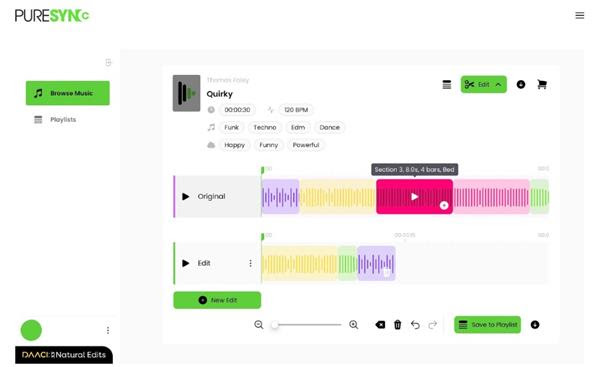
Natural Edits brings powerful, patented music editing technology to Rights Holders and their Licensees within the global sync market. By embedding Natural Edits into their entire catalogues within their existing web-based platforms, Rights Holders can enable internal and external users to engage with a track at a level of detail and control as never before. Natural Edits can also be added to web-based platforms incrementally with functionality initially added to a small number of test tracks, then smoothly scaled up. To support this, DAACI will provide a fast, simple API that Music Rights Holders’ web-based platforms can use to dynamically query which tracks are supported and place an ‘Edit’ button on them.
From the moment they begin considering a track, users will be exposed to the track’s latent potential to fit countless contexts from looping beds for background music, to topped-and-tailed snippets for adverts, extended pieces for arbitrary length videos, and precise edits matching specific narratives and music briefs.
Natural Edits enables any user of any skill level to create and deliver a personalised edit of any track in a few simple clicks, driving discoverability and, just as importantly, licence potential of a track.
Natural Edits has already been adopted by music platforms including Pure Sync. Julian Goodkind, CEO of Pure Sync says: “Pure Sync are delighted to be incorporating Natural Edits. We see this as a pivotal moment in our adoption and utilisation of Ethical AI tools. This elevates and amplifies our creative capabilities as Music Supervisors within the Sync world, to deliver more creatively, efficiently and cost effectively.”
DAACI invites Music Rights Holders to enquire about Natural Edits integration at hello@daaci.com.
To find out more, or to sign up for future beta testing visit: daaci.com
In 2022, if you don’t find ways to enhance your videos, they probably won’t get watched. That is because everyone on social networks have become professional video editors, thanks to the variety of filters and effects that can be found on these apps. On TikTok, the way to create originally, and be viewed more, is certainly to use them both on your videos. Here is what you need to know, if you wish to add flair to your posts.
As Many Effects and Filters as you can ever desire
The truth is, there are so many effects and filters on TikTok, that it will take you a while to try them all. However, once you do so (or at least tried a few), you should know that there is an important element to keep in mind when using TikTok filters: You want to stick to one or only a few, so that people can recognize your videos easily. Although you may think it is fun to change all the time, it is not the best way to get followers and to keep them viewing your creations, afterwards. Stability is key, and it is true about filters on TikTok, as well.
How to go about adding Filters to Your TikTok Videos
Filters are the first thing you should play around with. You will find them on the top right side of the screen, when you are in a “Create” mode. So, once you have started the app, jump into this mode right away, which you can enter at the bottom of the screen, right in the centre space. Once you have located the filter tab, click on it and a menu will appear, this time at the bottom of your screen. You can now take a look at all the options you have, by swiping. If you are looking for something more precise, in one of the categories, just click on the tab instead of swiping, and you will see the various options, including Portrait and Landscape.
Now that you have found the filter that you want, and you have selected it, you can choose its intensity, by sliding the grader to the left (less intense) or to the right (more intense). Do so until you have found the right one for you, and start recording your video. If you want to close the filter, just click on the “Stop” icon, on the left side.
How to go about adding Effects to Your TikTok Videos
Once TikTok is on, click on the “Record” button, at the bottom. Once that is done, you can now tap on the “Effect” button, also at the bottom of the screen. To choose the effect that you would like to use, first choose the category you want, by swiping left or right. There is more than a dozen, such as green screen, music and animals. Inside them, you will often have up to 50 different elements to choose from. Once you click on one, it can be used automatically, for the most part, while some will require additional inputs on your side.
The process of writing a text is complex and has phases that need to be followed to ensure quality. One of these phases is proofreading, which is the process of checking the text for grammar mistakes, typographical errors, and other inaccuracies. Proofreading is important because it is the final chance to catch and correct any errors in a text before it is published. A well-edited and proofread text looks more professional, accurate, and polished. In addition, catching and correcting errors can improve the clarity of a text.
Proofreading is an important step in the writing process because it can make your text look more professional and error-free. However, if you don’t do it correctly, you might end up making mistakes that can affect the overall quality of your text. In this article, we will discuss some common proofreading mistakes that you should avoid
Fully relying on Spellcheckers
Many people make the mistake of relying too much on spell checkers. Spellcheckers are helpful tools, but they are not perfect. They can often miss mistakes, especially if the words are spelled correctly, but are used in the wrong context. For example, the word “its” is spelled correctly, but it is used in place of “it’s” (which is short for “it is”). Sometimes other words might simply be in the wrong place or function, and if you are not too savvy with doing the final assessment on your own, consider hiring UK proofreaders that can help scan your text with a fresh pair of eyes. This is an amazing benefit because writers sometimes go back and forth with a text so many times they simply go over those mistakes, not even noticing them.
Not reading your text out loud
Another common proofreading mistake is not reading your text out loud. This is a good way to catch errors because when you read aloud, you can hear how the text sounds and catch mistakes that you might have missed when you were reading it silently. It is considered good practice when you are taking a break from sitting and writing to stand up and stretch, and try to read the text out loud. Doing these two things at the same time will help you stay focused and catch any mistakes you may have missed.
Making assumptions about grammar rules
There are many rules about grammar that seem like they should be followed, but there are also many exceptions to these rules. If you are not sure about a particular rule, it is best to look it up rather than make assumptions. For example, the rule about using “than” versus “then” is often confused by writers. “Than” is used when comparing things, and “then” is used to indicate time or sequence. However, there are many cases where either word can be used incorrectly. The best way to determine which word to use in a specific situation is to look it up in a grammar book or online grammar resource.
Not using a style guide
When you are writing, it is important to use a style guide to ensure that your text is consistent and appears polished. A style guide will provide you with the rules for formatting your text, using correct punctuation, and referring to sources. There are many different style guides, such as the MLA Style Guide and the APA Style Guide. If you are not familiar with a particular style guide, it is best to consult with someone who is before you start writing your text.
Editing for clarity
One of the most important aspects of proofreading is editing for clarity. This means checking your text to make sure that all of the points are clear and that there are no confusing or ambiguous passages. You can do this by reading your text out loud and asking yourself the following questions:
Is the meaning of each sentence clear?
Are the points being made in a logical order?
Are any words or phrases unclear?
Can any sentences be shortened or rewritten for clarity?
Is the tone of the text appropriate?
If you answer “no” to any of these questions, then you will need to revise your text for clarity.
Repeated words or phrases
Another mistake that can be made when proofreading is to have repeated words or phrases. This can make the text appear choppy and disrupt the flow of the writing. You can check for this by reading your text aloud and listening for any words or phrases that are repeated. If you find any, revise them. Repetitive words make the entire syntax sound poor and unprofessional, and in case you don’t have an alternative way of restructuring that part of the text, you can always try to find a synonym for the repeated word.
Using incorrect punctuation
One of the most common mistakes that people make with punctuation is using it incorrectly. This can happen when people are not familiar with the rules about how to use punctuation properly. A good way to avoid making this mistake is to familiarize yourself with the rules and then practice using them correctly. You can also use a style guide to help you with this. Another common mistake that people make is using the wrong type of punctuation mark. For example, using a comma instead of a semicolon or vice versa. You can avoid this by being familiar with the different types of punctuation marks and knowing when to use each one.
Leaving comma splices
A comma splice is a mistake that occurs when two independent clauses are joined together with only a comma. This can make the text difficult to read and can be confusing for the reader. You can avoid this by making sure that each clause is properly punctuated. This means using either a comma and conjunction (such as “and” or “but”) or a semicolon to join the clauses together.
Proofreading is an important part of the writing process because it can make your text look more professional and error-free. However, if you don’t do it correctly, you might end up making mistakes that can affect the overall quality of your text. In this article, we will discuss some common proofreading mistakes that you should avoid.