Tech Review – Fiitii HifiDots from MIFO

The FiiTii HiFiDots are the latest earbuds from the company which we have been testing for around a month which gave us plenty of time to get our ears around which is an excellent lead time it must be said to go over a product inside out and that is what we did with these having came on several trips which included one to Milan and here is where it all began and it was with the ANC alone that gets these in my top 5 earbuds this year.

The case is one of many things, how it opens and how it is built, the case has a small button to release the lid and it pops upward which is really cool and something new compared to most earbud cases out there today, the case is one of the most solid earbud cases you will find and due to its build and the materials used you are missing out on wireless charging which for me is no huge deal because of the product overall although I do prefer cases with wireless charging I will let them away with it.

The earbuds themselves are small but mighty they look cool fit well and are simple to use when it comes to the controls and being so small I thought my clunky fingers would be an issue but this was not the case at all. They are simple to control and easy to use and we go through this in the video review below along with a look at their app.

FiiTii HiFiDots by MIFO – techbuzzireland

How these sound of course is the main course for these and these are simply fantastic. When at first I got these I was delighted to see they had an app to go with the earbuds and something I suggested before with the MIFO S Active we review which again where tiny but might and these had no app so does the app make a big difference? Indeed it does and these sound great, the volume the highs lows and mids and the ANC is one of the best yet I have tried this year and gearing toward headphones status.

Once these are turned up to the max you can forget about what is going on around you even on a plane train or a bus, yes I have been on them all in my testing this time as lots of travel was going on which came in handy for testing these and another pair of earbuds and these clearly won right out in most aspects. Calls also excellent on these as at the time I again had to take many and clear both ends, no lag latency either noted.

The App


The earbuds feature a bass dynamic driver that is 10mm, with 2 layers of diaphragm, PU-DLC. This double-layer structure allows magnetic flux to increase by a significant 20%-resulting in lush, full mids and potently dynamic bass.
HiFiDots’s meticulously designed internal structure features 2 exclusively customised BA drivers. These BA drivers are placed closer to the opening of the sound tube for less treble loss. Overall, thanks to its design, not only do the A’s 2 BA drivers sound transparent, they also work perfectly with the bass dynamic driver for a cohesive sound, without disjointed treble and mids.

With Passive Crossover processing technology(2 years of audio debugging by audio engineers), it not only achieves strong balanced performance on treble, mids and bass, but also has no frequency division trace feeling. It meets the requirement of Hi-Fi digital, to be capable in recognition of its ability to bring you accurate high-fidelity audio as the artist intended.

Overall these earbuds are a clear winner for me and does what they say on the tin and the lack of wireless charging or auto play and pause can be easily forgiven. Check the unboxing below and we also check out the app and go through the earbuds in detail.

Features

2BA-1Dynamic speaker drivers
Lossless audio
Bluetooth 5.3
MAdaptive active noise cancellation
6H battery life 30H with case
2C/3C fast charging
Noble metal case design
APP support
Personalized sound
IPX7 waterproof

Specs

Transmission profiles: HSP/HFP/A2DP/AVRCP/SPP
Battery life: Moderate ANC 6H Strong ANC: 4.5H
Transparency: 4.5H
Bluetooth codec – SBC/AAC/Aptx-Adaptive/ Aptx-Lossless
Weight(earbuds): 4.2g 2
Waterproof: IPX7
Speaker Frequency: 20Hz-40KHz
SPOR Full Charge(earbuds) -45 mins (2C fast charging)
Battery capacity(the case): 460mAh
Bluetooth vers 5.3
Battery life with the cases Approx 30 hrs
Full Charge(the case) -1 hrs (3C fast charging)
Battery capacity(earbuds) 35mAh
Weight(the case): 98g
Product size(earbuds) 20.4 26 17.3mm  the case 52 62.5 32.6mm

Charging types Type-C

Buy on the official website: https://bit.ly/hifidots

Buy on Amazon:
US link: https://amz.run/6frU
UK link: https://amz.run/6fri
CA link: https://amz.run/6frd
AU link: https://amz.run/6frj
De link: https://amz.run/6frv

20% Off amazon discount
20% Code: AL22ZI4N
End Date: 31/07 /2023 11:59 PMPDT

Video Review

Useful Information You Should Know About On-page Optimization

Are you a business owner who wants to make your brand more available to internet users? Do you struggle to find the right way to boost your website’s viewership? There are many ways to optimize your website to make it more appealing to potential customers. 

These useful tips on how to make the most of your online presence can be implemented one by one or simultaneously. Check out each one and decide which tasks will work best for the benefit of your website.  

Optimizing Your Site With SEO

Whether your business is large or small, one of the most important tools you have at your disposal is SEO, which stands for search engine optimization. This is the process of maximizing traffic to your site by ensuring that your website appears high up on search engine results pages.

Almost nobody browses page two of search results pages on Google or other popular search engines. So, if you want your business to be discoverable, you need to make sure your site comes up at the top of page one. Employ SEO techniques like keyword use and link building, professional web design, and the creation of relevant, high-quality content across multiple channels to achieve this goal. 

Keywords and Link Building

A couple of classic SEO optimization techniques are the use of keywords and link building. Keywords are words and phrases that are relevant to your business and feature on the sites and blog posts of your competitors. You can use online tools to discover which keywords are most relevant to your business and make sure to use them in natural ways throughout your web pages and in your content.Furthermore, understanding the intricacies of SEO and link building can be challenging, especially for businesses new to the digital landscape.

For those seeking guidance, resources like those offered by Digital Spotlight AU, a specialist in SEO strategies, can be invaluable. Their insights and expertise can help demystify these concepts, ensuring your SEO efforts are both effective and aligned with the latest industry practices.

Meanwhile, link building is the process of generating a lot of backlinks to your site from well-reputed blogs, news sites, and other relevant websites. This improves your search engine ranking as it associates your page with reputable and trusted sites. You can also create internal links to other pages on your site to encourage readers to visit your site and learn more. If you are mentioned in any large publications, make sure to feature this on your site, as it makes your company look more legitimate.

The Power of a Well-Designed Website

If you want to optimize your online site for maximum traffic, you first have to understand the importance of a well-designed website. Experts at Paddle Creative highlight the power of a fully-optimized website that is responsive, boasts relevant compressed visuals, and advanced animations, for generating new leads and making sales. Only when your website is designed by professionals with search engine optimization in mind can you achieve a wider global audience and business growth

Webflow is software used by companies for website building and hosting. Its online visual editor platform allows users to design, build, and launch websites without a lot of previous experience in web design. It is easy to use and produces great results in terms of creating a usable, reliable, and appealing website that ranks well on search engines. 

Create Relevant and High-Quality Content

Another essential technique for improving your on-page optimization is the creation of relevant and high-quality content. You should generate informative blog posts about your products or services and related topics. Then, visitors to your site will see that you are an authority in the field and a great source of useful and up-to-date information.

You can also create engaging videos about hot topics in your field. Just make sure that your videos are concise, informative, and meaningful to your target audience. The idea is to grab the attention of potential leads and turn them into paying customers. Include a call to action in your videos and blogs to subscribe to your newsletter, try out a product, or visit another page on the site so you can retain the viewer’s interest. 

An important thing to remember with this kind of content is consistency. High-quality content is only considered high-quality if every post is of the same caliber. A consistent message will give your brand a good reputation and lead to customer loyalty. 

Use Multiple Social Media Channels 

Once you have generated content like informative articles and entertaining videos, you can upload them onto popular sites like Twitter, Facebook, Instagram, and TikTok. Make sure all of your content features your business name and logo clearly and there is a link to your site in the description. This way, you will attract a wider global audience to your well-designed and SEO-optimized site. 

You can even feature some of your TikToks or Instagram reels on your website to hook visitors and encourage them to explore your social media channels in more depth. One of the great things about social media posts is that they are shown to social media users who are most likely to want to engage with your products or services. This is due to the clever algorithms that govern social media “for you” or “discover” pages. 

By using multiple social media platforms to disseminate your engaging, relevant, and high-quality content, you can maximize your reach to various corners of the planet, build a following online, develop a strong online presence, and encourage conversations about your business and its products or services. 

Having a positive online presence and an easily-recognizable brand will be very beneficial for attracting new leads and retaining customers. Highlight your presence on social media on your website so people know that you are a transparent company, easy to get in touch with, and have a large following.


The optimization of a web page can be tackled in many different ways, as highlighted by this article. The key to really knowing how to optimize your viewership is to know what works for your brand. 

Any number of these suggestions can be put into place in order to bring more people to your website and usually, the key is a combination of all of them. Keep these tips on hand and see how they can make your business grow its online presence. 

Less than half of business leaders think their company is adequately prepared to respond to a cyber breach

A survey from Irish IT service provider Auxilion has revealed that less than half (44%) of business leaders in Ireland think their organisation is adequately prepared to respond to a cyber breach.

The survey of 100 C-suite executives in larger companies or enterprises (more than 250 employees) across Ireland, carried out by Censuswide, also revealed that more than a third (36%) of businesses fell victim to a cyberattack in 2022 and 44% of business leaders think their company will fall victim to a cybersecurity breach this year.

Moreover, some 42% don’t believe they have enough skills within their organisation to guide it through a cyber-attack and a similar proportion (41%) don’t believe their cybersecurity budget is adequate to protect against all risks.

Furthermore, 34% of respondents don’t believe their leadership team or board is doing everything it can to safeguard the company’s digital assets and data. Despite these concerns, just 20% of business leaders expect to invest in cybersecurity solutions in 2023.

The research also revealed that only 36% of business leaders think their organisation upholds governance adequately and 43% have had to abandon a project due to poor governance. The average cost of failed IT projects during 2022 came in at €840,671.

However, a little over half (51%) undertake an annual self-assessment of performance relating to governance or compliance. To improve governance, 43% said outsourcing to a third party would improve their company’s governance, with 44% already using a managed services provider.

The top benefits of working with managed services providers were found to be 24/7 assistance (21%), increased project delivery (21%), cost savings (20%), plugging the skills gap (20%), and improved productivity (19%). Eighteen per cent said supporting compliance, while enhanced security was cited by 17% of respondents.

Commenting on these results, Philip Maguire, Auxilion CEO and founder, said: “The survey highlights the need for organisations to identify and implement IT strategies which directly support business goals and address concerns – some of which could prove, or are already proving, to be quite costly.

 “Not only are companies facing the possibility of cyber breaches due to inadequate safeguards, but failed IT projects are also impacting the bottom line. That’s not to mention the worries business leaders have around plugging the skills gap and achieving company objectives.

 Organisations really need to look at what digital solutions and services they can deploy today to overcome such obstacles and capitalise on potential opportunities. As well as rectifying the areas of poor governance and inadequate cybersecurity, these technologies can also boost efficiency, support productivity and drive growth.”

Pivo Inc. announces release of Pivo Max

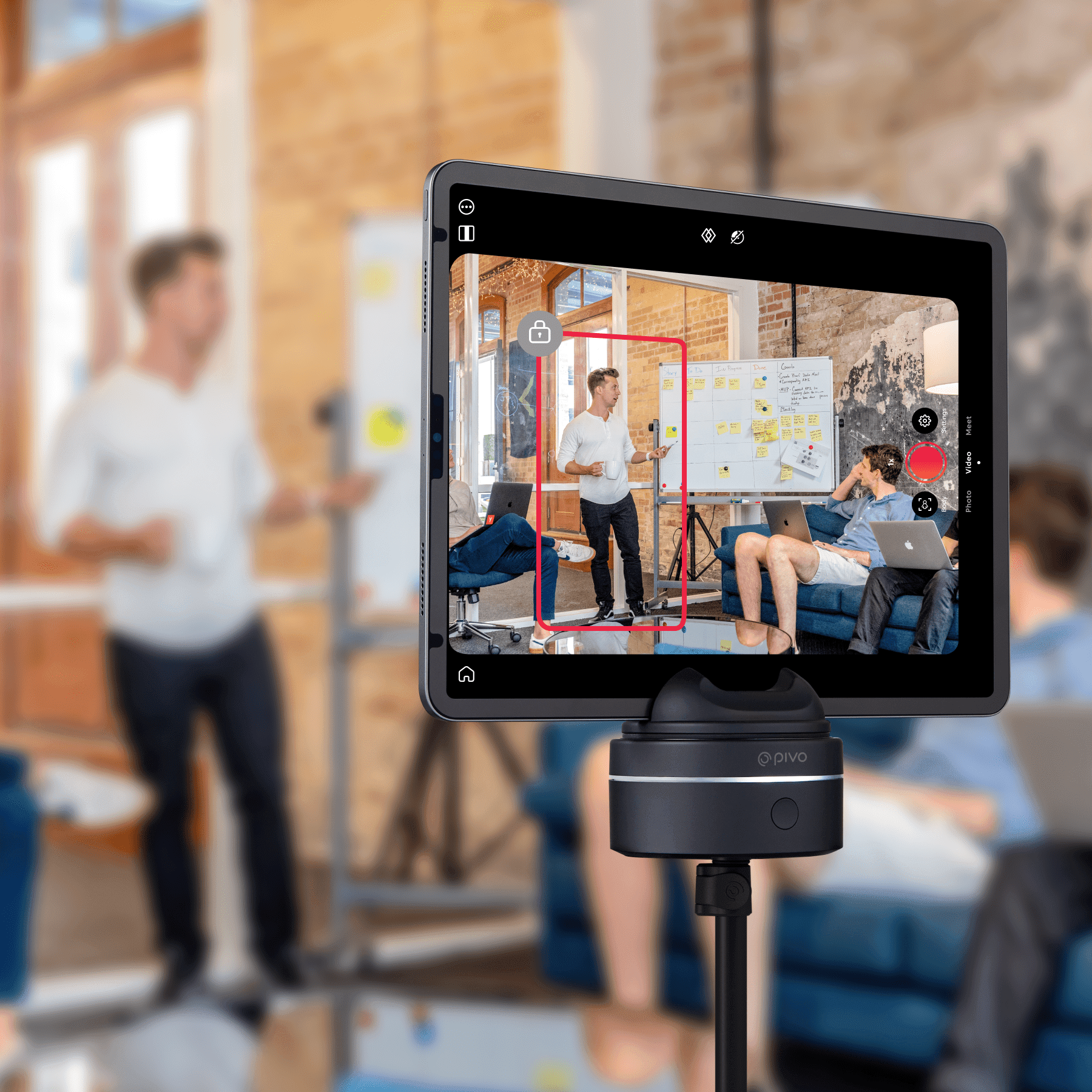
Pivo Inc, leading AI technology developer that aids self-improvement by turning smart devices into a user’s personal camera crew, has launched their new premium offering: Pivo Max. Building on the success of their hero products Pivo Pod and Pivo Pod Lite, Max offers compatibility with tablets and cameras for the first time.

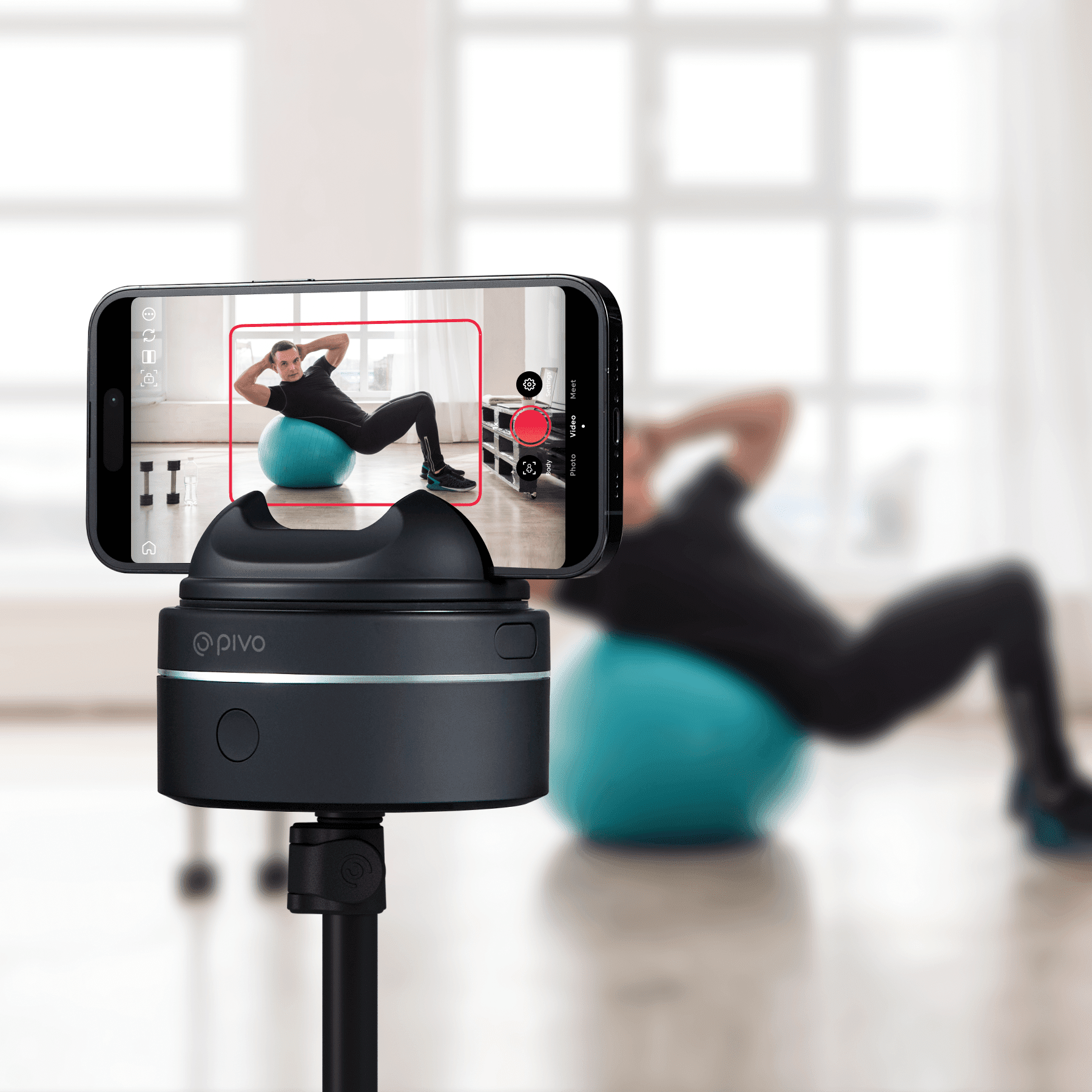
Pivo Max, named an Innovation Awards Honoree at CES® 2023, builds upon Pivo Pod’s existing capabilities. By simply attaching the smart mount to their tripod, users can capture stunning 360° footage with Pivo’s AI-powered technology. When synced with the Pivo+ and Pivo Play apps, Pivo’s Face and Body Auto-Tracking feature means users can move freely, never having to worry about leaving the frame.

The all-new Pivo Max has a wide range of uses – much like the Pivo Pod and Pivo Pod Lite models, it is ideal for fitness, coaching, equestrian and sports practice. With its larger, 2kg payload and tablet and camera compatibility, Pivo Max has a wider professional appeal, perfect for established creators, real estate agents and even those in education or business settings.

Like the Pivo Pod, Pivo Max maintains horse and dog [now out of beta] tracking capabilities, so users can capture training routines and coaches can join remotely.

Pivo Max comes equipped with six different rotation speeds: Slower, Slow, Normal, Fast, Frenzy, Turbo. Whether users are recording a presentation in-class or a dance tutorial at the studio, they can rest assured Pivo Max will keep up with them.

Pivo Max comes with an integrated LED status, so users can easily view power, pairing, connection, charge, capture and recording statuses. Also new is the Pivo Max Power Bank, available for purchase separately. The Power Bank allows users to simultaneously charge their Pod and personal device during use.

Ken Kim, CEO of Pivo says of the release, “Following the success of our other mounts – the Pivo Pod and Pivo Pod Lite, we wanted to offer a model that not only offers more premium features, but is also geared towards professionals in their field. Pivo Max is a game changer for markets like real estate and education, and we’re excited to see the technology that worked so well for our earlier models continue to reach new heights.”

Pivo Max, which comes with a remote control and is compatible with both Pivo apps, is available in the UK now from uk.pivo.ai with an RRP of £239.99. Between June 19th – 30th Pivo will be offering up to 30% off Pods as part of their Summer Flash Sale.

New state-of-the-art robotics lab to be created at Maynooth University

The Maynooth University Foundation is delighted to announce the creation of a state-of-the-art robotics lab, which will be supported by a donation from Intel Ireland. The lab will provide MU students with invaluable hands-on learning experiences using cutting-edge robotic technologies.

The establishment of the robotics lab at a total cost of €150,000 will equip Maynooth University students with access to innovative robotic technologies and equipment used by engineers from Intel and other companies. This hands-on experience will enable them to bridge the gap between classroom learning and real-world application, empowering them to develop and refine their skills in robotics.

The new robotics lab is set to become a hub of innovation, where students can explore and experiment with robotics, pushing the boundaries of technology and unlocking new possibilities. This new lab will support students in MU’s current degree programmes in Robotics and Intelligent Devices, Electronic Engineering and Computer Science.

The gift from Intel is coupled with an investment from the University, demonstrating the power of public-private partnerships to fuel innovation and improve student learning experiences.

The establishment of the robotics lab further strengthens the ties between Intel and Maynooth University.

Dave Selkirk, the Director of Advanced Analytics MSO Automation at Intel Ireland, said: “We are very proud of our close partnership with Maynooth University, a close neighbour of ours here in North Kildare. The development of key infrastructure in the area of robotics will provide an important opportunity for students to gain practical experience in an evolving technology field that has massive potential in Advanced High-Volume Manufacturing.”

Vice-President External Affairs at Maynooth University Rebecca Doolin said: “We are tremendously grateful to our neighbour and partner Intel for supporting the development of a new robotics lab, which will give Maynooth students hands-on learning opportunities to work with the same robots Intel engineers down the road are using, bringing their classroom learning to life.”

Doolin noted a Memorandum of Understanding (MOU) signed by Maynooth University and Intel in 2019, and its significance in creating a strategic research and innovation partnership.

“Over the years, Maynooth University has developed a strong partnership with Intel that has fostered collaboration in various areas, including student skills and experiences, research, innovation, and community engagement. As neighbours in a vibrant and fast-growing region of Ireland, today’s announcement not only deepens the ties between Intel and MU, but also demonstrates the positive impacts on student learning and innovation that such partnerships can yield.”

Prof Gerry Lacey, Head of Engineering at Maynooth University, said: “Robotics and AI are creating new industries, making agriculture more sustainable and revolutionising transportation. We are excited that Intel’s support will help our students to become leaders in creating this new future.”

Tech Review – Anker Soundcore Liberty 4 Earbuds

The last pair of earbuds reviewed from Soundcore was the Liberty 3 pro which was one of my top earbuds at the time for that year and still remain high on the list still today and a pair of earbuds which can be now got fairly cheap which is something you could do if on a budget and when the Liberty 4 arrived I was really interested to see how these would sound coming off the back of the Liberty 3 pro even though the shape and style is different with no wings either. These earbuds however come packed with technology for those into fitness and of course sound which is important but there is much more tech in this pair and are an ideal for those who want to log fitness data which being honest is not me but the tech is there and there is many who will certainly take the company up on thes featured more aligned with smartwatches.

These are stem styled earbuds and look clean and fit well and before you get moving you need to download their app and do the HearID ANC test to get them set up properly for the best quality and they certainly deliver on the ANC aspect. They are comfortable to wear for long spells and will not fall out and once the right tips fitted you are good to go. The ANC is not up with the Liberty pro 3 but still good overall. Rather than having a touch sensitive are here or button these earbuds operate by squeezing them and there is different squeeze forces you could apply but this is down to the individual user to set up.

The fitness aspects of the app are great and they use your mobile phone to set some things up like the calibration for example which you will see in the video review below. As mentioned above these are more targeted at people into fitness however the audio is for everyone but with the fitness element thrown in they offer super value for money.

The app is packed with features and settings and you should explore them all to get the maximum effect out of them, for me all instances not used plus I have so many earbuds into test but I go over what is on these which you will not find on other earbuds, these earbuds would need be in your ears quite a lot to use the full suite of features and get the results you want..

When it comes to sound there is lots on offer and they sound great for the money and overall give other more expensive offerings a run for their money but again not up their with the Liberty Pro 3 however still excellent overall..The sound is in short great loud and punchy with no lag latency no distortion when maxed out and overall just spot on and with the app these deliver excellent value for the money and put it up to the rest that are more expensive, so if you are a fan of the brand and need new earbuds and on a certain budget put these on your list to check out.

The App


Features 

  • Crisp, clear sound via ACAA™️ 3.0 Coaxial Acoustic System
  • 360° immersive spatial audio with music and movie modes
  • CloudComfort™️ ear tips for long-lasting comfort
  • All-new heart rate sensor with soundcore app
  • HearID personalized active noise cancelling
  • 9/28 hours of playtime for all-day listening

BUY

Video Review

Google Maps launches Immersive View in Dublin.

Google Maps is expanding Immersive View to new cities and landmarks, introducing a simpler way to navigate, and updating Recents on desktop Google Maps. The great news is this includes Dublin and for those who will now begin their holidays or those who will travel to Dublin should check the latest update out, check out the news below.

In many parts of the world, summer is here  —- which often means time for trip planning and exploration. Today, we’re sharing three new updates from Google Maps to help you make the most of your summer adventures.

Immersive View: rolling out to new cities and available for 500+ landmarks around the 

Earlier this year, we launched Immersive View to transform the way you explore — using AI to fuse together billions of images and create a multidimensional view of the world with trusted information layered on top. Today, we’re starting to roll out Immersive View in four new cities: Amsterdam, Dublin, Florence and Venice — and are expanding it to over 500 iconic landmarks around the world, from Prague Castle to the Sydney Harbour Bridge on Android and iOS.

So if you’re planning a trip to Boston and want to see the historic Faneuil Hall, you can get a jump start on familiarizing yourself with the area before you visit. Just search for it in Google Maps and tap on the first video to virtually soar over the building and find places nearby. With the time slider, you can see what the weather will be like at different times of day and how crowded it will be so you can plan ahead. And where we have data available, you can peek inside of restaurants and cafes to help you decide whether you want to make a reservation — thanks to an advanced AI technique called neural radiance fields, or NeRF — which was developed right here at Google.

Track your trip progress with glanceable directions, which start rolling out this month

While we love the rich details of Immersive View, we also know that sometimes less is more — especially when you’re somewhat familiar with your route and just need to see when the next turn is. That’s why we’re launching glanceable directions in Maps, helping you easily track your trip progress right from your lock screen or route overview.

Once you opt in, just request directions to your destination and get going. You’ll see updated ETAs and where to make your next turn — information that was previously only available in comprehensive navigation mode. And if you decide to take another path, we’ll update your trip automatically. Glanceable directions start rolling out globally this month for walking, cycling and driving modes on Android and iOS.

Stay organized and plan trips with new updates to Recents on desktop 

One of the most difficult parts of planning a trip is keeping track of all the places you want to visit — especially if you’re visiting multiple cities. We built Recents on desktop to help with just that. It automatically organizes places you’ve researched into a handy highlight on the left side of your screen when you open Maps.

Now, with new updates rolling out globally next month, we’ll save places in your Recent highlights even after you close your Google Maps window — so you can take a break from planning and come back to it later without ever losing your progress. You can remove places you’ve viewed, plan multiple trips at once and share a selection of places — like attractions or hotels — with your travel buddy to get their thoughts. Once you know where you want to visit, select three or more destinations, click “directions,” and Maps will even create a custom route that hits all your stops and saves it to your Recents. Who’s up for a summer road trip!

Whether you’re hitting up local gems, a national park or flying halfway around the world, let Google Maps be your ultimate travel companion this year.

Top 7 No Watermark Video Editors for PC in 2023

We’re going discuss the top 7 no-watermark video editors for PC in 2023. We’re going to mention their distinctive features and the pros of using each one. After reading this article, you should easily be able to choose the one that fits your needs.

1. Movavi Video Editor

This no-watermark video editor stands out with its user-friendly interface and intuitive controls, making it a popular choice for beginners seeking a hassle-free video editing experience. Here are the pros of using it in comparison to other tools:

  • Built-in media content: It includes a library of royalty-free music tracks and sample videos to enhance and complement your projects.
  • Fast rendering and exporting: The software offers efficient rendering and exporting options, enabling users to save time during the final production process.
  • Audio editing and enhancement features: Alongside video editing, it allows users to edit and enhance audio tracks to achieve optimal audio quality. We don’t want sloppy audio in our videos.
  • Screen recording: It enables users to capture and record their screen activity, which is ideal for creating tutorials, demonstrations, or gameplay videos.
  • Automatic video creation: There’s a feature called The Montage Wizard which provides a quick and automated way to create professional-looking videos by guiding users through the editing process.   

2. Clideo

This edgy video-making tool features cloud-based functionality, allowing users to edit videos online without the need for software downloads or installations, making it accessible and convenient for users across various devices and systems. Other pros:

  • Online accessibility: It allows users to edit videos online from anywhere with an internet connection, eliminating the need for specific hardware or software installations. It’s an awesome feature.
  • Privacy and security: The developers value your privacy and ensure that your uploaded videos are not shared with any third parties, providing a secure environment for your editing projects.
  • Quick processing: The powerful cloud infrastructure enables fast processing times, allowing you to edit and save your videos efficiently. However, it depends on the length and complexity of the videos.

3. Kapwing

Another program that has a unique feature of collaborative video editing where it allows multiple users to work together on a video project simultaneously, making it ideal for teamwork and cooperative content creation. Other pros include:

  • Creative templates: The software features a library of pre-designed templates for quick and easy video creation. Something suitable for both professionals and beginners trying to make great videos.
  • Subtitle generation: It allows users to automatically generate subtitles for their videos or manually add and customize them. The possibility to customize subtitles is more than welcome in many cases.
  • Cloud storage: Similar to the previous one, it offers secure cloud storage for edited videos so you can easily access and share them.
  • Social media optimization: This video editor provides features that are tailored for social media platforms, including resizing, aspect ratio adjustments, and meme creation.

4.OpenShot video editor

This universal video editor is great because it’s available across all platforms, including Windows, Mac, and Linux. It allows users to enjoy its features and capabilities regardless of the preferred platform. These are the pros of using it:

  • Keyframe animation: This feature empowers users to have precise control over animated elements, allowing them to create dynamic and customized visual effects.
  • Multi-track editing and timeline: It enables users to work with multiple audio and video tracks simultaneously, providing greater flexibility and control over the editing process.
  • Real-time preview: The software allows users to preview their edits in real-time, providing instant feedback on how changes impact the final result, enhancing the editing workflow and efficiency.

5. Animoto

As another video editor without watermark branding, it has intelligent video creation technology that automatically generates professional-quality videos by analyzing the content you choose, making it effortless to create polished videos with minimal effort or expertise. Other pros are:

  • Analytics and insights: It allows you to gain valuable insights into the performance of your videos with built-in analytics, helping you understand audience engagement. You can optimize your videos according to that.
  • Branding and customization: The software lets the users customize videos with their brands, logos, watermarks, colors, and fonts to maintain their brand consistency.
  • Drag and drop: The intuitive drag-and-drop interface allows us to easily arrange and edit our media files. It requires no technical expertise. It’s great for beginners.
  • Text and caption options: We can add text overlays, captions, and subtitles to our videos to convey messages, enhance storytelling, or provide context. This can be great for tutorials.

6. CyberLink PowerDirector

There’s one feature that sets this Windows PC video editor, its AI-powered style effects which utilize artificial intelligence algorithms to transform videos into stylized visual effects, giving them a distinct and artistic look not easily replicated by other editors:

  • 360-degree video editing: The editor allows us to edit and enhance immersive 360-degree videos with dedicated tools for trimming, adding effects, and creating dynamic perspectives.
  • Professional-grade color correction: It lets us utilize powerful color grading tools, including LUTs(Look-Up Tables), color wheels, and advanced adjustment controls for precise color manipulation.
  • Customizable design tools: The software allows the user to create custom titles, menus, and graphics with its built-in design tools and templates for a polished and professional look.
  • Dynamic video effects: There’s a possibility to access a wide range of visual effects, transitions, titles, and animated overlays to add flair and creativity to your videos. Most video editors have effects, but this one has great effects.

7. Shotcut

The final cross-platform video app on this list has a powerful and customizable filter system, which allows users to apply a wide variety of visual and audio effects to their videos, giving them extensive creative control over their projects. Here are the other pros of using it:

  • Native timeline editing with multitrack functionality: It enables users to create intricate and layered video compositions by stacking and arranging multiple video and audio elements, resulting in visually dynamic and immersive storytelling.
  • Hardware encoding and decoding for improved performance: The software leverages hardware encoding and decoding capabilities, utilizing the power of the user’s hardware to enhance performance and ensure smooth editing and playback of videos.
  • Wide selection of video and audio filters and effects: It provides a broad range of video and audio filters and effects, including color grading tools, transitions, visual effects, and audio effects, providing users with extensive creative options.
  • Customizable interface and keyboard shortcuts: The software allows users to customize the interface layout and create personalized keyboard shortcuts, optimizing the editing workflow based on individual preferences.

Conclusion

These 7 pieces of software are the top no-watermark video editors for PC available. They all have their distinctive unique features based on which you can choose your preferred one. Hopefully, we made your decision much easier for you.

Fujifilm Introduces the INSTAX SQUARE SQ40 Instant Camera

FUJIFILM Europe GmbH, Imaging Division, announced today the launch of its new INSTAX SQUARE SQ40 instant camera (SQ40), a new addition to the INSTAX SQUARE lineup of instant cameras. Fujifilm has also introduced a new INSTAX SQUARE instant film variety, “Sunset”, featuring a variety of film borders with soft color gradients designed to be reminiscent of a serene, peaceful sunset.

“Consumers love our INSTAX MINI 40 instant camera, so expanding the line to also include a SQUARE format option just made sense,” said Shin Udono, Senior Vice President, Imaging Solutions, FUJIFILM Europe. “Not only can INSTAX fans now have another instant camera with a classic look, but they can also now enjoy the SQ40’s large, square image area.”

Key SQ40 features include:

Automatic Exposure function

The SQ40’s Automatic Exposure function automatically senses the level of ambient light when the shutter button is pressed, optimizing the shutter speed and flash output according to the scene. It allows even novice INSTAX instant camera users to take photos that are automatically adjusted regardless of interior or exterior conditions, producing high-quality photos on-the-spot.


Selfie Mode for quicker and easier selfies

Users can activate the Selfie Mode, perfect for taking selfies and close-up shots, by simply twisting the lens after powering the SQ40 on. Using this mode to take amazing selfies and close-ups is incredibly easy and convenient.

New Film Variety Introduced:

Also accompanying the launch of SQ40 is Fujifilm’s launch of the new INSTAX SQUARE “Sunset” variety of instant film. The design of this new square format instant film is inspired by the gentle gradation of the colors in the sky during a sunset. As with all INSTAX SQUARE instant film varieties, Sunset will be available in a single pack with 10 exposures.

INSTAX MINI EVO Now Available in Brown:

Fujifilm is also pleased to introduce brown as a new color option for its FUJIFILM INSTAX MINI EVO hybrid instant camera (MINI EVO) product line. Initially introduced in 2021 in a black camera body, MINI EVO’s unique hybrid format combines the excitement and satisfaction of traditional instant camera functionality with the capabilities of digital imaging technology to select, share, and store specific images. Paired with INSTAX MINI instant film, MINI EVO creates high-quality prints directly from the camera. Images can also be printed from a paired Smartphone camera roll using the INSTAX MINI EVO Smartphone App. 

Pricing and Availability:

Fujifilm’s INSTAX SQUARE SQ40 instant camera will be available at Fujifilm stockist’s nationwide at a manufacturer’s suggested retail price EUR 150.00 (incl. VAT) and is expected to be available for purchase on 29th June 2023. For more product information, visit www.instax.ie/cameras/square-sq40/

INSTAX SQUARE Sunset instant film is also expected to be available on 29th June 2023 at a manufacturer’s suggested retail price of EUR 11.00 (incl. VAT) per pack (10 sheets). For more information about this new INSTAX SQUARE instant film variety, visit www.instax.ie/film/#film-selector.


Fujifilm’s INSTAX MINI EVO hybrid instant camera in brown will be available at a manufacturer’s suggested retail price of EUR 200.00 (incl. VAT) and is also expected to be available for purchase on 29th June 2023. For more information regarding the INSTAX MINI EVO product, visit www.instax.ie/cameras/mini-evo/