The Complete Guide to Hiring iOS Developers

If you’re looking to include the Apple platforms in your new app you should know that they have a loyal customer base. This means that it is an even smarter decision to develop for them since they will have more of an immediate and wider audience.iOS apps are growing in popularity and Apple, who operates the app marketplace, has seen a substantial increase as well. The most recent estimate from Apple reveals that there were 2,220,000 apps on their platform for Q1 of 2019 – which is a staggering 34% increase in just one year.

Would you hire an iOS developer with just one skill set or someone who only has limited experience? They typically won’t fit the bill.It often takes a lot of planning & effort to create apps for iPhone and other mobile devices. You’ll likely have to define project goals, develop an architecture that you can test, organize workflows, and decide on the approach you’ll use to develop your app.

You will need iOS developers for tasks such as making apps, providing security levels and developing mobile sites. They also need to have a good level of experience in these tasks – this means taking on leadership roles as well as getting involved in the design process.If you’re looking for a good approach to formulating an effective development process, then you should find a PM and IT architecture professor. You’ll also need to rope in iOS developers who can offer valuable input.

However, iOS app development is no less important than Android development. You should consider the best salary rates for iOS developers. iOS users are prioritizing Apple products. With a choice of devices and smartphones, this is likely to continue happening. iOS app developers are very important in creating applications for iOS devices, making it easier for anyone who wants to use them.

iOS users are typically more satisfied with their phones, which gives them peace of mind in knowing they’ll always have a potential customer who values quality and innovation. They can also be the first choice for your business when it comes to apps. iOS apps are more likely to function smoothly and have fewer complaints from customers on the Apple platform. This ensures that businesses find it easier to sell on devices that run iOS. Apple has been focused on premium customer service and high-quality hardware for a long time, which is what you would expect from them.

What is an iOS Developer and Why Should I Hire one?

An iOS developer is a person who builds apps for iPhones and iPads. They are responsible for the design, development, and maintenance of apps. iOS developers work on a variety of different platforms such as Android or Windows.The demand for iOS Developers has increased significantly in recent years because of the boom in mobile applications. This is due to the increasing popularity of apps such as Facebook, Instagram, Snapchat, Tinder, etc.Hiring an iOS Developer is a good idea because they are capable of designing and developing apps that have user-friendly interfaces with great user experience. It also helps to create engaging content that keeps users coming back for more.

How to Find an iOS Developer for Your Business

There are many ways to find an iOS developer for your business. One way is to hire a freelance iOS developer who is experienced in the field. The other option is to go through a mobile app development company that provides services like hiring, finding, and managing developers.There are also ways you can find an iOS developer online such as through ios programmer for hire. There are a few things that you need to consider when looking for an iOS developer.

The first thing to consider is the experience of the developer. Some developers have worked in the industry for years and have built long-lasting relationships with their clients.The second thing to consider is the cost of development services. There are a lot of factors that can influence this, such as location, time and expertise. There are many ways to find the right iOS developer for your business. You can hire an agency, use a freelancer platform or search online.

What is an iOS Developer?

Apple’s iOS operating system is the most popular mobile platform in the world. It has been used by over a billion people to create apps on their iPhones and iPads.iOS developers are experts in creating apps for Apple’s mobile devices. They use the Objective-C programming language and Xcode IDE to write code for iPhone and iPad apps. They also use Swift as their primary development language when writing code for newer models of iPhones and iPads.An iOS developer is a person who creates software applications for the Apple iOS operating system, which is the most popular smartphone platform in use today.

An iOS Developer is a professional who builds software applications for Apple’s mobile operating system. The apps are written in the Swift programming language, which is optimized for Apple’s iOS operating system.The job of an iOS Developer can be challenging and rewarding, but it requires a lot of work. It requires skills in both development and design, as well as knowledge about Apple’s hardware and software platform.

How iOS App Developers Can Help

With the rise of mobile apps, iOS developers are in demand. The demand for iOS app development is increasing at a rapid pace and will continue to grow.Apple has introduced many new features in recent years that make it easier for developers to build apps for their platform. The addition of these features has helped iOS developers increase their productivity and create more engaging apps with better user experience.The introduction of ARKit, ARCore, and CoreML have also made it easy for developers to create augmented reality apps that can be used in industries like healthcare, education, retail and gaming.

Apple’s iOS is the most popular mobile operating system in the world. So, it’s no surprise that a lot of developers are working on apps for this platform.This section will help you understand how to make your app work better with Apple’s iOS 12 and watchOS 5.

Apple Watch Series 8: 3 New and Noteworthy Features

Here are the biggest features for Apple Watch Series 8 you should know about.

In addition to all the advantages of an Apple Watch, the series 8 smartwatch is all about the sensors. While the watch may look almost similar to the previous models on the outside, the inside could well save your life.

From the new body temperature sensor that can help track fevers and ovulation, to the new crash detection technology that can automatically call emergency services in the event of a car wreck, the Apple Watch Series 8 offers great features designed to help keep you safe and well. If that was enough to grab your attention, read on below, as we’ll explain some of the best features of the Apple Watch Series 8 in details.

1. skin temperature sensor

One of the biggest features on Apple Watch Series 8 is the skin temperature sensor, which is being promoted as a tool for cycle and fertility tracking. Changes to wrist temperature have been proven accurate indicators of probable ovulation.

Besides providing basic body-temp information, the watch can also draw on its readings and those of other sensors to provide a more holistic image of the wearer’s health. This permits things like better cycle and ovulation tracking, as well as new health-tracking alerts that may catch brewing health concerns earlier.

According to Apple’s support page, anyone can use the temperature sensor to track the metric (outside of using advanced cycle tracking) by using Apple Watch sleep tracking.

2. Low Power Mode

The new Apple Watch Series 8 will last up to 18 hours on a single charge. But borrowing a feature from the iPhone and iPad, the Apple Watch Series 8 low power mode will disable some services, while attempting to maintain operations as close as possible to its normal mode. With low power mode enabled, you can get up to a whopping 36 hours of usage with the Apple Watch Series 8. It doesn’t truly double the Apple Watch’s battery life, but if you frequently forget your charger or you often go on short trips without, this could be a life-saver.

3. Crash Detection

The Apple Watch Series 8 includes a new feature known as Crash Detection, also found on its latest iPhone 14 lineup. This safety feature on Apple Watch Series 8 is capable of detecting car crashes. The user will be asked by the watch if they wish to contact emergency services. If they don’t respond within 10 seconds, the watch will automatically notify the user’s emergency contacts and send them their precise location.

To accomplish this, the Apple Watch Series 8 is bundled with two new motion sensors inside, along with updated gyroscopes and accelerometers. These together makes it possible for the watch to identify exact moment the crash happens.

Conclusion

Apple has introduced a few new features in the Apple Watch Series 8 to make it an improvement over the previous models. Apple Watch Series 8 could feel like Series 7 for the vast majority of people with only two new features – the temperature sensor with advanced cycle tracking and crash detection. But if you’re planning to upgrade from Series 3, 4, or SE, you get a larger display, always-on screen, faster charging, and all of the latest and greatest health features.

What do you think about the Apple Watch Series 8? What are your favorite features? Share your thoughts in the comments!

Apple Watch SE 2022 (44mm Starlight) first look, unboxing and set-up

Yes I went and did it, got another Apple Watch and this time the SE starlight 44mm. I am looking at the Ultra down the road however have seen none in stores yet and want to see just how big it looks on the wrist rather than stock image reviews or photos. As for the SE I think will be popular and good value for money and for those who have yet to jump into the smartwatch game no matter what OS your prefer the entry level offerings are probably best to begin with. Given Apple is more expensive than others this is a decent smartwatch at a decent entry price however probably too high for many which I agree with, I have come down from the Apple Watch 7 series to try it out and so far so good for my needs.

Not going to bore you with the specs but today I just take a first look and unboxing of the new Apple Watch SE and the set-up process which is quite simple as with anything Apple is and if you need to know some more feel free to drop your thoughts in the comments on our YouTube channel and stay tuned for more on the Apple iPhone 14 pro and the watch as we have accessories to check out in the coming weeks.

Check out the iPhone 13 pro vs 14 pro unboxing here

Unboxing the Apple Watch SE 2022


Which Is Better: iPhone Apple 14 pro or Apple 13 pro?

No one ever really knows what to expect when Apple announces a new iPhone. But this year, there was more speculation than ever before about which model would be the best. Some people argued that the 14 pro was the clear winner, while others claimed that the 13 pro offered better value for your money. In the end, it all comes down to personal preference. So, which is right for you? Read on to find out!

The Pros and Cons of the Apple 14 Pro

The iPhone 14 Pro is the latest and greatest iPhone to hit the market. It has a quad-rear setup consisting of a 48MP main, 12MP telephoto, 12MP ultrawide, and a TOF 3D depth lens. This makes for some seriously impressive photos and videos. The phone is also packing a punch when it comes to performance with its A16 Bionic chip.

The iPhone 14 Pro has a 6.1 inches LTPO Super Retina XDR OLED display panel. The new Gorilla glass protection is said to be 4x stronger than any other phone on the market, making it extremely durable. The 3.46GHz clocking speed is the fastest of any iPhone to date and allows for incredibly smooth performance when using apps and playing games. iOS 16 OS comes installed on the device, giving users access to a wealth of new features and improvements.

However, when it comes to the new iPhone 14, there are a few drawbacks that need to be considered. One is that customization is limited on iOS 16. This can be frustrating for users who want to personalize their phones. Another downside is that without a micro SD card slot, storage is limited. Finally, the fingerprint sensor is not available on this model, so security may be an issue. 

The Pros and Cons of the Apple 13 Pro

Apple iPhone 13 Pro is the previous release from Apple, and it comes with a host of impressive features. The most notable update is the addition of a 120Hz ProMotion display, which offers super smooth scrolling and responsive touch input. The phone also features an updated camera system with Ultra Wide and Zoom lenses, as well as improved low-light performance. Under the hood, the iPhone 13 Pro is powered by Apple’s A15 Bionic chip, which delivers significant improvements in speed and power efficiency. Overall, the iPhone 13 Pro is a powerful and capable smartphone that should appeal to a wide range of users.

But not everything about the new phone is perfect – one of its biggest drawbacks is that it doesn’t come with a charging block in the box. For a phone that costs as much as the iPhone 13 Pro does, many people feel that Apple should include a free charging block.

When deciding between the iPhone Apple 14 Pro and Apple 13 Pro, MyDeal iPhone offers a comprehensive selection of both models, allowing you to compare their features, specifications, and prices to make an informed decision on which one is better suited for your needs.

What Is in Common?

Both handsets have the same front and back Ceramic Shield protective glass and IP68 water resistance rating. Since last year’s iPhone 14 lineup, Apple has continued to utilize the proprietary Lightning port for the iPhone 14 series, though its future devices may be the last off the back of the Lightning connector. The iPhone 14 Pro and the iPhone 13 Pro have the same 6.1-inch Super Retina XDR display.

How to Decide which iPhone Is Right for You?

With the release of the new iPhone 14 pro and iPhone 13 pro, there are now more options than ever when it comes to choosing an iPhone. So, how do you know which one is right for you? Here are a few things to consider that will help you make the decision.

Operating System

One of the most important things to consider when choosing an iPhone is the operating system. The iPhone 13 pro and iPhone 14 pro both come with Apple’s latest operating systems, iOS 15 and iOS 16. Both operating systems are packed with new features and improvements, so you can be sure you’re getting the best possible experience with either phone. 

Display Size and Resolution

Another important consideration when choosing an iPhone is the display size and resolution. The iPhone 13 pro has a 6.1-inch display with a resolution of 2532×1170, while the iPhone 14 pro has a 6.7-inch display with a resolution of 2556×1179. If you’re looking for a bigger display, then the 14 pro is the way to go. However, if you’re not as concerned about display size, then the 13 pro will still provide you with a great experience. 

Camera Features

The camera is one of the most important features of any smartphone these days, and both the iPhone 13 pro and iPhone 14 pro have great cameras. The 13 pro has three camera sensors (ultra-wide, telephoto, and TrueDepth front), just like the 14 pro. However, there is a difference: the iPhone 14 Pro will feature a 48MP main camera, a 65 larger sensor than the 12MP main camera on the iPhone 13 Pro. This bump in megapixels will allow for significantly more detailed photos and videos. The increased sensor size will also enable better low-light performance and improved autofocusing. Besides, iPhone 14 can also give 8K resolution videos. If you’re someone who likes to take a lot of pictures or videos, then the extra camera characteristics on the 14 pro will be beneficial. However, if you’re not as concerned about having camera benefits, then the 13 pro will still give you great results. 

Pricing

There’s no denying that the iPhone 13 Pro is still a great phone, even after its release of the iPhone 14 Pro. It’s got a powerful processor, excellent camera, and plenty of storage space – up to 1TB. Plus, it’s likely to be cheaper now that the newer model is out, for instance, iPhone 14 Pro starts at $999, while the iPhone 13 Pro is available for $899. So if you’re on a budget and don’t mind missing out on the latest and greatest features, the iPhone 13 Pro may be the better buy for you.

If you don’t have enough money to buy iPhone 14 pro, you can make use of online casino bonuses, for example, a deposit bonus no wagering. This will allow you to get extra money to play with, and you won’t have to worry about wagering requirements. Simply receive the bonus into your account and you’ll be able to use it on any game you like. There are usually no restrictions on how you can use the bonus, so you can even use it on progressive jackpot slots. With a deposit bonus no wagering, you can increase your chances of winning big without having to spend any extra money.

Conclusion

There are a lot of factors to consider when choosing between the iPhone 13 pro and iPhone 14 pro. But ultimately it comes down to your personal preferences. Do you want a bigger display? Are you looking for more camera features? Consider your needs and wants, and then make your decision accordingly. Either way, you’ll be getting a great phone.


iPhone 14 Pro unboxing and side by side with the 13 Pro and the cases problem

The iPhone has just dropped and moving on from the 13 Pro I have been asked and asked myself about the case issue which is will the 14 pro fit the 13 and vice versa, we have plenty of iPhone 14 Pro cases coming in for review next week but this is just a quick look at both iPhones and explaining that the cases will not fit both and of course a clever move by Apple to get more cash.

In short the buttons are basically lowered down on the phone which you will see in the video below, There is room for argument on thinner based cases where you may get some functionality but not all so in short the cases for the 13 Pro will not fit the 14 Pro properly, they will go on each other but that’s as far as it goes but you can look at it this way if you are waiting on a case for the 14 Pro you can perhaps get a thinner one on but as you will see in this video depending on the thickness of the case it will be an issue.

Stay tuned for more on the iPhone 14 pro and case reviews. Check out the Apple Watch SE 2022 unboxing

Video Link


Atom Studios launches conscious range of iPhone 14 accessories

Atom Studios has launched a collection of conscious cases and accessories for the iPhone 14 range, with the latest from Apple soon hitting the shelves now is the time to get a look and decide what is right for you and have the latest accessories at hand for when your new device arrives. Lets see what is on offer.

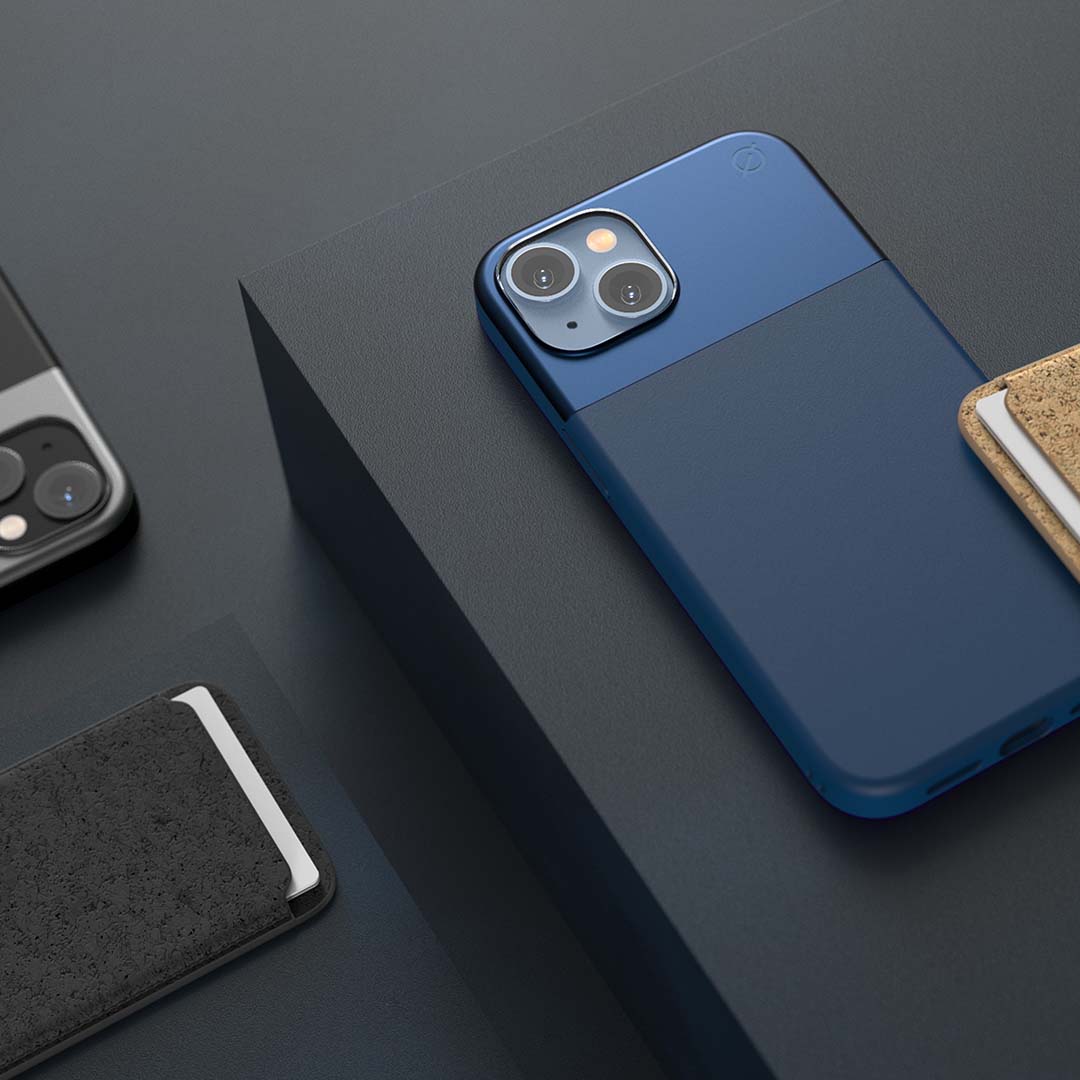
Atom Studios Split Wood Fibre cases for iPhone 14

Available in ink blue or atom green

Price: £47.99 / $47.99

Available from: Atom Studios, Amazon UK, Best Buy, Verishop, Telenor


Available in Atom Green and Ink Blue, these Split Wood Fibre cases by Atom Studios aren’t only stylish, they’re also designed with the environment in mind. The materials are a blend of sustainably conscious wood fibre specially developed by Atom Studios and recyclable aluminium, offering durability and protection without costing the earth.

The built-in magnets are 50% thicker than magnets used in many other cases, without adding any bulk, offering a more stable MagSafe charging experience with a lightweight, slim case. It also has a 1mm raised edge to protect the screen and 10ft drop protection thanks to the strengthened aluminium.

Atom Studios’ iPhone 14 cases are cross compatible with their equivalent predecessor devices (except for the Plus), so an iPhone 14 Pro fits 13 Pro, the 14 fits the 13, and the 14 Pro Max fits the 13 Pro Max to increase longevity, reduce the amount of products needed and trucks on the road. Check the website for device specific info and exceptions.

Due to the natural materials used, each case ‘wears in’, resulting in a unique look as the colour and patina subtly changes over time. The performance of the case is not affected by this.


Atom Studios Split Silicone cases for iPhone 14

Available in: Pink Clay, Ink Blue, Carbon black

Price:  £44.99 / $44.99

Available from: Atom Studios, Amazon UK (coming soon)


Atom Studios offers natural materials, style and protection for your new iPhone 14 with its range of Split Silicone cases.

Utilising natural materials, including silicone — made from silica which is found abundantly in sand — and strengthened aluminium, which is infinitely recyclable, results in a distinctive look and sustainable credentials.

They’re practical too; with 10ft drop protection and 1mm raised edges, you needn’t worry about dropping your phone. They also feature 50% thicker magnets than a typical case, while still being slim and lightweight, offering a more stable MagSafe charging experience.

Atom Studios’ iPhone 14 cases are cross compatible with their equivalent predecessor devices (except for the Plus), so an iPhone 14 Pro fits 13 Pro, the 14 fits the 13, and the 14 Pro Max fits the 13 Pro Max to increase longevity, reduce the amount of products needed and trucks on the road. Check the website for device specific info and exceptions.


Atom Studios Split Clear cases for iPhone 14

Price: TBC £39.99 / $39.99

Available from Atom Studios, Amazon UK (coming soon)


A completely new design introduced for iPhone 14, this dual-material case features frosted recycled plastic at the top and transparent recycled plastic at the bottom, allowing you to show off the design of your new phone. It features fingerprint protection to avoid smudges and anti-yellowing technology prevents discolouring over time.

Enjoy a more stable charging experience thanks to the magnets, which are 50% thicker than typical magnets used in other cases without adding bulk or weight.

The 10ft drop protection and 1mm raised edges keep your phone safe during those heart-in-mouth moments when it gets dropped.

Split Clear cases are cross compatible with their equivalent predecessor devices (except for the Plus), so an iPhone 14 Pro fits 13 Pro, the 14 fits the 13, and the 14 Pro Max fits the 13 Pro Max to increase longevity, reduce the amount of products needed and trucks on the road. Check the website for device specific info and exceptions.

Atom Studios Keep – MagSafe wallet

Price: £29.99

Colours: Carbon black, natural

Available from: Atom Studios, Amazon

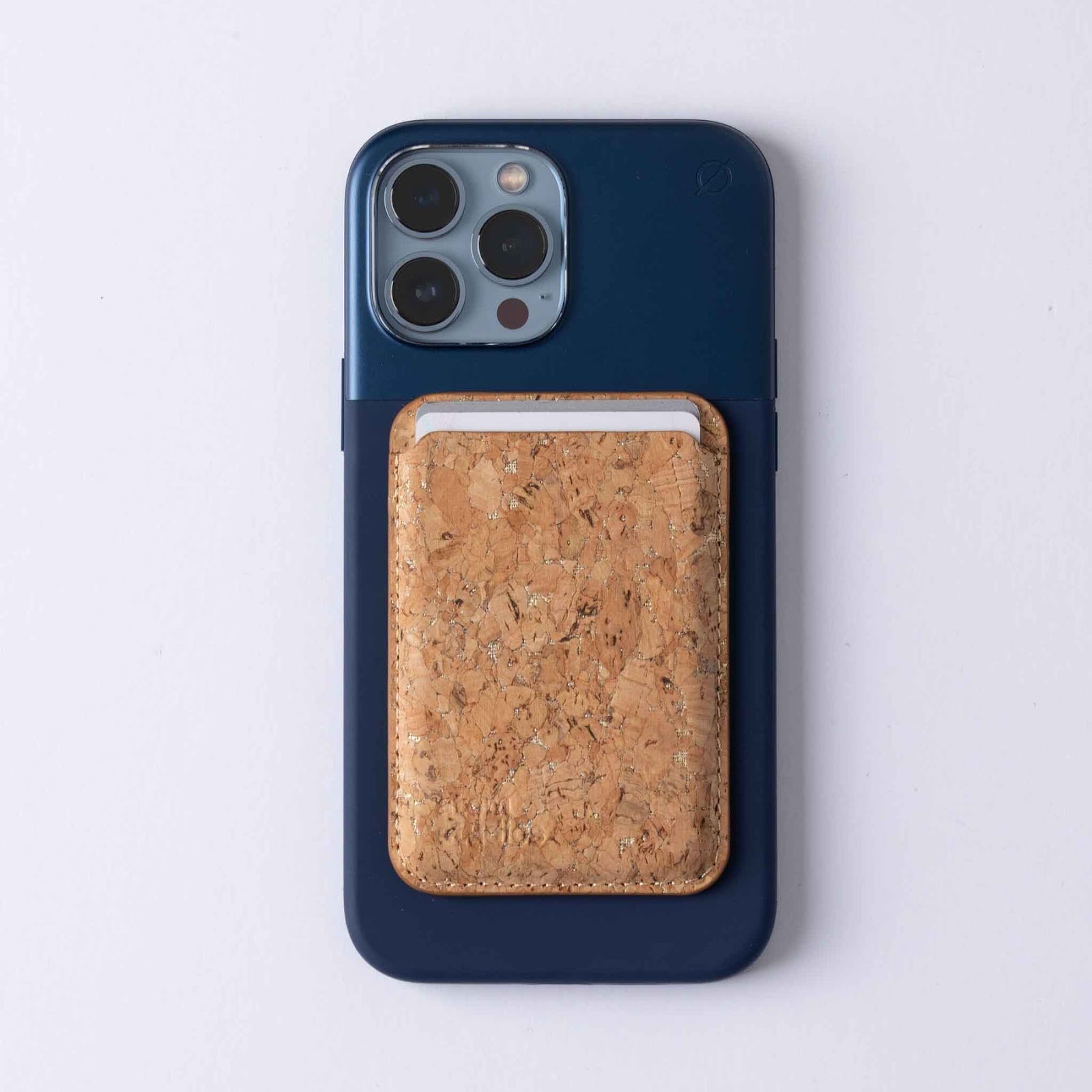
Keep is a MagSafe wallet made from cork — a natural, durable alternative to leather and plastic that has the added benefits of being naturally water repellent and antibacterial. The wallet boasts a minimalist design and subtle Atom Studios logo, which emphasises the natural beauty of the cork, and has a card slot which can hold two cards, offering a convenient way to keep credit, debit and ID cards close to hand.

Not only is cork biodegradable, recyclable and reusable it’s also inherently sustainable – oak cork trees grow abundantly and harvesting the cork assists in CO2 absorption.

Compatible with all MagSafe equipped iPhones (14, 13 and 12) the secure built-in magnets ensure that Keep stays firmly in place on the back of a phone or MagSafe phone case.

Atom Studios ‘glass’ Screen Protector for iPhone

Price: £19.99 / $24.99

Available from Atom Studios

Available for iPhone 12, 13 and 14 models, glass keeps your iPhone screen protected from scratches, fingerprints and other surface damage. Designed to be tough, the anti-scratch double tempered glass offers high performance protection while the smooth finish ensures crystal clear clarity so you’ll forget it’s there.

Atom Studios has designed the glass screen protectors with an innovative application system for easy, precise alignment with no dreaded bubbles and minimal waste (many screen protectors come with lots of components). The applicator is also made from wheat and recycled plastic offering a sustainable solution.

Glass is available for the following iPhone models:

  • iPhone 14 / 14 Plus

  • iPhone 12/12 Pro

  • iPhone 12 Pro Max

  • iPhone 13/ 13 Pro

  • iPhone Pro Max


Atom Studios ‘block’ – 30W dual-port fast charge plug

Price: £27.99

Colour: ink blue

Available from Atom Studios, Three

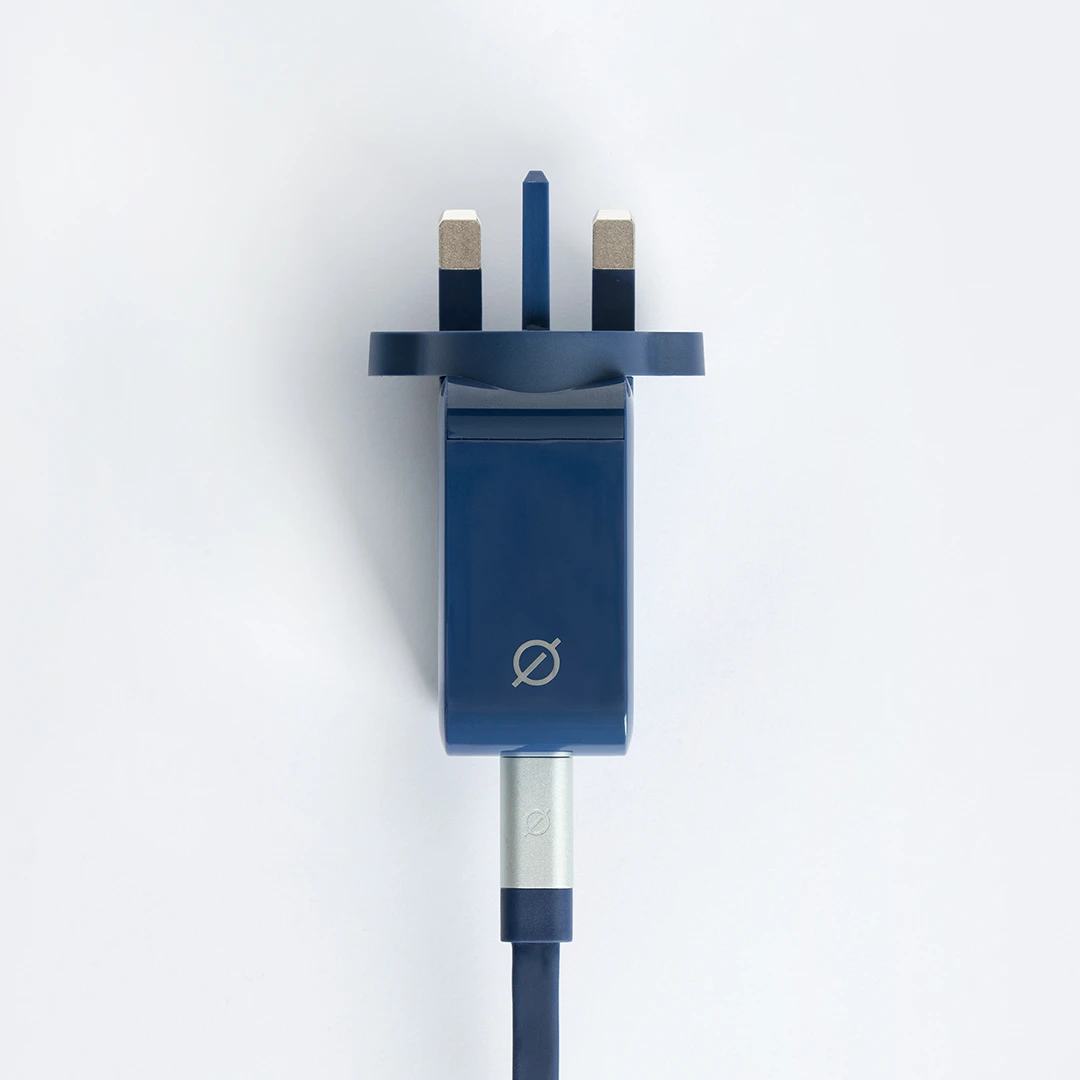
Charge two devices simultaneously without losing power thanks to block, the dual-port fast charge plug by Atom Studios. It has two ports – a USB-A and USB-C connection which cover most mobile device charging needs (including Apple and Android) as well as other accessories like e-readers and digital cameras. Block provides 30W of power, so you can still enjoy fast charging via the USB-C connection, even when you’re also charging another device via the USB-A output, so your devices are always ready when you need them.

Featuring Atom Studios’ classic signature ink blue colour, a glossy finish and compact design, block can be easily slipped into your bag so you can enjoy fast charging via plug sockets available in cafes, hotels, etc.  A range of matching charging cables with various charging cables are available from Atom Studios too,  for a coordinated look. Block is also universally compatible with non-Atom Studios USB-A/C charging cables.

Consumer protection foundation seeks record damages of nearly €5 billion from Apple

The Consumer Competition Claims Foundation announced that it is filing the largest class action damages claim in the EU on behalf of Apple iPhone and iPad consumers. Apple has illegally used its monopoly power to make consumers overpay for apps and in-app purchases for more than a decade. The lawsuit, which will be filed in the Amsterdam District Court, seeks damages for EU consumers who have bought an app in the Apple App Store or made an Apple in-app purchase since 1 September 2009, as well as a court order to force Apple to stop its unlawful behaviour.

Apple’s abusive behaviour towards European consumers

The action alleges that Apple has taken specific steps to ensure that purchasers of iPhones and iPads have had no choice but to shop for apps via the Apple App Store and pay with Apple’s own payment service Apple IAP. Because users cannot use a different platform to buy apps and make in-app purchases, Apple has effectively created a marketplace over which it has complete control. Consumers cannot purchase any apps – such as Minecraft, Angry Birds, Baby Monitor 3G, Moofer MyFitnessPal and CandyCrush – on their iPhone or iPad without using Apple’s platform.

Apple has taken advantage of its monopoly position by taking an up to 30% cut of every sale from app developers – a fee that experts have concluded is six times higher than it would have been in a competitive marketplace. In turn, app developers have been forced to increase their prices, passing the cost of Apple’s monopolistic practices along to consumers. Damages from Apple’s abusive scheme amount to nearly €5 billion, exclusive of interest.

Consumer Competition Claims

The Consumer Competition Claims Foundation is a not-for-profit consumer organization that defends consumers against unfair trade practices and obtains compensation for their losses. The management and supervisory boards consist of experts in (competition) law and finance.

Bert Heikens, the foundation’s Chairman, commented, “After careful review, the board decided to take on Apple because it has clearly abused its dominance for over a decade, and caused consumers across the EU significant financial harm. This is just the type of consumer protection case that our foundation pursues.”

The Dutch foundation has enlisted the legal services of international law firm Scott + Scott, the largest law firm in the Netherlands representing victims of anti-competitive schemes, to handle its claim. “We are pleased the foundation has turned to our law firm to seek relief from Apple,” said David Scott, the firm’s managing partner.

We demand that Apple cease abusing its dominant position in the market. In addition, it must compensate tens of millions of consumers across the EU for the damage it has inflicted,” continued Damiën Berkhout, a partner in Scott + Scott’s Dutch office.

All costs for the claim are being funded by Hereford Litigation, a third-party litigation funder experienced in the financing of group and collective litigation globally.

European consumers can register their support

The foundation calls on consumers who have made a purchase in the Apple App Store or via an Apple in-app purchase since 1 September 2009 to register at https://www.consumercompetitionclaims.com/  We strongly encourage consumers to register on the website,” said Heikens, “Simply by adding their names, they can help ensure that they are positioned to receive the damages they deserve to collect.”

Best Ways to Free up Space on Mac and iPhone

Apple devices today are really thin, thanks to Solid State Drives or SSDs. But SSDs are really expensive and drive sizes that you’d get with HDDs aren’t cheap to include in MacBooks and iPhones. This makes it hard to store a lot of data in your Apple device and clearing up space becomes important every now and then. Here are five ways to clear up space on your Mac and iPhone. 

Use the Storage Manager 

Mac has a storage manager that lets you look at the space occupied by different file formats (videos, photos, documents, etc) and deletes any files that aren’t of use to you. If you’re looking to clean your Mac, you should use the best Mac cleaner. If you need a quick fix, go to the storage manager and use it to find files that can be deleted to free up more space. 

The feature also recommends different files that aren’t used often and can be deleted, making the entire process a lot easier. If you have any files in your recycle bin or old cache files, the storage manager will highlight them for you to delete. This feature is great if you don’t have separate software to manage your device storage. 

Use the iCloud

Using iCloud is one of the best ways to free up your storage as well as keep it from filling up. You can keep frequently used files on your physical drive and upload the rest of your data to iCloud. Whenever you need any of these files, you can search them through your iCloud data and retrieve them whenever you want. 

Also, it’s really easy to manage files in iCloud and store more data than what you could on your device. Sync your device to iCloud and it will automatically upload your documents, photos, and videos. Once all the files are uploaded, you can delete them from your device. 

Use sorting and finder tool

The sorting tool is a great way to look for large files that are hidden within a pile of files. All you need to do is go to your drive and look for the sorting tool on the top right. When you click on it, a drop-down menu will allow you to sort your files according to a variety of aspects. Look for ‘Size’ and click on it. Once all the files are sorted accordingly, start from the top and look for files that are the biggest in size. 

If they aren’t useful to you, permanently delete them from your storage or upload them to your iCloud. Another method is to look for files by using the search or finder tool. This is useful when you know the names of the files that you don’t need anymore and can be removed. 

Use cleaning software. 

Getting cleaning software can be great for your Mac or iPhone as it becomes a one-stop place for all storage management. A cleaning software gives you a detailed report of your storage along with ways to optimize your drives. 

You can also delete cache and junk files through this software, which can be hard to find manually. If you get cleaning software for your Mac or iPhone, regular checking can eliminate the possibility of your drives filling up more than 70%. There are plenty of cleaning software online but ensure you get one that provides the maximum amount of benefit at the lowest possible cost. 

Clean your downloads folder

The Downloads folder is often the biggest source of storage problems. This is because they are only accessed when a new file is downloaded. Otherwise, they are not checked or cleaned. If you download a lot of files, check your Downloads folder regularly and delete files as soon as you are done using them. Another way of reducing downloaded junk files is by changing the download location to the Desktop. 

Since the files are on your Desktop, you are more likely to delete the files once you don’t need them anymore. If you don’t wish the downloads to crowd your desktop, change the location to a file that you visit regularly. By using such ways to optimize storage, you won’t ever fill up your storage drive. 

Conclusion

Keep these five efficient ways to clean your devices in mind and look for your own ways to optimize your storage. Use cleaning software and regularly check on your storage and cache files. It’s only by staying on top of your storage space and by being conscious of your downloads that you can maintain the health of your storage drive. Plus, you won’t ever have to worry about reaching a point where you have to delete necessary data just to have space for one extra photo or video. 


Twelve South introduces the TimePorter for Apple Watch. #AppleWatch #TwelveSouth #Tech

 Twelve South today introduced the TimePorter, a compact case and charging stand for the Apple Watch. Taking inspiration from a sunglasses case, not only can the neatly designed TimePorter hold all your essential Apple Watch accessories, it also acts as a charging and display stand. Whether users are travelling and need a case for protection or simply want a storage and charging solution that won’t look out of place on a bedside table, the TimePorter is the ultimate companion for the Apple Watch.

The TimePorter can hold everything needed to dress and power an Apple Watch, including the extra-long Apple charging cable, an additional Watch band, a USB charger and more. An integrated portal holds the magnetic charging disc flush with the roof of the TimePorter so users can simply slip their Watch band around the contoured leather case for charging. A built-in spool within the case feeds out just enough cable to reach the nearest power outlet and also stops it from tangling.

The TimePorter can also be used as a display stand due to its multi-angle case top that can be adjusted to give users the perfect view of incoming notifications and alerts whilst the Watch charges. For those who like to use nightstand mode whilst they sleep, just position the Watch horizontally across the TimePorter and angle to view. The magnetic charging disc will hold the watch in place.

The Twelve South TimePorter is available now for £44.99 at Amazon.co.uk.