PicHit.Me App launches on Android and iOS,Windows Phone update soon.by @jimboireland #PicHitMe

PicHit.Me is an exciting app where you can upload photos and make money it launched initially on Windows Phone last year and now has spread its wings to two more platforms which is Android and iOS,Often the case with well known apps its the reverse order here as Windows Phone users had the chance to use this app before any other..

What is PicHit.Me.

PicHit.Me contains three basic sections.

  • Market – A fun and vast photo market, where you get access to people’s photos and can request the photos you need. The photo market’s goal is to be where the photo need is big (starting of in PowerPoint and Word).
  • Missions – Photo missions where you can participate and upload your photos in order to earn money, win prizes, get rewarded with coupons, learn more about photographing, show your photo skills, compete or get reviews and ratings from others.
  • Me – Your account where you collect all your rewards, create your profile, gather your favorite photos in albums, connect to other members and interact with the community.


PicHit.Me is an eco-system that connects billions of people in need of photos with the billions of people with a camera.

PicHit.Me is global. PicHit.Me targets everyone. PicHit.Me opens up new ways to learn and earn money by taking photos.

PicHit.Me offers a fun, easy and affordable way to legally use photos


PicHitMe has been on WindowsPhone and has been a big success so if you have not tried it yet now is the time..


Download for Windows Phone  

Now PicHit.Me has hit Android and iOS this is great news for them and its great new for those who have been waiting to use the App.

PicHit.Me is the perfect app for both photographers and people looking for legally cleared images. Those in need of photos have the ability to find the perfect image by requesting photos from the community of photographers. The request feature engages a crowd of photographers to capture the images straight from your imagination. Photographers can in turn accomplish these missions for a chance to be rewarded.


You can download PicHit.Me on here  on  iOS  Android and Windows Phone ,also to note the Windows Phone app will be getting updated next month which is good news for users..

Also said today

Simply download the app, create a PicHit.Me account and post your fantastic photos to the relevant missions. There is even a $250 reward up for grabs in our latest Challenge, as we search for the perfect PowerPoint background – so be sure to upload to this mission to be in with a chance of winning.

Source

#Shifts – A Mobile Calendar App made for Shift Workers. by @jimboireland #Apps #Shifts

There is plenty of calendar apps today on all Operating Systems be they good or bad or just stock apps built in but this app is designed purposely for shift workers hence the name “Shifts” it looks quite intuitive and nice check it out below.


Traditional calendar apps aren’t ideal for shift workers. You don’t necessarily work a traditional Monday to Friday 9-5 job. That makes it hard to keep track of when you’re working, especially with early morning and overnight schedules.

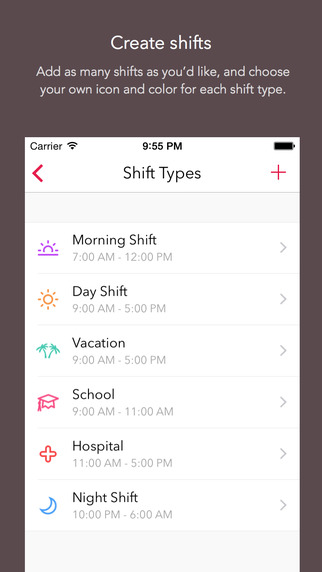
Shifts solves this problem with a simple solution. Create your own custom shifts using our attractive icons and color picker, then add them to your calendar with just one tap.

You can add up to 2 shifts per day, or setup a shift rotation and apply it to your Shifts calendar all at once. This makes it easy to enter an entire month – or even year’s worth of shifts in less than a minute! See any of your upcoming shifts right from the lock screen.


After you’ve entered your shifts, you can view them in our beautiful month view calendar, or in a handy list format. You can overlay your personal calendar on top, so you’ll know when you have things going on outside of work.

With just a tap you can share your schedule with friends, family, and co-workers – whether they’re using Shifts or not.

Built exclusively for iOS 8 and Apple’s latest iPhones, Shifts is the modern way to keep track of your work schedule


CREATE SHIFTS

Add as many shifts as you’d like, and choose your own icon and headerr for each shift type.

ADD TO CALENDAR WITH ONE TAP

Select one of your shifts, then tap each day on the calendar you’d like to add it to. Up to 2 shifts per day.

SHARE YOUR SCHEDULE

Send friends, family, and co-workers your work schedule whether they’re using Shifts or not.

VIEW UPCOMING SHIFTS RIGHT IN THE WIDGET

See your schedule without even opening up the app, right from the lock screen, or from inside any other app.

SET UP CUSTOM SHIFT ROTATIONS

Set up shift rotations and Shifts will automatically apply your shifts over any date range you choose – great for repeating schedules (e.g. a 3-week schedule that repeats for 4 months)


View your personal iCloud calendar overlaid on your work schedule
• Add personalized notes to any of your shifts
• Enter your hourly rate and we’ll show you an estimate of your monthly earnings
• Add up to 2 different shifts per day
• Reminders for shifts
• Indicate vacation days with the holiday icon, or sick days with the medical icon
• See your schedule on the Calendar or List view
• Swipe between months, or pick any month (just tap the date at the top)

GREAT FOR:

• Nurses
• Emergency workers
• Doctors
• Security guards
• Cleaners
• Retail employees
• Laborers
• Servers, bar tenders, kitchen staff
• Grocers
• Police and Firefighters
• Military
• Surgeons
• News and media reporters
• Paramedics
• Students and part time workers
• Taxi or Uber drivers
• Shipping and warehouse staff
• Pest control workers
• Locksmiths
• Hydro workers
• Protective service
• Food preparations
• Truckers and tow-truck drivers
• Construction workers
• Bus drivers and other transportation workers
• Anyone else who has trouble keeping track of their schedule!


DOWNLOAD iOS only..