Leading real hands on tech review site in Ireland with technology, business news and more. Jim O Brien Tech.
Author: Jim O Brien/CEO
CEO and expert in transport and Mobile tech. A fan 20 years, mobile consultant, Nokia Mobile expert, Former Nokia/Microsoft VIP,Multiple forum tech supporter with worldwide top ranking,Working in the background on mobile technology, Weekly radio show, Featured on the RTE consumer show, Cavan TV and on TRT WORLD. Award winning Technology reviewer and blogger. Security and logisitcs Professional.
The Super EQ Q2 Pro earbuds are the latest on offer from the company and are a solid purchase after my testing over some weeks, these have a slightly larger profile than the average ear so may not suit all however they are a solid fit and more so for those with larger ears.
Build and design
These are built well and solid and made from plastic with a step effect from the top down they are similar to others out there in shape and size but the effect from the top down makes them stand out and they look nice in fairness with the gold band around the touch area of the earbud which is great by the way for executing controls
Sound
These are really good on the bass side of things and are considered bass heavy in my book which for some is what they want to hear, they are loud and punchy fine with highs lows and mids and overall gave me a great listening experince overall and cant really complain, even on maxed out volume there was no distortion either no lag latency and loud and feeling centre they do a great job even though there is no app for them at present.
These can be also used individually which is another plus and will extend battery life if you are one to use earbuds in this fashion be it for work or driving for example.
Call are fine too work really well and clear both ends on my testing period..
Modes
You have transparency mode here which is what we are now seeing drop into the cheaper earbuds before this was ANC and the transparency mode worked quite well even in a busy environment.
Super EQ Q2 techbuzzireland
Features
Hybrid active noise canceling technology) SuperEQ Wireless Earbuds come with a professional feed-forward and feedback active noise canceling function to reduce ambient noise up to
33dB filter out noise by 90% It’s never been easier to completely immerse yourself in sound, taking the bustle out of travel and commuting • Transparency model You may still need to pay attention to external sounds when you wear true wireless earbuds on an airplane, subway, bus, or in the office. Just switch to
Transparency Mode. It lets the outside sound in and allows you to talk to people nearby without taking off the earphones.
One step Pairing Simply open the charging case and turn on the Bluetooth to build a connection. Q2 Pro wireless earbuds support Single Bud Listening. Listen via either the left or right earbud without having to worry about fiddly connections and complicated setup.
Calls with excellent clarity Thanks to the CVC 8.0 technology, which is short for “Clear Voice Capture, wireless earphones pick up your voice with incredible accuracy. Calls sound crisp, clear, and free of unwanted noise
Charge on the go Pro wireless earbuds can last for over 8 hours of playtime from a single charge and 28 extra hours in the compact charging case Fits travel everywhere and ensure the music is playing throughout all-day.
Nearly three quarters of Irish adults (68.6%) rely on their smartphones while working, at least some of the time, according to new research revealed by Samsung Ireland. This research highlights a change in work habits, especially when it comes to how people leverage technology. Almost sixty per cent of Irish people (59.5%) need technology to multitask, while the survey also revealed that the majority of Irish respondents never leave their house without their smartphone (62%).
With this research, Samsung wanted to explore the role technology plays in enabling the transition to better ways of working, including the ability to work from anywhere, multitasking and better productivity. The national survey of over 1,000 people, conducted by Opinion Matters found that the use of technology made users more productive and even became a source of inspiration to many respondents.
Smartphone Reliance
Samsung’s research revealed that people still rely heavily on their smartphones, particularly in the world of work where 7 in 10 (68.6%) rely on their smartphone devices to work, at least some of the time, with:
Almost one in four (23%) said they consistently use their mobile devices throughout a workday
A further 13% claiming they are on their devices all of the time, and
While 32.7% rely on their device at least some of the time
This also rings true in younger demographics, with three quarters of Millennials (76%) saying they rely on their smartphones to do their job, 26.3% consistently check in on their devices while working, and almost half (49.3%) claim they would feel lost without their smartphone device.
Multitasking
More than half of Irish people (60%) say they need technology to multitask. Interestingly, 35-44 year olds are 10% more likely to multi-task than their next generation, 45-54 year olds. The research revealed due to reliance on smartphones, multitasking has become easier for respondents with most Irish people revealing they regularly watch or play something on their devices even while they watch TV (63%). Over a quarter of 16–25-year-olds admit to using their phone while at the cinema (30.6%) or a friend’s birthday party (42.1%), while they are least likely to sneak a text at a christening (12.9%).
Paul Toland, Ireland Sales Lead for Samsung’s IM Division commented, “It’s incredibly interesting to see the increased adoption of technology in work environments. Our research proves that there’s a demand for more innovative devices, and we are proud to have made huge strides in this area recently through the launch of our latest range of Foldables. The Samsung Galaxy Z Fold3 blends smartphone and tablet functionality, where users can easily run three apps on screen at the one time. Through products like this, we can see the technological advancement for productivity is becoming a priority in new device design.”
“Our customer feedback helps us deliver the best devices possible, particularly inspiring us to incorporate innovative smash-proof solutions such as Gorilla Glass Victus and Armor Aluminum frame, in our latest Flagship range. While mobiles are more prevalent, in Ireland Samsung saw a 15% increase in tablet sales in the first three quarters of 2021, highlighting consumers love for multi-device usage.”
A Source of Inspiration
Smartphones are now one of our greatest companions for both work and life, with over 82.4% of respondents claiming that the content they see on their device brings them inspiration. The research revealed that the majority of Irish people never leave their house without their smartphone (62%), while 30.3% of 16-24 year olds claim that their smartphone means more to them than most of their possessions.
When it comes to purchasing smartphones, there’s a keen interest in innovation with people wanting more from their devices. Over 70% of respondents want a device that stays charged for longer (72.8%), while other key requirements include wanting a smash-proof (61.3%) and water-proof device (59.8%) that has access to the internet from anywhere (54.5%). It is clear that respondents don’t want to spend a minute without their smartphones regardless of location, accidental drops or even if they’re out in the rain.
Quentin Doran O’Reilly, Head of Product Management said, “At Samsung we have seen first-hand a transformative change in the world of work thanks to technology, which is why we developed, and are constantly refining, the Samsung Ecosystem. Our goal is to empower people with technology, be it smartphones, tablets or wearables that integrate seamlessly. The Samsung Galaxy Ecosystem, thanks to app continuity, pursues a connected lifestyle that makes it easier and more comfortable to use Galaxy devices simultaneously or switch between them easily. From experience, it is invaluable to be able to seamlessly connect your collection of devices to your phone without spending five minutes in the settings. When working from home, I can easily join calls whilst walking using my Galaxy Watch and Galaxy Buds”.
Recently announced the all new Zhiyun Smooth 5 Gimbal has arrived but we have the combo pack which is an ideal tool for vloggers and more to look at and comes with all the accessories required in one kit and also a travel bag to so you can store everything in one bag which is also quite handy. The Smooth 5 can be bought on its on too if you wish at a cheaper price which also gives the consumer options.
SMOOTH 5 Feature Highlights
Design – Upgraded motor performance and algorithm
The SMOOTH 5 has a smaller size than its predecessor but much stronger performance thanks to an upgraded motor performance and algorithm. The industry-standard 3-axis design allows movements in all angles to be amazingly smooth, even in extreme angles.
This makes it easy to shoot in all angles switching seamlessly from portrait to landscape mode, and it mounts easily on the phones favoured by mobile filmmakers like the iPhone 13 Pro MAX, Xiaomi Mi Mix Fold, Huawei Mate X2, and the Samsung Galaxy S21 Ultra thanks to its smart lock design.
Easy to use control panel – Point, click, and shoot
Users will feel at ease thanks to the all-in-one control panel that allows them to adjust many features with only one hand without the trouble of using an app. There’s also a multifunctional control wheel that gives users perfect control over zooming and focusing.
Creative Functions – Next-generation tools for the mobile creative genius
With the SMOOTH 5, mobile filmmakers can reach their creative peak. Some of the creative features included in the SMOOTH 5 are Magical Pano, allowing for a magnificent view in your smartphone with 180° panorama, Timelapse, where you can watch the time go by at a quicker pace to experience scenes that are used to take a longer time., and Live Stream Master, which allows for face tracking for the perfect live stream experience. Other features include SmartFollow, which automatically tracks a designated person or object, Dolly Zoom, which mimics a Hollywood style dolly shot without the expensive equipment, and MagicClone which allows you to clone yourself and to appear in multiple parts of a scene.
Today we have a quick first look at the product and show you what you will get in the package and if you have any questions feel free to ask below or on our social handles and we will have a full real hands on review soon.
The SMOOTH 5 is available for £159, or with a combo that includes a tripod, carrying case, and magnetic fill light as well as a VIP membership card all for £209 .Amazon or ZHIYUN’s online store.
NagleCommunity College was today revealed as the winner of The Excellence in Education award at the annual it@cork Leaders Awards, winning €5,000 to promote STEM activities within their school for teachers and students. Eight other winners were awarded on the day, recognising standout innovation, growth and impact in the south west technology sector.
Award-winners included Trustap, which received the Scale Up of the Year award, and Clearstream Global Securities Services, which was recognised as the Multinational of the Year for 2021. The Smart Technology Innovation award went to BioMarin while the it@cork Skillnet Best Workplaces award was awarded to Cloudera. Excellence in social impact saw the Diversity, Inclusion and Social Impact award go to Wisetek while Tech Start Up of the Year was awarded to Limerick-based, WrxFlo.
Paul Hourican of PFH was awarded Tech Person of the Year after being selected by the it@cork Executive Board for his commitment to developing and growing the tech sector in the region throughout his career. Chairperson of it@cork Gillian Bergin presented the Chairperson’s Community Award to the Cork Migrant Centre at Nano Nagle Place for their commitment to supporting migrant families in the region through outreach and upskilling programs.
Speaking about the awards, Ms Bergin, said: “Despite a tough year, we have seen world-class innovation and agility throughout the technology sector, in the south west region and beyond. We were hugely impressed by the standard of this year’s submissions; their energy, passion and optimism shone through and each finalist should be immensely proud. The 2021 Leaders Awards winners and finalists exemplify the best in our sector and I am confident that the future is bright for technology in the South West.”
it@cork Treasurer, Aiveen Hyland, who led the project team behind the event said: “It has been my honour to oversee the awards process this year and I would like to thank all at it@cork, our sponsors and our judges for their time and dedication and indeed to our valued members for their support throughout 2021.”
The sponsors of this year’s awards included Enterprise Ireland, C.H. ROBINSON, Springboard Communications, Deloitte, TREND MICRO, KPMG, Altada, it@cork Skillnet, and Cork County Council. All awards winners received bespoke glass sculptures created by Fermoy artist Suzanne O’Sullivan.
The annual Leaders Awards is one of two flagship events for it@cork each year designed to showcase the best of technology leadership, innovation and excellence in the region. A not-for-profit organisation, it@cork works with academia, private sector, and state agencies to promote the region as a technology excellence hub and provides a click-and-connect ecosystem for new and established companies to connect and participate in the region.
Tech Person of the Year Award – Paul Hourican, PFH
Tech Start Up of the Year Award– WrxFlo
Scale Up of the Year Award–Trustap
Multinationalof the Year Award- ClearstreamGlobal Securities Services (CGSS) (Deutsche Börse Group)
Smart Technology Innovation Award–BioMarin
It@corkSkillnet Best Workplace Award–Cloudera
Diversity, Inclusion and Social Impact Award–Wisetek
Chairperson’s Community Award – Cork Migrant Centre
Excellence in Education Award – Nagle Community College
Sades make their first step into wireless gaming peripherals with the Warden I, featuring Bluetooth 5.0, 30-hour battery life and mobile/console/PC compatibility.
Sades is proud to announce their new wireless gaming headset: the Warden I – which will enter the UK market in early 2022.
The brands first foray into the world of wireless technology, the Sades Warden Ⅰ listens to customer demand and delivers an updated, technologically advanced take on the good old gaming headset.
Getting rid of the annoying cable once and for all, the Warden I importantly maintains the brand’s emphasis on quality and innovation: delivering 40ms ultra low latency via either Bluetooth 5.0, a transmitter or a 3.5mm AUX cable.
With a focus on freedom and movement, Sades’ newest headset allows gamers to enjoy fantastic gaming audio anytime, anywhere. Whether they’re cruising along in the passenger seat or slouching into their favourite bean bag, the Warden I gives gamers the freedom to game however they want, wherever they want. Need a snack mid-match? No problem, just get up and grab it. Need to head out and fancy playing some Fortnite Mobile? No worries, the Warden I have got you covered.
Sades Warden I
For gamers who enjoy multiple ways to game, the Warden Ⅰ headset is compatible with most devices, including: smartphone, PC, PS5, Xbox One, Nintendo Switch etc. and comes with an impressive 30-hours of playback time (2.5-hour charge time).
Something important to every gamer is audio quality, and fans of Sades will be glad to know that the Warden I delivers consistent and impressive fidelity. Equipped with the latest in bluetooth technology and superb ear-cup speakers, the Warden I produces weighted bass and delicate mids and trebles. Even if they’re out and about, gamers can be assured that their gaming experience doesn’t go lacking.
For the design savvy, several design details of the Warden I also cannot be missed. The ear-cups freely rotate up to 90 degrees to provide users with more flexibility and comfort, whilst the blue lights on the exterior light up automatically when powered on. To help users who carry their headphones, the microphone can also be tucked away neatly when not in use and the nylon headband can be detached, allowing you to clean or replace it with an optional premium leather version – complete with exquisite graphics.
Apple Music is one of the top music streaming services in the world. You can pay a fixed charge periodically to access more than 90 million high-quality Apple Music songs in the Apple Music Library for free. For Apple Music users, you can not only stream popular Apple Music playlists such as Apple Music 1 and Apple Music Hits online, but also download these desired songs for offline playback. Besides you can use Apple Music App on Apple devices, you can also install it on any Internet-connected device, such as Mac or PC computers, iOS or Android phones and tablets, etc. But when you want to transfer and play Apple Music to MP3 players, CD player and other devices which is not have network supported, the things get tough.
Why You Need an Apple Music Converter?
Although Apple Music allows users to download Apple Music tracks for offline playback during the subscription period, these downloaded songs can only be played in the Apple Music App, you cannot transfer them to other devices which are not authorized by Apple Music. That is because of the DRM protection of Apple Music, this technology is used for avoiding users from downloading and transferring Apple Music songs to their own devices, then cancel the subscription and run away. Worse, once you cancel your Apple Music subscription, you will lose the access to Apple Music, for sure, the downloaded songs will be disappeared.
Under such circumstance, if you want to keep Apple Music forever even if you cancel the Apple Music service, you need to convert Apple Music to MP3. After converting Apple Music songs to MP3, so that you can listen to Apple Music on any device freely.
If you want to convert Apple Music to MP3, you cannot find the Free Apple Music converter, most Apple Music converter are paid. Which is the best paid Apple Music Converter? In google search, you will find there are lots of Apple Music converters, our testing team have tested up to 10 different brands of Apple Music converters. Technically, we strongly recommend TunesBank Apple Music Converter and UkeySoft Apple Music Converter, both will help you convert Apple Music to MP3, M4A, FLAC, or WAV with lossless quality at fast speed. Compared two Apple Music Converters, if you use Windows computer, we suggest you choose the UkeySoft, which up to 16X conversion speed, if you use Mac, TunesBank is the best, all similar converters in market, only TunesBank can convert Apple Music songs up to 5X speed on Mac, others brands only use 1X conversion speed. Therefore, we have written this article about the detailed evaluation of TunesBank Apple Music Converter, in order to help users quickly convert Apple Music to MP3 for playing on any devices.
TunesBank – Best Apple Music Converter for Mac and Windows
TunesBank Apple Music Converter can works perfect on Mac and Windows computer, it is specially designed for all Apple Music users to remove the DRM and convert Apple Music songs/playlist/albums. It uses the advanced music decryption technology to unlock the Apple Music DRM protection and re-encode them into various popular audio file formats, including MP3, M4A, AAC, FLAC, etc. In this way, you can download and convert Apple Music to common files which can be compatible with any device and player. Surprisingly, this tool applies to iTunes as well. All of contents of iTunes, such as music, audiobooks can be converted to MP3, M4A and other formats, too. Moreover, the ID3 tags and metadata info will be saved well in output files, which is convenient for users to manage the output files.
Next, we are going to introduce you the outstanding features of TunesBank Apple Music Converter in details.
Remove DRM from Apple Music
DRM technology is used to prevent users from transferring Apple Music to any device that’s not related to Apple. TunesBank Converter adopt the advanced audio decryption technology, it can help you remove DRM from Apple Music and iTunes music or audiobooks with ease. So that you can get the rid of Apple Music DRM encryption, and listen to Apple Music at anytime, anywhere.
Download Apple Music as Local Files
Although users can download Apple Music for offline playback during the subscription, the downloaded files are cache files and can not be transferred to any device. Worse, once your subscription ends, the downloaded files will be gone. Thanks to TunesBank Converter, you can download and keep Apple Music tracks as your own files permanently. And listen to Apple Music on any device and player freely.
Convert Apple Music to MP3, M4A, FLAC, etc.
As we mentioned above, Apple Music adds DRM protection to all tracks and encoded as M4P format. And M4P is not compatible with the most of devices and players. TunesBank are able to satisfy Apple Music users who wants to freely enjoy Apple Music on any device. It supports to convert Apple Music to popular formats, including MP3, M4A, AAC, FLAC, AC3, AU or AIFF to meet the different needs of users, such as SanDisk MP3 Player, Sony Walkman, iPod Nano/Shuffle, Kindle, or burn to CD and transfer to USB stick ,etc.
100% Original Quality Preserved
The output quality is the question that users care about most, it is related to the auditory experience. TunesBank uses the superior virtual sound card to preserve Apple Music original audio data without touching any quality. Moreover, if you are a picky ears of music, you can customize the output quality according to your needs, such as adjust the sample rate to 44,100 Hz and bit rate as 320kbps.
Keep ID3 Tags & Metadata in Output Files
There are many Apple Music Converter on the market, but they just record the audio from Apple Music. TunesBank is not the same, it can save the ID3 tags and metadata information in the output Apple Music tracks, such as title, name, artist, album name, genre, copyright, cover, etc. With its assist, users can manage the output files conveniently.
Multi-task Converting & 10X Conversion Speed
After knowing so many wonderful features, TunesBank are able to provides lightning conversion speed for users. It can run up to 10X speed on Windows and 5X faster conversion speed on Mac computer. Except for conversion speed, it can also supports to multi-task convert Apple Music. With these functions, you can convert a Apple Music playlist or album at in a few seconds, which save you a lot of time.
Concise Interface & Easy-to-Use
After the installation of TunesBank Apple Music Converter, a easy and concise interface will come into view. Its user interface is kind of like iTunes, which will make you feel familiar. And TunesBank has the functions of detect and load Apple Music & iTunes playlists automatically. Besides its user-friendly interface, the operation of TunesBank is straightforward that any one are able to grasp immediately.
Compatibility of TunsBankApple Music Converter
TunesBank Apple Music Converter is suitable for both Mac and Windows computer operate system. It can support Windows 11/10/8.1/8/7 (32 bit or 64 bit) versions. And for Mac version, it can support Mac OS X 10.12 or higher. You can select the proper version according to your computer.
How to Convert Apple Music to MP3
In the following tutorial, we are going to guide you how to download Apple Music to local drive with TunesBank Apple Music Converter. After the downloading is finished, you can keep Apple Music on your computer permanently, and play Apple Music on any device and player freely. Make sure you have installed the Apple Music App (MacOS 10.15 Catalina or above) or iTunes application on your computer.
Step 1. Install & Run TunesBank Apple Music Converter
Before you starting, download and install the TunesBank Apple Music Converter on your PC or Mac computer in advanced, then double-click the TunesBank to open the program. Then the Apple Music App (MacOS 10.15 Catalina and above) or iTunes application will be automatically opened at the same time.
Step 2. Select Apple Music Songs to Convert
Please hit on the “Refresh” option from the left side, then all Apple Music tracks will load in the main interface. You can select and import Apple Music files you desired from them and tick the checkbox in front of each song.
Step 3. Define Output Format
Under the bottom of TunesBank, you can adjust the output settings depending on your needs. TunesBank offers various popular formats for you to choose. And you can also customize the output quality, output folder, codec, bit rate, sample rate, channels, etc.
Step 4. Start to Convert Apple Music to MP3
When all settings are ready, press on “Convert” button to download Apple Music to computer. The indicator progress bar will show the music files which are converting. TunesBank lets you to return to the “Library” and import more songs to “Converting” list to convert.
Step 5. Get Apple Music MP3 Files
Once the downloading is completed, you can go to “Finished” tab to view all the output songs, touch on “View Output File” button to locate the output files.
Price
TunesBank Apple Music Converter is very cost-effective, the single license is $39.95. You can use it forever on 1 computer. And if you want to share the program with family, you can try family license which is available for 5 computer, just costs $79.95 for lifetime use.
Final Words
As a good Apple Music converter that can help you convert Apple Music to plain audio format for offline listening on any devices. Technically, the best Apple Music to MP3 Converter you can choose is TunesBank Apple Music Converter, which will help you convert Apple Music, iTunes Music, iTunes audiobooks, Audible audiobooks and podcasts to high-quality MP3, M4A, AAC, AC3, AIFF and AU files at fast speed. TunesBank Apple Music Converter is the best Apple Music converter which is suitable for all Apple Music users. It has ability to download and keep Apple Music songs to computer permanently. In this way, you can enjoy Apple Music offline even if you stop the subscription, or you can transfer them to any device and player for playback without any interruption. It offers users free trial, you can download it and have a try!
Spotify is the world’s largest music streaming service with more than 165 million premium users. It offers the best music suggestion you could ever find in any streaming service like Apple Music, Amazon Music Unlimited, YouTube Music, Tidal. For music artists it is one of the most suitable platforms and Spotify promotion service is a very helpful tool to increase engagement quickly.
As a music lover, do you want to download all Spotify songs and playlists for offline listening on any devices, but Spotify is a music streaming service, and Spotify uses DRM to protect its over 75 million songs, even though you can download Spotify songs for offline playback with a Premium account, the songs you downloaded comes with DRM protection and you can only play them within Spotify App. To remove the DRM protection from Spotify music, you will need to use a professional Spotify Music Converter. Fortunately, you can use the UkeySoft Spotify Music Converter to remove Spotify DRM and convert Spotify music to MP3, either Free or Premium users can use it to convert Spotify music to DRM-free MP3 format. Now you can use this downloaded MP3 format for listening to it in an offline mode, sharing it with your friends, and using it as background music for your PowerPoint presentations.
The UkeySoft Spotify Music Converter application works on both Windows and Mac computer, with this Spotify to MP3 converter, you can download and convert Spotify music to MP3, M4A, WAV, FLAC or any other format, whether Free or Premium subscription. UkeySoft Spotify Music Converter is a very simple and easy-to-use the software. It has an intuitive and clean UI as well. It is perhaps the best and most effective converter software we have ever used. Here are all the features the application provides.
Main Features of UkeySoft Spotify Music Converter
Convert Spotify songs into various formats such as MP3, M4A, WAV, FLAC, OGG and AIFF.
Either free or premium subscribers can download Spotify songs, albums or playlists for offline listening on any devices.
Remove DRM Protection from songs downloaded from Spotify.
Download Spotify music to PC and Mac for easy playback.
Convert Spotify music with 100% audio quality as the original.
Preserve all the metadata tags like song title, artist, album, cover photo, track number, genre, etc. in the converted songs.
Batch convert Spotify songs at a single time.
Enjoy Spotify music offline even with your free account.
Copy music to USB drive to share with family and friends.
How to Convert Spotify Music to MP3?
For getting started, you first have to download the Spotify Music to MP3 Converter on your Mac or PC. The steps shown here are for Mac. But the steps for Windows are also similar. Step 1. Installing the UkeySoft Spotify Music Converter on a Mac
To initiate the installation process, you can download the UkeySoft Spotify Music Converter for Mac first. Then click on the icon to run it. You can use the application for free or register now. Do note that the free version only gets you about 3 minutes of conversion for every audio file. To convert full songs, you have to register.
Step 2. Launch the Spotify Music to MP3 Converter To launch the Spotify Music Converter, simply click on the icon. Spotify will launch at the same time.
Step 3. Add Music to the Converter
Now you have to import all your songs and playlists from your library. To do so, just drag songs, playlists, albums, tracks, etc. from Spotify to UkeySoft Spotify Music Converter (Mac).
Or, you also can click on “Add Files” button present on the top-left area, then add songs by copying the Song/Artist link and pasting them into the search bar.
Step 4. Select Music to Download
The songs you’ve added will be now displayed. You can select songs which you’d like to convert by selecting them individually or selecting all of them at once (batch select).
On the next screen, all the songs selected for conversion will be displayed. You can also see the original metadata which will be retained into your converted songs.
Step 4. Select Output Format Now select the format you would want your songs in. Go to Options > Advanced and select among the formats MP3 (default), M4A, WAV, FLAC. You can also edit the sample rate and bitrate of your songs here.
Tips: If you want to change the output format, you can also do so. Go to Options > General and browse to the folder you want your songs in.
Step 5. Download and Convert Spotify Music to MP3
Hit “Convert” button and relax. The conversion process has begun. After the conversion process stops, all the songs will be added to the folder you specified (or the default one) in your favorite format.
Manually Activating UkeySoft Spotify Music Converter
You can use the free version of the application but that restricts you to just 3 minutes of audio. This is why purchasing and registering is recommended.
Step 1. To register, launch the application and click on the “Register” button. Now, enter the registration code. You will get the registration code in your email inbox once you have successfully purchased the software.
Step 2. After entering the code, click the drop-down button next to the activation button, click “Activate“.
Step 3. Once you have successfully activated the software, you will see the message “Activation Successful!”
Great. You have successfully registered and activated UkeySoft Spotify Music Converter.
Pros
Easily convert Spotify music into other audio formats
Keeps all the metadata intact after the conversion process
100% quality of the music retained
Cons
Need to install Spotify application on computer.
Not compatible with iOS and Android.
System Requirements
Operating System – Windows 8, 8.1, 10, 11 (32-bit & 64-bit)
Operating System – Mac OS X 10.6 and above
Processor – 1GHz processor or above
Monitor – Monitor with 1024×768 pixels or higher resolution
RAM – 512MB or higher of RAM
Support Languages – English, French, Japanese, Deutsch, Espanol, Simplified Chinese, and Traditional Chinese.
Final Verdict
This is a great tools can help you convert Spotify to MP3 for offline listening, it’s a must-have tool that all Spotify users need to own one. Technically, the best Spotify to MP3 Converter you can choose is UkeySoft Spotify Music Converter, we have tested other brands of Spotify downloader, only the UkeySoft will help you convert Spotify music to MP3, M4A, FLAC, AIFF, or WAV with lossless quality at fast speed, and the the output quality is almost as the CD quality; Moreover, all the ID3 tags are saved on the output MP3 or M4A files, so that you can easily to handle your songs while playing on other MP3 player, or burning them to a CD.
In a word, you can keep using Spotify for free as it is a freemium service. And at the same time, keep downloading and saving your favour songs using the UkeySoft Spotify Music Converter for offline listening on any device
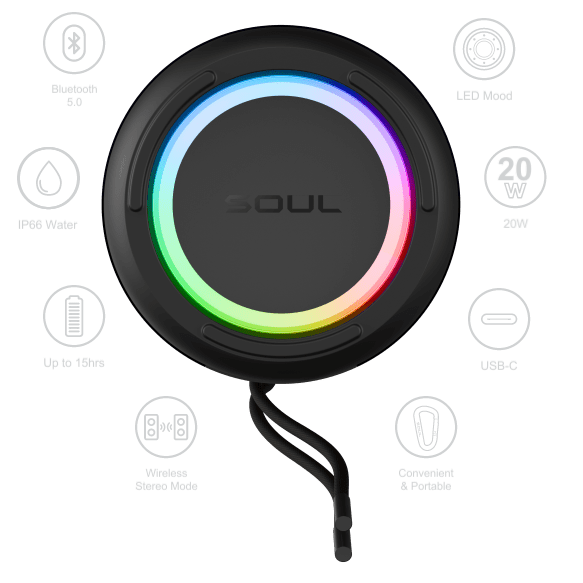
The S-STORM MAX is packed with all the features you need for a durable yet portable music speaker. Rain or shine you can enjoy SOUL’s signature powerful Hi-Fi stereo sound. And it has a customizable LED mood light to suit your mood and color preference.
TAKE IT ANYWHERE
Durable design and construction. Take the S-STORM MAX anywhere, with its IP66 dust and waterproof rating, it can weather any storm or adventure.
BE THE LIFE OF THE PARTY Enjoy up to 15 hours of continuous fun and music enjoyment.
CUSTOMIZABLE MUSIC
MOOD LIGHT
We understand everyone is different, so we designed a beautiful translucent mood light ring for you to choose your favorite color preference in any situation. The mood light allows the S-STORM MAX to change colors with the beat of your music + 7 color options (Red, Violet, Blue, Teal, Green, Cool green, Multi-color) or you can simply turn if off.
WIRELESS STEREO MODE You can sync two S-STORM MAXs together and enjoy extra powerful stereo sound. Once they are paired, the audio will be separated into two channels for higher quality stereo sound.
UNIVERSALLY PORTABLE AND COMPATIBLE
The S-STORM MAX is equipped with a lanyard and carabiner for extra portability and security. It’s also engineered with 3 different input options in case your connected bluetooth device runs out of juice: Aux in, TF card, USB drive slot.
POWERFUL SOUND
Powerful Hi-Fi stereo sound for all your portable music needs. The S-STORM MAX has two passive radiators for ultimate bass enhancements.
Standby Time: 310 hours
Playtime: Up to 15hrs (varies by volume level and content)
Just like a new car starts to lose value the second you drive it out of the dealership, phones start to depreciate as soon as you take them out of the box – and some depreciate in value much faster than others.
musicMagpie’s Annual Phone Depreciation Report uses our own trade-in data to compare the values of the most popular phones from Apple, Samsung, Google, OnePlus and Huawei, for three years from the date the device was launched, creating a definitive guide to phone depreciation.
We’ve crunched the numbers to help you reduce the amount of money you lose from depreciation and help you make smarter choices for the environment too.
Of all the 5G phones released, the iPhone 12 Pro, one of Apple’s first 5G-enabled models, managed to retain its value the best in the six months after release, dropping by just 32%. Samsung’s first 5G-enabled phone release, the Samsung 10 5G, lost a higher 55% of its value in the first six months.
The 10 phones which held the most of their value at 12 months are all iPhones – making them the better investment for people who are likely to trade their device back in every year to upgrade.
The iPhone 11 has held onto its value the best, depreciating by 33% in the first 12 months. The iPhone 11 Pro, and iPhone 8 Plus take the 2nd and 3rd positions, losing 36% and 38% of their value respectively after 12 months.
The OnePlus 7T and the Samsung S7 Edge are the best performing non-Apple phones, losing 50% and 52% of their value in their first 12 months on sale.
The Huawei Mate 30 Pro was the worst performing phone in our 2021 report, losing a huge 87% of its value in the first year. The Huawei P20 and OnePlus 8 were the next worst performing phones, losing 84% and 83% of their value after just 12 months.
Apple’s worst performing model was the iPhone X, which lost 51% of its value 12 months after launch. The Samsung models which depreciated most in the first 12 months were Samsung Flip, which lost a substantial 83% of its value, and the Samsung Fold, which lost 75%.