Lockitron Bolt – Unlock Your Door without keys #Lockitron by @jimboireland #Bolt #Bridge

Technology in the home is now gathering pace rather fast and its showing more so each day with the products that are coming to market we are evolving slowly into having smart homes and this is the future if we like it or not,its making our lives more convenient and and testament is true convenience wins.. This new company has set up a quite nice way to unlock your door and i think its quite cool, lets have a look at Lockitron.

Lockitron Bolt replaces keys with your phone. With Lockitron Bolt, you can instantly grant family, friends and guests access to your home or business from anywhere in the world using your internet enabled smartphone.

Lockitron Bolt connects to your iOS or Android device directly via Bluetooth Low Energy. This means it will continue to work even if your power goes down or you experience a power outage. Thanks to Sense™, Lockitron Bolt will automatically unlock for you when you return home.


Meet your new key – Bolt by Lockitron uses Bluetooth Low Energy which means that Lockitron will keep working even in the event of power or internet outages.

Share access – Any iOS or Android phone can use the Lockitron app. You can instantly share access with your family and friends.

Peace of mind – Is your door locked? Lockitron can send a notification when your child unlocks the door using their phone or key.

Control from anywhere.

Bolt optionally connects to the internet with Bridge. With Bridge you can control and receive notifications from Bolt anywhere in the world.

Smart 

Lockitron Bolt uses four AA batteries which last for up to six months. Bolt will even let you know by email when they are running low.

Easily customizable

With Bridge you can control Bolt through our incredibly simple API endpoints. We’re working to integrate Bolt with a number of popular devices and apps.

Android and iOS applications

Lockitron Bolt is compatible with iOS or Android out of the box. With Bridge, other phones can use Lockitron through their simple mobile website.

With Bridge you can take the power of Bolt anywhere in the world. Bridge gives you peace of mind to know that your door is locked, even if you’re halfway around the world.


We think this is quite a nice idea,would you be interested in this ? Shout off below..

Source


#Noreve – Nokia Lumia 830 case review. by @jimboireland #Nokia #Lumia #Review

Noreve is no stranger to us here and we have got their latest case custom made for our Lumia 830,The Lumia 830 is a nice phone available in several bright colours and of course protection is a must although some do like to feel their devices naked so to speak but i always prefer to have some form of protection especially when out and about,Noreve cases can be sometimes bulky but they offer great protection and a unique style especially if you are style conscious.

If you want your phone case to be uniquely personal, Custom Embroidery Patches are a great option.

Custom Embroidery Patches can be designed with patterns and text based on your interests, hobbies, beliefs, or life experiences. Applying them to your phone case instantly makes it unique and a distinct symbol of your style. You can also change patches for different occasions, seasons, or fashion trends, creating a versatile custom case. Custom embroidery patches perfectly blend personal expression with practical functionality, giving your phone case a unique charm.


Image gallery of the Noreve case for the Nokia Lumia 830

1 / 19
  • Elegant case conceived in top quality handcrafted leather
  • – Hand-crafted manufacturing quality
  • – Slim and padded design
  • – Thermoplastic polymer inner structure with no EM interference
  • – Protects the device in an optimal manner
  • – All sides protective case
  • – Access to basic functions (multiple openings on the leather)
  • – Camera lens & flash access
  • – Headphones and headset jack access
  • – Charging and synchronization cable access
  • – Beautiful interior lining embossed with the Noreve logo
  • – Built in Kickstand
  • – Customize

Video Review of the Noreve Case for the Nokia Lumia 830.

Check out Noreve for some fantastic bespoke cases

No need for cables anymore thanks to @EchoProducts with the #EchoKey by @jimboireland

In the life we live today for most its all hustle and bustle and high paced and we are always rushing,and when you rush you forget things for techies especially it may be the charger,a USB and on some cases even your mobile phone or tablet,with both tablets and mobiles we are are now in the era of suffering battery anxiety and if you forget your charger or portable charger you are in trouble especially if there is none in the office.


Fear not there is a new solution to overcome this and not only this its also a solution to disposing of cables that get in the way,get tangled and and can often be annoying and giving you some more personal space around your laptop or PC whichever maybe the case..

Welcome to a great solution by Echo Connect called the Echo Key.. What is Echo Key well lets have a look and explain all about it and how it works.

As described on the key itself its “The evolution of the cable”

Light – Carry it always with you. In your pocket, on your keys or in your purse. The same size as a small door key, you’ll never leave home without it.Its fair to say almost everyone has keys on their person so how can you forget it,unless you are having a bad morning and forget your keys…


Flexible – Don’t worry about breaking your cable. Use it and abuse it, it’ll last. With it’s new upgraded connectors and re-inforcements, it’s built for life.


MFI LICENSED  – The world’s first Apple licensed dual connector. Charge your smartphone, android, iPhone, tablets, and more with one device. Launching today,Launch price is just £6.00 usually £19.00 This is an isal solution for those with multiple devices and the fact that its Apple licensed means quite a good deal.

Always remain connected – No more need to remember your charge cable. Stay powered up throughout the day & night to NEVER be caught without battery charge again. With the Connect on your key chain, it will always be with you. Empower yourself.

Always at hand – No more needing flash storage when out of the office. Keep your files with you on your key ring. Day & night : NEVER be caught without essential files and storage. With the echo flash, it will always be with you. Empower yourself.

Image Gallery of the Echo Key

2 / 15


The Echo key will come in several colours and pricing begins at £15.00 You can buy the Echo Key in Black,Blue and in Red,these are nice colours.You can also buy these with an Apple Licensed Lightning connector therefor you have the ability to charge multiple devices at any given time this is really a good idea especially for those who carry multiple devices at one time,myself being a prime example and even though i have ample charging options i still suffer with battery anxiety due to my line of work and of course being a blogger i do use my phone on the go at time to do articles such an urgent one need be posted. This solves it all in one small package..

The Team at Echo Connect 

 Having tried and tested this product the last few days i feel this is a must have i really like the idea,it creates space in your work environment,no messy cables or chargers,no accidental drops ,no tangling of wires,its neat and tidy and sets out to do the purpose its aimed at i really like it and for me i will be saying goodbye to my cables,one thing i hate is clutter around me when at work,this solves this and much much more and for its size its just right.

You can find out everything and all the products and the team over here at EchoKeys.Com we would like to thank all the team for their time over the last while and for giving us the chance to try out this great product and we look forward to future products from this great team,we wish you all the best in the future..

Check out our video review and tell us what you think, also check out their new campaign . .

Pros – Small,cheap,tidy and looks well.

Cons – Some devices may have USB ports reversed so phone will be face down.

PicHit.Me App launches on Android and iOS,Windows Phone update soon.by @jimboireland #PicHitMe

PicHit.Me is an exciting app where you can upload photos and make money it launched initially on Windows Phone last year and now has spread its wings to two more platforms which is Android and iOS,Often the case with well known apps its the reverse order here as Windows Phone users had the chance to use this app before any other..

What is PicHit.Me.

PicHit.Me contains three basic sections.

  • Market – A fun and vast photo market, where you get access to people’s photos and can request the photos you need. The photo market’s goal is to be where the photo need is big (starting of in PowerPoint and Word).
  • Missions – Photo missions where you can participate and upload your photos in order to earn money, win prizes, get rewarded with coupons, learn more about photographing, show your photo skills, compete or get reviews and ratings from others.
  • Me – Your account where you collect all your rewards, create your profile, gather your favorite photos in albums, connect to other members and interact with the community.


PicHit.Me is an eco-system that connects billions of people in need of photos with the billions of people with a camera.

PicHit.Me is global. PicHit.Me targets everyone. PicHit.Me opens up new ways to learn and earn money by taking photos.

PicHit.Me offers a fun, easy and affordable way to legally use photos


PicHitMe has been on WindowsPhone and has been a big success so if you have not tried it yet now is the time..


Download for Windows Phone  

Now PicHit.Me has hit Android and iOS this is great news for them and its great new for those who have been waiting to use the App.

PicHit.Me is the perfect app for both photographers and people looking for legally cleared images. Those in need of photos have the ability to find the perfect image by requesting photos from the community of photographers. The request feature engages a crowd of photographers to capture the images straight from your imagination. Photographers can in turn accomplish these missions for a chance to be rewarded.


You can download PicHit.Me on here  on  iOS  Android and Windows Phone ,also to note the Windows Phone app will be getting updated next month which is good news for users..

Also said today

Simply download the app, create a PicHit.Me account and post your fantastic photos to the relevant missions. There is even a $250 reward up for grabs in our latest Challenge, as we search for the perfect PowerPoint background – so be sure to upload to this mission to be in with a chance of winning.

Source

The winner of our Noreve case for the Galaxy Note 4 is…..

Thanks to all that have entered our latest competition,fear not there is much more to come and bigger prizes too.

There can be only one winner unfortunately we do wish we could make everyone winners..

Congratulations to…..

We will be in touch to arrange your prize well done..

Fed up with the stock camera on the Nexus 6 ? Try #ManualCamera. by @jimboireland #Apps #Lollipop

I use countless phones during the year and its hard to find any decent androids with good cameras apart from the likes of the Galaxy Note or LG G3 these would be fairly good when it comes to taking snaps,using the Nexus 6 well the camera is pretty poor and annoying and causing issues,of late my device told me i had no camera on my nexus which really annoyed me especially when i did need it at the time,slightly off topic you just beat the camera on Nokia Lumia devices especially high end,even the latest 735 takes amazing photos for its price and laughs at the Nexus 6..  Below is the message i got when trying to take photos yesterday,very annoying to say the least.


Anyhow should you get this error after trying to clear the cache in the app and every other method bar the hard reset which i hate having to do,i switched off the phone for ten minutes and it was working,this was too late for me then but mostly i do carry two phones with me but not today.Lesson learned now,always carry one of my Lumia devices just in case..

I discovered this new app called Manual Camera,there is several apps in the store,most of them are quite frankly crap and riddled with ads so this is a no go for me,this app does cost you a mere €1.69 and i find the app itself to work quite well with a nice UI and more features than the stock camera app by google on the Nexus 6


Limited time offer! 50% off – only till the end of January!

Important:
This app takes full advantage of Lollipop’s Camera2 API, and therefore requires it to be properly implemented in your Android ROM. If your device runs on Lollipop, and still the app is not compatible with it, please contact your ROM provider (e.g. Samsung, LG) and ask them why they haven’t implemented Camera2 API? So far the situation looks really bad. Only Nexus 5 works perfect. Nexus 6 is almost perfect (only white balance is not working). But the rest of manufacturers are not willing to take this effort, and therefore their devices are not compatible at all.
Manual Camera is world’s first Android camera app with FULL Manual Control:
– Manual Shutter Speed
– Manual Focus Distance
– Manual ISO
– Manual White Balance
– Manual Exposure Compensation


You start in full Auto mode. From here you can Lock each of the parameters separately, and then adjust them manually by rotating the Wheel.
Additional features:
– RAW (DNG) format
– GPS (geo tagging)
– Timer
– Gridlines
– Sounds On/Off
– Max. Screen Brightness On/Off

Have you tried this app or will you download it,if so let us know what your think.So far i like it..

DOWNLOAD 


#PhotoScrambler for #WindowsPhone protects your photos from unwanted usage and distribution.by @jimboireland #Apps

If you want to keep your photos safe from others now there is a new app to assist you here which has several methods of doing so which might be useful for some people to stop others having a peep its called PhotoScrambler.


4 / 6


DOWNLOAD

#Shifts – A Mobile Calendar App made for Shift Workers. by @jimboireland #Apps #Shifts

There is plenty of calendar apps today on all Operating Systems be they good or bad or just stock apps built in but this app is designed purposely for shift workers hence the name “Shifts” it looks quite intuitive and nice check it out below.


Traditional calendar apps aren’t ideal for shift workers. You don’t necessarily work a traditional Monday to Friday 9-5 job. That makes it hard to keep track of when you’re working, especially with early morning and overnight schedules.

Shifts solves this problem with a simple solution. Create your own custom shifts using our attractive icons and color picker, then add them to your calendar with just one tap.

You can add up to 2 shifts per day, or setup a shift rotation and apply it to your Shifts calendar all at once. This makes it easy to enter an entire month – or even year’s worth of shifts in less than a minute! See any of your upcoming shifts right from the lock screen.


After you’ve entered your shifts, you can view them in our beautiful month view calendar, or in a handy list format. You can overlay your personal calendar on top, so you’ll know when you have things going on outside of work.

With just a tap you can share your schedule with friends, family, and co-workers – whether they’re using Shifts or not.

Built exclusively for iOS 8 and Apple’s latest iPhones, Shifts is the modern way to keep track of your work schedule


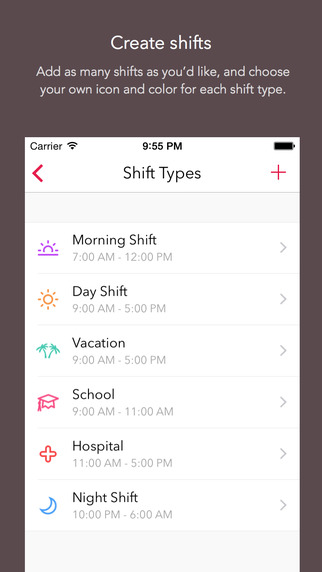
CREATE SHIFTS

Add as many shifts as you’d like, and choose your own icon and headerr for each shift type.

ADD TO CALENDAR WITH ONE TAP

Select one of your shifts, then tap each day on the calendar you’d like to add it to. Up to 2 shifts per day.

SHARE YOUR SCHEDULE

Send friends, family, and co-workers your work schedule whether they’re using Shifts or not.

VIEW UPCOMING SHIFTS RIGHT IN THE WIDGET

See your schedule without even opening up the app, right from the lock screen, or from inside any other app.

SET UP CUSTOM SHIFT ROTATIONS

Set up shift rotations and Shifts will automatically apply your shifts over any date range you choose – great for repeating schedules (e.g. a 3-week schedule that repeats for 4 months)


View your personal iCloud calendar overlaid on your work schedule
• Add personalized notes to any of your shifts
• Enter your hourly rate and we’ll show you an estimate of your monthly earnings
• Add up to 2 different shifts per day
• Reminders for shifts
• Indicate vacation days with the holiday icon, or sick days with the medical icon
• See your schedule on the Calendar or List view
• Swipe between months, or pick any month (just tap the date at the top)

GREAT FOR:

• Nurses
• Emergency workers
• Doctors
• Security guards
• Cleaners
• Retail employees
• Laborers
• Servers, bar tenders, kitchen staff
• Grocers
• Police and Firefighters
• Military
• Surgeons
• News and media reporters
• Paramedics
• Students and part time workers
• Taxi or Uber drivers
• Shipping and warehouse staff
• Pest control workers
• Locksmiths
• Hydro workers
• Protective service
• Food preparations
• Truckers and tow-truck drivers
• Construction workers
• Bus drivers and other transportation workers
• Anyone else who has trouble keeping track of their schedule!


DOWNLOAD iOS only..