
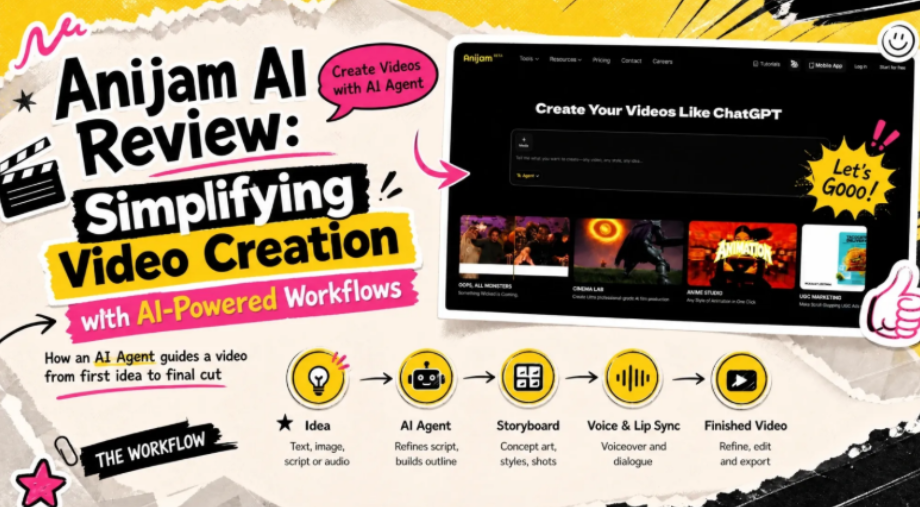
More and more creators are turning to AI tools for video creation. AI video generators have cut out much of the hassle of filming, editing and switching between apps, and a rough idea can become a clip in minutes. But regular users soon run into a new set of problems. A script has to be strong before any visuals are generated, characters and voices can drift from scene to scene, and small details are hard to control or fix without starting over. Every extra attempt also costs time and credits.
Anijam AI is an AI creative platform built to tackle those problems. An AI Agent guides the process, refining the script, building a full story outline and generating the storyboard, while characters, voices and editing stay on one canvas where creators keep control. This review looks at what Anijam AI can create, how a project moves from an idea into a finished video, and who is likely to get the most from it.
What Is Anijam AI?
Anijam AI is an AI video creation platform built around an AI Agentand a growing library of ready-made templates. Instead of learning timeline software, users describe an idea in plain language and work with the Agent through chat to turn it into a video.

It is an all-in-one platform that keeps everything on one canvas, from script and concept art to storyboard and editing. You can start with any input such as a script, an image, a videoor an audio file. Besides, the platform runs on both web and mobile.
The result is a tool aimed at creators, marketers and storytellers who want finished videos without a full production setup.
What Can You Create with Anijam AI Video Generator?
Anijam AI Video Generator turns text, images or scripts into finished videos, and its wider toolset is organised by goal, so the same platform can handle a quick social clip or a multi-episode story. These are the main formats it supports.

Storytelling Videos
Storytelling videos bring written narratives and creative ideas to life through visual scenes, characters and dialogue. With Anijam AI, creators can turn a story concept or script into a sequence of scenes, complete with character designs and lip-synced dialogue. This makes it useful for visual storytelling, fictional narratives, short cinematic videos and more.
Series & Short Dramas
AI-generated series and short dramas focus on episodic storytelling, with recurring characters, connected plots and multiple episodes. Anijam AI helps creators maintain character consistency across different scenes and episodes while developing stories over time. This makes it easier to produce serialized content for audiences who enjoy following ongoing stories, particularly on short-video platforms.
Animation
Animated videos can be made in several looks, including anime, Ghibli-style, 3D, cartoon and Minecraft-style animation. This range suits children’s stories, learning videos and playful social clips, where a bright, expressive style matters more than realism.
Social Media & Trending Videos
Ready-made templates and trending formats help creators produce short, shareable clips for TikTok, Reels and YouTube Shorts. They work well for videos made from a single photo or a quick idea, and new templates are added regularly to follow what is popular.
Marketing, Ads and Product Videos
Brands can turn product photos into promotional clips, create ad videos or make UGC-style content for their campaigns.
Character & Avatar Videos
Characters can be created, animated and given a voice with lip sync. That makes the platform useful for talking-character videos, avatar-style presenters and audio-led clips. It also suits brand mascots and creators who prefer to stay off camera.
Educational & Ex plainer Videos
Teachers, trainers and businesses can turn lessons, presentations or onboarding material into explainer videos. The format suits short lessons, product walkthroughs and staff training, where a clear visual explanation works better than text alone.
From an Idea to a Finished Video: How Does Anijam AI Work?
Anijam AI moves a project through connected areas of one workspace rather than between separate apps. The Tools panel sits on the left, the canvas and Story Blocks in the centre, and the Story Agent on the right.

Anijam’s workspace: Tools, canvas, Story Blocks and the Story Agent in one view.
Start with Any Input
A project can begin with a text prompt, a reference image, a video, a full script or an audio file. Creators can also pick a template, so there is a way in whatever material they already have.
The AI Agent Plans the Production
In the Story Agent chat, the creator describes the video. The Agent drafts a story outline, creates concept art for the characters and key objects, and builds a storyboard. It also offers a choice of visual styles before generating full shots.
Each result is placed in a matching Story Block, and creators can edit the text or add reference images. The Agent reads those changes when it continues.
The Tools Panel for Flexible Creation
The Tools panel offers a more hands-on way to create. AI Image and AI Video generate new visuals, while Lip Sync, Character, Voice and Style manage how a project looks and sounds. Results appear on the canvas, ready to sit beside the Agent’s work.
Refine the Result with Prompts and the Timeline
Once a video is generated, it can keep improving. A new prompt asks the Agent to revise a scene or shot, while the built-in timeline editor fine-tunes captions, motion timing and transitions. The finished video can then be exported.
One Canvas Brings Everything Together
The canvas is an infinite workspace for arranging and comparing images and videos, which helps with larger projects. Because script, scenes, characters, voices and editing all live in one place, there is no need to export files between apps. That is the main reason the workflow feels simpler.
What Makes Anijam AI Really Different?
Beyond the basic workflow, a few features set Anijam apart.
AI Video Agent Works as Your Assistant
Rather than returning a single clip from one prompt, the Agent acts like a production assistant. It handles planning, structure and larger changes through conversation, while the creator keeps control of the direction. That balance suits beginners and more experienced creators alike.
Character Consistency & Built-In Lip Sync
Characters are designed once and carried across scenes and episodes, which helps series and long videos look cohesive. For voices, Anijam AI offers a library covering more than 30 languages and also accepts uploaded audio, with lip sync matching mouth shapes and timing to the dialogue.
Visual Style & Trending Templates
The style library spans anime, Ghibli, 3D cinematic, cartoon, pixel art and realistic looks. Alongside it, a growing set of trending templates gives creators a quick starting point when they would rather adapt a format than begin with a blank prompt.
Multiple AI Video Models
Anijam AI brings several AI video models into one workspace, including Seedance 2.0, Kling O3, Wan 3.0 and Minimax Hailuo H3. Creators can choose the model that suits a shot, or generate the same scene with different models and compare the results.
Mobile-to-Web Sync
The mobile app suits quick, template-led videos, while the web version offers the full canvas for larger projects. Projects sync between the two, so an idea started on a phone can be continued on a bigger screen.
How to Use Anijam AI Video Generator (Step-by-Step)
The steps below follow Anijam AI’s web version, where the Agent, the canvas and the tools sit side by side. It takes a project from first idea to exported video in five stages.
Step 1: Sign Up and Choose How to Start
·Open Anijam AI and sign up or log in.
·Choose how to begin:
·Use the prompt box on the home page.
·Click New project to open a blank canvas.
·Pick a template and adapt it to your idea.
·Arrive at the workspace. Every route ends on the canvas, where you type your idea or upload media.
Step 2: Chat with the Story Agent
·Tell the Agent what you are making and the Agent will refine the script, draft a Story Outline, create Concept Art for each characters and key object, and build a Storyboard step by step.
·Pick a visual style from the previews it suggests or the style library before it generates the full shots.
Step 3: Review and Edit the Results
·Edit text inside a Story Block, such as the story outline or a scene description.
·Upload your own reference images into a Block.
·Drag content onto the canvas to compare shots or rearrange the sequence.
·Use AI Image or AI Video in the Tools panel to swap a character portrait or create an alternative shot.
Step 4: Add Voice and Lip Sync
·Generate a voiceover with the Voice tool, or upload your own audio.
·Apply Lip Sync to match character mouths to the dialogue.
Step 5: Refine, Export and Share
·Adjust scenes with prompts or the timeline, then export the finished video.
·Share your finished work if you like. Anijam AI’s Creator Program invites creators to submit original videos for rewards.
Is Anijam AI Worth It?
For creators who want a simpler route from idea to video, it looks like a practical option. Here is how it weighs up.
Strengths
Everything in one project. Script, visuals, voice and editing stay together.
A low barrier to entry. Chatting with the Agent or adapting a template needs no editing background.
Flexible ways to start. Text, images, scripts, audio or templates all work, on web or mobile.
Highly editable at every stage. Each stage can be reviewed and approved before the next begins, and everything on the canvas can be edited, which gives creators more control over the result.
Limitations
Generation can slow at peak times. Waiting times may increase when the platform is busy.
Who It Is For
Anijam AI works best for people who want finished videos without a full production team.
Storytellers and series creators. Script and storyboard support from the Agent, plus consistent characters and voices, suits short dramas, story-led series and longer narrative videos.
Social media creators. Templates and trending formats make it easy to turn a quick idea or photos into a shareable clip.
Marketers and small brands. Product photos can become promotional clips, ads and UGC-style content without a shoot.
Educators and trainers. Lessons, walkthroughs and onboarding material can become clear explainer videos.
Beginners. Chatting with the Agent means being guided through each step, and no editing background is needed to get started.
Final Thoughts
The first wave of AI video tools made it easy to generate a clip. The harder task is turning an idea into a complete video, with a strong script, consistent characters and room to refine every detail. That is where the workflow matters as much as the model behind it.
Anijam AI shows what that shift can look like. An Agent guides the script, outline and storyboard, one canvas keeps every stage together, and creators stay in control of the characters, voices, styles and edits. The result is a simpler path from a good idea to a finished video.
As AI becomes part of everyday video creation, AI-powered workflows like Anijam’s are likely to shape where video creation goes next. By simplifying the steps from first idea to final cut, they give creators more time for what matters most: finding strong ideas and telling better stories.