
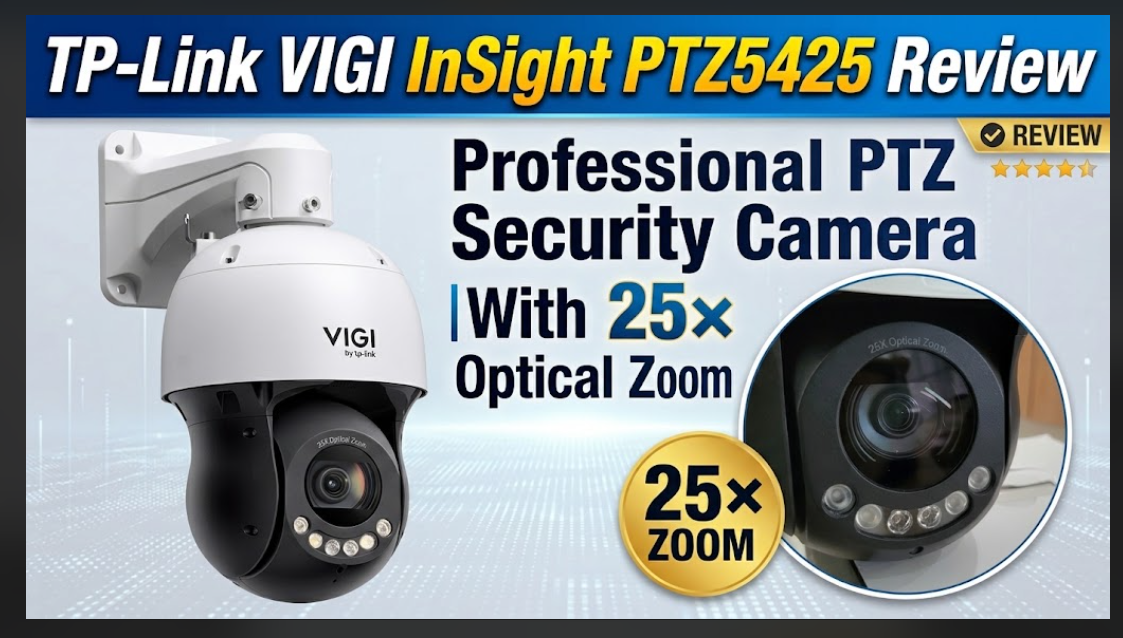
The TP-Link VIGI InSight PTZ5425 With 25× Optical Zoom is the latest high end security camera on offer and TechBuzzIreland has extensive experience with the TP-Link ecosystem, having covered products across its TP-Link, Deco, Tapo, ranges. Our previous hands-on experience includes Mesh Wi-Fi, smart home devices, smart lighting, power products and indoor and outdoor security cameras. This gives us useful experience of TP-Link’s approach to connected and security technology, so we were interested to see how the VIGI InSight PTZ5425 performs as a professional PTZ surveillance camera.
What is the TP-Link VIGI InSight PTZ5425 With 25× Optical Zoom
The TP-Link VIGI InSight PTZ5425 is a 4MP outdoor network speed dome security camera designed for large-area surveillance. It combines 25× optical zoom, 16× digital zoom, 360° pan coverage, intelligent auto tracking and smart detection, along with support for both local and network-based recording.
It is a substantial camera. The metal construction gives it a solid feel, and at approximately 2.8 kg, this is not a small or discreet camera. That physical size may be something to consider depending on where it is being installed, although its appearance will also act as an obvious visual deterrent.
The camera is rated IP66 for weather protection and IK08 for vandal resistance, with 6kV lightning protection and an operating temperature range from -30°C to 65°C.
The camera can be powered using 12V DC or PoE. It is worth noting that a 12V power supply is not supplied with the camera, so if you are not using PoE, you will need to provide a suitable 12V power supply separately.
The camera also features a 10/100M Ethernet port with PoE support.
Key features
- 4MP resolution
- 25× optical zoom
- 16× digital zoom
- 360° pan coverage
- Intelligent auto tracking
- Human and vehicle classification
- Smart detection
- Up to 300 presets
- Eight patrols
- 32 pattern scans
- Red and blue warning lights
- Integrated audio
- MicroSD storage up to 512GB
- ONVIF Profile G, S and T
- IP66 weather protection
- IK08 vandal resistance
- 6kV lightning protection
- VIGI App, Web UI and VIGI Cloud VMS support

Installation and setup
One of the areas I found particularly straightforward with the PTZ5425 is the initial setup.
The process starts by scanning the QR code on the box, which takes you through to the TP-Link VIGI app. The Android version currently has a 5.0-star rating from approximately 9.66K reviews and more than 500K downloads, which is useful feedback when looking at the overall app experience.

The setup itself is easy. The app can be used to add the camera by scanning the QR code, while there are also other connection options, including network auto-discovery and manual entry.
For installation, I would recommend setting the camera up on a workbench first rather than mounting it immediately. Getting the camera connected, configuring the app and updating the unit before putting it into its final position makes the process easier.
The camera can also be connected directly to a router using Ethernet, with the 12V power supply connected to the camera when required. As mentioned above, the 12V power supply itself is not supplied, so this needs to be considered if PoE is not being used.
Once connected, the app can be used to update the camera and configure the username and password. The password is also required when accessing the camera through an NVR.
Storage options
The camera has a built-in MicroSD card slot supporting capacities up to 512GB.
When using local recording, we would recommend choosing a good-quality, recording-grade MicroSD card from a reputable supplier, rather than simply selecting the cheapest high-capacity card available.
When the card is inserted, the camera provides verbal communication advising that the SD card needs to be formatted. This can be completed easily through the system.
Recordings can then be accessed directly through the VIGI app, while connecting the camera to an NVR provides another option and allows the NVR’s own software to be used for configuration.
This gives the PTZ5425 several different ways of being deployed rather than forcing the user into one recording method.
The VIGI App
The TP-Link VIGI app is an important part of the overall experience.
The app provides remote live viewing, playback, event searching, notifications, smart detection features, two-way audio and multi-camera monitoring. It can also be used to configure and manage compatible VIGI devices.
One of the things I particularly like here is the choice of setup and connection options. The camera doesn’t have to be used in one particular way, with options including the app, direct network connection, MicroSD storage, NVR integration and VIGI cloud/VMS options.


The app also allows cameras to be shared with other users, with configurable permissions, which could be useful where more than one person needs access.
For a security camera, having an app that is straightforward to use is important, and the combination of the setup process and the very strong user rating gives some useful context here.
PTZ and zoom
This is where the PTZ5425 really starts to differentiate itself from a conventional fixed security camera.
The camera provides 360° pan coverage and a motorised varifocal lens with 25× optical zoom. There is also 16× digital zoom.
The PTZ system supports up to 300 presets, eight patrols and 32 pattern scans, allowing different viewing positions to be configured.
Presets can be particularly useful where there are specific areas that need to be monitored regularly. Rather than manually moving the camera each time, predetermined viewing positions can be configured and accessed directly.
The camera can also patrol preset positions on a schedule and react to motion or analytics events.


The camera’s pan and tilt movement is fast, with preset pan speeds of up to 240°/s. Combined with the optical zoom and auto tracking, this provides considerable flexibility when monitoring larger areas.
Smart detection and tracking
The PTZ5425 has a wide range of detection options.
These include:
- Human detection
- Vehicle detection
- Intrusion detection
- Line crossing
- Region entering
- Region exiting
- Loitering
- Abnormal sound detection
- Scene change detection
- Camera tampering detection
Human and vehicle classification can also be used to help reduce unnecessary notifications.
This is useful in real-world environments where there can be a lot of movement. For example, rather than receiving notifications for every type of movement, the system can be configured around human and vehicle activity.
The detection settings can also be configured according to time, providing additional flexibility.
Intelligent auto tracking can be triggered by humans, vehicles or events, allowing the camera to follow activity rather than simply recording a fixed area.
Image and low-light performance
The PTZ5425 uses a 4MP sensor and records at up to 2688 × 1520 resolution, with the main stream supporting up to 30fps in 60Hz operation and 25fps in 50Hz operation.
The camera also includes image processing features such as WDR, BLC, 3D DNR, HLC, SmartIR, digital defog and electronic image stabilisation.
For night-time use, the camera has IR and integrated white-light illumination. The camera specifications provide an IR range of up to 100 metres and white-light illumination up to 50 metres.
The low-light capability is therefore a significant part of the camera’s specification, particularly for larger outdoor areas.
However, while the overall feature set is extensive, I did have some reservations around the image processing in use. This is worth mentioning because having a long list of image-processing features does not automatically mean every scene will produce the same result.
Audio and active deterrence
The PTZ5425 includes a built-in microphone and speaker, allowing two-way communication.
There are also dedicated audio input and output interfaces, along with alarm inputs and an alarm output.
The camera incorporates red and blue warning lights and a siren, providing active deterrence in addition to simply recording an event.
This could be useful where the camera is being used to monitor a defined area and there is a requirement not just to record activity but also to provide a visible or audible response.
Connectivity and integration
The PTZ5425 offers several connection options.
It has a 10/100M Ethernet port with PoE support, along with support for a range of network protocols.
Importantly, it also supports ONVIF Profiles G, S and T, allowing it to be integrated with compatible third-party systems.
The camera is designed around the VIGI surveillance platform rather than the Omada SDN platform, and can be managed through the VIGI App, Web UI or VIGI Cloud VMS.
For users who already have an NVR or another compatible surveillance ecosystem, the ONVIF support is an important consideration.
It means the camera does not necessarily have to operate as a completely isolated device.
Physical size
There is no getting away from the fact that this is a large and heavy PTZ camera.
At around 2.8kg, with its substantial metal construction, it is considerably more imposing than a typical compact home security camera.
For a domestic installation, this could be a consideration both from an installation and visual perspective. On the other hand, the size makes it very clear that this is a serious surveillance device, and its physical presence can itself act as a deterrent.
For commercial premises, yards, larger properties or areas requiring wider surveillance coverage, the size is less likely to be an issue.
Overall
The TP-Link VIGI InSight PTZ5425 With 25× Optical Zoom is a feature-rich PTZ camera aimed at larger surveillance requirements rather than simply being another small home security camera.
What stands out is the 25× optical zoom, 360° coverage, intelligent tracking, human and vehicle classification, extensive detection options and the variety of ways the camera can be connected and configured.
The setup is straightforward, particularly through the VIGI app, and there are plenty of options available depending on how the camera is intended to be used. It can operate with MicroSD storage, connect to an NVR, use VIGI software or be integrated with compatible systems through ONVIF.
The VIGI app is another strong part of the overall package. The setup is easy, the app provides a good range of functions and the current 5.0-star Android rating from a high number of reviews is encouraging.
The camera is also extremely solidly built, with its IP66 weather protection and IK08 vandal resistance adding to its suitability for outdoor deployment.
There are, however, some things to consider. This is a physically large and heavy camera, so installation needs to be planned accordingly, particularly in a domestic environment. The 12V power supply is also not included, so anyone intending to use 12V DC rather than PoE will need to source a suitable power supply separately.
There is also a considerable amount of functionality here, and while that provides flexibility, some users may find that there are more options than they actually require.
For local recording, we would also recommend using a good-quality recording-grade MicroSD card from a reputable supplier rather than opting simply for the cheapest high-capacity card.
I also have some reservations around the image processing, so I would recommend looking at the accompanying photographs and video rather than judging the camera purely from its specification sheet.
Overall, TP-Link VIGI InSight PTZ5425 With 25× Optical Zoom is broader with capabilities of the TP-Link VIGI range, particularly when it comes to professional surveillance, PTZ control, analytics and integration. For anyone requiring extensive coverage and a camera that offers multiple connection and configuration options, this is a model that provides plenty to work with.