
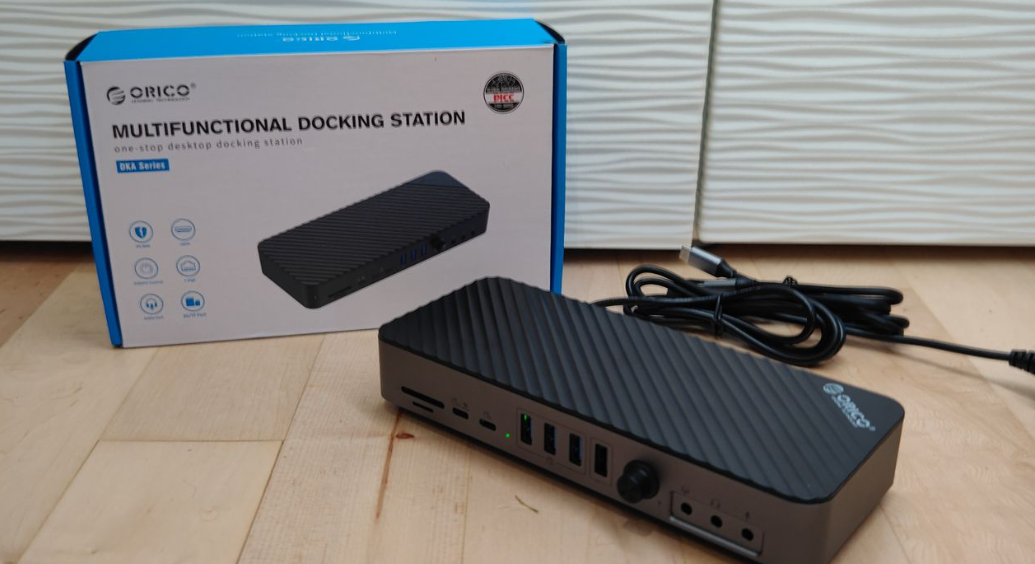
Docking stations have become increasingly important for users working across multiple screens, laptops, and accessories, particularly as modern laptops continue removing dedicated ports. The Orico DKA Series Multifunctional Docking Station aims to provide an all-in-one desktop connectivity solution with what Orico describes as a 20-in-1 setup.
Having used and tested the unit in a practical work environment, the DKA Series focuses heavily on connectivity and reducing desktop cable clutter while still remaining straightforward to use.
Features
- 20-in-1 docking station design
- HDMI, DisplayPort, and VGA outputs
- Supports up to four displays
- USB-C laptop connection and charging
- 3x USB-A 3.0 ports
- 3x USB-A 2.0 ports
- SD and TF card readers
- Dedicated headphone and microphone jacks
- Physical volume control knob
- Independent power button with LED indicator
Design and Build
The docking station uses a combination of lightweight aluminium alloy and ABS materials. Despite being relatively lightweight, the unit still feels solid on the desk and does not feel cheaply constructed.
One feature immediately noticeable is the independent power button with LED status light. This is a practical addition as it avoids needing to disconnect power directly from the socket when not in use.
Unlike many docking stations currently on the market, Orico has also included dedicated audio controls with separate headphone, microphone, and 2-in-1 audio jacks alongside a physical volume knob. For users regularly on calls, using headsets, or connecting speakers, this is genuinely useful in day-to-day use.

Connectivity
The main strength of the DKA Series is the extensive number of available ports.
Video connectivity includes:
- 1x HDMI
- 2x DisplayPort
- 1x VGA
HDMI vs DisplayPort
While most users are familiar with HDMI, DisplayPort (DP) is commonly used on PC monitors and multi-monitor desktop setups.
For normal office work and video playback, both HDMI and DP work very well. However, DisplayPort can offer advantages for higher refresh rate monitors and more advanced multi-screen setups.
HDMI remains the more compatible option for TVs and general devices, while DisplayPort is often better suited for PC workstations and multiple monitor configurations.
The inclusion of both HDMI and DP on the Orico dock gives users flexibility depending on their monitor setup and usage requirements.
Comparison between HDMI and DisplayPort usage scenarios.


USB connectivity includes:
- 3x USB-A 3.0 (5Gbps)
- 3x USB-A 2.0 (480Mbps)
Additional features include SD and TF card readers along with the dedicated audio ports.
While the VGA connection may have limited use for many users in Ireland and the UK today, it may still be useful in office, education, or legacy hardware environments.
The inclusion of older USB-A 2.0 ports may also appear dated initially, however they remain practical for lower bandwidth peripherals such as keyboards, mice, printers, and wireless dongles.

Setup and Everyday Use
Setup was straightforward during testing. Devices simply connect through their relevant ports, while the laptop connects directly through the supplied USB-C cable.
The docking station supports up to four monitors depending on system compatibility and display configuration. During use, the dock helped significantly reduce desktop clutter by allowing displays, accessories, and peripherals to remain permanently connected at the rear of the unit.
One of the biggest practical advantages of modern USB-C docking stations compared to older proprietary laptop docks is flexibility. Switching between laptops becomes much easier, requiring only a single USB-C connection rather than multiple cables and chargers.
The dock also provides laptop charging through USB-C with quoted power delivery up to 90W.
For most standard laptops this should be more than sufficient for everyday use. However, users with larger power-hungry laptops such as gaming laptops, mobile workstations, or 15-inch and 16-inch MacBook Pro models should be aware that under heavier workloads the dock may not fully maintain battery charging while in use.
In practical terms, the docking station may still power the laptop and operate correctly, but the battery could slowly drain or remain static during intensive workloads.
Conclusion
The Orico DKA Series Multifunctional Docking Station delivers strong connectivity options with minimal setup effort. Its biggest strengths are the wide range of display outputs, dedicated audio controls, and the ability to simplify desktop cable management through a single USB-C connection.
The addition of the physical volume knob and separate audio ports helps the dock stand out from many competing models which often focus purely on USB expansion.
While the 90W power delivery may not fully satisfy high-performance laptops during intensive workloads, it should be more than adequate for most standard business and productivity users.
Overall, the DKA Series is a practical multi-purpose docking station that focuses on compatibility, ease of use, and reducing workspace clutter without overcomplicating the setup process.