ROOM Teams Up with Zoom and HP to launch Purpose-Built Video Conferencing Room for Zoom in Ireland

ROOM is launching ‘Room for Zoom’ in Ireland with Zoom Video Communications, Inc and HP Inc. This turnkey video collaboration suite for modern offices and workplaces will support businesses to better connect remote employees with those who have returned to the office.

Room for Zoom provides a tailored space for one of the most popular collaboration software, and at the same time bridges the gap between in-person and remote working for the new hybrid workplace that puts people’s needs first.

As workers in Ireland get ready to readjust to life back in the office, demand for integrated workspace designed for Zoom’s video communications platform will increase. Room for Zoom is a soundproof, modular architecture solution that’s fitted with built-in VC lighting, a monitor, webcam, skylights, connected power sources, ventilation and more to offer the ultimate video conferencing room.

In a time when the workspace is at stake, it needs a complete overhaul In a recent survey carried out by Ireland Thinks, 71% of workers said that if they can work remotely, they should have the right to do so. Earlier this month, the IBEC said
that workplaces in Ireland must be facilitated in their attempts to manage requests for remote working in a flexible and collaborative manner which is suitable for their business.

The CIPD — the body representing HR professionals also published a survey in late 2021 on hybrid working. Its figures suggest that 40% of surveyed employers expect that more than half of their staff will work from home after the pandemic has ended. Most employees expect to work part of the time in a central or local office.

It’s clear that in a post-pandemic Ireland, people will demand flexible, hybrid work arrangements — neither working entirely from home, nor entirely from an office.

“The return to office working is a much-debated topic among businesses and workers globally, but one thing that everyone agrees on is video communications are very much here to stay. We’ve teamed up with Zoom and HP to create a solution that allows employees in the workplace to seamlessly connect with their remote-based colleagues” said ROOM Co-Founder, Morten Meisner-Jensen. “Our aim is not just about changing spaces – we want to rethink and redesign our relationship with work. Improving life for employees at work is now on the radar of CEOs and CFOs globally. This is why we have designed a space in which employee-centric software and modular architecture complement each other. Modular architecture makes workspace design affordable and flexible because it can grow with a company.

It’s something that’s right for today but can also be reconfigured to evolve with the changing needs of a business tomorrow” added Meisner-Jensen. Room for Zoom: Modular architecture that meets the needs of a hybrid world Room for Zoom, like all of ROOM’s modular products, includes sustainable soundproofing made from recycled plastic bottles, which is engineered to reduce noise by 27dB. The Room also features a custom accessory rail for personal belongings, and a whiteboard provides users with a comfortable, clutter-free workspace and ample natural light.

ROOM’s innovative, adaptive, modular office furniture provides dedicated environments for both individual or collaborative work. ROOM’s products are pre-fabricated, sustainably sourced, and flat-packed, offering both quick assembly and continued flexibility to accommodate the changing needs of companies navigating the post-pandemic return to physical offices.

To combat the uncertainty of flexible lease terms and hybrid work models, ROOM helps to inform customers’ spatial planning across workspaces with Room Sense. This is the company’s proprietary analytics dashboard that provides companies with real-time data on product utilization and office density.

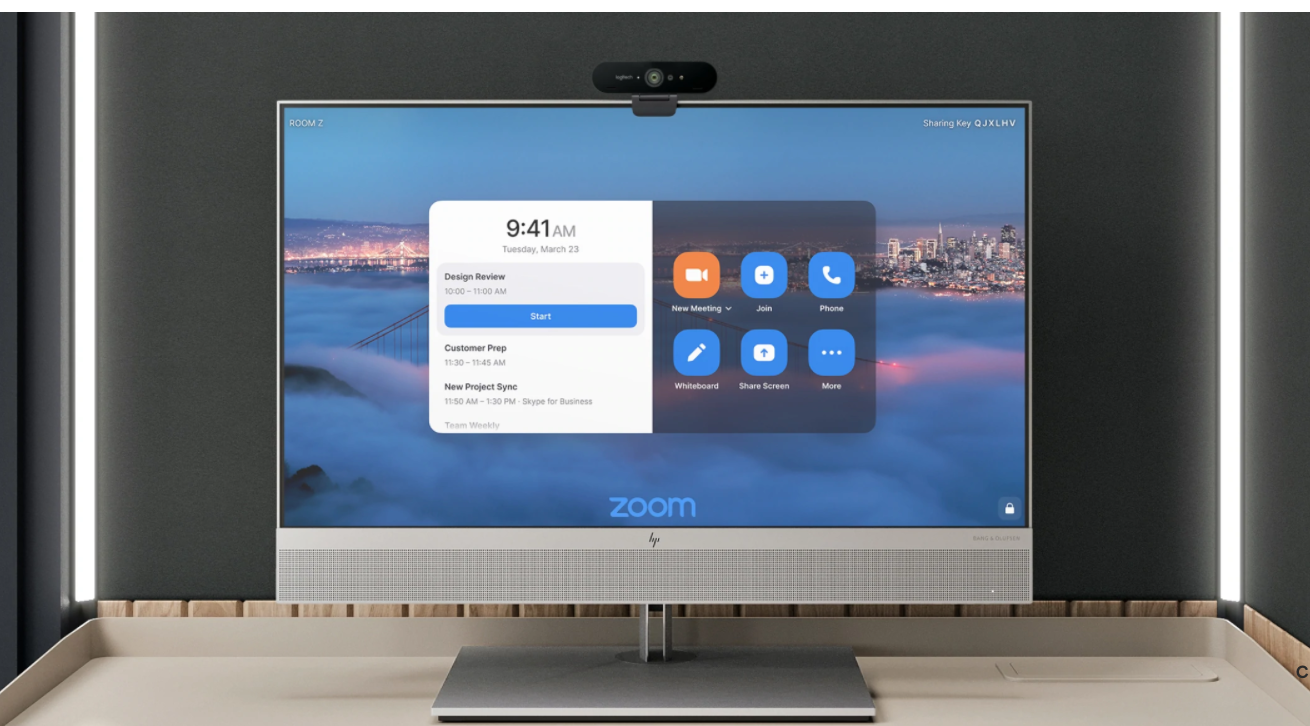
Room for Zoom combines ROOM’s modular Focus Room with an HP Collaboration G6 27-inch All-in-One touchscreen, paired with a Logitech Brio Ultra HD PRO Business Webcam, pre-installed with Zoom Rooms software for seamless communication and collaboration in ROOM’s modular solution.

Room for Zoom also features two custom-built LED light strips with remote dimming that create the perfect, shadow-free video conference experience. Room for Zoom is available in two different colour pallets, light and dark, and costs €16,495. More information on Room for Zoom is available here.

As with ROOM’s modular Focus Room, Room for Zoom will also feature:

● Adjustable desk heights, providing comfort for all seating positions
● Built-in power sources, so employees never run out of battery
● Silent fans and fresh air ventilation to ensure the working environment comfortable, regardless of the season
● Optional HEPA filtration for clean, filtered, fresh air

“Architecture and location can be a source of stress during video calls: lighting, background noise and the chance someone could walk into the room during a conversation. ROOM worked with us to put together a product that removes those pain points while helping people in workplaces in Ireland work more closely together, regardless of their location,” adds Phil Perry, Head of UK & Ireland at Zoom. “We’re excited by this collaboration, and we’re looking forward to seeing Room for Zoom roll out across Ireland in the coming months.”

For more information on ROOM’s workplace solutions visit room.com.

Proofreading Mistakes That You Might Want to Avoid

The process of writing a text is complex and has phases that need to be followed to ensure quality. One of these phases is proofreading, which is the process of checking the text for grammar mistakes, typographical errors, and other inaccuracies. Proofreading is important because it is the final chance to catch and correct any errors in a text before it is published. A well-edited and proofread text looks more professional, accurate, and polished. In addition, catching and correcting errors can improve the clarity of a text.

Proofreading is an important step in the writing process because it can make your text look more professional and error-free. However, if you don’t do it correctly, you might end up making mistakes that can affect the overall quality of your text. In this article, we will discuss some common proofreading mistakes that you should avoid

Fully relying on Spellcheckers

Many people make the mistake of relying too much on spell checkers. Spellcheckers are helpful tools, but they are not perfect. They can often miss mistakes, especially if the words are spelled correctly, but are used in the wrong context. For example, the word “its” is spelled correctly, but it is used in place of “it’s” (which is short for “it is”). Sometimes other words might simply be in the wrong place or function, and if you are not too savvy with doing the final assessment on your own, consider hiring UK proofreaders that can help scan your text with a fresh pair of eyes. This is an amazing benefit because writers sometimes go back and forth with a text so many times they simply go over those mistakes, not even noticing them. 

Not reading your text out loud

Another common proofreading mistake is not reading your text out loud. This is a good way to catch errors because when you read aloud, you can hear how the text sounds and catch mistakes that you might have missed when you were reading it silently. It is considered good practice when you are taking a break from sitting and writing to stand up and stretch, and try to read the text out loud. Doing these two things at the same time will help you stay focused and catch any mistakes you may have missed.

Making assumptions about grammar rules

There are many rules about grammar that seem like they should be followed, but there are also many exceptions to these rules. If you are not sure about a particular rule, it is best to look it up rather than make assumptions. For example, the rule about using “than” versus “then” is often confused by writers. “Than” is used when comparing things, and “then” is used to indicate time or sequence. However, there are many cases where either word can be used incorrectly. The best way to determine which word to use in a specific situation is to look it up in a grammar book or online grammar resource.

Not using a style guide

When you are writing, it is important to use a style guide to ensure that your text is consistent and appears polished. A style guide will provide you with the rules for formatting your text, using correct punctuation, and referring to sources. There are many different style guides, such as the MLA Style Guide and the APA Style Guide. If you are not familiar with a particular style guide, it is best to consult with someone who is before you start writing your text.

Editing for clarity

One of the most important aspects of proofreading is editing for clarity. This means checking your text to make sure that all of the points are clear and that there are no confusing or ambiguous passages. You can do this by reading your text out loud and asking yourself the following questions: 


  • Is the meaning of each sentence clear?
  • Are the points being made in a logical order?
  • Are any words or phrases unclear?
  • Can any sentences be shortened or rewritten for clarity?
  • Is the tone of the text appropriate?


If you answer “no” to any of these questions, then you will need to revise your text for clarity.

Repeated words or phrases

Another mistake that can be made when proofreading is to have repeated words or phrases. This can make the text appear choppy and disrupt the flow of the writing. You can check for this by reading your text aloud and listening for any words or phrases that are repeated. If you find any, revise them. Repetitive words make the entire syntax sound poor and unprofessional, and in case you don’t have an alternative way of restructuring that part of the text, you can always try to find a synonym for the repeated word. 

Using incorrect punctuation

One of the most common mistakes that people make with punctuation is using it incorrectly. This can happen when people are not familiar with the rules about how to use punctuation properly. A good way to avoid making this mistake is to familiarize yourself with the rules and then practice using them correctly. You can also use a style guide to help you with this. Another common mistake that people make is using the wrong type of punctuation mark. For example, using a comma instead of a semicolon or vice versa. You can avoid this by being familiar with the different types of punctuation marks and knowing when to use each one.

Leaving comma splices 

A comma splice is a mistake that occurs when two independent clauses are joined together with only a comma. This can make the text difficult to read and can be confusing for the reader. You can avoid this by making sure that each clause is properly punctuated. This means using either a comma and conjunction (such as “and” or “but”) or a semicolon to join the clauses together.


Proofreading is an important part of the writing process because it can make your text look more professional and error-free. However, if you don’t do it correctly, you might end up making mistakes that can affect the overall quality of your text. In this article, we will discuss some common proofreading mistakes that you should avoid.