PUZZLEPHONE Goes Ahead with a new Concept- PUZZLECLUSTER by @Tiwaash #PuzzlePhone #Tech

Sometime back we had an exclusive interview with the team of PuzzlePhone and we were pretty much impressed by the whole concept of dividing the phone into The Spine, Brain and Heart & still keeping it affordable allowing the users to just change the module which needs an upgrad. You can know about PuzzlePhone here. Moving ahead, PuzzlePhone is in news again & yet again for a unique solution to improve the life of the product and reduce the electronic waste.

The team at PuzzlePhone has come up with a new solution and they say “There is life even afterlife. At Circular Devices we believe that a product’s life cycle can be extended beyond its initial planned usage, thereby delaying its obsolescence. With electronic waste becoming an increasing threat for our planet, we took it upon ourselves to find an alternative to the inevitable disposal of your device”.

Here is the detailed explanation of what PUZZLECLUSTER project is all about:

Even if your smartphone can no longer deliver the performance you seek, it still contains a fully working computer, and there is no reason it should be discarded straight away. Our unique technology enables your device to be easily upgraded by replacing the PUZZLEPHONE’s Brain CPU module. The PUZZLEPHONE Brain is a self-contained computer in a convenient modular enclosure that is easily connectable. However, we are developing a state-of-the-art technology that will enable your old Brain modules to live on after you decide to upgrade.

http://www.puzzlephone.com/wp-content/uploads/2015/01/PuzzleCluster-A4-rev3-flatten_lr.png

PUZZLECLUSTER, the first scalable computer cluster platform based on recycled modular mobile technology.

The PUZZLECLUSTER will allow PUZZLEPHONE Brain modules to be reused and connected to form a fully integrated computer cluster. Our goal is to deliver a scalable product that can meet the needs of home users and small and medium enterprises, but also public institutions and data centers. Its applications can range from research and data analysis, to rendering farms and in-house cloud services, as well as any other case that requires parallel computing.

Initially, the PUZZLECLUSTER will include a power supply, internal connectivity for the PUZZLEPHONE Brain modules and supporting peripherals and external connectivity. It will also provide slots for PUZZLEPHONE Battery modules, which will be used for built-in UPS functionalities.

Thanks to this, all the computing power of the PUZZLEPHONE can live beyond its lifecycle in the device, and continue to live for a very long time as part of the PUZZLECLUSTER.

“When developing the PUZZLEPHONE, we always think about the whole cycle, from sourcing components to manufacturing, the device use itself and what to do when the time to upgrade comes,” says Alejandro Santacreu, Circular Devices CEO. “The PUZZLEPHONE Brain is a fully functional low power computer ready to be integrated in the PUZZLECLUSTER. It makes no sense to discard a perfectly working computer just because you have upgraded your smartphone. The PUZZLECLUSTER will extend the usable life of the PUZZLEPHONE Brain modules way beyond any other smartphone processor”.

At Circular Devices, our priority is to deliver state-of-the-art technology while minimizing our environmental footprint. We achieve this by thinking about the whole product life cycle before and after its planned use and exploring innovative and disruptive concepts like the PUZZLEPHONE and the PUZZLECLUSTER. We don’t dream about the future, we make it happen now.

We are very pleased with such great thought and initiative from the team at Circular Devices & wish them all the best for the future projects.

Stay tuned for more tech buzz.

PicHit.Me App launches on Android and iOS,Windows Phone update soon.by @jimboireland #PicHitMe

PicHit.Me is an exciting app where you can upload photos and make money it launched initially on Windows Phone last year and now has spread its wings to two more platforms which is Android and iOS,Often the case with well known apps its the reverse order here as Windows Phone users had the chance to use this app before any other..

What is PicHit.Me.

PicHit.Me contains three basic sections.

  • Market – A fun and vast photo market, where you get access to people’s photos and can request the photos you need. The photo market’s goal is to be where the photo need is big (starting of in PowerPoint and Word).
  • Missions – Photo missions where you can participate and upload your photos in order to earn money, win prizes, get rewarded with coupons, learn more about photographing, show your photo skills, compete or get reviews and ratings from others.
  • Me – Your account where you collect all your rewards, create your profile, gather your favorite photos in albums, connect to other members and interact with the community.


PicHit.Me is an eco-system that connects billions of people in need of photos with the billions of people with a camera.

PicHit.Me is global. PicHit.Me targets everyone. PicHit.Me opens up new ways to learn and earn money by taking photos.

PicHit.Me offers a fun, easy and affordable way to legally use photos


PicHitMe has been on WindowsPhone and has been a big success so if you have not tried it yet now is the time..


Download for Windows Phone  

Now PicHit.Me has hit Android and iOS this is great news for them and its great new for those who have been waiting to use the App.

PicHit.Me is the perfect app for both photographers and people looking for legally cleared images. Those in need of photos have the ability to find the perfect image by requesting photos from the community of photographers. The request feature engages a crowd of photographers to capture the images straight from your imagination. Photographers can in turn accomplish these missions for a chance to be rewarded.


You can download PicHit.Me on here  on  iOS  Android and Windows Phone ,also to note the Windows Phone app will be getting updated next month which is good news for users..

Also said today

Simply download the app, create a PicHit.Me account and post your fantastic photos to the relevant missions. There is even a $250 reward up for grabs in our latest Challenge, as we search for the perfect PowerPoint background – so be sure to upload to this mission to be in with a chance of winning.

Source

The winner of our Noreve case for the Galaxy Note 4 is…..

Thanks to all that have entered our latest competition,fear not there is much more to come and bigger prizes too.

There can be only one winner unfortunately we do wish we could make everyone winners..

Congratulations to…..

We will be in touch to arrange your prize well done..

Fed up with the stock camera on the Nexus 6 ? Try #ManualCamera. by @jimboireland #Apps #Lollipop

I use countless phones during the year and its hard to find any decent androids with good cameras apart from the likes of the Galaxy Note or LG G3 these would be fairly good when it comes to taking snaps,using the Nexus 6 well the camera is pretty poor and annoying and causing issues,of late my device told me i had no camera on my nexus which really annoyed me especially when i did need it at the time,slightly off topic you just beat the camera on Nokia Lumia devices especially high end,even the latest 735 takes amazing photos for its price and laughs at the Nexus 6..  Below is the message i got when trying to take photos yesterday,very annoying to say the least.


Anyhow should you get this error after trying to clear the cache in the app and every other method bar the hard reset which i hate having to do,i switched off the phone for ten minutes and it was working,this was too late for me then but mostly i do carry two phones with me but not today.Lesson learned now,always carry one of my Lumia devices just in case..

I discovered this new app called Manual Camera,there is several apps in the store,most of them are quite frankly crap and riddled with ads so this is a no go for me,this app does cost you a mere €1.69 and i find the app itself to work quite well with a nice UI and more features than the stock camera app by google on the Nexus 6


Limited time offer! 50% off – only till the end of January!

Important:
This app takes full advantage of Lollipop’s Camera2 API, and therefore requires it to be properly implemented in your Android ROM. If your device runs on Lollipop, and still the app is not compatible with it, please contact your ROM provider (e.g. Samsung, LG) and ask them why they haven’t implemented Camera2 API? So far the situation looks really bad. Only Nexus 5 works perfect. Nexus 6 is almost perfect (only white balance is not working). But the rest of manufacturers are not willing to take this effort, and therefore their devices are not compatible at all.
Manual Camera is world’s first Android camera app with FULL Manual Control:
– Manual Shutter Speed
– Manual Focus Distance
– Manual ISO
– Manual White Balance
– Manual Exposure Compensation


You start in full Auto mode. From here you can Lock each of the parameters separately, and then adjust them manually by rotating the Wheel.
Additional features:
– RAW (DNG) format
– GPS (geo tagging)
– Timer
– Gridlines
– Sounds On/Off
– Max. Screen Brightness On/Off

Have you tried this app or will you download it,if so let us know what your think.So far i like it..

DOWNLOAD 


#PhotoScrambler for #WindowsPhone protects your photos from unwanted usage and distribution.by @jimboireland #Apps

If you want to keep your photos safe from others now there is a new app to assist you here which has several methods of doing so which might be useful for some people to stop others having a peep its called PhotoScrambler.


2 / 6


DOWNLOAD

#Shifts – A Mobile Calendar App made for Shift Workers. by @jimboireland #Apps #Shifts

There is plenty of calendar apps today on all Operating Systems be they good or bad or just stock apps built in but this app is designed purposely for shift workers hence the name “Shifts” it looks quite intuitive and nice check it out below.


Traditional calendar apps aren’t ideal for shift workers. You don’t necessarily work a traditional Monday to Friday 9-5 job. That makes it hard to keep track of when you’re working, especially with early morning and overnight schedules.

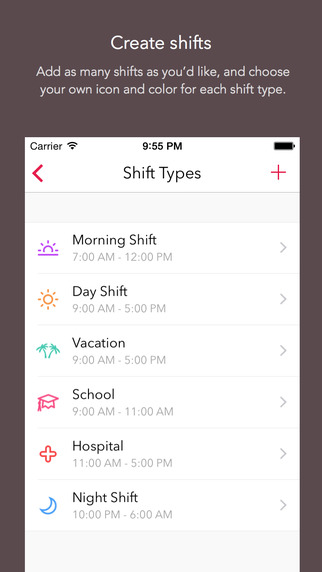
Shifts solves this problem with a simple solution. Create your own custom shifts using our attractive icons and color picker, then add them to your calendar with just one tap.

You can add up to 2 shifts per day, or setup a shift rotation and apply it to your Shifts calendar all at once. This makes it easy to enter an entire month – or even year’s worth of shifts in less than a minute! See any of your upcoming shifts right from the lock screen.


After you’ve entered your shifts, you can view them in our beautiful month view calendar, or in a handy list format. You can overlay your personal calendar on top, so you’ll know when you have things going on outside of work.

With just a tap you can share your schedule with friends, family, and co-workers – whether they’re using Shifts or not.

Built exclusively for iOS 8 and Apple’s latest iPhones, Shifts is the modern way to keep track of your work schedule


CREATE SHIFTS

Add as many shifts as you’d like, and choose your own icon and headerr for each shift type.

ADD TO CALENDAR WITH ONE TAP

Select one of your shifts, then tap each day on the calendar you’d like to add it to. Up to 2 shifts per day.

SHARE YOUR SCHEDULE

Send friends, family, and co-workers your work schedule whether they’re using Shifts or not.

VIEW UPCOMING SHIFTS RIGHT IN THE WIDGET

See your schedule without even opening up the app, right from the lock screen, or from inside any other app.

SET UP CUSTOM SHIFT ROTATIONS

Set up shift rotations and Shifts will automatically apply your shifts over any date range you choose – great for repeating schedules (e.g. a 3-week schedule that repeats for 4 months)


View your personal iCloud calendar overlaid on your work schedule
• Add personalized notes to any of your shifts
• Enter your hourly rate and we’ll show you an estimate of your monthly earnings
• Add up to 2 different shifts per day
• Reminders for shifts
• Indicate vacation days with the holiday icon, or sick days with the medical icon
• See your schedule on the Calendar or List view
• Swipe between months, or pick any month (just tap the date at the top)

GREAT FOR:

• Nurses
• Emergency workers
• Doctors
• Security guards
• Cleaners
• Retail employees
• Laborers
• Servers, bar tenders, kitchen staff
• Grocers
• Police and Firefighters
• Military
• Surgeons
• News and media reporters
• Paramedics
• Students and part time workers
• Taxi or Uber drivers
• Shipping and warehouse staff
• Pest control workers
• Locksmiths
• Hydro workers
• Protective service
• Food preparations
• Truckers and tow-truck drivers
• Construction workers
• Bus drivers and other transportation workers
• Anyone else who has trouble keeping track of their schedule!


DOWNLOAD iOS only..

Microsoft’s Windows 10 Event – At a Glance by @Tiwaash #Microsoft #Windows10

Finally the much awaited event went live today where Microsoft showcased all about Windows 10 and some new technology which there are introducing the world to. Windows 10 is the most advanced OS made by Microsoft, which will work on various devices of various sizes. Continue reading to know what happened at the event today.

Windows 10 Overview

After the event went live, Terry Myerson announced on stage that, for the first year after Windows 10 launches, any device running Windows 7, Windows 8.1, or Windows Phone 8.1 will be able to upgrade to the latest version of MIcrosoft’s OS — for free. Which we consider is good thing as far as users are concerned.

Taking feedback from 1.7 million insiders from the Microsoft Insider Program, Windows 10 can easily be called as the most advanced OS from the company which offers seamless multitasking with special attention on the user security and privacy and comes with loads of features. The key features are listed below

  • Now Cortana is made available on PCs & laptops with advanced capabilities and “Hey Cortana” activates the personal assistant.
  • Improved design and interface.
  • New universal apps for PC such as Outlook, Calendar etc. now are more functional and go well with the whole interface.
  • Project Spartan is here to replace Internet Explorer. Spartan is fast responsive and feature rich, providing you with the option to create notes right on the browser, there is reading mode on board and many more.
  • Gaming is getting a massive push in Windows 10. A new Xbox app enables Game DVR for sharing clips of most PC games with your friends — and they’re sent across Xbox Live, so Xbox One owners can watch as well.

Cortana for Windows 10

On the desktop of Windows 10, Cortana takes the form of a search box located right beside the Start button. The box will allow you to search the web and your local computer, with results popping up above it. Cortana can be used to perform simple searches, but as on Windows Phone, it can also be used to surface much richer information, like flight statuses. Cortana can also be used to send and dictate emails, control music, and launch apps. Notifications will also pop up here.

Windows 10 for Phones

Joe Belfiore today demonstrated the new experience tailored specifically for phones and tablets with screens of 8 inches and smaller. The most immediate change is a shift of the background image to sit behind the UI tiles, making for a much tidier and more attractive interface. The settings menu has also been cleaned up dramatically, with Belfiore noting it’s a universal app that will function identically whether on the desktop or mobile version. The first build of Windows 10 for phones will be made available to members of the Windows Insider Program in February.

Office for Windows 10 Phone & Tablet

Microsoft demoed Office for Windows 10 today, giving a first look at how it will look on phones and small tablets. It’s a huge improvement over what Word, Powerpoint, and Excel currently look like on WindowsPhone. The new apps look a lot more like their desktop counterparts, just streamlined to make more sense for a small, touchscreen device.

Windows 10 for Xbox One

Microsoft’s gaming chief Phil Spencer just announced that Windows 10 is coming to Xbox One. “For developers that want to bring their application over the TV screen this is going to make it very easy for them to do so.” Microsoft announced a the new Xbox App for Windows 10 and Xbox One Streaming to Windows 10 devices.

New Device: 84-inch Surface Hub tailored for Windows 10

Microsoft unveiled a whole new category of device designed to showcase Windows 10. It’s called the Surface Hub. Surface Hub features an 84-inch 4K display with support for multi-touch and pen input. A 55-inch option will also be available. The massive screen also includes dual cameras, microphones, and a wide array of “advanced sensors,” Microsoft says.

New way of Computing: Windows Holographic with HoloLens Headset

Microsoft also revealed its next great innovation: Windows Holographic. It’s an augmented reality experience that employs a headset, much like all the VR goggles. Microsoft’s solution adds holograms to the world around you. The HoloLens headset is described as “the most advanced holographic computer the world has ever seen.” It’s a self-contained computer, including a CPU, a GPU, and a dedicated holographic processor. The dark visor up front contains a see-through display, there’s spatial sound so you can “hear” holograms behind you, and HoloLens also integrates a set of motion and environmental sensors.

Stay tuned for more tech buzz.

Twitter for Windows Phone gets an update AT LAST. by @jimboireland #Twitter #WindowsPhone

Well its been how many months now since twitter last seen an update on Windows Phone yes it was way back then when Android and iOS reaped updates quite regular especially Twitter for Android.

Todays news will be welcome for many users of the app but i fear third party apps have took over the official with apps like Tweetium and Twabbit for example,Windows Phone users have given up along time ago on the official app so can it claw back any of its old friends,well lets see what is new..

Much awaited was to add photos via DM and to have the ability to upload more than one photo at a time and this is now possible which will help current users of the app.We also have people hub integration also you can now ask Cortana (where available) to send tweet when in the app..You can now also share websites from IE to the app from your device,Apart from that there is no cosmetic changes either so it still looks a bit on the outdated side there and notifications are still an issue and sharing is also missing although you can via IE.

Source   Thanks for the tip Milorad.

Download Twitter for WindowsPhone