Revolut amps up fight against impersonation scams

Revolut, the global fintech with more than 65 million global customers and 12 million in the UK, is today launching a new in-app feature designed to protect users from one of the most insidious types of fraud: impersonation scams. The new feature detects when a customer opening the Revolut app is on the phone – this includes apps allowing voice calls – and confirms whether they are, or not, talking with a Revolut agent. It goes one step further than similar features in the market, helping customers promptly take the right action to report attempted fraud and keep their funds safe if it is found they’re being targeted.

With the rise of AI-generated deepfake voices and increasingly sophisticated social-engineering tactics, criminals are finding new ways to convince consumers they are speaking to their bank or somebody they trust. Impersonation scams trick victims into believing they’re on a legitimate call with a trusted financial institution or person – often pressuring them to move money to safer accounts, to share sensitive data, or to approve fraudulent transactions.

This threat is accelerating rapidly. Scammers can now generate highly convincing scripts and even synthetic voice mimics. Concerningly, A 2021 study found that only 25% of people can accurately distinguish a deepfake voice from a real one – however, most participants falsely believed they could identify the fakes. This leaves people vulnerable to scams – only adding to the surge of APP (Authorised Push Payment) fraud.

Empowering users with timely, actionable protection

Revolut’s new feature introduces a live in-app banner that appears the moment the app detects the user is on a phone call. The system identifies whether the call is coming from Revolut or from another number and advises accordingly:

  • If the caller is Revolut, the banner will confirm that the call is legit
  • If the caller is not Revolut, the user will see a clear, urgent banner informing them that they are not on a call with Revolut
  • Tapping the banner leads users to actionable protection pathways based on what’s happening.

This real-time contextual system provides an additional layer of defence against impersonation attempts that occur during live calls – a scenario where victims can be caught off guard and vulnerable under pressure.

Rami Kalai, Product Owner at Revolut said: “Revolut is committed to building a safer financial future. As fraudsters adopt AI and advanced deepfake tools, we need to innovate fast to defend our customers and stay ahead of rapidly evolving fraud threats. This new feature not only gives users real-time, contextual warnings in the moment they need them most but also guides them to identify impersonation scams providing clear, actionable steps to keep their money safe while the fraud attempt is happening.”

A broader strategy to protect customers

This launch builds on a suite of recent features introduced by Revolut to protect customers from scams and unauthorised activity. In 2024 alone, Revolut’s advanced fraud-prevention systems saved customers more than £600 million that would have otherwise been lost to scams. Recent releases include:

  • In-App Calls – allowing customers to speak to Revolut directly and securely via the in-app feature, eliminating the need to trust phone numbers received externally in the vast majority of cases.
  • Wealth Protection and Street Mode – features designed to keep transfers safe through biometric verification and delay them, in the case of Street Mode, to contrast specific events like transfer mugging.
  • Enhanced machine-learning systems that detect and block risky transactions before they leave a customer’s account.

The new feature is already active for all Revolut customers with an iOS device. Android users will need to proactively authorise the feature from the Security Hub.

Disclaimer

This feature is optional for Android users and does not guarantee complete protection

Over 6,500 Irish SMEs directly helped by National Enterprise Hub in its first 12 months

Over 6,500 SMEs have been directly supported by the all-of-Government National Enterprise Hub (NEH) in the first 12 months since its launch.

The top grants availed of by businesses ranged in value from €3,000 to €7,000 and  focused on supporting businesses with cashflow, expansion and productivity to help them deal with concerns around rising costs, and competitiveness.

The National Enterprise Hub has attracted over 220,000 active online users to its website over the last 12 months and also offers a full-time dedicated phone line, connecting business owners with specialist advisors who can discuss potential grant options over the phone.

The National Enterprise Hub, an initiative of the Department of Enterprise, Tourism and Employment and Enterprise Ireland, brings together information and resources on over 250 Government supports from 30 different Departments and State Agencies. Looking ahead, there will be a continued and renewed focus on simplifying business grant applications for SMEs engaging with the National Enterprise Hub.

The businesses are from a range of industries however the majority fall within Tourism & Hospitality, retail & consumer products, food, health & beauty, professional services and the construction sector. This free service makes it easier and more efficient for businesses to access and avail of supports such as grants, funding, loans and expert advice across a range of sectors.

Minister for Enterprise, Tourism and Employment, Peter Burke, said “With over 6,500 companies engaging in its first 12 months, the National Enterprise Hub has proven effective in streamlining and simplifying access for SMEs to government supports, equipping them with vital digital and sustainability resources to navigate rising costs and stay competitive.

Research from my Department shows that four in five businesses believe sustainability is important. An awareness campaign is currently underway showcasing how the NEH can support businesses in cutting costs through grants such as the LEO’s Energy Efficiency Grant and SEAI’s Business Energy Upgrade Scheme.

My focus now with the NEH is on reducing administrative burdens and red tape for businesses by consolidating multiple grant applications into a single, simplified process. We must redouble our efforts to simplify processes for businesses and make sure that we think about small businesses first. I look forward to its continued growth and positive impact on Irish SMEs.”

Conor O’Donovan, Head of Start-Ups and the National Enterprise Hub, said: “SME engagement with the National Enterprise Hub has met and exceeded our targets to date, supporting 6,500 businesses within our first year of operation. One of the main aims of the Hub was to engage with businesses who haven’t availed of government supports to date and to make the process of availing of government supports faster and easier.”

“We know that Irish SMEs are operating in a complex environment and being able to access grants and supports is more important than ever. Small businesses who are engaging with the National Enterprise Hub are concerned about rising cost of business and competitiveness – that is why a single source of government supports for businesses is important to ensure that accessing the right information is made easier.

The National Enterprise Hub has a team of dedicated advisors who are directing SMEs to the right support that will help them. It’s for every business in the country and we’d encourage every business to go online to neh.gov.ie or pick up the phone and start the conversation around your business needs today.”

Audrey Hughes, CEO ofPrinciple HR said: “Like so many Irish SMEs, we are focused on providing the highest quality of service delivery to our customers, while remaining competitive. Accessing government supports to assist can feel daunting but the National Enterprise Hub made the process so much easier by putting us in contact with the right agency whose support and expertise fitted our needs. Through our initial engagement with the National Enterprise Hub, Principle HR is now an Enterprise Ireland client and in a short period of time our business has been helped through the strategic marketing review support and engagement with their overseas market advisors. With the business environment constantly changing, I’d encourage all SMEs no matter what stage they are on their growth journey to contact the NEH today to learn about what supports could be available to them.”


Top Supports Availed of by SMEs through National Enterprise Hub:

•    Dept of Social Protection: Wage Subsidy Scheme

•    Dept of Social Protection: Jobs Plus Subsidy

•    Enterprise Ireland: Pre-Seed Start Fund

•    Enterprise Ireland: New Frontiers Programme

•    Enterprise Ireland/LEO: Innovation Vouchers

•    LEO: Energy Efficiency Grant

•    LEO: Mentoring

•    LEO: Start Your Own Business Programme

•    LEO: Grow Digital Voucher

•    MicroFinance Ireland: Start-up Loan

•    Revenue: Start-Up Relief for Entrepreneurs SURE

•    SBCI: Growth and Sustainability Loan Scheme

•    SBCI: Leasing and Hire Purchase

•    SEAI: Exceed Grant Scheme

•    Skillnet Ireland: Skillnet Business Networks

•    Skillnet: Mentoring

•    Solas: SOLAS Micro-Qualifications


The Hub team can be contacted through the website (www.neh.gov.ie), email enquiry@neh.gov.ie  or by phone (01 727 2100), where users can engage directly with an advisor.

How to create an educational app that will captivate users

In the modern world, educational apps are becoming as important as entertainment apps. Educational companies are actively implementing IT solutions to strengthen the brand and increase profits. Online schools and multimedia courses have already become part of our daily lives, turning PCs and smartphones into indispensable educational tools. 

This trend will continue to intensify, driving growing demand for education software development services among businesses of all sizes. So, how can they create a quality educational app that will captivate users? The developers from Light IT Global are going to help figure it out.

What is an educational app

An educational app is software for distance learning. It is designed to simplify the process of acquiring new skills and knowledge for people of all ages, no matter where they are. These apps are valued for their ability to provide access to education without restrictions on location or physical condition. 

Not all educational apps are limited to mobile devices. There are many successful examples on the market that are available through the internet or have both web and mobile versions. An example is Google Classroom. This app has gained wide popularity due to its availability on the internet and on mobile devices.

What types of educational applications are available?

There are several types of educational apps, each serving different purposes and audiences.

  • Learning management systems (LMS). These are comprehensive platforms that cover the entire educational process, from planning to course delivery and assessment. They offer teachers and students a unified platform for educational tasks.
  • Online course platforms. These platforms provide access to a wide range of educational materials, allowing users to choose what they want to study—from languages to programming.
  • Language learning apps. These apps provide users with tools to learn new languages, including vocabulary, grammar, and conversational practice.
  • Distance learning platforms. These platforms create bridges between teachers and students, offering a place for meetings, knowledge exchange, and learning.
  • Apps for people with special needs. These apps are designed for those who, due to physical limitations, are unable to attend traditional educational settings.
  • Exam preparation apps. These apps support students in preparing for standardized tests and exams.
  • E-book/audiobook apps. Audiobooks and podcasts on educational topics attract those who seek to expand their knowledge through auditory learning.
  • Educational game apps. Games that combine learning with entertainment provide a unique and engaging learning experience for all ages.


Each category serves a specific need in the educational landscape, catering to different learning styles and preferences.

First steps in development

Developing an educational application is a complex process. The experienced developers from Light IT Global have prepared a list of seven key steps to help you get started.

Step #1. Define your offering

Determine what your application will offer. If you’re not sure, refer back to categories of educational applications. Find what sets you apart from competitors. Your application should have unique features or approach to attract an audience.

Step #2. Study your audience

Identify the needs of different user groups. Differences between children, adults, parents, and their preferences are important. Understanding the desires of your target audience is the key to creating a successful product.

Step #3. Conduct market research

Study potential competitors and market trends. It’s important to know what already exists and what problems your product can solve. Pay attention to user reviews of similar applications. This will help you avoid others’ mistakes.

Step #4. Plan functionality

Make a list of everything you want to include. Don’t be afraid to dream big at this stage. Start by creating a prototype and MVP. This will help form the foundation of your application.

Step #5. Choose a platform

Decide whether your product will be a web application, a mobile application, or both. Choose between iOS, Android, or cross-platform solutions depending on your audience.

Step #6. Choose an IT provider

Use networking events and social media such as LinkedIn to find a suitable IT partner. Consider assembling a diverse, cross-functional team to work on the project.

Step #7. Development, launch, and support

After establishing the team, the project moves to the development and testing stages. Monitor feedback and make necessary improvements to keep the application relevant.

This path will provide you with the foundation for creating an effective and in-demand educational application that meets user needs and stands out in the market.

Final thoughts

To outperform competitors in creating an educational application, it is important to focus on market leaders such as Duolingo, Coursera, and Quizlet. According to Likeweb research, these applications dominate in many countries due to their accessibility, engagement, and adaptability.

Success in the educational app market is often linked to free access or freemium monetization model, making content available to a wide audience. Gamification and continuous development, responding to user requests, also play a key role, making learning engaging and maintaining user interest. Adding new features and integrating with social networks can significantly increase audience engagement and loyalty.

#IFA2023 – Garmin launches Venu 3 and Venu 3S GPS smartwatches with new features for wheelchair users

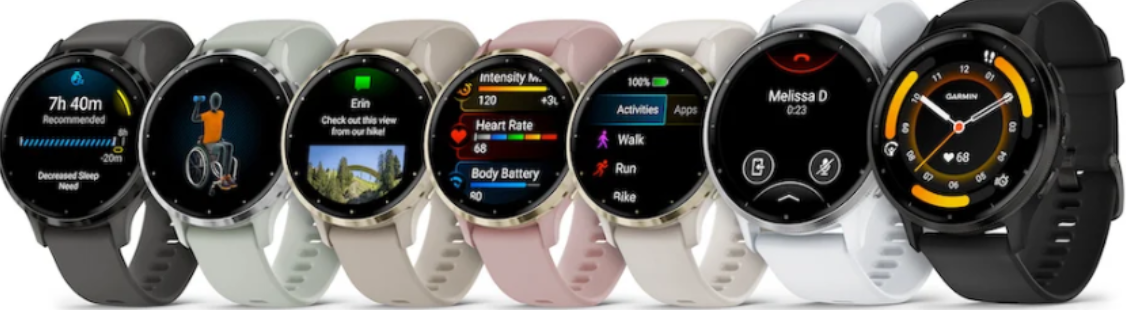
Garmin today announced the Venu 3 and Venu 3S GPS smartwatches designed to support every health and fitness goal. Featuring extensive fitness insights, beautiful AMOLED touchscreen displays and an impressive battery life, Venu 3 series is purpose-built to help users get a more complete picture of their health. It also includes new features for wheelchair users—letting them track pushes, follow wheelchair-specific workouts and more. Stay even more connected with Venu 3 series at home or on the go; a built-in speaker and microphone allow users to make and take phone calls or respond to text messages right from the wrist (when paired with a compatible Apple or Android smartphone). Available in two sizes and comfortable enough to wear all day and night, Venu 3 series gets up to 14 days of battery life in smartwatch mode. And because users don’t have to charge their watch every night, they can monitor health metrics 24/7 and receive a more holistic view of their stress, Body Battery and sleep with new personalized sleep coaching and nap detection.

See how Venu 3 series can help support every health and fitness goal here.

“No matter what your health and fitness journey looks like, Venu 3 is ready to support you every step of the way. Whether your focus is on meaningful rest and relaxation, getting a good workout in, chasing your next PR at an upcoming race, or anything in between, the exciting new features on the Venu 3 series provide even more personalized data, making it easier to understand your body like never before.” – Dan Bartel, Garmin Vice President of Global Consumer Sales

New features to love

  • Sleep coach: Receive a sleep score and personalized coaching for how much sleep is recommended and keep track of different sleep stages, naps and other key metrics such as Pulse Ox1 and heart rate variability (HRV) status.
  • Morning report: Receive an overview of sleep, recovery, HRV status and more upon waking up. Even customize the report to view more personalized details.
  • Nap detection: Automatically track or log naps to see how they may benefit the body and the suggested time and duration they should be.
  • Body Battery improvements: Monitor energy levels throughout the day to find the best times for activity and rest. And get even more details and personal insights on how sleep, naps, daily activities and high stress specifically impact energy levels2.
  • Wheelchair mode: Track daily pushes and receive weight shift alerts plus wheelchair-specific sports apps and workouts. In creating these new features, the algorithms of some existing features were modified to enhance the meaningfulness of key insights for wheelchair users.
  • Workout benefit and recovery time: Better understand how each workout affects the body and how much time is needed to recover to take on any fitness challenge.
  • Rate of perceived exertion: Record how difficult a workout was and how it felt.
  • Interval creation: Build interval workouts for running and cycling activities right on the watch.
  • Meditation activity: Follow guided meditation practices to help reduce stress, anxiety and more.
  • Built-in speaker and microphone: Make and take calls right from the watch (when paired with a compatible smartphone) and use the smartphone’s voice assistant to respond to text messages and more. Those with an Android phone can also view photo messages and respond to texts using the on-watch keyboard.
  • Two font sizes: Choose between a small or larger font size to view smart notifications, workout data and more with greater ease.

For health gurus

Loaded with extensive health and wellness stats, Venu 3 series is ready to help keep users going strong. And with days of battery life, users don’t have to worry about charging their watch every night, meaning they can have access to certain health features 24/7. Day or night, Venu 3 series can track heart rate2, respiration, Pulse Ox, stress andBody Battery energy levels. While sleeping, Venu 3 series will monitor heart rate variability to provide users with a deeper understanding of their overall health and will also track those “zzz’s” while traveling and offer personalized tips to help reduce jet lag.

For fitness fanatics

With more than 30 built-in sports apps, users can track the ways they move—from walking and running to cycling, pool swimming, activities for wheelchair users and more. Venu 3 series even lets users follow preloaded animated workouts for strength, HIIT, Pilates and yoga right from the watch. Plus, users can create their own step-by-step workouts from more than 1,600 exercises in the Garmin Connect app and send them directly to the watch. For those looking to train for a 5K or something a bit longer, free Garmin Coach adaptive training plans can help users prepare. In addition to keeping tabs on daily steps, calories burned and floors climbed, Venu 3 series can track moderate and vigorous intensity minutes, VO2 max during a run or bike ride and cycling power in watts (when paired with a compatible power meter or indoor bike).

For life on the go

Stay connected – even while on the go – with Venu 3 series. In addition to making and taking calls directly from the watch, Venu 3 series lets users receive emails, texts and alerts when paired with their compatible smartphone. Safety and tracking features help provide peace of mind by sending a message with the user’s live location to chosen emergency contacts if they feel unsafe or if an incident is detected3. While out and about, Garmin Pay contactless payments let users breeze through certain checkout lines or transit systems4.Users can also download songs and playlists from Spotify®, Amazon Music and Deezer (subscription required) for phone-free listening. What’s more, users can download apps, watch faces and more from the Connect IQ™ Store right on the watch, or find more options in the smartphone app.

Featuring a lightweight, stainless steel bezel and silicone band, Venu 3 is available in whitestone/silver and black/slate while Venu 3S comes in pebble gray/slate, sage gray/silver, French gray/soft gold, dust rose/soft gold and ivory/soft gold. Available now, Venu 3 series has a suggested retail price of $449.99.