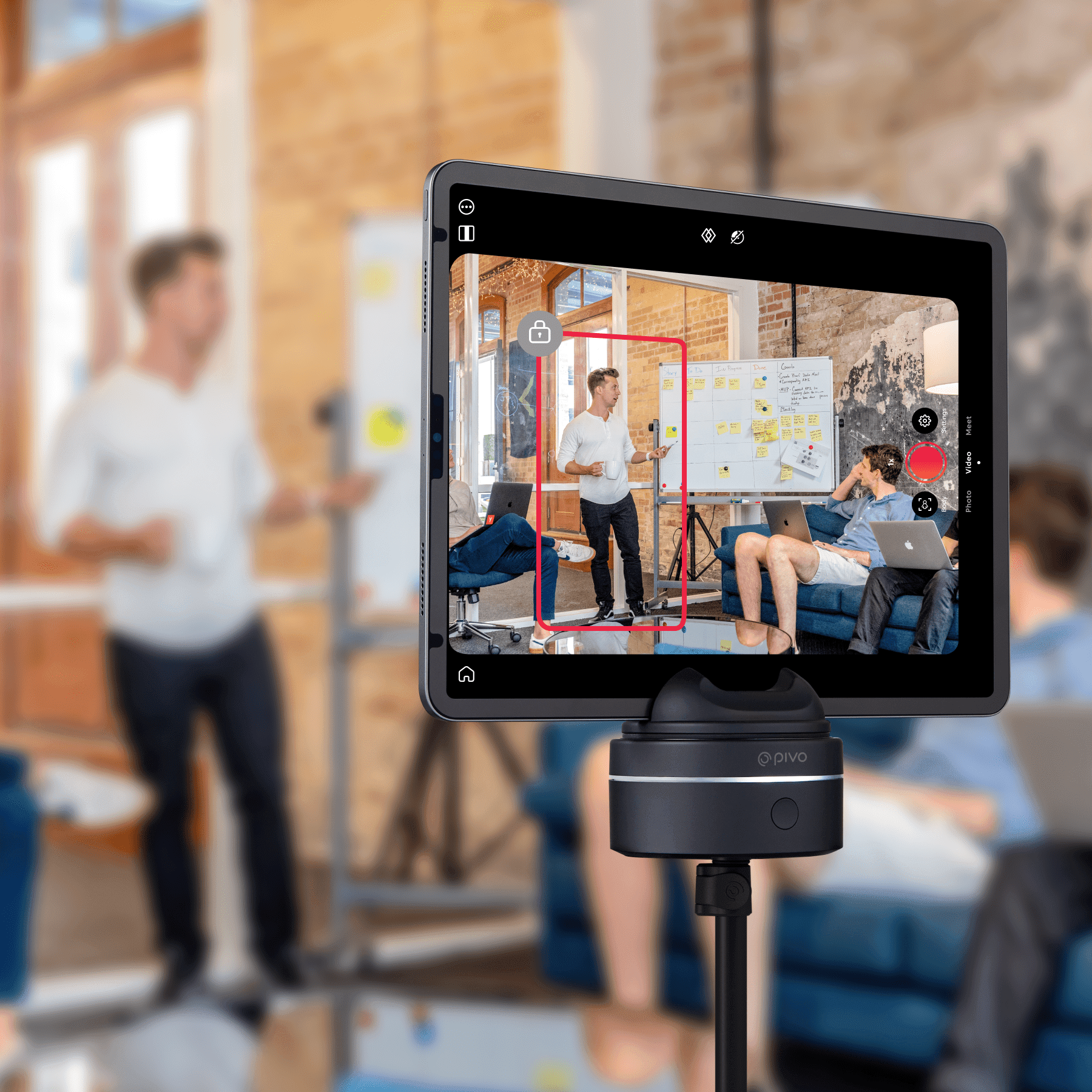
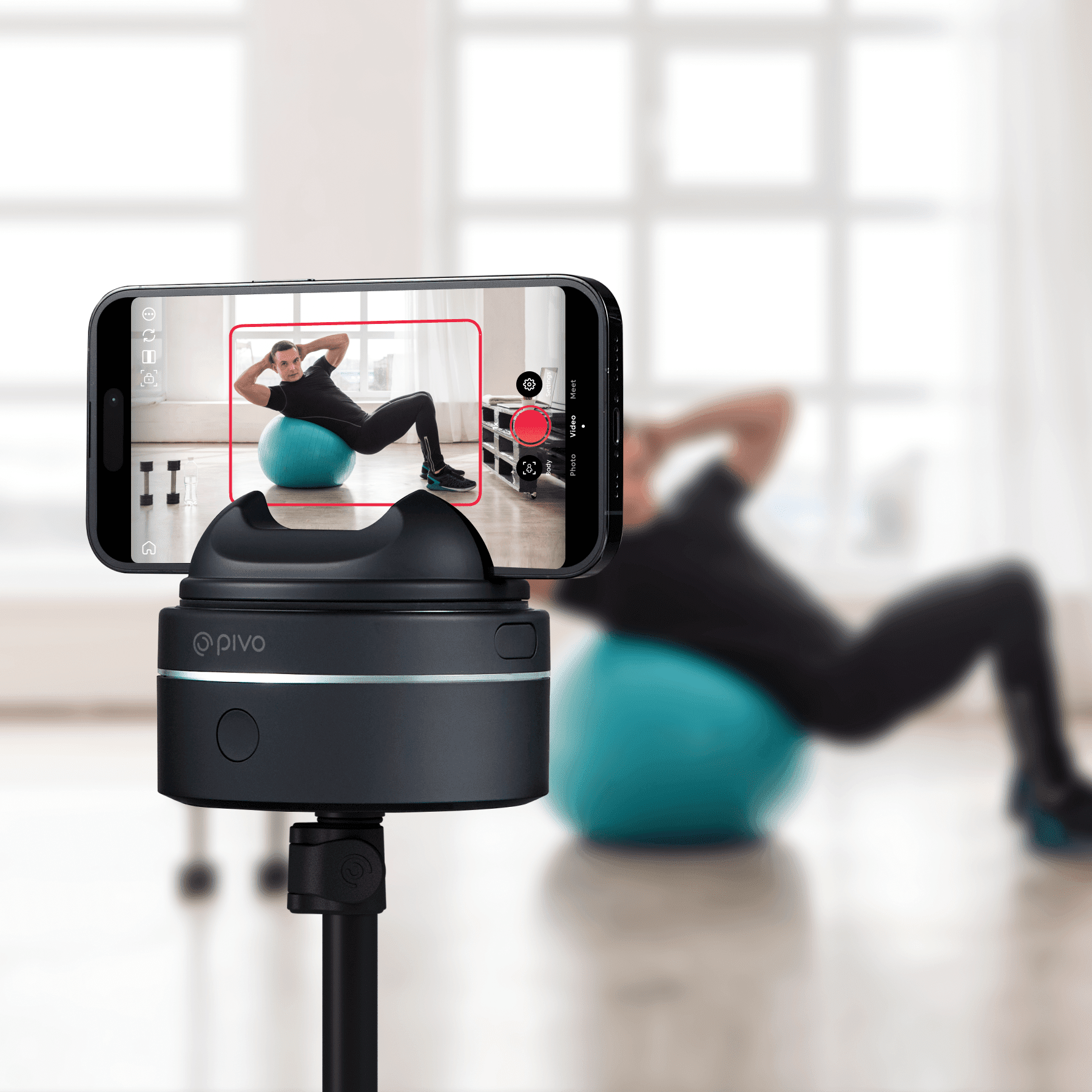
Pivo Inc, leading AI technology developer that aids self-improvement by turning smart devices into a user’s personal camera crew, has launched their new premium offering: Pivo Max. Building on the success of their hero products Pivo Pod and Pivo Pod Lite, Max offers compatibility with tablets and cameras for the first time.
Pivo Max, named an Innovation Awards Honoree at CES® 2023, builds upon Pivo Pod’s existing capabilities. By simply attaching the smart mount to their tripod, users can capture stunning 360° footage with Pivo’s AI-powered technology. When synced with the Pivo+ and Pivo Play apps, Pivo’s Face and Body Auto-Tracking feature means users can move freely, never having to worry about leaving the frame.
The all-new Pivo Max has a wide range of uses – much like the Pivo Pod and Pivo Pod Lite models, it is ideal for fitness, coaching, equestrian and sports practice. With its larger, 2kg payload and tablet and camera compatibility, Pivo Max has a wider professional appeal, perfect for established creators, real estate agents and even those in education or business settings.
Like the Pivo Pod, Pivo Max maintains horse and dog [now out of beta] tracking capabilities, so users can capture training routines and coaches can join remotely.
Pivo Max comes equipped with six different rotation speeds: Slower, Slow, Normal, Fast, Frenzy, Turbo. Whether users are recording a presentation in-class or a dance tutorial at the studio, they can rest assured Pivo Max will keep up with them.
Pivo Max comes with an integrated LED status, so users can easily view power, pairing, connection, charge, capture and recording statuses. Also new is the Pivo Max Power Bank, available for purchase separately. The Power Bank allows users to simultaneously charge their Pod and personal device during use.
Ken Kim, CEO of Pivo says of the release, “Following the success of our other mounts – the Pivo Pod and Pivo Pod Lite, we wanted to offer a model that not only offers more premium features, but is also geared towards professionals in their field. Pivo Max is a game changer for markets like real estate and education, and we’re excited to see the technology that worked so well for our earlier models continue to reach new heights.”
Pivo Max, which comes with a remote control and is compatible with both Pivo apps, is available in the UK now from uk.pivo.ai with an RRP of £239.99. Between June 19th – 30th Pivo will be offering up to 30% off Pods as part of their Summer Flash Sale.
Golfing is one of the most popular sports for people of all ages and backgrounds to enjoy. During a round of golf, it’s essential to have access to all the necessary tools you need to keep track of your score, calculate distances from each hole, and more. To make this easier than ever before, many are turning towards tech-savvy solutions such as smartphones.
Nowadays with just your phone in hand, you can easily manage a range of tasks – from tracking scores and flagging hazards on the course to looking up swing tips online – so that you can get ahead on the green!
In this blog post, we’ll discuss how having an updated mobile device can help improve your game when golfing by providing crucial information about every aspect of tuning up your performance out there. Read along as we break down how using modern workflow processes like these provide experienced players with practical advantages even during their games!
Create a scorecard on your phone
Have you ever wished you could keep track of your score while playing games on your phone? Look no further than creating a scorecard on your device! With just a few clicks, you can easily track your score and even keep a record of past games.
No more struggling to remember who won last time or trying to tally up the score in your head. Whether you’re playing a solo game or competing with friends, a scorecard on your phone is the perfect way to stay organized and on top of your game. So why not give it a try and see how much easier it can make your gaming experience?
Download golf apps that provide tips and advice
As a golfer, you know the importance of precision and technique to perform well on the course. Thankfully, technology has come to the rescue with some of the best golf apps available to help you reach your full potential on the links. From swing analysis to weather forecasts and tee-time bookings, these apps are packed with essential features that can take your game to the next level.
With so many options to choose from, it can be challenging to know where to start. However, by downloading the best golf apps, you can have access to tips and advice that will help you improve your skills and strategy. So why not take advantage of today’s digital world and download a golf app today to help you become a better player? If you need to keep tab on your numbers check out The Left Rough.
Use navigation apps to find nearby courses
Gone are the days of getting lost on your way to the golf course. With navigation apps at your fingertips, finding the best courses and the perfect tee times has never been easier. You can even use these apps to locate the right hole for your skill level.
Whether you’re a seasoned player or just starting, using navigation apps can save you time and hassle so that you can focus on enjoying the game. So ditch the maps and paper directions and embrace the convenience of technology on the golf course!
Take pictures of each hole so you can analyze your mistakes later
Have you ever finished a round of golf and wondered where you went wrong? Maybe you missed a birdie opportunity, or perhaps a poor shot cost you a stroke. Whatever the case may be, the key to improving your game is analyzing your mistakes. And the best way to do that is by taking pictures of each hole.
By capturing your shots on camera, you can go back later and see what adjustments you need to make to improve. It’s like having your coach right there with you on the course. So next time you head out to play a round, don’t forget to pack your camera and start analyzing your game like a pro.
Get insight into different holes
Golfing has always been a sport that requires skill and strategy, and with the help of technology, golfers can now gain an even greater advantage on the course. Golfing apps are the perfect tool for any avid golfer looking to improve their game and gain a competitive edge.
These apps provide in-depth insights into each hole, including its par, length, terrain type, and more. With this knowledge, golfers can make more informed decisions when it comes to club selection, shot placement, and course management.
No matter if you’re a seasoned pro or just starting, golfing apps are an essential addition to your toolkit. So why not download one today and get ready to take your game to the next level?
Keep up with the latest news in the golf community
Staying on top of all the latest happenings in the golf community can be a challenge, but it doesn’t have to be. By following various golf sites on social media, you can easily keep tabs on the latest tournaments, players’ performances, and equipment releases.
With just a few clicks, you can stay informed about your favorite golfers and stay abreast of any breaking news. From Instagram to Twitter, there are plenty of platforms where golf enthusiasts can get their daily dose of golf news.
So why not join the community and tap into the wealth of knowledge available online? By staying connected, you might just discover your new favorite golfer or learn about a new tournament that you can’t wait to watch.
With the capabilities of our phones and tablets today, they can be more than useful when it comes to golfing. Whether you use it to track your score and previous games, pick up some tips on how to improve your swing, find courses or tee times nearby, learn the different stats for various holes, or even just keep up with the latest news in the golfing world, you’ll have no shortage of options to choose from.
Investing in one of these apps could make a huge difference in improving your game and give you access to helpful resources that could give you that extra edge needed when competitions pop up. Make sure to do your research though – golfing apps are abundant out there so take time to find one that fits best for what you need.
The Liberty Soundcore range have been a favourite with me over the years and the Liberty 3 pro are one of the best earbuds of 2021 and even still highly regarded today for me and today we have the all new Liberty 4 in for review. These earbuds have a lot of claims made here which I really look forward to finding out and no doubt they will be interesting to see and they also come packed with great specs too and not only this these have heart rate tracking built in and 360 spatial audio which sounds really cool.
We will be testing these out over the coming weeks and will have a full review soon as we always do with a hands on look and also a look at their app which is also neat, if you have any questions feel free to comment and we answer all questions and give you a real hands on look rather than stock images in our final review of all our products.
Features
Crisp, clear sound via ACAA™️ 3.0 Coaxial Acoustic System
360° immersive spatial audio with music and movie modes
Bringing on remote workers is an increasingly popular choice for businesses all over the world. Working remotely often provides employees with a better work-life balance, improves their morale, and can even boost productivity in some cases.
However, if you truly want to get the most out of your remote workers and ensure everything goes well, there are some pieces of technology you should be using. With that in mind, this article is going to go over a few technologies that every company working with remote workers should be using.
Time Tracking Technology
Using remote employee time tracking and monitoring technology is a great option when working with remote workers. It helps you to keep tabs on what people are doing, how long they are working, the things they are downloading, websites they are visiting, and more.
While plenty of remote workers will work hard all day without needing to be monitored, others may slack off and get distracted. This technology helps keep your remote team productive and can also give you more information about their performance, strengths, and weaknesses. It can also boost security as you will be able to catch it quickly if someone accidentally accesses something they shouldn’t or sends out the wrong information to the wrong person.
There are different rules in different places about what can be tracked and monitored, so always make sure you are operating within the confines of the law.
Video Conferencing Technology
Another good option is enhancing remote work with video conferencing. One of the major issues with remote work is a lack of communication and these employees feeling disconnected from the team. They cannot attend in-person meetings and don’t see their coworkers every day, and this can feel a little isolating.
By using video conferencing technology, you can ensure your remote workers feel like part of the team and can put a face to the name of the people they work with. This technology allows people from all over the world to join meetings to get to know their bosses and coworkers a little bit better and ensure they don’t miss out on crucial information or updates.
This technology is also quite flexible as most will allow remote workers to join a meeting on their computer, on a tablet, or even on their phone.
Project Management Tools
Lastly, if you have remote workers, it makes sense to use some kind of project management tool. This allows teams to work together on projects, manage tasks, send notes, plan out work that needs to be done, and so much more. They can be used for teams that work together in-office but are especially good for remote teams with members all over the world.
They ensure everyone can stay on the same page and each person knows what they are responsible for doing. In addition to helping teams collaborate, this technology can also allow people to communicate and share files with one another, too.
In conclusion, if your business employs or partners with remote workers, these are pieces of technology you should be using.
Are you a fleet manager and worried about the safety of your drivers out on the road? If so, equipping your vehicles with a tracking dash cam should be one of your top priorities.
Dash cams are becoming increasingly commonplace in many commercial fleets due to their ability to monitor driver behavior and provide visual evidence of any type of incident. Why is having a tracking dash cam an important part of keeping your employees safe while also improving overall operations efficiency in your fleet? Read on to hear our answer.
What is a tracking dash cam and why is it important for fleet vehicles?
A tracking dash cam is a video camera designed specifically for use in vehicles, providing a continuous recording of the road ahead.
For fleet vehicles, such cameras are essential for a number of reasons. They can improve safety by monitoring driver behavior and identifying hazardous driving practices and also serve as a powerful tool for fleet management. By providing real-time location data for each vehicle, as well as detailed information about driving speeds and routes taken, the right dash cam for your semi truck can help fleet managers optimize schedules, reduce fuel consumption and increase overall efficiency. Additionally, these cameras can provide valuable evidence in the event of an accident or other incident, helping resolve disputes and protect against fraudulent insurance claims.
All in all, a tracking dash cam is an important investment for any fleet looking to improve safety, streamline operations, and protect their assets.
The Benefits of Installing a Tracking Dash Cam in Your Fleet Vehicles
Dash cams are becoming increasingly popular among fleet vehicle owners and for good reason. These innovative devices offer a wide range of benefits that can greatly improve the efficiency and safety of any fleet operation. Let’s take a closer look.
Monitor Driver Behavior
Tracking dash cams has revolutionized the way we monitor driver behavior. With advanced features such as GPS tracking and G-force sensors, these devices are capable of capturing every detail of a driver’s journey. By analyzing this data, fleet managers and business owners can gain valuable insights into their drivers’ behavior and identify areas for improvement.
Not to mention, dash cams reduce the risk of accidents, as drivers are more likely to behave responsibly when they know they are being monitored. As technology continues to improve, there has never been a better time to invest in a tracking dash cam to keep your drivers safe and accountable on the road.
Improve Fleet Safety
A tracking dash cam like CameraMatics fleet camera systems is a great tool to improve fleet safety for companies with a large number of vehicles on the roads. This technology offers real-time monitoring of driver behavior to ensure they are following all traffic laws and driving safely.
With a tracking dash cam, fleet managers can easily identify and address any issues, including speeding or distracted driving, before they escalate into more serious problems. In addition, the footage recorded by the dash cam can serve as evidence in the event of an accident or insurance claim, which can save time and money for both the company and the driver involved. Pretzel City business owners can review the incident and work with Truck Accident Legal Experts in Reading, PA to understand liability and ensure that all necessary documentation is in order. This collaboration can be crucial in mitigating legal repercussions and protecting the company’s interests.
Reduce Operating Costs
Dash cams are a smart investment for any business looking to cut operating costs. This innovative technology not only helps to retain valuable company assets and reduce insurance premiums, but it also promotes safer driving habits among employees.
Tracking dash cams capture and store footage of driving activity, allowing business owners to monitor performance, identify areas for improvement, and protect against false claims. With the ability to track mileage, location, and speed, businesses can manage their fleets more efficiently and take corrective action when needed.
Identifying the Right Dash Cam System for Your Business
Every business owner wants to ensure the safety and security of their vehicles and drivers on the road. That’s why dash cam systems have become an essential tool for many companies. But with so many options available, it can be challenging to identify the right one for your business.
You need to consider video quality, storage capacity, GPS tracking, and ease of use. By doing your research and carefully evaluating your needs, you can find the dash cam system that will provide the best protection for your business on the road.
Installation and Maintenance Tips For Tracking Dash Cams
If you’re considering investing in a tracking dash cam, know that proper installation and maintenance are key to getting the most out of your device. First and foremost, make sure your dash cam is mounted securely on your windshield or dashboard and that it has a clear, unobstructed view of the road ahead. Regularly reviewing your footage and setting your camera to overwrite old files can help ensure that you’re always capturing important information.
Keeping your device clean and regularly checking for updates can prevent technical issues down the line. By taking these simple steps, you can feel confident that your tracking dash cam is working at its best level possible.
Tracking dashcams are becoming valuable tools for fleet business owners as they provide a host of benefits, from monitoring driver behavior and improving safety to reducing operating costs.
By acknowledging the advantages that these devices offer, companies can create an optimum level of safeguard for their fleet vehicles while making informed decisions in regard to operational expenses.
Pivo Inc, a leading developer of AI-technology for content creators, is upgrading its smart pods to include ‘Lock-On Tracking’ mode. Whether users want to capture themselves in a crowded place or record footage with more people in the shot, this new feature means Pivo will follow the star of the show’s movement, keeping them in the frame at all times, regardless of what is happening around them.
Using Pivo is like having a personal camera crew. Powered by AI-technology, the Pivo smartphone mount, which can rotate 360 degrees, automatically tracks a user’s face and body movements. It follows them at all times, zooming in and out, to make sure they are always in focus and in the frame. The new ‘Lock-On Tracking’ mode gives users even more control, by allowing them to manually select themselves in an environment where there are other people. This ensures the Pivo Pod stays locked on the correct person at all times.
“Our vision at Pivo is to become the creator-tech brand for the next digital era. Our community is at the heart of this — we want to support them to make sure they get the best experience. So when our users asked for single person motion-tracking, we prioritised it with our development team to get the feature ready as soon as we could. ‘Lock-On Tracking’ will make content creation even easier as you will no longer have to worry about who else is in the frame. This is a huge milestone for Pivo and we’re excited to share this with the world.” says CEO Ken Kim.
Pivo Pods enable users to capture videos and photos of themselves. With powerful app-driven motion tracking and easy-to-learn editing modes, creating content solo has never been so easy. Pivo has two models to choose from including:
Pivo Pod Active:
The Pivo Pod Active offers accurate tracking for faster movements, making it ideal for sports and fitness content creators and activities like dancing, athletics, skating and horse riding. Pivo Pod Active can be used in both portrait and landscape orientation, has four different speed modes as well as face, body and horse tracking, ensuring every moment of fast-paced content is captured, eliminating the need for a costly videographer or expensive camera and equipment.
The Pivo Pod Active comes with a companion remote and charging cable and is easy to use out of the box, no technical photography expertise required — users can focus on creating content they’re passionate about immediately.
The mount is compatible with tripods, including Pivo’s own standard Tripod and Tripod Mini (purchased separately) which both have a ¼″ UN thread universal mount, making them compatible with other devices including cameras.
Pivo Pod Lite:
For content creators whose videos don’t involve lots of high speed movement, Pivo’s entry level tracking mount, Pod Lite, uses the same AI tracking technology, freeing up their hands and allowing them to create content solo, without having someone else filming.
Pivo Apps:
In addition to the hardware, a free companion app, Pivo+, integrates with Pivo Pod Active, allowing creators to host live fitness classes and video calls using the same auto-tracking technology, taking fitness and sports content to the next level and allowing for more interactive content.
A second standalone free app, Pivo Play (available on Google Play and App Store) allows creators to create fun edits designed with social media engagement in mind.
Pivo Pod Active is available now for £124.99 from the Pivo website, Amazon and Currys. Pivo Pod Lite is just £69.99 and available in seven stylish colours. To use the new ‘Lock-On Tracking’ mode download or update the Pivo+ app which is available from the Apple App Store and Google Play.
Price tracking & monitoring software can be a lifesaver for businesses that want to keep tabs on their competition. Not only does this software allow you to see how your prices compare to those of your competitors, but it also helps you track price changes over time so that you can adjust your prices as needed.
However, choosing the right price tracking & monitoring software can be difficult, especially given the number of options available. We’ve prepared a list of factors you should consider when doing it and would like to provide you with tips for narrowing down your options.
What Is Price & Monitoring Software?
Price & monitoring software is a type of software that gives business owners the ability to track and monitor the prices of their products or services. This type of software is typically used by businesses that sell products or services online, as it can help them to keep track of their competitors’ pricing and adjust their own prices accordingly.
There are many different price monitoring software programs available on the market, and each one offers different features and capabilities. Some of the most popular features include price alerts, price history tracking, and price comparison tools. Businesses can use these features to help them make more informed pricing decisions and stay competitive in the marketplace.
What Are The Benefits of Price Tracking & Monitoring Software?
Price tracking and monitoring software likePriceva can offer many benefits to businesses. For example, it:
Allows businesses to stay competitive by monitoring price changes and comparing prices with competitors;
Can help businesses save money by adjusting prices as needed in response to market changes;
Makes it easy to track price changes in the long run so that you can make pricing decisions correctly;
Can help businesses to identify opportunities for price discounts and promotions.
If you feel like you need a price tracking & monitoring tool we will help to choose the best one.
How to Choose the Best Price Tracking & Monitoring Software?
There are a few factors you should consider when choosing price tracking & monitoring software for your business needs. This includes:
The type of business you have. For example, if you have an online business, then you will need software that can track prices on the internet.
The size of your business. If you’re running a small business, you may not need all the features offered by larger software programs. However, if you have a large business, you will likely need many features and capabilities.
Your budget. Choose a more basic program if you have a limited budget and a more comprehensive one if you’re not limited by money.
What features you need. There are such features as price alerts, price comparison tools, and price history tracking. You should choose the software that offers the features that are important for your business.
Ease of use. Otherwise, you may struggle to get the most out of the program.
After you have considered all these factors you can start to narrow down your options and choose the best price tracking & monitoring software for your needs.
How to Narrow Down Your Options?
It can be difficult as there are many different options but we’ve prepared some tips that will help you to narrow them down.
Tip #1. Start by doing some research and reading online reviews. This will help you get an idea of what is available and what other people are saying about products.
Tip #2. Think about what features are most important to you and your business. This will help you focus on products that offer the features you need.
Tip #3. Don’t be afraid to ask for recommendations from friends or colleagues. If someone you know has used price tracking & monitoring software before, they may be able to recommend a good product.
Tip #4. Take advantage of free trials when available. This will allow you to try out a product before making a purchase.
Tip #5. Get in touch with customer support to get more information about a particular product. They will be able to answer any questions you have and give you more information about the product.
To Sum Up
Making a decision about which price tracking & monitoring software to use for your business can be tough, but it doesn’t have to be. By considering the factors above and taking advantage of resources like online reviews and free trials, you can make the process a lot easier. And once you’ve found the right product for your needs, you’ll be able to enjoy the benefits it offers.
Fitbit have launched a new feature which is the Premium Sleep Profile and what a great to to test out their Fitbit Sense which has just arrived and our first time to check out the brand on site which we look forward too, on first look at the device it feels premium and has more features than I had expected in comparison to some other similar products I have here in for review and I quite like it.
With health and fitness being a daily part of people’s lives now people want more features and Fitbit have launched a new option which is great for those who track their sleep never mind the stress something which I both lack and have an abundance of so for me an ideal time to check out what is on offer here.
This new Fitbit Premium feature offers a new longitudinal analysis of your sleep patterns. It also makes your sleep data even easier to interpret with fun animal characters, so you can take steps to improve your sleep quality and, in turn, your overall health.
How does it work?
Wear your Fitbit device to sleep for at least 14 nights per calendar month to receive an assessment. The more you wear the device to sleep, the more precise the evaluation. Sleep can vary significantly from night to night, so it’s helpful to analyze your sleep data over a longer period from your own sleep environment to uncover more insights into your habits and how you can improve.
As a Premium member you will see your Sleep Profile, including your sleep animal and monthly sleep analysis, on the first day of every month. Animals can change from month to month, and data collected throughout the month will inform the next animal you receive the following month. There is no “ideal” animal – each one can be used to better understand your sleep patterns and how you can improve your sleep quality.
Web analytics is an important part of successfully running a website. Analytics can help you understand how your visitors are using your site, which pages they find most interesting, the bounce rate (the percentage of people who leave your site after viewing one page), and other data that can improve search engine optimization and conversion rates for your business. This article will provide some tips on tracking visits to your website to better analyze what’s happening on-site. Let’s get into the details.
What is Website Visitor Tracking?
Website visitor tracking is the process of recording and analyzing data about how visitors interact with a website. This data can include which pages were visited, how long they stayed on each page, where they came from (referral sources), and what actions they took while on the site (such as clicking through to other pages or making a purchase).
Website visitor tracking isn’t an entirely new concept and has been around since the early days of web analytics. With a tool for visitor tracking, businesses can easily track website visitor behavior and activity, understand how their website is being used, and make changes to improve the user experience. Website owners must track their website visitors because it can help them decide what content to keep or remove from their site, how to improve the user experience, and even where to allocate resources for marketing purposes.
How Does Website Visitor Tracking Work?
Several tools will help you track website visitors. Some sites will offer free options for tracking your visits to your site, while others may require paid subscriptions to advanced packages with additional features.
Website visitor tracking requires the use of web beacons or tags, which can come in many forms, including images, scripts, or even invisible pixels that are embedded in a site’s code. These beacons can work by setting cookies on your computer, allowing you to track visits from the same device and browser over time without setting a new cookie each time you visit a website.
Another form of web beacon is typically seen as an image within a site page. These images are typically very small, and the only purpose is to send data back to a server. The way this works is by using information from your web browsers such as your IP address, language settings, referrer URL (where you came from), timestamp of when you visited the site, and other relevant details that can be used to identify you and your visit.
What Can You Track with Website Visitor Tracking?
You can track several different things when using website visitor tracking software. They include:
The number of visitors to your site over time
The number of visitors from different countries
What pages are being visited on your site
How long do people stay on each page
Where people are coming from to visit your site (referral sources)
What actions people are taking while on your site (such as making a purchase or filling out a form)
This data is valuable for understanding how people use your website. You can use it to improve the user experience by changing the design, layout, or content of your site. You can also use it to decide where to focus your marketing efforts and understand what is working well for you and what isn’t.
Can Visitor Tracking Drive Growth?
Website visitor tracking can certainly help drive growth by providing you with the data that will allow you to make better decisions about your site. Data from website visitor tracking will enable marketers and business owners to understand what content is working, where their audiences are coming from, how engaged visitors are with their pages, and more. This, in turn, helps them create a better user experience and content that is more likely to convert visitors into customers.
It’s important to note that website visitor tracking isn’t a one-time fix-all solution, but rather it should be used as part of an overall strategy for growth. By taking the data collected from your website visitor tracking and using it to make changes on your site, you can continue to improve your site and increase engagement, leading to more conversions and better results for your business.
How Do I Get Started with Website Visitor Tracking?
There are several different ways to get started with website visitor tracking. You can use existing analytics software that your current marketing or internet service provider may offer, but these options typically have limited features, and you would need to upgrade for more advanced capabilities. There are also some free tools available online if you don’t want to pay anything out of pocket, but these typically have limitations.
Another option is to purchase your website visitor tracking software with advanced capabilities, doesn’t require you to use existing services or other tools, and allows for full customization of how the data is collected. Depending on what you are trying to track, some options will be more affordable than others with different features.
It would be best if you took the time to evaluate what you are trying to track on your website and then find a tracking software solution that will work for you. There are many tools and capabilities available, but the important thing is to make sure you have all the information needed before making any decisions.