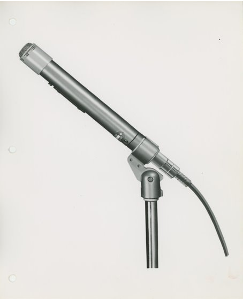
One For The Money, Two For The Show, Three (or Four) Iconic Microphones Used By Elvis

The new Baz Luhrmann film, “Elvis,” brings the story of Elvis Presley to the big screen. Warner Brothers was committed to ensuring as much historical accuracy as possible, and asked Shure to consult on the microphone models Elvis used. The Company was provided photos of Elvis performing, then identified the vintage mics, and offered suggestions on alternative models when appropriate. For decades, Shure has assisted film production companies in identifying and locating historically accurate microphones.

While there are a variety of Shure microphones used in the movie, here are three (or four) different types of Shure microphones Elvis used throughout his career:


The Shure Unidyne I Model 556 – This variation of the Unidyne I is one of the more recognisable microphones that Elvis used in the prime of his career. According to the 1947 Shure Product Data Sheet, “The Model 556 is a Super-Cardioid type unidirectional moving-coil dynamic microphone providing wide-range high-quality reproduction of sound.

The true unidirectional characteristic of the ’Unidyne‘, obtained by the ’Uniphase‘ principle provides highly satisfactory operation under adverse acoustic conditions where a conventional microphone would be practically useless.

The microphone has a New Acousto-Mechanical circuit containing a moving-coil element, which operating in conjunction with a high flux magnet, provides high efficiency and smooth peak-free response from 40 to 15,000 cycles. The rear response is down approximately 15 decibels (dB) due to the ’uniphase‘ unidirectional acoustic network.

The new moving-coil unit comes with a double windscreen to ensure quiet outdoor operation. As a precaution against mechanical vibration pickup, the unit is spring-suspended inside the microphone case, which is, in turn, floated in live rubber in the stand connector.

The case is modern in design, with attractive streamlining and grille treatment. The swivel allows the microphone to be aimed at the source of sound for best pickup.”

Shure’s iconic Unidyne microphone was featured on the special edition “Elvis” stamps issued in 1993.


The Shure Model 525 omnidirectional moving coil dynamic – The 1954 Product Data Sheet describes this microphone as “a slender, moving-coil dynamic microphone, custom-built to provide high-fidelity reproduction of voice and music as well as features an omnidirectional pattern.

The microphone is versatile and reliable for both indoor and outdoor use. The extended, smooth frequency response and the attending faithful reproduction are largely due to a newly designed diaphragm attached to a sensitive coil suspended in a magnetic structure.

The use of high-efficiency magnetic materials and specially designed magnetic circuits has made it possible to develop this small microphone and still achieve maximum operating efficiency. The microphone is ruggedly built to withstand hard usage and is unaffected by temperature and humidity variations.”

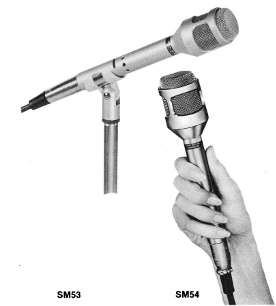
Shure SM53 and SM54 – The SM53 and SM54 were internally the same, with the SM54 having a larger grille.

According to the 1970 Product Data Sheet, “the reliable performance, outstanding features, and handsome appearance of the SM53 and SM54 make them extremely versatile and ideally suited for many demanding applications in television, radio, recording, motion pictures, and sound reinforcement. The performance and appearance of the two models are very similar; however, the SM54 is specifically designed for use in very difficult close-talking and hand-held situations because of its immunity to “pop” and breath blasts.” Elvis used these microphones in the 1970s, primarily because they had little bass build-up from the proximity effect. The deep voice of Elvis did not require “more bass.”

Earth Overshoot Day 2022 – “As of 29 July, we are in debt to our children”

Earth Overshoot Day was calculated. It signified the day on which human consumption of raw materials can no longer be covered by the formation of new resources. In other words: every day after it, we incur ecological debt. When calculated in 1971 this date fell on 25 December – i.e. humanity consumed more resources than were available for only six calendar days – in just over 50 years, this date now falls on 28 July; 150 days earlier. In 2006, the first global Earth Overshoot Day campaign was launched together with the Global Footprint Network, and since 2007 the WWF, the world’s largest nature conservation organisation, has been involved.

“This year, from the 29th of July onwards, we will already be ecologically in debt to our children and grandchildren,” says Peter Windischhofer, CEO and Co-Founder of refurbed. “For 156 days this year, we will consume resources that do not belong to us. This is like my salary being used up on the 17th of the month and living on credit for the remainder,” says the founder of the green tech scale-up and online marketplace for sustainable consumption. 

The COVID-19 Pandemic has highlighted humanity’s ecological impact

Since 2018, Earth Overshoot Day has been a regular visitor in the month of July with the exception of 2020 when it occurred on August 22nd. This was due to global lockdowns; “2020 showed how much influence we could have as a society and how it is possible to move the date back again,” says Windischhofer. “Now we have to learn to find ways to move the date further back, even without COVID-19.”

Ireland’s 2022 Overshoot Day was worryingly on April 21st, much earlier than the world average

According to the Central Statistics Office, in 2018 alone, Ireland had the 3rd worst emissions per capita in Europe, with 53% higher emissions per person than the EU average (12.6 tonnes vs. 8.2 tonnes). “If everyone in the world lived the way we Irish do, we would have celebrated Earth Overshoot Day on the 21st of April this year,” says Pádraig Power, Ireland’s marketing manager for refurbed, about the unpleasant date. “This concrete figure will hopefully help us recognise Ireland’s exuberant consumer behaviour, and help us realise that now is the time to put the steps in place for a greener future.”

“Change has to be easy, otherwise it is not long-term”

“It is simply not true that the individual can do nothing,” Founder Windischhofer knows from his own experience. “Everything we do has effects – some stop eating meat, others switch from the car to the train. The pandemic has shown that remote working is possible across the board and that many kilometres in our everyday lives are also simply superfluous,” the committed entrepreneur is convinced. “It is important that we make changes in behaviour easy, pleasant and attainable, only then will they be permanent. Our consumer behaviour is changing. The concept of ‘reuse – recycle – repair’ is slowly catching on in people’s minds, but every person is different, every person can save CO2 somewhere else. The Earth doesn’t care where we save, it only cares that we do it.” 

Refurbed is a CO2 negative and an environmentally positive organisation – for every product sold, refurbed plants a tree to offset carbon emissions created during the refurbishing process. The trees are planted in countries such as Haiti, Madagascar, Kenya, Indonesia and Mozambique or Nepal through their partnership with Eden Reforestation Projects. The company also plants native trees in woodlands across Ireland as part of their partnership with Reforest Nation.

Sky Glass launching in Ireland this August

You may have heard about Sky glass last October when it launched in the UK, but Sky Ireland has today announced that Sky’s new TV, Sky Glass, will officially launch in Ireland on Thursday, 25th August 2022.

Available in a range of sizes and colours, Sky Glass is the only TV with award-winning Sky inside, allowing customers to get Sky TV over WiFi – removing the need for a satellite dish or set-top box. Simply plug, pair and play to enjoy stunning picture quality and cinematic sound, with everything you need built in. With easy access to stream your favourite content and apps using voice command, Sky Glass makes it simple for users to find and watch the TV they love.

Speaking about Sky Glass launching in Ireland, Sky Ireland CEO, JD Buckley, said:

“Following its hugely successful launch in the UK, we are thrilled to announce that Ireland will be the second market to launch Sky Glass. The launch of Sky Glass here marks a significant milestone in Sky’s 25-year history in Ireland and follows our recent announcement that Sky Mobile is coming to Ireland in 2023, as well as the opening of our four new flagship retail stores.

“Investing in the best technology, the best content and the best customer experience are always our top priorities and Sky Glass is the most innovative product we have developed yet. It opens the world of Sky to customers who may not have been able to access Sky TV before now. With the ability to stream the best content and apps over WiFi, Sky Glass features Ultra HD, Quantum Dot technology and 360° Dolby Atmos® sound. Sky Glass will be available in Ireland from August 25th, but we are giving customers the opportunity to pre-register for Sky Glass now.”

Features of Sky Glass

  • The only TV with Sky and all your favourite apps inside
  • Everything in one place – Sky Glass eliminates wasted time trekking from app to app
  • Cutting-edge design available in five colours and three sizes
  • Ultra HD and Quantum Dot technology producing over 1 billion colours
  • 360° Dolby Atmos® sound with powerful built-in speakers and sub-woofer
  • Talk to your TV: just say “Hello Sky” to find what to watch
  • The world’s first TV to be certified CarbonNeutral®

Customers can pre-register for Sky Glass now on www.sky.ie/skyglass. From August 25th, Sky Glass will be available to order through all of Sky’s customer channels – online, through Sky’s contact centre and in any Sky retail store.

The Lifts Of Moher – Electric buggies wheeled out at Clare visitor attraction

People with disabilities or reduced mobility can now fully enjoy everything the Cliffs of Moher Experience in County Clare has to offer courtesy of two electric buggies.

Operated by trained staff, the Burren Buggy and Wild Atlantic Shuttle provide visitors to with a guided tour of Ireland’s most natural attraction from the viewing platforms overlooking the majestic cliffs to the iconic 19th century O’Brien’s Tower.

“The Lifts of Moher are proving to be hugely popular, particularly for individuals with mobility issues, those with disabilities, the elderly, their families and carers,” explained Geraldine Enright, Director of the Cliffs of Moher Experience.

She continued, “This service is offered to those who are in need and the beauty of the experience is that users get to see and learn about the Cliffs in a way that they wouldn’t have otherwise.”

“The buggies are electric in keeping with our sustainability ethos and are widely accepted by onlookers recognising the care and service offered by the Cliffs of Moher Experience to those in need.  The feedback has been overwhelmingly positive,” she added.

U.S. tourist Laura Sitters, who recently suffered a hip injury, praised the initiative stating, “Upon my arrival, I was informed that I could get a ride in the golf cart in order to check out the views. Kieran Kelly (staff member) graciously drove me around to the various vantage points. People who have limited mobility for whatever reason should have the opportunity to see the cliffs and the waves crashing down at the base of the cliffs and that’s only feasibly with people like Mr. Kelly and the golf carts.”

The introduction of the buggies is the latest in a series of measures introduced at the County Clare visitor attraction to further enhance on-site accessibility.

According to Ms. Enright, “The Cliffs of Moher site is fully accessible throughout the visitor centre building and main viewing areas and provides ample disability parking and drop off. Wheelchairs also are available for use from different areas on-site. All our accessibility initiatives support the Clare Age Friendly Strategy & Action Plan, which was adopted by Clare County Council.”

Cliffs of Moher visitor Eimear King said, “If you have limited mobility do not let that stop you going to this spectacular attraction. There is a golf buggy style transport available, specific parking and wheelchairs available. All of these provided the most accessible experience for one that cannot walk very far.”

With free Wi-Fi available throughout the main visitor centre building and viewing platforms, visitors also can access a range of information about the Cliffs of Moher via their smartphone. The multilingual Cliffs of Moher Experience app contains 13 audio tracks narrated by Conor Tallon and featuring contributions from people with an intrinsic knowledge of the rich history, geology, flora and fauna of Ireland’s most visited natural attraction.

The Burren Buggy and Wild Atlantic Shuttle are free of charge and are subject to availability. No pre-booking is required. Visit www.cliffsofmoher.ie for more information.

Five Methods to Fix Frozen MacBook when Booting Up

Introduction

MacBook laptops sometimes run into the issue of not booting up for some reason. It could be because of corrupted startup file, incompatible operating systems with the MacBook model, bad startup disk, and so on. When these issues exist, it becomes harder to start up the MacBook normally. 

This article provides five simple methods to fix frozen MacBook that is not booting up. It explains these step processes and applicable solutions to scenarios when the Mac is not booting up.

Methods of Fixing MacBook That Is Not Booting Up

Below are the top five recommendations to get your MacBook up and running once again. They are:

  1. Safe Mode Boot

Booting in Safe Mode limits the number of checks and processes that Mac focuses on while trying to boot. It is very useful for performing certain diagnostics to discover the real issue with the laptop not booting. 

To proceed with safe mode, first force shut down the Mac. Next, press and hold down the shift key immediately after restarting the Mac. To get some feedback on the actions you are taking while trying to boot in safe mode, press and hold the ‘Shift + Command + V’ key combination when you restart the Mac. This will boot into safe mode alongside verbose mode. 

You should see safe mode written on the top right corner if you are successful. The safe mode interface also looks a bit different with blocks of color in comparison with the usual transparency. Once you are in safe mode, try uninstalling recent software or undoing recent settings changes. 

  1. PRAM/NVRAM reset

Parameter Random Access Memory is a special memory section that stores data in the Mac for shutting down, volume settings, and screen resolution. Resetting PRAM helps to reset the parameters to the default value and helps to end any process disrupting proper boot-up. 

To reset PRAM/NVRAM, first shut down your Mac. Click and hold down the ‘Command + Option (alt) + P + R’ key combination immediately after restarting. Keep holding down these keys for at least 5 seconds before releasing the keys. This should reset your Mac and allow it to restart normally. In other cases, you boot to the progress bar and your Mac starts up after some minutes.

  1. System Management Controller (SMC) Reset

The SMC is responsible for low-level hardware functions like power button action, battery management, LED, and so on. Resetting the SMC will return the power management settings to default and help to fix the boot failure. 

To begin the reset process, make sure the Mac is shut down by long pressing the power button. After about 15 to 20 seconds, hold down the ‘Shift + Control + Option’ key combinations and press the power button for about 10 seconds. Release the button and restart the Mac to see the result.

  1. Disk Utility option in Recovery mode

A corrupt drive might prove to be incompatible with the startup process because of some corrupt files. Using the recovery mode, a fix for the drive can happen with the ‘First Aid’ feature in the Disk Utility option. The first step is to get the laptop to boot in recovery mode. To do this, first force shut down the laptop. Then proceed to click the ‘Command + Option + R’ key combination immediately after restarting.

When the screen shows the ‘macOS utilities’ menu, your Mac is in recovery mode. Proceed to navigate to the Disk Utility option. From the Disk Utility, select the startup drive and apply for the ‘First Aid’ program on the drive. If there are errors with the startup disk, the Disk Utility will help fix them.

  1. File system check

In a scenario where the file system is the reason why MacBook is not booting up, running a check and slightly modifying it will help fix the issue. Although this step is a bit technical, it is easy and quite straightforward. To begin this process, first shut down your Mac. Restart with and press the ‘Command + S’ key combination. This launches the Mac in single-user mode. You should release the keypress only when a black screen and white text appears on the screen. 

Next, enter the ‘fsck –fy’ command in the command line prompt and click the return key. Wait while the file system modification is ongoing. After the checks are over, you should see either one of the two messages: ‘The volume (Mac name) appear to be OK’ or ‘FILE SYSTEM WAS MODIFIED’.

Proceed to type reboot and press enter to restart your MacBook. 

Data Recovery with iBoysoft

One thing you worry about the frozen MacBook is the data within. There is one effective solution from iBoysoft Data Recovery for Mac to recover data from a dead MacBook. iBoysoft offers an effective and efficient data recovery software that helps to recover important data from your laptop. It offers the option to recover your files from the laptop that might have some fault. 

In three easy steps, you can recover your files. First, download and install the iBoysoft tool free from the internet. The second step is to launch and perform a quick or deep scan of the disk you select. Thirdly, preview and recover the files you choose to recover. You are suggested to store these files on an external hard drive instead of saving them in the original location. 

Fortunately, when your MacBook refuses to boot up, iBoysoft data recovery can help you recover your data. Through the terminal, you can launch the iBoysoft tool and save your data to an external device. From the recovery mode, select terminal on the ‘macOS utilities’ screen. 

In the terminal command window, enter the following command: ‘sh <(curl http://boot.iboysoft.com/boot.sh) command to launch the iBoysoft data recovery. From the software interface, select the disk you wish to scan and perform the scanning process. Select the files you need to recover and select ‘recover’. For this data recovery process to work, make sure your Mac has an active internet connection.  

Gadgets and Apps for Back to School / Uni 2022

Whether starting secondary school, going to college or leaving for university in September, no doubt pupils and students already have a long list of everything they need. Ten Four Communications has put together a few additional suggestions – from an alarm clock to get them to lectures on time and multifunctional colour changing lamp for their desk to a reusable notebook/planner to keep them organised – that they may want to consider. 

Groov-e Soundbar 20 

Price: £29.99 

Available from: www.groov-e.co.uk from September 2022.  


This new wireless soundbar from Groov-e is a must have for any student heading to university this year. Providing impressive sound quality, simply connect via Bluetooth to a compatible device to listen to music, watch movies or make hands free calls. Colour changing LED lights make it the perfect addition to any party plus it is lightweight and portable so can be taken anywhere – another room, garden party or even home for the weekend. An integrated stand pops out to hold your smartphone or tablet making it perfect for those who want to binge Netflix series when not studying. Featuring a rechargeable battery it offers 10+ hours of playback on a single charge.  

Price: £34.99 

Available from: www.groov-e.co.uk and Smyths Toys  


The Groov-e Astra is a multi-functional, colour changing lamp which features a wireless charging pad and Bluetooth speaker. It is perfect for a student’s desk, getting rid of messy cables and allowing them to charge a mobile phone while working, studying, reading or sleeping. 

Whether users need extra light at their desk to revise for exams, or on their nightstand so they can read before bed, the Astra features 9 LED light modes to ensure they have the right level of brightness. Also, perfect for mood lighting, users can change the colour of the light it emits at the touch of a button. 

Astra’s flexible arm means users can adjust the light to their preferred angle, ensuring they don’t strain their eyes and can work or read more comfortably. Additionally, Astra has an integrated 3W wireless speaker.  Users simply connect a device via Bluetooth from up to 10m away to listen to their favourite tunes.   


Price: £49.99 

Available from: TwelveSouth.com or Amazon.com 


The Twelve South ParcSlope is a one-piece metal stand that raises a laptop screen to an optimum viewing position while keeping the keyboard angled and low to the desk for comfortable typing. Whilst the ParcSlope is a great addition to any desk setup, it is also small and light enough that it can be moved around the home in the event students want to study from their kitchen island or dining room table. With ParcSlope, users will enjoy better ergonomics that help to relieve shoulder and wrist pain, a video call friendly viewing angle and an open wedge design that allows for increased airflow and a cooler, quieter laptop.

For iPad users, ParcSlope angles the device to a wrist-friendly 18-degree angle that’s perfect for sketching, creative work, note taking or performing music. The matte black easel stand is sturdy and holds every iPad (except iPad mini) in a landscape or portrait mode. ParcSlope even allows users to turn their iPad into a mini desktop by pairing it with a wireless keyboard providing an even smarter way to work. 


Price: £299 

Available from Amazon UK 


Small but agile, Bittle is a powerful robot that can be programmed to walk, do tricks and roll around just like a real dog. Designed for coding and fun, Bittle operates on OpenCat, an open-source quadrupled robot platform that offers endless programming and customisation possibilities. Bittle is an ideal tool for teaching, researching and learning about STEM and robotics. 


Price: £39.99 

Available from: www.groov-e.co.uk 


Waking up for school or uni can be hard but with the Light Curve wake-up light, alarm and radio, users can start their day a little easier. The light, which mimics natural daylight, will come on at the selected time, starting off gently and gradually getting brighter until it’s at the optimum level to help rouse sleepy-heads up. When it’s actually time to get out of bed, a chosen alarm sound or radio station will also be activated to help users wake fully.

For those who like to read or need the light on darker mornings to get ready, the Light Curve has 10 levels of brightness using its LED lamp. And for those who want to create more of an atmosphere, one of the seven coloured mood lighting options can be selected.  


Price: £39.99 

Available from: Amazon.co.uk  


Rocketbook notebooks and planners provide a classic pen and paper experience, yet are built for the digital age. Not only can handwritten notes be digitised and sent to the cloud using a smartphone and accompanying Rocketbook app, the ink (when you write using any pen from the Pilot FriXion Line) can then be quickly erased from the pages with a damp cloth, enabling the books to be used over and over again and saving paper in the process. The Academic Planner has been designed for students and approved by teachers. It is equipped with 13 different page types to help you manage class schedules, weekly goals and daily workloads. 


Price: £38.99 

Available from: Amazon.co.uk 


Rocketbook has partnered with Panda Planner to combine inspiration with innovation. The Panda Planner features undated monthly, weekly and daily templates to organise your life as well as goals and motivation templates. The innovative synthetic paper allows you to write smoothly with a Pilot FriXion pen then magically wipe your planner clean with a damp cloth to use year after year. The Rocketbook app scans and connects your notes to the cloud to digitally save and share your notes.  

Price: Basic (free), Personal (£5.99 per month), Professional (£7.49 per month) 

Available from: Apple App Store or Google Play 


Evernote automatically saves notes online and makes them available on all devices so you can access them anywhere, anytime. Ideal for students who do a mix of online and in-person studying or like a change of scenery. The document scanning function is also useful for copying from text books and the Search Handwriting feature identifies words in handwritten pieces.

Is a pirate’s life for you?

Ahoy there matey! Are you up for an adventure across the slot sea, where chests overflowing with gold and sought-after treasures are hidden within the lands? Seeking out the treasures hidden within the reels can be smooth sailing or a topsy turvy adventure when the seas get rough, but that’s what a pirate’s life is all about.

If you’re up for joining our quest along the lobby lands of Paddy Power Games online casino, then jump aboard our pirate ship as we venture through the slot sea in search of the perfect treasure; pirate-themed Slots.

Scroll to jump aboard…Pirate Frenzy

Sail to a deserted island, where the only things to be found are a crab, palm trees, the ocean, three rows and six reels.

With the sounds of not only the ocean in your ears but classic fruit machines too, your pirate adventure begins as soon as you press spin.

To make the adventure around the reels more pirate-friendly, the slot symbols consist of bottles of rum, oranges, golden anchors, sacks of gold coins and gems, as well as a parrot. If you create the perfect symbol combination along the reels, you could see yourself sailing off with a treasure chest of prizes worth up to 10,000x your wager!

Pirate Gold

Our next stop on the pirate map takes us towards land. Set at the crack of dawn, you’ll see the sun rising in the distance and the morning mist along the ocean top and around the ships setting the mood along the harbour for a heist, pirate style!

As lit lanterns blow in the wind, hanging from a wooden grid comprised of five rows and four rows, it’s the symbols you need to keep watch of in order to claim the jackpot worth up to 32,000x your wager. With bronze, silver and gold coins, a hook, a telescope, a treasure map, a ship and a treasure chest spinning around this slot, alongside male and female pirate symbols, could you spin a winning combination, left to right, and claim the treasure hidden within?

Pirates Hold

Time to sail into the unknown where three shipmates could help transform your gameplay and possibly your bankroll too, with just a spin of five reels and three rows. Set somewhere within the sea, when you open the game, you’ll be welcomed with a slot grid with a ship on the left and land on the right.

In order to start reaping rewards from the reels, you’ll need to create winning combinations with symbols such as a treasure chest, compass, a gun, jewels, a cannon wild and three shipmates; Anne Robber, Davy Locker and Jack Arrow.

If you land one of the three shipmates on reel five, along with a handful of coins, you’ll activate bonus features attached to each pirate.

  • Anne Robber – opens a ship battle round. She’ll clone wilds within the reel to create bigger winning opportunities.
  • Jack Arrow – pulls us underwater to the seabed, where a sequence of expanded reels and free spins are waiting for you.
  • Davy Locker – opens his bonus on a separate screen that features a special wheel that will award you varying free spin amounts.

Will you become a fully-fledged pirate of the online Slots or will you end up walking the plank? There’s only one way to find out!

Tech Review – Snakehive Metro Leather Case and Magsafe Cardholder

Need some new ideas to spruce things up on your Galaxy S22 Ultra or iPhone Snakehive has some options for you tp try out and they are really good quality built products, We have the Metro case for the Galaxy S22 Ultra and the Metro Magsafe Cardholder here to check out.

Starting with the case it is a two tone affair with premium leather and it also has a metal kickstand to consume media so no need to take the device out of the case at all, it also works with wireless charging too and it does look the part and you can also customize them too which is an added bonus, this case also add additional grip and can be placed either face or rear down and be safe from getting the screen damaged and the camera array is also protected on the rear too and overall it does look really premium and is no my main case for said phone. Check the video for a full hands on review below..

Features

  • Soft-touch silicone phone holder with a genuine leather outer lip. Hugs your phone twice as hard as other cases.
  • A two-way kickstand for Family video-calls and binge-watching TV.
  • Fully Wireless Charging compatible for clever charging.
  • Made to measure with easy access to buttons and ports.

BUY

Metro Magsafe cardholder

Another nice product sent to us was this really cool cardholder one that is not made with plastic or metal but again premium leather, it sit nicely on the back of your device too and can hold up to three cards comfortably too, this is one of the thinnest cardholders I have tested out and again has that two tone effect which looks really well and does not just drop off easily like some can, see the video below for more on this, unfortunately I have moved on my iPhone but we can still get an idea what it looks like and will look well on my iPhone Pro later this year. It is compatible with iPhone 12, iPhone 12 Pro, iPhone 12 Pro Max, iPhone 13, iPhone 13 Mini, iPhone 13 Pro & iPhone 13 Pro Max.

Features

  • Your MagSafe cardholder is instantly attached to the back of your case via a strong magnet.
  • Designed in the UK, it has all the sleekness of a leather wallet without the bulky back pocket.
  • Handcrafted using rustic cowhide leather with a durable handstitched finish, it looks the part and lasts.
  • The spring function prevents your cards from spilling out, so you’ll always be able to settle the bill.
  • With a quick-access corner and handy thumb slider, you can slide out your credit card of choice.

BUY 

Video review


Tech Review – Tronsmart Groove 2 Waterproof Outdoor Bluetooth Speaker

It is well into the Summer season now and from what we can see is people are now travelling again going to concerts, camping, going on holidays or doing a staycation so for this you will need a decent affordable speaker to blast those tunes out and the new Groove 3 from Tronsmart might be up your street, we are no stranger her to tech from Tronsmart and are big fans and their latest speaker gives you more than good sound from their latest speaker which is small and portable.

The Groove 2 speaker is also IPX7 rated so this means it can go to your camping site, the beach a picnic or more and it is also very robust too with a nice finish on it, it also has the option to hang it from anywhere with the carabiner clip built in so it does not have to lay on a flat surface, either way you will enjoy the sound coming from this speaker given its size.

It has got a super sturdy build quality and housing wrapped with rubber edges and buttons up top that are raised and control the functions really easy, there is also a trip mount on the underside so it makes the speaker super portable, But there is more, we have RGB lights thrown into the mix to and this gives it some additional flair and makes it not boring like some portable speakers can be and they light effects look really well too.

When it comes to sound it does pack a punch and it has some bass, there is no app access here which would have been nice so hopefully they start adding their speakers to their app later on as their app is actually one of the better ones out there today and would be a real sweetener for the consumer but all is not bad regardless, the speaker is loud it is punchy it has bass and plays music quite well and easily fills a large room anyway.

The controls on top are simple to use and you can also use our phone too, there is also the option to put a micro sd card in which is really cool and now a common feature with Tronsmart and their speakers.

Tronsmart Groove 2 techbuzzireland

The sound though is what everyone wants to know about in these reviews and it is good, check out the unboxing and video samples below and you be the judge, the speaker packs a punch in a large room, even better in a smaller room and you will be surprised by the punch it packs and the light effects make it an excellent speaker to have at your disposal and let people be surprised by the sound that pops from it alongside the lights which is a thing these days and people will be impressed. Check the video review and audio samples for more and you be the judge.

Features

  • Captivating Bass.
  • Diverse Light Modes.
  • Convenient Carabiner.
  • IPX7 Waterproof.
  • True Wireless Stereo Pairing.
  • Dual EQ Modes.

BUY

Video Review