Bring fun to life with the new instax mini Link 3 photo printer

FUJIFILM Europe GmbH, Imaging Solutions Division, is set to launch the new instax mini Link 3™ instant photo printer, designed to transform your everyday moments into vibrant, colorful instax™ mini photos. This innovative product, an update to the highly popular instax mini Link 2™ printer, combines cutting-edge technology with playful features, making it the perfect companion for capturing, printing and sharing life’s moments simply in fun & creative ways. 

Available in three on-trend colors – Sage Green, Clay White, and Rose Pink – the textured and easy-to-hold instax mini Link 3™ printer is designed to be as mobile as your smartphone, allowing you to print photos simply and effortlessly from anywhere. Adorned with three unique LED lights on the front to tell you what the printer is doing, this instant photo printer is both functional and stylish. The printer also supports the instax Pal™ digital camera for direct print and features a USB-Type C port for easy charging.

Pricing and Availability:

Fujifilm’s instax mini Link 3™ instant photo printer will be available at a manufacturer’s suggested retail price of EUR 130.00 (incl. VAT). It is expected to be available for purchase across Europe on 28th August 2024. Available at Fujifilm stockists nationwide or visit https://www.instax.ie/printers/mini-link-3/

Launching new instax mini film “SPRINKLES”Fujifilm is also thrilled to announce the launch of the new instax™ mini film “SPRINKLES.” Inspired by the new instax AiR Studio™ effects, the film features a colorful sprinkle pattern reminiscent of cakes, ice cream, and other sweets. The silver sprinkles have a metallic sheen that accentuates the design, making the film both colorful, fun and eye-catching.

The SPRINKLES film pairs perfectly with the instax mini Link 3™ printer’s distinctive instax AiR Studio™ and Click to Collage modes, adding that extra touch of fun and creativity to your instant photos.

Pricing and Availability:

The new instaxmini film “SPRINKLES” will be launched on the same date, 28th August 2024, at a manufacturer suggested retail price of EUR 10.50 (incl, VAT). Available at Fujifilm stockists nationwide or visit https://www.instax.ie/film/

instax UP!™ Smartphone App Update

And that’s not it! Fujifilm also announces an update to its free, downloadable instax UP!™ App. An App designed for instax™ users to digitally scan, import, organize, and store their photos in one place, regardless of which Fujifilm instax™ instant film, camera or printer product they use. 

The latest addition to the instax UP!™ App is the introduction of “instax Days™”, a new calendar function where your scanned-in instax™ photos are automatically dated and added to a calendar. Users know the date of key moments instantly, as well as can modify dates.  

The updated instax UP!™ App is available today.

For more product information, visit www.instax.ie

See our other instax reviews

8 Tips to Increase the Photo-Realism in Your Renders

Your level of design skill is going to be the determining factor in creating photo-realism in your renders. Modern software can do a lot to add extra details, but in the end, it is your designing and creative skill that makes something look photo realistic. If you have given it all you’ve got and things are still looking a little fake, then try out a few of the methods in this article.

1 – Test and Re-Test Using a Good Rendering Service

You should really be testing and re-testing your changes and your designs. If you don’t have a lot of computing power, then use a company that will render your designs for you. Using a company like https://rebusfarm.net/  is often faster than trying to do it all yourself, especially if rendering means it ties up some of your computers or systems for a while. 

2 – Add Realistic Light Dead Last

You can test a bit of realistic lighting before you are finished, if you wish, but it doesn’t add the sort of value you may have hoped for. Add realistic lighting very last and don’t go overboard with your efforts. You should start with the larger elements first and then add detail as you go. With that in mind, adding realistic light too early will skew the way in which you create and add details. Get the details and everything else right first, and then start playing around with the light.

3 – Use Depth of Field

Traditional animators have trouble with depth of field. Luckily, there are many varieties of software out there that make depth of field very easy to handle. In some cases, it is just a case of altering a few settings on the camera before you set your render running.

4 – Beware of Adding Too Much Light

This is discussed a little more in point six on this article, but one of the big giveaways with renders is when lamps and lights emit too much light. Look at photos and you will see there are many occasions where two of the same types of light will shine in very different ways and with different intensities simply because of where they are located.

5 – Try to Avoid Super Sharp Edges

It is weird, but the further away you are from something, the less sharp the points and edges should be. If you create a building using perfect measurements and angles, and it has very pointy edges, then it looks faker the further away you pull the camera. In many cases, you are better off using the bevel technique on the end of pointy and very sharp edges and points. 

6 – Use IES Light Profiles

Sometimes, the way light interacts with your designs is what gives them away as fake. Light is able to do different things in rendered images than it is in real life. When you use IES light profiles, you reset the balance a little so that lights act a little more naturally.

7 – Use Specular Maps For Glossy Areas

You can use your artistic skills to create some lovely looking glossy areas, from shiny paint to glass tables. However, if people interact with the design, then the illusion may be lost. If you use specular maps, then you allow the computer’s AI to figure out how the glossy areas should interact with light sources. 

8 – Add The Tiniest Bit of Dirt

If you were creating designs for TV shows and movies, then you would add imperfections and dirt. However, if you are creating a product or a building, then you don’t want to add dirt and imperfections. Therefore, you should add the tiniest bit of dirt in the unavoidable places, such as where the grass meets your walls, or on the bottom of tires on a car.

Sony has just updated the Camera App on the Z5 Line up By @VicenteA_George #Sony #Camera #XperiaZ5

Today is a great day! After several years Sony has finally decided to update their Camera App but for now, just for the Z5 Line-up

The version has jump to 2.0.0

This is something most of the reviewers and users have been begging for since quite a time now, though I personally found the Sony camera UI really clean and simple is truth that now maybe is “too simple”

Well, apparently the complaint made it to Sony’s ears and now we have this.

Now you can now simply swipe to switch between the main camera modes like Superior Auto, Manual, Video and Xperia Camera apps.


According to some users the start-up time has been reduce, but apart from that, there’s no such a different in quality or processing speed.

So if you are expecting manual controls like Lumia or LG you’ll have to wait another update (in the best scenario)

As a bonus, we have now check that if you are rocking a Z3+ you’ll also be able to install this new version, but previous generations will need root.

For updating, just go to “What’s new?” on your devices and look for the update.

Or simple click HERE

Source: Sony Mobile Blog

Celebrate 1st Anniversary of Momento App with free download of Momento+ by @Tiwaash #App #WindowsPhone #HappyBirthdayMomento

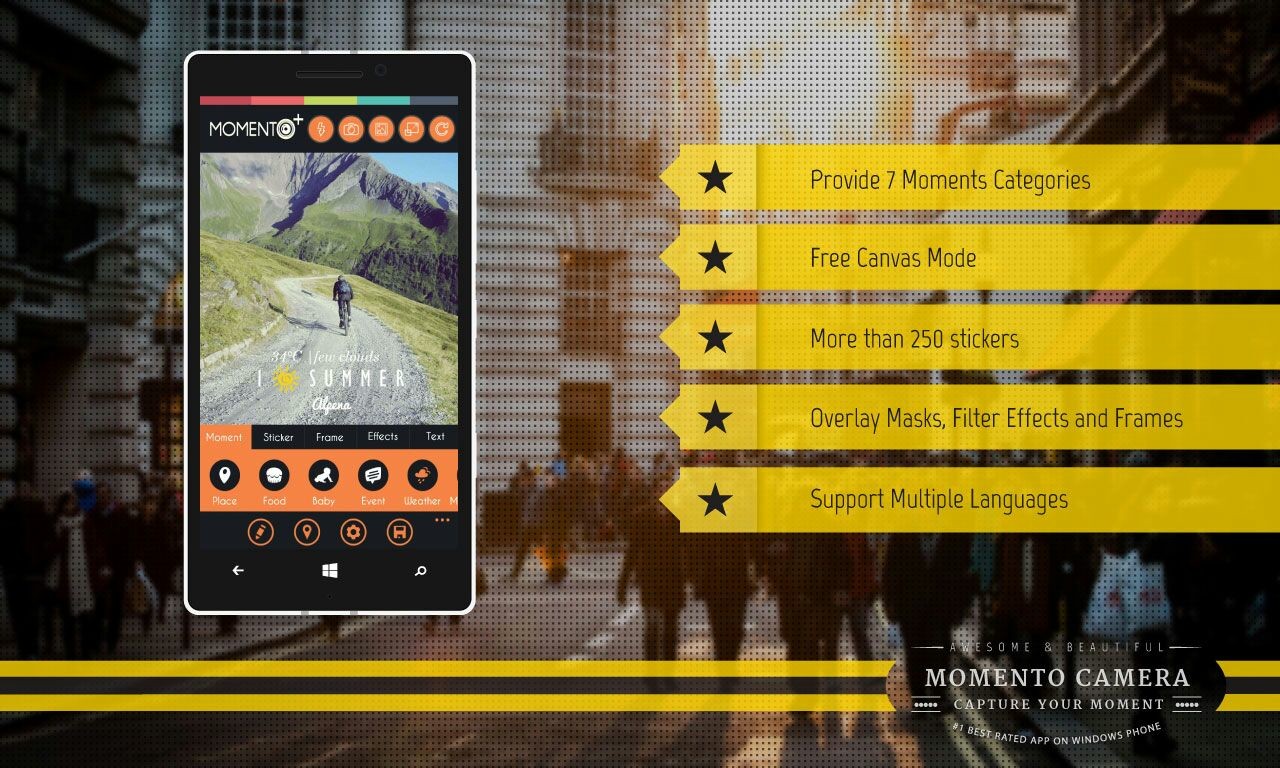
We all enjoy good times in life. We capture those beautiful moments so that we can cherish them over time and share with our close ones. It would be great if we could just snap a photo and customize it to suit our taste and share the moment right there with our friends and family. This was the idea behind the popular app Momento by Madina Technologies which later on came up with the premium service Momento+, which turns 1 today.

In celebration of Momento’s 1st Anniversary, Madina Technologies is giving everyone the opportunity to download Momento+ for free. Momento+ is the premium version of Momento – the best photo editing application on Windows Phone to capture your special moments. This offer is for 3 days only, from January 2-4, 2015. Throughout the 3 days, Madina Technologies is running a creative photo campaign on twitter using Momento with the hashtag #HappyBirthdayMomento.

Momento

For those who are fond of capturing moments and enjoy editing photos, Momento App allows users to add different details to their photos to portray the ambience of each particular moment. Users will also find various filter effects, frames, and over 250 stickers that they can add to their captured moments. Photos that have been edited can be saved to users’ mobile phones or OneDrive, which later enables them to be sent through various social media networks. Currently, Momento already supports 11 languages including English, Indonesian, Turkish, Spanish, Portuguese, Russian, French, Italian, German, and Mandarin.

Throughout its one-year journey, Momento has reached over 1.5 million users and is awarded the best photo editing application in more than 20 countries. Momento has also won several competitions including Winner of Vserv App Competition Indonesia 2014, Runner-Up of Microsoft Imagine Cup Indonesia 2014, and Runner-Up of Nokia Imagin8 Mission Worldwide.

Momento+ App is able to run on all types of Windows Phone 8 and Windows Phone 8.1. Momento+ is available for download on Windows Phone Store.

Start making the best of this wonderful opportunity and get the best of this deal and do not forget to share your moments with us on Twitter and Momento. Do not forget to use #HappyBirthdayMomento. We whole heatedly wish the whole team all the very best for their future and may they win more and more awards while improving this app in the best way possible.

Stay tuned for more updates and tech buzz.