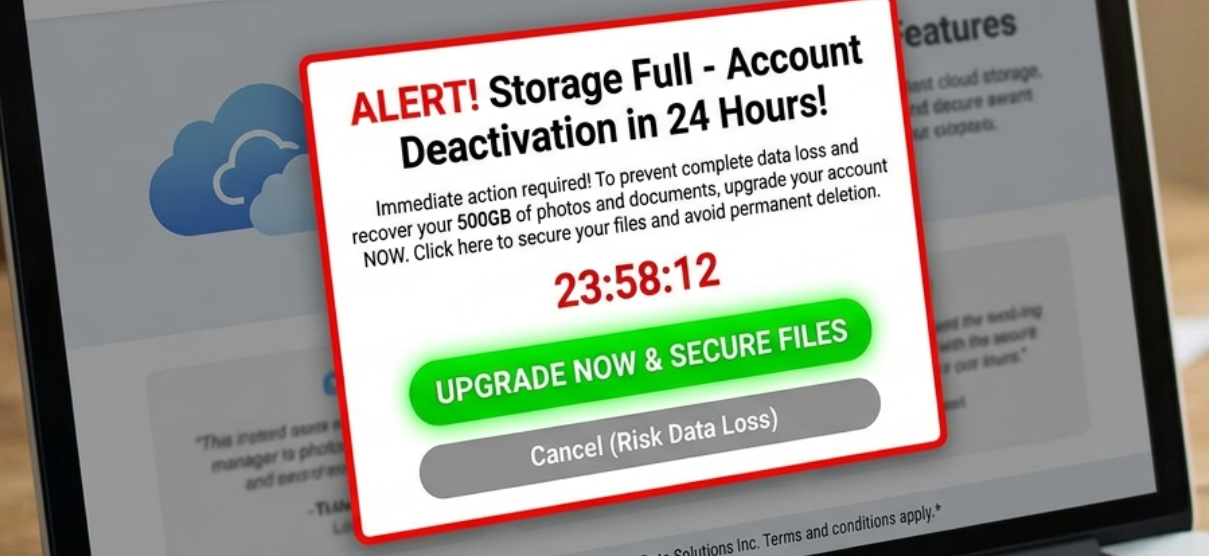
We’re all annoyed by storage alerts, but we still need them to keep our devices running smoothly. Smartphone and computer users see these notifications when space is running low. Most people quickly respond to avoid performance issues. This habit created an opportunity that scammers know how to exploit.
One of the most common tactics is based on a fake “disk full” warning, which appears as a system-like notification or a browser pop-up. The alert imitates real operating system messages, so it’s difficult for most users to recognize it’s fake at first glance. If you engage, you’ll be redirected to a page that promotes a suspicious app presented as a quick fix.
These scams are designed to feel urgent and legitimate. The message pushes you to act immediately, warning you about potential data loss. To understand how storage scams trick users, you must recognize the subtle signs that show you’re not being offered a legitimate tool. Even cautious users can be misled into entering payment details, so everyone needs to improve their phishing awareness.
Why Storage Alerts Work as a Scamming Strategy
Storage warnings are designed to lead to immediate action. When a device is low on space, its performance degrades. Some apps may stop working properly, so the user feels they have to fix the issue as quickly as possible. This sense of urgency is exactly what makes the alerts effective, but also easy to imitate.
Scammers take advantage of this user behavior. They create messages that look like official system notifications. The alerts copy the design, language, and structure of real operating systems, so they seem trustworthy at a glance. For users who aren’t deeply familiar with system settings, it’s not easy to distinguish between a legitimate and a fake warning.
Real storage notifications come from system settings. Scam messages, on the other hand, are triggered through web browsers or redirects. Then how can they trick users? These fake messages are designed to look identical to system pop-ups. Many users never notice the difference.
First Step to Protection: Learn How Storage Scams Trick Users
When you understand how these fake alerts work, it will be easier for you to recognize them. Although the design varies, most of these scams follow a pattern.
-
Fake system warning
The process starts with a pop-up or redirect that displays a message. It might be something like “Your disk is full” or “Storage critically low.” These alerts show up while browsing, clicking on ads, or visiting compromised websites. They look like system-level notifications, using familiar icons and phrases.
-
Redirect to a fake solution
If you interact with the alert, you’ll be taken to a page that offers a quick fix. This may be shown as a cleaning tool or security utility. Yes; there are legitimate apps that can help you deal with storage. But they are never promoted through “low storage” alerts. Fake pages usually include progress bars, scan results, and warnings that make the situation seem serious.
-
Installation or payment trap
At this stage, users are encouraged to download software or subscribe to a service. Sometimes the app is unnecessary, but harmless. But in some cases, it may track your activity or request payments for features that won’t solve any real issues.
Trends and Statistics on Storage Scam Messages
Storage scams are a part of a general increase in online frauds. Recent data shows how quickly the problem is growing. According to the Federal Trade Commission, over $12.5 billion losses to fraud were reported in 2024. That’s a 25% increase compared to the previous year. A big part of these scams were through Internet services, and younger people reported losing money to fraud more frequently than older people.
The FTC also reported that people lost $3 billion to online scams. We’re seeing a decline in frequency for the traditional methods, such as calls and emails. The fact that these scams are becoming more effective is concerning. Phishing and impersonation tactics are strong entry points. Scammers use believable messages that mimic trusted systems.
Unfortunately, these scams are effective. The increase in the percentage of targets who lost money shows that the messages are convincing. Storage scams aren’t isolated incidents. They are a part of a larger system of phishing attacks that keep evolving.
Signs of a Storage Scam
Raising awareness about the warning signs of storage scams is important for improving consumer tech security. These messages do look convincing, but there are a few clear indicators that something isn’t right:
- The alerts look like system messages, but they appear in the browser. The real storage warnings come from your device’s operating system. They won’t show up from a web page or a pop-up.
- Aggressive and urgent prompts are always suspicious. Don’t trust messages like “immediate action required.” Their goal is to pressure you into clicking without thinking too much.
- Once you engage with the message, an unfamiliar app will be recommended. Real systems don’t push unknown software as a solution to storage issues.
- Fake tools produce too-good-to-be-true scan results. They claim to find dozens of issues in an instant, even before they perform a real scan.
- Unexpected redirects are a clear sign of a sign. If you’re taken to an external website that is nowhere near the official app store, don’t trust it.
- Any demand for payments or sensitive data is suspicious.
Being able to recognize the signs of an online scam is the only way to reduce the risks. Stay alert and follow basic security practices, so you’ll avoid falling for these threats.