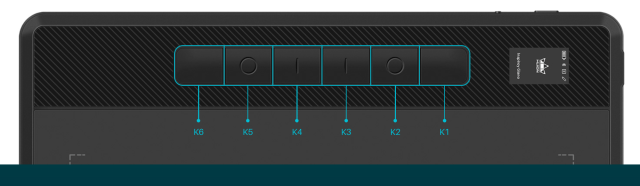
The HUION Inspiroy Dial 2 professional-grade drawing tablet with and slim design with 6 buttons which can be configured and 2 dials. The two dials can be set to cycle between three different controls (scroll, zoom, and brush size) by pressing the dial. The texture of the tablet is similar to paper without the rubber feeling you might expect.
Accessories


Setup and use:
The setup is standard in terms of plugging in the USB cable to the laptop and downloading software from the website with the supplier user guide giving clear instructions. Alternatively, this can be connected via Bluetooth 5.0 with a range of 10 meters. The Bluetooth while good to have seems impractical as to use the drawing tablet required the use of a monitor to view the work.


The supplied software allows the configuration of the dual dial controllers and supports the quick-access Windows Radial Menu. These can be programmed with a menu of options in terms of Zooming in or out, changing the brush size, scrolling through the pages, adjusting the volume and my favourite – Undo.
The software allows the configuration to allow for “Left hand / right hand “ use, & the monitor to use as a selected area, if using dual monitors


The tablet came with a pen that is responsive and accurate, making it easy to create detailed and intricate drawings. The holder stores 5 standard pen nibs and 5 felt pen nibs made of fibre, the latter of which can provide a greater level of resistance, thus making you feel like you are drawing with a traditional pen.


Warranty This came with a two-year warranty,
Conclusion
The HUION Inspiroy Dial 2 is solid, slim and lightweight ( 10.5 x6.5″active area is ideal. 0.3″ ultra-thin design) while does not come with a travel case if moving in a laptop bag etc, the drawing tablet allows a multitude of configurations in terms of the 2 dials and 6 buttons which can be configured via the supplied software. The setup in terms of the mechanics is standard with no latency noticed in the pen use. Once set up this works but required a lot of practice to allow drawing on the tablet while viewing a separate monitor to see where the pen is located.
The drawing tablet does have coordinated listed when the pen is located and is compatible with Windows. Mac, chrome, Linus, and Android allow for a versatile experience with 18 hours of battery life if used via Bluetooth, this can be used with most creative software like Adobe Photoshop, Clip Studio Paint, SAI, Lightroom, Affinity Designer, ZBrush, etc
Overall a response drawing tablet with a multitude of configuration options with a pen-like feel of a standard pen used with an array of options to provide a delightful drawing experience.
Buy
https://www.amazon.co.uk/HUION-Inspiroy-Bluetooth-Battery-Free-Compatible-Black-Silver/dp/B0B1V1JBNX