emporia TOUCHsmart.3 Review

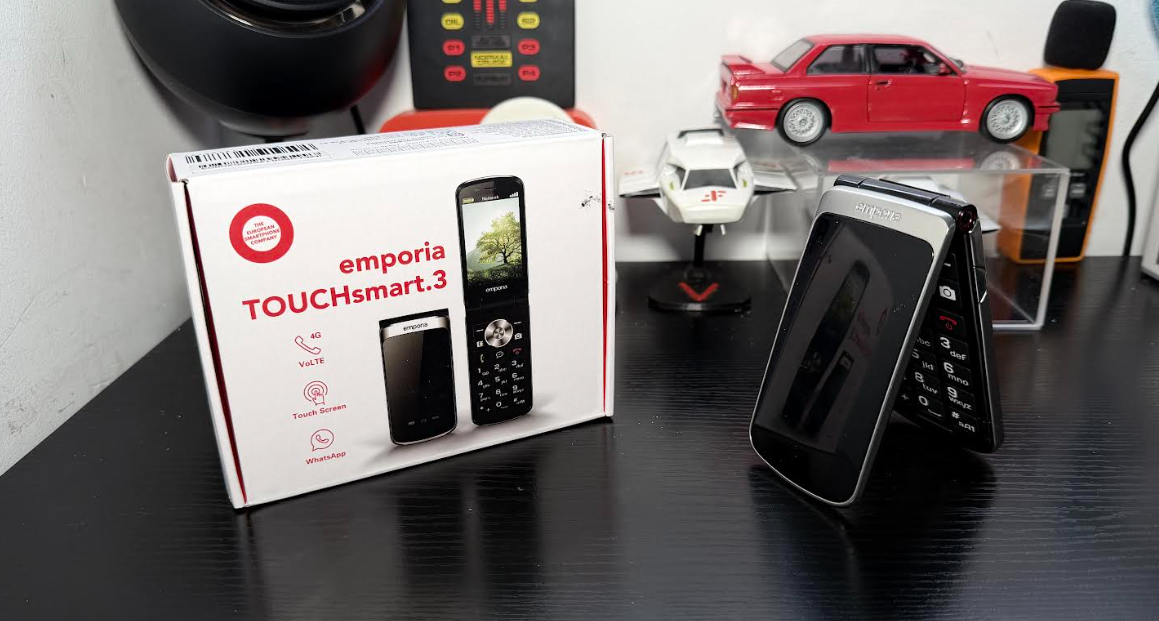
The emporia TOUCHsmart.3 is not a flagship smartphone, nor is it a basic “talk and text” feature phone. It carves out a unique and necessary niche: a clamshell (flip) phone that combines the simplicity and tactile feel of a physical keyboard with the modern connectivity required today, primarily instant messaging and flip phones are back with a bang and this one looks nice and is well built only the front display could have had some use but not this time.

It is clearly targeted at the senior market or those seeking a “dumbphone” experience who still need essential smart features like WhatsApp which is like other massaging apps more commonly used now and a growing trend with senior users of smartphones.

The TOUCHsmart.3 is built around a “best-of-both-worlds” design philosophy, blending hardware and software elements for maximum accessibility.

The most distinguishing factor is the flip design coupled with dual input:

  1. Physical Keypad: Features large, clearly labeled keys that are easy to press, making dialing and basic texting straightforward.
  2. Touchscreen: The internal 3.47-inch display is a full touchscreen, allowing users to navigate apps like WhatsApp and maps just like a small smartphone, you would be forgiven to forget it is actually a touch screen which I forgot several times but its cool and you should avail of it.

This combination addresses the common frustration of needing a full keyboard for dialing but a touchscreen for modern app interaction. Flipping open the phone also automatically answers a call like the good oul days with flip phones.

Unlike many basic feature phones, the TOUCHsmart.3 supports 4G LTE, Wi-Fi, and Bluetooth 5.0. Crucially, it runs on a simplified Android OS, giving it the power to run essential modern communication apps.

Emporia highlights the dedicated shortcut key for messaging (WhatsApp, Signal, or Telegram), recognizing that staying in touch often means more than just SMS and voice calls.

Yays

  • Ease of Use: The large buttons and the charging cradle are highly praised by the target audience (seniors).
  • SOS Function: The dedicated emergency button offers peace of mind by contacting up to five designated contacts instantly which is a key USP with emporia devices all round
  • Build Quality: It has an IP44 rating and generally feels sturdy and well-built.
  • Accessibility: Hearing aid compatibility (M4/T4) is a thoughtful inclusion.

Nays

  • Performance: The hardware (2GB RAM, MediaTek P35) can lead to some lagging especially when using complex apps or trying to multitask but this device is not targetted at such a user but tested anyway.
  • Battery Life: The 1,400 mAh battery capacity is relatively small for an Android-based device, possibly needing to charge it daily, particularly if using messaging apps frequently.
  • Limited Customization: Being an adapted Android device, it can be restrictive in accessing deeper settings or using alternative launchers.
  • Internal Storage: The 16GB internal memory is limited, although it is expandable up to 64GB via MicroSD.
  • Camera Quality: The 8 MP main camera is functional but delivers only basic photo quality, which is typical for a device in this segment but perfoms well in daytime scenarios.

The emporia TOUCHsmart.3 is an excellent choice for a very specific user: someone who values the tangible simplicity of a flip phone and physical buttons but cannot live without a key messaging app like WhatsApp to stay connected with family.

It’s the ultimate compromise phone—less complex than a full smartphone, but far more connected than a standard feature phone.

If your priority is simplicity, ease of calling/texting, safety, and a dedicated WhatsApp button, the TOUCHsmart.3 is a highly recommendable device.

However, if you require a phone for heavy internet browsing, demanding apps, long-lasting battery life without daily charging, or taking high-quality photos, you might find the performance and battery limitations frustrating but previous flip phone users of old will feel comfortable as they where the same before and again aimed at a targt demographic.


Image and Video samples day and night front and rear cameras


Features

  • Simple and Convenient: With pre-installed WhatsApp, you can easily chat with family and friends, share photos or send voice messages – without any complicated settings. Stay in touch with your loved ones with ease.
  • Your Everyday Smart Companion: Large physical keys, a bright color touchscreen, and intuitive navigation make it extremely easy to use – perfect for those looking for a hassle-free mobile experience.
  • One-Touch Security: The built-in emergency button allows up to five contacts to be alerted with a single press – for quick and efficient assistance when needed.
  • Exceptional Sound Quality: Extra-loud ringtone, loud speakers, and hearing aid compatibility ensure you won’t miss a call and hear every conversation clearly.
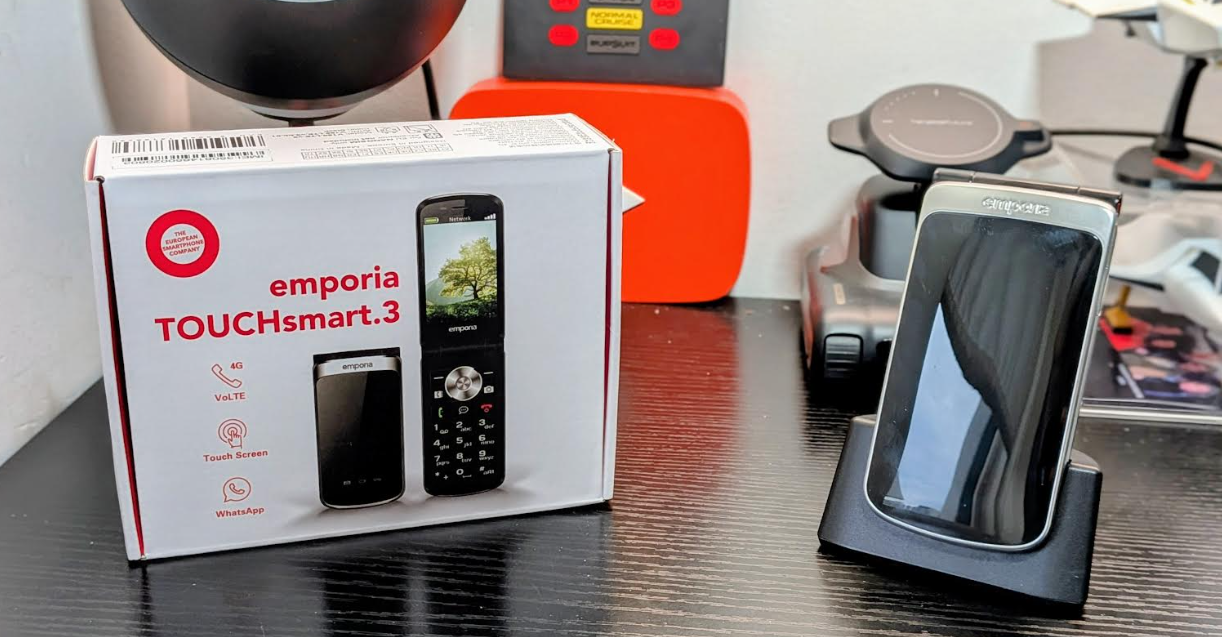
  • Convenient Charging – No More Bulky Cables: The included charging dock makes charging a breeze – just put the phone on its stand, and it charges automatically. No more fiddling with cables.

BUY

Unboxing and walkthrough

Other emporia reviews 


emporia TOUCHsmart.3 unboxing and first look

Intelligent solutions impress with their simplicity. This is also the case with this mobile phone for seniors, which comes pre-installed with WhatsApp, Signal and Telegram. emporia have also combined a touchscreen with buttons, making it even easier to use. This makes the emporiaTOUCHsmart.3 the most intelligent flip phone on the market. Along with other models we have from the brand we will be also testing this one out over the coming weeks check the unboxing below and the full review at a later date and if you have any questions feel free to ask.

emporia have also brought back the shortcut button. Thanks to these buttons on your senior mobile phone, you can launch your favourite app (WhatsApp, Telegram or Signal) directly and immediately start communicating with your loved ones. The phone is also equipped with a voice assistant, LED torch, alarm clock with snooze function, radio, calendar, etc. Safety in operation and use is also ensured by the patented emporia emergency button, IP44 dust and splash protection, M4/T4 hearing aid compatibility and automatic call acceptance when the phone is opened.

The model also has two cameras (8 MP back camera and 2 MP selfie camera), supports VoLTE (Voice over LTE) and is equipped with the Android OS operating system.

Features

  • Shortcut button for WhatsApp, Signal or Telegram
  • Touchscreen and keyboard in one device
  • Hotspotfunction for internet access
  • emporia emergency call function
  • Automatic call acceptance when the device is opened
  • IP44 protection against dust and splash water

BUY

See our other emporia reviews

Unboxing

HUION Kamvas Slate 11 Tablet Review

The HUION New Kamvas Slate 11 Tablet is a budget friendly device made for comprehensive usage and is a portable Android tablet that doubles as a drawing display, making it an excellent choice for artists and students who want to create on the go. Its compact size, a bit larger than an A5 notebook, makes it easy to slip into a backpack, while its solid aluminum build gives it a premium, durable feel and also is great for general tablet use which is a win win.

Display and Drawing Experience

The tablet features an 11-inch FHD+ (1920×1200) IPS screen with a 90Hz refresh rate, ensuring smooth visuals whether you’re drawing, watching videos, or playing games. One of its most notable features is the “Nano-Etched Soft Light Screen.” This matte surface does an excellent job of reducing glare and creating a paper-like texture for a more natural drawing feel. It also has a fingerprint-resistant coating to keep the screen clean. While the display is bright and the 99% sRGB color gamut is decent for general use, some reviewers have noted that the colors can appear less vibrant and the contrast is not on par with more expensive professional tablets.

It comes with a pen

The included H-Pencil is a solid stylus that offers a comfortable, lightweight feel. It boasts 4096 levels of pressure sensitivity and tilt recognition, which are standard features for this price range. This however is more so for those who are into drawing and art but for beginners like me I find it an excellent tool to have at my disposal and can learn whilst enjoying media at the same time with the split screen option. 

Performance and Features

Powered by a MediaTek Helio G99 SoC and 8GB of RAM, the Kamvas Slate 11 handles multiple applications and drawing layers without significant lag. It runs on Android 14 and comes with pre-installed creative apps like HiPaint, allowing you to start drawing right out of the box. With 128GB of internal storage, expandable up to 1TB via a microSD card, you’ll have plenty of space for your projects. The 8000mAh battery provides up to 11 hours of continuous use, and the four speakers deliver good stereo sound for multimedia.

Image and video settings and samples

Conclusion

The HUION New Kamvas Slate 11 is an impressive, budget-friendly standalone drawing tablet. Its portability, solid build, and paper-like screen texture are major selling points. While its drawing performance and display quality might not satisfy professionals, it’s a fantastic and feature-rich option for casual artists, students, and anyone looking for an all-in-one device for creative work and entertainment on the go with a great screen and great audio with 4 speakers dishing out decent sound. 

Features

PORTABLE & LIGHTWEIGHT
Slip it into your bag, take it EVERYWHERE!

Slimmer than most tablets – slightly bigger than an A5 notebook, with a sturdy aluminum build.

Perfect for lectures, cafes, travel – jot notes or watch tutorials on-the-go!

NOTE-TAKING MADE EFFORTLESS
Write, doodle, organize – all in one place!

Pre-installed HiNote app – start scribbling notes instantly without setup.

Android 14 + Google Play – add your favorite tools (Evernote, Zoom, Netflix, etc.).

COMFORT FOR MARATHON STUDY SESSIONS
No eye strain, no headaches – just focus!

Paper-like screen texture – feels like writing on real paper, no skidding or smudging! 

Anti-glare screen – say goodbye to harsh reflections in libraries or sunny spots.

90Hz smooth scrolling – flip through PDFs, articles, or slides like butter.

Vibrant FHD display – crisp text and colors for textbooks, videos, or diagrams.

ALL-DAY BATTERY FOR NONSTOP PRODUCTIVITY
Outlast even your longest study grind!

11-hour battery life – survives back-to-back classes or binge-watching breaks.

Fast charging – 2.7 hours to full, so you’re never stuck waiting.

PRECISION PEN FOR ORGANIZED MINDS
Write neatly, highlight perfectly, erase cleanly!

Natural pressure sensitivity – switch from bold headers to tiny footnotes effortlessly.

Lightweight design – no hand cramps during 3-hour lectures.

Customizable pen shortcut – assign erase, highlight, or undo to the H-Pencil’s button.

POWER TO HANDLE MULTITASKING
Zoom meetings, notes, and Spotify – all at once!

8GB RAM + 8-core processor – juggle apps smoothly (no freezing during deadlines!).

128GB storage + 1TB expandable – store textbooks, lecture recordings, and memes. 

MULTITASK LIKE A PRO

Split-screen mode – take notes while watching a tutorial or browse research side-by-side.

SMART TOOLS FOR REAL-WORLD NEEDS

13MP rear camera – snap whiteboard notes or scan handouts directly into HiNote.

8MP front camera – nail virtual presentations or study group calls.

IMMERSIVE SOUND FOR FOCUS OR FUN

4 stereo speakers – crystal-clear audio for podcasts, lectures, or post-study Netflix.

BUY

Other HUION reviews

Video Review