Clock O’ Matic. Give your Windows Phone a taste of Lollipop #Clocks #Multipurpose by @jimboireland

There is no shortage of alarm clock apps on any OS today which its fair to say but we now how a new alarm clock which gives you windows phone users a taste of lollipop on your device,and been an Android user myself these two are more or less identical to each other as pictured below on the Nexus 6 and Lumia 535

Clock o Matic does however give you much more that just the time. It gives you alarms,stopwatch and countdown timers just to begin with..

Clock O’ Matic Unique than other Apps
– It’s All Purpose
– It functions even if the App is switched OFF the Stopwatch and Timer will continue ticking
– Notification Center Access for Adding Quick Alarms,Timers,World Time and Stopwatch
-Live Transparent Beautiful Background
-Randomized Textured Background
– Complete User Customization with 300+ Color Swatches

Alarms:-
1. Adding Unlimited Number of Alarms
2. Alarms can be DISABLED and Old Alarms can be RE-ENABLED
3. Collection of Alarm Sounds from Soothing Sounds to Extreme Wake up Sounds
4. Clockface Animation in Adding Alarms for Retro Effect
5. Alarms added via Timepicker option also available


Clock:-
1. Digital Clock with Changing Shades during the Day similar to Android Lollipop Clock
2. Tapping On Clock will open a Night Shade Clock with dim lights
3. World Clock includes ALL TimeZones
4. Clocks Update Every Minute

Stopwatch:-
1. Clean UI with only Necessary Buttons under an Event
2. Faint HeartBeat Animation
3. Results are in TEXT Format that makes it Easy for Sharing unlike .csv formats
4. Stopwatch Clock Ticks In and OUT of App without Battery Loss
5. Remembers your Lap times

Countdown Timer:-
1. Clean UI with Elegant Design
2. Add Unlimited Number of Timers
3. Timers Tick IN and OUT of App

Live Tile Clock Updates Every Minute when Start Screen is Awakened
Transparent Tile Clock.

Download by clicking the image below..

Put your life into perspective with amazing facts and stats with #YoureGettingOld.by @jimboireland

This was sent into us today and we thought that maybe all should see it as its an interesting tool that can perhaps jog some peoples memory back and dish out some trivia and facts from years ago to present.

All you need to do is enter the correct fields into the boxes and the rest will all happen by itself it will then give some things that have a happened in the past and test your memory to see if you can remember some of things that happened in the past its quite a neat tool and some fun and its for everyone not just you..

Once you fill in the above the rest will then follow on and its totally safe to be here so do not worry it does not require and login info or further sign ins nor requests any personal info,its all calculated for you and changes daily so you can come back again and see some more facts and trivia from yesteryear..

Also you can then share the results if you like to Facebook,Twitter,LinkedIn,Tumblr,Pintrest,Google+,Reddit and Email..


TAKE THE TEST BY CLICKING BOX BELOW.

Tell us what you think and where you shocked by the results and information given…

Source

A Reason to Cheer for #WinPhans, #VLC for #WindowsPhone is finally out by @Tiwaash #App

During the last month the WindowsPhone community was pretty happy that VideoLabs finally had decided to develop VLC for WindowsPhone when it released VLC for WP Beta to the registered testers, which made it pretty obvious that the full fledged app was round the corner.

Good news is VLC for WindowsPhone is now available on the store for download and out from Beta. VLC player supports various video and audio codecs. The UI is clean and straightforward giving you control over your music and videos. VLC for WindowsPhone requires WindowsPhone 8.1.

Download VLC from here and enjoy your music and videos.

Stay tuned for more updates and tech buzz.

Design,Fly and modify your planes with #SimplePlanes by @jimboireland #Android #iOS #PC #MAC

A new game has popped up on the play store and it seems quite interesting if you enjoy aircraft.

Simple Planes is a new game that gives you the ability to mess around with aircraft and then to try fly them,not like a real simulator but some nice setbacks and its a nice game to pass the time if this is your scene.You can customise your craft and download other craft too so its giving you some time to get creative..


Description
Note: This game requires at least 512MB of RAM and a 1GHz CPU.Bring all of the imaginative aircraft you’ve had in your head to life.Snap parts together to build your airplane’s body. Place engines to add thrust. Design the wings and then strap yourself into the pilot’s seat and see how it flies.AIRPLANE DESIGNER
You have the tools you’ll need to bring almost any airplane to life. Use the flexible wing tool to change the shape of the wings and build almost anything.

Next-generation fighters, WW2 warbirds, civilian aircraft, and everything in between, some people have even made dragons, trains, and space stations.


DYNAMIC FLIGHT MODEL
Flight simulation at its finest. Every little change you make in the designer impacts how the airplane flies. Weight distribution, thrust, lift, and drag are all calculated before creating the final flight model.

REALTIME DAMAGE
Parts can break off in spectacular fashion while flying due to over-stress or by hitting something. The fun won’t stop there though. You can keep on flying even with a missing wing if you’ve got the skills.

SANDBOX MODE
Test your airplane with no restrictions. So, you’ve had a rough landing and the left engine was knocked off? After watching the engine fly off into the sunset you may decide to go ahead and slap the throttle to full…give it another go with only one engine.

CHALLENGES
Climb into the cockpit of one of your custom aircraft and see how it does in the challenges. The challenges will keep you entertained for hours. Land on aircraft carriers, dodge surface-to-air missiles, race through courses, and so much more.

AIRPLANE PAINTER
Use pre-built themes, or paint every part of your bird to make it just the way you want. Share your favorite stylings with all of your friends.


CROSS-PLATFORM AIRPLANE SHARING
There are no in-app purchases to get access to the airplanes people have shared; they are all available to download for free from http://www.SimplePlanes.com. You can use them even if they were made on another platform.

CONTROLLER SUPPORT
SimplePlanes has full support for gamepads/joysticks, and provides in-game input mapping for each control surface, as well as throttle, brakes, landing gear, pausing, cameras, etc.

EDUCATIONAL
Tutorials will help players learn the basics of real airplane design and the considerations that need to be taken when airplanes are made.

Watch video below,not official but official is on app links..

Simple Planes costs €3.95 and is well worth it.

Download on ANDROID iOS   You can also get it from AMAZON APP STORE PC and  MAC


Celebrate 1st Anniversary of Momento App with free download of Momento+ by @Tiwaash #App #WindowsPhone #HappyBirthdayMomento

We all enjoy good times in life. We capture those beautiful moments so that we can cherish them over time and share with our close ones. It would be great if we could just snap a photo and customize it to suit our taste and share the moment right there with our friends and family. This was the idea behind the popular app Momento by Madina Technologies which later on came up with the premium service Momento+, which turns 1 today.

In celebration of Momento’s 1st Anniversary, Madina Technologies is giving everyone the opportunity to download Momento+ for free. Momento+ is the premium version of Momento – the best photo editing application on Windows Phone to capture your special moments. This offer is for 3 days only, from January 2-4, 2015. Throughout the 3 days, Madina Technologies is running a creative photo campaign on twitter using Momento with the hashtag #HappyBirthdayMomento.

Momento

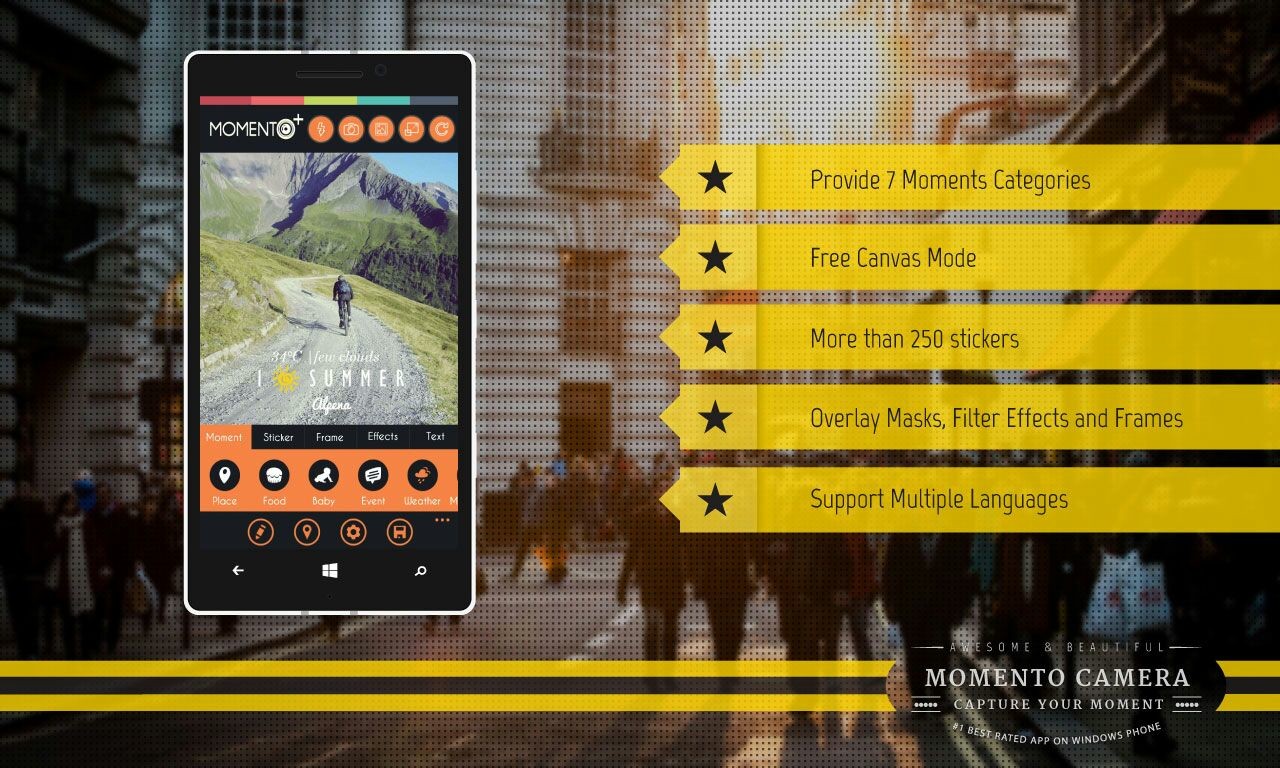
For those who are fond of capturing moments and enjoy editing photos, Momento App allows users to add different details to their photos to portray the ambience of each particular moment. Users will also find various filter effects, frames, and over 250 stickers that they can add to their captured moments. Photos that have been edited can be saved to users’ mobile phones or OneDrive, which later enables them to be sent through various social media networks. Currently, Momento already supports 11 languages including English, Indonesian, Turkish, Spanish, Portuguese, Russian, French, Italian, German, and Mandarin.

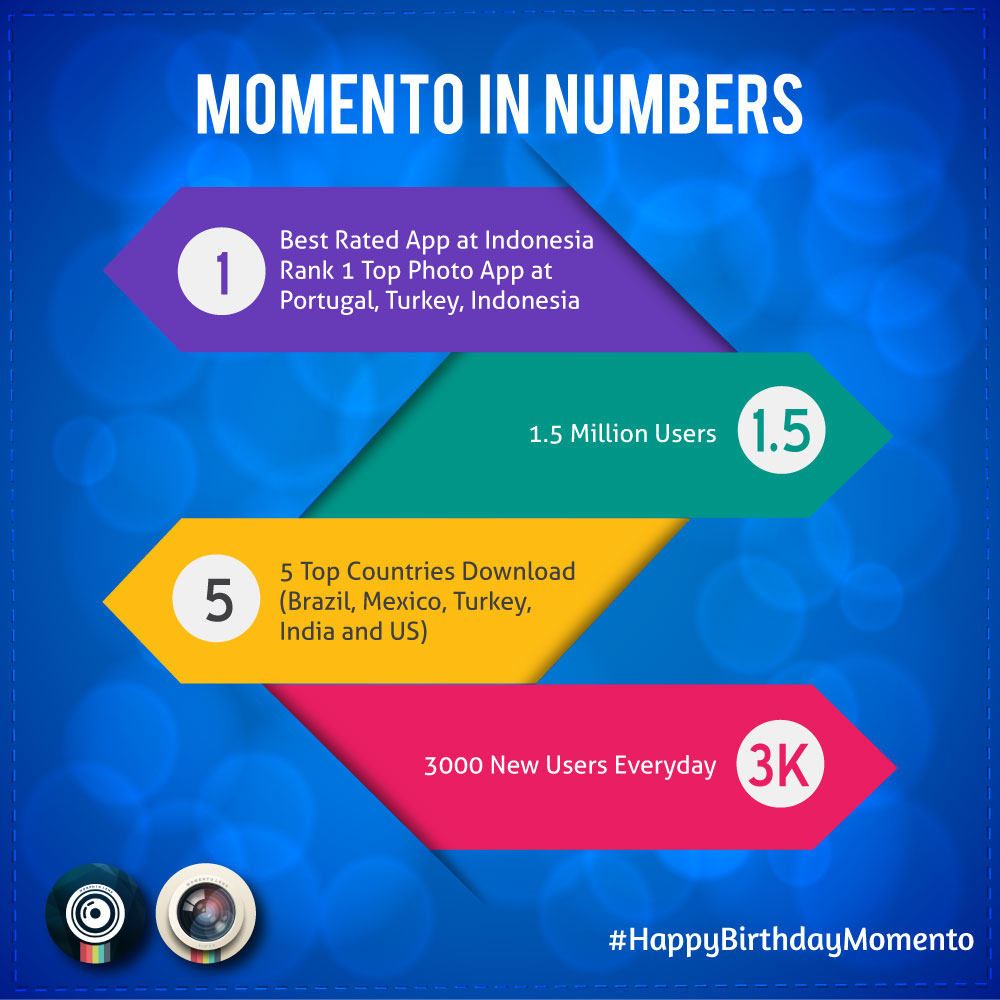
Throughout its one-year journey, Momento has reached over 1.5 million users and is awarded the best photo editing application in more than 20 countries. Momento has also won several competitions including Winner of Vserv App Competition Indonesia 2014, Runner-Up of Microsoft Imagine Cup Indonesia 2014, and Runner-Up of Nokia Imagin8 Mission Worldwide.

Momento+ App is able to run on all types of Windows Phone 8 and Windows Phone 8.1. Momento+ is available for download on Windows Phone Store.

Start making the best of this wonderful opportunity and get the best of this deal and do not forget to share your moments with us on Twitter and Momento. Do not forget to use #HappyBirthdayMomento. We whole heatedly wish the whole team all the very best for their future and may they win more and more awards while improving this app in the best way possible.

Stay tuned for more updates and tech buzz.

Windows Phone app for Bank of Ireland Customers on the cards. #Apps #Banking by @jimboireland

The App gap is still an annoying problem for Windows Phone users not only here in Ireland but across the world,However there is good third party options available to those who want some big named apps but the main problem really is local apps.Again some companies are against third party devs and of late Snapchat has been one of the main victims who have suspended accounts.

Banking apps is another big area which highly annoys Windows Phone users,over the last two years users have been fobbed off with the same old script WE CURRENTLY HAVE NO PLANS AT THE MOMENT.

Similar to the reply pictured below..

Over the last few days the Bank of Ireland iOS and Android apps had problems,so we went looking for answers and decided to have one more attempt of perhaps finding some kind of definitive answer on the WP app..

On asking customer service we were told that is been worked on and there was a Q & A we missed on the topic which yields the following..


Yes is the short answer!

As I’m sure you are aware, at present Android and iOS are the largest OSs by market share for smart phones. This has been the case since we decided to build the mobile app – hence our decision to start there. We build separately for each OS since we believe it allows us to provide a better user experience for users on different phones (things behave differently on Android, Google, Windows, etc…

The down side to this approach is that there is substantial overhead in each additional OS added. However, Windows is the ‘third OS’ for mobile (overtaking RIM) so we are looking to add it to our supported OS list. At present it remains on the ‘candidate change list’ so I can’t promise a date but I would hope we can do this sooner (note I am still talking bank speed here…!) rather than later. A big push will be the speed at which Windows OS 8 for phones is adopted. In the interim, I apologise to you and anyone else who struggles with the online site on a mobile.

Jonathan (and the Bank of Ireland Mobile Team)

So going forward it could be good news and may spark other banks to provide the banking apps that Windows Phone users have wanted for 2 years.

Source

The Winner of the Nokia 130 sim free Dual Sim is…………………

A big thanks to all who has entered out Nokia 130 competition.

As always there can be only one winner but stay tuned for more prizes we have lots in the goodie bag.

The winner of the NOKIA 130 is… Lisa Patterson.


We will make arrangements on getting the phone out to you ASAP..

We have a look at the mighty Nexus 6 – Unboxing & Walkaround by @jimboireland #Nexus6

The Nexus 6 arrived today and on first receiving the box the size of it was enough to say it was going to be a rather big device.Its slightly bigger than the Galaxy Note 4 but not as huge as the mighty Nokia Lumia 1520.

The back of the device is curved so for been so big it does fit quite well in hand which makes not so cumbersome,this will of course depend on the individual using it small handed people will find it a problem and will need both hands,if you have big stupid hands like me it will not be a problem to get to grips with.

It does not feel heavy at all despite its size and so far i’m quite liking a lot about the device and how the UI is,i still prefer the Galaxy Note Edge overall apart from touchwiz and find the Nexus that bit quicker due to stock Android and no rubbish on the device..though you will be missing some feature you are custom to but can get them on the play store.

1 / 7


Having been using the device for a few days the back is a major fingerprint  magnet this may annoy some so keep a lint free cloth handy or buy a protective case,also to note the front facing speakers has a sizeable gap between speaker and bezel this is another dirt trap and can be a bit bothersome to clean it,again maybe a case of some kind will help but will add bulk to an already bulky device,i have found the camera to be poor compared to competitors such as the Note Edge or Note 4 for example which have been the last two devices in house.

Also the battery does not appear to be fantastic either but being new it will take a few charge cycles to setting so this will be something to keep an eye on,it does come with fast charge like the Note 4/Edge which is a gift it charges super fast i have to say..

Take a look at video and if you have  any questions do ask us below or on Twitter.