
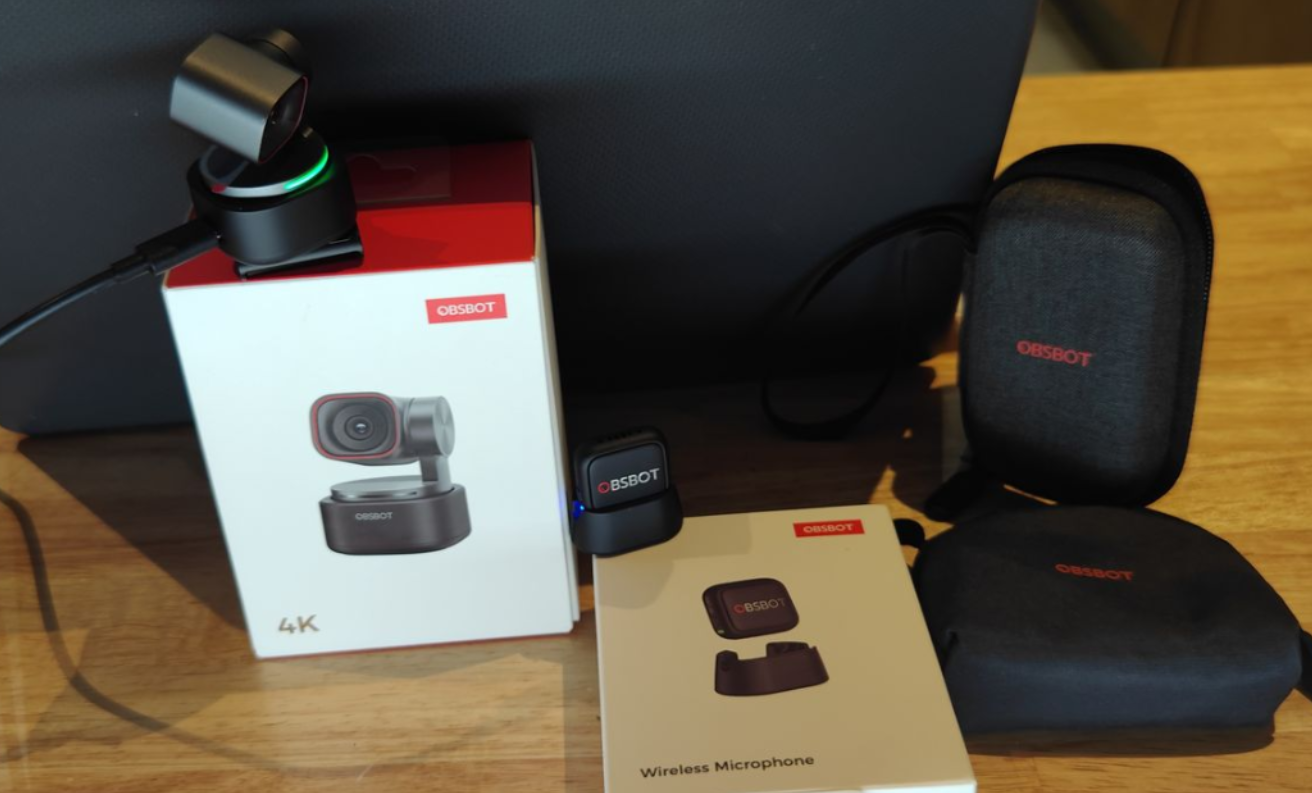
At TechBuzz Ireland we have looked at several OBSBOT products over the years, and the Tiny 3 with the Vox SE Wireless Microphone continues that trend with a compact PTZ webcam and matching wireless audio kit aimed at creators and remote workers. The camera itself is the real highlight here, with a small, solid build and plenty of smart features, while most of the drawbacks in this package are centred around the microphone and its accessories rather than the Tiny 3.
Design, build and what you get
The Tiny 3 arrives in the familiar OBSBOT‑style packaging, and having reviewed many of these units before, the presentation and layout will feel very familiar. The first noticeable detail is just how small and compact the Tiny 3 is, yet it still feels solid in the hand and well put together.
In the box you get the Tiny 3 camera, USB‑C cable, USB‑C to USB‑A adapter, adjustable mount, user manual, warranty card and a dedicated Tiny 3 storage case. The case is a big practical plus, as it keeps the camera, mount and cable together and protected, which matters more here because of the exposed gimbal design.
The body uses an aircraft‑grade aluminium alloy with a dual‑axis gimbal, and despite the compact size it never feels flimsy. At around 63 g it is light enough to carry every day, but still has enough weight that it does not feel like a cheap plastic webcam perched on top of your screen.
Key specs and features
Inside, the Tiny 3 is built around a 1/1.28‑inch CMOS sensor with effective pixels of 50 MP, giving it plenty of resolution to work with for both 4K and lower‑resolution modes. It supports up to 4K at 30 fps and 1080p at 120 fps, along with a 4x digital zoom and a 2‑axis gimbal for smooth framing and movement.
You also get DCG HDR, wide ISO support from 100 to 12800, and Dual All‑Pixel PDAF autofocus for quick and reliable focusing. On the audio side, the Tiny 3 has an intelligent directional built‑in mic system and can also connect to external audio devices such as the Vox SE.
OBSBOT has packed in a long list of headline features including:
- Top‑tier spatial audio performance
- “Tiny in Size, Titan in Performance” compact design
- Premium imaging system aimed at flagship‑level webcam quality
- Industry‑leading AI features such as Smarter AI Tracking 2.0, voice‑activated control and effortless framing
- Powerful creative software with professional image controls and creative tools
- RTC remote interaction for real‑time remote control and streaming
- OBSBOT Avatar & Virtual Voice (beta) for VTubing and motion capture
- Seamless integration into the wider OBSBOT ecosystem, including multicam setups and wireless audio workflows
Setup and software
Out of the box, the Tiny 3 works as a plug‑and‑play webcam and can be used straight away with apps like Microsoft Teams, Skype and similar platforms. That said, to really get the most from the hardware it is strongly recommended to download and install the free OBSBOT Center software and update to the latest firmware.
Once the software is installed, you gain access to more detailed image controls, AI tracking options, presets and creative tools. The physical unit can sit on top of a laptop or monitor using the adjustable mount, or you can use the built‑in 1/4‑inch thread to attach it to a tripod (tripod not included) for more flexible positioning.
The overall setup process is straightforward if you are used to webcams, but there is still a bit of learning involved if you want to explore all of the AI and control features the Tiny 3 offers.
Voice and gesture control
Voice control remains one of the more standout features on the Tiny 3, allowing you to use commands such as “Hi Tiny”, “Sleep Tiny”, “Track me”, “Unlock me”, “Zoom in”, “Zoom out” and preset positions 1, 2 and 3. When it works, it gives you a very convenient hands‑free way to control framing and behaviour, particularly useful when you are away from the keyboard during a call or recording.

Gesture control is also supported and allows you to trigger actions using simple hand movements, making it easy to start tracking or adjust framing without fumbling around in software menus. Together with the AI tracking, these controls help the Tiny 3 feel more like a small PTZ studio camera than a basic webcam.


OBSBOT Vox Wireless Microphone
Alongside the Tiny 3, I also tested the OBSBOT Vox Wireless Microphone, which is designed to work seamlessly with the Tiny 3 series. The microphone kit comes with its own carry case, and this is important because there are a lot of small accessories included which could easily get lost otherwise.
In the case you will find the compact wireless mic unit along with a furry windshield, lanyard, magnetic holder, necklace and a USB‑C charging docking station. The mic itself is made from hard plastic and feels solid given its size, and the overall idea is to provide a flexible, cable‑free audio solution that fits neatly into the OBSBOT ecosystem.
From a technical point of view the Vox has some strong numbers: it offers studio‑grade audio quality with omnidirectional pickup, dual‑channel recording, plug‑and‑play operation, extended battery life and versatile mounting options. It is designed to work with smartphones and tablets that have USB‑C, and integrates with OBSBOT Center and OBSBOT Live.
The microphone specifications include:
- Dimensions: 28.53 × 25.47 × 11.5 mm
- Weight: approx. 9 g (excluding magnetic clip)
- Usage time: up to 20 hours
- Microphone directivity: omnidirectional
- Sensitivity: −37 dBFS ±1 dBFS @ 1 kHz, 94 dB SPL
- Maximum sound pressure level: 123 dB SPL
- Signal‑to‑noise ratio: 68 dBA
- Frequency response: 50 Hz–20 kHz
- Sampling rate and bit depth: 48 kHz/24‑bit
- Wireless mode: GFSK 2 Mbps
- Battery voltage: 3.7 V (operating 3.3–4.4 V)
- Working distance: up to 100 m in open, interference‑free conditions
- Battery capacity: 170 mAh
- Operating temperature: 0–40°C
In use, the Vox works well in terms of audio quality and wireless range, delivering a clutter‑free, cable‑free workflow when paired with the Tiny 3. However, there are some niggles: the large number of small accessories makes it easier to misplace parts, and charging the microphones through the dock feels less convenient than if OBSBOT had used a more straightforward wireless charging solution or a single USB‑C connection directly to the kit.

Software integration and niggles
Connecting the Vox to the OBSBOT camera through the software is not completely intuitive on first install. The instructions tell you to select mode, go to Audio, choose OBSBOT Microphone and then add TX1/TX2, but actually finding those options in the software for the first time can be a bit of a challenge.
Once you have located the correct settings, pairing works as expected and is easy enough, but this initial friction is worth noting if you are not used to digging through software menus. This contrasts with the camera side of things, where basic setup is closer to plug‑and‑play, particularly if you just want to use the Tiny 3 as a standard webcam first and explore the extra features later.

Warranty
One area that feels slightly out of step with the overall premium feel of the Tiny 3 and Vox kit is the warranty. The package comes with a one‑year warranty, which is fine on paper but a bit of a disappointment given the quality of the hardware and the fact that the Tiny 3 has moving parts in the gimbal.
For a product at this level and price point, a longer warranty would provide more peace of mind, especially for users planning to use it heavily for work or content creation.
Verdict
Overall, the OBSBOT Tiny 3 is a pleasure to use and feels like a Swiss‑Army‑knife style webcam – small, responsive and packed with genuinely useful features. The 2‑axis gimbal, digital zoom, fast response and hand gesture/voice controls make it easy to frame shots the way you want, whether you are on calls or creating content as part of the wider OBSBOT ecosystem.
As with previous OBSBOT units I have used, the Tiny 3 feels solid in the hand, with a compact design and included storage case that make it simple to carry between setups without worrying about the gimbal. The free software adds more creative control and multiple ways to operate the camera, so you can get more out of it than a standard plug‑and‑play webcam while still being able to drop it into everyday apps like Teams or Skype.
The add‑on Vox wireless microphone technically works well, with good audio and range, but the number of small accessories, the extra charging dock and the slightly awkward first‑time setup in the software mean most of my niggles are around the mic rather than the camera. A longer warranty than one year would better match the premium feel of the kit, but taken on its own, the Tiny 3 is an easy camera to recommend if you want a compact, feature‑rich webcam that can grow with you inside the OBSBOT ecosystem.