
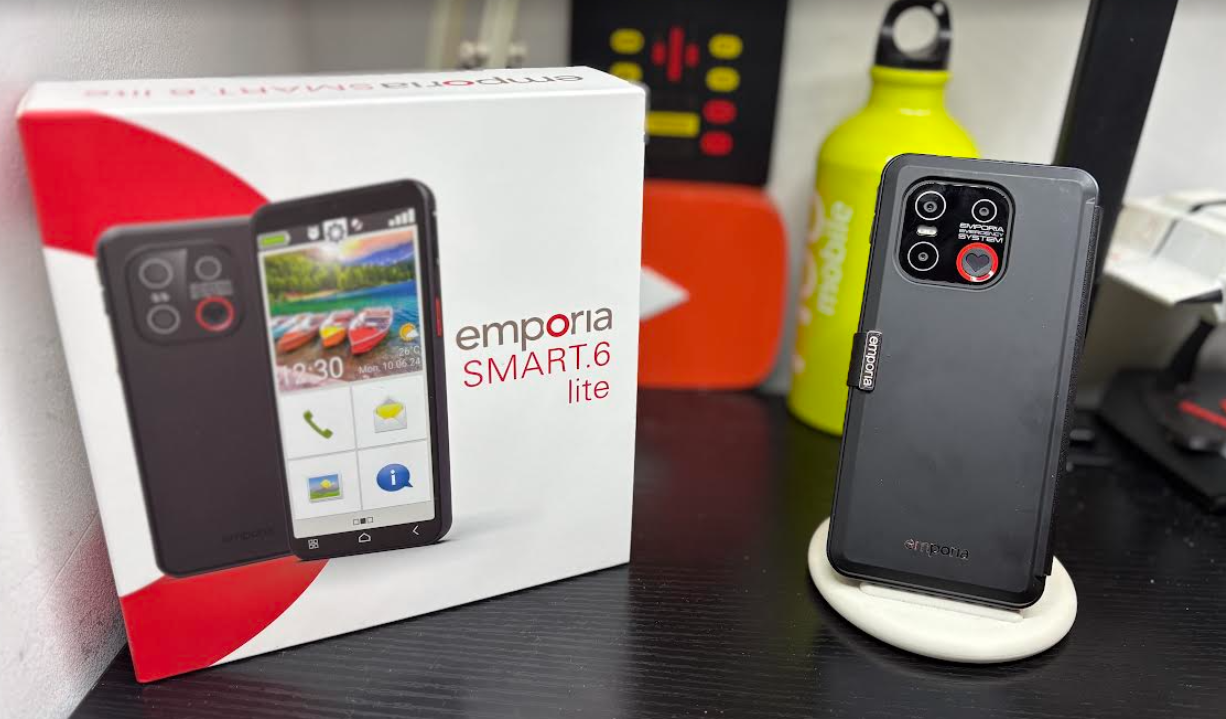
The emporia SMART.6 lite smartphone is one of their latest devices to their portfolio of simple to use phones for the older generation amongst us which is great as technology is now being embraced by such and not only that some situations in life now require such devices at hand to do certain things.
emporia have been leaders in this area with smartphones offering a variety of easy to use devices in which takes away the convoluted mess people have to go through for setting up and more and making it simple to use and set up to each individual’s requirements without the hassle of too many settings and sub-menus.
They do however have a newer model which is the ME.6 which needs to be mentioned for a more seasoned elderly user that allows both the true Android user experience and not only that reverts to the simple menu emporia are renowned for and this device is again a simpler version of the SMART.6
Now I am fortunate enough to get to test the best phones on the market costing up to two grand and more and even for a seasoned poweruser all year round with several devices in use at one time or on rotation I often get frustrated with such phones with all the menus and sub menus and finding things people need and have to look for but with emporia phones this is not the case with this and other models.
I would put the SMART6.Lite in the mid range with the pricing and specs here overall it has all the features you would expect on any other smartphone but simplified to a simple menu structure and again comes with a cool leather cover case with a visible screen and 4 main keys and once you open the cover you have 4 options present which of course can be changed by pressing and holding to select whatever suits you better and do check the emporia coach app which needs to be installed.
On the homescreen you will see a settings icon swipe left for contacts and emergency options and swipe right for your favourite apps and swipe right for you full list of favourites now these can be changed when you add your own apps and on the bottom right you can see and all apps folder and then these can be used as shortcuts.

The smartcover can be changed to functions/favourites or turned off but I highly suggest it is used even at default settings and it is going with the company’s ethos keeping it simple and you should look at the accessibility menu here for more.
The triple lens camera has a 13MP main camera with depth of field and macro for fantastic photos using the easy camera App, or you can use the Pro-Camera App . The 8mp selfie camera on the front brings fun snaps every day and is ready for WhatsApp video calls.The camera is ok in mostly yielding better results on outdoor settings in the daytime you can see samples taken by me below on the best settings if you are one that still likes to take photos which would be the case for family gatherings and so on for the older gen these days and from a typical user the camera is fine but will not win awards for the usual expectations you would see on more expensive devices which is fine as in my experience these days with the older folk including my father is not to pushed on taking photos but just looking at them online or what has been sent to him on WhatsApp and so on.
There is a One touch Panic button on the back in the camera array which you will add a number to on the homescreen by swiping left as mentioned above and can be used to keep you safe at night or used as a quick access key for your camera or the handy torch.


Overall for me this is a well built device offering the basics and more for the older generation keeping things simple you are not getting the bells and whistles you may find on other phones here but this is not intended for that market and it can easily do your daily tasks and more.
As a long time user of emporia products and putting them to real world testing loaded with my app collection multitasking and more these are the best devices on offer for those wanting more and going forward will need more for certain tasks in life and my own father has switched some time ago from his much loved Nokia phones to an emporia device I gave to him and to be fair he has not much patience with smartphones but I get it like his friends and neighbours they just want things kept simple and empora is the way forward if you are moving up from a dumbphone or feature phone for the first time.
Specs
- 4G smartphone with 5.45″ HD screen
- Award winning emporia easy to use interface (switchable to standard android)
- Smart cover with 4 interactive buttons for key features (including use of Camera / calls & torch)
- Easy charging cradle included
- NFC for contactless payments and real-time blood glucose monitoring
- Finger print reader for biometric security
- Physical panic button for personal security
- 6GB RAM & 128GB RAM (Expandable with micro SD card)
- Octa-core 1.8GHz processor processor
- Triple lense 13MP main camera with 8mp selfie camera
- Height: 147 mm Depth 9mm